

A graphics card can transform a desktop, but only if it fits the case, matches the power supply, and suits the monitor. A compact office PC needs a very different upgrade from a high-end gaming tower.
Our Best graphics cards for pc guide covers everything from low-profile cards for adding modern display outputs to large, high-performance models with substantial cooling hardware. The ASUS TUF Gaming RTX 5080 is the fastest pick here, while the XFX RX 9060 XT offers the most balanced route to serious gaming.
Comparison table
| # | Product | Award | Memory | Cooling or form factor | Best for |
|---|---|---|---|---|---|
| 1 | ASUS TUF Gaming RTX 5080 | Best for high-end gaming | 16GB GDDR7 | 3.6-slot, triple fan | Demanding gaming and creative workloads |
| 2 | XFX Swift RX 9060 XT | Best overall | 16GB GDDR6 | Triple fan | Modern gaming PCs |
| 3 | GIGABYTE RX 9060 XT Gaming OC | Best quiet performance | 16GB GDDR6 | Two-slot, Hawk fans | Quiet, feature-rich builds |
| 4 | GIGABYTE RTX 3050 Windforce | Best compact gaming upgrade | 6GB GDDR6 | Dual fan | Smaller mainstream PCs |
| 5 | MOUGOL Radeon RX 580 | Best for older gaming PCs | 8GB GDDR5 | Dual fan | Entry-level gaming and creation |
| 6 | MSI GT 1030 4GD4 | Best low-profile upgrade | 4GB DDR4 | Single fan | Small office desktops |
| 7 | QTHREE GT 730 | Best for four displays | 4GB DDR3 | Low profile | Multi-monitor office setups |
| 8 | Glorto GT 730 | Best HTPC display card | 4GB DDR3 | Low profile | SFF and HTPC systems |
| 9 | Glorto GT 610 | Best for basic legacy displays | 2GB DDR3 | Low profile | Older PCs and simple output |
| 10 | QTHREE GT 210 | Best for minimal upgrades | 1GB DDR3 | Low profile | Basic Windows 7 to 10 systems |
1. ASUS TUF Gaming RTX 5080: Best for High-End Gaming

Pros
- Blackwell architecture and DLSS 4
- 16GB of GDDR7 memory
- Large triple-fan cooling system
- Protective PCB coating and durable components
Cons
- Very large 3.6-slot design
- Five-pound card demands careful case planning
- Too much hardware for ordinary office use
Best for: demanding gamers and creators building a high-end desktop around a substantial graphics card.
The ASUS TUF Gaming RTX 5080 is the obvious performance leader in this group, but it is also the card that places the greatest demands on the rest of the PC. This is not a casual drop-in upgrade. Its 13.7-inch length, 5.7-inch width, and 3.6-slot design can crowd a case quickly, while its five-pound weight makes a reinforced installation sensible.
Its 16GB of GDDR7 memory gives the card the fastest memory type represented here and leaves room for demanding games, high-resolution textures, and graphics-heavy creative work. The underlying Blackwell architecture and DLSS 4 support make it a much more modern platform than the RTX 3050, RX 580, or any of the GT-series cards below it. Those older models are aimed at lighter workloads and display expansion, not the same class of gaming.
Cooling is a major part of the TUF design. ASUS uses three Axial-tech fans over a large fin array, along with a phase-change GPU thermal pad intended to maintain thermal performance under sustained loads. Military-grade components and a protective PCB coating add durability, particularly for a system that will run hot and often.
The weakness is physical rather than conceptual. A 3.6-slot card may block neighboring expansion slots, and many smaller cases simply will not have enough room. Its capabilities are also wasted in a desktop used mainly for web browsing, office software, and video playback. Readers building a more conventional gaming PC should look closely at the XFX Swift RX 9060 XT instead.
Choose the ASUS TUF Gaming RTX 5080 when maximum capability matters more than compact dimensions. It is the pick for a serious high-end build, provided the case and power hardware are ready for it.
2. XFX Swift RX 9060 XT: Best Overall

Pros
- 16GB of GDDR6 memory
- Triple-fan cooling
- Boost clock up to 3320 MHz
- Modern RX 9060 XT chipset
Cons
- Long 11.4-inch card
- Larger than compact upgrade cards
- No DVI or VGA output listed
Best for: PC builders who want modern gaming hardware without stepping up to the physically massive RTX 5080.
The XFX Swift RX 9060 XT is the card most people should start with in this roundup. It has enough memory for current gaming workloads, a modern AMD chipset, and a triple-fan cooler that looks suited to sustained loads. Unlike the low-profile cards here, it is designed as a proper performance component rather than a way to add one more monitor to an old desktop.
The 16GB GDDR6 memory is the headline specification. It gives the GPU considerably more room than the 6GB RTX 3050 and avoids the narrow capacity of the GT 1030, GT 730, GT 610, and GT 210. The listed boost clock reaches 3320 MHz, although actual operating behavior depends on the rest of the PC, game settings, and thermal conditions.
XFX lists the card at approximately 11.4 inches long and 4.9 inches wide. That makes it far more manageable than the ASUS TUF RTX 5080, but it still needs a mainstream desktop case with useful clearance. Its triple-fan SWFT cooling solution is a sensible match for the hardware, though compact builders should not assume it will fit just because the card is shorter than the ASUS.
The GIGABYTE RX 9060 XT Gaming OC is the closest rival. It also has 16GB of GDDR6, but its two-slot layout, dual BIOS, and silent mode may appeal more to someone focused on case space or acoustics. The XFX card wins for straightforward cooling hardware and a clearly stated 3320 MHz boost clock. The RTX 3050 is easier to accommodate, but it is a substantial step down in memory capacity and generation.
The main limitation is compatibility planning. This is not a low-profile card, and the listing does not provide the complete power or clearance picture a cautious buyer may want. Check the case opening, motherboard slot area, and power supply before ordering. For a new gaming-focused build, the XFX Swift RX 9060 XT is the strongest all-round recommendation here.
3. GIGABYTE RX 9060 XT Gaming OC: Best Quiet Performance

Pros
- 16GB GDDR6 memory
- PCIe 5.0 support
- DisplayPort 2.1a and HDMI 2.1b
- Performance and Silent BIOS modes
- Reinforced metal backplate
Cons
- More than 11 inches long
- White finish may not suit every build
- Requires careful case clearance
Best for: a modern gaming PC where cooling options, display connectivity, and a tidy two-slot design all matter.
The GIGABYTE RX 9060 XT Gaming OC is a more feature-conscious alternative to the XFX card. Its appeal is not simply the 16GB of GDDR6 memory. GIGABYTE adds PCIe 5.0 support, current DisplayPort 2.1a and HDMI 2.1b connectivity, a reinforced structure, and two BIOS modes that let the owner choose between Performance and Silent operation.
That display connectivity makes sense for a newer monitor setup. The card is designed for current high-refresh displays rather than legacy VGA or DVI screens, and the newer outputs offer more headroom for demanding panels. It is a better fit for a recently built desktop than for a refurbished office machine with an older monitor and a limited power supply.
The cooling package is unusually detailed for this class of card. It combines alternate-spinning Hawk fans, composite copper heat pipes, a copper plate, 3D active fans, screen cooling, and server-grade thermal conductive gel. The Silent BIOS gives the buyer a quieter operating mode, while the default Performance mode prioritizes the card's output. RGB lighting with 16.7 million customizable colors is also included, though that is secondary to the thermal design.
At 11.06 inches long, 4.65 inches wide, and 1.57 inches tall, it is not a small card, but the two-slot layout is useful when compared with the ASUS TUF RTX 5080's 3.6-slot footprint. The XFX Swift RX 9060 XT has a similar memory capacity and a triple-fan cooler, yet the GIGABYTE is the more interesting pick for someone who wants silent mode and newer display standards.
Its weakness is that the listing still leaves some practical system questions for the buyer to resolve, especially power requirements and total case clearance. The white finish may also clash with a dark interior. If those details work with your build, this is one of the most complete choices among the Best graphics cards for pc.
4. GIGABYTE RTX 3050 Windforce: Best Compact Gaming Upgrade

Pros
- Dual WINDFORCE fans
- 6GB GDDR6 memory
- Second-generation RT cores
- Third-generation Tensor cores
- Compact 7.5-inch length
Cons
- Less memory than both RX 9060 XT cards
- 96-bit memory interface
- Not the strongest choice for demanding modern games
Best for: upgrading a relatively compact mainstream desktop that needs a modern NVIDIA GPU.
The GIGABYTE RTX 3050 Windforce is the sensible middle ground between the serious RX 9060 XT cards and the display-only upgrades below. Its 7.5-inch length is much easier to accommodate than the 11-inch-plus performance cards, and its dual WINDFORCE fans provide active cooling without the bulk of a large triple-fan design.
This model carries 6GB of GDDR6 memory through a 96-bit interface. That is enough to make it a meaningful step beyond the GT-series options, while the RTX 3050 platform adds second-generation RT cores and third-generation Tensor cores. Those features give it access to NVIDIA-specific rendering and acceleration technologies that the GT 1030, GT 730, GT 610, and GT 210 do not offer.
The card is listed at 7.5 inches long, 4.4 inches wide, and 0.88 pounds. Those dimensions make it the easiest performance-oriented card here to consider for a crowded case, although buyers still need to verify slot height and available airflow. Its standard size description does not mean it will fit every slim office chassis, so do not confuse short length with low-profile construction.
The XFX Swift RX 9060 XT is clearly the stronger modern gaming choice, with 16GB of memory and a newer GPU platform. The RTX 3050's advantage is physical practicality. It is also more appropriate than the MSI GT 1030 when the system needs a genuine step into RTX-class features rather than basic acceleration and display output.
The 6GB capacity and 96-bit interface are the real limitations. Buyers running demanding games at high settings or planning a long-lived graphics workstation should choose one of the RX 9060 XT cards instead. For a smaller mainstream PC that needs more than office graphics, this GIGABYTE model remains the most balanced compact option.
5. MOUGOL Radeon RX 580: Best for Older Gaming PCs

Pros
- 8GB GDDR5 memory
- HDMI, DisplayPort, and DVI
- Supports three-monitor setups
- Dual-fan cooling and heat pipes
- DirectX 12, Vulkan, and OpenGL 4.6 support
Cons
- Requires a 6-pin power connector
- 500W minimum power supply is listed
- Nearly 9.5 inches long
Best for: refreshing an older gaming or content-creation desktop that still has suitable power and case space.
The MOUGOL Radeon RX 580 is an older design with a useful combination of memory and outputs. Its 8GB of GDDR5 gives it more capacity than the RTX 3050, while HDMI, DisplayPort, and DVI make it easier to connect a mixture of newer and older screens. That flexibility is valuable in an aging desktop where replacing every monitor is not part of the plan.
MOUGOL lists 2048 stream processors and a 1206 MHz core clock. The card supports DirectX 12, Vulkan, and OpenGL 4.6, plus hardware acceleration for applications such as Premiere Pro and Blender. Those details make it more versatile than the low-end cards, though the RX 9060 XT models are much more modern and better suited to a new performance build.
The physical design is substantial but not extreme. The listing gives dimensions of 240 by 135 by 45 millimeters, or approximately 9.45 by 5.31 by 1.77 inches, with a dual-fan cooler and heat pipes. It also uses a PCIe 3.0 x16 interface and needs a 6-pin power connector. MOUGOL specifies a 500W minimum power supply, so this is not a passive upgrade for an office PC with a small proprietary power unit.
The DVI output is the card's clearest advantage over the XFX Swift RX 9060 XT and GIGABYTE RX 9060 XT Gaming OC. Those newer cards make more sense for current gaming displays, while the RX 580 is better suited to a mixed-generation system. The RTX 3050 is shorter and more modern in feature support, but it has less memory and fewer legacy display options.
The age of the platform is its weakness. It is not the card we would choose for a fresh high-end build, and the power requirement rules out many prebuilt desktops. If your older tower has the correct connector, enough power, and room for a dual-fan card, the RX 580 remains a practical bridge between office graphics and modern gaming hardware.
6. MSI GT 1030 4GD4: Best Low-Profile Upgrade

Pros
- Low-profile dimensions
- Single-fan cooler
- 4GB DDR4 memory
- DisplayPort 1.4a and HDMI 2.0b
- 0.6-pound design
Cons
- Only two display outputs
- 64-bit memory interface
- Not intended for demanding gaming
Best for: small office desktops that need a straightforward low-profile graphics upgrade.
The MSI GT 1030 4GD4 is the cleanest low-profile choice for a compact desktop that needs more capable display hardware without a large cooler or external power lead. Its 5.91-inch length, 2.72-inch height, 0.75-inch width, and 0.6-pound weight make it much easier to work into a small chassis than the RX 580 or either RX 9060 XT.
The card uses a GeForce GT 1030 chipset with 4GB of DDR4 memory, a 64-bit interface, and a listed boost clock of 1430 MHz. It has one DisplayPort 1.4a output and one HDMI 2.0b output. That is a useful pairing for a compact workstation with one modern monitor and one secondary screen, but it is less flexible than the four-output QTHREE GT 730.
Its single fan keeps the cooler simple, and the low-profile format suits small cases. The design is focused on basic acceleration and display connectivity rather than the gaming performance offered by the RTX 3050. The 4GB memory figure sounds generous beside the older cards, but DDR4 and the narrow interface place this product in a different class from the 16GB RX 9060 XT models.
The QTHREE GT 730 is a better fit when four monitors are essential, while the GIGABYTE RTX 3050 Windforce is the far better choice for actual gaming. MSI's advantage is the combination of a recognized compact design, a current DisplayPort output, and a small physical footprint. It makes more sense as a practical office upgrade than as the center of a gaming build.
Skip it if your goal is high-detail gaming or creative work that depends on sustained GPU throughput. Choose it when your case is small, your display needs are modest, and you want a simple card that does not dominate the system.
7. QTHREE GT 730: Best for Four Displays

Pros
- Four display outputs
- Two HDMI ports, DisplayPort, and VGA
- Low-profile design
- 30W low-power specification
- DirectX 12 and Windows 11 support listed
Cons
- DDR3 memory and 64-bit interface
- Requires an available x8 graphics slot
- Basic office and multimedia performance only
Best for: compact office systems that need up to four connected displays.
The QTHREE GT 730 has one reason to buy it over the other low-profile cards: its output selection. Two HDMI ports, DisplayPort, and VGA allow up to four monitors, which is far more useful for a multi-screen office workstation than the two outputs on the MSI GT 1030 or the two on the Glorto GT 610.
The specification is built around basic display capability. QTHREE lists a 1000 MHz memory clock, 4GB of DDR3 memory, and a 64-bit interface on a Kepler-based GT 730. That is enough context to place it correctly. It is for office work, light multimedia, and HD video playback, not a substitute for the RTX 3050 or the RX 9060 XT in a gaming PC.
The low-profile design is the other major benefit. The card is intended for small-form-factor and ITX-style installations, and the listing says it uses an available PCI Express x8 graphics slot. Its stated 30W power use means it does not need an external power connector, which simplifies upgrades in compact systems. Buyers should still confirm that the motherboard slot and included bracket arrangement match the case.
The Glorto GT 730 is a close comparison. It also provides four-screen output and 4GB of DDR3 memory, while the QTHREE offers a 1000 MHz memory clock and a 30W specification. The Glorto lists a 902 MHz core frequency and broader software support details, so the better choice depends on which output and system details line up with your machine.
Do not buy this card expecting meaningful modern gaming performance. The older memory design and narrow interface are its limits. Choose it for a compact workstation where four monitors matter more than 3D speed, and it becomes one of the most targeted products in this list.
8. Glorto GT 730: Best HTPC Display Card

Pros
- Four-screen output support
- Two HDMI ports, VGA, and DisplayPort
- 4GB DDR3 memory
- Low-profile bracket design
- DirectX 12 and OpenGL 4.6 support
Cons
- Older DDR3 memory
- 64-bit bus width
- Not a modern gaming GPU
Best for: small-form-factor and HTPC systems needing several legacy and modern display connections.
The Glorto GT 730 is aimed at the same practical problem as the QTHREE GT 730: adding display capacity to a small PC. Its two HDMI ports, VGA, and DisplayPort support up to four screens through NVIDIA Surround, giving it an unusual amount of connectivity for a low-profile card.
Glorto lists a 902 MHz core frequency, 4GB of DDR3 memory, and a 64-bit bus width. It also lists support for DirectX 12, OpenGL 4.6, CUDA, OpenCL, DirectCompute, and DirectML. Those software features can help with compatibility, but they do not turn this older GT 730 into a modern gaming component. The card is best understood as a display and light multimedia upgrade.
The output limits are clearly stated as well. HDMI and DisplayPort are listed up to 2560 by 1600, while VGA is listed up to 2048 by 1536. That makes the card useful for a mixed monitor setup, especially when an older VGA screen needs to remain in service. The low-profile bracket is designed for towers, small-form-factor PCs, and HTPCs, with an exception for micro-form-factor systems.
Compared with the QTHREE GT 730, this Glorto model has the same broad purpose and similar memory arrangement. QTHREE lists a 1000 MHz memory clock and a 30W low-power figure, while Glorto emphasizes its core frequency and software support. Both are more appropriate for office displays than for games. The MSI GT 1030 is a better compact choice when only two screens are needed and a newer output combination is preferable.
The card's weakness is simply the age of the GPU and memory technology. It cannot compete with the RTX 3050, RX 580, or either RX 9060 XT for gaming. It is a sensible choice for an HTPC or office tower that needs four screens, a low-profile installation, and support for a mixture of VGA, HDMI, and DisplayPort monitors.
9. Glorto GT 610: Best for Basic Legacy Displays

Pros
- Low-profile form factor
- HDMI and VGA outputs
- 2GB DDR3 memory
- No external power supply listed
- Windows 11 compatibility listed
Cons
- Only two display outputs
- PCI Express 1.1 interface
- DirectX 11 platform is very limited for modern gaming
Best for: older or small PCs that need basic HDMI and VGA output.
The Glorto GT 610 is a straightforward legacy display card. It gives an older desktop HDMI and VGA, fits a low-profile slot arrangement, and does not need an external power supply. That combination can solve a narrow but real problem when the integrated graphics are unavailable or the original card has failed.
Its GeForce GT 610 chipset uses a 40nm process, a listed 523 MHz core frequency, and 2GB of DDR3 memory on a 64-bit bus. The card supports DirectX 11, OpenCL, CUDA, and DirectCompute 5.0. These are old capabilities, and the card should not be considered for current gaming. The QTHREE GT 210 is even more limited, while both GT 730 models offer more memory and broader display connectivity.
Glorto lists HDMI output up to 2560 by 1600 and VGA up to 2048 by 1536. That makes it suitable for two-monitor office use where one screen uses a digital connection and the other uses VGA. The low-profile bracket is intended for standard towers, small-form-factor systems, and HTPCs, though the listing excludes micro-form-factor PCs.
The strongest case for this card is compatibility with an older machine. It is simpler than the RX 580, which needs a 6-pin connector and a 500W minimum power supply, and it is less demanding than any modern gaming card in this roundup. The trade-off is that the QTHREE GT 730 gives a much more capable multi-display setup, while the MSI GT 1030 offers a newer low-profile alternative for two screens.
Skip it for games, video editing, or a new performance build. Buy it only when the goal is modest HDMI and VGA output in a compact or aging computer, and confirm the case bracket and operating system requirements before installation.
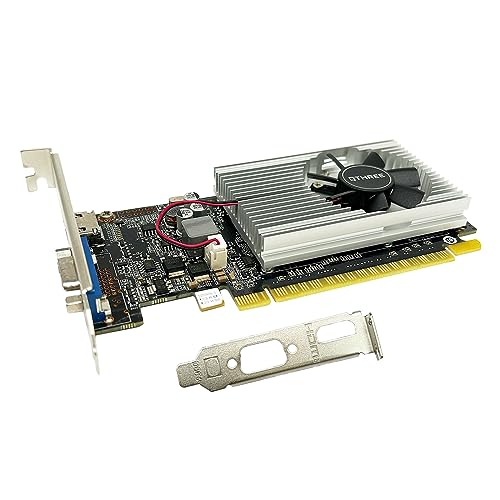
10. QTHREE GT 210: Best for Minimal Upgrades
Pros
- Low-profile installation
- HDMI and VGA outputs
- No external power supply
- PCI Express 2.0 x16 interface
- Supports older Windows versions
Cons
- Only 1GB of DDR3 memory
- Not compatible with Windows 11 according to the listing
- Not suitable for modern gaming
Best for: very old PCs needing a simple low-power HDMI or VGA output.
The QTHREE GT 210 is the most limited card here, but its purpose is clear. It is a small, low-profile replacement for a basic display adapter, with HDMI and VGA outputs and no external power requirement. That can be enough for an older office computer or a simple secondary system.
QTHREE lists a 589 MHz core clock, up to 1066 Mbps effective memory speed, and 1GB of DDR3 memory on a 64-bit interface. It uses PCI Express 2.0 x16 and supports up to two monitors. Those numbers explain why it belongs at the bottom of a modern graphics-card buying list. The card is designed around basic work, video, and simple desktop use rather than demanding 3D applications.
The physical installation is uncomplicated in principle. Its low-profile construction saves space in slim and ITX-style systems, and the listing mentions a low-profile bracket. The card uses solid-state capacitors and does not require an external power connector. Those are useful traits when upgrading an old computer with a small power supply and limited internal room.
The Glorto GT 610 is the closest comparison, but it has twice the memory and is listed as compatible with Windows 11. The MSI GT 1030 is a much better low-profile choice for a newer office PC, while the QTHREE GT 730 adds four-display support and more memory. The GT 210 only makes sense when the older system and its software environment are the priority.
The Windows compatibility note is important. The listing says this model supports Windows 10, 8, 7, Vista, and XP but is not compatible with Windows 11. That rules it out for many current PCs. Choose it only for a legacy system that matches those requirements and needs basic HDMI or VGA output.
How to choose best graphics cards for pc
The right GPU is determined as much by the computer around it as by the chipset. Check these factors before choosing between a compact display card and a full-size gaming model.
GPU class and workload
Start with the task. The GT 610, GT 210, GT 730, and GT 1030 are primarily display and light multimedia cards in this selection. The RTX 3050, RX 580, RX 9060 XT, and RTX 5080 are the appropriate families to consider for gaming or GPU-accelerated creative work.
Do not use memory capacity alone as a performance shortcut. The GT 730 has 4GB, but it uses older DDR3 memory and a 64-bit interface. The RX 9060 XT cards have 16GB of GDDR6, making them far more suitable for current graphics workloads.
Video memory
Memory capacity affects how comfortably a GPU handles textures, large projects, and high-resolution displays. The 1GB on the QTHREE GT 210 is strictly basic, while 2GB on the Glorto GT 610 is still limited. The 4GB cards are more useful for office work and light multimedia, but they are not interchangeable with a modern 16GB gaming card.
For a gaming build, the RX 9060 XT cards and ASUS RTX 5080 have the most headroom in this group. The RTX 3050's 6GB and RX 580's 8GB sit between the modern performance cards and the older display adapters.
Case clearance and slot width
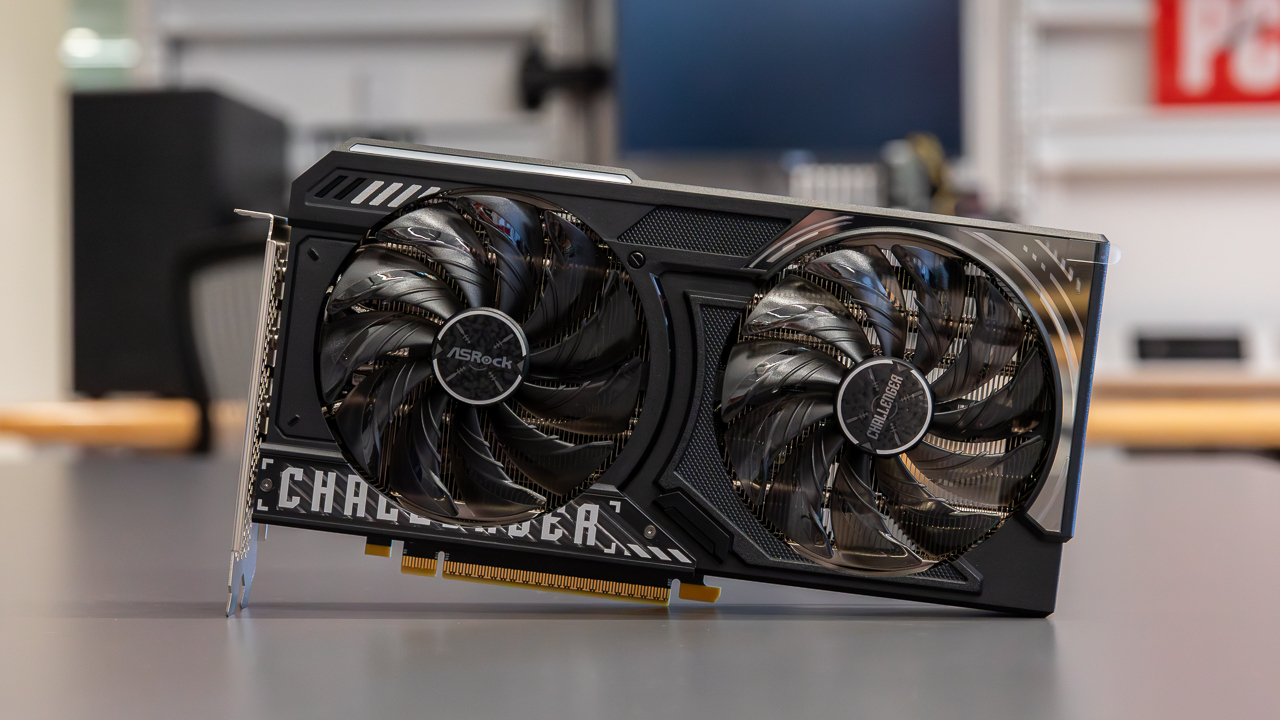
Measure the case before ordering. The ASUS TUF RTX 5080 is 13.7 inches long and uses a 3.6-slot design. The XFX and GIGABYTE RX 9060 XT cards are both around 11 inches long. These cards need a conventional desktop case with sufficient width and open slot space.
Low-profile cards solve a different problem. The MSI GT 1030, QTHREE GT 730, Glorto GT 730, Glorto GT 610, and QTHREE GT 210 are intended for smaller systems. A short card is not automatically a low-profile card, so check the bracket and card height rather than relying on length alone.
A graphics card that cannot clear the case, power supply, or neighboring slot is not an upgrade, no matter how capable its chipset is.
Cooling and airflow
Larger GPUs need a case with useful airflow around the cooler. The ASUS uses three Axial-tech fans over a large fin array, the XFX uses a triple-fan SWFT cooler, and the RX 580 uses two fans and heat pipes. The GIGABYTE RX 9060 XT adds Performance and Silent BIOS modes, giving the owner a choice between the default performance profile and quieter operation.
Small display cards have simpler cooling requirements, but the case still needs some ventilation. A single-fan GT 1030 is easier to accommodate than a large triple-fan card, while passive or low-power-oriented designs can be useful in compact office systems.
Outputs and display standards
Match the outputs to the monitors you already own. HDMI and DisplayPort are the most useful connections for current screens, while VGA and DVI matter when keeping older displays in service. The two GT 730 cards stand out for four-screen support, with two HDMI ports plus VGA and DisplayPort.
The RTX 3050, RX 580, and RX 9060 XT cards make more sense when gaming or high-refresh displays are involved. The GT 610 and GT 210 are better understood as basic HDMI and VGA solutions.
For a broader system-building checklist, the parts that need to work together in a gaming desktop are worth considering before choosing the GPU.
Power requirements
Power planning becomes more important as the GPU gets faster. The MOUGOL RX 580 specifically lists a 6-pin power connector and a 500W minimum power supply. The low-profile QTHREE GT 730 lists 30W operation without an external power supply, while the GT 610 and GT 210 are also designed around low-power installations.
The data provided for the RTX 3050, RX 9060 XT cards, and RTX 5080 does not state complete power requirements. Confirm those details from the card and system documentation before purchase. A graphics card should be matched to the power supply, connectors, and airflow, not installed on appearance alone.
Frequently asked questions
Which graphics card is best for a modern gaming PC?
The XFX Swift RX 9060 XT is the strongest all-round choice in this list. It combines the RX 9060 XT chipset, 16GB of GDDR6 memory, a boost clock listed up to 3320 MHz, and triple-fan cooling. The ASUS TUF RTX 5080 is the higher-end option for buyers building around maximum performance.
Is the RTX 3050 suitable for a smaller desktop?
The GIGABYTE RTX 3050 Windforce is easier to fit than the RX 9060 XT and RTX 5080 models because it is listed at 7.5 inches long and uses two fans. It is not a low-profile card, however, so slim office cases still require a careful clearance check.
Which card supports the most monitors?
The QTHREE GT 730 and Glorto GT 730 both support up to four screens. Each provides two HDMI outputs along with VGA and DisplayPort. They are designed for multi-monitor office setups rather than demanding gaming.
Can the RX 580 work in an older PC?
It can, but the system must meet the card's requirements. The MOUGOL RX 580 needs a 6-pin power connector, and its listing specifies a 500W minimum power supply. It also measures approximately 9.45 inches long, so case clearance matters.
Are the GT 610 and GT 210 good for gaming?
No. Both are basic legacy display adapters with older DDR3 memory and limited graphics capability. The GT 610 is the more capable of the two, while the GT 210 is intended for very old systems and is listed as incompatible with Windows 11.
Do all graphics cards fit small-form-factor PCs?
No. The MSI GT 1030, QTHREE GT 730, Glorto GT 730, Glorto GT 610, and QTHREE GT 210 use low-profile designs suited to smaller systems. The RTX 5080, RX 9060 XT cards, and RX 580 require much more internal room and careful power planning.
Which card is best for older monitors?
The MOUGOL RX 580 is the most flexible performance card because it includes HDMI, DisplayPort, and DVI. For a basic two-monitor legacy setup, the Glorto GT 610 and QTHREE GT 210 provide HDMI and VGA, while the GT 730 models add more output choices.
The bottom line
The Best graphics cards for pc in this roundup depend on the machine you are upgrading. The XFX Swift RX 9060 XT is the pick for a modern gaming desktop because its 16GB of GDDR6 memory and triple-fan cooler give it a strong balance of capability and practicality. Choose the ASUS TUF Gaming RTX 5080 when high-end performance is the priority and your case can accommodate its 3.6-slot design.
For compact systems, the GIGABYTE RTX 3050 Windforce is the most convincing gaming-oriented upgrade. The MSI GT 1030 is better for basic low-profile office use, while the QTHREE and Glorto GT 730 cards make sense when four displays are more important than gaming speed.
If you are undecided, choose the fastest card your case, cooling, and power supply can safely support, then verify the monitor outputs before ordering.
As an Amazon Associate we earn from qualifying purchases.