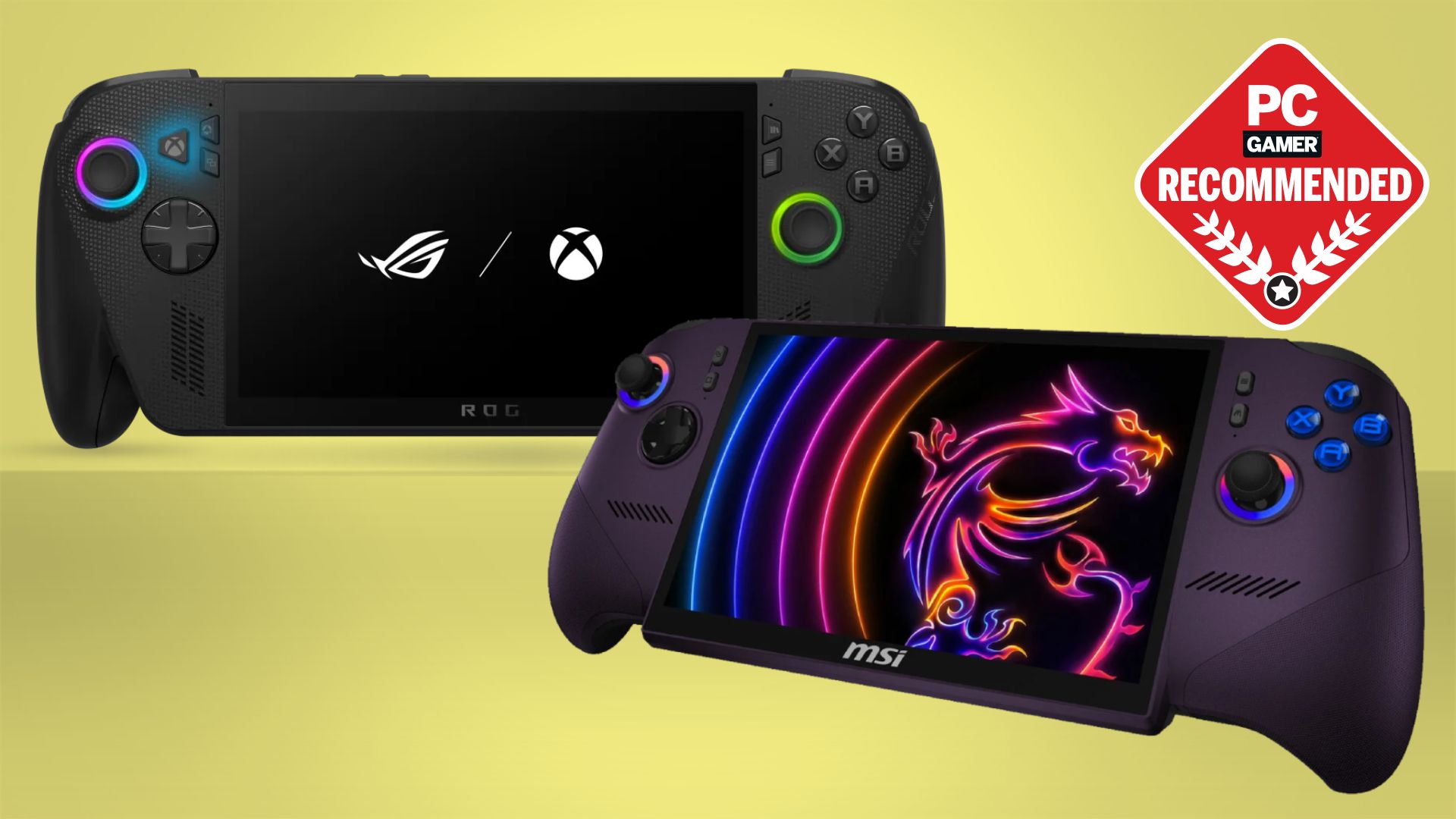

A handheld console can mean a pocket-sized Atari player, a Linux emulator box, or a full Windows gaming computer with access to Xbox and Steam libraries. Choosing the wrong type leaves you with a device that either cannot run the games you want or feels needlessly complicated for a few quick sessions.
The Best handheld console depends first on where the games come from. The ASUS ROG Xbox Ally is the strongest all-rounder for native PC and Xbox gaming, while the Rhesusco RG56PRO is the better fit for a self-contained retro library. This list also covers PlayStation Remote Play, cloud gaming, Android titles, kid-friendly devices, and dedicated Atari nostalgia.
Comparison table
| # | Product | Award | Screen | Battery or power | Best for |
|---|---|---|---|---|---|
| 1 | ASUS ROG Xbox Ally | Best overall | 7-inch 1080p, 120Hz touchscreen | 60Wh battery, 30-minute 0 to 50 percent charging claim | PC and Xbox gaming |
| 2 | Rhesusco RG56PRO | Best retro library | 5.5-inch 1280x720 IPS | 5000mAh, up to 8 hours | Broad retro collections |
| 3 | PlayStation Portal | Best for PS5 Remote Play | 8-inch 1080p LCD, up to 60fps | Not specified | Playing a PS5 away from the TV |
| 4 | OnePro Cloud Handheld | Best cloud and streaming mix | 7-inch 1080p touchscreen | 8+ hours | Cloud, remote play, and Android |
| 5 | MANGMI AIR X | Best Android handheld | 5.5-inch 1920x1080 IPS, 400 nits | 5000mAh, up to 8 hours | Android and retro gaming |
| 6 | MVMOD XF40V | Best compact retro pick | 4-inch 720x720 IPS | 4000mAh, 6 to 8 hours | Pocketable emulation |
| 7 | Anbernic RG Rotate | Best rotating screen | 3.5-inch 720x720 touchscreen | Not specified | Vertical and horizontal games |
| 8 | ZWXYVUT X9 | Best large-screen basic retro player | 5.5-inch IPS | 1500mAh, 4 to 6 hours | Simple retro play on a large display |
| 9 | WELLST·G P30S | Best for younger children | 3-inch LCD | 860mAh rechargeable battery | First gaming device for kids |
| 10 | My Arcade Atari Pocket Player | Best dedicated Atari player | 2.75-inch full-color display | Four AA batteries or USB-C cable | Atari fans and collectors |
1. ASUS ROG Xbox Ally: Best Overall

Pros
- Windows 11 supports Xbox, Steam, Epic, and other PC libraries
- 7-inch 120Hz touchscreen with FreeSync Premium
- Contoured grips and balanced 1.47-pound design
- Dual USB Type-C ports support TV connections and accessories
Cons
- Windows brings more setup and maintenance than a dedicated console
- 512GB of storage can fill quickly with large PC games
- Battery life varies significantly with demanding games
Best for: players who want native PC gaming and Xbox access in one handheld.
The ASUS ROG Xbox Ally is the closest device here to replacing a traditional gaming setup. It boots into the Xbox experience, but it is still a Windows 11 computer underneath, so the same machine can reach Xbox Game Pass, Steam, Epic, and other Windows game libraries. That flexibility is the reason it takes the top spot. The PlayStation Portal is more focused and easier to understand, but it cannot play PC games locally.
Its 7-inch touchscreen runs at 1920 by 1080 with a 120Hz refresh rate. Fast motion feels smoother than on the 60Hz displays used by several other picks, and FreeSync Premium helps the screen stay in step with changing frame rates. The claimed 500-nit brightness and Gorilla Glass touchscreen should also help when the screen is being used away from a dark room. Those details matter more here than a giant preloaded game count because this is built around current PC software.
Inside are an AMD Ryzen Z2 A processor, 16GB of LPDDR5 6400MHz memory, and a 512GB SSD. That combination gives the Ally the storage speed and memory expected from a modern PC, while the 60Wh battery provides a larger stated capacity than the retro devices below. ASUS also claims that 30 minutes of charging takes the battery from zero to 50 percent. Dual USB Type-C ports make it easier to attach a display or multiple accessories, and the product can connect to a TV for a larger-screen setup.
The weakness is the operating system. Windows offers the widest library, but it also means updates, launchers, account logins, and occasional controller or display settings. The 512GB SSD is useful, though modern games can consume it quickly. The MANGMI AIR X is simpler for Android and retro titles, while the OnePro Cloud Handheld is lighter for streamed games. Pick the ASUS when access to native PC software matters more than a console-like interface.
2. Rhesusco RG56PRO: Best Retro Library

Pros
- More than 31, 000 preloaded classic games
- 5.5-inch 1280x720 IPS display
- 5000mAh battery with up to 8 hours of stated play
- Dual 3D joysticks and mechanical buttons
- Open Linux system supports customization
Cons
- The large library can be difficult to browse
- Linux is less flexible than Android for modern apps
- The product is focused on retro gaming rather than current releases
Best for: retro players who want a large ready-to-play collection and physical controls.
The Rhesusco RG56PRO is the pick for someone who wants to turn it on and start browsing old games without building a library first. Its stated collection exceeds 31, 000 titles, covering arcade, adventure, fighting, puzzle, and fifth-generation 3D games. That number will not matter to everyone, but it does make this more immediately useful than a bare Android handheld that expects you to configure everything yourself.
The 5.5-inch IPS panel has a 1280 by 720 resolution, wide viewing angles, and an anti-glare coating. It is not as sharp as the 1080p panel on the MANGMI AIR X, yet the lower resolution is well matched to classic software and should be less demanding on the hardware. The RG56PRO also has dual 3D joysticks, mechanical buttons, and seven-color LED lighting. The lights are decorative, but the joysticks give it a broader control layout than small single-purpose players such as the My Arcade Atari Pocket Player.
A built-in 2.0GHz RK3562 chip runs the open Linux system. The listing compares its performance with the Snapdragon 662 or 665, though the more useful point is that it is designed for emulation and system customization rather than modern Windows games. The 5000mAh polymer lithium battery is rated for up to 8 hours, and USB Type-C fast charging is supported. The product notes that charging should use up to 5 volts through the dedicated DC port, so owners should pay attention to that instruction.
The RG56PRO is not the cleanest choice for someone who wants Android apps, cloud services, or a current PC library. Its dimensions are listed as 7 by 4 by 4 inches and its weight as 0.88 pounds, so it is portable but not the smallest model here. The MVMOD XF40V is easier to slip into a pocket, while the RG56PRO offers the more expansive screen and library. For anyone comparing the trade-offs between preloaded retro libraries and open systems, this is the more accessible option.
3. PlayStation Portal: Best for PS5 Remote Play
Pros
- Large 8-inch full HD display
- Up to 60fps at 1080p
- DualSense-style haptics and adaptive trigger support in compatible games
- Remote Play works with compatible PS5 and PS4 games
- 3.5mm audio and PlayStation Link support
Cons
- Requires a PS5 for its main Remote Play function
- Network quality directly affects the experience
- It is not a local, general-purpose gaming console
Best for: PS5 owners who want to play away from the television.
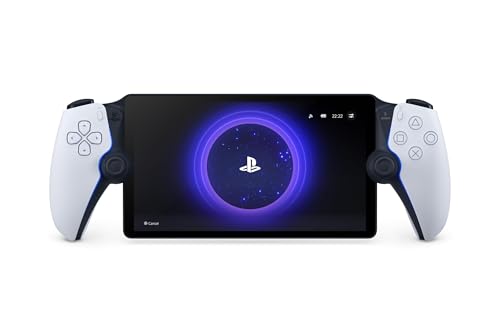
The PlayStation Portal solves one specific problem extremely well: freeing a PS5 from the television. It streams compatible PS5 and PS4 games installed on the console, allowing another person to use the TV while the owner keeps playing. The built-in controls are shaped around the DualSense experience, so it feels much more like holding a divided PS5 controller than using a generic streaming screen.
Its 8-inch LCD is the largest display among the dedicated remote-play options here, with 1080p resolution and performance up to 60fps. That size makes small interface text and detailed game worlds easier to see than on the 5.5-inch retro devices. Tempest 3D AudioTech is available in supported games when a compatible audio device is connected through PlayStation Link or the 3.5mm jack.
The important limitation is the connection requirement. Sony specifies at least 5Mbps broadband Wi-Fi for use and recommends 15Mbps or more for a better experience. The PS5 must be powered on or in Rest Mode, connected to broadband, paired with the Portal, and associated with a PlayStation Network account. That means this is not the right answer for a flight, a campsite, or any place without a suitable network.
Cloud streaming from the Game Catalog and Classics Catalog is also supported with PlayStation Plus Premium, along with select digital PS5 games in a user's library. Those features add flexibility, but the Portal remains much narrower than the ASUS ROG Xbox Ally or OnePro Cloud Handheld. Consider it if playing console games without occupying the main television is the real goal. Skip it if you want local emulation or an independent game library.
4. OnePro Cloud Handheld: Best Cloud and Streaming Mix

Pros
- Supports Xbox Cloud Gaming, GeForce NOW, PlayStation, PC, and Android
- 7-inch 1080p display
- 430g lightweight design
- 8+ hours of stated battery life
- 4K video output and dual speakers
Cons
- Major cloud services require the appropriate subscriptions
- Streaming quality depends on Wi-Fi and the remote system
- Local performance is not comparable with the ASUS ROG Xbox Ally
Best for: players who use several cloud and remote-play services rather than one console ecosystem.
The OnePro Cloud Handheld is the most service-agnostic device in this group. It can access Xbox Cloud Gaming, NVIDIA GeForce NOW, Amazon Luna, PlayStation Plus Premium, and Boosteroid, while remote-play options include Moonlight, PlayStation Remote Play, Steam Link, and PXPlay. That makes it appealing to a household with games spread across Xbox, PlayStation, and PC rather than a single console.
The 7-inch 1080p touchscreen gives streamed games enough room for menus and map text, and the 430g weight is notably light for a device with full controls and a large display. The listing also calls out haptics, a gyroscope, and upgraded digital joysticks with Circle and Square modes. Circle Mode is intended for precise tracking, while Square Mode provides a broader input range. Those controls should suit streaming better than the basic buttons on a simple retro player.
The MediaTek Genio 510 chipset and 2T2R MU-MIMO Wi-Fi module are intended to reduce latency during streaming and improve wireless performance. The OnePro also supports Android games and emulation, including claimed compatibility with PS2 and GameCube titles. Its 4K video output can connect to an external display or AR glasses, and dual speakers handle sound when headphones are not convenient. Battery life is stated at 8 hours or more.
The catch is that a streaming handheld cannot fix a weak home network or a distant server. The listing recommends broadband Wi-Fi of at least 5Mbps for remote play, and access to many services requires a separate subscription. The PlayStation Portal has a more convincing controller feel for PS5 owners, while the OnePro reaches more platforms. It is the right Best handheld console for a player who wants one screen for many streaming accounts, not for someone seeking the strongest local processor.
5. MANGMI AIR X: Best Android Handheld

Pros
- Android 14 with a customized game launcher
- 5.5-inch 1920x1080 IPS touchscreen
- 400-nit brightness and full sRGB color claim
- Snapdragon 662 processor with active cooling
- Hall joysticks, Hall triggers, and RGB lighting
Cons
- Android setup takes more work than a preloaded retro console
- 64GB built-in storage is limited for apps and games
- Android gaming performance depends on the individual title
Best for: users who want Android games, emulation, streaming, and expandable storage.
The MANGMI AIR X sits between a retro emulator and a small Android tablet with built-in controls. It runs Android 14, supports mainstream Android titles, and includes a customized launcher, screen mapping, game sidebar, and on-device OTA updates. That is a more modern software setup than the Linux systems on the Rhesusco and MVMOD, though it asks the owner to manage apps and settings.
The 5.5-inch IPS touchscreen is unusually sharp for this category, with 1920 by 1080 resolution, a claimed 400-nit brightness, and 100 percent sRGB coverage. Text and interface elements should look cleaner than they do on the Rhesusco's 720p screen, while the compact size keeps the device easy to hold. The AIR X also supports 5G Wi-Fi mirroring for TV play, along with a microSD card slot for additional ROMs and applications.
A Qualcomm Snapdragon 662 octa-core processor runs at up to 2.1GHz, paired with 4GB of RAM and 64GB of storage. The built-in single-fan cooling system is a welcome detail for longer sessions. Hall joysticks and linear Hall triggers avoid the mechanical contact design used by many inexpensive handhelds, and the RGB lighting has constant, breathing, and rainbow modes with adjustable brightness and hue.
Its 5000mAh battery is rated for up to 8 hours and accepts 15W USB Type-C charging. The AIR X is lighter than many larger handhelds at a listed 0.63 pounds, but its Android flexibility comes with more decisions about which games to install and how to configure them. The OnePro Cloud Handheld is better for a broad streaming focus, while the Rhesusco RG56PRO is easier for immediate retro play. Choose the AIR X when Android access and a sharp screen are the priority.
6. MVMOD XF40V: Best Compact Retro Pick

Pros
- More than 18, 000 stated preloaded games
- Open Linux system with 30-plus emulators
- 4-inch square 720x720 IPS display
- Wi-Fi multiplayer and wired controller support
- 4000mAh battery rated for 6 to 8 hours
Cons
- Smaller screen than the Rhesusco RG56PRO
- Included library and emulator support may need sorting
- No stated Android app support
Best for: retro players who want a smaller device with Wi-Fi and a substantial starting library.
The MVMOD XF40V is a sensible middle ground for retro gaming. It is smaller than the Rhesusco RG56PRO, yet it still claims more than 18, 000 curated games across NES, SNES, GBA, PS1, N64, and arcade systems. The listing says the titles are tested for playability, a useful distinction from devices that simply advertise a huge number without explaining what is included.
Its 4-inch IPS panel uses a square 720 by 720 resolution and full lamination to reduce glare. The square shape is particularly comfortable for systems that were designed around a similar display proportion, while the 4-inch size keeps the device pocket-friendly. The 4.8 by 6.8 by 2.1-inch dimensions are listed as compact, and the product includes a screen protector, Type-C cable, and manual.
The open-source Linux system runs on a quad-core processor and supports more than 30 emulators. The product claims smooth performance for demanding systems such as PSP, N64, and Dreamcast, though emulator results can differ by game. Built-in Wi-Fi allows online multiplayer, and wired controllers can be used for local play. That gives it more social flexibility than the My Arcade Atari Pocket Player or the basic WELLST·G P30S.
A 4000mAh battery is rated for 6 to 8 hours of continuous play. The main compromise is screen size, especially beside the Rhesusco, and there is no stated Android ecosystem for streaming apps or modern mobile games. The Anbernic RG Rotate is more distinctive and versatile for vertical titles, but its game card is not included. Choose the XF40V if you want a compact Linux retro machine with Wi-Fi and a generous starting collection.
7. Anbernic RG Rotate: Best Rotating Screen

Pros
- 360-degree swiveling 3.5-inch touchscreen
- Landscape and portrait play modes
- Android 12 with Wi-Fi 5 and Bluetooth 5.0
- Adjustable low-profile and raised shoulder buttons
- Compact alloy and ABS construction
Cons
- 32GB built-in storage is limited
- TF or SD game card is not included
- Smaller screen than most other Android picks
Best for: players who appreciate a flexible screen and play games in different orientations.
The Anbernic RG Rotate earns its place through a feature no other console here has: a screen that swivels between landscape and portrait orientations. That is useful for classic arcade games, vertically oriented titles, videos, and apps. It is not merely a cosmetic hinge. The ability to rotate the display changes how the small device fits in the hands and how certain games use the available space.
The 3.5-inch touchscreen has a 720 by 720 resolution, so it is square and well suited to both orientations. Android 12 provides access to apps and compatible games, while the Unisoc T618 octa-core processor, 3GB of RAM, and 32GB of storage handle navigation and multitasking. Storage can be expanded, but the listing explicitly says a TF or SD game card is not included.
Controls are more adaptable than the compact body suggests. The RG Rotate comes with interchangeable low-profile and raised L2 and R2 shoulder buttons, along with a D-pad, function buttons, vibration feedback, and ergonomic controls. Wi-Fi 5, Bluetooth 5.0, USB-C charging, video playback, music, and e-book support broaden its role beyond emulation.
The listed dimensions are 3.12 by 3.12 by 0.84 inches, making it one of the easiest devices here to carry. There is no battery capacity or play-time claim in the supplied details, which makes endurance harder to judge than on the MVMOD or MANGMI. The MVMOD XF40V is the safer choice for a ready-loaded retro library, while the RG Rotate suits someone who will configure Android and use the unusual display. It is a niche Best handheld console, but a genuinely interesting one.
8. ZWXYVUT X9: Best Large-Screen Basic Retro Player

Pros
- Large 5.5-inch IPS screen
- Supports TV connection
- More than nine built-in emulator types are claimed
- Bluetooth-compatible controller expansion
- Type-C charging
Cons
- Shorter stated battery life than the Rhesusco and MVMOD
- The listed dimensions are unusually vague
- Fewer software details than the Android and Linux picks
Best for: casual retro players who want a large screen and TV connectivity.
The ZWXYVUT X9 is built around a straightforward idea: give basic retro gaming a larger display. Its 5.5-inch IPS screen is the same diagonal size as the Rhesusco's, making small sprites and menu text easier to see than on the MVMOD XF40V or My Arcade Atari Pocket Player. The listing also claims enhanced color saturation and automatic brightness adjustment, though it provides no resolution figure.
The system supports more than nine classic game emulators and includes a 360-degree non-slip joystick with textured buttons. Bluetooth-compatible controller expansion allows a second control method, and the console supports connection to a TV. Those features make the X9 more suitable for occasional shared play than the tiny dedicated Atari device, even though the software description is much less detailed than the Rhesusco's Linux specification.
A 1500mAh lithium battery is rated for 4 to 6 hours of play and uses Type-C fast charging. That is enough for a commute or a few sessions, but it gives the X9 less endurance on paper than the 4000mAh MVMOD and 5000mAh Rhesusco. The product also supports TXT e-book reading, bookmark memory, and background music, which are secondary extras rather than reasons to buy it.
The biggest uncertainty is what the console can run well. The listing mentions a flagship gaming chip and an 80 percent performance improvement, but does not identify the processor or provide a clock speed. That makes it harder to compare with the named chips in the ASUS, MANGMI, and Anbernic devices. Pick the X9 for its large screen, TV support, and simple approach. Choose the Rhesusco if a broad, clearly described retro library matters more.
9. WELLST·G P30S: Best for Younger Children

Pros
- 220 preloaded games
- Small body designed for children's hands
- Rechargeable 860mAh battery
- 3-inch LCD screen
- Includes sports, entertainment, and adventure games
Cons
- Much smaller screen than the main handhelds
- Game selection is fixed
- No stated TV connection or expandable storage
Best for: children who need a simple first gaming device without downloads or accounts.
The WELLST·G P30S is not competing with the ASUS ROG Xbox Ally or PlayStation Portal, and that is exactly the point. It is a small, self-contained toy with 220 preloaded games, a simple arcade-like body, and controls intended for smaller hands. A child can pick it up and start playing without a store account, game launcher, or network connection.
Its 3-inch high-definition screen is compact, and the listed body measures 5.9 by 2.8 by 0.7 inches with a weight of 0.4 pounds. Those dimensions should make it comfortable for children to carry, though adults may find the controls and display cramped. The game mix includes entertainment, sports, and adventure titles, giving it more variety than the single-brand My Arcade Atari Pocket Player.
An 860mAh lithium-ion battery is rechargeable and intended to avoid regular battery replacement. The product does not provide a specific play-time figure, so parents should not assume it will match the 6 to 8 hours claimed by the larger retro consoles. There is also no stated storage expansion, TV output, or online function. The fixed software selection is both its limitation and its simplest feature.
For a first device, the P30S is less intimidating than an Android handheld and less costly to damage than a full PC gaming system. It is not the right pick for a teenager who wants current games or for an adult who needs a large screen. The MVMOD XF40V gives older players better controls and a much broader system range. Choose the WELLST·G when ease of use and child-sized portability matter most.
10. My Arcade Atari Pocket Player: Best Dedicated Atari Player

Pros
- Officially licensed Atari titles
- 100 games included
- 3.5mm headphone jack
- Built-in speaker, volume control, and brightness adjustment
- Small vertical design
Cons
- Uses four AA batteries, which are not included
- USB-C cable is not included
- 2.75-inch display is the smallest in this group
Best for: Atari fans who want a dedicated collection in a compact vertical player.
The My Arcade Atari Pocket Player is the cleanest expression of a dedicated retro console in this list. It focuses on officially licensed Atari software rather than trying to imitate a full multi-system emulator. The 100 included games cover recognizable classics such as Pong, Yars' Revenge, Breakout, Asteroids, Centipede, and Missile Command, along with bonus games.
The vertical color display measures 2.75 inches, and the device is listed at 5.8 inches deep, 2.8 inches high, and 1.5 inches wide. That gives it a narrow, pocket-friendly shape, but the small screen makes it less comfortable for detailed games than the ZWXYVUT X9 or Rhesusco. Brightness adjustment helps, and the built-in speaker has volume control for quick sessions.
Power comes from four AA batteries, which are not included, or a USB-C cable, which is also not included. The listing specifically recommends standard non-rechargeable batteries, so this is not a rechargeable handheld in the same sense as the WELLST·G or MVMOD. A 3.5mm headphone jack allows private play, a useful feature on a commute or in a shared room.
The main question is whether the Atari catalog is enough. If you want several console generations, the Rhesusco RG56PRO or MVMOD XF40V is far more flexible. If you want a collectible-feeling device with authentic Atari branding and no setup, the Pocket Player makes more sense. Readers weighing a focused collection against a multi-system retro machine should choose this only when Atari is the attraction.

How to choose best handheld console
Start by deciding whether you need local games, remote play, cloud access, or a simple preloaded toy. The right hardware changes completely depending on that answer.
Game source
Native PC gaming requires a device such as the ASUS ROG Xbox Ally, with Windows, a capable processor, memory, and fast storage. Remote-play products such as PlayStation Portal depend on another console, while cloud devices depend on a stable Wi-Fi connection and the relevant service. Preloaded retro consoles are easiest to start but offer less freedom to change the library.
Display size and shape
A larger display makes modern games, menus, and small text easier to see. The 7-inch OnePro and ASUS models suit streamed or current games, while the 2.75-inch Atari player is best for short sessions. Square screens such as those on the MVMOD and Anbernic can work especially well with older systems and vertical arcade titles.
Controls
Look for full-size sticks and a comfortable D-pad if you play action, racing, or fighting games. Hall joysticks and triggers on the MANGMI AIR X are designed for precise input, while adjustable shoulder buttons make the Anbernic RG Rotate more adaptable. Small children's devices are easier to carry, but their controls are less suitable for adult hands.
A huge game count cannot rescue a handheld with cramped controls or a display that makes every menu hard to read.
Battery and charging
Battery capacity is only part of the picture, since processor load, screen brightness, and streaming use affect endurance. The Rhesusco lists 5000mAh and up to 8 hours, the MVMOD lists 4000mAh and 6 to 8 hours, and the ZWXYVUT lists 1500mAh and 4 to 6 hours. Check whether the console uses rechargeable USB-C power, replaceable batteries, or an unspecified battery system.
Software and storage
Linux retro systems are often focused and easy to browse, but Android offers apps, streaming, and expandable storage. Windows provides the broadest PC library, though it needs more maintenance. Storage also matters: the ASUS has a 512GB SSD, the MANGMI has 64GB, and the Anbernic has 32GB, while a preloaded console may devote much of its available space to its included games.

Frequently asked questions
Is the ASUS ROG Xbox Ally a standalone console?
Yes. It runs Windows 11 and supports native games from Xbox, Steam, Epic, and other Windows platforms. It can also connect to a TV through its dual USB Type-C ports.
Does PlayStation Portal require a PS5?
Its main Remote Play function requires a PS5, a PlayStation Network account, and a suitable broadband Wi-Fi connection. Cloud streaming from supported catalogs is also available with PlayStation Plus Premium, subject to the stated compatibility requirements.
Which handheld is easiest for retro gaming?
The Rhesusco RG56PRO is the easiest broad retro pick because it comes with a large preloaded collection and an open Linux system. The My Arcade Atari Pocket Player is even simpler if you only want officially licensed Atari games.
Can these handhelds play modern PC games?
The ASUS ROG Xbox Ally is the clear choice for native modern PC gaming because it uses Windows 11, an AMD Ryzen Z2 A processor, 16GB of memory, and a 512GB SSD. The OnePro can stream PC games, but streaming is different from running them locally.
Which handheld is best for cloud gaming?
The OnePro Cloud Handheld supports a wider collection of cloud and remote-play services than the other products here. The experience still depends on Wi-Fi quality, the remote device, and subscriptions to services such as Xbox Cloud Gaming or GeForce NOW.
Are retro game libraries expandable?
Several products support expansion or customization. The Rhesusco uses an open Linux system, the MVMOD supports adding ROMs and customizing settings, and the MANGMI has a microSD card slot. The supplied details for the WELLST·G and My Arcade players do not state expandable storage.

The bottom line
The Best handheld console here is the ASUS ROG Xbox Ally for players who want one device that reaches Xbox, Steam, Epic, and other PC libraries. Its 120Hz 1080p touchscreen, strong hardware, contoured grips, and TV connectivity make it the most capable option, though Windows is more involved than a dedicated console interface.
For retro gaming, the Rhesusco RG56PRO is the better recommendation. Its 5.5-inch IPS screen, dual 3D joysticks, open Linux system, 5000mAh battery, and large preloaded collection make it easier to enjoy classic games immediately. The PlayStation Portal remains the specialist choice for PS5 owners, while the WELLST·G P30S is the sensible option for younger children.
If you are undecided, choose the ASUS for current PC games and the Rhesusco for a ready-to-play retro collection.
As an Amazon Associate we earn from qualifying purchases.