

A good work headset has to handle more than music. It needs to reduce nearby conversations, switch cleanly between a laptop and phone, stay comfortable through a long meeting, and make your voice understandable when the room gets busy. The wrong pair can turn a normal afternoon into a cycle of pressure points, missed notifications, and microphone complaints.
Our Best headphones for work picks include over-ear noise cancellers, lighter on-ear models, and one dependable wired USB headset. We prioritized the features that change a working day: multipoint Bluetooth, microphone design, battery life, charging speed, transparency modes, and the physical fit.
The Soundcore Q20i Black is our top pick, with the Bose QuietComfort, Sony WH-CH720N, Beats Studio Pro, and simpler wired and on-ear options covering the rest of the field.
Comparison table
| # | Product | Award | Design | Battery | Connection | Best for |
|---|---|---|---|---|---|---|
| 1 | Soundcore Q20i Black | Best overall | Over-ear | 40 hours with ANC | Bluetooth 5.0, AUX | Most home and office workers |
| 2 | Bose QuietComfort | Best for comfort | Over-ear | 24 hours | Bluetooth multipoint, wired | Long listening sessions |
| 3 | Soundcore Q20i White | Best light-color option | Over-ear | 40 hours with ANC | Bluetooth, AUX | Buyers wanting the Q20i in white |
| 4 | Sony WH-CH720N | Best lightweight ANC | Over-ear | 35 hours | Bluetooth multipoint | Lightweight daily wear |
| 5 | Beats Studio Pro | Best for Apple and Android | Over-ear | Up to 40 hours | Bluetooth, USB-C, 3.5 mm | Work and travel |
| 6 | Sony WH-CH520 Black | Best compact wireless | On-ear | 50 hours | Bluetooth multipoint | Casual desk listening |
| 7 | Logitech H390 | Best wired work headset | On-ear, wired | USB powered | USB-A | Computer calls |
| 8 | Beats Solo 4 | Best battery life | On-ear | Up to 50 hours | Bluetooth, USB-C, 3.5 mm | Wireless listening without ANC |
| 9 | Sony WH-CH520 Blue | Best colorful compact pick | On-ear | 50 hours | Bluetooth multipoint | Simple office listening |
1. Soundcore Q20i Black: Best Overall

Pros
- Hybrid ANC uses four microphones
- 40-hour battery with ANC enabled
- Connects to two devices at once
- App includes EQ presets and transparency mode
Cons
- Bass-forward sound may need EQ adjustment
- Heavier than the Sony WH-CH720N
- AUX mode does not provide the same feature set
Best for: someone who wants one wireless headset for music, meetings, and daily office distractions.
The Soundcore Q20i Black gets the practical details right. It is an easy headset to leave beside a laptop because it can handle music from the computer and calls from a phone without forcing you through repeated pairing. The over-ear design creates a useful physical barrier around the ears, while its hybrid active noise cancelling system uses two internal and two external microphones to reduce external noise.
Its 40mm dynamic drivers give the sound a strong, energetic character, and BassUp adds more low-end weight when that is what you want. The soundcore app makes the tuning less fixed than it first appears. There are 22 EQ presets, along with the option to create a personal adjustment, so spoken content and music can be separated more clearly. Transparency mode is useful when a colleague speaks or you need to hear an announcement without removing the headset.
Battery life is especially well suited to irregular workdays. Soundcore rates it for 40 hours with ANC on and 60 hours in normal mode. A five-minute charge adds four hours of listening, which is enough to rescue a neglected battery before a meeting. Bluetooth 5.0 handles the wireless connection, and the included AUX option gives you a wired fallback. Hi-Res audio is available through that cable, although the Q20i's wireless modes are the more convenient way to use it at a desk.
The Bose QuietComfort is more polished for extended comfort, and the Sony WH-CH720N is noticeably lighter on the head. The Q20i counters with longer ANC battery life than Bose and more sound customization than either. Its real weakness is the emphasis on bass and the fact that AUX mode does not retain every wireless feature. Readers who want a neutral presentation or the lightest possible fit should look at Sony instead.
For most people, though, this is the most complete work package in the group. It is the pair we would keep for a home office, shared workspace, and occasional commute, especially when switching between a work computer and a personal phone matters as much as noise reduction.
2. Bose QuietComfort: Best for Comfort

Pros
- Plush over-ear cushions suit long sessions
- Quiet and Aware listening modes
- Adjustable EQ through the Bose app
- Multipoint Bluetooth and wired fallback
Cons
- Shorter battery life than the Soundcore Q20i
- Fewer listening modes than some rivals
- USB-C charging is not a wired audio connection
Best for: workers who wear headphones for long stretches and put comfort ahead of maximum battery life.
The Bose QuietComfort is the choice for people who notice headband pressure and ear fatigue before they notice almost anything else. Its plush cushions sit around the ears rather than pressing directly on them, and the padded band is designed to stay secure without making a long listening session feel like a clamp. That makes it a natural fit for a full day of meetings, writing, or focused work.
Bose keeps the control scheme simple with Quiet and Aware modes. Quiet is the mode for reducing office chatter and steady background noise. Aware lets the surrounding world back in when you need to hear a coworker or remain alert while moving around. There is no need to remove the headset for every brief interaction, which is one of those small conveniences that matters after several hours.
The audio can be adjusted in the Bose app, with separate control over bass, midrange, and treble. The headphones provide up to 24 hours of battery life, and a 15-minute USB-C charge adds up to 2.5 hours of playback. Multipoint Bluetooth lets the headset remain connected to two devices, while the included audio cable with an in-line microphone provides a wired option when Bluetooth is not appropriate or the battery is depleted.
Soundcore Q20i Black lasts considerably longer and offers more app-based modes, while Sony WH-CH720N weighs less. Bose wins when the physical experience is the deciding factor. Its weakness is not comfort but endurance and flexibility. The 24-hour battery is adequate for a workweek pattern, yet it gives less breathing room than the leading Soundcore and Sony models.
Choose the Bose QuietComfort if your workday means wearing headphones continuously and you want soft over-ear padding with straightforward controls. It is also a sensible option for anyone who wants the headset to move between desk, travel, and quiet reading without changing its basic character.
3. Soundcore Q20i White: Best Light-Color Option

Pros
- Same hybrid ANC design as the black Q20i
- 40-hour ANC battery life
- Dual-device connection
- Extensive EQ control in the app
Cons
- White finish can show desk grime more readily
- Bass-heavy default tuning
- Slightly heavier than Sony WH-CH720N
Best for: anyone who wants the Q20i feature set in a lighter finish for a home or office desk.
The Soundcore Q20i White is not a different acoustic design from the black version. It is the same useful formula in the Almond White finish, which makes it worth considering when appearance matters in a video-heavy workspace. The over-ear cups and padded headband give it the familiar closed-in feel of a traditional office noise-cancelling headset.
Its hybrid ANC uses four built-in microphones, with two inside and two outside the earcups. That arrangement is intended to reduce surrounding noise in offices, on commutes, and in other busy environments. Transparency mode reverses the experience when you need awareness, and the soundcore app lets you choose ANC, Normal, or Transparency rather than leaving you with a single fixed sound profile.
The technical case is strong for work. The 40mm dynamic drivers provide detailed audio with a pronounced bass response, while the app offers 22 presets and custom EQ adjustment. Battery life reaches 40 hours with ANC on and 60 hours in normal mode. A five-minute top-up adds four hours, and dual-device Bluetooth connection allows the headset to move between a laptop and phone as calls arrive.
The Sony WH-CH720N is lighter, and Bose QuietComfort feels more luxurious over a long session. The Q20i White has the same advantage as the black Q20i: more endurance and broad control over the sound. The drawback is mostly practical. A light finish can make fingerprints and marks more visible, and listeners who prefer balanced vocals may want to change the default EQ.
There is no reason to choose this version for different performance. Choose it because the finish fits your desk, camera setup, or personal preference. It remains a strong option for someone who wants the Q20i's dual-device workflow, ANC, transparency, and long battery without a dark headset on the desk.
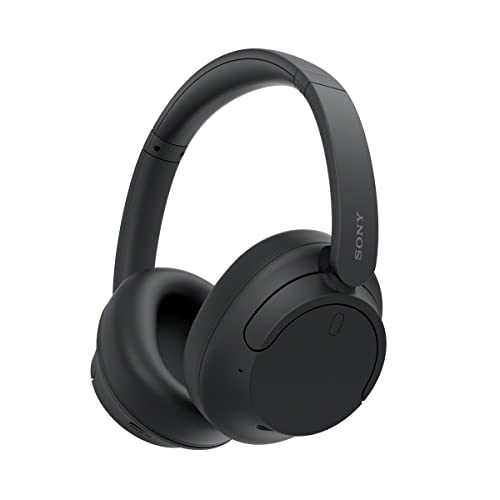
4. Sony WH-CH720N: Best Lightweight ANC
Pros
- Lightweight 192-gram design
- Up to 35 hours of battery life
- Multipoint Bluetooth
- Beamforming microphones for calls
Cons
- Less substantial than the heavier over-ear picks
- App features require setup for full control
- No wired audio option is listed
Best for: workers who want active noise cancelling without a heavy headset on their head.
The Sony WH-CH720N makes a convincing case for wearing over-ear headphones all day without feeling weighed down. At 192 grams, it is Sony's lightest wireless noise-cancelling headband design in the supplied lineup. That matters during long editing sessions and video calls, when even a comfortable headset can become distracting simply because it is there.
Sony uses its Integrated Processor V1 with dual noise sensor technology for noise cancellation. Ambient Sound mode and Adaptive Sound Control let the listening experience respond to the surroundings, which is useful when a quiet room turns into a conversation or a commute. The over-ear design still provides passive isolation, so the electronics do not have to do every bit of the work.
The WH-CH720N is rated for up to 35 hours of battery life, with a three-minute quick charge providing up to one hour of playback. Multipoint Bluetooth keeps two devices available at once, which is a major benefit for workers who answer calls on a phone while listening from a computer. Sony's DSEE processing is intended to improve compressed music, and the beamforming microphones use Precise Voice Pickup technology to focus on speech during hands-free calls.
Soundcore Q20i Black lasts longer with ANC enabled and gives you more EQ presets. Bose QuietComfort feels softer and more substantial. Sony's advantage is the middle ground: it supplies real ANC and multipoint connection without the weight of the larger-feeling alternatives. The limitation is that it may not feel as enveloping, and the supplied information does not list a wired listening mode.
If physical lightness is your first concern, the Sony WH-CH720N is the one to choose. It is particularly well matched to workers who alternate between music, calls, and ambient awareness and do not want a larger headset dominating their head or desk.
5. Beats Studio Pro: Best for Apple and Android

Pros
- ANC and Transparency modes
- USB-C lossless audio and 3.5 mm cable
- Up to 40 hours of battery life
- Works with Apple and Android devices
- Personalized Spatial Audio
Cons
- More features than some office users need
- Over-ear design weighs more than Sony WH-CH720N
- USB-C audio requires a compatible device and setup
Best for: people who want work headphones that also serve as a travel and entertainment headset across Apple and Android devices.
The Beats Studio Pro is built for the worker who does not stop using a headset when the workday ends. Its over-ear UltraPlush cushions, active noise cancelling, and Transparency mode cover the office basics, while Spatial Audio with personalized dynamic head tracking adds a more immersive option for movies and compatible music. The result is a versatile headset rather than a narrowly focused conference tool.
The custom acoustic platform is tuned for rich, balanced audio, and the Studio Pro supports lossless audio over USB-C. A 3.5 mm cable offers a conventional analog option, so there are several ways to connect it to a work computer or other device. Apple and Android compatibility is explicit, with one-touch pairing intended to make moving between ecosystems less troublesome.
Battery life reaches up to 40 hours, and a 10-minute Fast Fuel charge provides up to four hours of power. Class 1 Bluetooth is designed for a stable connection with fewer dropouts across locations. Voice-targeting microphones reduce background noise for calls, although the product is not presented as a dedicated boom-mic office headset. That distinction matters if spoken communication is the central task.
The Soundcore Q20i Black is the simpler work-first recommendation, while the Sony WH-CH720N is lighter. Beats Studio Pro earns its place by combining ANC, wired options, USB-C lossless audio, spatial features, and cross-platform pairing. Its weakness is that its broader entertainment feature set may be unnecessary for someone who only needs quiet calls at a desk.
Choose it when one headset must cover laptop work, commuting, travel, music, and video. For more specialized call needs, a wired model such as the Logitech H390 keeps the microphone closer to the task and removes wireless battery management from the equation.
6. Sony WH-CH520 Black: Best Compact Wireless

Pros
- Up to 50 hours of battery life
- Lightweight on-ear design
- Multipoint Bluetooth
- EQ Custom in Sony's app
- Built-in microphone
Cons
- On-ear fit provides less isolation than over-ear models
- No active noise cancelling
- Ear pressure may vary with long sessions
Best for: workers in relatively calm spaces who want a small wireless headset for music and occasional calls.
The Sony WH-CH520 Black takes a less isolating but more compact approach to work listening. Its on-ear cups swivel, the headband adjusts, and the lightweight construction is easy to put on and take off throughout a day. That makes it less enclosing than the Soundcore Q20i or Bose QuietComfort, which can be an advantage in a quiet home office where awareness matters.
The trade-off is the absence of active noise cancelling. The soft ear pads sit on the ears rather than around them, so nearby voices and steady equipment noise will remain more apparent. For a calm room, that open relationship with the surroundings can be comfortable. For a shared office, the over-ear ANC models in this guide are much better equipped for concentration.
Battery life is the CH520's strongest practical feature. Sony rates it for up to 50 hours, with quick charging available when needed. Multipoint connection lets it remain linked to two devices, and the built-in microphone handles hands-free calls. Sony's Headphones Connect app provides EQ Custom adjustment, while DSEE is intended to improve compressed music playback.
Sony WH-CH720N adds ANC and an over-ear fit, making it the obvious step up for noisy surroundings. The Logitech H390 provides a more direct call setup with a rotating boom mic. The CH520 instead wins on low bulk and long wireless endurance. Its weakness is the on-ear seal, which can become tiring for some people and does little to block an active workplace.
Pick the black CH520 for a straightforward desk companion when you want to hear the room and do not need ANC. It is also a useful option for people who prefer a smaller headset for quick calls, background music, and switching between a phone and computer.
7. Logitech H390: Best Wired Work Headset

Pros
- Plug-and-play USB-A connection
- Rotating noise-cancelling boom mic
- In-line volume and mute controls
- 6.23-foot cable
- Adjustable headband and swivel cushions
Cons
- Cable limits movement
- USB-A is less convenient on some newer devices
- No wireless mode or battery
Best for: computer-based meetings where dependable wired connection and a clear boom microphone matter most.
The Logitech H390 is refreshingly direct. Plug its USB-A connector into a compatible computer and it is ready for calls without pairing, charging, or switching between wireless devices. That simplicity is its main appeal. It is a headset for a desk, not a travel companion, and it focuses on the microphone and controls that office calls actually use.
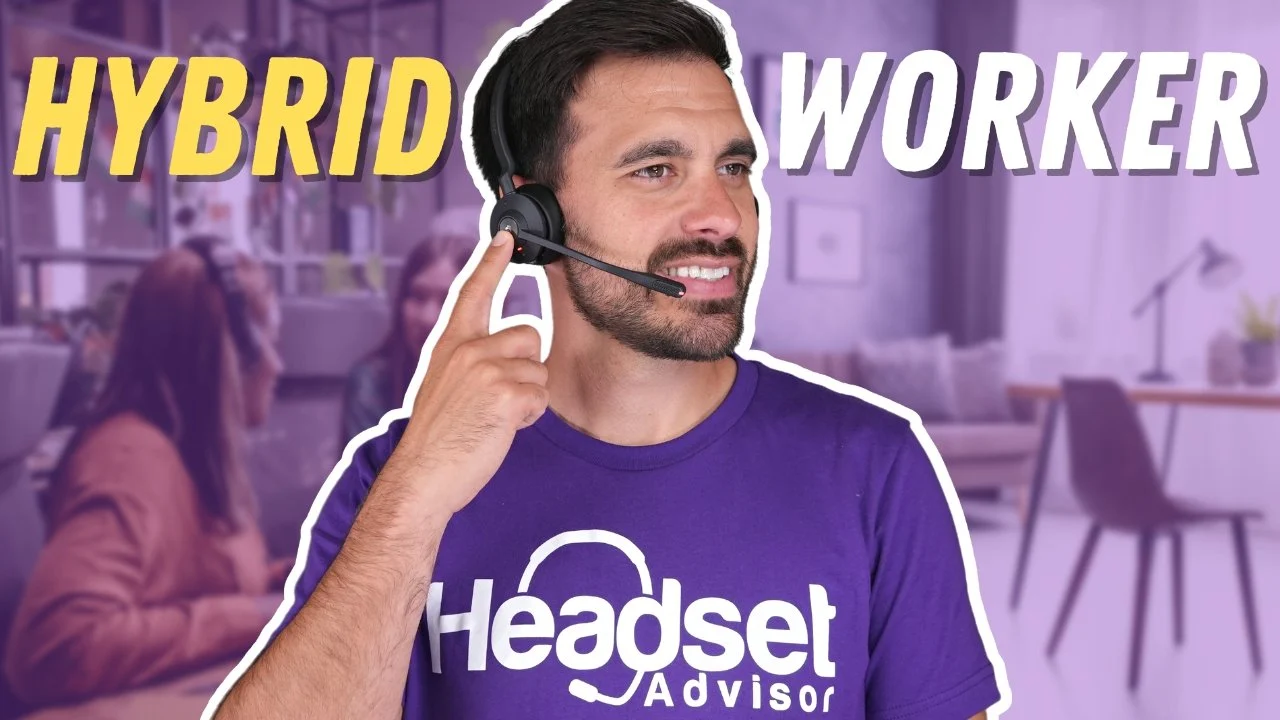
The rotating noise-cancelling microphone sits on a boom that can move out of the way when you are listening rather than speaking. In-line controls provide volume adjustment and call mute without reaching for the meeting software. The fine-tuned drivers handle stereo audio for calls, music, and general computer use, though this is not the pick for a richly featured wireless listening setup.
Its 6.23-foot, or 1.9-meter, USB-A cable gives enough room to stand and stretch during a long conversation. The adjustable headband and swivel-mounted leatherette ear cushions provide the basic physical flexibility expected from a work headset. Logitech also identifies it as tested for Chromebook compatibility, which broadens its usefulness for school and lightweight office computers.
The Sony WH-CH520 Black is far easier to carry around, and the Soundcore Q20i Black is better for managing noise. Logitech wins when the computer is the center of the workday and you want a boom mic that can be muted by touch. Its weakness is the cable, especially if your desk has a USB-C-only laptop or you regularly move between rooms.
For a fixed workstation, the H390 remains a sensible specialist. Choose it when call reliability and a physical microphone matter more than ANC, battery life, wireless freedom, or a headset that can double as a travel pair.
8. Beats Solo 4: Best Battery Life

Pros
- Up to 50 hours of battery life
- USB-C and 3.5 mm lossless audio
- Lightweight on-ear design
- Apple and Android compatibility
- Personalized Spatial Audio
Cons
- No active noise cancelling
- On-ear cups offer limited isolation
- Less focused on office call control than the Logitech H390
Best for: workers who want exceptionally long wireless endurance and a headset that also suits music and travel.
The Beats Solo 4 is an on-ear headset with a strong emphasis on freedom from charging. Its battery is rated for up to 50 hours, and a 10-minute Fast Fuel charge adds up to five hours of playback. That makes it easy to use across several workdays without treating charging as part of the morning routine.
The design uses a flex-grip headband and angled, adjustable earcups to create a stable fit. UltraPlush cushions are intended for comfort and durability, while the on-ear construction keeps the headset less enclosing than the over-ear picks. That can suit workers who dislike a fully sealed feel, though it also means that surrounding conversations and office noise are not actively reduced.
Wireless listening works with Apple and Android devices, and Class 1 Bluetooth is intended to support extended range with fewer dropouts. The Solo 4 also supports high-resolution lossless audio through USB-C or a 3.5 mm cable. Personalized Spatial Audio with dynamic head tracking adds an entertainment-focused feature that is not essential for meetings but expands what the headset can do away from the desk.
Sony WH-CH520 Black offers a similar 50-hour battery target in a simpler on-ear design. Beats adds USB-C lossless audio, 3.5 mm support, spatial audio, and a more substantial feature set. Neither model has ANC, so the Soundcore Q20i Black remains the clear choice for a noisy office. The Logitech H390 is better when a boom microphone and wired call workflow take priority.
The Solo 4 is the right fit for someone who values battery endurance and wants the headset to follow them from work to music and travel. Skip it if your workplace is loud or if you need strong microphone positioning for frequent conference calls.
9. Sony WH-CH520 Blue: Best Colorful Compact Pick

Pros
- Up to 50 hours of battery life
- Lightweight on-ear construction
- Multipoint Bluetooth
- Built-in microphone
- EQ adjustment through Sony's app
Cons
- No ANC
- On-ear pads do not block much office noise
- Color is the main distinction from the black version
Best for: someone who wants the compact Sony CH520 design in blue for a quiet desk or shared household workspace.
The Sony WH-CH520 Blue is the same working concept as the black CH520, with the blue finish as its meaningful distinction in this list. It is a small on-ear wireless headset that slips on quickly, swivels for easier storage, and avoids the enclosed feel of a full over-ear model. For a quiet room, that is a pleasant balance between having audio available and staying connected to the surroundings.
The lack of ANC sets a clear boundary. The CH520 can help with casual listening and calls, but it is not designed to erase a busy office. If you need to focus beside conversation, a pair such as the Sony WH-CH720N or either Soundcore Q20i is better suited. The on-ear fit also means comfort depends more heavily on how the pads meet your ears over time.
Battery life is rated at up to 50 hours, and quick charging helps when the headset has been neglected. Multipoint Bluetooth lets you connect to two devices at once, while the built-in microphone supports hands-free calls. Sony's app adds EQ Custom, DSEE processing for compressed music, and features such as Fast Pair and Find My Device support.
The black Sony WH-CH520 has the same capabilities, so there is no performance reason to favor one over the other. The Logitech H390 remains the better specialist for a fixed computer and frequent calls, while Beats Solo 4 offers more audio connection options and spatial features. Sony's advantage is a light, uncomplicated wireless design with long battery life.
Choose the blue version when you want those qualities and prefer a more visible finish. It is a good match for a quiet home office, light calls, and background listening, but it should not be mistaken for a noise-isolating headset.

How to choose best headphones for work
The right work headset depends on the noise around you, how often you take calls, and whether you need one pair for both desk use and travel.
Noise cancellation and awareness
Active noise cancelling uses microphones and processing to reduce external sound before it reaches your ears. It is most useful against steady distractions such as air conditioning, train noise, and office hum. The Soundcore Q20i, Bose QuietComfort, Sony WH-CH720N, and Beats Studio Pro include ANC, while the on-ear models and Logitech H390 do not.
A transparency or ambient mode matters when you need to hear a colleague or announcement without removing the headset. If your workspace is quiet, the lighter on-ear design of the Sony WH-CH520 may be more comfortable than paying for isolation you will rarely use. For louder environments, start with the over-ear models.
ANC helps with steady noise, but it does not replace a good microphone when the meeting itself is the priority.
Microphone design
A built-in microphone keeps a wireless headset compact, but a boom microphone places the pickup closer to your mouth. The Logitech H390 is the clearest example here, with a rotating noise-cancelling boom and physical mute controls. Beats Studio Pro uses voice-targeting microphones, while Sony and Soundcore use built-in microphone systems.
Think about how many calls you take and how much background sound reaches your desk. Occasional calls in a quiet room do not require the same microphone arrangement as a day filled with meetings. Readers focused primarily on spoken communication may also want to compare how different wireless call setups handle busy rooms.
Over-ear and on-ear fit
Over-ear cups surround the ears and generally provide more passive isolation and a less direct pressure point. They also tend to feel larger. On-ear headphones are lighter and easier to remove quickly, but their pads rest on the ears and block less surrounding sound.
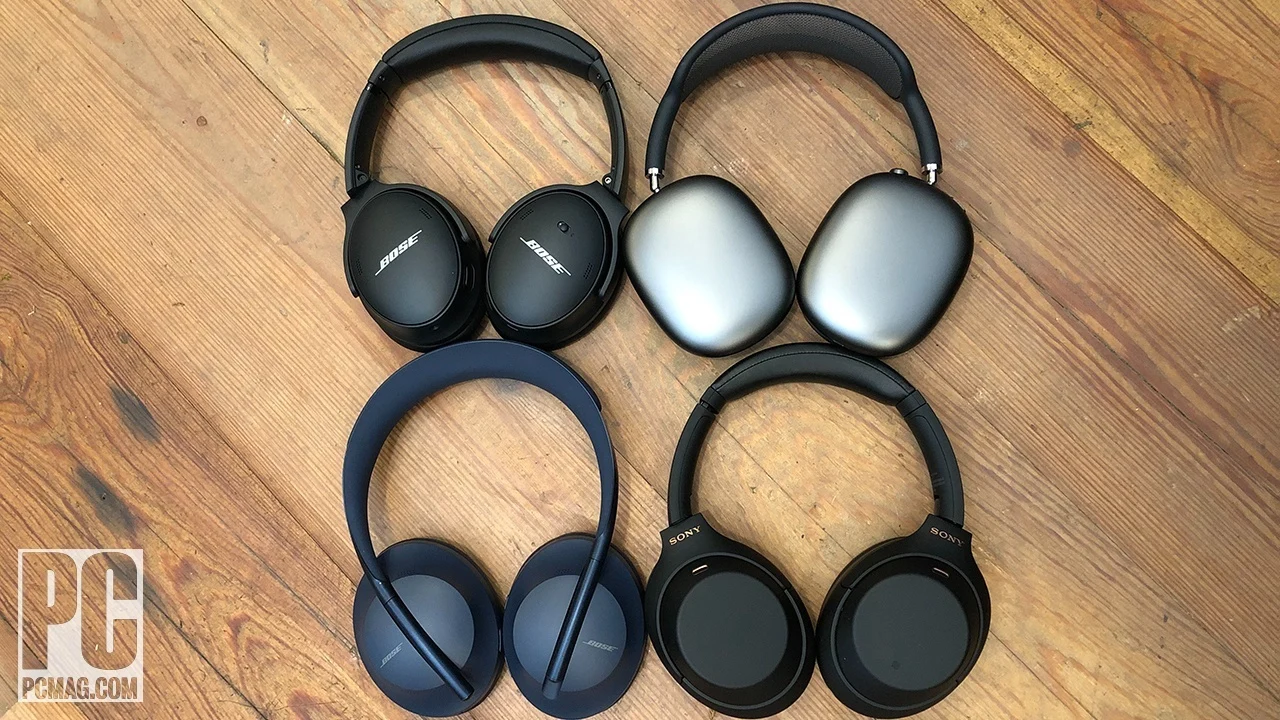
Bose QuietComfort emphasizes plush over-ear comfort, Sony WH-CH720N emphasizes low weight, and the Soundcore Q20i models offer a more substantial closed-in fit. The Sony WH-CH520, Beats Solo 4, and Logitech H390 use on-ear designs. If you wear headphones for several uninterrupted hours, cushion shape and headband pressure matter as much as the feature list.
Battery and charging
Battery life determines how much attention the headset demands during the workweek. The Soundcore Q20i reaches 40 hours with ANC on, Bose QuietComfort reaches 24 hours, Sony WH-CH720N reaches 35 hours, and the on-ear Sony and Beats Solo 4 models reach up to 50 hours.
Quick charging is useful when a meeting appears unexpectedly. Soundcore adds four hours after five minutes, Sony WH-CH720N adds one hour after three minutes, Bose adds up to 2.5 hours after 15 minutes, and Beats Solo 4 adds up to five hours after 10 minutes. A wired headset such as the Logitech H390 avoids battery planning entirely, though the cable limits movement.
Device switching and wired options
Multipoint Bluetooth allows headphones to remain connected to two devices, which is useful when a work laptop and phone share call duties. Soundcore Q20i, Bose QuietComfort, Sony WH-CH720N, and Sony WH-CH520 all list dual-device or multipoint support.
Wired options provide another layer of flexibility. Soundcore Q20i includes AUX, Bose includes an audio cable, Beats Studio Pro supports USB-C lossless and 3.5 mm audio, and Beats Solo 4 supports USB-C and 3.5 mm connections. If your main computer is the center of your workday, the trade-offs between a wired and wireless desk headset are worth considering before you choose.
Frequently asked questions
Are over-ear headphones better for working?
Over-ear headphones usually provide more passive isolation and leave less pressure directly on the ears. They are a strong fit for busy offices or anyone who wants active noise cancelling. On-ear models are smaller and lighter, but they allow more surrounding sound through.
Is active noise cancelling useful in an office?
ANC is useful when the office has steady background noise, nearby conversations, or equipment hum. It is less important in a quiet room, where a lighter on-ear headset may be more comfortable. Transparency modes are helpful when you need to hear people without taking the headphones off.
Which work headphones are easiest to use with two devices?
Soundcore Q20i, Bose QuietComfort, Sony WH-CH720N, and Sony WH-CH520 support connection to two devices. That allows a laptop and phone to remain available together. The Logitech H390 is simpler but stays connected to one computer through USB-A.
Are wireless headphones suitable for long meetings?
They can be, provided the fit is comfortable and the microphone performs well in your environment. Bose QuietComfort emphasizes plush over-ear comfort, Sony WH-CH720N keeps weight low, and Logitech H390 offers a boom mic for a more call-focused setup. Check battery life if meetings fill most of the day.
Can these headphones be used with a computer?
Yes. The wireless models connect through Bluetooth, and the Logitech H390 connects by USB-A. Sony WH-CH520 also lists Swift Pair support for Windows 10 computers. Wired audio options are available on Soundcore Q20i, Bose QuietComfort, Beats Studio Pro, and Beats Solo 4.
Do on-ear headphones block office noise?
On-ear headphones generally block less noise than over-ear models because their cushions sit on the ears. The Sony WH-CH520 and Beats Solo 4 do not include ANC, so they are better for quieter spaces. Choose an over-ear ANC model if concentration in a busy room is the main goal.
The bottom line
The Best headphones for work for most people are the Soundcore Q20i Black because it combines hybrid ANC, dual-device Bluetooth, app-based EQ, transparency mode, and 40 hours of battery with ANC enabled. The Bose QuietComfort is the stronger choice when plush long-session comfort matters most, while the Sony WH-CH720N is the better fit for people who want an especially light over-ear design.
Choose the Logitech H390 for a fixed computer and frequent calls, or the Sony WH-CH520 Black for simple wireless listening in a quiet room. The Beats models make more sense when work headphones also need to handle music, travel, wired audio, and Apple or Android devices.
If you are undecided, choose the Soundcore Q20i for noisy surroundings and the Logitech H390 for a call-heavy desk.
As an Amazon Associate we earn from qualifying purchases.