
A first layer that will not stick, a tangled spool, or a printer that needs constant adjustment can turn a promising project into an evening of troubleshooting. The right machine should make the routine parts, such as leveling, loading filament, and removing a finished print, feel predictable.
Our Best home 3d printer picks range from compact CoreXY machines to enclosed, heated-chamber models for demanding materials. Some focus on speed, some on multicolor printing, and others on making the first setup less intimidating.
The FLASHFORGE Adventurer 5M is our top pick, while the other nine cover multicolor work, large prototypes, advanced materials, and simpler entry points.
Comparison table
| # | Product | Award | Build volume | Max speed | Best for |
|---|---|---|---|---|---|
| 1 | Flashforge Adventurer 5M | Best overall | 220 x 220 x 220mm | 600mm/s travel | Most home makers |
| 2 | Flashforge Adventurer 5M Pro | Best for materials | 220 x 220 x 220mm | 600mm/s travel | Enclosed material variety |
| 3 | Creality K2 Combo | Best compact multicolor | 260 x 260 x 260mm | 600mm/s | Color projects |
| 4 | Creality K2 Plus Combo | Best large format | 350 x 350 x 350mm | 600mm/s | Large models and batches |
| 5 | Flashforge AD5M | Best easy maintenance | 220 x 220 x 220mm | 600mm/s | Simple upkeep |
| 6 | QIDI Max4 Combo | Best heated chamber | 390 x 390 x 340mm | 800mm/s | Engineering materials |
| 7 | Flashforge AD5X | Best four-color option | Not provided | 600mm/s | Multicolor productivity |
| 8 | Creality Ender 3 V3 SE | Best simple starter | 8.66 x 8.66 x 9.84in | 250mm/s | First-time users |
| 9 | ELEGOO Centauri Carbon | Best advanced enclosed printer | 256 x 256 x 256mm | 500mm/s | Carbon fiber materials |
| 10 | Creality K2 Pro Combo | Best professional multicolor | 300 x 300 x 300mm | 600mm/s | Larger multicolor work |
1. Flashforge Adventurer 5M: Best Overall

Pros
- Automatic bed leveling
- Rigid CoreXY all-metal structure
- Quick nozzle changes
- Double-sided PEI platform
- Remote monitoring through the Flash Maker app
Cons
- 220mm cube limits very large models
- The listed 600mm/s figure is travel speed
- No multicolor system included
Best for: home makers who want a fast, low-fuss printer for everyday projects.
The Flashforge Adventurer 5M is the printer we would put in the spare room, workshop, or office and expect to use regularly. Automatic leveling removes one of the most irritating setup chores, and the CoreXY layout gives the machine a stable foundation for fast movement. It feels aimed at people who want to spend more time designing and less time adjusting the bed.
Its 220 x 220 x 220mm build volume is large enough for household organizers, replacement parts, toys, and most practical models, though it is not a large-format machine. Flashforge lists 600mm/s travel speed and 20, 000mm/s² acceleration. Those figures matter most when the printer is moving between features and across empty areas, so they should not be read as a guarantee that every model prints at 600mm/s. The 32mm³/s high-flow nozzle and dual-fan nozzle cooling help the machine keep filament moving during faster jobs.
The 280°C direct extruder supports common materials, while the quick-detachable nozzle can be changed in about three seconds. Multiple nozzle sizes from 0.25mm to 0.8mm give you a useful choice between fine detail and faster extrusion. The dual-sided PEI platform also makes model removal less awkward, and the 35-second warm-up to 200°C is a small but welcome convenience.
The Flash Maker app adds remote status checks and monitoring, features the simpler Flashforge AD5M also offers. The Adventurer 5M does not include the Pro model's broader listed material support or enclosed design, and it has no multicolor workflow. Still, its balance of automation, speed, maintenance access, and manageable size makes it the strongest all-rounder here.
Choose it if you want a capable home machine that does not make you learn printer maintenance before you can make your first useful object.
2. Flashforge Adventurer 5M Pro: Best for Materials
Pros
- Full-metal CoreXY frame
- Automatic pressure-based leveling
- Supports PLA, ABS, PETG, ASA, TPU, PC, and composite filaments
- Quick-detachable nozzle
- Remote control and live video monitoring
Cons
- Same 220mm cube volume as the standard model
- Heavier than the Adventurer 5M
- Setup simplicity does not remove regular cleaning
Best for: makers who need a broader material range in a compact enclosed-style setup.
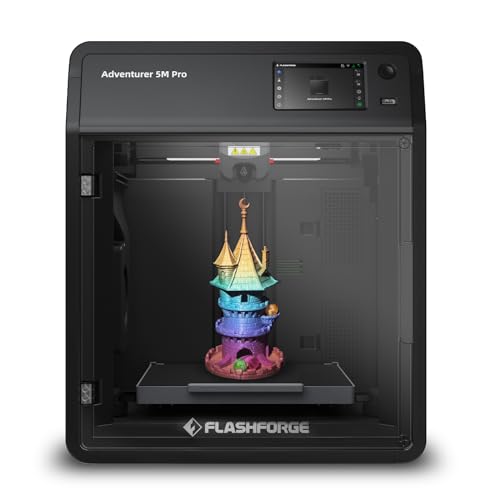
The Flashforge Adventurer 5M Pro is the more serious version of the first pick. Its appeal is not that it prints a bigger object. It uses the same 220 x 220 x 220mm working area, but it gives experienced users more room to explore materials and tune their workflow.
Flashforge lists a 280°C all-metal direct extruder and compatibility with PLA, ABS, PETG, ASA, TPU, PC, PLA-CF, and PETG-CF. That does not mean every material is equally effortless, but the range is useful for people moving beyond basic PLA. The full-metal CoreXY structure is designed to stay stable at up to 600mm/s travel speed and 20, 000mm/s² acceleration.
Pressure-based auto leveling is a meaningful feature for a machine that may be used with different materials and print surfaces. The double-sided PEI platform helps with adhesion and removal, while the nozzle system accepts 0.25mm, 0.4mm, 0.6mm, and 0.8mm options. A finer nozzle can help with small details, while a wider one suits larger, faster parts.
The Pro model is heavier than the standard Flashforge Adventurer 5M, and that extra mass is part of its more substantial build. It is still not the right choice for someone who needs a 350mm or 390mm build area. The ELEGOO Centauri Carbon reaches a higher nozzle temperature, but the Adventurer 5M Pro offers a more compact path into varied materials.
Buy this one when material flexibility matters more than multicolor printing or maximum object size.
3. Creality K2 Combo: Best Compact Multicolor

Pros
- CFS multicolor system included
- 260mm cubed build volume
- Automatic leveling and AI camera
- Mostly preassembled
- Silent mode with step-servo motors
Cons
- One CFS unit is included
- Larger multicolor setups require more CFS units
- Less chamber temperature information than the larger K2 models
Best for: color-focused makers who want more build room than a compact 220mm printer provides.
The Creality K2 Combo changes the conversation by including a CFS multicolor system. It is still a fairly approachable home machine, but it can produce models where color changes are part of the design rather than a finishing step with paint.
Its 260 x 260 x 260mm build volume is a useful middle ground. It gives you more space than the Flashforge machines without reaching the footprint of the K2 Plus or QIDI Max4. Creality says the printer is 95% preassembled, so the initial setup should be less involved than building a machine from a kit. Automatic leveling and a smart AI camera add further help during the first layer and longer unattended jobs.
The CFS can support up to 16 colors when four CFS units are connected, though this Combo includes one unit. Automatic filament selection, switching, and relay functions make multicolor jobs more manageable. The system also supports PLA, PETG, ABS, PLA-CF, and PET, giving it a useful materials base for decorative and practical prints.
The K2 uses step-servo motors on the extruder and X/Y axes, with dynamic torque adjustment intended to improve movement and noise control. Silent mode is a welcome touch for a printer in a home workspace. The Creality K2 Pro Combo offers a bigger 300mm cube and a heated chamber, while the K2 Combo is easier to place and less demanding for ordinary projects.
This is the one to choose when four-color printing is central to the hobby but you do not need a large professional machine.
4. Creality K2 Plus Combo: Best Large Format

Pros
- 350mm cubed build volume
- CFS multicolor expansion
- Heated chamber up to 60°C
- 350°C hardened-steel-tip nozzle
- Dual AI cameras and independent Z motors
Cons
- Heavy at more than 70 pounds
- Needs substantial space
- Larger machines demand more careful placement
Best for: creators who print large models, batches of smaller parts, or demanding engineering filaments.
The Creality K2 Plus Combo is built around one advantage: its 350 x 350 x 350mm build volume. That extra room changes what you can print in one piece. Large props, enclosures, prototypes, and batches of smaller components are all more practical than they are on the 220mm machines.
Creality lists 600mm/s printing, 30, 000mm/s² acceleration, and a 40mm³/s high-flow system. FOC step-servo motors on the XYZ axes are intended to keep a large moving platform controlled at speed. The Matrix frame uses die-cast aerospace-grade aluminum alloy, while dual Z motors and four linear rods are designed to keep vertical travel steady.
This model is also the most capable of the two larger Creality machines for high-temperature filament. Its chamber can maintain temperatures up to 60°C, and the hardened steel tip nozzle supports operation up to 350°C. Those features are relevant for ASA, PPA, and other high-melting-point or abrasive materials, though the correct filament profile and ventilation still matter.
The CFS handles automatic filament selection, switching, and relay, with up to 16 colors possible through four connected CFS units. Dual AI cameras watch the chamber and toolhead, with the latter used for flow-rate optimization. Compared with the Creality K2 Combo, this is a much larger commitment in both workspace and machine mass. The QIDI Max4 Combo has an even larger stated build area and a 65°C heated chamber, but the K2 Plus combines its large volume with Creality's multicolor system.
Pick it when object size and material capability matter more than compact placement.
5. Flashforge AD5M: Best Easy Maintenance

Pros
- One-click automatic calibration
- Tool-free nozzle changes in about three seconds
- Double-sided PEI steel plate
- Power-loss print recovery
- Remote monitoring and network control
Cons
- 220mm cubed build volume
- No multicolor system
- The listed speed is a maximum, not a typical result for every print
Best for: beginners and regular users who want quick maintenance and simple calibration.
The Flashforge AD5M is the practical, stripped-back member of the Adventurer group. Its main strength is reducing the small maintenance tasks that make a home printer feel needy. One-click calibration measures the nozzle-to-bed distance automatically, and the flexible PEI steel plate helps finished models release without excessive scraping.
The all-metal CoreXY motion structure is intended to limit vibration during fast printing. Flashforge lists a maximum speed of 600mm/s, along with vibration compensation to reduce layer shifts. Its 220 x 220 x 220mm build area is familiar territory for household parts and models, but it rules out the larger single-piece work possible with the Creality K2 Plus Combo.
The quick-release nozzle accepts 0.25mm, 0.4mm, 0.6mm, and 0.8mm diameters. That is a useful range for choosing detail or throughput, and a tool-free change can make cleaning less frustrating. The AD5M also supports automatic filament loading and unloading, print recovery after a power outage, and remote status checks through the Flash Maker app.
The Flashforge Adventurer 5M has a broader feature balance and is our top pick, while the AD5M makes a stronger case for someone who values straightforward servicing. It does not offer the Pro model's listed material range or the AD5X's four-color workflow. The machine is best kept away from buyers who know they will quickly outgrow a 220mm cube.
For a simple printer that asks little during setup and routine upkeep, the AD5M is a sensible choice.
6. QIDI Max4 Combo: Best Heated Chamber
Pros
- 390 x 390 x 340mm build area
- 65°C active heated chamber
- Hardened steel nozzle
- Closed-loop X/Y motors
- AI camera for failure detection
Cons
- Very large and heavy
- Polar Cooler is sold separately
- More machine than casual PLA users need
Best for: advanced home workshops printing large parts and high-temperature composites.
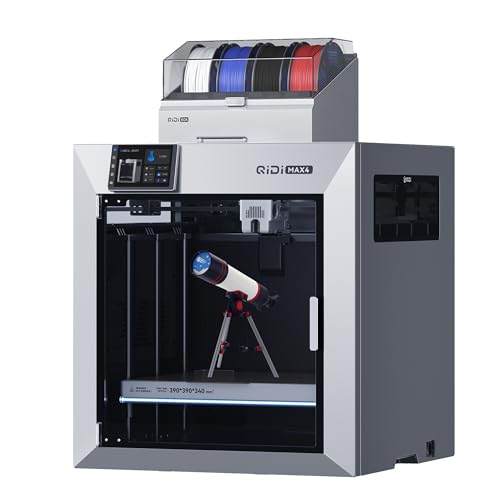
The QIDI Max4 Combo is not a small desktop companion. Its 120-pound listed weight and 28 x 28 x 30-inch dimensions call for a sturdy, permanent location. In return, it provides the biggest stated build area here, at 390 x 390 x 340mm, so large parts can be printed without splitting them into sections.
The active chamber reaches 65°C, which helps reduce warping when printing materials that are less forgiving than PLA. QIDI lists support for ABS-CF, PC, and PPS-CF, along with a hardened steel nozzle and 40mm³/s high-flow hotend. Closed-loop X/Y motors and a 2mm lead screw with an anti-backlash nut are intended to keep movement precise across the large platform.
QIDI lists speeds up to 800mm/s and acceleration up to 30, 000mm/s². As with every printer here, those maximum figures describe the machine's capability rather than a universal setting for every filament and model. The built-in AI camera can detect problems such as spaghetti failures and pause the job, a useful safeguard when a large print runs for many hours.
The printer can connect to QIDI BOX for up to 16-color and multicolor printing, but the Polar Cooler is not included and must be purchased separately. The Creality K2 Plus Combo is smaller and adds a CFS system directly to its multicolor workflow. The Max4 makes more sense for users who prioritize chamber control and volume over an immediately complete color setup.
Choose it for a serious workshop, not a cramped desk or an occasional weekend project.
7. Flashforge AD5X: Best Four-Color Option

Pros
- Four-color printing
- Automatic filament backup
- 600mm/s maximum speed
- Full-auto calibration
- Compact modular design
Cons
- Build volume is not provided in the listing
- Color changes can create additional waste
- No heated chamber specification is provided
Best for: makers who want a compact multicolor workflow for decorative and creative prints.
The Flashforge AD5X is the most direct answer for anyone who wants multicolor printing without moving to one of the much larger Creality machines. Its Intelligent Filament System supports four-color printing and can provide filament backup, making it useful for projects where a spool may run out during a long job.
Flashforge lists 600mm/s speed and 20, 000mm/s² acceleration, paired with a rigid all-metal CoreXY structure. Full-auto calibration helps keep the first layer consistent, while vibration suppression is intended to reduce alignment shifts. The listing does not provide a build volume, so buyers who need a particular model size should verify that detail before choosing it.
Material support includes PLA, TPU, PETG, SILK, PLA-CF, and PETG-CF. That gives the AD5X a wider creative range than a basic PLA-only setup, though a multicolor system is not automatically ideal for every print. Color transitions can add material changes and make a job more involved than a single-filament model.
Its compact modular design and side-by-side arrangement for four spools make placement easier than with the Creality K2 Plus Combo or QIDI Max4 Combo. The Creality K2 Combo offers a larger documented build area, while the AD5X is the more focused choice for four-color productivity in a smaller footprint.
Buy this one when multicolor is the point of the printer and the missing build-volume specification does not conflict with your projects.
8. Creality Ender 3 V3 SE: Best Simple Starter

Pros
- CR Touch automatic leveling
- Sprite direct extruder
- Dual Z-axis design
- Automatic filament loading and unloading
- Three-step assembly
Cons
- Slower than the CoreXY printers here
- Smaller build volume than the K2 models
- No enclosed chamber or multicolor system
Best for: first-time users who want a familiar printer with useful automation.
The Creality Ender 3 V3 SE is the approachable choice in this group. It does not chase the extreme speeds or advanced chambers of the newer enclosed machines. Instead, it concentrates on the basics that determine whether a beginner can get a first print started without a long calibration session.
Its 8.66 x 8.66 x 9.84-inch build area is enough for many household models, figures, brackets, and small organizers. The 250mm/s maximum speed is below the 500mm/s to 800mm/s figures listed by the faster machines, but it remains a substantial step beyond older entry-level printers. The Sprite full-metal dual-gear direct extruder supports PLA, TPU, and PETG.
CR Touch automatic leveling works with a strain sensor for automatic Z offset, while dual Z-axis lead screws help reduce wobble. The printer arrives preassembled enough that Creality says three steps are needed, with about 20 minutes from unpacking to first print. Automatic filament loading and unloading also remove a common beginner annoyance.
The Flashforge AD5M is faster and has a CoreXY frame, while the Ender 3 V3 SE has a more traditional design and a smaller maximum speed. It is not the right pick for carbon-fiber composites, large batches, or multicolor projects. It is a good fit for someone who wants to learn the fundamentals without starting with a complex machine.
If this is your first printer and your models will stay modest in size, the Ender 3 V3 SE is the least intimidating route into the hobby.
9. ELEGOO Centauri Carbon: Best Advanced Enclosed Printer

Pros
- 320°C brass-hardened steel nozzle
- Enclosed chamber
- Built-in camera and dual LED lighting
- Die-cast aluminum frame
- Fully assembled and pre-calibrated
Cons
- No multicolor system listed
- Smaller build area than the large QIDI and Creality models
- Carbon fiber materials require careful handling
Best for: makers who want an enclosed, high-temperature printer in a mid-sized format.
The ELEGOO Centauri Carbon arrives with a strong claim for convenience: it is fully assembled and pre-calibrated. That is appealing for users who want an enclosed machine but do not want to build one before learning how it works. The 256 x 256 x 256mm volume also gives it more room than the 220mm Flashforge models.
Its CoreXY structure reaches up to 500mm/s and 20, 000mm/s² acceleration. A rigid die-cast aluminum frame is designed to minimize vibration, while automatic vibration compensation and pressure advance support consistent layers at higher speeds. The enclosed chamber and enhanced cooling are useful when working with more demanding filament types.
The 320°C brass-hardened steel nozzle is the headline hardware feature. It is suited to abrasive carbon fiber reinforced filament and other materials where a standard brass nozzle would wear more quickly. The dual-sided build plate has a PLA-specific surface intended to improve adhesion with less warping, though advanced materials still require correct temperature control and ventilation.
A built-in chamber camera, dual LED lighting, and remote adjustments make it easier to keep an eye on long jobs. The Flashforge Adventurer 5M Pro offers a broader listed material range in a similarly compact class, while the Centauri Carbon reaches a higher nozzle temperature. It is not the choice for multicolor printing, and buyers should not confuse an enclosed design with a heated chamber because the listing does not state an active chamber temperature.
Choose it if material capability and ready-to-print convenience matter more than color changes or maximum build size.
10. Creality K2 Pro Combo: Best Professional Multicolor

Pros
- 300mm cubed build volume
- CFS multicolor system
- Heated chamber up to 60°C
- Dual AI cameras
- Hardened-steel direct-drive extruder
Cons
- Large and heavy
- More complicated than a basic home printer
- Multicolor jobs require more planning and filament changes
Best for: ambitious home workshops that need larger multicolor and composite-material prints.
The Creality K2 Pro Combo sits between the K2 Combo and K2 Plus in both size and capability. Its 300 x 300 x 300mm build volume is large enough for bigger prototypes and batch production, while the included CFS system brings automatic multicolor printing into the same machine.
The printer reaches up to 600mm/s with 20, 000mm/s² acceleration, using FOC step-servo motors and linear rails. A direct-drive extruder with hardened steel gears supports abrasive materials, and the 40mm³/s flow rate is intended to keep up with faster movement. A quick-swap hotend and automatic filament cutting also make maintenance more manageable.
The chamber can maintain up to 60°C, which helps stabilize materials such as ASA and PPA. The listed material range includes PLA, ABS, ASA, PPA-CF, and PET-CF. Dual AI cameras divide the monitoring work, with one watching the chamber for failures and the other optimizing flow rate and checking for waste chute blockages.
The K2 Pro is more compact than the Creality K2 Plus Combo, but the Plus offers a 350mm cube and a higher 350°C nozzle specification. The standard Creality K2 Combo is easier to justify for ordinary multicolor projects, while the Pro makes sense when chamber heating, carbon-fiber materials, and larger parts all matter. Its size and 61-pound listed weight make it a poor fit for a temporary setup.
This is the right Creality when you want a serious multicolor workhorse without stepping all the way up to the largest model.
How to choose best home 3d printer
The right machine depends less on a headline speed figure than on the objects, materials, and amount of maintenance you expect to handle.
Build volume
Build volume determines the largest object you can print in one piece. A 220mm cube suits most household projects, but 300mm, 350mm, and 390mm machines are better for large props, prototypes, and batches of smaller parts.
Check all three dimensions, not just the width. A model may fit across the bed but exceed the available height.
Motion system and speed
CoreXY frames, rigid metal structures, linear rails, and step-servo motors help control movement at high speeds. Acceleration and flow rate matter alongside the advertised maximum speed because the nozzle must melt and deposit filament quickly enough to take advantage of rapid motion.
A slower printer can still produce excellent parts. Stability and consistent first layers are more useful than chasing a top number that only applies to selected settings.
Leveling and first-layer control
Automatic leveling measures the relationship between the nozzle and build plate so the first layer has a better chance of adhering evenly. Pressure-based systems, CR Touch sensors, strain sensors, and automatic Z offset all address the same basic problem from different angles.
A fast printer with a poor first layer is still a slow way to make anything.
The Flashforge machines emphasize one-click calibration, while Creality's larger models can probe only the area used by the print. That targeted approach can reduce setup time without removing the need to keep the plate clean.
Nozzle and material range
A 280°C nozzle handles common materials such as PLA, PETG, ABS, and TPU. Higher temperatures and hardened steel tips are more useful for abrasive or high-temperature filaments such as carbon-fiber composites, PPA, and PPS-CF.
Do not select a high-temperature printer solely because the number is impressive. Material profiles, chamber temperature, ventilation, and the build surface all affect whether those filaments print successfully.
Multicolor systems
CFS, IFS, and QIDI BOX workflows automate filament switching for multicolor or multimaterial prints. Four spools can cover many creative projects, while the Creality systems can expand to up to 16 colors when multiple units are connected.
Color printing usually adds pauses, transitions, and material changes. If most of your models are single-color functional parts, a simpler filament path may be easier to manage.
Frequently asked questions
What build volume is suitable for home printing?
A 220 x 220 x 220mm build area is enough for many toys, organizers, brackets, and replacement parts. Choose 300mm or larger when you expect to print large prototypes, props, or several parts in one batch.
Is 600mm/s realistic for every print?
No. The listed maximum is a capability of the printer and motion system, not a universal setting for every model or filament. Detail level, layer height, material, acceleration, and flow rate all affect practical print speed.
Do automatic leveling systems eliminate maintenance?
No. They reduce manual bed adjustment, but the build surface and nozzle still need cleaning. The printer may also need nozzle changes, lubrication, firmware updates, and occasional checks of belts or moving parts.
Are enclosed 3D printers safer for a home?
An enclosure can contain drafts and help maintain more consistent printing conditions. It does not replace ventilation or sensible material choices, especially when printing ABS, ASA, or composite filaments.
Should a beginner choose a multicolor printer?
Choose multicolor if color changes are central to the projects you want to make. For learning basic modeling and printing, a single-filament printer such as the Flashforge AD5M or Creality Ender 3 V3 SE usually presents fewer moving parts.
What is the advantage of a direct-drive extruder?
A direct-drive extruder places the feeding mechanism close to the hotend. That can improve control with flexible filament such as TPU and helps the printer push material consistently, though the quality of the overall extrusion system still matters.
Do I need a heated chamber?
Most PLA projects do not require one. A heated chamber becomes more useful for materials that are prone to warping or benefit from stable heat, including ABS, ASA, and several engineering composites.
The bottom line
The Best home 3d printer for most people is the Flashforge Adventurer 5M. It combines automatic leveling, a rigid CoreXY structure, quick nozzle changes, a useful 220mm cube, and remote monitoring without becoming a specialized industrial machine. The Flashforge Adventurer 5M Pro is the better fit when broader material support matters.
For multicolor work, choose the Creality K2 Combo for a manageable middle size, the Flashforge AD5X for a compact four-color workflow, or the Creality K2 Pro Combo when you need a heated chamber and a larger build area. Large-format specialists should look at the Creality K2 Plus Combo or QIDI Max4 Combo.
If you are undecided, choose the Flashforge Adventurer 5M unless your projects clearly require multicolor printing, a heated chamber, or a build volume larger than 220mm.
As an Amazon Associate we earn from qualifying purchases.