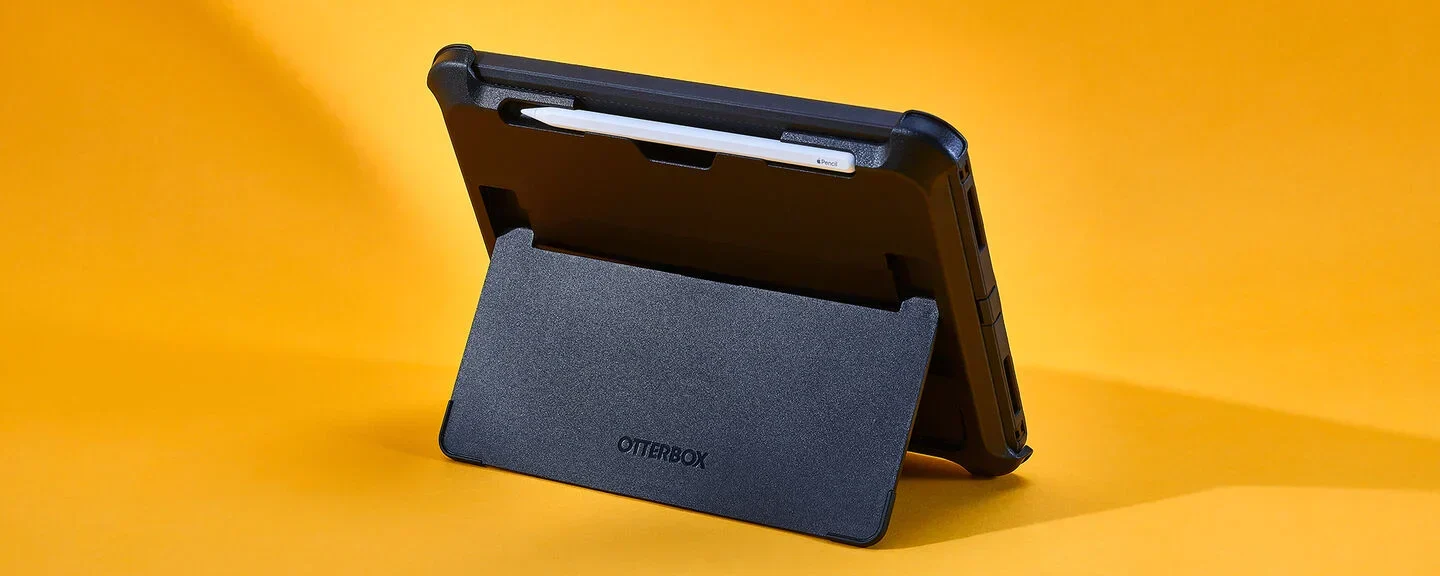

A loose case can turn an iPad into an awkward slab, while an overbuilt one adds bulk every time you pick it up. The right cover should fit the exact model, stay steady at useful angles, and protect the corners without getting in the way of charging, Touch ID, or the speakers.
Our Best iPad Cases picks focus mainly on the iPad A16 11th generation and iPad 10th generation, with one larger ZUGU option for the 13-inch iPad Air and 12.9-inch iPad Pro. MoKo for iPad A16 Case is our top pick, followed by sturdy rotating cases, folio designs, and slimmer covers.
The best all-around choice is MoKo for iPad A16 Case, with ZUGU, SEYMAC, DTTO, ToaPoia, and Akkerds covering the major protection and portability trade-offs.
| # | Product | Award | Compatibility | Stand design | Protection | Pencil storage | Best for |
|---|---|---|---|---|---|---|---|
| 1 | MoKo for iPad A16 Case | Best overall | A16 11th gen, 10th gen | 2 magnetic angles | PU leather, microfiber, PC shell | Apple Pencil 1st and USB-C charging support | Everyday use |
| 2 | ZUGU 10.9-inch iPad Case | Best premium folio | A16 11th gen, 10th gen | 8 magnetic angles | 5-foot drop protection | Pencil compatible | Frequent travel |
| 3 | DTTO Swivel iPad Case | Best for flexible viewing | A16 11th gen, 10th gen | Multi-angle swivel | Synthetic leather, microfiber | Built-in holder | Hands-free browsing |
| 4 | SEYMAC Rotating iPad Case | Best rugged protection | A16 11th gen, 10th gen | 30, 45, and 60 degrees | Full body, built-in screen protector | Holder included | Kids and outdoor use |
| 5 | ZUGU 13-inch iPad Air Case | Best for large iPads | 13-inch iPad Air, 12.9-inch iPad Pro | 10 magnetic angles | 5-foot drop protection | Pencil compatible | Large-screen work |
| 6 | DTTO Hand-Strap iPad Case | Best folio storage | A16 11th gen, 10th gen | Multi-angle grooves | Synthetic leather, nonslip lining | Built-in holder | Notes and commuting |
| 7 | ToaPoia Slim iPad Case | Best lightweight folio | A16 11th gen, 10th gen | 2 positions | TPU back | Built-in holder | Light daily carry |
| 8 | MoKo Pencil Holder iPad Case | Best built-in screen cover | A16 11th gen, 10th gen | Multiple magnetic angles | TPU frame, PC back, screen protector | Built-in holder | Scratch protection |
| 9 | SEYMAC Protective iPad Case | Best for carrying by hand | A16 11th gen, 10th gen | Rotating 30, 45, and 60 degrees | 3-layer body, screen protector | Pencil loops | Work and travel |
| 10 | Akkerds Trifold iPad Case | Best simple folio | A16 11th gen, 10th gen | 2 positions | PU leather, TPU interior | Built-in holder | Basic everyday coverage |
1. MoKo for iPad A16 Case: Best Overall

Pros
- Broad compatibility with A16 11th generation and 10th generation iPads
- Magnetic cover supports viewing and typing positions
- PU leather, microfiber, and translucent PC construction
- Supports Apple Pencil 1st generation and USB-C Pencil charging
- Auto wake and sleep functionality
Cons
- Only two stated viewing angles
- Pencil and USB-C adapter are not included
- Not compatible with other iPad models
Best for: everyday iPad owners who want a protective folio with useful essentials.
The MoKo for iPad A16 Case gets the important things right without turning the tablet into a heavy protective shell. Its PU leather exterior feels more like a conventional folio, while the microfiber lining and translucent PC back shell give the tablet a more secure home than a simple cover. At 0.490625 pounds, it is also one of the lighter options here.
Compatibility is unusually clear, which matters because the A16 11th generation and 10th generation iPads are close enough to invite mistakes. This case is designed for the 11-inch 2025 models A3354, A3355, and A3356, plus the 10.9-inch 2022 models A2696, A2757, and A2777. Check the model number on the back of the iPad before ordering. The precise cutouts retain access to Touch ID, speakers, earphones, volume buttons, and the other controls.
The magnetic connection creates two stated positions, one aimed at viewing and one at typing. That is less flexible than the eight-angle stand on the ZUGU 10.9-inch iPad Case, but it keeps the MoKo design straightforward and compact. The magnetic strip also handles auto wake and sleep, so opening the cover wakes the tablet and closing it puts the screen to sleep.
Pencil support is practical rather than extravagant. The case supports Apple Pencil 1st generation and USB-C Pencil charging, although the listing notes that a USB-C to Apple Pencil adapter is needed for that setup. There is no Pencil in the package. The main weakness is the limited stand adjustment, and people who expect a built-in screen protector or serious drop shell should choose the SEYMAC options instead.
For most owners, though, this is the cleanest balance of coverage, weight, tablet access, and folio convenience. It is the one we'd choose for reading, streaming, light typing, and regular carrying.
2. ZUGU 10.9-inch iPad Case: Best Premium Folio

Pros
- Eight-angle magnetic stand
- Stated 5-foot drop protection
- Two-year comprehensive warranty
- One-time iPad repair coverage described by the manufacturer
- Slim protective folio design
Cons
- Heavier than the MoKo folio
- Pencil is not included
- Exact model compatibility still needs checking
Best for: owners who want a refined folio and more stand positions.
The ZUGU 10.9-inch iPad Case is the most convincing choice when the stand matters as much as the cover. Its magnetic system offers eight angles, giving it a much wider range than the two-position MoKo and Akkerds folios. That flexibility helps when the iPad shifts from a kitchen counter to a desk, sofa, or lap.
ZUGU states that the case provides 5-foot drop protection while keeping the design slim. The published dimensions are 9.8425 by 7.874 by 1.9685 inches, and the listed weight is 1.00971715996 pounds. Those figures make it substantially more substantial than the MoKo, though that extra presence is tied to the stronger stand and protection claims.
The feature set goes beyond the usual magnetic sleep and wake cover. ZUGU includes a two-year comprehensive warranty, 30-day free returns, and one-time repair fee coverage if the iPad is damaged while in the case. Those policies do not make the tablet indestructible, but they add reassurance for someone who carries an iPad constantly.
The drawback is weight and bulk. The ToaPoia Slim iPad Case is a better fit for a reader who wants a light folio that disappears in a bag, and the SEYMAC Rotating iPad Case gives more obvious all-around coverage. ZUGU also does not include a Pencil, so stylus owners need to account for that separately.
This is the premium folio pick for someone who adjusts the screen frequently and wants a stand that feels more deliberate than a folded triangular cover. It is not the right choice for anyone who values the lightest possible setup.
3. DTTO Swivel iPad Case: Best for Flexible Viewing
Pros
- Flexible swivel structure for changing viewing angles
- Adjustable hand strap for one-handed use
- Two cross-lined pockets for cards, cash, or notes
- Built-in Pencil holder
- Auto sleep and wake
Cons
- Listed weight is about 1.04 pounds
- Synthetic leather can feel bulky beside slim covers
- Pencil is not included
Best for: readers, travelers, and anyone who uses an iPad one-handed.
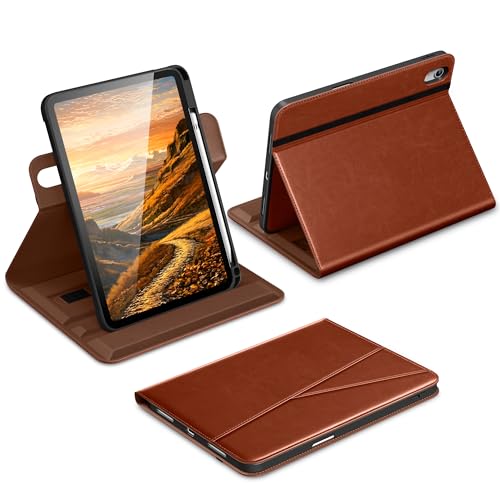
The DTTO Swivel iPad Case has a different personality from the MoKo. Instead of treating the iPad as a small laptop with a fixed folio stand, it is built around flexible browsing. The swivel structure lets the tablet rotate through positions for reading, short videos, news, games, drawing, and writing.
Its hand strap is the feature that makes the design useful beyond a desk. Slip a hand behind the case and the iPad becomes easier to hold while standing or moving around. An external elastic band keeps the folio closed, and the front cover includes two cross-lined pockets for bills, cards, cash, or small papers. That storage is handy for commuting, although it also contributes to the case's 1.04058187664-pound listed weight.
The case uses a synthetic leather exterior with a microfiber lining. That combination should help shield the iPad from scratches and ordinary bumps, but it is not the same kind of impact-focused construction as the SEYMAC Protective iPad Case. Auto sleep and wake are built in, and the Pencil holder accepts Apple Pencil USB-C or 1st generation models.
The DTTO's main competition is its sibling, the DTTO Hand-Strap iPad Case, which also has a hand strap, pockets, elastic closure, and Pencil storage. This swivel model is the better choice when angle flexibility comes first. The navy DTTO is the simpler pick when conventional grooves and a more traditional folio feel are preferable.
Skip it if your priority is a thin case that adds as little physical presence as possible. Choose it if the iPad spends a lot of time in one hand, on a lap, or moving between portrait and landscape use.
4. SEYMAC Rotating iPad Case: Best Rugged Protection

Pros
- Full-body shock-absorbing design
- Built-in screen protector
- 360-degree rotating kickstand
- Hand strap, shoulder strap, and Pencil holder
- Port plugs help keep dust out
Cons
- Larger than folio-style cases
- Rotating hardware adds bulk
- Six-month maintenance or replacement service is limited in duration
Best for: children, outdoor use, and iPads exposed to frequent bumps.
The SEYMAC Rotating iPad Case is the clear choice when protection is the first concern. It does not try to mimic a slim notebook cover. Instead, it wraps the tablet in a full-body case with a built-in screen protector, shock-absorbing construction, port plugs, and a soft handle strap.
The rotating kickstand supports 30, 45, and 60-degree viewing, drawing, video, and typing angles. That is less granular than the ZUGU's eight magnetic positions, but the mechanism serves a different purpose. The SEYMAC can rotate for landscape or portrait use and is easier to manage when a child is watching or when the tablet is being used outdoors.
The dimensions are 10.8267716425 by 8.1889763696 by 0.9055118101 inches, with a listed weight of 0.7936641432 pounds. It is broader than a conventional folio, but the listed weight is lower than several leather-style alternatives. A shoulder strap makes carrying easier, and the Pencil holder keeps the stylus with the tablet.
The screen protector is a major advantage over the MoKo for iPad A16 Case and the ToaPoia Slim iPad Case, neither of which lists a built-in screen protector. The weakness is the usual one for rugged shells: access and handling feel less refined, and the thick rotating stand is unnecessary for someone who mainly reads at home.
Families should take a closer look at the protection features that matter for everyday tablet carrying, even though phones and iPads have different dimensions. The principle is the same: corner coverage, screen coverage, and grip matter more than a sleek appearance when accidents are likely.
This is the strongest practical pick for an iPad that will be shared with children, taken on trips, or used where drops and dust are realistic possibilities.
5. ZUGU 13-inch iPad Air Case: Best for Large iPads

Pros
- Designed for 13-inch iPad Air models and 12.9-inch iPad Pro models
- Ten-angle magnetic stand
- Stated 5-foot drop protection
- Two-year comprehensive warranty
- One-time repair fee coverage described by the manufacturer
Cons
- Not compatible with the smaller A16 or 10th generation iPads
- Listed weight is 1.2 pounds
- Pencil is not included
Best for: owners of a 13-inch iPad Air or 12.9-inch iPad Pro who need a stable work stand.
The ZUGU 13-inch iPad Air Case belongs in this roundup because it solves a different compatibility problem. It is made for the 13-inch iPad Air with M2, M3, or M4, as well as the 12.9-inch iPad Pro third and fourth generation. It is not a larger version of the smaller ZUGU case, and it will not fit the A16 or 10th generation iPads listed elsewhere here.
Its ten-angle magnetic stand is the headline feature. A large iPad has more screen area and more leverage against a stand, so angle choice and stability matter more than they do on a compact folio. ZUGU also states that this model offers 5-foot drop protection while maintaining an ultra-slim profile.
The case weighs 1.2 pounds and measures 11.4 by 8.9 by 0.5 inches according to the product information. That adds noticeable weight to an already large tablet. The trade-off is a folio that can support presentations, recipe browsing, streaming, and desk work without forcing the screen into one or two fixed positions.
ZUGU includes a two-year comprehensive warranty, 30-day free returns, and one-time repair fee coverage for damage that occurs while the iPad is in the case. Those support features distinguish it from the more basic folios, though the Pencil is not included. The SEYMAC Rotating iPad Case offers a more rugged design for smaller iPads, but it is not an alternative for this larger model.
Buy this case only after confirming both the iPad family and screen size. For the right large iPad, it is the most versatile stand-led design here. For an A16 or 10th generation owner, the compatibility mismatch makes it an automatic skip.
6. DTTO Hand-Strap iPad Case: Best Folio Storage

Pros
- Built-in hand strap for browsing and note-taking
- Front document pocket
- Built-in Pencil holder
- Two anti-slip grooves
- Auto wake and sleep
Cons
- Less protective than a rugged full-body case
- Listed weight is 0.881849048 pounds
- Pencil is not included
Best for: commuters and students who need pockets and one-handed control.
The DTTO Hand-Strap iPad Case is the practical organizer in the group. Its front document pocket can hold notes, tickets, cash, or cards, while the internal Pencil slot keeps an Apple Pencil USB-C or 1st generation stylus from disappearing in a bag. That makes it more useful for commuting than a bare cover with no storage.
The hand strap is built into the case, so browsing and taking notes one-handed should feel more secure. For desk use, two anti-slip grooves in the front cover provide multiple positions for watching movies, presentations, reading, and study. The case also uses an elastic band to keep the cover closed.
Protection comes from a synthetic leather exterior and a nonslip lining that is intended to help with scratches, bumps, and drops. This is still a folio, not a sealed rugged shell. The SEYMAC Rotating iPad Case is the better answer when the iPad will be around children or outdoor hazards, while the DTTO is easier to live with in an office or classroom.
The dimensions are 10 by 7.8 by 0.8 inches, and the listed weight is 0.881849048 pounds. That is a moderate amount of added bulk, especially once the pockets are used. Auto wake and sleep, precise access to the controls, and the rear opening for easy Pencil access round out a sensible design.
The DTTO is a good fit for people who want the iPad to function as a portable notebook and document holder. It is less appealing for anyone who wants the cleanest, slimmest folio or a built-in screen protector.
7. ToaPoia Slim iPad Case: Best Lightweight Folio

Pros
- Slim and lightweight TPU construction
- Built-in Pencil holder
- Auto sleep and wake
- Two viewing positions
- Full access to cameras, ports, speakers, and buttons
Cons
- Only two stated stand positions
- Less impact-focused than the SEYMAC cases
- Pencil is not included
Best for: readers and travelers who want a light folio with basic protection.
The ToaPoia Slim iPad Case is designed around low fuss. Its soft TPU back adds coverage without the thick rotating hardware found on the SEYMAC models, and the trifold front creates two standing positions. It is a sensible shape for reading, streaming, and occasional typing.
ToaPoia lists compatibility with the A16 11th generation 11-inch iPad and the 10th generation 10.9-inch iPad. The specific model numbers are A3354, A3355, A3356, A2696, A2757, and A2777. That is the same model family served by the MoKo, DTTO, and Akkerds cases, but checking the number on the tablet remains important.
The case weighs 0.49375 pounds according to the product information. That puts it close to the lightest folio options here and well below the larger ZUGU and DTTO designs. The trade-off is protection. The TPU material is described as helping prevent scratches and bumps, but there is no built-in screen protector or stated drop-protection rating.
A built-in magnetic strip handles auto sleep and wake, and the Pencil holder supports magnetic attachment and wireless charging on the side. The listing does not include the Pencil. Cutouts preserve access to the cameras, speakers, ports, and buttons, which is exactly what a slim cover should do.
If you are comparing ways to keep a stylus and tablet ready for daily use, the holder is a useful detail, but it does not replace choosing a compatible Pencil. Pick ToaPoia when carrying weight matters more than maximum impact protection. Choose MoKo instead when you want a more structured folio with a PC back shell and support for Pencil charging.
8. MoKo Pencil Holder iPad Case: Best Built-in Screen Cover

Pros
- Built-in screen protector
- TPU shock-absorbing frame
- Hard PC back plate
- Pencil holder
- Multiple magnetic viewing angles
Cons
- Listed weight is 0.97 pounds
- Built-in screen protector may not suit every user
- Pencil and adapter are not included
Best for: users who want front and back coverage in one case.
The MoKo Pencil Holder iPad Case takes a more protective route than the company's top pick. Its transparent hard PC back plate and flexible TPU shock-absorbing frame cover the rear and corners, while a built-in full HD screen protector sits over the display. That combination makes it appealing for households where scratches are as concerning as drops.
The case fits the A16 11th generation 11-inch iPad and 10th generation 10.9-inch iPad, including the model numbers A3354, A3355, A3356, A2696, A2757, and A2777. Precise openings preserve Touch ID, the speakers, ports, buttons, and other controls. The transparent back also leaves the tablet's original appearance visible and can be decorated with stickers.
Magnets provide multiple stable viewing angles for video, typing, and hands-free use. Auto sleep and wake work when the cover opens or closes. A side Pencil slot accepts Apple Pencil 1st generation or USB-C models, so the stylus stays with the tablet instead of loose in a case or bag.
The 0.97-pound listed weight is the cost of that extra coverage. It is heavier than the ToaPoia Slim iPad Case and MoKo for iPad A16 Case, and the screen protector adds another layer between a finger or Pencil and the display. Some users like that protection; others prefer a completely bare screen feel.
The MoKo is the right middle ground for an owner who wants more than a folio but less bulk than a rotating rugged shell. If the iPad is regularly exposed to serious drops, SEYMAC's full-body designs remain more convincing.
9. SEYMAC Protective iPad Case: Best for Carrying by Hand

Pros
- Three-layer protective construction
- Built-in screen protector
- Rotating stand with three angles
- Adjustable hand and shoulder straps
- Pencil loops
Cons
- Listed weight is 1 pound
- Bulkier than folio cases
- Six-month maintenance or replacement service is limited in duration
Best for: people who carry an iPad around work sites, classrooms, or busy homes.
The SEYMAC Protective iPad Case is closely related to the rotating SEYMAC model above, but its construction and carrying features make it a distinct option. It uses a hard internal shell, soft silicone exterior, and built-in screen protector to create three layers between the iPad and everyday accidents.
Its stand rotates through 30, 45, and 60 degrees and works in vertical or horizontal orientations. That makes it more adaptable than a normal trifold folio, especially when the tablet is used for reading or typing in portrait mode. The rotating stand also folds away when the iPad is being carried.
The adjustable hand strap gives a secure one-handed grip, while the removable shoulder strap is useful for walking between rooms, classrooms, meetings, or outdoor locations. Pencil loops keep a stylus nearby. The case weighs 1 pound and measures 10.79 by 8.07 by 0.87 inches, so it is clearly designed for protection rather than minimal bulk.
Compared with the SEYMAC Rotating iPad Case, this model emphasizes its three-layer front and back construction and removable shoulder strap. The other SEYMAC lists port plugs and a soft handle strap, so choose between them based on how much carrying flexibility you need. Neither is as sleek as the ZUGU folio or ToaPoia cover.
SEYMAC lists six months of maintenance or replacement service for product defects. That is useful support, though it is not a substitute for checking the case carefully after installation. This is the protective carrying option for people who want straps and a screen protector built into the same package.
10. Akkerds Trifold iPad Case: Best Simple Folio

Pros
- PU leather exterior with TPU interior
- Built-in Pencil holder
- Two viewing and typing positions
- Auto sleep and wake
- Precise access to Touch ID, ports, speakers, and cameras
Cons
- Two stand positions limit adjustment
- No built-in screen protector listed
- Pencil and adapter are not included
Best for: iPad owners who want a straightforward folio with basic coverage.
The Akkerds Trifold iPad Case keeps the traditional folio formula intact. A PU leather exterior covers a TPU interior, and the tablet sits inside a frame designed to protect the back and four corners. It is less elaborate than the SEYMAC cases and less stand-focused than ZUGU, but that simplicity is part of its appeal.
Compatibility covers the A16 11th generation 11-inch iPad and 10th generation 10.9-inch iPad. The listing identifies models A3354, A3355, A3356, A2696, A2757, and A2777. As with every case in this roundup, confirm the model number before ordering because the case is not intended for other devices.
The trifold cover offers two viewing or typing positions. That is enough for common tasks, but not as flexible as the DTTO swivel design or the ZUGU magnetic stands. Auto sleep and wake are built in, and precise cutouts retain access to the cameras, speakers, ports, and Touch ID.
The built-in Pencil holder accommodates Apple Pencil 1st generation and USB-C models, while the listing says the Pencil and adapter are not included. The case weighs 0.66125 pounds and has a listed footprint of 9.84 by 7.87 by 0.59 inches, making it easier to carry than the heavier protective shells.
Choose Akkerds when you want a conventional cover with a little more structure than a bare flap. The MoKo for iPad A16 Case has a more polished overall feature balance, while ToaPoia is the stronger slim alternative. Akkerds remains a sensible uncomplicated option for home, school, and general tablet use.
How to choose best ipad case
Start with the iPad model number, then decide how much protection and stand flexibility you will actually use. The most convincing case on paper is still the wrong purchase if it fits a different generation or makes the tablet unpleasant to carry.
Model compatibility
The A16 11th generation and 10th generation iPads have different model numbers from the larger iPad Air and iPad Pro models. The smaller cases here list compatibility with A3354, A3355, A3356, A2696, A2757, and A2777. The large ZUGU model is for the 13-inch iPad Air and 12.9-inch iPad Pro instead.
Check the model number printed on the back of the iPad, not just the screen size. A case that says 11 inches can still be intended for a particular generation, camera arrangement, or button layout.
Protection level
Folio cases such as MoKo, DTTO, ToaPoia, and Akkerds mainly protect the tablet from scratches, bumps, and ordinary handling. Rugged SEYMAC models add hard or shock-absorbing layers, built-in screen protectors, straps, and stand hardware.
If the iPad is used by children or carried outdoors, grip and screen coverage matter more than a slim silhouette.
Look for a stated drop-protection rating when impact resistance is central to the decision. ZUGU lists 5-foot drop protection, while SEYMAC emphasizes full-body or three-layer protection. Do not assume that every synthetic leather folio offers the same level of protection.
Stand adjustment
Two-position trifold covers are fine for routine viewing and typing. Swivel and magnetic systems offer more freedom when the iPad moves between portrait and landscape, desk and lap, or reading and drawing.
ZUGU lists eight angles for the smaller case and ten for the large iPad model. DTTO uses a flexible swivel structure, while SEYMAC lists 30, 45, and 60-degree positions. More angles usually mean more hardware, so compare flexibility with the amount of bulk you are willing to carry.
Weight and bulk
The listed weights range from 0.490625 pounds for the MoKo folio and 0.49375 pounds for ToaPoia to 1.2 pounds for the large ZUGU case. A heavier case can feel reassuring, but it changes how comfortable the iPad is to hold for long reading sessions.
Slim folios are easier to slide into a bag. Rugged cases are easier to grip and more forgiving when the tablet is dropped. Think about how often you hold the iPad in one hand before choosing a case based only on its protection claims.
Pencil storage and charging
A Pencil holder prevents the stylus from getting lost, but holders do not all provide the same charging arrangement. MoKo's first case states support for Apple Pencil 1st generation and USB-C Pencil charging, with a USB-C to Apple Pencil adapter needed for that setup.
Other models list holders or loops for Apple Pencil 1st generation and USB-C models. Confirm the Pencil version you own, and remember that the Pencil is not included with these cases.
Frequently asked questions
Which iPad models do most of these cases fit?
Most of the cases in this roundup fit the A16 11th generation 11-inch iPad and the 10th generation 10.9-inch iPad. The listed model numbers include A3354, A3355, A3356, A2696, A2757, and A2777. Always compare the number on the back of your tablet with the case listing.
Which case has the strongest protection?
The SEYMAC Rotating iPad Case and SEYMAC Protective iPad Case have the most protection-focused designs. Both include a built-in screen protector and a larger protective body, while the first model also lists port plugs and shock-absorbing construction.
Which case is easiest to carry?
The MoKo for iPad A16 Case and ToaPoia Slim iPad Case have the lowest listed weights among the smaller folios. The DTTO and SEYMAC models add hand or shoulder straps, which can make carrying safer even though the case itself is larger.
Do these cases include an Apple Pencil?
No. The product information describes holders, loops, or Pencil charging support, but the Pencil is not included. The MoKo case also notes that a USB-C to Apple Pencil adapter is needed for a particular charging setup.
Which case has the most adjustable stand?
The ZUGU 13-inch iPad Air Case lists ten magnetic angles, while the smaller ZUGU 10.9-inch iPad Case lists eight. DTTO's swivel case also offers flexible positioning, and the SEYMAC cases provide rotating positions at 30, 45, and 60 degrees.
Do these cases support auto wake and sleep?
The MoKo, DTTO, ToaPoia, Akkerds, and other folio designs list auto wake and sleep through built-in magnets. Rugged cases may focus more on physical protection and rotating stands, so check the individual feature list if this function is essential.
The bottom line
The Best iPad Cases choice for most A16 11th generation and 10th generation owners is the MoKo for iPad A16 Case. It combines a light folio design, a PC back shell, microfiber lining, magnetic viewing positions, Pencil support, and auto wake and sleep without the bulk of a rugged shell.
Choose the ZUGU 10.9-inch iPad Case if you want a more adjustable magnetic stand and stronger stated drop protection. Choose the SEYMAC Rotating iPad Case or SEYMAC Protective iPad Case when the iPad will face children, outdoor use, or frequent carrying. Owners of a 13-inch iPad Air or 12.9-inch iPad Pro should choose the larger ZUGU model instead.
If you are undecided, buy the MoKo for a normal home and work routine, or choose SEYMAC when protection is the priority.
As an Amazon Associate we earn from qualifying purchases.