

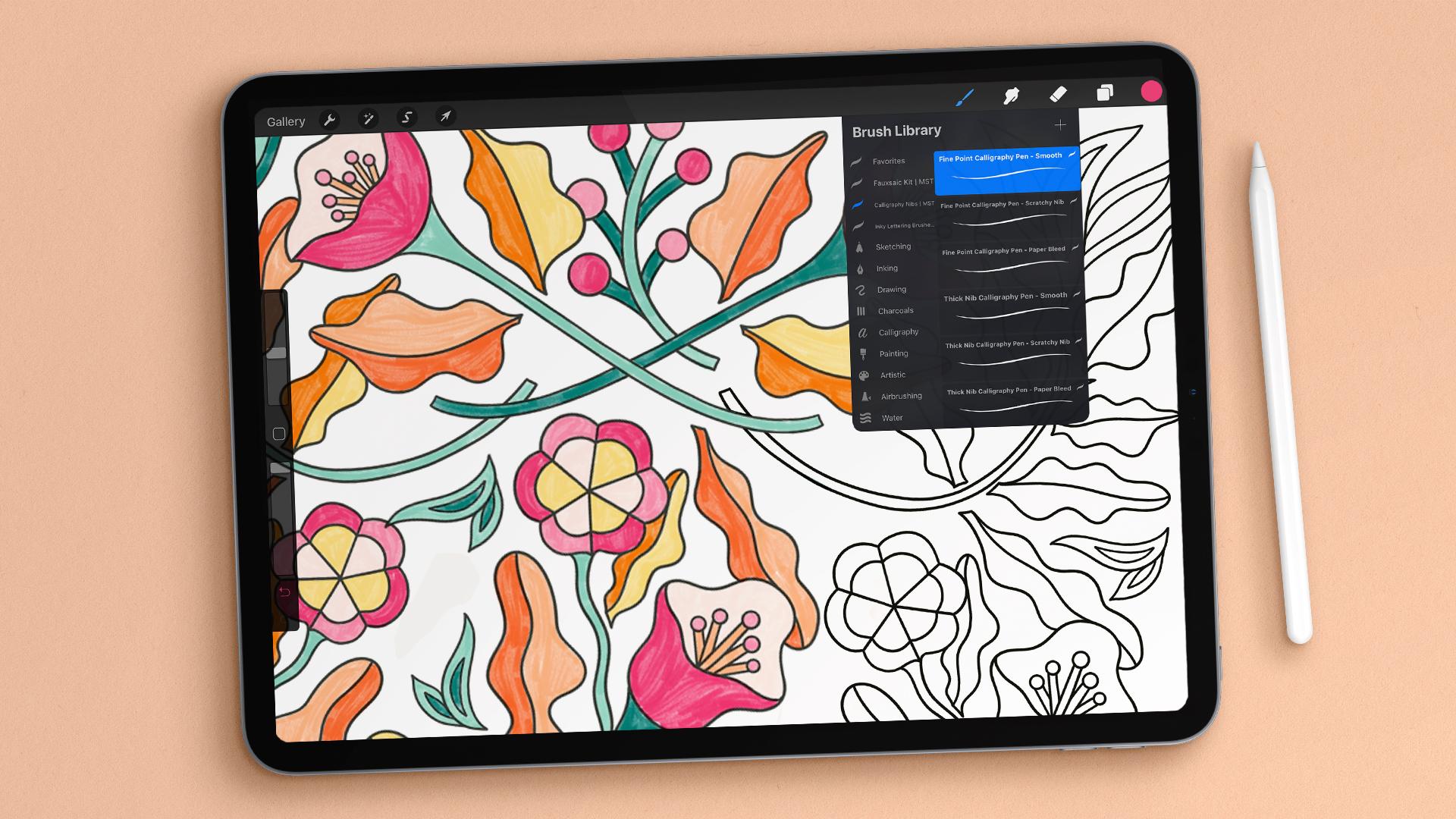
A Procreate canvas can look spacious on one iPad and cramped on another. The screen size affects how much of the artwork and tool palette you can see, while the chip determines how comfortably the tablet handles large documents, layers, and other creative apps.
The Best ipad for procreate depends on more than buying the fastest model. The current range includes a capable A16 iPad, M4 iPad Air models, M5 and M4 iPad Pro models, plus several renewed older iPads that still have useful drawing features.
Our top pick is the Apple iPad Air 11-inch M4, while the Apple iPad Pro 13-inch M5 is the choice for artists who want the largest, most advanced canvas. These ten picks cover portable sketchbooks, larger studio-style screens, and older models for lighter creative work.
Comparison table
| # | Product | Award | Display | Chip | Storage | Best for |
|---|---|---|---|---|---|---|
| 1 | Apple iPad Air 11-inch M4 | Best overall | 11-inch Liquid Retina | M4 | 128GB | Most artists |
| 2 | Apple iPad 11-inch A16 | Best everyday pick | 11-inch Liquid Retina | A16 | 128GB | Casual drawing |
| 3 | Apple iPad Pro 13-inch M5 | Best large canvas | 13-inch Ultra Retina XDR | M5 | 256GB | Professional workflows |
| 4 | Apple iPad Air 13-inch M4 | Best big Air | 13-inch Liquid Retina | M4 | 128GB | Large-screen drawing |
| 5 | Apple iPad Pro 13-inch M4 | Best Pro storage | 13-inch Ultra Retina XDR | M4 | 512GB | Large creative libraries |
| 6 | Apple iPad Air 11-inch M4 256GB | Best extra storage | 11-inch Liquid Retina | M4 | 256GB | Portable artists with large files |
| 7 | Apple iPad Air 11-inch M2 | Best renewed Air | 11-inch display | M2 | 128GB | Mobile sketching |
| 8 | Apple iPad 9th Generation 128GB | Best renewed capacity | 10.2-inch Retina | A12 Bionic | 128GB | Older iPad users |
| 9 | Apple iPad 9th Generation | Best basic renewed pick | 10.2-inch Retina | Not listed | 64GB | Simple sketches |
| 10 | Apple iPad 9th Generation Premium | Best renewed condition | 10.2-inch Retina | A13 Bionic | 64GB | Refurbished buyers |
1. Apple iPad Air 11-inch M4: Best Overall

Pros
- M4 chip leaves plenty of headroom for demanding creative apps
- P3 wide color and True Tone suit detailed artwork
- Supports Apple Pencil Pro and Apple Pencil USB-C
- Wi-Fi 7 with Apple N1
- Compact 11-inch design
Cons
- 11 inches can feel tight beside a large tool palette
- Touch ID is less immediate than Face ID for some users
Best for: artists who want a modern, portable iPad with serious creative performance.
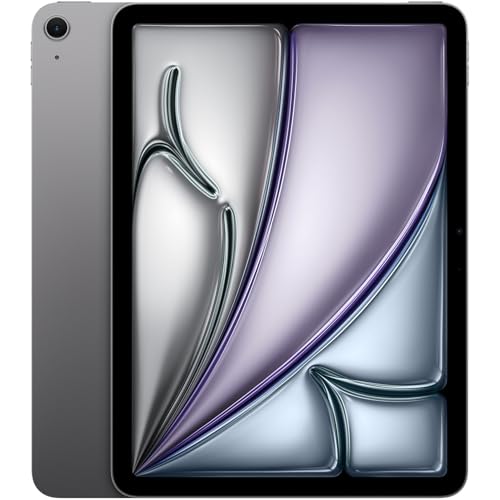
The Apple iPad Air 11-inch M4 gets the balance right. It is small enough to carry as a sketchbook, yet its M4 chip gives Procreate and other demanding apps considerable room to grow. The 11-inch Liquid Retina display is a comfortable working surface for sketching, painting, and image editing without turning the tablet into a desk-bound slab.
The display has P3 wide color, True Tone, and ultralow reflectivity. P3 is useful when color matters, since it supports a wider color range than a basic display. True Tone changes the display's color temperature to suit the room, which can make long drawing sessions easier on the eyes, though artists preparing color-critical work may prefer to turn that feature off while judging a final image.
This model supports Apple Pencil Pro and Apple Pencil USB-C, giving it a stronger accessory path than the A16 iPad. Its Wi-Fi 7 connection with Apple N1 is also a modern foundation for moving large files or working with cloud-based projects. Touch ID is built into the tablet, and Apple lists all-day battery life, so it works well as a mobile creative tool rather than merely a tablet that stays near an outlet.
The main limitation is the screen size. The Apple iPad Pro 13-inch M5 gives a much bigger canvas, and the Apple iPad 11-inch A16 is a simpler choice for lighter drawing. The Air sits between them with better long-term performance than the basic iPad and a less imposing shape than the Pro. Artists who want room for a large reference image, canvas, and tool controls at once should choose a 13-inch model instead. For everyone else, this is the iPad we would keep.
2. Apple iPad 11-inch A16: Best Everyday Pick

Pros
- A16 chip gives everyday apps a strong performance base
- 11-inch Liquid Retina display
- 128GB starting storage
- Supports Apple Pencil USB-C
- USB-C connector and Wi-Fi 6
Cons
- Does not list support for Apple Pencil Pro
- Wi-Fi 6 is behind the newer Air models
- Touch ID instead of Face ID
Best for: students, hobbyists, and artists starting with digital illustration.
The Apple iPad 11-inch A16 is the straightforward pick. It has the familiar shape and an 11-inch Liquid Retina display, but the A16 chip makes it more capable than an older entry-level iPad. For sketching, practice work, class notes, and occasional finished illustrations, it has the basic ingredients most people need.
Its 128GB storage is a sensible starting point for an artist who is not keeping a huge archive of layered files on the tablet. The display includes True Tone, which adjusts color temperature for the surrounding light. That is pleasant during general use, although anyone checking exact colors for print should work in a controlled viewing environment.
Apple lists compatibility with Apple Pencil USB-C and the first-generation Apple Pencil. The USB-C connector is convenient for charging and accessories, while Wi-Fi 6 handles file transfers, streaming, and cloud access without feeling dated. The 12MP Center Stage front camera and 12MP Wide rear camera are useful for calls, scanning references, and capturing 4K video, though they are not central to the drawing experience.
The Apple iPad Air 11-inch M4 is the better fit for heavier layers and a longer creative lifespan, while this iPad is easier to recommend for ordinary drawing and illustration practice. Its real weakness is the accessory ceiling compared with the Air models, which support Apple Pencil Pro. If pressure-sensitive drawing is the heart of your work and you want the newest Pencil features, move up. If you want a clean, current iPad for learning Procreate, this one is the sensible starting point.
3. Apple iPad Pro 13-inch M5: Best Large Canvas

Pros
- M5 chip is built for demanding creative workloads
- 13-inch Ultra Retina XDR display
- ProMotion, P3 wide color, and True Tone
- Apple Pencil Pro support
- Face ID, LiDAR, and Wi-Fi 7
Cons
- 13-inch size is less comfortable for one-handed sketching
- 256GB may feel limiting for a large media archive
- More hardware than casual artists need
Best for: professionals who want the biggest, most advanced drawing surface in this group.
The Apple iPad Pro 13-inch M5 is the specialist tool in this roundup. Its 13-inch screen gives a canvas that feels much closer to a compact studio monitor than a pocket sketchbook. That extra area matters in Procreate because you can keep the artwork visible while leaving room for brushes, layers, and references.
The Ultra Retina XDR display adds extreme brightness, precise contrast, ProMotion, P3 wide color, and True Tone. ProMotion is particularly relevant to drawing because a faster-feeling display can make strokes appear more immediate and fluid. The combination of a large canvas and wide color support is well suited to artists who inspect subtle gradients, shadows, and bright highlights.
The M5 chip is designed for demanding productivity, graphics, and on-device AI tasks. This model supports Apple Pencil Pro and the Apple Pencil USB-C, and its Wi-Fi 7 connection with Apple N1 is ready for large file transfers. Face ID avoids reaching for a top button during a busy workflow, while the LiDAR Scanner adds depth sensing for supported augmented-reality work. The 12MP landscape Center Stage camera and 12MP Wide rear camera also make it more useful for calls and media work.
It is not the easiest iPad to carry around while drawing in a cramped chair. The Apple iPad Air 11-inch M4 is more nimble, and the Apple iPad Air 13-inch M4 offers the same broad screen size without this model's full Pro feature set. Choose the M5 when the screen, speed, and display behavior are central to your work. Everyone else should think carefully before carrying this much tablet.
4. Apple iPad Air 13-inch M4: Best Big Air

Pros
- Large 13-inch Liquid Retina display
- M4 chip for demanding multitasking
- P3 wide color, True Tone, and ultralow reflectivity
- Apple Pencil Pro support
- Wi-Fi 7 with Apple N1
Cons
- Heavier than the 11-inch Air
- 128GB leaves less room for a large archive
- Lacks the Pro display features
Best for: artists who want a large canvas without moving to the iPad Pro line.
The Apple iPad Air 13-inch M4 makes the strongest case for a large drawing surface without going all the way to the Pro models. The 13-inch Liquid Retina display gives Procreate's canvas more breathing room, which is useful when your work depends on visible detail or when you keep references open beside the artwork.
Its M4 chip handles complex multitasking and demanding graphics work, and Apple lists all-day battery life. The display includes P3 wide color and True Tone, while ultralow reflectivity helps keep room lighting from becoming a constant distraction. It does not have the Ultra Retina XDR display or ProMotion listed for the Pro models, but the core canvas remains large and color-focused.
The Air supports Apple Pencil Pro and Apple Pencil USB-C. Wi-Fi 7 with Apple N1 helps with large uploads and downloads, and the 12MP Center Stage front camera is useful for calls when the tablet is placed in landscape orientation. Touch ID handles unlocking and authentication, and the device also works with Apple's Magic Keyboard for users who alternate between illustration and writing.
The trade-off is physical size. The Apple iPad Air 11-inch M4 is easier to hold and has the same M4 platform, while the Apple iPad Pro 13-inch M5 has the more advanced display and newer chip. This Air is the right answer for artists who value canvas area first and do not need every Pro display feature. Skip it if portability matters more than seeing a larger work surface.
5. Apple iPad Pro 13-inch M4: Best Pro Storage

Pros
- 512GB storage for large creative libraries
- Ultra Retina XDR display with ProMotion
- M4 chip with a 10-core CPU and 10-core GPU
- Thunderbolt and USB 4 support
- Face ID and LiDAR Scanner
Cons
- Wi-Fi 6E is not as current as Wi-Fi 7
- Large 13-inch design is less portable
- Pro hardware may exceed simple drawing needs
Best for: artists who need a large display and substantial local storage.
The Apple iPad Pro 13-inch M4 remains a powerful drawing workstation, especially for artists who keep many projects locally. Its 512GB capacity gives layered artwork, reference files, and large creative apps more space than the 128GB and 256GB models in this list.
The 13-inch Ultra Retina XDR display is the attraction. It combines extreme brightness and contrast with ProMotion, P3 wide color, and True Tone. For an illustrator, the benefit is not simply a larger picture. The screen can show fine detail, broad tonal changes, and a sizable interface without forcing the canvas into a small portion of the display.
The M4 platform includes a 10-core CPU and 10-core GPU, according to the product information. That gives this iPad a strong base for graphics work, multitasking, and other demanding apps. Apple Pencil Pro and Apple Pencil USB-C are supported, while the USB-C connector supports Thunderbolt and USB 4 for external displays and drives. Face ID is quick to use, and the LiDAR Scanner supports depth-aware augmented-reality experiences.
The newer Apple iPad Pro 13-inch M5 has the stronger generation of chip and Wi-Fi 7, while the Apple iPad Air 13-inch M4 is the simpler large-screen alternative. This M4 Pro makes more sense when 512GB storage and fast external connectivity matter. Artists who mainly draw small pieces and export them regularly will not use its full capability.
6. Apple iPad Air 11-inch M4 256GB: Best Extra Storage
Pros
- M4 performance in a portable 11-inch body
- 256GB storage
- Apple Pencil Pro and USB-C Pencil support
- P3 wide color display
- Wi-Fi 7 with Apple N1
Cons
- Same compact canvas as the 128GB version
- Touch ID rather than Face ID
- No Ultra Retina XDR display
Best for: mobile artists who want more working space for files than the standard Air configuration.
The Apple iPad Air 11-inch M4 256GB is nearly the same creative tool as the top pick, but its larger storage allocation changes who should choose it. The 11-inch body remains light enough for travel, and the M4 chip is ready for serious drawing, editing, and multitasking.
The Liquid Retina display supports P3 wide color, True Tone, and ultralow reflectivity. That combination gives artwork a broad color range and makes the screen more comfortable in changing rooms. The 11-inch size remains a deliberate compromise: it is easy to handle, but a large reference image or a crowded layer panel can make the canvas feel constrained.
Apple Pencil Pro and Apple Pencil USB-C support make this model suitable for the same drawing accessories as the 128GB Air. Wi-Fi 7 with Apple N1 supports fast wireless transfers, and all-day battery life helps when the tablet is used away from a desk. Touch ID is reliable for authentication, while the 12MP cameras support Center Stage calls and 4K video capture.
The Apple iPad Air 11-inch M4 128GB is the better match if your projects are mostly stored elsewhere, while the Apple iPad Pro 13-inch M4 is more compelling for artists who want a larger display and fast external storage connections. This version earns its place by giving a portable artist more room for local projects. Choose it when you want the 11-inch form without constantly managing files.
7. Apple iPad Air 11-inch M2: Best Renewed Air
Pros
- M2 chip suits demanding tablet apps
- 11-inch Air design
- 128GB storage
- Professionally inspected and tested
- Battery is stated to exceed 80 percent capacity relative to new
Cons
- Pre-owned condition can vary
- Accessories are compatible rather than original
- Does not include the newer M4 platform
Best for: artists who want an Air-class drawing tablet in a renewed configuration.
The Apple iPad Air 11-inch M2 is the most interesting renewed option here because it keeps the modern Air shape and a capable M-series chip. It is a good fit for someone who wants an 11-inch canvas for sketches and illustrations but is considering a professionally inspected pre-owned device.
The listing confirms 128GB storage and says the tablet has been inspected, tested, and cleaned by qualified suppliers. It also states that the battery exceeds 80 percent of the capacity relative to new. That is useful information, but it is still not the same certainty as choosing a new tablet, and battery condition remains a point to check after delivery.
The model is listed as Wi-Fi, and the compatible accessories may not be original. Those details matter to artists because a replacement charger or accessory can work perfectly while still differing from Apple's own hardware. Before ordering, check the exact Pencil and keyboard requirements for your workflow. Readers comparing stylus options can also review which features make a stylus practical for drawing.
The newer Apple iPad Air 11-inch M4 models offer a more current platform and Wi-Fi 7, while the renewed Apple iPad 9th Generation models are older and have smaller displays. This M2 Air is the middle ground. It suits an artist who wants the Air family and can accept renewed-device conditions, but buyers who want predictable accessories and the newest hardware should choose a new model.
8. Apple iPad 9th Generation 128GB: Best Renewed Capacity

Pros
- 128GB storage
- 10.2-inch Retina display
- A12 Bionic chip with Neural Engine
- Apple Pencil first-generation support
- Touch ID and stereo speakers
Cons
- Older A12 Bionic platform
- Uses Lightning rather than USB-C
- Wi-Fi 5 is older than the newer models
Best for: artists who want a larger local library on an older iPad design.
The Apple iPad 9th Generation 128GB is an older but clearly specified drawing tablet. Its 10.2-inch Retina display gives Procreate more room than a phone, and 128GB storage provides space for more projects than the 64GB renewed models below it.
The A12 Bionic chip with Neural Engine is not in the same class as the M2, M4, or M5 models. It is better suited to straightforward sketching and illustration than to a workflow built around heavy multitasking or demanding graphics apps. The display is still the central strength, especially for artists who want a traditional iPad canvas without moving to a large 13-inch model.
Apple Pencil first-generation support makes this a viable drawing setup, but the accessory experience is older. The iPad uses a Lightning connector, and the listed wireless standard is Wi-Fi 5. Its 8MP rear camera, 1.2MP FaceTime HD front camera, stereo speakers, and Touch ID are useful general tablet features, though none changes the core drawing experience.
The Apple iPad 9th Generation Premium has a newer A13 Bionic chip but only 64GB storage, while the Apple iPad 11-inch A16 is a more current new model with USB-C and Wi-Fi 6. Choose this 128GB version if local storage matters more than having the latest port and wireless features. Skip it for a large, long-term Procreate archive that will grow quickly.
9. Apple iPad 9th Generation: Best Basic Renewed Pick

Pros
- 10.2-inch Retina display
- Familiar iPad form factor
- 64GB storage
- Touch ID
- Wi-Fi model
Cons
- The listing provides very few specifications
- 64GB can fill quickly with layered artwork
- Older-generation hardware
Best for: simple sketches and artists who already work with a small local library.
The Apple iPad 9th Generation is the least fully documented model in this roundup, so it needs a more cautious recommendation. The listing confirms a 10.2-inch Retina display, 64GB capacity, Wi-Fi connectivity, and a renewed configuration. That is enough to identify it as a basic drawing tablet, but not enough to make broad claims about every part of the hardware.
A 10.2-inch screen remains workable for sketches, handwritten notes, and simpler illustrations. The key constraint is the 64GB capacity. Procreate files with many layers can occupy storage quickly, especially when combined with reference images and other apps. Artists who regularly work on large canvases should look at the 128GB iPad 9th Generation or a newer model instead.
The product title identifies this as a 2021 ninth-generation iPad, but the feature data supplied for this listing only names the display. That means buyers should confirm the exact condition and included accessories on the product page before ordering. The renewed status also makes the tablet more suitable for a secondary creative device than for someone who needs the most predictable long-term setup.
The Apple iPad 9th Generation Premium lists an A13 Bionic chip and the same 64GB capacity, while the 128GB ninth-generation model gives an older iPad more breathing room for files. This version is the narrowest recommendation in the group. Choose it for uncomplicated drawing and a small project library, not as the foundation for a professional archive.
10. Apple iPad 9th Generation Premium: Best Renewed Condition

Pros
- A13 Bionic chip with Neural Engine
- 10.2-inch Retina display with True Tone
- 12MP Ultra Wide front camera with Center Stage
- Touch ID and stereo speakers
- Renewed Premium configuration
Cons
- 64GB storage
- Older Lightning-era design
- Smaller canvas than the 13-inch choices
Best for: buyers who want a renewed ninth-generation iPad with a clearly listed A13 platform.
The Apple iPad 9th Generation Premium is a more clearly specified version of the basic ninth-generation listing. It has an A13 Bionic chip with Neural Engine and a 10.2-inch Retina display with True Tone. That makes it a reasonable older iPad for sketches, notes, and lighter creative work.
True Tone adjusts the display's color temperature to match the room. It can make general drawing more comfortable, but artists judging exact color should remember that the screen is changing its appearance based on ambient conditions. The 10.2-inch canvas is large enough for a focused drawing session, though it gives less room for references and tool panels than the Air and Pro models.
The 12MP Ultra Wide front camera with Center Stage is a meaningful improvement for video calls, and Touch ID handles authentication. Stereo speakers round out the tablet's general-use abilities. The 64GB storage limit remains the central issue for Procreate users, particularly those who keep many layered files on the device.
The Apple iPad 9th Generation 128GB is the more practical older pick for artists who need more local room, while the Apple iPad Air 11-inch M2 brings a newer Air design and M-series performance. This Premium model makes sense when the documented A13 hardware and renewed configuration are more important than storage. It is not the one to choose for a growing professional library.
How to choose best ipad for procreate
The right tablet for Procreate comes down to canvas space, Pencil support, storage, and how much performance your artwork demands.
Display size and panel features
An 11-inch display is easier to carry and comfortable for most sketching. A 13-inch display gives the canvas more room beside the brush library, layers, and reference material. Liquid Retina screens suit general illustration, while the Ultra Retina XDR displays in the iPad Pro models add extreme brightness, contrast, P3 wide color, True Tone, and ProMotion.
A larger canvas helps most when you keep references and tools visible, not simply because the number on the screen is bigger.
Chip performance
The A16 in the current standard iPad is a solid modern platform for everyday drawing. The M2, M4, and M5 chips are better suited to demanding multitasking, complex graphics work, and creative workflows that extend beyond a single canvas. Older A12 Bionic and A13 Bionic models can still suit lighter work, but they leave less headroom for future projects.
Apple Pencil compatibility
The current iPad supports Apple Pencil USB-C and first-generation Apple Pencil. The Air and Pro models support Apple Pencil Pro as well as Apple Pencil USB-C. That distinction matters if you want the newer Pencil features, so confirm the tablet and stylus pairing before buying. Our guide to choosing a Pencil for different iPad tasks covers the practical differences between compatible options.
Storage capacity
128GB is a more comfortable starting point than 64GB for artists who keep layered files, reference images, and several creative apps installed. The Air models here offer 128GB or 256GB, while the M4 Pro provides 512GB. The M5 Pro listing specifies 256GB. Storage cannot be added later, so think about where finished projects and source files will live.
Wireless and connector generation
Wi-Fi 7 with Apple N1 appears on the M4 Air and M5 Pro models. The current A16 iPad has Wi-Fi 6, the M4 Pro has Wi-Fi 6E, and the older renewed models use older wireless hardware or list Wi-Fi without a newer generation. USB-C on the current iPad and newer Air and Pro models is more convenient for modern accessories and drives than the Lightning connector on the older ninth-generation models.
Frequently asked questions
Which iPad is best for Procreate?
The Apple iPad Air 11-inch M4 is the strongest all-around choice in this group. It combines an M4 chip, an 11-inch P3 wide color display, Apple Pencil Pro support, and Wi-Fi 7 in a portable design.
Is the 11-inch iPad Air large enough for drawing?
Yes, for most artists. It provides a comfortable canvas while remaining easier to hold and carry than a 13-inch model. Artists who keep large references, layers, and tool panels open at the same time may prefer the Apple iPad Air 13-inch M4 or an iPad Pro.
Is an iPad Pro necessary for Procreate?
No. The standard Apple iPad 11-inch A16 and the iPad Air models are capable drawing tablets. The Pro models make more sense when you need the Ultra Retina XDR display, ProMotion, a larger screen, Face ID, LiDAR, or substantial local storage.
How much storage should an artist choose?
128GB is a sensible starting point for many artists. Choose 256GB or more if you keep a large collection of layered Procreate files, references, video, and other creative apps on the tablet.
Can these iPads use Apple Pencil Pro?
The Apple iPad Air M4 models and both iPad Pro models list support for Apple Pencil Pro. The Apple iPad 11-inch A16 lists Apple Pencil USB-C and first-generation Apple Pencil support instead. The renewed older iPads list first-generation Apple Pencil support where that feature is provided.
Is a renewed iPad suitable for drawing?
A renewed iPad can work well for sketches and lighter illustration, but condition, battery health, and accessories deserve closer attention. The renewed M2 Air listing states that its battery exceeds 80 percent capacity relative to new, while the older listings provide different levels of detail.
Should artists choose the 13-inch iPad or the 11-inch model?
Choose 13 inches when seeing more of the canvas and interface at once matters most. Choose 11 inches when portability and comfortable handheld use matter more. The Apple iPad Pro 13-inch M5 offers the most advanced display here, while the Apple iPad Air 11-inch M4 is easier to carry.
The bottom line
The Best ipad for procreate for most people is the Apple iPad Air 11-inch M4. Its M4 chip, P3 wide color display, Apple Pencil Pro support, and portable size make it the most balanced choice for illustration, notes, and creative apps. Artists who want a large canvas should choose the Apple iPad Pro 13-inch M5, whose Ultra Retina XDR display and ProMotion features are better suited to a spacious studio-style workflow.
The Apple iPad 11-inch A16 is the simpler current option for casual drawing, while the Apple iPad Air 13-inch M4 gives artists more canvas without stepping into the Pro range. The renewed iPads remain useful for lighter work, but their older platforms, smaller storage options, or less complete listing details make them more specific recommendations.
If you are undecided, choose the Apple iPad Air 11-inch M4 unless a 13-inch canvas is your first priority.
As an Amazon Associate we earn from qualifying purchases.