

A child’s first connected device should solve a specific problem, not create a smaller version of the phone you are trying to keep out of their hands. Some kids smart watches are really GPS phones with strict contact controls. Others are offline activity trackers or electronic toys with cameras and games.
We compared the 10 Best Kids Smart Watches across those very different categories. The right pick depends on whether your priority is dependable family communication, location tracking, school restrictions, fitness, or simple entertainment without cellular service. JrTrack 5 by Cosmo is our top pick, while the rest cover everything from cellular calling to offline games and activity tracking.
Comparison table
| # | Product | Award | Screen | Connectivity and safety | Best for |
|---|---|---|---|---|---|
| 1 | JrTrack 5 by Cosmo | Best overall | Not specified | GPS, calls, texts, SOS, approved contacts | Families wanting a controlled first phone |
| 2 | BIGGERFIVE Brave 2 Blue | Best fitness tracker | 1.8-inch HD touch screen | App optional, no phone needed | Activity tracking without calling |
| 3 | Berilona 4G Kids Watch | Best cellular starter | 1.7-inch curved HD IPS | 4G, GPS, video calls, SOS | Younger children needing communication |
| 4 | VTech KidiZoom DX4 | Best learning toy | Large high-resolution screen | Offline, splash-proof | Camera games and creative play |
| 5 | Phyulls Kids Watch | Best offline game library | 1.54-inch touch screen | No SIM, no calling | Offline entertainment |
| 6 | TickTalk 5 | Best connected features | Not specified | 4G, Wi-Fi, GPS, video calls, SOS | Families wanting a fuller phone watch |
| 7 | BIGGERFIVE Brave 2 Black | Best no-phone fitness option | 1.8-inch HD touch screen | App optional, no phone needed | Independent activity tracking |
| 8 | BIGGERFIVE Fitness Tracker | Best simple tracker | 1.8-inch HD touch screen | App optional, no calling | Steps and basic wellness features |
| 9 | Cosjoype Kids Watch | Best camera toy | 1.54-inch IPS HD | Offline, no cellular calling listed | Creative play and habit tracking |
| 10 | JrTrack 5 SE by Cosmo | Best school-focused phone watch | Not specified | GPS, calls, texts, School-Fi, SOS | Children who need automatic school limits |
1. JrTrack 5 by Cosmo: Best Overall

Pros
- Real calling and texting with approved contacts
- Real-time GPS and SafeZone alerts
- Parent controls for apps, contacts, and time limits
- Focus Mode and SOS safety tools
- Optional Spotify and Spotify Kids access
Cons
- Works only with Cosmo Mobile service
- Intended for children ages 6 and up
- The display size is not specified
Best for: families looking for a controlled first phone with location tracking.
The first thing to understand about the JrTrack 5 by Cosmo is that it is a phone watch rather than a toy watch. It gives a child real calling and texting, but the parent decides who can contact the device. That distinction matters for a first connected device because the watch is designed to keep unknown callers, internet access, and social media out of the experience.
Cosmo’s HaloGPS system is built around real-time location tracking, while SafeCore adds SOS alerts, SafeZone notifications, and an optional emergency-calling function. Parents can also review sent and received text messages. Those controls make the watch more useful for children who are becoming more independent but are not ready for unrestricted smartphone communication.
The communication tools go beyond plain voice calls. The watch supports text, pictures, audio, and short video messages with parent-approved contacts. Its eSIM activates through Cosmo Mobile Family-Safe service, with coverage stated for the United States, Canada, and Mexico. The limitation is important: the JrTrack 5 is not compatible with other carriers, so it is not a neutral unlocked watch.
Daily features include alarms, reminders, a step counter, activity goals, a calculator, a timer, a stopwatch, and a find-my-watch feature. Parents can enable kid-safe apps and set access limits, including Focus Mode for distraction-free periods. Spotify and Spotify Kids are available as optional music features, though a separate Spotify Family subscription is required.
Compared with TickTalk 5, the JrTrack 5 takes a more deliberately closed approach. TickTalk has broader messaging and connectivity features, while Cosmo’s appeal is the cleaner set of parent-approved boundaries. JrTrack 5 SE by Cosmo is the better fit if automatic school-aware restrictions are the deciding factor. Choose this model for a child who needs dependable family contact and GPS, but skip it if carrier flexibility or a completely offline watch matters more.
2. BIGGERFIVE Brave 2 Blue: Best Fitness Tracker
Pros
- Works without a phone or app
- Tracks steps, distance, calories, and active minutes
- Supports 80 sports modes
- Heart-rate and sleep monitoring
- Parent-controlled puzzle games
Cons
- No cellular calling or GPS safety system is listed
- Some features require the companion app
- Built-in games have no sound effects
Best for: children who need movement tracking rather than communication.
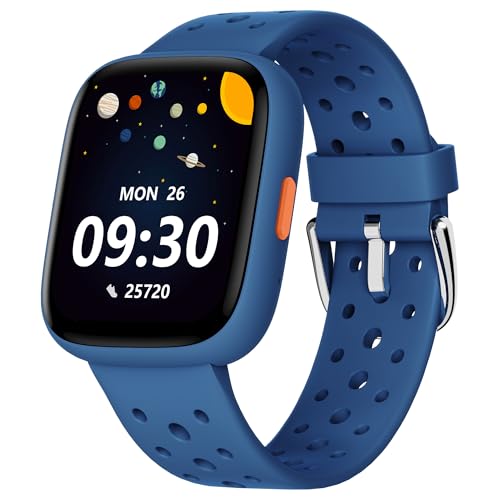
The BIGGERFIVE Brave 2 Blue is the clearest example of why the phrase Best kids smart watch covers several different products. It is not a phone watch. It is a fitness tracker that can operate on its own, making it a sensible option when parents want a child to see activity information without adding calls, messages, or location services.
Its 1.8-inch HD touch screen gives the tracker enough room for activity details and watch-face customization. With the BIGGERFIVE app, children can choose from more than 100 cloud dials and create custom dials using their own photos. The app is optional for basic use, but it is needed for the broader customization and management features.
The activity side is well covered. The watch counts steps, distance, calories burned, and active minutes, and it supports 80 sports modes including walking, running, cycling, and basketball. It also monitors real-time heart rate and tracks sleep patterns. Those features can encourage a child to notice daily movement, though parents should treat the wellness data as general guidance rather than medical information.
There are five built-in puzzle games, and parents can restrict them through the app or lock them completely. The lack of sound effects is useful in quiet settings, but it also makes the games less lively than the camera-and-game watches from VTech KidiZoom DX4 and Phyulls Kids Watch. The watch is compatible with Android 6.0 or later and iOS 9.0 or later when the app is used.
The weakness is the same feature that makes this model uncomplicated: there is no listed calling, messaging, GPS, or SOS system. If you need to know where a child is or receive a call, JrTrack 5 by Cosmo is in another category entirely. Pick the Brave 2 Blue for an active child who can carry a phone when needed, or for younger children who only need a wearable activity prompt.
3. Berilona 4G Kids Watch: Best Cellular Starter

Pros
- 4G voice, text, and video calling
- Dual GPS and LBS positioning
- Geofences and route playback
- Class Mode disables entertainment features
- Includes a Speedtalk SIM card
Cons
- The included SIM works only in the United States
- A data plan must be activated separately
- The watch is listed with a 1.7-inch screen, smaller than some trackers
Best for: younger children who need calling, location, and a simple parent app.
The Berilona 4G Kids Watch aims at the parent who wants cellular features without handing over a full smartphone. Its Junicare app pairs through a QR code built into the watch, and parents can manage contacts, block unknown callers, and check the child’s real-time location. That setup is more involved than an offline watch, but it also provides a much more useful safety layer.
The communication package includes 4G voice calls, text chat, and two-way HD video calls through the front-facing camera. A one-touch SOS function lets a child call a parent quickly. The included Speedtalk SIM card is usable only in the United States, and the instructions require activation through Speedtalk with a selected data plan. Families should confirm network and service requirements before giving the watch to a child.
Location features combine GPS and LBS positioning. Parents can define electronic geofences around places such as home and school, receive alerts when the child leaves those areas, and review up to 24 hours of route playback. This is a useful feature set for a child who is beginning to walk short distances independently, although the accuracy of any location system can vary with surroundings and network conditions.
The 1.7-inch curved HD IPS screen is paired with a breathable silicone strap and a woven strap. Class Mode can be activated remotely and can disable games, the calculator, pedometer, and stopwatch, leaving positioning and emergency calling available. That is a more practical school control than simply telling a child not to use the watch.
Compared with JrTrack 5 by Cosmo, the Berilona watch offers an included SIM and video calling, while Cosmo provides a more established closed-contact and app-control structure in its own service ecosystem. TickTalk 5 has more extensive messaging and network features, but it is also a larger commitment. Choose Berilona when video calling and a straightforward cellular starter package matter most, and skip it if you need service outside the United States.
4. VTech KidiZoom DX4: Best Learning Toy

Pros
- Two cameras for photos and video
- Music player and composer app
- 50 built-in clock faces
- Splash-proof construction
- Activities designed to encourage movement
Cons
- No calling, messaging, or GPS features are listed
- Charges through the included micro-USB cable only
- The 0.21-pound body is heavier than some simple trackers
Best for: children who want a creative wrist toy instead of a connected phone.
The VTech KidiZoom DX4 is best understood as a camera, music, and game toy shaped like a smartwatch. That makes it appealing for a child who is fascinated by watches but does not need to call home. It is intended for ages 4 and up, and its menu of playful features is easier to explain than the cellular systems in the first three picks.
Two cameras let children take photos and videos, add effects, and experiment with the composer app. The watch includes a music player and activities that encourage movement, including challenges and reaction games. It also includes 50 clock faces, with more available to download, and a shake function that announces the time aloud. Those details give the watch a stronger educational and creative identity than the fitness-first BIGGERFIVE models.
The large screen is described as high resolution, though its exact display measurement is not provided in the product information. The body measures about 8.9 by 0.6 by 1.7 inches and weighs 0.21 pounds. On a small wrist, that weight may be more noticeable than the extremely light Phyulls watch, but it also reflects the DX4’s camera and metal-body design.
The watch is splash-proof, not presented as a swimming or fully waterproof device. It uses a rechargeable lithium-ion battery and must be charged with the included micro-USB cable. VTech specifically cautions against third-party adapters, so families should keep that cable with the device rather than assume any spare charger is suitable.
The central limitation is also the reason to buy it: there is no listed cellular connection, GPS, calling, or parent communication system. Cosjoype Kids Watch and Phyulls Kids Watch offer more games and similar offline fun, while VTech has the stronger brand-led learning and camera presentation. Choose the KidiZoom DX4 for creative play, movement activities, and time-telling practice, not as a child locator.
5. Phyulls Kids Watch: Best Offline Game Library

Pros
- 39 built-in puzzle games
- Camera, video recorder, and voice recorder
- MP3 player and included memory card
- Pedometer, alarm, calculator, and flashlight
- No SIM card or app required
Cons
- No calling function
- The 1.54-inch screen is smaller than the BIGGERFIVE trackers
- Battery life varies with use
Best for: children who want lots of offline activities without cellular features.
The Phyulls Kids Watch is a compact offline entertainment device with a surprisingly broad menu. It does not require a SIM card, a phone, or a downloaded app, and it has no calling function. That makes setup straightforward, but it also means parents should not mistake it for a safety watch.
Its 1.54-inch touchscreen includes 39 puzzle games, a selfie camera, video recording, a voice recorder, an MP3 player, a flashlight, a pedometer, an alarm, a stopwatch, a calculator, a calendar, and a habit tracker. Children can also adjust themes, screensavers, backlight time, ringtone volume, and language settings. The sheer variety will appeal to children who want to explore menus and collect activities.
The watch includes an SD memory card for storing music, pictures, and videos. The product description says it can store more than 10, 000 HD photos or more than six hours of video, though actual usable capacity and file sizes will affect those figures. That storage feature gives it a stronger creative-play angle than the fitness-only BIGGERFIVE devices.
Battery life is stated as three to seven days depending on use and other factors, with a full charge taking about two hours. The soft silicone material is intended to be comfortable, and the product includes a USB cable. It is a better match for a child who wants a camera and music player on the wrist than for a child who needs a parent-managed communication channel.
The drawback is fundamental. There is no calling, GPS, cellular connection, or parent app, so Berilona 4G Kids Watch is a much better choice for location and emergency contact. VTech KidiZoom DX4 has two cameras and movement activities, while Phyulls counters with more explicitly listed built-in games and storage. Pick Phyulls for self-contained play, especially when the watch will be used at home or on trips where a phone watch is unnecessary.
6. TickTalk 5: Best Connected Features

Pros
- Voice and video calls over Wi-Fi or cellular data
- Real SMS, group chats, photos, and voice messages
- GPS tracking with route playback
- School Mode and extensive contact controls
- IP67 water resistance and shockproof, dustproof design
Cons
- More communication features can mean more setup
- The display size is not specified
- Its connected features are unnecessary for children who only want games
Best for: families seeking the broadest phone-watch communication toolkit.
The TickTalk 5 is the most phone-like watch in this group. It supports voice and video calls through Wi-Fi or cellular data, and its 5MP front camera is designed for HD video conversations. Quick-dial buttons provide access to 911 and other emergency contacts, with location notifications sent to parents during emergency calls.
Messaging is unusually complete for a children’s watch. Real SMS and group chats work with family and approved contacts, and children can send talk-to-text messages, voice messages, emojis, photos, and ordinary texts. Unknown numbers are automatically blocked. Parents who prefer an added layer of privacy can use in-app messaging with end-to-end encryption.
TickTalk’s location tools use Google Maps and SmartPin, which the product describes as an AI-powered location correction system for children’s watches in the United States. Parents can view real-time location and route playback, while emergency calls include location updates. As with any GPS watch, the usefulness depends on signal and surroundings, but the control set is unusually detailed.
The parental app handles trusted contacts, blocked callers, call logs, reminders, School Mode, watch passwords, app-user permissions, and T-Cloud backup settings. The watch also includes an activity tracker, step goals, reminders, a calculator, calendar, timer, stopwatch, photo filters, and e-greeting cards. There are no games or social media features listed, which keeps the entertainment side more restrained than the toy watches.
TickTalk claims up to 100 hours of standby time, support for Wi-Fi and Bluetooth, and up to nine LTE bands, with use across many countries. The watch is also described as IP67 water-resistant, shockproof, and dustproof, with ScreenSafe protection. Those are meaningful advantages over JrTrack 5 by Cosmo, but the TickTalk’s broader feature set may be excessive for a child who needs only approved calls and location. Choose it for families that want rich communication and robust parental controls, and choose JrTrack 5 SE by Cosmo when automatic school-aware restrictions are the priority.
7. BIGGERFIVE Brave 2 Black: Best No-Phone Fitness Option

Pros
- Can be used without a phone
- 80 sports modes
- Heart-rate and sleep monitoring
- 1.8-inch HD touch screen
- App controls for games and watch faces
Cons
- No calling or location tracking is listed
- App compatibility starts at Android 6.0 and iOS 9.0
- The five puzzle games are basic
Best for: families wanting a standalone activity watch in a neutral black finish.
The BIGGERFIVE Brave 2 Black is functionally very close to the blue Brave 2 in this roundup. Its main distinction is the black finish and a stated wrist-size range of 110 to 190 millimeters, or 4.33 to 7.48 inches. That range gives parents a useful sizing reference before ordering.
Like the blue version, it counts steps, distance, calories burned, and active minutes. It supports 80 sports modes, including walking, running, cycling, and basketball, and adds real-time heart-rate and sleep-pattern monitoring. For a child who responds to visible goals, the combination of activity data and customizable watch faces can make ordinary movement feel more engaging.
The 1.8-inch HD touch screen is the practical strength here. It offers enough space for readings and 100 or more cloud dials through the app, including dials made with a child’s own photos. The tracker can operate without the app and without a phone, though the app is needed for expanded functions and game restrictions.
Parents can control the five puzzle games from the app, including locking them all the time. That is helpful for school or bedtime routines. The product description does not list cellular service, GPS, calls, texts, or SOS alerts, so this is a wellness and activity device rather than a safety communicator.
The BIGGERFIVE Fitness Tracker below offers much the same basic platform, while the Brave 2 versions make the 80 sports modes and parent-controlled games especially clear. If you are choosing between this model and TickTalk 5, the decision is not close: TickTalk is for communication, Brave 2 is for movement. Pick the Black Brave 2 when your child needs activity encouragement and the wrist-size range fits.
8. BIGGERFIVE Fitness Tracker: Best Simple Tracker

Pros
- Pedometer and all-day activity tracking
- 80 sports modes
- Heart-rate and sleep monitoring
- Optional phone app
- Custom watch faces
Cons
- No calling, texting, or GPS features are listed
- Only a single strap is specified
- The app is needed for the fullest set of controls
Best for: children who mainly need steps and basic activity feedback.
The BIGGERFIVE Fitness Tracker is the simplest recommendation for parents who want a pedometer-led watch without cellular service. It shares the 1.8-inch HD touch screen and broad activity feature set found on the Brave 2 entries, but its product title places the emphasis squarely on step tracking.
The watch records steps, distance, calories burned, and active minutes, and it offers 80 sports modes. Heart-rate monitoring and sleep-pattern tracking add more context to a child’s routine. Those numbers can be useful prompts for movement and rest, but they should not be used to diagnose a health issue or replace professional advice.
The companion BIGGERFIVE app works with Android 6.0 or later and iOS 9.0 or later. It provides more than 100 cloud watch faces and lets children use their own photos for customization. The tracker can also be used without the app and without a phone, which is the key convenience for families trying to avoid another connected device.
Five puzzle games are built in, and the app can restrict them or lock them entirely. That gives the tracker a small entertainment component without turning it into a full game watch. The product information identifies the size as a single strap and the color as Rainbownylon, so families should pay attention to the strap style when comparing it with the black Brave 2.
This model is a closer match to BIGGERFIVE Brave 2 Blue and BIGGERFIVE Brave 2 Black than to any cellular watch in the roundup. The Brave 2 listings are the better fit when sports tracking and wrist sizing are the deciding factors, while this one suits a child who mainly wants a step counter and a changeable face. Skip it if the watch needs to contact a parent or report a child’s location.
9. Cosjoype Kids Watch: Best Camera Toy

Pros
- 39 games and a selfie camera
- MP3 player, voice recorder, and video
- Pedometer, flashlight, alarm, and habit tracking
- 1.54-inch IPS HD touch screen
- Aluminum frame design
Cons
- No cellular calling or GPS is listed
- The screen is smaller than BIGGERFIVE’s 1.8-inch display
- The product description gives mixed age guidance
Best for: children who want photos, games, music, and simple habit prompts.
The Cosjoype Kids Watch is another offline toy watch, but it puts more emphasis on the camera and habit features than the VTech model. It is designed for children and includes a broad collection of functions without requiring cellular service or an app. That makes it easy to hand over for independent play, provided parents do not expect communication or tracking.
The 1.54-inch IPS HD touchscreen sits in an aluminum frame. Children can use the selfie camera for photos and video, add large-head stickers, listen through the MP3 player, record voice notes, and browse 39 games. The watch also includes a pedometer, flashlight, alarm, stopwatch, calculator, habit tracker, themes, and screensaver options.
The product description says the rechargeable battery lasts more than seven days and identifies the battery as 500mA. Battery performance will vary with camera, music, and game use, but the larger stated capacity gives this model a different endurance target from the Phyulls watch, whose stated working time is three to seven days. A USB cable is included for charging.
Parental control and habit tracking are listed among the features, though the supplied information does not explain the depth of those controls. The age guidance also varies across the listing, mentioning ages 4 to 12 in one place and ages 6 to 10 in another. That is worth resolving before choosing it for a very young child.
The Cosjoype watch is most directly comparable with Phyulls Kids Watch. Both offer 39 games, a camera, music, and offline use, while Phyulls provides more detail about its memory card and storage. VTech KidiZoom DX4 is the stronger choice for a more structured learning-toy experience. Choose Cosjoype when camera play, habit prompts, and the aluminum-frame design matter more than phone-watch safety features.
10. JrTrack 5 SE by Cosmo: Best School-Focused Phone Watch

Pros
- School-Fi can recognize arrival at school
- Real calls, SMS, MMS, and group messaging
- GPS tracking, safe zones, and location history
- Approved contacts and unknown-caller blocking
- SOS and optional 911 calling
Cons
- Works only with Cosmo Mobile service
- Intended for children ages 6 and up
- The display size is not specified
Best for: families that want communication to remain available while school distractions are restricted.
The JrTrack 5 SE by Cosmo is the specialist pick in this roundup. It shares the phone-watch foundation of the regular JrTrack 5, but its headline feature is School-Fi. When enabled, School-Fi recognizes when the child arrives at school and automatically limits distractions while preserving essential communication and safety features.
That distinction can remove a recurring chore for parents. Instead of relying only on a fixed schedule, the watch is designed to respond to the school location. The feature is particularly useful for children whose school day changes or whose travel schedule does not line up neatly with a manually programmed block.
Communication remains comprehensive. The watch supports real calls, SMS and MMS texting, photos, voice notes, video messages, and family group messaging. Only parent-approved contacts can reach it, and unknown callers are blocked. Parents can also manage apps, set time limits, and view the child’s text history through the Cosmo system.
GPS features include a dedicated location chip, real-time Active Tracking, customizable safe-zone alerts, and location history. SafeCORE adds SOS alerts and optional 911 calling. The watch uses an eSIM and requires Cosmo Mobile Family-Safe service, so families should treat the cellular-service requirement as part of the product rather than an incidental setup detail.
Compared with JrTrack 5 by Cosmo, the SE earns its place through automatic school-aware control. The standard model offers Focus Mode, a growing library of kid-safe apps, and optional Spotify access, so it may be the better fit for families that want more entertainment flexibility. TickTalk 5 offers a broader communication system and up to 100 hours of standby time, but the SE is more focused on school routines. Choose JrTrack 5 SE for a child who needs a first phone watch that knows when to quiet down.
How to choose best kids smart watch
Start by deciding whether the watch is meant to connect a child to family, track activity, or provide offline play. Those are different jobs, and the most convincing feature list is not useful if it solves the wrong one.
Cellular communication
A cellular phone watch can support calls, texts, video calls, or emergency contacts away from Wi-Fi. Look for parent-approved contacts and unknown-caller blocking, since those controls matter more for a child’s first communicator than a long list of novelty apps. The JrTrack models, TickTalk 5, and Berilona watch are the cellular choices here.
Check the service requirement carefully. JrTrack 5 and JrTrack 5 SE require Cosmo Mobile Family-Safe service, while Berilona’s included Speedtalk SIM is limited to the United States. An offline watch avoids service activation entirely, but it cannot contact a parent.
GPS and safety controls
GPS tracking is useful when a child walks to school, visits friends, or spends time away from home. Stronger systems combine real-time location with safe zones, route history, and SOS alerts. JrTrack 5 SE, JrTrack 5, TickTalk 5, and Berilona include versions of those tools.
A camera is entertaining, but an approved-contact system is what makes a phone watch appropriate for a child.
Location accuracy can vary indoors and around tall buildings, so treat GPS as a helpful safety layer rather than an invisible guarantee. Confirm how alerts are managed in the parent app before relying on them.
School restrictions
School Mode or Focus Mode should limit distractions without removing emergency communication. TickTalk 5 includes School Mode, JrTrack 5 has Focus Mode, Berilona has a remotely controlled Class Mode, and JrTrack 5 SE adds School-Fi that is designed to recognize arrival at school.
Automatic controls are convenient, but parents should still understand what remains active. Berilona’s Class Mode leaves positioning and emergency calling available while disabling games, calculator, pedometer, and stopwatch.
Activity tracking
A fitness-focused watch should make movement visible without pretending to be a medical device. Step count, distance, active minutes, sports modes, heart-rate monitoring, and sleep tracking are the relevant features in the BIGGERFIVE models.
The BIGGERFIVE watches can work without a phone, while their companion app adds watch-face customization and game restrictions. Choose one when a child needs activity encouragement, not when the family needs calling or location tracking.
Offline play and durability
Offline toy watches are simpler because they do not need cellular activation or a parent app. VTech KidiZoom DX4, Phyulls Kids Watch, and Cosjoype Kids Watch focus on cameras, games, music, and creative features. Compare the number of games, camera tools, storage information, screen size, and charging details.
For active children, construction matters too. TickTalk 5 is described as IP67 water-resistant, shockproof, and dustproof. VTech’s KidiZoom DX4 is splash-proof. Neither description should be treated as permission for swimming unless the manufacturer explicitly supports it.

Frequently asked questions
Do kids smart watches need a phone plan?
Only cellular models need a service plan. JrTrack 5 and JrTrack 5 SE use Cosmo Mobile Family-Safe service, while the Berilona watch requires activation of its Speedtalk SIM and a selected data plan. Offline models such as VTech KidiZoom DX4, Phyulls Kids Watch, and Cosjoype Kids Watch do not list cellular calling.
Can a kids smart watch call a parent?
The cellular watches in this roundup can call approved contacts. JrTrack 5, JrTrack 5 SE, TickTalk 5, and Berilona support calling, while Phyulls, VTech, Cosjoype, and the BIGGERFIVE trackers do not list calling functions.
Which models have GPS tracking?
JrTrack 5 and JrTrack 5 SE include real-time GPS, safe-zone alerts, and location features. TickTalk 5 includes real-time location and route playback, and Berilona combines GPS and LBS positioning with geofences and route playback. The fitness and offline toy watches do not list GPS safety tracking.
Can a child use these watches at school?
Several models provide controls for school use. JrTrack 5 has Focus Mode, JrTrack 5 SE has School-Fi, TickTalk 5 includes School Mode, and Berilona has Class Mode. The BIGGERFIVE app can restrict its puzzle games, but those watches are not cellular school communication devices.
Are offline kids watches safer than phone watches?
Offline watches reduce communication and internet exposure because they do not provide cellular calling or messaging. They also cannot send an SOS or show a child’s location, so they do not provide the same safety function as a controlled phone watch. The safer choice depends on whether the child needs communication or only entertainment.
Are the fitness features medical devices?
No. The BIGGERFIVE watches list heart-rate and sleep monitoring alongside activity tracking, but those features should be treated as general wellness information. They are not a substitute for medical equipment or professional advice.
What should I check before buying a cellular kids watch?
Confirm the required carrier, service coverage, SIM or eSIM setup, parent app compatibility, and the contact-control system. Also check whether the watch supports the emergency features your family expects. Carrier restrictions are especially important for the Cosmo watches and the Berilona model.

The bottom line
The Best kids smart watch for most families is JrTrack 5 by Cosmo because it combines real calling and messaging with approved contacts, GPS, SafeZone alerts, SOS tools, and adjustable app controls. It gives children a useful connection to family without opening the door to a conventional smartphone experience.
Choose TickTalk 5 if video calls, real SMS, group chats, broad parental controls, and a tougher water-resistant design matter more than a restrained feature set. For a child who only needs steps and activity goals, BIGGERFIVE Brave 2 Blue is the more sensible category fit. For offline play, VTech KidiZoom DX4 offers the strongest creative learning identity.
If you are undecided, choose a phone watch only when your child genuinely needs contact or location tracking. Otherwise, start with an offline tracker or learning watch and add cellular features later.
As an Amazon Associate we earn from qualifying purchases.