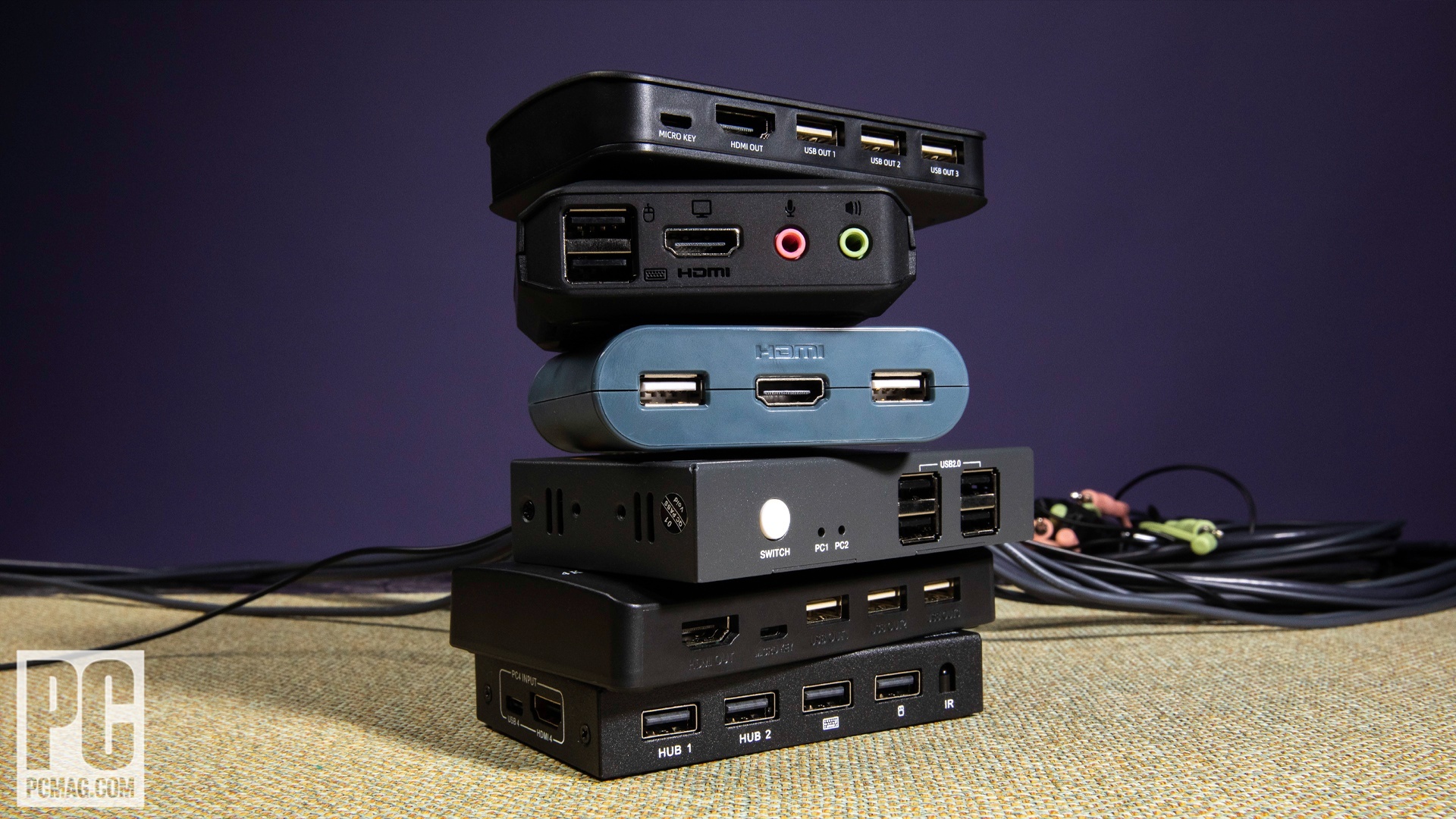

Switching between a work computer and a personal PC should take one button press, not a hunt behind the desk for the right HDMI and USB cables. The right KVM switch shares your monitor, keyboard, mouse, and other peripherals while keeping two systems ready on the same workstation.
The Best KVM Switch depends on the number of computers, displays, and ports you need. UGREEN’s triple-monitor model is the most capable wired option here, while Hearvo’s single-monitor switch is the simplest fit for a conventional two-computer desk. The list also includes a four-computer switch, a remote-access KVM, a USB-only switch, and a laptop-to-desktop dock.
Our top pick is the UGREEN 8K Triple Monitor KVM, with options below for single-monitor desks, dual-screen workstations, remote administration, and four-computer setups.
Comparison table
| # | Product | Award | Display support | USB sharing | Best for |
|---|---|---|---|---|---|
| 1 | UGREEN 8K Triple Monitor KVM | Best overall | 3 monitors, up to 8K at 60Hz | 4 USB 3.0 | Triple-screen desks |
| 2 | Hearvo S7232H Single Monitor A | Best single-monitor setup | 1 monitor, 4K at 60Hz | 3 USB-A, 1 USB-C | Keyboard, mouse, and device sharing |
| 3 | Unitek Dual Monitor KVM | Best for desktop PCs | 2 monitors, 4K at 60Hz | 4 USB-A | Two desktop computers |
| 4 | GREATHTEK 4-Port KVM | Best for four computers | 1 monitor, 4K at 60Hz | 3 USB 3.0, 1 USB-C | Four-system offices |
| 5 | Hearvo Dual Monitor KVM | Best dual-monitor Hearvo | 2 monitors, 4K at 60Hz | 3 USB-A, 1 USB-C | Dual-screen home offices |
| 6 | Hearvo S7232H Single Monitor B | Best compact KVM | 1 monitor, 4K at 60Hz | 3 USB-A, 1 USB-C | Small desks |
| 7 | GL.iNet Comet Pro | Best remote-access KVM | 4K passthrough at 30fps | Remote keyboard and mouse access | Headless systems and remote recovery |
| 8 | UGREEN 4-Port USB Switch | Best USB-only switch | No video switching | 3 USB-A, 1 USB-C | Sharing peripherals without video |
| 9 | UGREEN Dual HDMI KVM | Best HDMI dual-screen KVM | 2 monitors, 4K at 60Hz | 3 USB-A, 1 USB-C | HDMI-only workstations |
| 10 | TobenONE Laptop Desktop KVM | Best laptop and desktop dock | 2 monitors, 4K at 60Hz | USB-A, USB-C, USB 2.0 | One laptop and one desktop |
1. UGREEN 8K Triple Monitor KVM: Best Overall

Pros
- Runs two computers across three monitors
- Supports DisplayPort 1.4 and HDMI 2.1
- Handles up to 8K at 60Hz or 4K at 240Hz
- Includes four USB 3.0 ports
- Offers a wired desktop controller
Cons
- Both computers must support three-display output
- No keyboard hotkey switching
- Does not support EDID emulation
Best for: someone building a demanding three-monitor workstation around two compatible computers.
The UGREEN 8K Triple Monitor KVM is the one to choose when a single screen feels like a compromise. It lets two computers share three monitors, a keyboard, a mouse, and other USB devices, so a work PC and a personal system can occupy the same full-size workstation without repeated cable changes. The aluminum enclosure also looks more at home beside a serious desk setup than the generic plastic boxes lower down this list.
Its video hardware is unusually strong. Each of the two DisplayPort 1.4 outputs and the HDMI 2.1 output can support up to 8K at 60Hz, with lower-resolution modes including 4K at 240Hz, 144Hz, 120Hz, 60Hz, and 30Hz. HDR10+, HDCP 2.3 and 1.4, VRR, FreeSync, and G-Sync support give it the bandwidth and compatibility needed for high-refresh displays. Those numbers only matter if the computers, monitors, and cables support them, but the headroom is useful for a workstation that mixes productivity screens with a fast gaming panel.
The three screens can mirror one image or extend the desktop across all three. Switching happens from the main button or the included desktop controller, which is more convenient than reaching behind a monitor. Four USB 3.0 ports cover the usual keyboard and mouse combination along with devices such as a printer or webcam. The supplied package includes four DisplayPort cables, two HDMI cables, two USB-A cables, a power adapter, and the controller.
This is more demanding to install than the Hearvo single-monitor options. Each computer needs two DisplayPort cables, one HDMI cable, and one USB cable, and each computer must support three displays. Laptops with only USB-C ports need an adapter, and the lack of EDID emulation can mean that windows and display arrangements do not behave exactly as they would with a direct connection. It also does not offer hotkey switching. Choose it for a genuinely three-screen desk, not for a basic two-computer setup.
2. Hearvo S7232H Single Monitor A: Best Single-Monitor Setup

Pros
- Straightforward two-computer, one-monitor design
- 4K at 60Hz output
- Three USB-A ports and one USB-C port
- Adaptive EDID
- Button and wired remote switching
Cons
- Limited to one monitor
- Requires separate HDMI cables
- No software or hotkey switching
Best for: a desk with one HDMI monitor and two computers that share several USB peripherals.
The Hearvo S7232H Single Monitor A gets the ordinary KVM job right without asking you to redesign the desk. Two computers connect to one HDMI monitor, keyboard, and mouse, and the switch adds enough USB connectivity for a webcam, printer, scanner, headset, or flash drive. For a typical home office, that is the useful middle ground between an HDMI switch and a full multi-display command center.
The video output reaches 4K at 60Hz and also supports 4K at 30Hz, 2K, 1080p, 3D, and HDCP 2.2. A 4K display can remain sharp while the 60Hz refresh keeps cursor movement and ordinary desktop animation smooth. The switch uses two HDMI connections for the computers and includes two USB 3.0 cables for the computer-side data links. It does not require driver software or a separate power supply according to the supplied features.
There are four USB 3.0 peripheral ports in total, split between three USB-A connections and one USB-C connection. The claimed transfer speed is up to 5Gbps, which is useful when a shared flash drive or scanner is doing more than a keyboard and mouse. Adaptive EDID is intended to make display recognition more stable when changing systems, while the switch button and wired remote give you two practical places to initiate the change.
The limitation is simple: this is a one-monitor product. The Hearvo Dual Monitor KVM is the better fit for two screens, and the UGREEN 8K Triple Monitor KVM is much more flexible for mixed DisplayPort and HDMI systems. The two S7232H listings have the same stated feature set, so this entry is best understood as one of two closely matched single-display choices. It suits anyone who wants a clean, uncomplicated desk and does not need a second screen.
3. Unitek Dual Monitor KVM: Best for Desktop PCs
Pros
- Supports two monitors from two computers
- Combines HDMI and DisplayPort inputs
- Four USB-A peripheral ports
- 4K at 60Hz with HDR support
- Includes a 5V 2A power adapter
Cons
- Not compatible with laptops
- Intended for desktop hosts
- Requires several cables for dual-screen output
Best for: two desktop computers sharing two monitors and a full set of USB accessories.
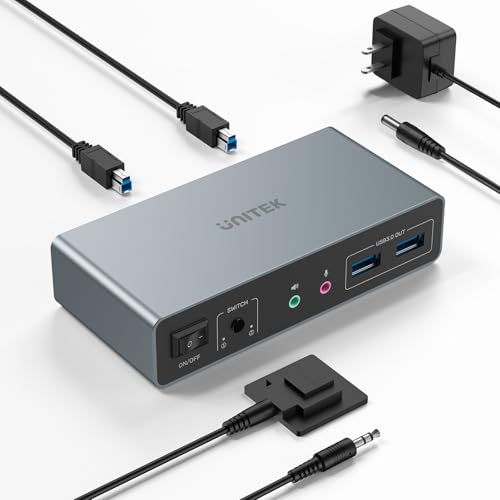
The Unitek Dual Monitor KVM is a good match for a desk built around two conventional desktop PCs. It supports dual-monitor output and combines HDMI with DisplayPort, a useful advantage when the graphics cards in the two computers do not have identical output layouts. The design is less suitable for laptop users, but desktop owners get a direct, clearly defined connection scheme.
Video support reaches 4K at 60Hz, with compatibility for 2K, 1080p, 3D, HDR, HDMI 2.0, and HDCP 2.2 and 1.4. That covers the needs of sharp office displays and protected video playback. The switch can feed both monitors from the selected computer, but both video cables and the USB data connection must be attached to each host. Unitek specifically says that the included USB-A to USB-B cables are required when HDMI and DisplayPort outputs are used together.
Four USB-A ports provide up to 5Gbps for USB 3.0 devices, with backward compatibility for USB 2.0 gear. A keyboard, mouse, printer, flash drive, or external drive can stay attached to the switch instead of moving between computers. The included desktop controller puts the switching button away from the main enclosure, and a 5V 2A adapter helps maintain stable operation when several USB devices are connected.
The key weakness is compatibility, not image quality. This model is explicitly not for laptops, so users with a USB-C notebook should consider the TobenONE Laptop Desktop KVM instead. It also needs more careful cable planning than the single-monitor Hearvo options. If your desk has two desktops with HDMI and DisplayPort outputs, though, the Unitek is more suitable than an HDMI-only model and gives you the dual-screen arrangement many desktop users actually need.
4. GREATHTEK 4-Port KVM: Best for Four Computers

Pros
- Connects four computers to one monitor
- 4K at 60Hz output
- Three USB 3.0 ports and one USB-C port
- Numbered wired controller
- LED indicators show the active computer
Cons
- Supports only one monitor
- No hotkey switching
- Larger enclosure than the compact single-monitor models
Best for: an office, lab, or home setup where four computers must share one display and USB control set.
The GREATHTEK 4-Port KVM solves a problem that most two-computer switches do not address. Four computers can share one HDMI monitor, keyboard, mouse, and USB accessories, which makes it useful for testing stations, IT desks, and offices with several active systems. Its one-monitor limit keeps the signal path straightforward, but the four inputs are the reason to pick it.
The switch supports 3840 by 2160 at 60Hz and works with 4K at 30Hz and 1080p displays. Adaptive EDID helps it identify connected displays, while LED indicators make it clear which of the four computers is active. There are three USB 3.0 ports and one USB-C port for shared devices, with the USB 3.0 connections intended for items such as a keyboard, mouse, camera, or flash drive.
Switching is handled by the front buttons or the included wired keypad. The controller uses numbered buttons for computers one through four, so the selection is direct rather than requiring repeated presses to cycle through each input. The package includes four USB 3.0 cables, an HDMI cable, a power cable, and the controller. That is a practical set of accessories for getting a multi-system desk connected.
The trade-off is that it has none of the dual-screen flexibility found in the Unitek Dual Monitor KVM or UGREEN Dual HDMI KVM. It also does not support hotkey switching, so users who want to change computers from the keyboard should look elsewhere. The enclosure measures 8.3 by 0.9 by 3 inches and weighs 1 pound, so it needs a little more room than a basic two-port switch. For four computers, the direct controls are more important than the extra footprint.
5. Hearvo Dual Monitor KVM: Best Dual-Monitor Hearvo

Pros
- Two computers share two monitors
- 4K at 60Hz output
- Four USB 3.0 ports including USB-C
- Adaptive EDID
- Button and wired remote switching
Cons
- Requires six HDMI cables for a full setup
- No DisplayPort input
- No hotkey switching
Best for: a dual-HDMI-monitor workstation shared by two computers.
The Hearvo Dual Monitor KVM is the sensible step up from a single-screen switch when two monitors are central to the workflow. It lets two computers share both displays, along with one keyboard and mouse, so a programmer, designer, or remote worker can keep the same wide workspace after switching systems. The two displays show the selected computer, rather than combining signals from both computers at the same time.
It supports up to 4K at 60Hz, plus 4K at 30Hz, 2K, 1080p, and 3D. HDCP 2.2 compatibility helps with protected content, while the 60Hz ceiling is appropriate for office screens and general creative work. This is an HDMI-only KVM, so it is a better match for a pair of HDMI monitors than for a workstation built around DisplayPort.
Four USB 3.0 ports include three USB-A connections and one USB-C port. The claimed 5Gbps transfer rate gives external storage, scanners, and webcams more bandwidth than a USB 2.0 switch, though the keyboard and mouse themselves need very little. Adaptive EDID is designed to reduce flicker, resolution mismatch, and display recognition problems when switching. The built-in button and wired controller provide the same two switching methods as the smaller Hearvo model.
The setup is cable-heavy. Hearvo says to prepare six HDMI 2.0 cables for the complete dual-monitor arrangement, and both computers need two HDMI cables plus one USB cable. The UGREEN Dual HDMI KVM offers a similar two-screen arrangement with supplied HDMI cables and broader HDR support, while the TobenONE Laptop Desktop KVM is more appropriate when one source is a USB-C laptop. Choose this Hearvo when both computers and both monitors are already centered on HDMI.
6. Hearvo S7232H Single Monitor B: Best Compact KVM

Pros
- Compact 5 by 2.4 by 0.8-inch enclosure
- One monitor and two computer support
- Four USB 3.0 peripheral ports
- Includes USB-C for shared devices
- Adaptive EDID and wired switching
Cons
- One-monitor output only
- No hotkey switching
- Requires an HDMI cable for each computer
Best for: a compact two-computer desk that needs shared USB-A and USB-C accessories.
The Hearvo S7232H Single Monitor B has the same stated core design as the other S7232H entry, but its compact enclosure makes it an easy fit when desk space is tight. It combines HDMI video switching with USB peripheral switching, so the keyboard and mouse follow the selected computer instead of remaining tied to one system.
The HDMI path supports 4K at 60Hz, along with 4K at 30Hz, 2K, 1080p, 3D, and HDCP 2.2. That is enough for a detailed desktop on a 4K monitor without dropping to a lower refresh rate for ordinary work. Adaptive EDID is intended to keep the monitor recognized as systems change, and the product does not need driver software or a separate power supply according to the supplied details.
Three USB-A ports and one USB-C port share peripherals at up to 5Gbps. That layout is more useful than a four-port USB-A-only design if one of your devices has moved to USB-C. The switch has a button on the unit and supports a wired remote, allowing the small box to sit behind a monitor while the control remains within reach. The package includes two USB 3.0 cables and anti-slip pads.
It remains a basic one-monitor KVM, so it cannot compete with the Hearvo Dual Monitor KVM for a two-screen desk or with the UGREEN 8K Triple Monitor KVM for high-refresh multi-display work. The two S7232H entries share their published specifications, and the distinguishing information available here is limited to their separate product listings. Pick this one when the smaller physical footprint matters and your desk has a single HDMI display.
7. GL.iNet Comet Pro: Best Remote-Access KVM

Pros
- Remote KVM access over Wi-Fi 6
- 4K video passthrough at 30fps
- Two-way audio
- Built-in Tailscale support
- Touchscreen interface
- Supports browser and app access
Cons
- Video passthrough is limited to 30fps
- More specialized than a conventional desk KVM
- ATX and Fingerbot extensions are sold separately
Best for: remote administration, home labs, BIOS access, and systems that need recovery from another location.
The GL.iNet Comet Pro is not simply a way to move a monitor and keyboard between two nearby computers. It is a remote-access device for situations where the computer may be across the building, in a server room, or sitting without a local monitor. Its purpose is to let you see and control a system when ordinary software access is unavailable.
The device supports both 2.4GHz and 5GHz Wi-Fi 6, along with wired connectivity. Video passthrough reaches 4K at 30fps through H.264 encoding, and the stream is designed to remain low latency while the local display continues working. Two-way audio adds voice communication for remote meetings and support sessions. The 30fps ceiling is fine for administration and desktop work, but it is not the right specification for a high-refresh gaming workstation.
Remote access works through a web-based cloud control function on Windows, macOS, and Linux without installing software on the controlled computer. A GLKVM app is available for Windows, macOS, iOS, and Android. Built-in Tailscale uses WireGuard encryption, and GL.iNet also supports a self-hosted lightweight cloud deployment on Linux and Ubuntu. The 2.22-inch touchscreen handles tasks such as Wi-Fi setup and cloud-service controls without requiring a separate computer.
Its most important advantage is access below the operating-system level. The Comet Pro is designed for BIOS access, OS installation, and remote disaster recovery, jobs that a conventional software remote desktop cannot always handle. Optional ATX Board and Fingerbot extensions can add remote power control or a hard reset. The weakness is that this is specialized hardware with a more involved networking concept than the plug-and-play Hearvo S7232H Single Monitor A. Choose it for remote control and recovery, not just for switching two local HDMI sources.
8. UGREEN 4-Port USB Switch: Best USB-Only Switch

Pros
- Shares four USB devices between two computers
- Includes USB-C and USB-A ports
- USB 3.0 data speeds up to 5Gbps
- Button and controller switching
- Supports Windows, macOS, ChromeOS, and Linux
Cons
- Does not switch video
- USB-C port does not support video output
- High-power devices may need external power
Best for: sharing a keyboard, mouse, printer, scanner, or camera when monitor switching is handled separately.
The UGREEN 4-Port USB Switch is the outlier in this group, and that is precisely why it can be useful. It is not a KVM switch and does not carry a monitor signal. Instead, it lets two computers share four USB devices, leaving video connected through a separate monitor input switch, dock, or the monitor’s own input controls.
Its four device ports include one USB-C and three USB-A connections. USB 3.0 transfer speeds reach up to 5Gbps, with backward compatibility for USB 2.0. That is enough flexibility for a keyboard, mouse, printer, scanner, headset, camera, or flash drive. The USB-C connection is for data only. It cannot send video and cannot be used as a display dock.
The switch is plug and play with Windows, macOS, ChromeOS, and Linux. A button on the unit and a wired controller provide two ways to change the active computer, and the main switch can be hidden to reduce desk clutter. UGREEN recommends optional USB-C power when several devices are connected or when a hard drive, headset, or other higher-power accessory needs a more stable connection. The ports are intended mainly for data transfer, not device charging.
This product should not be selected by mistake as a replacement for the Best KVM Switch in a dual-computer video setup. A true KVM such as the UGREEN Dual HDMI KVM changes video and USB together, while this UGREEN model changes USB only. It is the right choice when your displays already have a satisfactory input arrangement or when you specifically want to keep a printer and input devices shared without touching the display wiring.
9. UGREEN Dual HDMI KVM: Best HDMI Dual-Screen KVM

Pros
- Two computers share two HDMI monitors
- 4K at 60Hz output
- Four USB 3.0 ports including USB-C
- Supports mirror and extend modes
- Includes four HDMI cables
Cons
- HDMI only, with no DisplayPort input
- No EDID emulation
- Both monitors show the selected computer
Best for: a two-monitor workstation where every display connection is HDMI.
The UGREEN Dual HDMI KVM is a straightforward dual-screen switch for two computers. It keeps two monitors, a keyboard, a mouse, and other USB devices attached to the desk while letting you move the entire workstation from one computer to the other. Extend mode gives the selected computer two separate screens, while mirror mode sends the same image to both.
Each computer needs two HDMI cables and one USB-A cable, so the wiring is clear but not minimal. The switch supports up to 4K at 60Hz, along with 4K at 30Hz and 1080p or lower resolutions. HDMI 2.0, HDCP 2.2 and 1.4, 3D, HDR, and HDR10+ support cover a wide selection of displays and media sources. UGREEN recommends keeping output HDMI cables within 3 meters and using suitable 28AWG cables for reliable operation.
Four USB 3.0 ports include three USB-A ports and one USB-C port, with transfer speeds up to 5Gbps. That leaves room for a keyboard, mouse, flash drive, printer, mobile hard drive, or other shared accessory. The included power adapters help support USB devices, and switching can be done from the unit or the desktop controller. The package also includes four HDMI cables and two USB-A cables.
The main omission is EDID emulation. Displays can take a moment to recognize the selected source, and window placement may not remain as stable as it does with a KVM that preserves display identification. It also does not support keyboard hotkeys. The Unitek Dual Monitor KVM is a better fit for mixed HDMI and DisplayPort desktops, while the Hearvo Dual Monitor KVM has a similar HDMI-only concept. Pick UGREEN when the supplied HDMI cabling and HDR support fit your two-screen setup.
10. TobenONE Laptop Desktop KVM: Best Laptop and Desktop Dock

Pros
- Designed for one laptop and one desktop
- Two HDMI outputs
- Supports dual 4K at 60Hz
- Supports 1440p at 120Hz
- EDID emulation and auto-wake
- Up to 100W laptop power pass-through
Cons
- Does not support two laptops or two desktops
- macOS supports one extended display, with the second mirrored
- More specialized than a standard HDMI KVM
Best for: hybrid workers who alternate between one USB-C laptop and one desktop on two monitors.
The TobenONE Laptop Desktop KVM targets a very specific but common desk: one USB-C laptop beside one desktop computer. It turns that combination into a dual-monitor workstation and keeps the keyboard, mouse, webcam, headset, and other peripherals connected. A front button or wired remote handles the change, which is simpler than unplugging a laptop dock every morning.
Its two HDMI outputs support dual 4K at 60Hz or 1440p at 120Hz. The first mode favors sharp text and detailed office work, while the second gives compatible displays smoother motion. EDID emulation is a meaningful advantage here because it helps preserve window positions and reduces the blank-screen behavior that can occur when a computer thinks a monitor has been disconnected. Auto-wake can bring a sleeping computer back when it becomes active.
The dock-style port selection is broader than the basic KVMs in this roundup. It includes two USB-A 3.2 ports rated up to 10Gbps, one USB-C port rated up to 10Gbps with 15W charging for a phone or tablet, two USB 2.0 ports, and a 3.5mm audio jack. A dedicated PD 3.0 pass-through can provide up to 100W to the laptop, even while the desktop is the selected source. That can remove a separate laptop charger from the main desk setup.
Compatibility needs careful attention. The product is designed for one laptop plus one desktop, not two laptops or two desktops. It supports Thunderbolt 5, 4, and 3, USB4, and full-featured USB-C systems running Windows, ChromeOS, or Linux, but macOS supports only one extended display while the second is mirrored. The Unitek Dual Monitor KVM is better for two desktop PCs, and the UGREEN Dual HDMI KVM is simpler when every source is already HDMI. Choose TobenONE when laptop docking and display persistence matter more than universal source compatibility.
How to choose the best kvm switch
A KVM switch is easiest to choose when you start with the computers and displays you already own, then work outward to USB devices, switching controls, and special features.
Computer and monitor count
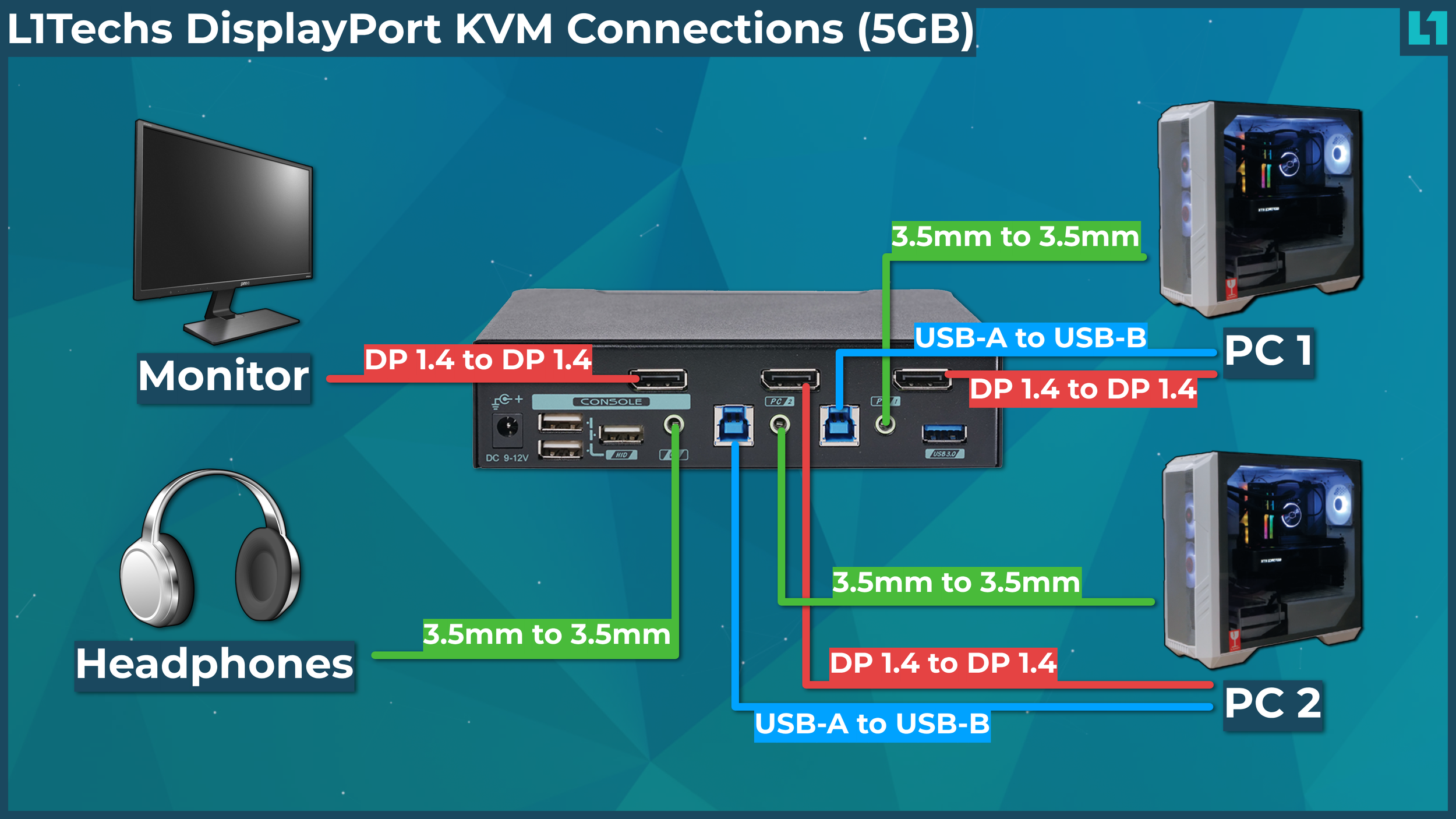
First count the computers and monitors that need to change together. A one-monitor KVM such as the Hearvo S7232H handles two computers without the cabling burden of a dual-screen switch. Two-monitor models need two video cables from each computer, while the GREATHTEK model uses one monitor to serve four computers.
Do not assume that a dual-monitor KVM can show one computer on one screen and another computer on the other. The UGREEN dual HDMI model, for example, sends both monitors the selected computer’s signal. For independent computer signals, you need a different class of multi-view device.
Video connectors and resolution
Match the KVM’s inputs and outputs to the graphics ports on the computers and monitors. DisplayPort support matters for the UGREEN triple-monitor and Unitek models, while the Hearvo and UGREEN dual-screen models here use HDMI. A claimed 4K at 60Hz mode requires compatible computers, monitors, and cables at every point in the chain.
High-refresh users should look beyond the headline resolution. The UGREEN triple-monitor model supports 4K at 240Hz, while TobenONE supports 1440p at 120Hz. The Comet Pro is different because its 4K passthrough is limited to 30fps, which is suitable for remote administration rather than fast local gameplay.
EDID behavior
EDID tells a computer what display is connected and which resolutions and refresh rates it supports. A KVM with EDID emulation can keep windows in place and reduce the black-screen pause that sometimes follows a switch. TobenONE and the Hearvo models list adaptive or emulated EDID features, while both UGREEN multi-monitor KVMs explicitly do not support EDID emulation.
If your work depends on windows staying exactly where you left them, EDID matters more than an extra USB port.
USB ports and bandwidth
Keyboard and mouse sharing requires only basic USB connectivity, but a webcam, scanner, flash drive, or external drive needs more. USB 3.0 ports can reach 5Gbps, and several products here add USB-C alongside USB-A. Check the port count and connector type before choosing, especially if you want to share a printer and camera at the same time.
A USB-only switch such as the UGREEN 4-Port USB Switch is useful when video is already handled elsewhere, but it cannot replace a KVM. High-power USB devices may also need an external power connection, particularly when several devices are active.
Switching method and installation
A front button is reliable, but a wired remote is more convenient when the switch is hidden behind a display. The products here generally use a button, remote controller, or both. None of the listed conventional KVMs advertises keyboard hotkey switching, so do not expect a shortcut from the keyboard unless the product specifically provides one.
Cable planning matters most for dual and triple-monitor setups. The full UGREEN triple-screen arrangement needs two DisplayPort cables, one HDMI cable, and one USB cable per computer. The Hearvo dual-monitor model needs six HDMI cables for its complete setup. If you want fewer cables and easier laptop docking, the TobenONE design is the more focused option.

Frequently asked questions
What does a KVM switch do?
A KVM switch lets one keyboard, video display, and mouse control more than one computer. The selected computer receives the shared peripherals and sends its video signal to the connected monitor or monitors. Many models also share USB devices such as printers, webcams, and storage.
Can a KVM switch support two monitors?
Some can. The Hearvo Dual Monitor KVM, Unitek Dual Monitor KVM, UGREEN Dual HDMI KVM, and TobenONE Laptop Desktop KVM all support two monitors, while the UGREEN 8K Triple Monitor KVM supports three. A one-monitor model cannot be expanded into a true dual-monitor KVM by adding a splitter.
Can one monitor show both computers at the same time?
The KVM switches in this roundup select one computer at a time. A dual-monitor KVM normally sends both monitors the selected computer’s output. Showing two computers simultaneously requires a multi-viewer or separate monitor inputs rather than a conventional KVM.
Do KVM switches work with laptops?
Some do, but the connection requirements vary. The TobenONE is designed for one USB-C laptop and one desktop, while the Unitek model specifically says it is not compatible with laptops. A laptop with only USB-C ports may need a USB-C to USB-A adapter for the KVM’s USB connection.
Does a KVM switch reduce monitor refresh rate?
It can if the switch or cable does not support the display’s mode. The products here list support ranging from 4K at 60Hz to 4K at 240Hz, but the computer, monitor, cable length, and connector standard must all support the selected setting. Remote KVM streaming has different limits, with the Comet Pro listing 4K at 30fps.
Is the UGREEN USB switch a KVM switch?
No. The UGREEN 4-Port USB Switch shares USB devices between two computers but does not carry video and does not connect a monitor. It is useful beside a separate display switch, but a true KVM is required if the monitor must change with the keyboard and mouse.
Can a KVM switch access a computer remotely?
The GL.iNet Comet Pro is built for remote access over Wi-Fi 6 or a wired connection. It supports browser and app control, two-way audio, and remote tasks such as BIOS access and operating-system recovery. Conventional desk KVMs in this list are intended for local switching.

The bottom line
The Best KVM Switch for the widest range of demanding local workstations is the UGREEN 8K Triple Monitor KVM. It supports three displays, DisplayPort and HDMI, high refresh rates, and four shared USB 3.0 ports, although it requires compatible three-display computers and careful cabling.
For a simpler desk, the Hearvo S7232H Single Monitor A handles two computers and one 4K display with adaptive EDID and both USB-A and USB-C peripheral ports. The Hearvo Dual Monitor KVM is the better choice when two HDMI screens are essential, while the GL.iNet Comet Pro is the clear specialist pick for remote recovery and headless administration.
If you are undecided, count your computers and monitors first, then choose the smallest KVM that supports every video connector and USB device you actually use.
As an Amazon Associate we earn from qualifying purchases.