

Editing photos on a small laptop can turn a careful color correction into a guessing game. A cramped screen, limited memory, or slow storage gets in the way long before you have finished sorting a large camera roll. The Best laptops for photo editing need more than a modern processor. They need a useful display, enough memory for layered files, and storage that does not fill after a few shoots.
This list ranges from basic large-screen HP models to powerful creator-friendly laptops with dedicated graphics. The strongest all-rounder is the Acer Aspire 14 Touch, while the ASUS ROG Strix G16 is the better choice for demanding GPU-assisted work. The other picks cover portability, huge storage, touch input, and lighter everyday editing.
Comparison table
| # | Product | Award | Display | Memory and storage | Graphics | Best for |
|---|---|---|---|---|---|---|
| 1 | Acer Aspire 14 Touch | Best overall | 14-inch FHD touchscreen | 32GB, 1TB SSD | Intel Arc 140V | Mobile photo editors |
| 2 | ASUS ROG Strix G16 | Best performance | 16-inch FHD+, 165Hz | 16GB, 1TB SSD | GeForce RTX 5060 | GPU-heavy editing |
| 3 | Acer Aspire 14 2TB | Best storage | 14-inch touchscreen | 32GB, 2TB SSD | Intel Arc 140V | Large photo libraries |
| 4 | HP OmniBook 5 AI | Best large display | 16-inch, 1920 x 1200 IPS | 16GB, 1TB SSD | Radeon 860M | Desk-based editing |
| 5 | Dell 16 Plus | Best business build | 16-inch, 1920 x 1200 touch | 32GB, 1TB SSD | Intel Arc 140V | Office and editing |
| 6 | Dell 16 AI Touch | Best multitasking | 16-inch, 1920 x 1200 touch | 64GB, 1TB SSD | AMD Radeon | Heavy multitasking |
| 7 | MacBook Neo 13 | Best compact Mac | 13-inch Liquid Retina | 8GB, 256GB SSD | Apple A18 Pro graphics | Apple users on the move |
| 8 | HP OmniBook 3 17.3-inch | Best large budget screen | 17.3-inch FHD IPS | 8GB, 512GB SSD | Radeon 610M | Basic desktop editing |
| 9 | HP 14 Business | Best lightweight basic pick | 14-inch display | 16GB, 128GB UFS plus 500GB external drive | Integrated graphics | Students and simple edits |
| 10 | HP 17.3 Touch | Best touch workspace | 17.3-inch, 1600 x 900 touch | 8GB, 128GB storage | Integrated graphics | Browsing and light edits |
1. Acer Aspire 14 Touch: Best Overall

Pros
- 32GB of LPDDR5X memory
- 1TB PCIe SSD
- Intel Arc 140V graphics
- Touchscreen supports stylus input
- Portable 3.09-pound design
Cons
- The listed screen details are limited
- Integrated graphics are not a match for the RTX 5060
- A 14-inch workspace can feel tight with complex panels open
Best for: photographers who want strong everyday editing hardware in a portable touchscreen laptop.
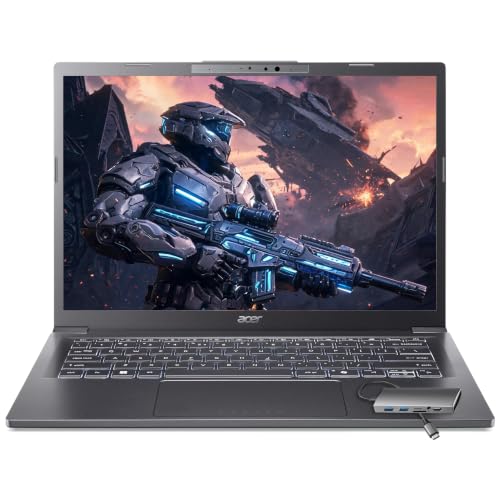
The Acer Aspire 14 Touch is the most balanced machine here. It has the memory, storage, graphics, and portability that photo editing asks for without committing to the bulk of a gaming laptop. The 14-inch touchscreen also makes quick retouching and image navigation feel more direct, particularly if you use stylus support as the listing describes.
Its 32GB of LPDDR5X memory is the most important number for a working photo library. That gives Lightroom or another editor more room for a catalog, browser tabs, exports, and background applications at the same time. The 1TB PCIe SSD provides fast application launches and a sensible place to keep active projects. It is a much more comfortable editing configuration than the 8GB systems lower in this list.
The Intel Core Ultra 7 258V processor includes a 47 TOPS NPU, while the Intel Arc 140V graphics use eight Xe cores. The NPU is aimed at local AI features such as background blur, auto-framing, and AI photo editing. The Arc graphics are also specified for GPU-assisted photo work and 1080p video editing. That makes this Acer a more capable creative machine than the HP OmniBook 3, while its 3.09-pound design is far easier to carry than the ASUS ROG Strix G16.
Acer includes Wi-Fi 6E and a USB hub with HDMI, USB-A, USB-C, SD card, and Ethernet connections. That is useful for photographers who move between a desk and a client location, since the supplied connectivity reduces the need to carry a collection of adapters. The weakness is the display information. The listing identifies it as an FHD touchscreen, but does not provide brightness or color coverage, so serious color-critical work should involve a calibrated external display. For mobile photographers who want the most complete setup in this group, this is the laptop we'd keep.
2. ASUS ROG Strix G16: Best Performance

Pros
- GeForce RTX 5060 graphics
- Core i7 14650HX processor
- 165Hz display with 3ms response time
- 16GB DDR5 memory
- 1TB PCIe Gen 4 SSD
Cons
- Heavier than the portable Acer options
- Gaming design is not subtle
- Display resolution is FHD+ rather than a higher-resolution panel
Best for: editors who use GPU-accelerated effects and want enough graphics power for creative work and gaming.
The ASUS ROG Strix G16 is the obvious performance specialist. It is built as a gaming laptop, but that same design gives it more graphics headroom than every other product here. The GeForce RTX 5060 laptop GPU, paired with the Intel Core i7 14650HX, is the configuration to choose when photo editing includes GPU-heavy filters, large effects stacks, or occasional video work.
The 16-inch display uses a 16:10 FHD+ panel with a 165Hz refresh rate and a 3ms response time. Those figures matter more for smooth scrolling and gaming than for still-image color work, but the 16:10 shape gives the editing interface a little more vertical breathing room than a conventional 16:9 screen. An ACR film is listed to improve contrast and reduce glare. The listing does not give color coverage or brightness, so a photographer should still treat an external calibrated monitor as the reference for final color decisions.
The 16GB of DDR5 memory is adequate for most photo workflows, and the 1TB PCIe Gen 4 SSD leaves useful room for applications, catalogs, and current projects. The ASUS ROG Strix G16 beats the Acer Aspire 14 Touch when the software can use its dedicated GPU. The Acer is the better travel companion, though, and its 32GB memory capacity is more attractive for a browser-heavy workflow with a large catalog open.
Cooling is a major part of this laptop's appeal. ASUS lists an end-to-end vapor chamber, tri-fan technology, and Conductonaut Extreme liquid metal on the chipset. Those components are intended to sustain performance under load, rather than letting a short burst of speed fade immediately. The tradeoff is a listed weight of about 5.84 pounds, plus the visual styling and RGB light bar that some offices may find distracting. Turn on Stealth Mode if you need a quieter appearance. This is the right pick for demanding editors who care more about graphics power than carrying comfort.
3. Acer Aspire 14 2TB: Best Storage
Pros
- 2TB PCIe SSD
- 32GB LPDDR5X memory
- Intel Arc 140V graphics
- Touchscreen with stylus support
- USB hub includes an SD card reader
Cons
- Display color specifications are not provided
- Integrated graphics trail the ASUS option
- Duplicate configuration makes the choice depend mainly on storage needs
Best for: photographers who keep a large local catalog and want a compact editing system.
The Acer Aspire 14 2TB is nearly the same idea as the first Acer, but it changes the decision by doubling the SSD capacity. That distinction matters if you keep RAW files, previews, exports, and active catalogs on the laptop instead of moving them to external storage after every project. A 2TB PCIe SSD gives this version much more breathing room for a working archive.
The core editing hardware remains strong. The Intel Core Ultra 7 258V is paired with 32GB of LPDDR5X memory and Intel Arc 140V graphics with eight Xe cores. The memory is particularly useful when a photo editor, file browser, cloud sync tool, and multiple browser tabs are open together. The Arc graphics are described as accelerating Lightroom and GPU effects, so this is not simply a storage upgrade attached to a weak office machine.
Like the other Acer, it has a 14-inch touchscreen and listed stylus support. The supplied USB hub adds HDMI, USB-A, USB-C, SD card, and Ethernet connections, making card transfers and desk setup less cumbersome. Wi-Fi 6E is also included. Its listed 3.09-pound weight and 0.7-inch thickness make it considerably easier to carry than the Dell and ASUS models.
The compromise is the same one found on the smaller-capacity Acer: the listing does not identify brightness or color coverage. That leaves uncertainty for final color-critical decisions, even though the rest of the hardware suits editing well. Choose this Acer over the Acer Aspire 14 Touch if you know your photo library will grow quickly. Choose the smaller SSD model if your projects live mainly on external or cloud storage.
4. HP OmniBook 5 AI: Best Large Display

Pros
- 16-inch 1920 x 1200 IPS display
- 300 nits brightness and anti-glare coating
- AMD Radeon 860M graphics
- 1TB SSD
- 50 TOPS NPU
Cons
- Listed color coverage is 62.5% sRGB
- 60Hz refresh rate
- The listed weight is 8 pounds
Best for: photographers who prefer a roomy screen and work mainly at a desk.
The HP OmniBook 5 AI makes a strong case for a larger editing surface. Its 16-inch 1920 x 1200 IPS LCD uses a 16:10 layout, so there is more vertical room for a photo canvas and tool panels than on a standard 16:9 display. The anti-glare coating helps in a bright room, and the listed 300 nits brightness is a useful step above the dimmer panels often found on basic laptops.
The display's limitation is clear in the specification: it covers 62.5% of the sRGB color space. That is not the sort of figure we would want to rely on for final professional color decisions without an external monitor. The 60Hz refresh rate is perfectly serviceable for still images, but it will not look as fluid as the ASUS ROG Strix G16 during fast scrolling or gaming.
Underneath, the Ryzen AI 7 350 has eight cores, 16 threads, and a boost speed up to 5.0GHz. Its 50 TOPS NPU supports local AI acceleration, while Radeon 860M graphics handle creative applications and general GPU work. The 16GB of memory is enough for many editing sessions, and the 1TB SSD gives room for a working catalog. It is not as flexible as either Acer Aspire 14 when traveling, but the larger screen is easier on the eyes at a permanent workstation.
HP adds Windows 11 Pro, Wi-Fi 6, Bluetooth 5.3, two USB-A ports, two USB-C ports, HDMI, and a headphone jack. The 1080p IR camera has a manual shutter, and Windows Hello facial recognition is listed for convenient sign-in. The awkward part is the listed 8-pound weight, which makes this a poor choice for frequent commuting despite its 0.73-inch thickness. If you work from one desk and plan to connect a calibrated monitor for final checks, the HP OmniBook 5 AI offers the most comfortable built-in workspace in the group.
5. Dell 16 Plus: Best Business Build

Pros
- 16-inch 16:10 touchscreen
- Intel Core Ultra 9 288V processor
- 32GB LPDDR5X memory
- Thunderbolt 4 and HDMI 2.1
- Wi-Fi 7
Cons
- The listed SSD is 1TB despite the product title's larger storage wording
- Display color coverage is not provided
- Integrated graphics are less suited to heavy GPU work than the ASUS
Best for: professionals who want a business-focused laptop with capable connectivity and touch input.
The Dell 16 Plus is a sensible bridge between office computing and creative work. Its 16-inch 16:10 touchscreen provides a broad working area, while the 1920 x 1200 resolution keeps text and interface controls comfortable. The 300-nit WVA display has ComfortView, which is intended to make long sessions easier on the eyes, but the listing does not provide color coverage. That makes an external reference display important for print or client-critical work.
The Core Ultra 9 288V has 12 cores and a listed boost speed up to 5.3GHz. Dell also lists an Intel Arc 140V GPU and an NPU supporting up to 48 TOPS. That combination should suit catalog management, retouching, exports, and AI-assisted features, although it does not have the dedicated graphics muscle of the ASUS ROG Strix G16. The 32GB LPDDR5X memory is a more comfortable fit than 16GB if you routinely keep several large applications open.
Connectivity is where Dell separates this model from many of the alternatives. It includes a USB-C port with DisplayPort 1.4 and Power Delivery, a Thunderbolt 4 port with DisplayPort 2.1 and Power Delivery, HDMI 2.1, a USB port, and a universal audio jack. Wi-Fi 7 and Bluetooth 5.3 are also listed. That makes it easy to build a desk around fast external storage and a second display. If you are considering a second screen, the amount of desk depth a larger panel needs is a practical part of the setup decision.
The Dell weighs 4.27 pounds and is listed at 0.67 inches thick, so it is portable without being genuinely light. One detail needs attention before ordering: the features specify 32GB of memory and a 1TB PCIe NVMe SSD, even though the product title mentions 96GB and 6TB. We would follow the more detailed feature information rather than assume the larger figures. This is a polished choice for a professional who wants a business laptop first and a capable editing system second.
6. Dell 16 AI Touch: Best Multitasking

Pros
- 64GB DDR5 memory
- 16-inch 1920 x 1200 touchscreen
- 1TB PCIe SSD
- USB-C with DisplayPort and Power Delivery
- Backlit keyboard and Wi-Fi 6
Cons
- Integrated AMD Radeon graphics
- Display color coverage is not provided
- Heavier than the compact Acer laptops
Best for: editors who keep large catalogs, browsers, and office applications open together.
The Dell 16 AI Touch is built around memory capacity. Its 64GB of DDR5 RAM is the largest clearly specified memory amount in this list, and that matters when a photo editor is only one part of a crowded workflow. Large catalogs, multiple browser windows, cloud tools, office applications, and background exports all benefit from having more memory available.
The 16-inch 1920 x 1200 display uses a 16:10 aspect ratio, IPS or WVA panel technology, 300 nits brightness, and ComfortView. Touch input supports navigation, drawing, and note-taking. Those details make it a comfortable general-purpose canvas, but the product information does not state color gamut or color accuracy. Photographers should not treat the panel as a calibrated reference simply because the resolution and brightness are useful.
The Ryzen 7 170 processor is paired with AMD Radeon graphics and a 16 TOPS NPU. The feature list positions it for photo editing, video playback, and content creation, though the integrated graphics are a clear step below the RTX 5060 in the ASUS. The Dell's advantage is not maximum filter performance. It is the ability to keep a lot of work open without immediately running out of memory.
Ports include USB-C with DisplayPort 1.4 and Power Delivery, two USB 3.2 Gen 1 ports, HDMI 1.4, and a headset jack. Wi-Fi 6, a 1080p webcam, a backlit keyboard, and a listed weight of 4.18 pounds round out the practical design. The Dell 16 Plus has the stronger business-oriented connectivity, while this version has more memory. Pick the Dell 16 AI Touch when multitasking is the pain point and your editing is mostly CPU-led rather than dependent on a dedicated GPU.
7. MacBook Neo 13: Best Compact Mac

Pros
- A18 Pro chip
- 13-inch Liquid Retina display
- Display supports 1 billion colors
- Up to 16 hours of listed battery life
- 1080p FaceTime HD camera
Cons
- 8GB unified memory
- 256GB SSD
- Small screen for detailed editing sessions
Best for: Apple users who want a compact laptop for everyday photo sorting and light editing.
The MacBook Neo 13 is the easiest laptop here to carry. Its aluminum enclosure weighs about 2.71 pounds, and Apple lists up to 16 hours of battery life. That combination suits photographers who edit between classes, travel stops, or client meetings rather than sitting at a desk all day.
The A18 Pro chip is the central attraction. Apple positions it for everyday applications and Apple Intelligence, and macOS runs the platform's native applications quickly. The 13-inch Liquid Retina display supports 1 billion colors, which should make photos look rich and gradients appear smoother than on the basic HP panels. The screen is still small for a dense editing interface, so a larger external display becomes appealing for long sessions.
The main constraint is the configuration: 8GB of unified memory and a 256GB SSD. That can work for selecting images, making adjustments, and exporting smaller projects, but it leaves less room for a large local catalog or many demanding applications at once. The Acer Aspire 14 Touch is a better Windows choice for heavier multitasking because it has 32GB of memory and a 1TB SSD. The MacBook Neo wins on portability and Apple ecosystem integration.
Apple also includes a 1080p FaceTime HD camera, a dual-microphone array, side-firing speakers, FileVault, Find My, and automatic security updates. Mac and iPhone features let users move photos and tasks between devices more easily. For photographers already invested in macOS, that convenience matters. For anyone who needs to store a large RAW library locally or use Windows-only tools, the limited memory and storage make this a selective purchase rather than a universal recommendation.
8. HP OmniBook 3 17.3-inch: Best Large Budget Screen

Pros
- 17.3-inch FHD IPS display
- Wide 178-degree viewing angles
- 512GB PCIe NVMe SSD
- Wi-Fi 6 and Bluetooth 5.4
- Listed battery life up to 14 hours and 15 minutes
Cons
- 8GB LPDDR5 memory
- Radeon 610M graphics
- Large chassis is less portable
Best for: casual editors who want a large screen for organizing and making simple adjustments.
The HP OmniBook 3 17.3-inch is about screen area rather than creative horsepower. Its 17.3-inch FHD IPS display provides a broad canvas for browsing a photo library and keeping editing controls visible. The listed 178-degree viewing angles are useful when the screen is shared, though the listing does not give brightness or color coverage.
The Ryzen 3 30 processor, Radeon 610M graphics, 8GB of LPDDR5 memory, and 512GB PCIe NVMe SSD form an entry-level configuration. That is enough for basic photo adjustments, web uploads, and everyday multitasking, but it is not the platform we would choose for large layered files or demanding AI effects. The Acer Aspire 14 Touch has four times the memory and a stronger Arc graphics solution, so it is the clear step up for serious editing.
HP lists battery life up to 14 hours and 15 minutes, with Fast Charge reaching 50% in approximately 45 minutes. Actual endurance depends on the application and display use, but the stated figure gives this large laptop a useful mobility advantage. Wi-Fi 6 and Bluetooth 5.4 handle wireless connections, while the FHD HDR camera and AI noise reduction make it better suited to calls than its basic creative hardware might suggest.
At 4.43 pounds, it is not a featherweight, but it is lighter than some of the larger models here. The weakness is the combination of 8GB memory and Radeon 610M graphics. A photo editor with a modest library may find the wide screen more useful than extra performance, while anyone working with RAW batches or layered compositions should move up to the Acer or HP OmniBook 5 AI. This HP is a comfortable basic desktop editor, not a professional workstation.
9. HP 14 Business: Best Lightweight Basic Pick

Pros
- 16GB DDR4 memory
- 14-inch compact design
- Windows 11 Pro
- Includes a 500GB external drive
- USB-C hub includes an SD card reader
Cons
- 128GB UFS internal storage
- Quad-core Intel N150 processor
- No dedicated graphics listed
Best for: students and casual photographers who need a compact Windows laptop for straightforward edits.
The HP 14 Business is a small, practical Windows laptop with an unusual storage arrangement. It has 16GB of DDR4 memory, 128GB of UFS internal storage, and a supplied 500GB external drive. That is more workable than the internal capacity alone suggests, but the external drive needs to stay available when a photo library grows.
Its Intel N150 is a quad-core processor with four threads, a 3.6GHz boost speed, and 6MB of L3 cache. The listing says it can handle photo and video editing applications, but there is no dedicated graphics processor specified. That puts it firmly in the basic-editing class. It can manage cropping, exposure changes, organization, and web publishing, but the Acer Aspire models are better suited to complex projects and GPU-assisted effects.
The 14-inch display keeps the chassis manageable, and the listed weight is 3.24 pounds. HP includes a 720p camera, dual-array microphones, Windows 11 Pro, Wi-Fi 6, and a bundle with a USB-C docking hub, SD and TF card readers, an HDMI connection, and a wireless mouse. Those extras make the laptop convenient for a student or home office, even though they do not change its modest processing ceiling.
The internal storage is the biggest concern. Keeping applications and an active catalog on 128GB leaves little flexibility, and moving files to the external drive introduces another object to carry. By comparison, the MacBook Neo has even less stated storage but a stronger platform, while the HP OmniBook 3 offers 512GB internally and a larger screen. Choose this HP for portability and simple work, not as a long-term home for a growing professional archive.
10. HP 17.3 Touch: Best Touch Workspace

Pros
- Large 17.3-inch touchscreen
- Anti-glare display
- Fingerprint reader
- Backlit keyboard with numeric keypad
- Wi-Fi 6 and Bluetooth 5.4
Cons
- 1600 x 900 display resolution
- 8GB memory
- 128GB listed storage
- No dedicated graphics listed
Best for: basic browsing, photo organization, and occasional light adjustments on a large touch display.
The HP 17.3 Touch offers the largest physical interface among the basic laptops here. The 17.3-inch touchscreen uses a 1600 x 900 resolution, a 16:9 aspect ratio, anti-glare treatment, and 250 nits brightness. Touch controls are useful for browsing and simple navigation, but the relatively low resolution gives a photo editor less room for a detailed canvas than the 1920 x 1200 displays on the HP OmniBook 5 and Dell models.
The listed configuration includes an Intel N-series quad-core processor and 8GB of RAM. HP also identifies 128GB of storage, while the product information lists 128GB eMMC. That is a tight amount of internal space for a photo collection, especially once applications and previews occupy part of it. There is no dedicated graphics processor listed, so this model belongs at the light-editing end of the roundup.
The practical features are better than the creative specifications. A full-size backlit keyboard has a number pad, and a fingerprint reader provides quick sign-in. The webcam has a shutter, while Wi-Fi 6 and Bluetooth 5.4 cover wireless connections. HP also includes USB-C, two USB-A ports, HDMI 1.4b, and a headset jack. At a listed 4.6 pounds, it is a substantial machine, but that is reasonable for a 17-inch laptop with a large touch panel.
Compared with the HP OmniBook 3 17.3-inch, this HP gives up resolution and SSD capacity while adding touch input, a fingerprint reader, and a keyboard with a number pad. The OmniBook 3 is the better fit for photo work because its FHD IPS display and 512GB PCIe SSD are more useful. Pick the HP 17.3 Touch only when the large touchscreen and basic office features matter more than editing speed or storage.

How to choose best laptops for photo editing
The right editing laptop balances the display, memory, storage, processor, graphics, and portability instead of chasing one impressive specification.
Display quality
A large screen makes it easier to keep the image visible alongside layers, tools, and a file browser. Resolution also matters. A 1920 x 1200 display gives an editing workspace more room than 1600 x 900, while a 16:10 aspect ratio adds useful vertical space.
Color information is the critical question. Brightness and wide viewing angles improve comfort, but they do not prove accurate color. Look for stated color coverage, then use a calibrated external display when final work must match prints or another screen. The HP OmniBook 5 lists 62.5% sRGB coverage, while several products do not provide a gamut figure at all.
Memory
Memory determines how comfortably a laptop handles a photo editor alongside catalogs, browsers, cloud software, and exports. 8GB is a limitation for modern photo workflows. 16GB is a reasonable starting point, while 32GB gives a much better buffer for large files and multitasking. The Dell 16 AI Touch reaches 64GB, which makes it the specialist choice for keeping a crowded workspace open.
Processor and graphics
A modern processor keeps imports, previews, and exports responsive. Dedicated graphics can matter when an editor uses GPU acceleration for effects, masking, AI tools, or video features. The ASUS ROG Strix G16 is the only model here with a GeForce RTX 5060, so it has a clear advantage in graphics-heavy workloads.
Integrated graphics are still suitable for many adjustments. The Intel Arc 140V in the Acer Aspire models is a stronger integrated solution than the Radeon 610M in the HP OmniBook 3. Judge the graphics hardware by the applications you use, not by the laptop's marketing language.
For photo editing, an accurate display and enough memory usually matter more than a fast gaming-style refresh rate.
Storage
Photo files grow quickly, especially when RAW originals, previews, exports, and backups share one drive. A 1TB SSD is a comfortable starting point for an active catalog. The Acer Aspire 14 2TB is the best fit for photographers who want more room without carrying an external drive.
The HP 14 Business takes another approach with 128GB of internal UFS storage and a supplied 500GB external drive. That can work, but it makes the workflow less self-contained. Leave room for the operating system, editing applications, catalogs, and temporary files before judging usable capacity.
Portability and connections
A lightweight laptop makes it easier to edit on location, but a larger screen can be more comfortable for long sessions. The Acer Aspire 14 models weigh 3.09 pounds, while the 16-inch Dell models are around 4.2 pounds. The ASUS is much heavier because of its gaming hardware and cooling system.
Ports matter when transferring from camera cards or connecting a calibrated monitor. USB-C with DisplayPort, HDMI, and an SD card reader reduce dongle dependence. If video is also part of the workflow, the hardware demands of editing longer video projects deserve a separate look because sustained graphics performance becomes more important.

Frequently asked questions
How much RAM does a photo editing laptop need?
16GB is a reasonable starting point for ordinary editing, while 32GB is more comfortable for large catalogs and multitasking. The 8GB configurations in the MacBook Neo, HP OmniBook 3, and HP 17.3 Touch leave less room for demanding projects. The 64GB Dell is the strongest option for keeping many applications open.
Is a touchscreen useful for photo editing?
A touchscreen can make navigation, cropping, and direct adjustments feel more natural. It is most useful when the laptop also supports stylus input, as the Acer Aspire models do. Touch does not replace a color-accurate display, so it should be treated as an interaction feature rather than proof of editing quality.
Do photo editors need a dedicated graphics card?
Not always. Basic adjustments and catalog work can run on integrated graphics, while GPU acceleration becomes more useful for complex effects, AI tools, and video features. The ASUS ROG Strix G16 has the strongest graphics hardware here with its GeForce RTX 5060.
Is a 14-inch laptop large enough for editing photos?
A 14-inch laptop can work well if it has a high-quality display and enough memory. The Acer Aspire 14 Touch is particularly practical because its 32GB memory, 1TB SSD, and touchscreen offset the smaller workspace. A 16-inch or 17.3-inch model is more comfortable when editing for long periods at a desk.
Does SSD storage matter for photo editing?
Yes. An SSD helps applications launch, catalogs load, and files move more quickly than older mechanical storage. Capacity matters too, since RAW files and previews can consume space quickly. The 2TB Acer Aspire 14 gives the most internal room among the clearly specified configurations.
Can a laptop display be trusted for color correction?
Only when its color coverage and calibration are suitable for the work. Several laptops in this list do not provide a color gamut specification, and the HP OmniBook 5 lists 62.5% sRGB coverage. For print or client-critical work, use a calibrated external monitor and treat the laptop screen as a convenient editing surface.
The bottom line
The Acer Aspire 14 Touch is our top choice among the Best laptops for photo editing because it combines 32GB of memory, a 1TB SSD, Intel Arc graphics, a touchscreen, and a portable design. The ASUS ROG Strix G16 is the better specialist pick when GPU performance matters more than weight, while the Acer Aspire 14 2TB makes more sense for photographers with a large local library.
For a desk-based setup, the HP OmniBook 5 AI offers the most useful large built-in workspace, though its listed color coverage means a calibrated monitor remains important. If you are still deciding between portability and a larger screen, choose the Acer Aspire 14 Touch for travel and the HP OmniBook 5 AI for a mostly stationary workflow.
If you are undecided, buy the Acer Aspire 14 Touch unless your editing software specifically benefits from the ASUS graphics card.
As an Amazon Associate we earn from qualifying purchases.