

A laptop that handles spreadsheets, video calls, travel, and demanding software rarely comes in one neat shape. A gaming machine can be powerful but heavy, while a thin office model may struggle when multitasking gets serious. This Best Lenovo Laptop guide separates those trade-offs instead of treating every Lenovo notebook as interchangeable.
We picked eight Lenovo laptops covering gaming, business, school, and general productivity. The Lenovo Legion LOQ 15 is our top pick for its unusually broad mix of gaming performance, fast display, useful storage, and practical design. The rest range from a highly equipped Legion 5i and enterprise-ready ThinkPad to straightforward everyday machines.
Comparison table
| # | Product | Award | Processor | Display | Memory | Storage | Best for |
|---|---|---|---|---|---|---|---|
| 1 | Lenovo Legion LOQ 15 | Best overall | Core i7-13650HX, RTX 5050 | 15.6-inch FHD IPS, 144Hz | 16GB | 1TB | Gaming and demanding mixed use |
| 2 | Lenovo 15.6-inch Business Laptop | Best lightweight office laptop | Intel N100 | 15.6-inch FHD, 250 nits | 8GB DDR5 | 256GB PCIe 4.0 NVMe | Travel and basic office work |
| 3 | Lenovo 16-inch Core i7 Laptop | Best large-screen productivity laptop | Core i7-13620H | 16-inch WUXGA IPS, 300 nits | 16GB DDR5 | 1TB PCIe 4.0 NVMe | Multitasking and content work |
| 4 | Lenovo 16-inch Core i5 Business Laptop | Best numeric-keypad laptop | Core i5-13420H | 16-inch WUXGA IPS, 300 nits | 16GB DDR5 | 512GB PCIe SSD | Spreadsheets and office work |
| 5 | Lenovo ThinkPad L16 Touch | Best business laptop | Core Ultra 5 225U | 16-inch WUXGA IPS touchscreen, 400 nits | 32GB DDR5 | 1TB SSD | Business travel and enterprise work |
| 6 | Lenovo Legion 5i OLED | Best gaming display | Core i7-14700HX, RTX 5070 | 15-inch 2.5K OLED, 165Hz | 16GB | 1TB | High-end gaming and creation |
| 7 | Lenovo V15 Ryzen 5 | Best ports and keypad | Ryzen 5 5500U | 15.6-inch FHD | 16GB | 512GB PCIe NVMe | Practical office setups |
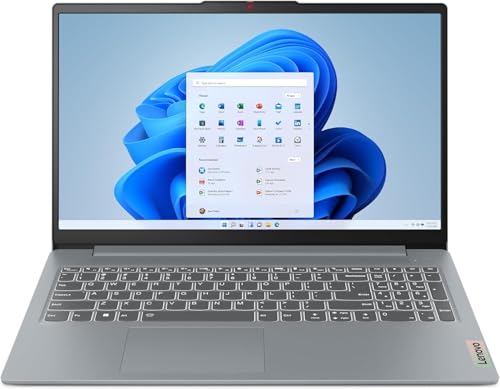
| 8 | Lenovo IdeaPad Slim 3 Touch | Best touchscreen everyday laptop | Ryzen 7 5825U | 15.6-inch FHD touchscreen | 16GB DDR4 | 512GB SSD | Home and school use |
1. Lenovo Legion LOQ 15: Best Overall

Pros
- Strong Core i7 and RTX 5050 combination
- 144Hz IPS display with G-Sync
- 1TB storage and 16GB memory
- Cooling system designed for sustained workloads
- Rapid Charge Pro reaches 70% in under 30 minutes
Cons
- Heavier than the office-focused Lenovo models
- FHD resolution is less sharp than the Legion 5i OLED
- Gaming hardware brings more bulk to daily travel
Best for: someone who wants one Lenovo laptop for serious gaming and demanding everyday work.
The Lenovo Legion LOQ 15 is the most convincing all-rounder here because it does not force a choice between capable gaming and sensible daily usability. It has the purposeful shape of a gaming laptop, but the aluminum cover and restrained Luna Grey finish keep it from looking like a portable light show. At 5.28 pounds, it is not a featherweight, though it remains manageable in a backpack when gaming power matters more than minimal carry weight.
Its Intel Core i7-13650HX processor gives the LOQ the headroom for demanding games, heavier multitasking, and creative applications. The GeForce RTX 5050 handles the graphics workload, while Lenovo's AI Engine+ is intended to tune CPU, GPU, and system settings for smoother play. The practical detail is the cooling system: Hyperchamber Cooling uses turbo fans, copper heat pipes, and a sealed thermal design to help maintain performance when the machine is working hard.
The 15.6-inch FHD IPS screen runs at 144Hz. That refresh rate makes fast camera movement and competitive play look more fluid than a standard office panel, and G-Sync is designed to reduce tearing, stutter, and input lag. The resolution is sensible for the RTX 5050, but the screen size and viewing distance that suit a gaming desk are still worth considering if this will spend most of its time connected to a larger display. The full keyboard, white backlight, and soft-landing switches also make it a better writing machine than many gaming designs.
The Legion 5i OLED below has the superior panel and a more powerful RTX 5070, while the LOQ is easier to justify for someone who wants a balanced machine rather than the highest graphical ceiling. Its weakness is portability: the 5.28-pound chassis and gaming-oriented cooling are obvious in a commuter bag. Skip it if you mainly write, browse, and attend calls. For a buyer who wants a single Lenovo notebook to cover games, school, creation, and regular office work, this is the one we'd keep.
2. Lenovo 15.6-inch Business Laptop: Best Lightweight Office Laptop

Pros
- 15.6-inch anti-glare FHD screen
- Wi-Fi 6 and Gigabit Ethernet
- Two USB-C ports with display and power support
- Privacy shutter and TPM 2.0
- Listed at 3.33 pounds
Cons
- 8GB memory limits heavier multitasking
- 256GB storage fills faster than the larger drives here
- Intel N100 is aimed at basic workloads
Best for: commuters, students, and home-office users with straightforward workloads.
The Lenovo 15.6-inch Business Laptop is the uncomplicated choice in this group. Its Intel N100 processor, 8GB of DDR5 memory, and 256GB PCIe 4.0 NVMe SSD are aimed at documents, browser work, video conferencing, and ordinary productivity software. It should feel responsive for those jobs, but this is not the laptop to choose for sustained creative workloads or a large number of demanding applications.
The 15.6-inch FHD display uses a 1920 by 1080 resolution and a 250-nit anti-glare finish. That combination suits documents and spreadsheets in an indoor office, with the anti-glare coating helping under overhead lights. The brightness is modest, so a bright room or outdoor setting will expose its limits sooner than the 400-nit ThinkPad L16.
Connectivity is unusually complete for a compact business machine. There are two USB-A 3.2 ports, two USB-C ports with Power Delivery and DisplayPort, HDMI 1.4b, an audio jack, Wi-Fi 6, Bluetooth 5.2, and Gigabit Ethernet. The 720p webcam has a physical privacy shutter, while firmware TPM 2.0 and a Kensington lock slot add useful office safeguards. These are the details that matter when a laptop has to move between a desk, classroom, and conference room.
Its listed 3.33-pound weight makes it one of the more travel-friendly options, although the product information also describes a slim 0.78-inch profile rather than giving a full premium ultraportable design. The Lenovo IdeaPad Slim 3 Touch offers more processor muscle and a touchscreen, while this model wins on office-focused connectivity and security. Choose it for email, documents, calls, and remote learning. Skip it if your routine includes heavy photo work, video editing, or dozens of demanding tabs.
3. Lenovo 16-inch Core i7 Laptop: Best Large-Screen Productivity Laptop

Pros
- Ten-core Core i7-13620H processor
- 16:10 WUXGA screen adds vertical workspace
- 16GB DDR5 memory and 1TB SSD
- SD card reader and versatile USB-C port
- 3.70-pound class design
Cons
- 45% NTSC gamut is not aimed at color-critical work
- 300 nits is less suitable for bright environments
- No discrete graphics listed
Best for: professionals and students who want a roomy screen for multitasking.
The Lenovo 16-inch Core i7 Laptop is built around the simple pleasure of having more room to work. Its 16-inch 16:10 panel gives documents and web pages extra vertical space compared with a conventional 16:9 screen, which means less scrolling through spreadsheets and longer pages. The 3.70-pound design is still reasonable for a large laptop, especially when the extra screen area replaces some need for an external monitor.
The Core i7-13620H brings 10 cores, split between six performance cores and four efficiency cores, with speeds up to 4.9GHz and a 24MB cache. That is a substantial step above the Intel N100 in the smaller business model. It is suited to large spreadsheets, many browser tabs, office applications, and lighter content creation. The 16GB of DDR5 memory supports that multitasking, while the 1TB PCIe 4.0 NVMe SSD leaves considerably more room for projects and media than a 256GB drive.
The 1920 by 1200 IPS display has a 300-nit brightness rating, anti-glare coating, and a 45% NTSC color gamut. The resolution and aspect ratio are excellent for office layout, but the color coverage is a reminder that this is a productivity screen rather than a professional editing panel. Ports include two USB-A 5Gbps connections, USB-C 5Gbps with Power Delivery and DisplayPort 1.2, HDMI 1.4, an SD card reader, and a headphone jack. Wi-Fi 6, Bluetooth 5.2, a 720p webcam, and a privacy shutter complete the useful daily package.
The Lenovo 16-inch Core i5 Business Laptop is a more focused alternative with a numeric keypad, while this Core i7 model offers more storage and a stronger processor for mixed workloads. It also includes a full-size keyboard and a 75 by 120mm precision touchpad, details that help during long sessions. The main limitation is the display's color range and moderate brightness. Pick it when screen area and multitasking matter more than gaming or color-critical creation, and consider how much storage and memory everyday work really needs before choosing a smaller configuration.
4. Lenovo 16-inch Core i5 Business Laptop: Best Numeric-Keypad Laptop

Pros
- Core i5-13420H with eight cores and 12 threads
- 16GB DDR5 memory
- WUXGA IPS display with extra vertical space
- Numeric keypad for data entry
- HDMI, USB-C, USB-A, and SD card reader
Cons
- 512GB storage is smaller than the top large-screen pick
- 300-nit screen is best indoors
- Not designed for modern gaming
Best for: accountants, students, and office users who enter numbers all day.
The Lenovo 16-inch Core i5 Business Laptop gets the important office detail right: a full-size keyboard with a numeric keypad. That matters more than a flashy design when the daily routine involves invoices, inventory, accounting, or long spreadsheet sessions. Its 16-inch chassis provides enough room for that keypad without making the main keyboard feel cramped.
The Core i5-13420H has eight cores and 12 threads, with speeds up to 4.6GHz. It is a good fit for office software, video calls, browser-heavy work, and light content creation. Its 16GB of DDR5 memory is more comfortable than the 8GB in the compact Lenovo 15.6-inch Business Laptop, particularly when a meeting, spreadsheet, and several browser windows are open together. The 512GB PCIe SSD provides fast boot and file access, though it offers less headroom than the 1TB drives in the leading models.
The 16-inch WUXGA IPS screen uses 1920 by 1200 resolution, anti-glare treatment, and 300-nit brightness. Its 16:10 shape gives documents a little more vertical room, and the privacy-shuttered 720p webcam is a sensible business touch. Wireless connections include Wi-Fi 6 and Bluetooth 5.2. The port selection includes two USB-A ports, USB-C with Power Delivery and DisplayPort, HDMI 1.4, an SD card reader, and a headphone jack.
The Lenovo 16-inch Core i7 Laptop is the faster option for heavier multitasking and includes twice the listed storage, but the Core i5 model makes a stronger case for data entry because of its numeric keypad. It weighs about 3.70 pounds, so it remains portable enough for school or office travel. The compromise is that it lacks the graphics hardware for serious gaming and its screen is not built for bright outdoor use. Choose it when typing numbers efficiently is central to the job, not as an all-purpose gaming machine.
5. Lenovo ThinkPad L16 Touch: Best Business Laptop

Pros
- 32GB DDR5 memory and 1TB SSD
- Bright 400-nit touchscreen
- Core Ultra 5 processor with 12 cores
- Thunderbolt 4 and HDMI 2.1
- Fingerprint reader, TPM 2.0, and Windows 11 Pro
Cons
- Nearly 3.96 pounds
- Resealed and upgraded by the listed computer seller
- More business-focused than entertainment-focused
Best for: professionals who need strong connectivity, security, and multitasking.
The Lenovo ThinkPad L16 Touch is the most complete business machine here. It combines a large touchscreen with 32GB of DDR5 memory, a 1TB SSD, Windows 11 Pro, and a port selection that makes it comfortable in a fixed office or a mobile workstation. It is not the lightest laptop in this roundup, but it is built around the needs of people who connect displays, docks, networks, and security accessories.
Its Intel Core Ultra 5 225U processor has 12 cores and reaches up to 4.8GHz. The available memory is generous for office multitasking, programming, video calls, and AI-assisted workflows, while the 1TB SSD gives projects and local files plenty of breathing room. The listing says the computer has been resealed to upgrade the memory and SSD, with a three-year warranty from the listed computer seller on those upgrades and a one-year Lenovo warranty on the remaining components. That arrangement deserves attention before ordering.
The 16-inch WUXGA IPS touchscreen reaches 400 nits and includes anti-glare treatment and Eyesafe Certified 2.0. It should be easier to read in brighter rooms than the 250-nit Lenovo 15.6-inch Business Laptop. Two Thunderbolt 4 ports, two USB-A 3.2 ports, another USB-A 2.0 port, Ethernet, HDMI 2.1, and a headphone combo jack cover a wide range of desk setups. The machine can support three external monitors through HDMI or Thunderbolt, and its 5MP IR camera adds facial recognition alongside a privacy shutter.
The ThinkPad L16 Touch is a better business tool than the Lenovo V15 Ryzen 5 when security, external displays, and newer connectivity matter. The V15 counters with a simpler design and numeric keypad, but the ThinkPad has the stronger professional feature set, including a fingerprint reader, TPM 2.0, a backlit keyboard, and Windows 11 Pro. Its weight and resealed upgrade configuration mean it is not for someone seeking the simplest thin-and-light purchase. For business travel, remote work, and demanding office administration, it is the most capable choice.
6. Lenovo Legion 5i OLED: Best Gaming Display

Pros
- Core i7-14700HX and GeForce RTX 5070
- 2.5K PureSight OLED display
- 165Hz refresh rate
- AI Engine+ for games and creative apps
- USB Type-C rapid charging to 70% in under 30 minutes
Cons
- 4.4-pound chassis is still substantial
- 16GB memory is less generous than the ThinkPad's 32GB
- OLED and high-end graphics may be unnecessary for office work
Best for: gamers and creators who want a premium laptop screen.
The Lenovo Legion 5i OLED is the specialist pick, and its display is the reason to choose it. The 15-inch PureSight OLED panel runs at 2.5K WQXGA resolution and 165Hz, giving games a sharper image and smoother movement than the FHD 144Hz panel on the Legion LOQ 15. OLED also gives this machine a more cinematic feel for films and a more spacious canvas for creative work.
The Intel Core i7-14700HX is built for heavy gaming and creation workloads, while the GeForce RTX 5070 brings the graphics capability to match the higher-resolution screen. Lenovo's AI Engine+ is designed to increase frames per second in demanding games and reduce rendering times in creative applications. The 16GB memory and 1TB storage are sensible for a gaming notebook, though the ThinkPad L16 Touch has more memory for users who keep many professional applications open at once.
Cooling uses Legion Coldfront: Hyper, with fans directing air over important components, copper heat pipes, and aluminum heat sinks. The machine weighs 4.4 pounds and measures 13.58 by 10.05 by 0.85 inches, so it is more portable than a large desktop replacement but still clearly a performance laptop. Rapid charging through USB Type-C reaches 70% in under 30 minutes, and the included three months of PC Game Pass adds a straightforward way to explore a broad game library.
The Legion LOQ 15 is the more balanced recommendation because its FHD panel matches its graphics hardware well and its design is less extravagant. The Legion 5i OLED is the one to buy when screen quality and graphical headroom come first. Its weakness is that this premium capability is wasted on someone who mainly edits documents, and 16GB memory is not unusually expansive in this group. Choose it for high-refresh gaming, streaming, and creative work where the OLED panel can earn its place.
7. Lenovo V15 Ryzen 5: Best Ports and Keypad

Pros
- Six-core Ryzen 5 5500U
- 16GB memory and 512GB SSD
- HDMI and RJ45 Ethernet
- Numeric keypad
- Windows 11 Pro
Cons
- Older processor platform
- Basic 15.6-inch FHD screen
- No USB-C display or power details listed
Best for: office users who need Ethernet, HDMI, and a numeric keypad.
The Lenovo V15 Ryzen 5 is a practical office laptop with no interest in showing off. Its six-core, 12-thread AMD Ryzen 5 5500U reaches up to 4.0GHz and is paired with 16GB of memory. That is a solid combination for documents, web work, calls, and general multitasking, although the processor is from an older generation than the Intel chips in the newer business models.
The 512GB PCIe NVMe SSD should make Windows startup and application loading feel quicker than a mechanical drive, with enough space for ordinary work files. The 15.6-inch display runs at 1920 by 1080, a familiar resolution for office applications and streaming. The product information does not provide a brightness or panel technology specification, so buyers who care about viewing comfort in bright rooms should look to the models with stated anti-glare and brightness ratings.
The V15's strongest feature is its physical layout. It includes a numeric keyboard, HDMI, RJ45 Ethernet, USB 3.0 Type-A, USB 2.0 Type-A, USB Type-C, a headphone and microphone combo jack, and Wi-Fi. Ethernet is valuable for a fixed office or a home desk where stable wired networking matters, while HDMI makes connecting a monitor or projector simple. Windows 11 Pro adds business-oriented features such as device management and Active Directory support.
The Lenovo 16-inch Core i5 Business Laptop has a newer processor and a larger 16:10 screen, but the V15 remains appealing when straightforward ports and numeric entry are more important than display area. Its main drawback is the lack of detailed screen information and its older Ryzen platform. It is a sensible fit for an office desk, small business, or home setup. Skip it if you need a bright touchscreen, Thunderbolt, or current gaming graphics.
8. Lenovo IdeaPad Slim 3 Touch: Best Touchscreen Everyday Laptop
Pros
- Ryzen 7 5825U with eight cores
- 15.6-inch FHD touchscreen
- 16GB DDR4 memory
- 512GB SSD
- Wi-Fi 6 and Bluetooth 5.2
Cons
- Product details provide limited supporting specifications
- Listed weight is about 6.99 pounds
- Integrated Radeon graphics are not intended for demanding games
Best for: home and school users who want touch input and capable everyday performance.
The Lenovo IdeaPad Slim 3 Touch is the everyday option for buyers who genuinely want to tap, scroll, and annotate directly on a laptop screen. Its 15.6-inch FHD display uses a 1920 by 1080 resolution, while the AMD Ryzen 7 5825U provides eight cores for general productivity, schoolwork, browsing, and video calls. It is a more capable starting point than the Intel N100 machine when several applications need to stay open.
The configuration includes 16GB of DDR4 memory and a 512GB SSD. That gives it a comfortable baseline for office applications, browser tabs, and local documents. AMD Radeon Graphics are included, but there is no discrete GPU listed, so this belongs with everyday laptops rather than the Legion gaming models. Wi-Fi 6 and Bluetooth 5.2 provide modern wireless connections, and the 720p HD camera covers basic video meetings.
The feature information supplied for this listing is sparse, so there are fewer confirmed details about brightness, ports, keyboard layout, and battery behavior than we have for the business machines. The product information lists a weight of about 6.99 pounds, which is unusually heavy for a laptop described as Slim and makes the physical dimensions especially important to check before carrying it regularly. Windows 11 Home keeps the software side simple for home and school use.
The Lenovo V15 Ryzen 5 offers Windows 11 Pro, Ethernet, and a numeric keypad, while the IdeaPad counters with a newer-feeling everyday profile, a touchscreen, and a stronger Ryzen 7 designation. The missing display and port details are the main reason to choose it carefully rather than automatically. It suits someone who values touch input and needs a general-purpose laptop. If you need verified business connectivity or frequent travel, the ThinkPad L16 Touch is the safer fit.

How to choose best lenovo laptop
The right Lenovo laptop depends less on the logo and more on the workload, screen, memory, and connections you will use every day.
Processor and graphics
The processor determines how quickly the laptop handles applications, multitasking, and sustained workloads. Intel Core i7 and Core i5 H-series chips in this group are suited to heavier work than the Intel N100, while the Ryzen 5 5500U and Ryzen 7 5825U are sensible general-purpose options. For gaming, a discrete GPU matters more than processor branding alone. The Legion LOQ 15 has an RTX 5050, while the Legion 5i OLED steps up to an RTX 5070.
Screen size and panel
A 16-inch 16:10 display gives spreadsheets and documents more vertical space than a standard 15.6-inch 16:9 panel. Brightness matters in rooms with strong daylight, and the ThinkPad L16 Touch has the highest stated brightness at 400 nits. Gamers should look at refresh rate and response characteristics, while creators may prefer the Legion 5i OLED's 2.5K resolution and OLED panel. A touchscreen is useful for direct navigation, but it does not automatically make a screen better for long typing sessions.
Memory and storage
Memory affects how many applications and browser tabs can stay open without slowdowns. The 8GB Lenovo 15.6-inch Business Laptop is suited to basic work, while 16GB is the more comfortable general-purpose starting point. The ThinkPad L16 Touch goes to 32GB for professional multitasking. Storage affects how much room you have for games, media, and projects. A 1TB SSD gives substantially more breathing room than a 256GB drive.
Ports and wireless connections
Check the ports before buying if the laptop will replace a desk computer. HDMI is useful for a monitor or projector, Ethernet helps in fixed offices, and an SD card reader is convenient for cameras and file transfers. Thunderbolt 4 on the ThinkPad L16 Touch supports more demanding dock and display setups. Wi-Fi 6 appears on several models, but the V15 remains attractive if a built-in RJ45 port is essential.
Buy for the workload you repeat every week, not the specification you might use once.
Keyboard, security, and operating system
A numeric keypad is valuable for accounting and spreadsheet entry, but it can change the feel and width of the keyboard. Business features such as a privacy shutter, fingerprint reader, TPM 2.0, and Windows 11 Pro matter when the laptop handles company data. For a wider look at office-focused trade-offs, the features that matter in a work laptop are more useful than a generic performance ranking.

Frequently asked questions
Which Lenovo laptop is best for gaming?
The Lenovo Legion LOQ 15 is the strongest all-round gaming pick because it combines a Core i7-13650HX processor, RTX 5050 graphics, a 144Hz FHD IPS display, G-Sync, and 1TB storage. The Lenovo Legion 5i OLED is the higher-end choice for buyers who want an RTX 5070 and a sharper 165Hz OLED screen.
Which Lenovo laptop is best for business work?
The Lenovo ThinkPad L16 Touch is the most complete business model here. It has 32GB DDR5 memory, a 1TB SSD, Windows 11 Pro, a fingerprint reader, TPM 2.0, Thunderbolt 4, Ethernet, and a 5MP IR camera with a privacy shutter.
Is 8GB memory enough for a Lenovo laptop?
Eight gigabytes can handle documents, email, light browsing, and video calls. It is less comfortable for many browser tabs, simultaneous meetings, large spreadsheets, and creative applications. The 16GB configurations in this roundup are the safer choice for a laptop intended to last through changing workloads.
Do any of these Lenovo laptops have a touchscreen?
Yes. The Lenovo ThinkPad L16 Touch has a 16-inch WUXGA IPS touchscreen, and the Lenovo IdeaPad Slim 3 Touch has a 15.6-inch FHD touchscreen. The other listed models are described with standard displays rather than touchscreens.
Which Lenovo laptop has a numeric keypad?
The Lenovo 16-inch Core i5 Business Laptop and Lenovo V15 Ryzen 5 both include numeric keypads. That layout is especially useful for accounting, inventory, invoicing, and spreadsheet-heavy work.
Is the Lenovo Legion LOQ suitable for school?
It can be, especially for students who also want to play games or use demanding applications. Its 5.28-pound weight and gaming cooling system make it less convenient for daily carrying than the smaller business models, so students focused only on notes and documents may prefer a lighter option.

The bottom line
The Best Lenovo Laptop for the widest range of buyers is the Lenovo Legion LOQ 15. Its RTX 5050 graphics, Core i7-13650HX processor, 144Hz G-Sync display, 16GB memory, and 1TB storage give it the flexibility to handle gaming, creation, and everyday work without the compromises of a basic office machine.
For professional users, the Lenovo ThinkPad L16 Touch is the better choice. Its 32GB memory, bright touchscreen, Windows 11 Pro, business security, and extensive connectivity make it more suitable for a managed work environment. The Lenovo Legion 5i OLED is the specialist alternative for buyers who care most about high-end gaming and a vivid 2.5K OLED panel.
If you are undecided, choose the LOQ for mixed use, the ThinkPad for business, and the Legion 5i OLED for display-led gaming.
As an Amazon Associate we earn from qualifying purchases.