

A keyboard can make a desk feel wrong within minutes. Flat keys may leave your wrists tense, a compact layout can hide the number pad, and a wireless combo may force you to compromise on the mouse. The Best best logitech keyboard picks below cover those differences instead of treating every Logitech board as interchangeable.
We chose the MX Keys S as the strongest all-rounder for quiet office work, multi-device use, and polished everyday typing. The rest of the list ranges from the tactile MX Mechanical and split Ergo K860 to gaming-focused, ergonomic, and straightforward keyboard and mouse combos.
Comparison table
| # | Product | Award | Connection | Layout | Best for |
|---|---|---|---|---|---|
| 1 | Logitech MX Keys S | Best overall | Bluetooth or Logi Bolt | Full size, low profile | Quiet, precise office typing |
| 2 | Logitech MX Mechanical | Best mechanical | Bluetooth or Logi Bolt | Full size, low profile | Tactile wireless typing |
| 3 | Logitech Ergo K860 | Best split design | Bluetooth or USB receiver | Split full size | Wrist and forearm comfort |
| 4 | Logitech MK270 Combo | Best simple combo | 2.4 GHz USB receiver | Full size | Basic desktop setups |
| 5 | Logitech G213 Prodigy | Best wired gaming | USB wired | Full size | RGB gaming and media control |
| 6 | Logitech Signature Slim K950 | Best slim wireless | Bluetooth or Logi Bolt | Full size, slim | Quiet multi-platform use |
| 7 | Logitech MK850 Combo | Best comfort combo | Bluetooth or USB receiver | Full size | Keyboard and mouse multitasking |
| 8 | Logitech MX Keys S Combo | Best keyboard and mouse set | Bluetooth or Logi Bolt | Full size, low profile | Premium productivity setups |
| 9 | Logitech Wave Keys | Best gentle ergonomics | Bluetooth or Logi Bolt | Wavy full size | Easier wrist positioning |
| 10 | Logitech MK345 Combo | Best palm-rest combo | 2.4 GHz USB receiver | Full size | Quiet home and office typing |
1. Logitech MX Keys S: Best Overall

Pros
- Fluid, quiet laptop-style typing
- Backlighting responds to approaching hands
- Connects to up to three devices
- USB-C charging and long battery life
- Smart Actions add useful shortcuts
Cons
- Low-profile feel is not for people who want tall mechanical keys
- Backlighting reduces the stated battery life
- No bundled mouse in this version
Best for: people who want a refined wireless keyboard for work across several computers.
The Logitech MX Keys S is the keyboard we would keep on a shared work desk. Its keys have a laptop-like profile, but the spherical dish on each key gives your fingertips a clear landing spot. The result is quiet and controlled rather than mushy, with a solid feel that suits long documents, email, and ordinary spreadsheet work. Its 18-inch length and 6-inch width give it a familiar full-size footprint without the bulk of a tall mechanical board.
Backlighting is one of the details that makes this model feel more considered than a basic wireless keyboard. The keys illuminate as your hands approach and adapt to the surrounding light, with further controls available in Logi Options+. That is useful in a dim room, although the keyboard is rated for up to 10 days on a full charge with the backlight in use. Turn the backlighting off and Logitech states up to five months of battery life. USB-C charging makes topping it up straightforward.
The MX Keys S can pair with up to three devices through Bluetooth Low Energy or the included Logi Bolt receiver, and it works with Windows, macOS, and Linux. The device switching is a strong reason to choose it over the Signature Slim K950, especially if you want more deliberate key shaping and illumination. It also supports Smart Actions in Logi Options+, allowing one keystroke to trigger a sequence of actions. Users who already have a compatible MX mouse can use Logitech's cross-computer tools to move text and files between Windows and macOS computers.
There are limits. This is not the board for someone who wants the physical snap of the MX Mechanical, and the low profile can feel too restrained if you prefer deep key travel. It also arrives as a keyboard alone, unlike the MX Keys S Combo. For anyone who wants quiet, accurate typing, flexible device switching, and useful illumination without a split ergonomic layout, this remains the most balanced pick.
2. Logitech MX Mechanical: Best Mechanical

Pros
- Tactile quiet mechanical switches
- Low-profile full-size layout
- Backlighting adjusts automatically
- Pairs with up to three devices
- USB-C charging
Cons
- Larger and taller than the MX Keys S
- Mechanical feedback will not suit every office
- Backlighting affects battery endurance
Best for: writers, developers, and office users who want tactile feedback without a tall gaming board.
The Logitech MX Mechanical is the natural choice for anyone who likes to feel a key reset beneath their fingers. Its tactile quiet switches provide a noticeable bump without the sharp noise associated with many conventional mechanical keyboards. The low-profile design keeps the full-size board closer to a laptop posture than a traditional desktop mechanical model, though its 2.1-inch height is still greater than the MX Keys S.
That distinction matters while typing. The MX Keys S is smoother and more discreet, while the MX Mechanical gives each press a more obvious point of confirmation. The tactile response helps when entering long passages or code because your fingers receive feedback before the next keypress. It is still a full-size layout, so the number pad, arrow keys, and function row remain available.
The keyboard connects to up to three devices through Bluetooth Low Energy or Logi Bolt. Its backlit keys wake when your hands approach and adjust to changing light, and Logitech quotes up to 15 days of use with illumination or up to 10 months with it switched off. Logi Options+ handles function-key customization, lighting effects, and cross-computer Flow controls. That combination makes it more versatile than the wired G213 Prodigy for a desk shared between a work computer and a personal machine.
The weakness is the same feature that makes it appealing: mechanical feedback. Even quiet tactile switches are more noticeable than the low-profile keys on the Signature Slim K950, and the board takes up nearly 18 inches by 6 inches. It is also not an ergonomic split design, so readers dealing with wrist or forearm discomfort should consider the Ergo K860 instead. Choose the MX Mechanical when the feel of each press matters as much as wireless convenience.
If you are still deciding between switch types, the differences that shape a mechanical typing experience are more important than the appearance of the keycaps.
3. Logitech Ergo K860: Best Split Design

Pros
- Curved split layout encourages a more natural position
- Cushioned memory foam wrist rest
- Three tilt settings
- Quiet full-size keys
- Bluetooth and USB receiver support
Cons
- Takes adjustment if you have always used a straight keyboard
- No backlighting
- Wide, deep shape needs substantial desk space
Best for: desk workers who want a pronounced ergonomic layout and built-in wrist support.
The Logitech Ergo K860 does not try to hide its ergonomic design. The key frame curves upward through the middle and separates the left and right typing zones, while the sloping body keeps your hands in a more natural position. That can feel unusual for the first few sessions, but it is the most deliberate wrist-focused design in this group.
Its cushioned wrist rest is the other major difference. Logitech says the memory foam rest provides 54 percent more wrist support and 25 percent less wrist bending than a standard keyboard without a palm rest. Those figures describe the intended design comparison, not a guarantee for every hand, but the practical point is clear: your palms have a broad, padded place to land rather than hovering at the desk edge. The keyboard weighs about 2.56 pounds and measures roughly 17.95 inches wide, so it is stable but not compact.
The palm lift offers three positions: 0, negative 4, and negative 7 degrees. That range lets seated and standing users adjust the angle rather than being locked into a single slope. The keys are scooped to match fingertips, and the full-size layout includes the number pad and familiar function row. Bluetooth and the USB receiver provide flexible connections, while Logitech Options can customize function keys and report battery status.
Compared with the Wave Keys, the Ergo K860 makes a stronger intervention in hand position. The Wave Keys is easier to approach because its layout remains more conventional, but it does not split the typing area as clearly. The K860's weakness is its learning curve and size. People who switch between several keyboards may find the curved layout frustrating, and there is no backlight for dim workspaces. It is the right pick when reducing wrist bending is the priority, not when you want the fastest transition from a standard keyboard.
Readers comparing layouts can also see how a split design changes everyday wrist positioning before choosing between these two ergonomic approaches.
4. Logitech MK270 Combo: Best Simple Combo

Pros
- Keyboard and mouse included
- Full-size layout with number pad
- Quiet low-profile keys
- Spill-resistant design
- Dedicated multimedia hotkeys
Cons
- Uses a USB receiver rather than Bluetooth
- Mouse is compact and basic
- No backlighting or multi-device switching
Best for: a straightforward desktop that needs a keyboard, mouse, and uncomplicated wireless setup.
The Logitech MK270 Combo is deliberately ordinary, and that is its appeal. It gives you a full-size keyboard with a number pad plus a compact wireless mouse, so a new desktop can be ready without matching separate accessories. The keyboard has low-profile, quiet keys, full-size F keys, arrow keys, and eight multimedia hotkeys for functions such as volume, playback, email, and internet access.
It connects through a USB receiver with a stated range of up to 33 feet. That is useful for a desktop under a television or a computer positioned away from the center of a desk, though it does require an available USB port. There is no Bluetooth pairing or device switching here. The keyboard includes adjustable tilt legs and a spill-resistant design, two practical touches for a shared or family workspace.
Battery life is the standout specification. Logitech states up to 36 months for the keyboard and 12 months for the mouse, with on/off switches for both. Those figures mean less routine maintenance than a rechargeable board, although replacing batteries is still part of ownership. The mouse is designed for either left- or right-handed use and has a compact shape that works for basic navigation.
The MK345 Combo has a palm rest and a more substantial right-handed mouse, while the MK270 is smaller and more neutral. The MX Keys S feels much more precise and refined, but it does not include a mouse in this version. Skip the MK270 if you need Bluetooth, illuminated keys, or premium multi-device controls. For a basic Windows desktop, reception, familiar layout, and long battery intervals matter more than elaborate software.
5. Logitech G213 Prodigy: Best Wired Gaming

Pros
- Five-zone RGB lighting with extensive color selection
- Anti-ghosting gaming matrix
- Dedicated media controls
- Integrated palm rest
- Adjustable feet and spill-resistant construction
Cons
- Wired design limits desk flexibility
- Membrane-style gaming feel is different from mechanical switches
- Full-size body is not compact
Best for: PC players who want lighting, media controls, and gaming-focused input without a wireless connection.
The Logitech G213 Prodigy is the obvious specialist in this roundup. It is the only board here built around gaming presentation and a wired connection, with five customizable lighting zones and more than 16.8 million color options through Logitech G HUB. The lighting can synchronize with other Logitech G devices, giving a gaming desk a coordinated look rather than a single illuminated strip.
Its gaming features are practical as well as visual. The anti-ghosting matrix is designed to keep multiple key presses registered, which matters in games that combine movement, sprinting, jumping, and ability controls. Dedicated media keys handle playback and volume without requiring a function-layer shortcut. An integrated palm rest and adjustable feet make longer sessions easier to manage, though the board remains a full-size model at about 17.8 inches wide.
The G213 is not a mechanical keyboard. Its keys are tuned for quick tactile feedback, but the sensation is more uniform and less distinct than the MX Mechanical. That can be a benefit for someone who wants a quieter, softer gaming board, while players specifically chasing mechanical switches should look at a dedicated mechanical model. The wired connection also avoids battery management and receiver placement, but it leaves a cable across the desk.
For a work-first desk, the MX Keys S is quieter and better suited to switching between computers. For gaming, the G213 has the stronger feature set, especially its media controls, lighting zones, and game mode and macro programming in G HUB. Skip it if a clean wireless setup or a restrained office appearance matters more than gaming controls.
For readers focused on play rather than general typing, the controls that matter during fast PC games are the useful comparison point.
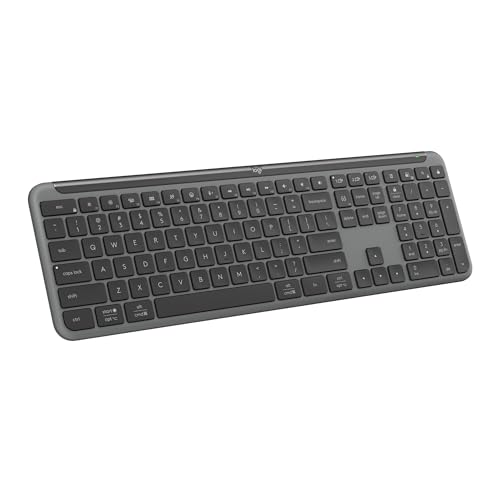
6. Logitech Signature Slim K950: Best Slim Wireless
Pros
- Slim laptop-style typing
- Switches between three devices
- Works across a broad range of platforms
- Quiet keys and useful shortcut row
- Bluetooth and Logi Bolt support
Cons
- No backlighting
- Less tactile than the MX Mechanical
- No bundled mouse in this version
Best for: people who want a quiet, thin full-size keyboard for computers, tablets, and phones.
The Logitech Signature Slim K950 is a good fit for a desk that needs to move between work and home devices without looking like a gaming station. Its laptop-style keys are quiet and familiar, and the full-size layout retains the number pad. The design is slim enough to feel less imposing than the MX Mechanical, while its weight of about 1.51 pounds makes it easier to move between a desk and a temporary workspace.
A single tap switches typing between three devices. The keyboard supports Windows, macOS, ChromeOS, Linux, iPadOS, iOS, and Android, so it is more flexible than a keyboard designed around one computer. It can connect with Bluetooth or Logi Bolt, and Logitech Options+ allows compatible shortcut customization on Windows and macOS. Dedicated controls cover common actions such as mute, volume, playback, and screen snipping.
The K950's quietness is useful in an office or living room, but it also exposes its main compromise. There is no backlighting, so the keys become harder to see in a dark room. The MX Keys S addresses that with proximity illumination and adaptive brightness, while the K950 keeps its simpler, slimmer construction. Its key feel is also flatter and less deliberate than the tactile MX Mechanical.
That makes the K950 a poor fit for anyone who wants illuminated keys or pronounced feedback. It is a better match for someone who types on a laptop and wants the same general sensation at a larger desk. Choose it over the MX Keys S when a lighter, simpler body and broad device compatibility matter more than backlighting and deeper customization.
7. Logitech MK850 Combo: Best Comfort Combo

Pros
- Cushioned palm rest
- Quiet full-size typing
- Contoured right-handed mouse
- Multi-device keyboard and mouse support
- Hyper-fast scroll wheel
Cons
- Large keyboard and mouse footprint
- Mouse is not ambidextrous
- Software features require Logitech Options
Best for: users who want a comfortable keyboard and a capable mouse for several screens or devices.
The Logitech MK850 Combo is built around the idea that a keyboard and mouse should work as one desk system. The full-size keyboard has quiet keys and a cushioned palm rest, while the contoured right-handed mouse is shaped for longer navigation sessions. That is a more complete setup than the keyboard-only Signature Slim K950, particularly for someone replacing both peripherals at once.
The mouse's hyper-fast scroll wheel is the most distinctive control. It can move quickly through long documents and web pages, then return to more controlled scrolling when precision is needed. The right-handed shape will feel more supportive to some users, but it immediately rules out people who need a left-handed or ambidextrous mouse. The keyboard itself keeps a familiar full-size layout rather than adopting the split geometry of the Ergo K860.
Both devices support multi-device use. Logitech says the keyboard can move between a computer, tablet, phone, or second computer, while the mouse can pair with up to three screens. Dual connectivity offers a choice between a USB receiver and Bluetooth Smart, and DuoLink can connect mouse and keyboard actions through Logitech software. That is a useful setup for someone who regularly moves between a work laptop and a desktop.
The MK850 is less elegant than the MX Keys S Combo for a premium productivity desk, and its large keyboard and right-handed mouse need room. It also lacks the MX Keys S's backlighting and more focused low-profile feel. Pick it when comfort and a capable scrolling mouse are more important than illumination, compactness, or the most refined typing experience.
8. Logitech MX Keys S Combo: Best Keyboard and Mouse Set

Pros
- MX Keys S keyboard included with MX Master 3S mouse
- Smooth low-profile typing
- Backlighting responds to hand proximity
- Mouse has an 8K DPI sensor
- Supports up to three devices
Cons
- Heavy full set at about 3.57 pounds
- Mouse is shaped for a right hand
- More equipment than users who only need a keyboard require
Best for: professionals who want Logitech's strongest keyboard and mouse pairing for multi-computer work.
The Logitech MX Keys S Combo takes the keyboard from our top pick and pairs it with the MX Master 3S mouse. That makes the most sense for a desk where scrolling, file movement, and precise pointer control are just as important as typing. The keyboard keeps the same laptop-like, spherical-dished keys, solid angle, quiet operation, and approach-activated backlighting as the standalone MX Keys S.
The mouse adds Logitech's MagSpeed wheel and an 8K DPI sensor. Logitech states that it can track on surfaces including glass, while the wheel is designed for fast movement through long pages and fine control when needed. The sculpted shape is intended for extended work, but it is not a universal mouse shape. Left-handed users and people who prefer a small symmetrical mouse should look elsewhere.
The keyboard and mouse both pair with up to three devices through Bluetooth Low Energy or the included Logi Bolt receiver. Logi Options+ adds Smart Actions and cross-computer controls, so the set suits a desk with Windows and macOS machines. The keyboard's charging specification is up to 10 days with backlighting or up to five months with it off, while the mouse's battery details are not specified in the supplied product information.
Compared with the standalone MX Keys S, this set earns its place only when the mouse is part of the plan. It is heavier than the keyboard alone, and the combined footprint can feel excessive beside a laptop. The MK850 Combo offers a more comfort-oriented palm-rest setup, but the MX Keys S Combo has the quieter, more precise keyboard and the more advanced mouse. Choose it for a polished multi-computer workstation, not for a spare keyboard drawer.
9. Logitech Wave Keys: Best Gentle Ergonomics

Pros
- Wavy shape encourages a natural hand position
- Cushioned memory foam palm rest
- Compact ergonomic alternative to a split board
- Supports up to three devices
- Up to three years of stated battery life
Cons
- No backlighting
- Shape may not suit users who prefer a straight layout
- Less corrective than the split Ergo K860
Best for: people who want ergonomic support without committing to a strongly split keyboard.
The Logitech Wave Keys occupies the middle ground between a conventional keyboard and the more dramatic Ergo K860. Its wavy form places the hands, wrists, and forearms in a more natural position while keeping the overall layout approachable. That makes it easier to try than a pronounced split design, especially for someone who has only used straight keyboards.
The cushioned palm rest uses memory foam and gives the wrists a broad support surface. At about 14.8 inches long and 8.6 inches wide, it is shorter from left to right than most full-size boards but deeper because of the wrist support and wave shape. It weighs about 2.16 pounds, enough to stay planted without being especially difficult to move.
Wave Keys supports Bluetooth and the Logi Bolt receiver, with Easy-Switch for moving between a laptop, tablet, and phone. It is compatible with Windows, macOS, iPadOS, and ChromeOS, and Logitech Options+ provides shortcut customization. Logitech states up to three years of battery life, a useful contrast with rechargeable boards that require a charging routine.
The Ergo K860 offers a more substantial change in wrist and forearm alignment, along with adjustable palm lift, but its learning curve is steeper. The Wave Keys is the calmer choice for a shared desk, though it cannot provide the same level of split positioning. There is also no backlight, so the MX Keys S remains the better choice for dim rooms. Choose Wave Keys when you want gentler ergonomics without abandoning a recognizable typing layout.
10. Logitech MK345 Combo: Best Palm-Rest Combo

Pros
- Full-size keyboard with palm rest
- Quiet keys and media controls
- Spill-resistant design
- Long keyboard and mouse battery life
- Contoured right-handed mouse
Cons
- Uses a USB receiver
- Mouse is not ambidextrous
- Large footprint and no backlighting
Best for: home and office users who want a familiar keyboard with a palm rest and included mouse.
The Logitech MK345 Combo is a simple full-size setup with a useful comfort upgrade over the smaller MK270. Its keyboard includes a palm rest, quiet keys, media controls, and a spill-resistant design. The layout is conventional, with the number pad and easy-access controls that make it suitable for general office tasks, schoolwork, and home administration.
The connection uses 2.4 GHz wireless technology with a stated range of up to 10 meters. It works with Windows, macOS, and ChromeOS and is designed for plug-and-play setup through its USB receiver. There is no Bluetooth, multi-device switching, or backlighting, so it is less adaptable than the K950 or MX Keys S.
Battery life is long for a keyboard and mouse set. Logitech states up to three years for the keyboard and 18 months for the mouse, with batteries included. The mouse has a contoured right-handed design and is intended for smooth tracking and scrolling. That shape may be more comfortable than the compact mouse in the MK270, but it is not suitable for left-handed users who want a neutral design.
The MK270 is a little more compact and has a longer stated keyboard battery interval, while the MK345 gives your palms somewhere to rest and offers a more substantial mouse. The MK850 Combo is the more capable step up for multi-device work and faster scrolling. Choose the MK345 when you want a familiar, quiet desktop set and do not need wireless features beyond a reliable USB connection.

How to choose best logitech keyboard
The right Best best logitech keyboard depends less on the logo and more on how your hands, devices, and desk interact with the board.
Key feel and profile
Low-profile keys sit closer to a laptop sensation and usually make a quiet office easier to share. The MX Keys S and Signature Slim K950 use that general approach, while the MX Mechanical adds tactile quiet mechanical switches for a more noticeable bump. The G213 is tuned for gaming feedback but does not provide the same mechanical switch experience.
If you write for long periods, pay attention to whether you want a soft, smooth press or a clear tactile reset. A spec label cannot decide that preference for you. The best way to judge it is to identify whether you tend to bottom out keys or prefer feedback that tells you a press has registered.
Ergonomic shape
A straight keyboard keeps the adjustment period short, but it may not suit wrists that sit at awkward angles for hours. The Wave Keys uses a gentler wave, while the Ergo K860 separates the typing zones and adds adjustable negative tilt. Both include cushioned wrist support.
A pronounced ergonomic shape needs desk space and patience. If you frequently move between a laptop keyboard and your external board, Wave Keys is the easier transition. If forearm position is the main concern, the K860 makes the more serious intervention.
Choose the layout that changes your hand position in a useful way, not the one that merely looks different.
Connectivity and device switching
Bluetooth is useful when you connect to tablets, phones, or computers without spare USB ports. A Logi Bolt receiver can provide a dedicated connection, and several models here support both. The MX Keys S, MX Mechanical, K950, MK850, MX Keys S Combo, and Wave Keys can switch among up to three devices or support comparable multi-device workflows.
The MK270 and MK345 use USB receivers and are simpler to set up on a fixed desktop. That is not a weakness if the keyboard will stay beside one computer. It becomes limiting when you regularly move between a work laptop and a personal machine.
Battery and charging
Rechargeable keyboards trade battery replacement for a charging routine. The MX Keys S is rated for up to 10 days with backlighting and up to five months with it off. The MX Mechanical is rated for up to 15 days with backlighting and up to 10 months without it. Wave Keys uses replaceable batteries and is rated for up to three years.
The combo models with replaceable batteries can be convenient for a desk that must remain ready without a cable. Check whether the board has an on/off switch and consider how often you use backlighting. Illumination is helpful in a dark room, but it changes the maintenance pattern.
Keyboard and mouse pairing
A combo is convenient when you need both devices, but a bundled mouse should match your hand and working style. The MK270 mouse is compact and works for either hand, while the MK345 and MK850 mice are contoured for right-handed use. The MX Keys S Combo includes the MX Master 3S, with an 8K DPI sensor and MagSpeed scrolling.
The keyboard alone is the better route when you already have a mouse you like. A full combo makes more sense when you want coordinated device switching, a single wireless setup, and software that links keyboard and mouse actions.
Frequently asked questions
Which Logitech keyboard is best for everyday office typing?
The Logitech MX Keys S is the strongest general-purpose choice here. Its low-profile keys are quiet and precise, it supports up to three devices, and its backlighting responds to approaching hands. The Signature Slim K950 is a good alternative if you want a thinner, simpler board and can live without backlighting.
Which Logitech keyboard has mechanical switches?
The Logitech MX Mechanical is the mechanical model in this roundup. It uses tactile quiet mechanical switches in a low-profile full-size layout, giving you a noticeable bump without the profile of a traditional tall mechanical board.
Which Logitech keyboard is best for wrist comfort?
The Ergo K860 offers the most pronounced ergonomic approach, with a curved split frame, cushioned wrist rest, and three palm-lift positions. Wave Keys is easier for users who want a gentler change from a standard layout.
Can these Logitech keyboards connect to more than one device?
The MX Keys S, MX Mechanical, Signature Slim K950, MK850 Combo, MX Keys S Combo, and Wave Keys support multi-device use through Bluetooth and, where specified, Logi Bolt. The MK270 and MK345 are designed around USB receiver connections and do not provide the same device-switching workflow.
Which Logitech keyboard is best for gaming?
The G213 Prodigy is the gaming-focused choice. It has five customizable RGB lighting zones, an anti-ghosting gaming matrix, dedicated media controls, game mode and macro programming through G HUB, and a wired connection.
Do Logitech keyboard and mouse combos include everything needed for a desktop?
The MK270, MK850, MX Keys S Combo, and MK345 include both a keyboard and mouse. Their connection methods and mouse shapes differ, so check whether you need Bluetooth, multi-device switching, a right-handed shape, or a mouse that works comfortably with either hand.
Which Logitech keyboard has the longest stated battery life?
Among the keyboards in this list, the Wave Keys has the longest stated battery life at up to three years. The MK270 is rated for up to 36 months for its keyboard, while the MK345 is rated for up to three years. Rechargeable MX models offer much longer intervals when their backlighting is turned off.

The bottom line
The Best best logitech keyboard for most people is the Logitech MX Keys S. It combines quiet, accurate low-profile typing with backlighting, USB-C charging, three-device connectivity, and useful Logi Options+ customization. Its lack of tactile mechanical feedback is the main reason not to choose it.
Pick the Logitech MX Mechanical if you want a clear tactile bump, or the Logitech Ergo K860 if wrist and forearm positioning matters more than a short adjustment period. For gaming, the Logitech G213 Prodigy is the obvious specialist, while the MX Keys S Combo is the strongest complete productivity set when you also need a high-end mouse.
If you are undecided, choose the MX Keys S for quiet multi-device work, the Ergo K860 for pronounced ergonomic support, or the MK270 Combo for a basic desktop that needs both input devices.
As an Amazon Associate we earn from qualifying purchases.