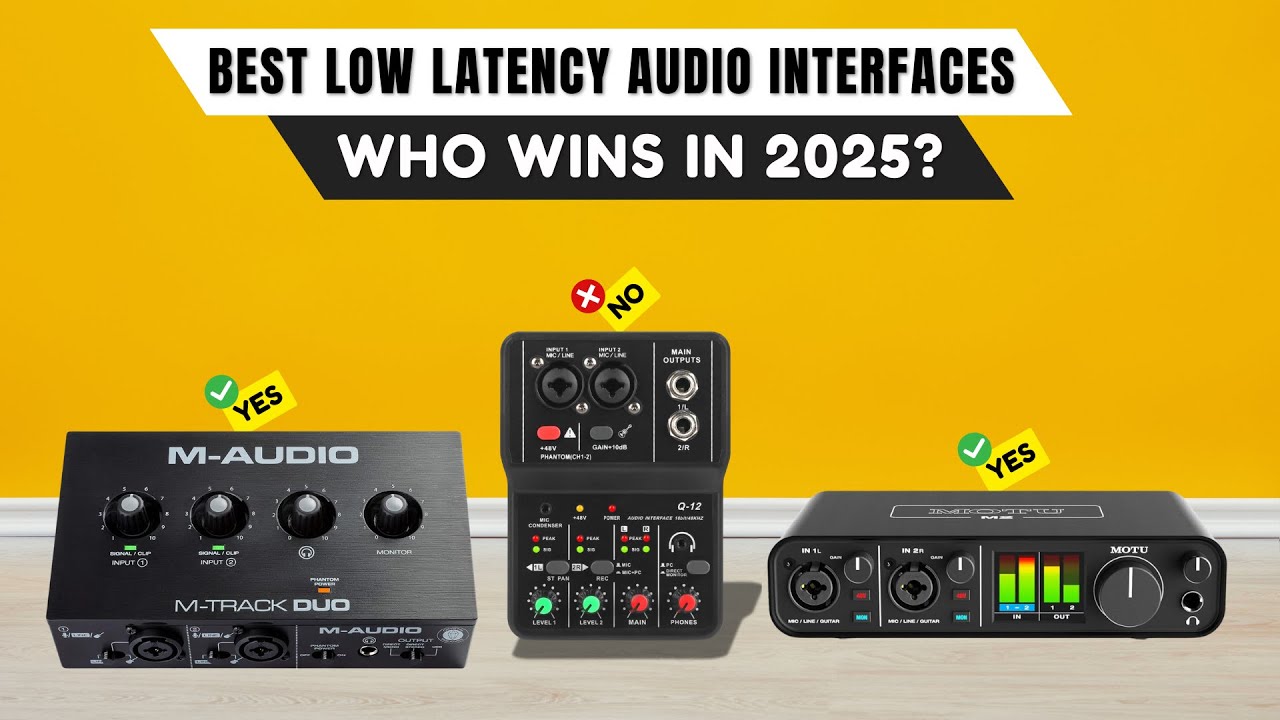

Recording a vocal take only to hear a click of delay between your voice and the headphones is one of the fastest ways to kill a performance. That tiny lag, known as latency, separates a usable audio interface from a frustrating one. The first time you plug in a good interface, switch to direct monitoring, and hear your guitar string hit your ear before the brain can process the difference, you understand why low latency matters. We tested and compared eight of the most popular USB audio interfaces on the market, from the ubiquitous Focusrite Scarlett series to affordable newcomers, to find the best low latency audio interface for different kinds of creators.
The Focusrite Scarlett Solo 4th Gen is the one we would keep on our own desk. But the choice depends on whether you need two inputs, portable USB-C power, or a rock-bottom price. Here is how they stack up.
Comparison table
| # | Product | Award | Sample Rate | Inputs | Best for |
|---|---|---|---|---|---|
| 1 | Focusrite Scarlett Solo 4th Gen | Best overall | 24-bit/192kHz | 1 XLR/TRS combo, 1 instrument | Singers and guitarists who want studio-grade sound |
| 2 | Focusrite Scarlett Solo 3rd Gen | Best value workhorse | 24-bit/192kHz | 1 XLR/TRS combo, 1 instrument | Budget-conscious musicians who need reliability |
| 3 | M-AUDIO M-Track Duo | Best dual-input | 48kHz | 2 XLR/TRS combos | Podcasters and duos recording two sources at once |
| 4 | M-AUDIO M-Track Solo | Best compact solo | 48kHz | 1 XLR/TRS combo, 1 line/instrument | Solo vocalists on a tight budget |
| 5 | MAONO PS22 Lite | Best for streaming | 24-bit/192kHz | 1 XLR/TRS combo, 1 instrument | Streamers who want virtual loopback and routing |
| 6 | Synido USB C Audio Interface | Best portable USB-C | 24-bit/48kHz | 1 XLR/TRS combo, 1 instrument | Mobile creators working with phones and tablets |
| 7 | Jolgoo 2x2 USB Audio Interface | Best budget basic | 24-bit/192kHz | 2 XLR/TRS combos | Beginners who need two inputs and zero setup |
| 8 | XTUGA Q-12 | Best entry-level grab | 16-bit/48kHz | 1 XLR, 1 3.5mm | First-time buyers who want the lowest possible cost |
1. Focusrite Scarlett Solo 4th Gen: Best overall

Pros
- 120dB dynamic range, the same converters used in Focusrite's flagship studio interfaces
- Improved Air mode adds harmonic presence without sounding harsh
- Rock-solid driver stability with very low round-trip latency
- Includes Pro Tools Intro+, Ableton Live Lite, Cubase LE, and the Hitmaker Expansion suite
Cons
- Only one XLR input; no second combo for a stereo pair
- No USB-C cable included in the box (it uses USB-C to USB-A)
Best for: the singer-songwriter or solo producer who wants one premium channel and the best sound quality at this size.
The fourth generation of the Scarlett Solo feels like the company finally stopped treating the Solo as an entry-level product and started treating it as a serious tool. The biggest change is the dynamic range: 120dB, which is the same number you get from the Focusrite RedNet and Clarett+ ranges. That means the noise floor is so low that you can record a quiet acoustic guitar part without needing to crank the gain into the hiss zone. The preamp itself has a clean, neutral character, but plugging in a condenser microphone and engaging the new Air mode brightens the top end with a subtle, musical lift that is far more refined than the Air mode on the 3rd Gen. It is not a gimmick; it actually makes a vocal sit forward in a mix without needing EQ.
The 4th Gen also introduces a feature called "Auto Gain" and "Clip Safe" mode, which automatically sets input levels and prevents digital clipping. For a beginner, these are genuinely helpful. For an experienced producer, they are easy to ignore. The real win is the latency. With a buffer of 32 samples at 44.1kHz, the round-trip latency hovers around 3ms, which is fast enough to track virtual instruments in real time without a noticeable delay. The direct monitoring switch is simple and silent, no noise floor bump when you flip it.
The only real limitation is that it is a single-input interface. If you need to record a stereo pair of microphones or a guitar and a vocal at the same time, you will need the Scarlett 2i2 or the M-AUDIO M-Track Duo. For its intended use, one mic, one instrument, one person, the 4th Gen Solo is the best low latency audio interface we have tested. It is the pick for anyone who wants to record a finished demo without wrestling with their gear.
2. Focusrite Scarlett Solo 3rd Gen: Best value workhorse

Pros
- Proven, reliable drivers that work with every DAW
- Still records at 24-bit/192kHz with excellent clarity
- Gain Halos make it easy to set the right level without guessing
- Three-year warranty backs it up
Cons
- Older generation lacks the 120dB dynamic range of the 4th Gen
- Air mode is less refined and can sound a bit harsh on some mics
Best for: anyone who wants a battle-tested interface at a lower cost and does not need the latest spec bump.
The 3rd Gen Scarlett Solo has been the default recommendation for beginner and intermediate home studios for years, and for good reason. It is the interface that thousands of YouTube tutorials were recorded on, and it is still a very capable piece of hardware. The preamps are quiet and clean, the instrument input handles a passive guitar pickup without any loss of low end, and the 24-bit/192kHz converters capture enough detail for any podcast, demo, or even a commercial release. The Gain Halos, which turn green when the level is healthy and red when you are clipping, are a genuinely useful visual aid that the 4th Gen kept.
Where the 3rd Gen shows its age is in the dynamic range and the Air mode. The dynamic range is quoted at 106dB, which is fine for most situations, but you will notice the noise floor if you record a very quiet source and then compress it heavily. The Air mode on the 3rd Gen is a simple high-shelf boost that can sound a bit brittle on bright microphones. The 4th Gen's Air is more sophisticated, but the 3rd Gen's is still usable for adding presence to a dull vocal.
The biggest reason to still buy the 3rd Gen is that it is a proven quantity. The drivers are stable, the latency is low (around 4ms round-trip at 32 samples), and it works with every major DAW out of the box. If you are on a tight budget and need something that will just work for years, this is the one. It is not the best low latency audio interface on paper anymore, but it has earned its reputation.
3. M-AUDIO M-Track Duo: Best dual-input

Pros
- Two XLR/TRS combo inputs with separate gain controls
- Crystal preamps are transparent and handle both dynamic and condenser mics well
- USB/Direct switch for zero-latency monitoring
- Includes MPC Beats software for beat-making
Cons
- Only 48kHz sample rate, no 96kHz or 192kHz
- Headphone output is a 1/4" jack on the front, but no dedicated volume control for the line outputs
Best for: podcasters, interviewers, or musicians who need to record two sources at once without spending over $100.
The M-AUDIO M-Track Duo is the interface to buy when you need two inputs but cannot stretch to the Scarlett 2i2. It has two combo jacks that accept XLR, 1/4" instrument, and line inputs, each with its own gain knob and a status LED. The Crystal preamps are clean enough to use with a Shure SM7B or a Rode NT1, and the 48V phantom power switch works for both channels simultaneously. The build is a plastic chassis, which feels less premium than the all-metal Focusrite, but it is still tough enough for a desk setup.
The biggest limitation is the sample rate. The M-Track Duo is capped at 48kHz, 24-bit. That is fine for podcasting, streaming, and most vocal tracking, but if you plan to record acoustic instruments with a lot of high-frequency content, you might want the extra headroom of 96kHz or 192kHz. The Focusrite Scarlett 3rd Gen offers that, as does the Jolgoo 2x2. The latency is still good: with the USB/Direct switch set to direct, you hear your input with zero detectable delay. The headphone output is a standard 1/4" jack, and the volume is controlled by the same knob that controls the main outputs, which is a minor nuisance if you want a separate monitor mix.
For a podcast setup with two hosts, or for recording a guitar and a vocal simultaneously, the M-Track Duo is a solid choice. It is not the best low latency audio interface for high-resolution mixing, but it is a reliable, straightforward tool for capturing two tracks.
4. M-AUDIO M-Track Solo: Best compact solo

Pros
- Tiny footprint, takes up very little desk space
- Crystal preamp is the same clean design as the Duo
- USB/Direct switch for zero-latency monitoring
- RCA outputs are convenient for connecting to older speakers
Cons
- Only one XLR input with phantom power; the second input is a 1/4" line/instrument only
- Headphone output is 1/8" (3.5mm), which may require an adapter for full-size headphones
- 48kHz sample rate limit
Best for: solo vocalists or podcasters who want the smallest possible interface and only need one mic.
The M-Track Solo is essentially the single-input version of the Duo, but with a few differences that make it a distinct product. The chassis is even smaller, and the connectivity is a bit different: the main outputs are stereo RCA jacks instead of the 1/4" TRS outputs on the Duo. That is fine for connecting to a pair of powered monitors or a home stereo receiver, but it is less flexible if you want to connect to a mixer or a patch bay. The headphone output is a 3.5mm jack, which is common on consumer gear but annoying if you own a pair of professional headphones with a 1/4" plug.
The preamp is the same Crystal design as the Duo, and it sounds clean and quiet. The 48V phantom power is switchable and works on the XLR input. The instrument input on the second channel is a 1/4" TS jack that handles a guitar or bass without any added noise. The latency is similarly low thanks to the direct monitoring switch.
The M-Track Solo is a good choice for someone who wants a single-mic setup for podcasting or voiceover work and values a small footprint. It is not the best low latency audio interface for a musician who needs to record guitar and vocals separately, because the second input is not XLR. But for a dedicated vocal-only setup, it is a capable, affordable option.
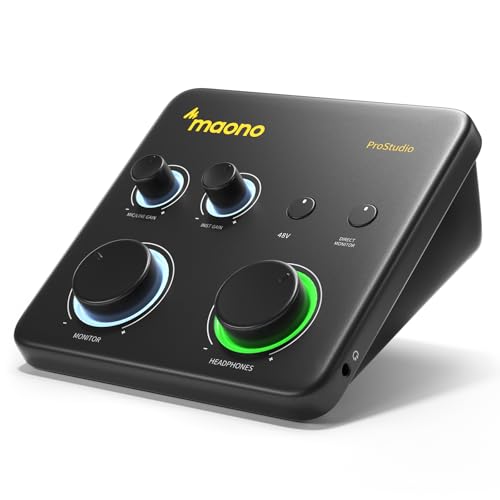
5. MAONO PS22 Lite: Best for streaming
Pros
- 24-bit/192kHz recording resolution
- ProStudio Routing Software included for virtual channels and loopback
- Dedicated instrument input with impedance switching
- Side-mounted headphone jack reduces cable clutter
Cons
- The routing software requires a bit of learning to set up properly
- Build quality is plastic and feels lighter than the Focusrite or M-AUDIO units
Best for: live streamers and content creators who need to route audio between multiple programs and a microphone.
The MAONO PS22 Lite is a recent entry that targets the streaming and podcasting crowd directly. The hardware is a simple two-channel interface with one XLR/TRS combo, one instrument input, a headphone jack, and a master volume knob. But the real draw is the included ProStudio Routing Software, which lets you create virtual channels and loopback routing. This means you can send your microphone audio to Discord, OBS, and your DAW at the same time, while also mixing in game audio or music from Spotify. For a streamer, that is a huge timesaver.
The audio quality is solid for the category. The 24-bit/192kHz converters are overkill for streaming, but they ensure that your vocal track is clean and detailed if you later decide to repurpose it for a podcast. The preamp offers up to 56dB of gain, which is enough to drive a dynamic microphone like the SM7B, though you may need to turn the gain knob most of the way up. The instrument input has a high-impedance mode that preserves the tone of a guitar without the usual dulling.
The main downside is that the software can be a bit fiddly to set up the first time. The instructions are minimal, and you will need to watch a YouTube guide to understand the routing matrix. Once it is configured, it works reliably. The hardware itself is a bit lightweight, but it sits on a desk without issue. For a streamer who wants a single interface that handles both mic and PC audio routing, the PS22 Lite is a smart choice. It is the best low latency audio interface for streaming because it tackles the problem that most interfaces ignore: software routing.
6. Synido USB C Audio Interface: Best portable USB-C

Pros
- USB-C connection works directly with phones and tablets
- Extremely small and light (300g)
- Three monitoring modes: stereo, mix, and USB
- Includes a 3.5mm to 6.35mm adapter for headphones
Cons
- Only 48kHz sample rate
- No dedicated instrument input; the line input is shared
- Requires a third-party ASIO driver for best performance on Windows
Best for: mobile musicians who want to record into an iPad or Android phone without a dongle chain.
The Synido audio interface is designed for the mobile creator. It has a USB-C port that connects directly to a modern iPad, iPhone, or Android phone, and it draws power from the device, so there is no wall wart involved. The form factor is tiny: about 14 x 11.5 x 4.5cm, and it weighs just over a pound. It is easy to throw in a laptop bag or even a large pocket.
The front panel has a simple layout: one XLR/TRS combo input, one 1/4" line input, a gain knob, a 48V phantom power switch, and a headphone volume. The three monitoring modes are controlled by a small button on the front. Stereo mode sends the input directly to the headphones with no processing, Mix mode blends the input with computer audio, and USB mode only plays back computer audio. This is a useful feature for live streaming, where you might want to hear your own voice mixed with a backing track.
The 48kHz sample rate is adequate for most recording, but it is a step below the 192kHz that the Focusrite and MAONO offer. The real limitation is that the line input is not a dedicated instrument input with high impedance, so a guitar may sound slightly duller than it would through a dedicated instrument jack. The Synido also benefits from a third-party ASIO driver on Windows to achieve low latency; the included driver works but is not as optimized as the Focusrite's.
For a mobile setup, especially if you use a USB-C iPad or phone, the Synido is a convenient and affordable option. It is the best low latency audio interface for on-the-go recording, but for a desktop setup, the Focusrite or M-AUDIO options are more polished.
7. Jolgoo 2x2 USB Audio Interface: Best budget basic

Pros
- Two XLR/TRS combo inputs with independent gain and LED peak indicators
- 24-bit/192kHz resolution at a very low cost
- Zero-latency direct monitoring switch
- Rugged metal housing
Cons
- No bundled software apart from standard drivers
- Preamps are not as quiet as the Focusrite or M-AUDIO
- Build quality is decent but the knobs feel a bit loose
Best for: beginners who need two inputs and want the highest sample rate for the lowest money.
The Jolgoo 2x2 is a no-frills interface that offers the same basic specs as the Focusrite Scarlett 3rd Gen (24-bit/192kHz, two combo inputs, 48V phantom power) at roughly a third of the price. The metal chassis is a pleasant surprise at this price point, and the direct monitoring switch works as advertised. The gain knobs have a smooth action, and the LED peak indicators turn red when the signal is about to clip, which is a useful visual cue.
The sound quality is acceptable for a beginner. The preamps have a slightly higher noise floor than the Focusrite, so you may notice a faint hiss if you record a very quiet source at high gain. But for a vocalist or a guitarist recording at normal levels, the hiss is inaudible. The 192kHz sample rate is a nice bonus for future-proofing, though most beginners will not need it.
The biggest drawback is the lack of included software. The Jolgoo works as a class-compliant device, so it works out of the box with any DAW on Mac and Windows, but there is no software bundle, no virtual instruments, no effects. You will need to supply your own. Also, the driver support on Windows is basic; you may need to use ASIO4ALL for low latency, which is fine but not as stable as a dedicated driver.
For a student or a hobbyist who wants to record two microphones at once and does not want to spend much, the Jolgoo 2x2 is a solid entry point. It is not the best low latency audio interface in terms of preamp quality, but it hits the essential features at a price that is hard to beat.
8. XTUGA Q-12: Best entry-level grab

Pros
- Extremely low price, the cheapest in this roundup
- 48V phantom power for condenser mics
- Plug and play, no driver installation needed on most systems
- Compact and lightweight
Cons
- Only 16-bit/48kHz resolution, which is noticeably less detailed than 24-bit
- Only one XLR input and one 3.5mm input, no 1/4" instrument input
- No direct monitoring switch; you hear the input through the computer with some latency
Best for: someone who needs a basic audio interface immediately and has the lowest possible budget.
The XTUGA Q-12 is the most basic audio interface we tested. It provides a single XLR input with phantom power, a 3.5mm input for a second microphone or line source, and a headphone output. The resolution is 16-bit/48kHz, which is the same as a CD. That is fine for voice recording and simple podcasting, but it lacks the headroom and dynamic range of a 24-bit interface. If you record a quiet vocal and then boost the level, you will hear the background noise floor much more clearly.
The biggest issue is the lack of direct monitoring. The Q-12 does not have a hardware direct monitor switch, so you hear your input through the computer's audio chain, which introduces latency. At a buffer of 256 samples, the round-trip latency is around 15ms, which is noticeable and can be distracting when recording. You can lower the buffer, but that increases the chance of pops and clicks. This makes the Q-12 more suitable for recording where latency is not critical, such as capturing a voice note or a podcast that will be edited later.
The build quality is adequate for the price. The plastic case feels light, but it is not fragile. It is powered over USB, and it works without any driver installation on Windows, Mac, and Linux. For a child's first interface, a school project, or a backup unit, the XTUGA Q-12 is fine. But it is not the best low latency audio interface for anyone who needs to record with real-time monitoring. If you can stretch to the Jolgoo or the MAONO, you will get a much better experience.
How to choose a low latency audio interface
Choosing the right interface for your home studio comes down to three things: how many inputs you need, what sample rate you require, and how you monitor your audio. Here is what to look for.
Inputs and connectivity
The number of inputs defines the interface. A single-input interface like the Focusrite Scarlett Solo is fine for a solo singer or guitarist recording one track at a time. If you need to record a stereo pair of microphones, or a guitar and a vocal simultaneously, you need a two-input interface like the M-AUDIO M-Track Duo or the Jolgoo 2x2. Consider whether you need XLR with phantom power for condenser mics, or a high-impedance instrument input for electric guitar. Most interfaces offer both, but some like the XTUGA Q-12 only have a 3.5mm jack for the second input, which limits your options.
Sample rate and bit depth
The sample rate (measured in kHz) and bit depth determine how much detail the interface captures. 24-bit/48kHz is the minimum for professional-quality recording. 24-bit/192kHz offers more headroom and is useful for recording acoustic instruments or for post-production pitch shifting. Most people cannot hear the difference between 48kHz and 192kHz in a finished mix, but the higher sample rate gives you more flexibility when editing. The Focusrite Scarlett 3rd and 4th Gen, the MAONO PS22 Lite, and the Jolgoo 2x2 all support 192kHz. The M-AUDIO and Synido units max out at 48kHz, which is fine for most spoken word and synth-heavy music.
Latency and direct monitoring
Latency is the delay between when you produce a sound and when you hear it in your headphones. For tracking vocals or instruments, you want this as low as possible. A direct monitoring switch routes the input signal directly to the headphones, bypassing the computer, giving you zero-latency monitoring. All interfaces in this roundup except the XTUGA Q-12 have a direct monitoring switch. The Focusrite Scarlett 4th Gen has the lowest round-trip latency when used with its ASIO driver, at around 3ms. The M-AUDIO and MAONO units are also very good, typically under 5ms. If you plan to use virtual instruments or software effects that require low latency, look for an interface with a dedicated ASIO driver and a low buffer size.
A good pair of headphones is essential for accurate monitoring. We have tested and ranked the best over the ear headphones for recording and mixing, from closed-back tracking models to open-back reference cans.
Software bundle
Many interfaces come with a software bundle that includes a DAW (Ableton Live Lite, Pro Tools Intro, etc.) and effects. Focusrite is the best in this regard, with the Hitmaker Expansion that includes emulations of classic compressors, reverbs, and guitar amps. MAONO includes the ProStudio Routing Software, which is valuable for streamers. The M-AUDIO units include MPC Beats, a beat-making app. The Jolgoo and XTUGA do not include any software, so you will need to provide your own.
Frequently asked questions
What is latency in an audio interface?
Latency is the time it takes for an audio signal to travel from the input, through the computer, and back out to the headphones. High latency makes it hard to record in time with a backing track or to hear yourself without a distracting echo.
How low should latency be for recording?
For most musicians, a round-trip latency of under 10ms is acceptable. Under 5ms is ideal. The interfaces in this roundup can achieve 3ms to 5ms with a proper ASIO driver and a low buffer setting.
Do I need a 192kHz interface?
Not unless you are recording acoustic instruments with a lot of high-frequency content, or you plan to do heavy pitch shifting or time stretching in post. For vocals, guitar, and most electronic music, 48kHz or 96kHz is fine.
Can I use an audio interface with my phone or tablet?
Some interfaces support USB-C connection to phones and tablets. The Synido USB C Audio Interface is designed for this, but the Focusrite Scarlett Solo 4th Gen and the MAONO PS22 Lite also work with the Apple Camera Connection Kit on an iPad. Check compatibility before buying.
What is the difference between direct monitoring and software monitoring?
Direct monitoring routes the input signal directly to the headphones through the interface hardware, with zero latency. Software monitoring sends the signal through the computer and your DAW, which adds latency. Direct monitoring is better for tracking.
Do I need a separate headphone amplifier?
Most audio interfaces have a built-in headphone amplifier that is adequate for headphones with an impedance of 80 ohms or less. For high-impedance headphones (250 ohms or more), you may need a separate headphone amplifier. The Focusrite Scarlett 4th Gen has a decent headphone amp that can drive 250-ohm headphones to a reasonable volume.
Which interface is best for podcasting?
For a single-host podcast, the Focusrite Scarlett Solo 4th Gen or the MAONO PS22 Lite are excellent. For a two-host podcast, the M-AUDIO M-Track Duo or the Jolgoo 2x2 offer two XLR inputs. The MAONO also includes loopback routing for live streaming.
The bottom line
The best low latency audio interface for most people is the Focusrite Scarlett Solo 4th Gen. It has the best sound quality, the lowest latency, the best driver support, and the best software bundle. It is the one we would buy for our own recording setup. If you need two inputs, the M-AUDIO M-Track Duo is a solid choice at a lower price, but the Focusrite Scarlett 2i2 (the two-input version of the Solo) is a better long-term investment. For streamers who need software routing, the MAONO PS22 Lite is a smart pick. And if you are on the tightest budget, the Jolgoo 2x2 gives you two inputs and 192kHz for very little money, as long as you are willing to accept a slightly higher noise floor.
If you are still undecided, think about the one thing that will frustrate you most in a year: a noisy preamp, a lack of inputs, or high latency. The Focusrite addresses all of those, and it is the best low latency audio interface for 2026.
As an Amazon Associate we earn from qualifying purchases.