

Small-form-factor PCs create a frustrating graphics card problem: the case may have room for a GPU, but not for the cooler, power connector, or full-height bracket that comes with a conventional model. The right card has to fit the chassis and the power budget without turning a compact desktop into a compromised gaming machine.
Our Best low profile GPU picks range from quiet display-focused cards to modern models capable of serious 1080p gaming. The key differences are not just memory capacity. Slot thickness, external power, video outputs, bus interface, and driver-era features all affect whether a card makes sense in your system.
The ZOTAC RTX 5060 Low Profile is the single best pick for buyers who want the most capable compact card. The rest of the list covers efficient upgrades, multi-monitor desktops, home theater PCs, and older systems that need simple display output.
| # | Product | Award | Memory | Power and slot design | Outputs | Best for |
|---|---|---|---|---|---|---|
| 1 | Sparkle Arc A310 ECO | Best overall | 4GB GDDR6, 64-bit | 50W TBP, single-slot | HDMI 2.0, 2x mini DisplayPort | Compact gaming and media PCs |
| 2 | maxsun RTX 3050 6GB | Best Nvidia upgrade | 6GB GDDR6, 96-bit | PCIe 4.0 x8, low profile | HDMI 2.1, DisplayPort 1.4a | Small gaming desktops |
| 3 | ZOTAC RTX 5060 Low Profile | Best performance | 8GB GDDR7, 128-bit | PCIe 5.0, 2-slot, 8-pin | 3x DisplayPort 2.1b, HDMI 2.1b | High-performance SFF gaming |
| 4 | SOYO RTX 3050 6GB | Best single-slot gaming card | 6GB GDDR6 | 70W, single-slot | HDMI 2.1, DisplayPort 1.4a | Slim workstations and SFF gaming |
| 5 | 51RISC RX 550 LP | Best low-power Radeon | 4GB GDDR5, 128-bit | 35W, PCIe 3.0 x16 | DisplayPort, HDMI | Basic gaming and quiet upgrades |
| 6 | ARDIYES GT 740 | Best for four monitors | 4GB GDDR5 | PCIe 3.0 x16, low profile | 4x HDMI | Office desks and HTPCs |
| 7 | maxsun GTX 1050 Ti | Best legacy gaming upgrade | 4GB GDDR5, 128-bit | PCIe 3.0 x16, low profile | HDMI, DisplayPort | Older compact desktops |
| 8 | QTHREE GT 730 | Best basic display card | 4GB DDR3, 64-bit | 30W, PCIe x8 | 2x HDMI, DisplayPort, VGA | Office and legacy systems |
1. Sparkle Arc A310 ECO: Best Overall

Pros
- Single-slot, low-profile design suits especially cramped cases
- 50W TBP avoids an external power connector
- Intel XeSS and ray tracing support
- Short bracket is included
- Modern HDMI and mini DisplayPort connectivity
Cons
- Only 4GB of graphics memory
- Two outputs use mini DisplayPort
- Single-fan cooling leaves less thermal headroom
Best for: compact PC owners who want a modern, efficient card for light gaming, media, and creative workloads.
The Sparkle Arc A310 ECO is the card we would start with for most compact desktops. It is small in the ways that matter during installation: the low-profile board is single-slot, uses one fan, and has a stated 50W TBP. That combination is much easier to accommodate than a thick gaming card with a dedicated power lead. Sparkle also includes a short bracket, so the card is prepared for a half-height chassis rather than leaving that crucial part to a separate purchase.
Its 4GB of GDDR6 runs across a 64-bit interface at 15.5 Gbps. That is not a specification built for demanding new games at high settings, but it is a sensible match for the A310's role in a small system. Intel's Xe HPG architecture brings DirectX 12 Ultimate, Vulkan 1.3, real-time ray tracing, and XeSS upscaling. Those features give it a more current software toolkit than the GTX 1050 Ti, RX 550, GT 740, and GT 730 elsewhere in this roundup.
Connectivity is practical, though not universal. There is one HDMI 2.0 port and two mini DisplayPort outputs. That gives a compact workstation three digital display connections, but anyone using older full-size DisplayPort cables will need the appropriate adapter. The card is listed at roughly 6.14 inches long and 2.72 inches wide, and its single-slot shape is a meaningful advantage over the two-slot ZOTAC RTX 5060 Low Profile.
The weakness is performance scale. Four gigabytes of memory can become restrictive in newer games, and the single fan has to move heat through a very small cooler. It also lacks the raw capability of the two RTX 3050 cards, while the ZOTAC is in another class entirely. Skip the Sparkle if your compact build has an eight-pin connector and enough cooling space for a stronger card. For everyone else, it is a well-balanced choice that pairs modern features with unusually easy installation.
2. maxsun RTX 3050 6GB: Best Nvidia Upgrade

Pros
- 6GB of GDDR6 memory
- HDMI 2.1 and DisplayPort 1.4a
- DLSS support from the Nvidia Ampere architecture
- Compact 6.65-inch card length
- Designed for slim SFF systems
Cons
- Uses an older Ampere-generation GPU
- PCIe interface is x8 rather than x16
- No stated external-power detail in the product data
Best for: a small-form-factor PC that needs Nvidia features and more gaming headroom than entry-level cards provide.
The maxsun RTX 3050 6GB is the more conventional gaming option among the compact cards near the top of this list. It has 6GB of GDDR6, a 96-bit memory interface, and a boost clock listed at 1470 MHz. That extra memory over the Sparkle Arc A310 ECO gives games more room for textures, while Nvidia's DLSS support can help maintain smoother output in compatible titles.
The card uses a PCIe 4.0 x8 interface and includes HDMI 2.1 alongside DisplayPort 1.4a. HDMI 2.1 is useful for a modern television or monitor, while DisplayPort remains the more natural connection for a desktop display setup. The listing also says it supports 8K output and multiple monitors, although those output capabilities should not be confused with the card having enough gaming power to render demanding games at that resolution.
Physical fit is one of its stronger points. The stated dimensions are 6.65 inches long and 2.71 inches wide, with a slim low-profile design aimed at mini and small-form-factor cases. It is a little longer than the Sparkle, but much shorter than the ZOTAC RTX 5060 Low Profile. Case clearance still needs checking, especially around the front edge and the motherboard's retention mechanism.
The maxsun's main issue is that its Ampere platform is no longer the newest option here. The ZOTAC offers a newer Blackwell architecture, 8GB of GDDR7, and DLSS 4, while the single-slot SOYO RTX 3050 6GB is easier to fit in especially narrow systems. The maxsun makes more sense when you want Nvidia's software ecosystem, 6GB of memory, and a compact card without moving to the larger ZOTAC design.
3. ZOTAC RTX 5060 Low Profile: Best Performance

Pros
- Strongest GPU architecture in this roundup
- 8GB GDDR7 at 28 Gbps
- DLSS 4 and Nvidia Blackwell architecture
- Three DisplayPort 2.1b outputs
- Metal backplate and composite heatpipes
Cons
- Two-slot design is less flexible in cramped cases
- Requires an eight-pin PCIe power connector
- 7.2-inch length demands careful clearance checks
Best for: SFF builders who want modern gaming performance and have room for a two-slot card with dedicated power.
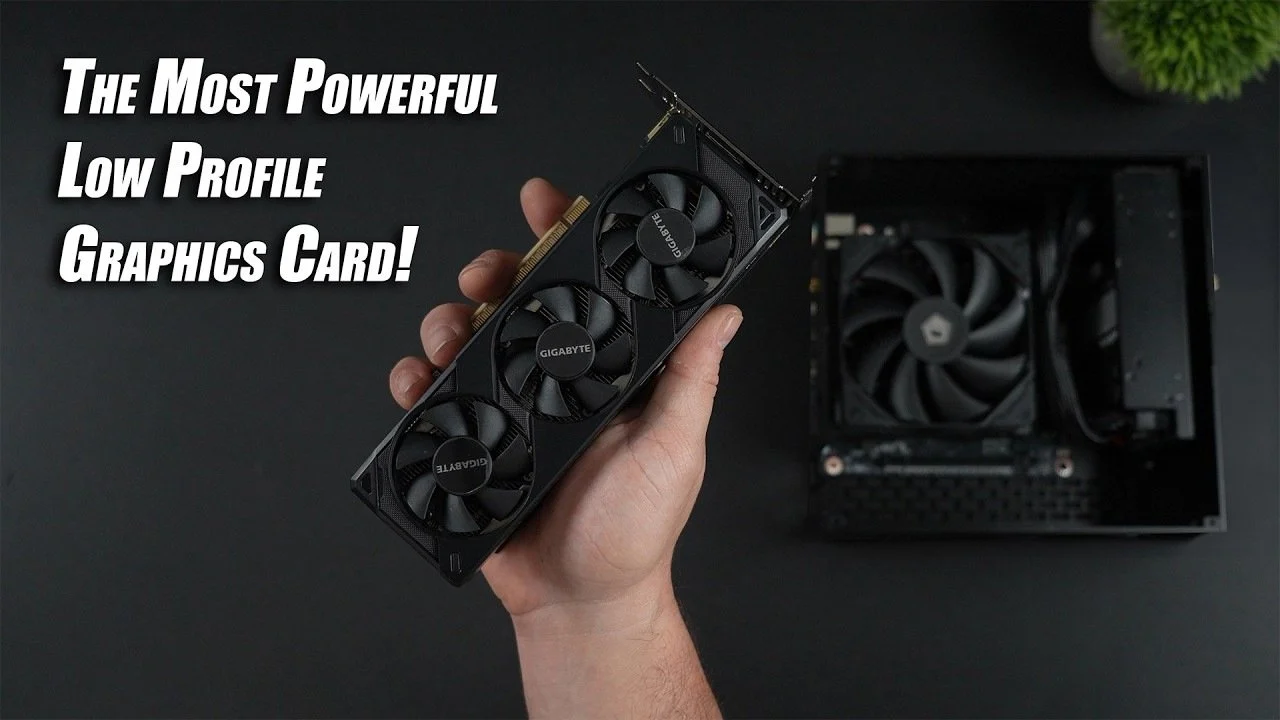
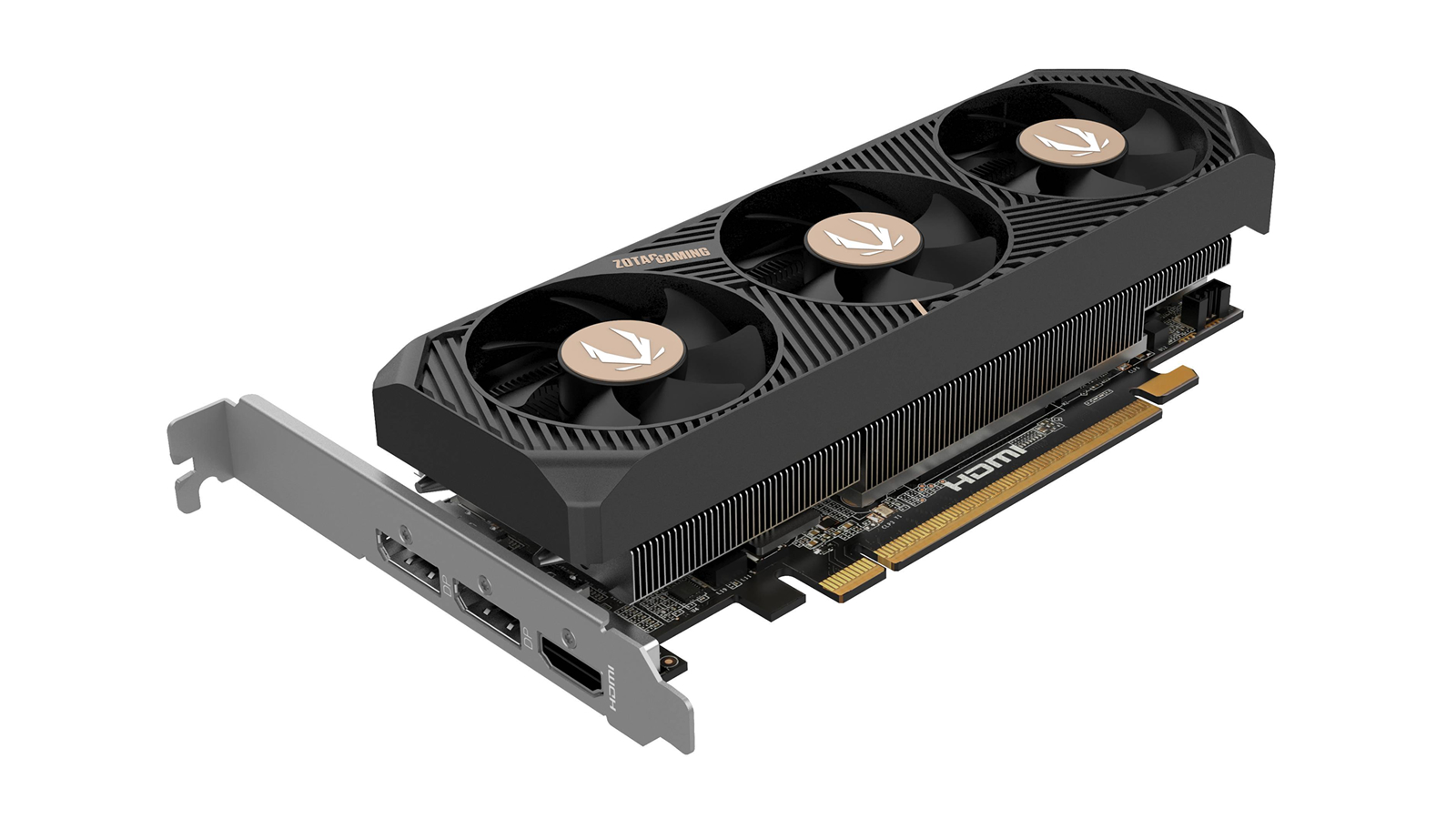
The ZOTAC RTX 5060 Low Profile is the obvious performance leader, but it is not the universal compact-PC answer. Its defining compromise is right in the hardware: this is a low-profile card with a two-slot design, a 7.2-inch length, and an eight-pin PCIe power connector. It can fit an SFF case, but only if the chassis has the necessary clearance and power wiring. That makes it a very different proposition from the bus-powered cards lower down the list.
The hardware is substantially more current than the rest. ZOTAC specifies Nvidia's Blackwell architecture, 8GB of GDDR7, a 128-bit memory interface, and 28 Gbps memory speed. In practical terms, that combination gives modern games more memory capacity and bandwidth than the 4GB GDDR5 or DDR3 cards here, and more room than the 6GB RTX 3050 options. DLSS 4 adds a current Nvidia upscaling and frame-generation feature set for supported games.
Its display selection is unusually generous for a compact board. Three DisplayPort 2.1b connections and one HDMI 2.1b port can feed up to four displays, and the card is listed as 8K-ready and VR-ready. Two 40mm fans, composite heatpipes, and a metal backplate point to a more serious cooling system than the single-fan Sparkle Arc A310 ECO or the small legacy cards. The listed width of 1.5 inches reinforces that it occupies two slots rather than being a narrow single-slot board.
The downside is not subtle. A buyer with a thin office desktop, a restrictive proprietary power supply, or only one expansion slot should skip it. Even if the card fits the case opening, the eight-pin lead and second slot can stop the installation. The maxsun RTX 3050 6GB is a safer choice for less demanding SFF gaming, but the ZOTAC is the card to keep if your case supports it and you want the highest ceiling in this group.
4. SOYO RTX 3050 6GB: Best Single-Slot Gaming Card

Pros
- Genuine single-slot low-profile design
- 6GB GDDR6 and 2304 CUDA cores
- 70W board power with no external connector
- HDMI 2.1 and DisplayPort 1.4a
- Half-height bracket included
Cons
- Older Ampere architecture
- Single-fan cooling has limited thermal capacity
- Shorter card still needs adequate case airflow
Best for: slim desktops that need a single-slot Nvidia card for 1080p gaming and everyday GPU acceleration.
The SOYO RTX 3050 6GB solves a fit problem that many compact gaming cards do not. It is described as a true one-slot, low-profile card and includes a 71mm half-height bracket. That matters in a slim workstation where the neighboring slot may be blocked, occupied, or simply absent. Its 6.61416-inch length is also manageable, though the case still needs to accept a card roughly 0.87 inches wide.
Underneath, this is an Nvidia Ampere card with 2304 CUDA cores, a listed 1507 MHz boost clock, and 6GB of GDDR6 memory. Those details put it ahead of the RX 550, GT 740, GTX 1050 Ti, and GT 730 for the kind of 1080p gaming and 3D work described by the product listing. It also supports ray tracing, DirectX 12 Ultimate, Vulkan 1.3, and OpenGL 4.6, so its software compatibility is broader than the older alternatives.
The power setup is friendly to office-derived systems. Its 70W TDP means it draws power through the PCIe slot, with no six-pin or eight-pin connector required. HDMI 2.1 and DisplayPort 1.4a handle modern displays and multi-monitor setups, and the listing describes support for 4K and 8K output. Those output standards are useful for desktop work, though they do not turn this into an 8K gaming card.
Cooling is the trade-off for the compact shape. A single PWM fan and a high-density heatsink are tasked with keeping the GA107 core cool, and the fan adjusts to workload. The maxsun RTX 3050 6GB offers the same memory capacity in a similarly compact format, while the ZOTAC RTX 5060 Low Profile is much faster, but neither gives the same clear single-slot advantage. Choose SOYO when physical fit and bus-powered installation come before maximum frame rates.
5. 51RISC RX 550 LP: Best Low-Power Radeon

Pros
- 35W TDP
- No external power connector
- 4GB GDDR5 on a 128-bit interface
- Short bracket mounted on the card
- Single-fan cooling is designed for quiet operation
Cons
- Older Radeon architecture
- Only HDMI and DisplayPort outputs
- Limited gaming performance for current releases
Best for: older desktops that need a quiet, low-power graphics upgrade with basic gaming and 4K display support.
The 51RISC RX 550 LP is built around restraint. Its 35W TDP, single fan, and lack of an external power connector make it a comfortable fit for an aging desktop whose power supply was never designed for a gaming GPU. The short bracket is mounted on the card, which removes one of the usual installation details to track down when moving into a low-profile case.
Its 4GB of GDDR5 uses a 128-bit interface, and the listed core clock range is 1100 to 1183 MHz. That memory interface is wider than the 64-bit design on the Sparkle Arc A310 ECO and QTHREE GT 730, although the RX 550's older architecture means the comparison is not simply about bus width. The card uses PCIe 3.0 x16 and has HDMI plus DisplayPort for desktop or television output.
The low power draw is its most convincing feature in real ownership. The listing says it works from PCIe slot power and can operate in an average system with a 300W power supply. That is still a system-level claim rather than a guarantee for every prebuilt desktop, so check the case bracket, BIOS support, and available slot before ordering. A single cooling fan and heatsink are intended to keep noise down, which suits an office PC or home theater box.
This is not the card for someone chasing modern visual effects. The SOYO RTX 3050 6GB is far more capable for gaming, and the ARDIYES GT 740 has a much more useful four-HDMI layout for a dedicated display wall. The RX 550 makes sense when the machine is old, the power supply is modest, and the goal is a quiet, uncomplicated graphics upgrade. Readers comparing more current Radeon hardware may also want to consider how newer Radeon cards differ across workloads before settling on an older model.
6. ARDIYES GT 740: Best for Four Monitors

Pros
- Four built-in HDMI outputs
- Both low-profile and full-height brackets included
- Silent cooling design
- Hardware-accelerated video decoding
- Intended for 1080p playback and everyday tasks
Cons
- GT 740 platform is aimed at basic graphics work
- Four HDMI ports are less flexible than mixed outputs
- Not suited to demanding modern games
Best for: office, digital-signage, and home-theater systems that need several HDMI-connected displays.
The ARDIYES GT 740 has one very clear reason to exist: four HDMI ports on a low-profile card. That arrangement is far more convenient than using adapters when a workstation needs several HDMI monitors, a group of digital signs, or a television-heavy home theater setup. The card also includes both half-height and full-height brackets, so it can move between a slim case and a conventional desktop.
Its 4GB of GDDR5 is described as suitable for daily graphics tasks, while the card's hardware-accelerated decoding is aimed at smooth 1080p video playback. Those are the right expectations. This is a display and multimedia card first, not a gaming card competing with the RTX 3050 models or the ZOTAC RTX 5060 Low Profile. Four outputs can make a system more productive without implying four-display gaming performance.
Installation is designed to be straightforward. ARDIYES lists a PCI Express 3.0 x16 interface, a compact low-profile body, and a silent fan-based cooling system. The included quick-start guide and screwdriver are small but useful touches for a basic desktop upgrade. The product description also says it supports modern Windows and Linux systems, though operating system and driver compatibility should still be checked against the computer being upgraded.
The port selection is both its strength and its limitation. Four HDMI connections are excellent when every screen accepts HDMI, but there is no DisplayPort or VGA output to connect older or office-specific panels directly. The QTHREE GT 730 is more versatile for mixed legacy displays because it includes VGA, DisplayPort, and HDMI, while the ARDIYES is the better fit for a uniform HDMI installation. For a quiet multi-screen workstation, this is the focused choice.
7. maxsun GTX 1050 Ti: Best Legacy Gaming Upgrade

Pros
- 4GB GDDR5 on a 128-bit interface
- Low-profile 6.5-inch design
- HDMI and DisplayPort outputs
- Solid capacitors and silver-plated PCB
- Fits many listed office desktop families
Cons
- Pascal architecture is now dated
- No newer Nvidia upscaling features listed
- Only two display outputs
Best for: older Dell, Lenovo, and HP compact desktops that need a straightforward low-profile gaming upgrade.
The maxsun GTX 1050 Ti remains relevant because many office PCs are still built around older hardware. Its low-profile design is listed at 6.5 by 2.71 inches, and the product description specifically names systems such as the Dell OptiPlex 7070 and 7020, Lenovo ThinkCentre M720Q and M710S, and HP EliteDesk 800 and 400. Those references do not guarantee compatibility, but they make the intended audience unusually clear.
This is a Pascal-generation card with a boost clock of up to 1392 MHz, 4GB of GDDR5, and a 128-bit interface. It supports DirectX 12 and uses PCIe 3.0 x16. Compared with the 51RISC RX 550 LP, the GTX 1050 Ti is the more natural choice for older 3D gaming, while the Sparkle Arc A310 ECO has newer ray tracing and XeSS features. The newer cards are better foundations for current software, but this maxsun model can be a sensible match for an older host system.
HDMI and DisplayPort cover the two most common digital display connections. The listing also cites support for 7680 by 4320 output and multi-monitor use, which is useful for desktop work but should not be read as a claim of gaming performance at that resolution. Silver-plated PCB construction and all-solid capacitors are presented as measures for temperature, efficiency, and stability, though the card's compact cooler still has a finite thermal ceiling.
The age of the architecture is the decisive drawback. Buyers wanting DLSS, modern ray tracing, or more comfortable performance in current games should move up to the SOYO RTX 3050 6GB or maxsun RTX 3050 6GB. Those who are upgrading a known compatible office chassis and want a simple, low-profile card without newer platform requirements can still find the GTX 1050 Ti an appropriate fit. For a wider look at selecting a GPU around an older system, the hardware trade-offs behind a sensible graphics upgrade are worth considering.
8. QTHREE GT 730: Best Basic Display Card

Pros
- Four total display outputs
- Includes HDMI, DisplayPort, and VGA
- 30W low-power design
- No external power connector
- Low-profile form fits compact cases
Cons
- DDR3 memory and Kepler architecture are dated
- Requires an available PCIe x8 graphics slot
- Intended for office and light multimedia work
Best for: older PCs that need several display connections and basic video playback rather than modern gaming.
The QTHREE GT 730 is the simplest card here, and that is not necessarily an insult. It is designed to add display capability to a compact or older computer, with two HDMI ports, DisplayPort, and VGA. That mix is much more useful than a single connector when an office has a blend of newer and older monitors. The low-profile design also helps it fit ITX and small-form-factor cases.
Its 4GB of DDR3 memory runs with a listed 1000 MHz memory clock on a 64-bit interface. The Kepler architecture is old, so those numbers should be understood as adequate for basic desktop work, light multimedia, and HD video playback, not current gaming. The card supports DirectX 12 and is listed as compatible with Windows 11, but the underlying GPU remains substantially behind the RTX 3050, RTX 5060, and Arc A310 options.
Power requirements are modest. QTHREE lists a 30W design, no external power supply, and a requirement for a 300W or greater system power supply. The unusual detail is the PCIe requirement: the motherboard needs an available x8 graphics slot. That should be checked carefully because many readers assume any open full-length PCIe slot will work the same way.
The QTHREE is a poor choice for someone searching for gaming performance, but a reasonable one for a dormant office PC that needs more screens. The ARDIYES GT 740 is more convenient for four HDMI displays, while the QTHREE wins when VGA and DisplayPort are part of the same installation. If the intended workload is more demanding than documents, video playback, and light desktop use, start with the 51RISC RX 550 LP or move to one of the RTX cards instead.
How to choose best low profile gpu
A good Best low profile GPU purchase starts with the case and power supply, then narrows the field by workload, outputs, and graphics architecture.
Case clearance and slot thickness
Low-profile describes the bracket height, not every dimension of the card. Measure the available card length, width, and neighboring-slot clearance inside the case. A single-slot model such as the Sparkle Arc A310 ECO or SOYO RTX 3050 6GB can fit where the two-slot ZOTAC RTX 5060 Low Profile cannot.
Check whether the card includes the half-height bracket required by the chassis. Sparkle, SOYO, and ARDIYES specify low-profile bracket support, while ARDIYES also includes a full-height bracket for standard desktop cases.
Power draw and connectors
Power-limited office desktops need a card that can run from the PCIe slot. The QTHREE GT 730 is listed at 30W, the 51RISC RX 550 LP at 35W, the Sparkle at 50W TBP, and the SOYO at 70W TDP. The ZOTAC RTX 5060 Low Profile requires an eight-pin PCIe power connector, so it belongs in a system with the correct cable and adequate cooling.
A card that fits the bracket but needs a connector your power supply does not have is not a compatible upgrade.
Memory and graphics architecture
Memory capacity matters, but generation matters too. The older GT 730 uses DDR3, while the RX 550 and GTX 1050 Ti use GDDR5. The Arc A310 uses GDDR6, the RTX 3050 cards use 6GB of GDDR6, and the RTX 5060 moves to 8GB of GDDR7.
For current games and GPU-accelerated work, newer architecture is generally more useful than a large memory number on an old chip. The ZOTAC brings Blackwell and DLSS 4, the RTX 3050 cards bring Ampere and DLSS, and the Sparkle brings XeSS and ray tracing support.
Display outputs
Choose outputs around the screens you already own. The ARDIYES GT 740 is unusually specialized with four HDMI ports. The QTHREE GT 730 offers two HDMI, DisplayPort, and VGA, making it more adaptable for mixed monitors. Sparkle uses one HDMI and two mini DisplayPort outputs, while the RTX cards use newer HDMI and DisplayPort standards.
Output support does not equal rendering performance. A card can drive a high-resolution display for desktop work while still being unsuitable for demanding games at that resolution.
Gaming workload
For modern gaming, begin with the ZOTAC RTX 5060 Low Profile, then consider the two RTX 3050 cards if the case and power supply are more restrictive. The Sparkle Arc A310 ECO is suited to lighter gaming and media workloads. The GTX 1050 Ti and RX 550 fit older or less demanding games, while the GT 740 and GT 730 are primarily display cards.
Readers comparing graphics cards beyond compact systems can use the performance questions that matter for gaming workloads to decide whether a small form factor is worth the compromises.
Frequently asked questions
What is a low-profile GPU?
A low-profile GPU uses a shorter bracket and a compact board designed for slim or small-form-factor desktop cases. It may still be long, thick, or equipped with a dedicated power connector, so low-profile does not mean every dimension is small.
Which card in this roundup is strongest for gaming?
The ZOTAC RTX 5060 Low Profile is the strongest option listed. It uses Blackwell architecture, 8GB of GDDR7, DLSS 4, and a more substantial two-slot cooler, but it also requires an eight-pin PCIe power connector and enough room for a 7.2-inch card.
Can a low-profile GPU run without external power?
Some can. The QTHREE GT 730, 51RISC RX 550 LP, Sparkle Arc A310 ECO, and SOYO RTX 3050 6GB are described with low power requirements or slot-powered operation. Always check the exact card, the power supply, and the case before installation.
Is 4GB of graphics memory enough?
Four gigabytes can be enough for office work, video playback, older games, and light creative workloads. It provides less headroom for current games than the 6GB on the RTX 3050 cards or the 8GB on the RTX 5060, especially when higher texture settings are involved.
Which card is best for multiple monitors?
The ARDIYES GT 740 is the most direct choice for four HDMI monitors because it has four HDMI ports. The QTHREE GT 730 is better when the displays use a mixture of HDMI, DisplayPort, and VGA.
Do these cards fit any small-form-factor PC?
No. The case needs the correct low-profile bracket opening, enough card length and thickness clearance, a compatible PCIe slot, and sufficient power. Proprietary desktops may also have BIOS or physical limitations that are not visible from the GPU dimensions alone.
Is a low-profile GPU useful for a home theater PC?
Yes, if the main goals are video playback, display output, and quiet operation. The ARDIYES GT 740 is aimed at 1080p playback and hardware-accelerated decoding, while the 51RISC RX 550 LP emphasizes low power and quiet cooling.
The bottom line
The ZOTAC RTX 5060 Low Profile is the pick for a capable gaming-focused SFF build that has room for a two-slot card and an eight-pin connector. For a more broadly compatible Best low profile GPU, the Sparkle Arc A310 ECO is easier to power and install, with modern features, a single-slot design, and a short bracket included.
The SOYO RTX 3050 6GB is the specialist choice when a genuine single-slot Nvidia card is essential. For office displays, the ARDIYES GT 740 and QTHREE GT 730 make more sense than a gaming GPU, while the 51RISC RX 550 LP remains a quiet option for older, power-limited systems.
If you are undecided, measure the case and check the power connectors first, then choose the fastest card that genuinely fits both.
As an Amazon Associate we earn from qualifying purchases.