

A single router can work well near the modem and still leave a bedroom, basement, or back patio struggling. Mesh systems solve that problem by placing several coordinated access points around the home, but the differences between dual-band, tri-band, Wi-Fi 6, Wi-Fi 6E, and Wi-Fi 7 matter once you have more than a few connected devices.
The Best mesh wifi systems below range from straightforward Wi-Fi 6 kits to fast tri-band Wi-Fi 7 networks with multi-gigabit ports. We looked at coverage claims, wireless standards, wired backhaul support, device capacity, and the software features that make a network manageable after setup.
For most homes, TP-Link Deco X55 is the single best pick, while the rest of the list covers large properties, newer Wi-Fi 7 hardware, compact systems, and simpler networks.
Comparison table
| # | Product | Award | Coverage | Wi-Fi standard | Device capacity | Best for |
|---|---|---|---|---|---|---|
| 1 | TP-Link Deco X55 | Best overall | Up to 6, 500 sq. ft. | Wi-Fi 6 AX3000 | Up to 150 devices | Most homes |
| 2 | TP-Link Deco 7 | Best dual-band Wi-Fi 7 | Up to 6, 600 sq. ft. | Wi-Fi 7 BE5000 | Over 150 devices | Newer devices and busy homes |
| 3 | eero 7 | Best for simple setup | Up to 6, 000 sq. ft. | Wi-Fi 7 | Over 120 devices | Easy network management |
| 4 | NETGEAR Orbi 370 | Best compact Wi-Fi 7 kit | Up to 6, 000 sq. ft. | Wi-Fi 7 BE5000 | Up to 70 devices | Smaller spaces |
| 5 | TP-Link Deco XE75 | Best Wi-Fi 6E system | Up to 7, 200 sq. ft. | Wi-Fi 6E AXE5400 | Up to 200 devices | 6 GHz-capable devices |
| 6 | TP-Link Deco 7 Pro | Best wired performance | Up to 7, 600 sq. ft. | Wi-Fi 7 BE10000 | Over 200 devices | Multi-gigabit networks |
| 7 | NETGEAR Orbi 770 | Best for large homes | Up to 8, 000 sq. ft. | Tri-band Wi-Fi 7 | Up to 100 devices | Large layouts |
| 8 | TP-Link Deco S4 | Best simple AC system | Up to 5, 500 sq. ft. | Wi-Fi 5 AC1900 | Up to 100 devices | Basic whole-home coverage |
| 9 | TP-Link Deco X20 | Best straightforward Wi-Fi 6 | Up to 5, 800 sq. ft. | Wi-Fi 6 AX1800 | Up to 150 devices | Wired backhaul on a standard network |
| 10 | eero 6 | Best for modest plans | Up to 4, 500 sq. ft. | Wi-Fi 6 | 75+ devices | Smaller connected homes |
1. TP-Link Deco X55: Best Overall

Pros
- Wi-Fi 6 performance with coverage up to 6, 500 square feet
- Three Gigabit Ethernet ports on every unit
- Wired Ethernet backhaul support
- Supports up to 150 connected devices
- Useful built-in network and parental controls
Cons
- Dual-band design lacks a separate 6 GHz band
- Gigabit ports limit multi-gigabit wired networks
- Requires a separate modem for most internet services
Best for: most homes that need broad coverage, plenty of Ethernet ports, and a sensible Wi-Fi 6 feature set.
The TP-Link Deco X55 gets the fundamentals right without making the network feel like a project. The three compact units create one network name, and the Deco app handles setup and ongoing management. That matters when the goal is to remove dead zones rather than spend an evening tuning radio settings.
Its Wi-Fi 6 AX3000 hardware uses a 2.4 GHz connection rated at 574 Mbps and a 5 GHz connection rated at 2, 402 Mbps. Those are theoretical wireless figures, but the important practical point is the extra capacity of Wi-Fi 6 for phones, laptops, televisions, cameras, and smart-home devices sharing the network. TP-Link rates the three-pack for up to 6, 500 square feet and up to 150 devices, giving it more headroom than the older Deco S4 and Deco X20.
The port layout is unusually useful in this group. Each unit has three Gigabit Ethernet ports, so a wired television, desktop, game console, or smart-home hub does not have to crowd onto a single connection. Ethernet backhaul can also carry traffic between the Decos instead of using wireless capacity for the mesh link. If you already have network cabling in the walls, that can make a larger home feel much more consistent.
The limitation is its dual-band design. The TP-Link Deco XE75 has a dedicated 6 GHz band, and the Wi-Fi 7 systems have newer wireless features, so those models make more sense for a very fast internet connection or a home full of new devices. The X55 remains the one we'd keep for a typical household that wants reliable coverage, usable wired connections, and manageable controls without chasing the newest standard.
2. TP-Link Deco 7: Best Dual-Band Wi-Fi 7

Pros
- Wi-Fi 7 with a 5 GHz rate up to 4, 324 Mbps
- Coverage up to 6, 600 square feet
- Supports more than 150 devices
- 2.5G Ethernet and simultaneous wired and wireless backhaul
- VPN client and server support
Cons
- Dual-band design has no separate 6 GHz band
- Wireless performance depends heavily on walls and placement
- Requires a modem for most internet providers
Best for: households that want Wi-Fi 7 features and 2.5G networking without moving to a tri-band system.
The TP-Link Deco 7 is the natural step up from the Deco X55 when the home has newer Wi-Fi 7 clients. It keeps the Deco approach of one network name and app-guided setup, but raises the ceiling with a four-stream BE5000 design. The result is a system aimed at busy homes where several devices need strong connections at once.
The 5 GHz band is rated up to 4, 324 Mbps, while the 2.4 GHz band is rated up to 688 Mbps. Those numbers describe the wireless links under ideal conditions, not the speed every phone will see, yet they show where the Deco 7 has an advantage over older dual-band systems. Wi-Fi 7 features such as multi-link operation can help compatible devices make better use of available connections, while older Wi-Fi generations remain supported.
TP-Link rates the three-pack for up to 6, 600 square feet and more than 150 devices. It also supports 2.5G Ethernet, along with simultaneous wired and wireless backhaul. That combination is important in a multi-floor home: a wired link between two units can stabilize the mesh, while the third unit can connect wirelessly where running cable is impractical.
The compromise is the lack of a dedicated 6 GHz band. The TP-Link Deco 7 Pro and TP-Link Deco XE75 use tri-band designs, which can give the mesh more room for backhaul or newer clients. Choose the Deco 7 when you want current Wi-Fi 7 capability, broad coverage, and a straightforward Deco setup, but do not need the extra band or the Pro model's higher-end wired options.
3. eero 7: Best for Simple Setup

Pros
- Wi-Fi 7 support with multi-link operation
- Two auto-sensing 2.5 GbE ports per unit
- Coverage up to 6, 000 square feet
- Supports more than 120 devices
- TrueMesh, TrueRoam, and TrueChannel software
Cons
- Advanced security features require an optional subscription
- Dual-band hardware lacks a dedicated 6 GHz band
- Less suited to buyers who want extensive manual controls
Best for: households that want a quick app-led setup and automatic network management.
The eero 7 is the least intimidating Wi-Fi 7 system here. Its main strength is not a long list of settings. It is the way the app, automatic updates, and TrueMesh software keep the network moving without asking the owner to understand every wireless parameter. For a family replacing an aging router, that simplicity can matter more than a higher theoretical wireless figure.
Each eero 7 supports internet plans up to 2.5 Gbps and has two auto-sensing 2.5 GbE ports. The three-unit system covers up to 6, 000 square feet and supports more than 120 devices. Eero also lists wireless speeds up to 1.8 Gbps, which is a more grounded description of its role than the larger aggregate figures used by some competing systems.
TrueRoam and TrueChannel are designed to keep devices on a suitable connection as people move around the house. The system is backward compatible with earlier eero hardware and works with eero Built-in on select Amazon Echo devices. A three-year warranty and US-based support are useful advantages for buyers who want a network that can be handed over to a less technical member of the household.
The eero 7 is not the right pick for someone who wants a full set of advanced controls without an optional service. Eero Plus adds advanced security, ad blocking, parental controls, Malwarebytes, 1Password, and a VPN, but those features are not all part of the basic experience. The TP-Link Deco 7 exposes more networking tools, while the eero 7 is the cleaner choice for people who want the app to make most decisions.
4. NETGEAR Orbi 370: Best Compact Wi-Fi 7 Kit

Pros
- Wi-Fi 7 BE5000 performance
- Coverage up to 6, 000 square feet
- Compact units designed for shelf placement
- Supports up to 70 devices
- Satellite expansion adds around 2, 000 square feet
Cons
- Lower device capacity than several competing systems
- Dual-band hardware has no 6 GHz band
- NETGEAR Armor protection starts with a 30-day trial
Best for: homes that need modern wireless hardware in compact units and do not have an unusually high device count.
The NETGEAR Orbi 370 is a tidy Wi-Fi 7 system for a home where the nodes need to sit visibly on shelves or furniture. NETGEAR emphasizes the compact design, and that is meaningful in practice because a mesh unit hidden behind a television or inside a cabinet is unlikely to perform as well as one placed in the open.
Its dual-band BE5000 platform is designed for 4K streaming, video calls, and everyday gaming. The three-pack covers up to 6, 000 square feet and supports up to 70 devices. That capacity is enough for many households, but it is notably more restrained than the TP-Link Deco 7, which is rated for more than 150 devices, or the TP-Link Deco XE75, which is rated for up to 200.
Enhanced Backhaul is the key feature for keeping video calls and streaming steady as devices move between units. The Orbi app guides the setup and allows management from anywhere, while the system works with cable and fiber providers. NETGEAR also says an additional Orbi 370 satellite can extend coverage by around 2, 000 square feet, giving the system a clear expansion path.
This is not the strongest choice for a large smart home or a house filled with simultaneous high-bandwidth clients. The lack of a separate 6 GHz band also makes the TP-Link Deco XE75 more appealing for compatible newer devices. Pick the Orbi 370 when compact hardware and uncomplicated Wi-Fi 7 coverage matter more than maximum device capacity.
5. TP-Link Deco XE75: Best Wi-Fi 6E System

Pros
- Tri-band Wi-Fi 6E with a dedicated 6 GHz band
- Coverage up to 7, 200 square feet
- Supports up to 200 devices
- 6 GHz can serve as a mesh backhaul
- Alexa support and useful HomeShield controls
Cons
- 6 GHz range is less forgiving through walls
- Older devices cannot use the 6 GHz band
- No Wi-Fi 7 features
Best for: homes with Wi-Fi 6E devices or layouts where a dedicated wireless backhaul can improve consistency.
The TP-Link Deco XE75 remains compelling because its third band solves a problem that raw speed claims do not. A mesh system has to communicate with its other units as well as with phones and computers. The XE75 can use the 6 GHz band as a backhaul by default, leaving the 5 GHz band less crowded for ordinary client devices.
The tri-band AXE5400 system combines a 6 GHz band rated at 2, 402 Mbps, a 5 GHz band rated at 2, 402 Mbps, and a 2.4 GHz band rated at 574 Mbps. TP-Link rates the three-pack for up to 7, 200 square feet and up to 200 devices. The 6 GHz band also avoids interference from legacy devices, though its shorter range means node placement still matters.
The Deco app handles setup and management, and Alexa can turn guest Wi-Fi on or off with voice commands. AI-driven mesh features learn about the network environment and client behavior to guide roaming. HomeShield includes basic network security, device identification, parental controls, quality of service, and periodic reports.
The weakness is compatibility and reach. A Wi-Fi 5 television cannot benefit from 6 GHz, and a 6 GHz signal is more easily weakened by walls than a 2.4 GHz connection. Wi-Fi 7 systems such as the TP-Link Deco 7 Pro offer a newer platform, but the XE75 is the more sensible fit for a home already using Wi-Fi 6E devices or one that needs tri-band wireless backhaul without jumping to the newest generation.
6. TP-Link Deco 7 Pro: Best Wired Performance
Pros
- Tri-band Wi-Fi 7 with BE10000 capacity
- Coverage up to 7, 600 square feet
- Supports more than 200 devices
- Four 2.5G WAN/LAN ports per unit
- USB 3.0 and simultaneous wired and wireless backhaul
Cons
- Larger units take up more shelf space
- Many homes cannot use its maximum network capacity
- Requires a separate modem for most internet providers
Best for: performance-focused homes with wired equipment, fast internet, or a planned multi-gigabit network.
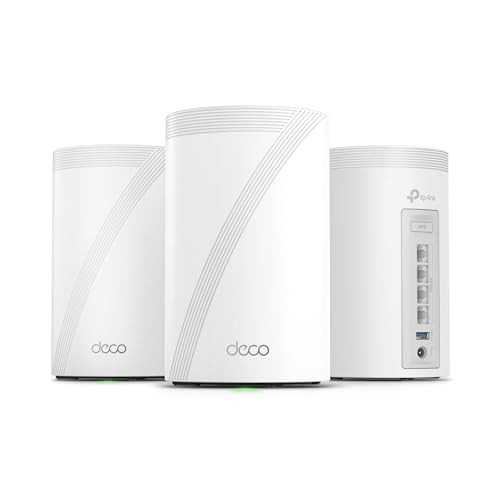
The TP-Link Deco 7 Pro is the serious networking kit in this roundup. Its advantage is not just Wi-Fi 7. The hardware gives a home network multiple ways to move traffic, which is useful when a desktop, storage device, access point, or wired entertainment system needs more than a basic Gigabit connection.
The three bands are rated at up to 5, 188 Mbps on 6 GHz, 4, 324 Mbps on 5 GHz, and 574 Mbps on 2.4 GHz. TP-Link rates the three-pack for up to 7, 600 square feet and more than 200 devices. These figures describe the system's capacity rather than a guaranteed speed to a particular room, but they make the Pro a strong match for a large, busy home.
Each unit has four 2.5G WAN/LAN ports and a USB 3.0 port. The system can use simultaneous wired and wireless backhaul, and the product information also describes a 10G Ethernet backhaul capability. That combination gives owners room to build around Ethernet now and faster internet service later. VPN client and server support adds flexibility for more advanced network setups.
The catch is that this is more system than many households need. The TP-Link Deco X55 is easier to justify for ordinary broadband and typical devices, while the NETGEAR Orbi 770 offers a different large-home approach with high aggregate performance. Choose the Deco 7 Pro if you can use its 2.5G ports, wired backhaul, device capacity, or tri-band design. Skip it if your network is mostly phones, televisions, and basic smart-home devices.
7. NETGEAR Orbi 770: Best for Large Homes

Pros
- Tri-band Wi-Fi 7 system rated up to 11 Gbps
- Coverage up to 8, 000 square feet
- Router plus two satellite extenders
- Supports up to 100 devices
- Enhanced backhaul and automatic security updates
Cons
- Built for US use only
- A 2.5 Gig internet port may limit the fastest service plans
- More hardware than a smaller home needs
Best for: large homes that need broad tri-band coverage and strong wireless links between nodes.
The NETGEAR Orbi 770 is designed around scale. The router and two satellite extenders cover up to 8, 000 square feet, giving it the broadest stated coverage in this group. Its tri-band layout also matters in a large house because the satellites need a strong path back to the router while serving clients in distant rooms.
NETGEAR rates the system for speeds up to 11 Gbps and up to 100 devices. Wi-Fi 7 brings lower-lag operation and more capacity than older standards, and the system remains compatible with older Wi-Fi devices. High-performance antennas and a 360-degree coverage design are intended to handle homes with multiple floors or difficult layouts.
Enhanced Backhaul keeps the satellite links separate from ordinary client traffic as the network operates across the home. Automatic firmware updates and Advanced Router Protection provide a security foundation without requiring the owner to monitor every update. The system is made for use in the United States only, so buyers elsewhere should not assume it is a universal fit.
The Orbi 770 is not automatically better for a small or moderately sized home. Its device capacity is lower than the TP-Link Deco 7 Pro, and the listed 2.5 Gig internet port may not suit the fastest service plans. It makes sense when coverage and tri-band reach are the priorities, especially in a large property where a smaller three-pack would leave weak spots.
8. TP-Link Deco S4: Best Simple AC System

Pros
- Coverage up to 5, 500 square feet
- Simple single-network roaming
- Six Gigabit Ethernet ports across the three units
- Supports up to 100 devices
- Wired Ethernet backhaul and Alexa support
Cons
- Older Wi-Fi 5 standard
- No Wi-Fi 6 or Wi-Fi 7 features
- Lower capacity for demanding modern networks
Best for: households that need broad basic coverage and do not require the newest wireless standard.
The TP-Link Deco S4 is the uncomplicated option. It uses three units to replace the traditional router and extender arrangement, creating one network name and password so devices can roam through the house without manually changing networks. That is a major improvement over a basic range extender, even though the underlying wireless standard is older.
The AC1900 system uses three by three, six-stream Wi-Fi and is rated for up to 5, 500 square feet and up to 100 devices. Those figures make it suitable for streaming, browsing, video calls, and ordinary smart-home use. The S4 is less suited to a home where many newer devices are competing for capacity or where the internet connection is particularly fast.
Each unit has two Gigabit Ethernet ports, giving the three-pack six ports in total. The units support wired Ethernet backhaul, which can make a significant difference when one node sits far from the main router or behind several walls. The Deco app provides guided setup, while Alexa can control guest Wi-Fi.
The TP-Link Deco X20 is a stronger long-term choice because Wi-Fi 6 handles busy networks better, and the TP-Link Deco X55 adds more Ethernet ports per unit. The S4 should be chosen for its straightforward coverage and simple controls, not for future wireless capacity. It is a good fit for a modest home that does not need Wi-Fi 6 or Wi-Fi 7 features.
9. TP-Link Deco X20: Best Straightforward Wi-Fi 6

Pros
- Wi-Fi 6 coverage up to 5, 800 square feet
- Supports up to 150 devices
- Wired backhaul support
- Six Ethernet ports across the three-pack
- Parental controls and basic HomeShield features
Cons
- Dual-band AX1800 hardware is less capable than Deco X55
- No 6 GHz band
- Not intended for multi-gigabit networks
Best for: homes that want Wi-Fi 6 capacity and wired backhaul in a simple three-unit system.
The TP-Link Deco X20 is a sensible middle ground between the older Deco S4 and the more capable Deco X55. It brings Wi-Fi 6 to a three-unit mesh system without turning setup into a technical exercise. The network uses one name throughout the house, and the app handles installation, management, and remote access.
TP-Link rates the system for coverage up to 5, 800 square feet and up to 150 devices. Wi-Fi 6 improves efficiency when phones, tablets, televisions, cameras, and smart-home devices share the network, even when most of those devices are not Wi-Fi 6 models. The product is described as suitable for internet plans up to 1 Gbps, which gives a useful boundary for its intended role.
The three-pack has six Ethernet ports in total and supports wired backhaul. That makes the X20 especially practical when Ethernet cable is already available between rooms. Alexa support can control guest Wi-Fi, while parental profiles let families limit and monitor internet use. HomeShield supplies basic network security, device identification, quality of service, and parental controls.
The TP-Link Deco X55 is the better pick when you need three ports on every node, while the TP-Link Deco XE75 is more appropriate for 6 GHz clients and tri-band backhaul. The X20 is the one to choose when a home needs a dependable Wi-Fi 6 foundation, six total Ethernet ports, and no need to chase the highest wireless figures.
10. eero 6: Best for Modest Plans

Pros
- Easy app-guided installation
- Wi-Fi 6 coverage up to 4, 500 square feet
- Supports 75 or more connected devices
- Automatic updates and remote management
- Built-in Zigbee smart-home hub
Cons
- Intended for internet plans up to 500 Mbps
- Smaller coverage area than the newer eero 7
- Less suitable for advanced manual configuration
Best for: smaller homes with moderate internet service and a preference for automatic management.
The eero 6 is a clean, low-friction way to extend Wi-Fi across a smaller home. The three-pack includes one router and two extenders, and the eero app walks through setup rather than assuming the owner knows how to configure a mesh system. Automatic updates keep the software current, while remote management makes it easy to check the network away from home.
Eero rates the system for internet plans up to 500 Mbps, coverage up to 4, 500 square feet, and 75 or more connected devices. Wi-Fi 6 helps the system manage a collection of phones, tablets, televisions, and smart-home products more efficiently than older Wi-Fi standards. It is still a modest platform compared with the eero 7, which reaches 2.5 Gbps service and more than 120 devices.
The eero 6 can also function as a Zigbee smart-home hub, making it useful in an Alexa-centered home with compatible devices. Eero's mesh software is designed to optimize the connection as a device moves between units, and the system can be expanded with cross-compatible eero hardware. Free customer support is available seven days a week in the United States.
The main reason to skip it is growth. If your internet service is faster than 500 Mbps, or if you expect a large collection of high-bandwidth devices, the eero 7 gives the network substantially more room. The eero 6 is best for someone who wants a simple, compact mesh system for a moderate connection and has no immediate need for multi-gigabit networking.

How to choose best mesh wifi
The right mesh system depends less on the largest number on the box than on how your home, devices, internet service, and wiring fit together.
Wireless standard
Wi-Fi 5 is still adequate for basic browsing and streaming, but Wi-Fi 6 is better at handling many devices at once. Wi-Fi 6E adds a 6 GHz band for compatible devices, while Wi-Fi 7 adds newer features such as multi-link operation and greater capacity. A newer standard helps most when your phones, laptops, and access points can use it.
Coverage and placement
Coverage claims are estimates based on ideal conditions. Thick walls, multiple floors, metal appliances, and long distances reduce usable range. Place the main unit near the modem and the other units where they still receive a strong signal, rather than at the farthest point of a dead zone. A system with a lower stated area can outperform a larger-rated kit when its nodes are placed more effectively.
Dual-band and tri-band design
Dual-band systems share the 2.4 GHz and 5 GHz radios between client devices and mesh traffic. Tri-band systems add either a 5 GHz or 6 GHz radio, giving the mesh more room to communicate between nodes. The TP-Link Deco XE75 can use 6 GHz as a backhaul, while the TP-Link Deco 7 Pro adds tri-band Wi-Fi 7 capacity for larger and busier networks.
A third band matters most when the nodes connect wirelessly and the home has several active devices, not simply because the label sounds newer.
Ethernet ports and wired backhaul
Ethernet backhaul sends traffic between mesh units over cable instead of using wireless airtime. It is often the most reliable way to cover a house with thick walls or multiple floors. Count the ports on each unit, not only the total across the pack. The TP-Link Deco X55 has three Gigabit ports per unit, while the Deco 7 Pro has four 2.5G WAN/LAN ports per unit.
Internet speed and device load
Match the system to the internet plan and the number of active devices. The eero 6 is designed for plans up to 500 Mbps, while the eero 7 supports plans up to 2.5 Gbps. Device capacity is also important in homes with cameras, speakers, locks, televisions, computers, and phones all connected at once.
Software and security
A mesh system should make it easy to create a guest network, update firmware, identify devices, and set parental controls. TP-Link's Deco app and HomeShield provide basic security and management features, while eero emphasizes automatic operation. NETGEAR includes automatic updates and router protection, with some advanced security features tied to an optional service or trial.
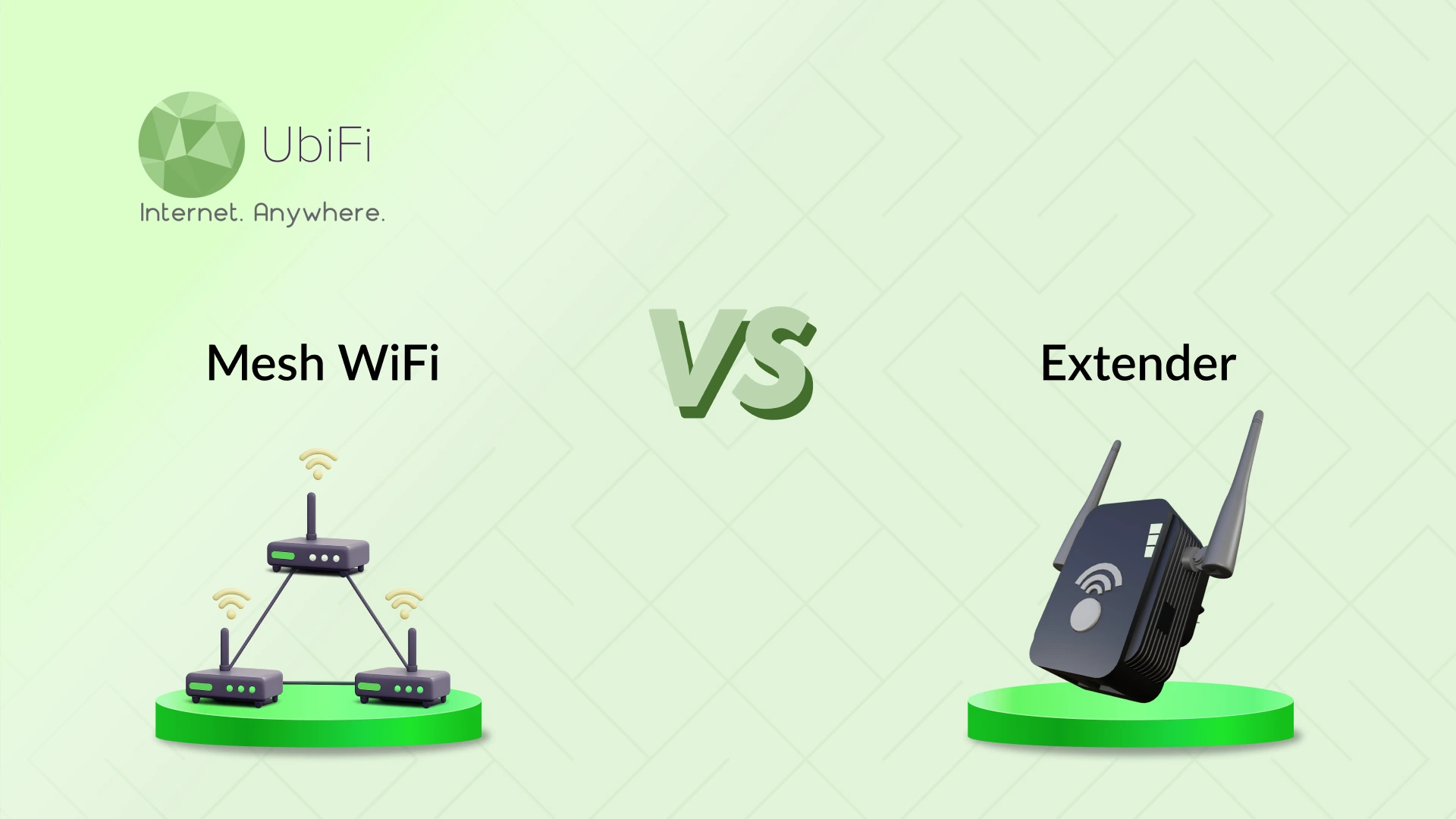
If you are deciding between a mesh network and a single powerful router, the layout is the deciding factor. A single router can be the cleaner answer in a compact apartment, while how multiple access points improve coverage across a home is more relevant for long, multi-floor, or wall-heavy layouts.
Frequently asked questions
Do mesh systems replace a wireless router?
Most of the systems here are designed to replace the existing wireless router, but they still require a modem for many internet services. The first mesh unit connects to the modem and acts as the router, while the other units extend the same network throughout the home.
Is Wi-Fi 7 necessary for a mesh system?
No. Wi-Fi 6 systems such as the TP-Link Deco X55 and Deco X20 can handle many homes well. Wi-Fi 7 becomes more useful when you have compatible devices, a fast internet plan, or a network that needs more capacity for simultaneous demanding tasks.
Is tri-band better than dual-band mesh?
Tri-band gives the system an additional radio for client traffic or wireless backhaul. That can improve consistency when nodes communicate wirelessly, especially across a large home. Dual-band can be sufficient when the nodes use Ethernet backhaul or the home has a modest number of active devices.
Can I use Ethernet backhaul with these systems?
The TP-Link Deco X55, Deco 7, Deco 7 Pro, Deco S4, and Deco X20 explicitly support wired backhaul in their listed features. Wired backhaul requires Ethernet cabling between units, but it can reduce the wireless burden and improve stability in difficult layouts.
Can older phones and laptops connect to Wi-Fi 6E or Wi-Fi 7 systems?
Yes. The Wi-Fi 6E and Wi-Fi 7 systems are backward compatible with older Wi-Fi generations. Older devices will not use the newest bands or features, but they can still connect to the network using the standards they support.
How many mesh units does a home need?
The systems in this roundup are three-unit kits, but the ideal number depends on the home's layout and construction. Units should be spread through the areas that need coverage, with enough overlap for the satellites to communicate reliably. Adding a unit to a poor location will not necessarily fix a weak connection.
Can mesh Wi-Fi improve a slow internet plan?
Mesh can improve coverage and reduce dead zones, but it cannot increase the speed supplied by the internet provider. It may make that connection more usable in distant rooms by providing a stronger link between the device and the network.
The bottom line
The Best mesh wifi pick for most homes is TP-Link Deco X55. It combines Wi-Fi 6 capacity, coverage up to 6, 500 square feet, support for up to 150 devices, three Gigabit ports on every unit, and wired backhaul in a package that is easy to manage. TP-Link Deco 7 Pro is the step-up choice for large, busy homes with 2.5G equipment, wired backhaul, or more than 200 connected devices.
For a simple app-led experience, eero 7 is the easier recommendation, while TP-Link Deco XE75 remains a strong choice when 6 GHz and tri-band backhaul matter more than Wi-Fi 7. The eero 6 and TP-Link Deco S4 make sense for smaller homes with more modest network demands.
If you are undecided, buy the TP-Link Deco X55 unless you specifically need Wi-Fi 7, 6 GHz, or multi-gigabit Ethernet.
As an Amazon Associate we earn from qualifying purchases.