

Metal engraving gets difficult when a machine that looks powerful on paper cannot produce a clean mark on stainless steel, anodized aluminum, or coated surfaces. The right tool depends on the metal you plan to mark, the size of each job, and whether you need a compact desktop machine or a production-ready setup. Our picks for the Best metal laser engraving machine include diode, infrared, enclosed, portable, and large-format designs.
The xTool F2 is the most capable choice for direct metal marking because its infrared laser is built specifically for vivid metal color marking, while its camera makes small-piece positioning unusually straightforward. The rest of the list ranges from compact starter engravers to large machines for signs, tumblers, batches, and mixed-material work.
Comparison table
| # | Product | Award | Laser system | Work area | Best for |
|---|---|---|---|---|---|
| 1 | xTool F2 | Best for metal marking | 5W IR and 15W diode | Not specified | Color marking and small batches |
| 2 | xTool S1 40W | Best enclosed machine | 40W diode | 23.93 x 15.16 inches | Large projects and tumblers |
| 3 | LONGER Ray5 20W | Best high-power open frame | 20W diode | 400 x 365mm | Cutting and studio work |
| 4 | Twotrees TTS-10 Pro | Best cutting-focused design | 10W diode | 300 x 300mm | DIY cutting and engraving |
| 5 | Carverall K15 Pro | Best beginner upgrade path | 10W diode | 11.8 x 7.9 inches | Coated metal and craft work |
| 6 | LONGER Ray5 10W 400 | Best large-area 10W model | 10W diode | 400 x 400mm | Signs and larger flat work |
| 7 | BlazeX M3 | Best enclosed starter kit | 10W diode | Not specified | Safer home crafting |
| 8 | LaserPecker LP2 | Best portable engraver | Laser output not specified | Portable format | Handheld and cylindrical work |
| 9 | ACMER S1 | Best compact starter | 2500mW diode | 130 x 130mm | Small home projects |
| 10 | LONGER Ray5 10W 24000 | Best flexible connectivity | 10W diode | Not specified | Offline and connected workflows |
1. xTool F2: Best for Metal Marking

Pros
- Combines a 5W infrared laser with a 15W diode
- Built-in 50MP camera supports precise positioning
- Handles color marking and 3D embossing
- Fully enclosed for indoor and on-site use
Cons
- Class 4 laser requires careful safety practice
- Compact work area is better for small pieces than large panels
- Accessories are needed for some expanded workflows
Best for: makers and small businesses that mark metal parts, tags, tumblers, and other small items.
The xTool F2 is the machine on this list that most directly answers the question of metal marking. Its 5W infrared laser is intended for deep, dark, vivid color marking on metal, while the 15W diode handles 3D embossing and thicker nonmetal materials. That combination is more useful than a single diode when your work moves between stainless steel, coated items, wood, and acrylic.
The built-in 50MP camera is a major practical advantage. It visualizes the work area and supports alignment accuracy of up to 0.1mm on small pieces, so placing a logo on a dog tag or a name on a metal plate is less dependent on manually framing the job. xTool also lists 0.00199-inch motion accuracy, which helps explain why this model is aimed at detailed work rather than simple marks.
Speed is another clear strength. The F2 is rated for up to 6000mm/s, and the supplied material presets are designed to reduce the amount of parameter hunting at the start of a project. The machine arrives fully assembled, weighs 4.6kg, and has a built-in fan. Its enclosed design is suitable for workshops, stores, fairs, and pop-ups, though smoke management still deserves attention when the material calls for it.
The limitation is its specialty. This is a compact machine, not the right answer for broad signs or large sheets. The Class 4 classification also means buyers must take its safety requirements seriously despite the enclosure. Compared with the xTool S1 40W, it gives metal-focused users a more versatile laser system and better camera workflow, but the S1 wins for large-format cutting. If your work centers on metal tags, color marks, and small-batch customization, the F2 is the one we would keep.
2. xTool S1 40W: Best Enclosed Machine

Pros
- 40W diode supports demanding cutting work
- Large 23.93 x 15.16-inch bed
- Enclosure filters 99 percent of laser light
- Rotary bundle supports tumbler projects
- Auto-focus and guided software simplify setup
Cons
- Diode laser is less specialized for bare metal than an IR laser
- Large footprint needs a dedicated workspace
- The enclosure limits access to oversized objects
Best for: users who need one enclosed machine for large projects, cutting, and rotary work.
The xTool S1 40W is the better fit when metal engraving is only part of a broader workshop. It has the strongest diode output in this group at 40W, a rotary bundle for tumblers, and a bed measuring 23.93 by 15.16 inches. That makes it far more comfortable for signs, batches of smaller items, and projects that would feel cramped on the F2.
Its metal capability is based on a diode laser rather than the F2's infrared module. That distinction matters. The S1 is equipped to engrave metal, but the F2 is the more deliberate choice for vivid color marking on metal. The S1 earns its place through wider material versatility and cutting strength, with the manufacturer stating that it can cut 18mm cherry wood in one pass.
The software and positioning features are unusually approachable for a machine of this size. Auto-focus, xTool Creative Space, material presets, and more than 1, 000 project tutorials reduce the setup burden. Pin-point Positioning supports placement on workpieces, while AutoPassthrough can handle projects up to 3, 000mm long. The included rotary setup opens a practical route into cylindrical items.
Safety is a major reason to choose this machine over open-frame models such as the LONGER Ray5 20W. The cover filters 99 percent of laser light, five flame sensors can halt operation, and lid-open and emergency-stop protections are built in. The compromise is physical size and access. An enclosed 40W machine needs a proper station, and buyers focused almost entirely on metal color marking should choose the F2 instead. For mixed-material production and large enclosed jobs, the S1 is the more complete package.
3. LONGER Ray5 20W: Best High-Power Open Frame

Pros
- 20W laser supports substantial cutting work
- 400 x 365mm work area
- 3.5-inch touchscreen and offline controls
- USB, TF card, WiFi, and app connections
- Protective enclosure and safety goggles included
Cons
- Open-frame operation needs careful workspace planning
- A diode laser is not as metal-specialized as infrared
- Larger frame takes significant desk space
Best for: studios and makers who want a large work area with high diode power.
The LONGER Ray5 20W is built for people who think in sheets, signs, and repeated jobs rather than individual tags. Its 400 by 365mm work area gives it a meaningful advantage over the smaller Twotrees TTS-10 Pro and Carverall K15 Pro. It is also the more suitable LONGER model here for users who expect cutting to matter as much as engraving.
The 20W module is rated for a maximum engraving speed of 24, 000mm/min. LONGER lists single-pass cutting of 15mm pine, 0.05mm stainless steel, and 8mm acrylic, plus deeper multiple-pass cutting on wood and acrylic. Those claims describe capability across materials, not a guarantee for every grade or finish, but they show why this version belongs near the top for demanding mixed-material work.
Fine detail is supported by a 0.08 by 0.1mm laser spot and stated precision up to 0.01mm. The machine also offers a 256-color palette for color engraving on stainless steel, metal, wood, leather, glass, acrylic, and cotton fabric. A 3.5-inch touchscreen makes it possible to monitor progress and adjust settings without relying entirely on a computer.
Connectivity is broad. USB, TF card, WiFi, and app control cover online and offline jobs, while LightBurn and LaserGRBL support more advanced workflows. The included enclosure, protective laser shield, emergency stop, motion protection, overheating protection, and safety goggles are useful, but an open-frame design still demands disciplined placement and ventilation. The xTool S1 40W is safer and more polished as an enclosed system, while the Ray5 20W gives experienced makers a larger, more flexible open workspace. Skip it if you only need small metal marks.
4. Twotrees TTS-10 Pro: Best Cutting-Focused Design

Pros
- 10W laser with 0.069mm spot
- 300 x 300mm work area
- Rated speed up to 30, 000mm/min
- Metal air assist nozzle included
- Online, TF card, mobile app, and web control
Cons
- Class IV classification demands serious safety precautions
- Smaller bed than the larger LONGER machines
- Bare metal work is more limited than coated metal work
Best for: DIY users who want fast cutting and several ways to control the machine.
The Twotrees TTS-10 Pro has a distinctly practical personality. It is not trying to be a compact camera-guided metal marker like the xTool F2. Instead, it pairs a 10W laser with a 300 by 300mm work area, a high claimed speed of 30, 000mm/min, and an air assist nozzle that helps clear smoke and dust during cutting.
Its 0.069mm laser spot is aimed at detailed engraving, while the manufacturer says the machine can cut 8mm plywood and 5mm black acrylic in one pass. Air assist is particularly useful when the job involves cutting rather than shallow surface marking because it supplies oxygen and pushes debris away from the beam path. The included metal nozzle also makes a future air-assist upgrade more straightforward.
Control options are generous. The 32-bit dual-core controller supports computer operation, TF card offline engraving, a mobile app, and web control. LaserGRBL and LightBurn are supported, and the machine can work with Windows, Mac, and mobile workflows through the listed software options. That flexibility is helpful when the machine is used in a shared studio or away from a permanent computer.
The weakness is safety and metal specialization. This is listed as a Class IV laser, and its red magnetic filter hood is not a substitute for sensible laser safety practice. Its metal results will depend heavily on the material finish and settings, so it is better suited to coated metal and mixed craft work than direct bare-metal production. Compared with the Carverall K15 Pro, the TTS-10 Pro offers a wider cutting-oriented workspace and faster stated speed, but the Carverall has a gentler beginner setup. Choose Twotrees when cutting is central to the workflow.
5. Carverall K15 Pro: Best Beginner Upgrade Path

Pros
- 10W output with one-touch smart focus
- A4-sized 11.8 x 7.9-inch work area
- Offline TF card operation
- Three-minute assembly claim
- Optional IR laser head upgrade
Cons
- Bare-metal marking requires the optional IR head
- Work area is smaller than the Ray5 machines
- Some claimed cutting capacities depend on material and passes
Best for: beginners who want coated-metal work now and an upgrade route toward stainless steel.
The Carverall K15 Pro is one of the more approachable machines here because it tries to remove several early obstacles at once. The listing says it assembles with six screws in about three minutes, includes starter materials and tools, and supports CutLabX on computers, tablets, and phones. One-touch smart focus is another useful touch for a first machine.
The 10W diode module is listed with verified output between 10.36W and 10.58W. Its 11.8 by 7.9-inch A4 work area is large enough for coasters, jewelry blanks, pet tags, and small signs, while four heightening columns allow taller objects such as gift boxes and skateboards. It is a sensible middle ground between the tiny ACMER S1 and the broad 400mm machines.
Metal buyers need to read the product distinction carefully. The standard diode setup is aimed at coated metal, wood, acrylic, leather, and similar materials. The listing says an optional 1W IR laser head can be added for stainless steel tumblers and aluminum. That upgrade path makes the K15 Pro more interesting than a fixed-purpose starter, but it also means the machine does not provide the full metal capability immediately.
The machine reaches a stated 15, 000mm/min and 0.01mm precision, with dual fans intended to reduce heat buildup. Smart memory can save the last file for repeat jobs, a useful feature for small batches. The LONGER Ray5 10W 400 offers much more workspace, while the BlazeX M3 offers an enclosure and honeycomb bed from the start. Choose the K15 Pro if a short setup, compact A4 format, and future IR expansion matter more than maximum bed size.
6. LONGER Ray5 10W 400: Best Large-Area 10W Model

Pros
- 400 x 400mm work area
- Dual-beam 0.06 x 0.06mm spot
- 24, 000mm/min maximum speed
- USB, TF card, WiFi, and app control
- Supports offline operation and batch processing
Cons
- Open-frame design needs a suitable enclosure or workspace
- 10W diode is less suitable for direct bare-metal marking
- Assembly and calibration take more involvement than enclosed models
Best for: makers who need a broad work area without moving to a 20W machine.
The LONGER Ray5 10W 400 is the large-format choice for makers who do not need the Ray5 20W's extra cutting power. Its 400 by 400mm work area is the largest stated flat bed among the 10W diode machines here. That space is valuable for signs, home décor, multiple small items, and layouts that would require repositioning on the K15 Pro or ACMER S1.
LONGER lists a dual-beam laser with a 0.06 by 0.06mm spot, 0.01mm engraving accuracy, and speeds up to 24, 000mm/min. It is designed to engrave wood, leather, acrylic, anodized metal, stainless steel, glass, ceramic, and slate, while the stated cutting capability reaches 20mm wood and 30mm acrylic. Material thickness, density, and number of passes will affect real results.
The 240MHz ESP32 controller supports USB, TF card, WiFi, and the LONGER app. That gives the machine a useful offline mode for repeat jobs and a more conventional computer workflow for design-heavy work. LightBurn and LaserGRBL compatibility also means an owner is not forced into one software environment.
This model is a better fit than the smaller LONGER Ray5 10W 24000 when physical workspace matters. The smaller model has similar connection flexibility but does not state the same 400 by 400mm bed in its supplied details. The trade-off is that this is still an open-frame diode machine. A protective cover, emergency stop, motion detection, overheating protection, and vibration sensing help, but they do not remove the need for careful operation. If you need room for flat projects and mostly work with coated metal or nonmetal materials, this Ray5 makes more sense than chasing a smaller footprint.
7. BlazeX M3: Best Enclosed Starter Kit

Pros
- Enclosure, honeycomb bed, tools, and materials included
- Class 1 safety design
- 0.01mm stated precision
- Built-in fan exhausts smoke and odors
- Supports LightBurn, LaserGRBL, and CutLabX
Cons
- Work area is not specified
- 10W diode is mainly suited to coated metal
- Rotary and air-assist features require add-ons
Best for: home users who want an enclosed starter setup with basic accessories included.
The BlazeX M3's strongest argument is that it arrives as a more complete home setup than many open-frame diode machines. The bundle includes a protective enclosure, honeycomb bed, tool kit, and 13 engraving materials. The honeycomb surface supports the workpiece, improves airflow, and helps protect the table during cutting.
Its 10W laser is listed with 0.01mm precision and compatibility with more than 200 materials, including wood, leather, glass, and coated metal. The machine is also described as a two-in-one engraver and cutter, with clean cuts on wood and acrylic forming a major part of its use case. For metal, the listing supports engraved patterns and coated surfaces rather than promising the kind of bare-metal color work offered by the xTool F2.
Safety is more developed than on the open-frame ACMER S1. The M3 is listed as Class 1, with a lid-open and tilt sensor that stops operation, plus a fan for smoke and odor exhaust. It supports Windows, macOS, iOS, and Android through LightBurn, LaserGRBL, and CutLabX. The enclosure also makes it a more comfortable choice for a home studio, though ventilation remains important.
The feature ecosystem can grow with the user. A rotary roller and risers support cylindrical work, while air assist and a purifier can improve cutting edges and workspace cleanliness. The drawback is that several of the more advanced capabilities are accessories rather than core features, and the listing does not state the work area. Compared with the Carverall K15 Pro, the BlazeX is easier to place in a home because of its enclosure, while the Carverall has the clearer IR upgrade path. Pick the M3 when included safety hardware matters most.
8. LaserPecker LP2: Best Portable Engraver

Pros
- Portable handheld design
- Electric roller supports cylindrical engraving
- 0.05mm compressed spot
- Smartphone and PC connectivity
- Small footprint and simple setup
Cons
- Cannot engrave pure or shiny metal
- Small working format limits flat projects
- Requires 11cm laser distance during use
Best for: users who need portability and frequent work on coated metal or cylindrical objects.
The LaserPecker LP2 is a different kind of machine from the Ray5 and xTool models. Its compact body can be used on a stand or handheld, and the included electric roller turns it into a practical tool for tumblers, pencils, and other cylindrical items. The unit measures about 5.9 by 5.9 inches across, with a height of about 8.7 inches, so it is easy to move between a home workspace and an event table.
Its 0.05mm compressed spot supports fine detail, and the machine offers 1K, 1.3K, and 2K resolution choices. The roller includes cylinder, slab, and trolley modes, with the listing stating that trolley mode can extend engraving length to 196 inches while keeping the width at 4 inches. That is a useful shape-oriented workflow that the flat-bed machines cannot replicate without rotary accessories.
Metal limitations are decisive. The LP2 can engrave coated metal and brushed stainless steel, but the listing explicitly says it cannot engrave pure metal or shiny metal. Light-colored or transparent materials may need to be painted or sprayed black first. Readers searching for direct metal marking should not treat this as a substitute for the xTool F2's infrared laser.
The LP2 connects to a smartphone or PC and supports JPG, PNG, and G-code files. Its plug-and-play format is less intimidating than assembling a large open frame, but keeping the laser at the specified 11cm distance adds a setup constraint. Compared with the ACMER S1, it is much better for portability and cylinders but much less useful for broad flat work. Choose it for mobile personalization, not for a general-purpose metal production bench.
9. ACMER S1: Best Compact Starter

Pros
- Compact 130 x 130mm working area
- 99 percent preassembled
- 0.01mm repeatable positioning accuracy
- Supports macOS, Windows, and Linux
- LightBurn and LaserGRBL compatible
Cons
- 2500mW laser is the least powerful here
- Small work area limits project size
- Listing focuses on coated and nonmetal materials rather than bare metal
Best for: beginners who need a small, portable machine for simple craft projects.
The ACMER S1 is the smallest and simplest machine in this roundup. It arrives 99 percent preassembled, with only a one-minute laser-head installation described in the listing. Its 2kg aluminum-alloy build and 250 by 250 by 162mm machine size make it easy to store when the work is occasional rather than continuous.
The usable work area is 130 by 130mm, so this is a machine for small plaques, tags, jewelry pieces, and test work. Its 2500mW diode laser has a stated 455 plus or minus 5nm wavelength, 2mm focal length, and up to 10, 000mm/min engraving speed. Repeatable positioning accuracy is listed at 0.01mm, which is useful for crisp small designs even though the laser lacks the cutting power of the larger models.
ACMER says the S1 can engrave wood, bamboo, leather, plastic, PCB, aluminum oxide, ceramics, and other materials, and can cut thin plywood, MDF, and acrylic. That list is more informative than calling it a universal metal engraver. Aluminum oxide and coated materials are a more realistic fit than untreated or shiny metal, and the 2500mW output places it well behind the F2, S1 40W, and Ray5 20W for demanding work.
The software side is friendly. Acmerstudio is included, while LightBurn and LaserGRBL are also supported across macOS, Windows, and Linux. The machine includes Class 4 certification, IEC 60825-1 compliance, a 12-month warranty, and stated 24/7 support, but a small open design still needs safe handling. If your projects fit the tiny bed, this is a sensible introduction. Anyone planning tumblers, signs, or repeated metal batches should move up to the Carverall K15 Pro or a LONGER Ray5.
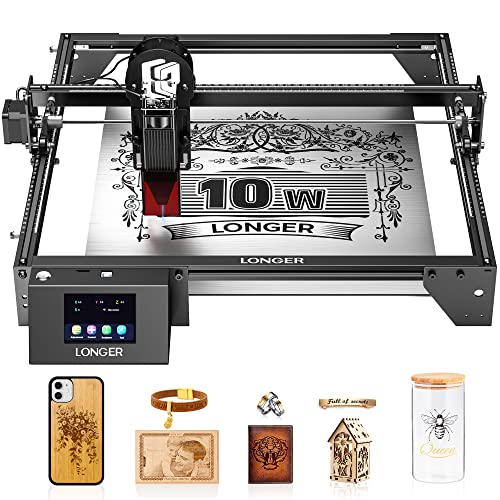
10. LONGER Ray5 10W 24000: Best Flexible Connectivity
Pros
- 0.06 x 0.06mm laser spot
- 10, 000mm/min maximum speed
- USB, TF card, WiFi, and app control
- Offline engraving support
- Emergency stop and motion protection
Cons
- Less powerful than the 20W Ray5
- Work area is not specified in the listing details
- Open-frame operation needs extra care
Best for: users who want several connection methods and offline operation in a 10W machine.
The LONGER Ray5 10W 24000 is close in spirit to the larger Ray5 10W 400, but it is presented as a more general flexible-control machine rather than a large-bed specialist. It uses a 10W output module, a 240MHz ESP32 processor, and a dual-beam design intended to improve engraving consistency and cutting performance.
Its 0.06 by 0.06mm laser point and stated 0.01mm precision support detailed work, while the maximum engraving speed is 10, 000mm/min. LONGER lists cutting up to 20mm wood and 30mm acrylic, along with engraving on stainless steel, cotton cloth, leather, metal, wood, glass, and acrylic. As with the other diode machines, those material claims do not mean that every bare-metal surface will mark deeply or consistently.
The connection options are the main attraction. USB suits a conventional computer workflow, TF card enables offline jobs, WiFi and app control provide flexibility, and LightBurn and LaserGRBL cover common desktop software. That makes it useful for a workshop where the machine may not stay connected to one computer.
Safety features include an emergency stop, motion protection, heat protection, a protective cover, safety goggles, and hidden active cooling. Even so, the open-frame format is not as contained as the BlazeX M3 or xTool S1. The Ray5 10W 400 is the better choice for a stated 400 by 400mm work area and faster operation, while this model makes more sense when connectivity and offline control are the priority. It is a capable general-purpose option, but not the first pick for direct metal marking.

How to choose best metal laser engraving machine
The right machine is determined less by a headline wattage than by the metal finish, work size, safety setup, and workflow you actually plan to use.
Metal laser type
A diode laser can mark coated metal, anodized aluminum, and some treated surfaces, but it is not automatically a direct bare-metal engraver. Infrared is the important differentiator in this list. The xTool F2 uses a 5W IR laser for dark and color metal marking, while the Carverall K15 Pro lists an optional 1W IR head for stainless steel and aluminum.
If untreated stainless steel is the main material, choose the machine with an infrared laser or a clearly stated metal-marking method, not simply the highest diode wattage.
The LaserPecker LP2 is a useful warning. It supports coated metal and brushed stainless steel but explicitly excludes pure and shiny metal. Read the material limitations before choosing a compact machine.
Laser output and cutting
Output affects cutting depth, pass count, and the range of nonmetal materials a machine can handle. The ACMER S1 uses a 2500mW diode, while the Ray5 models use 10W, the Ray5 20W uses 20W, and the xTool S1 uses 40W. Higher output is most important if you also cut plywood, acrylic, or thick craft stock.
Do not compare wattage without considering the job. A 15W diode in the xTool F2 is paired with a 5W IR laser for a more versatile metal workflow, while the 40W S1 is much more focused on high-throughput cutting and large projects.
Work area
Measure the pieces you expect to engrave, not just the machine footprint. The ACMER S1's 130 by 130mm area suits small tags and jewelry, the Twotrees TTS-10 Pro provides 300 by 300mm, and the LONGER Ray5 10W 400 reaches 400 by 400mm. The xTool S1 goes to 23.93 by 15.16 inches.
A larger bed also helps with batch work. If you regularly engrave multiple tags, coasters, or panels in one layout, a broad work area can save repositioning time. For one-off tumblers, a rotary accessory may matter more than a large flat bed.
Speed and precision
Speed ratings indicate maximum movement, not guaranteed finished-job time. The TTS-10 Pro lists up to 30, 000mm/min, the Ray5 20W and Ray5 10W 400 list up to 24, 000mm/min, and the F2 lists up to 6000mm/s. Actual results depend on power, material, image density, and the number of passes.
Spot size matters for small lettering and fine line work. The Ray5 10W models list a 0.06 by 0.06mm spot, the TTS-10 Pro lists 0.069mm, the Ray5 20W lists 0.08 by 0.1mm, and the LP2 lists a 0.05mm compressed spot. Camera alignment, focus control, and material stability can matter just as much as the smallest stated number.
Safety and ventilation
Open-frame machines need a controlled workspace, protective eyewear where required, and sensible smoke extraction. Emergency stops, motion sensors, protective shields, and overheating protection are useful safeguards, but they do not make an open frame automatically safe.
Enclosed designs offer a clearer path for home use. The xTool S1 filters 99 percent of laser light and includes flame sensors, while the BlazeX M3 is listed as Class 1 with lid-open and tilt protection. The xTool F2 is enclosed but classified as Class 4, so its safety requirements still deserve close attention.
Software and offline control
LightBurn and LaserGRBL are common choices for users who want more control over layout and parameters. The ACMER S1, Twotrees TTS-10 Pro, BlazeX M3, and LONGER machines support combinations of these programs. xTool uses Creative Space, with material presets and guided projects aimed at simpler setup.
Offline control is useful for repeat jobs or workshops where a computer cannot stay connected. TF card operation appears on the Twotrees and LONGER machines, while the LONGER models also add USB, WiFi, and app connections.
Frequently asked questions
Can a diode laser engrave bare metal?
Most diode machines in this roundup are better suited to coated metal, anodized aluminum, or treated surfaces than untreated metal. The xTool F2 is the strongest fit for direct metal marking because it includes a 5W infrared laser. Always check the stated material limitations for the specific machine.
Which machine is best for stainless steel?
The xTool F2 is the clearest choice for stainless steel marking because its infrared laser is designed for vivid metal marking. The Carverall K15 Pro can move into stainless steel work with its optional IR head. The LaserPecker LP2 supports brushed stainless steel but does not support pure or shiny metal according to its listing.
Is a 10W laser enough for metal engraving?
A 10W diode can engrave coated metal and some treated surfaces, but laser output alone does not determine bare-metal performance. The wavelength and material finish matter just as much. For direct metal marking, an infrared laser is a more meaningful feature than moving from one 10W diode frame to another.
Do I need an enclosure?
An enclosure is strongly useful for a home workspace because it limits exposure to laser light and helps contain smoke. The xTool S1 and BlazeX M3 have enclosed designs, while several LONGER, Twotrees, and ACMER models use open-frame layouts or protective covers. Even enclosed machines need appropriate ventilation and careful operation.
What work area should a beginner choose?
Choose the smallest area that comfortably fits your real projects, but leave room for growth if you expect to make signs or batches. The ACMER S1 is limited to 130 by 130mm, while the Carverall K15 Pro provides an A4-sized area. The Ray5 10W 400 is better for larger flat items and repeated layouts.
Are rotary attachments useful for metal work?
A rotary attachment is useful for cylindrical objects such as tumblers and bottles because it keeps the surface moving under the laser. The xTool S1 includes a rotary bundle, the LaserPecker LP2 includes an electric roller, and several other machines support rotary accessories. A rotary tool does not solve a laser's limitations with untreated metal.
What materials should I test first?
Start with a small sample of the same metal finish and thickness as the final workpiece. Coated metal, anodized aluminum, and brushed stainless steel can react differently from bare or polished surfaces. Record the power, speed, focus, and pass settings so repeat jobs are easier to reproduce.
The bottom line
The Best metal laser engraving machine for direct metal marking is the xTool F2. Its 5W infrared and 15W diode lasers cover more useful material types than a single diode, and the 50MP camera makes positioning small metal pieces far easier. It is the right pick for tags, tumblers, color marks, and portable small-batch work.
Choose the xTool S1 40W if you need a larger enclosed machine for cutting, broad layouts, and rotary projects, or the LONGER Ray5 20W if an open studio setup and high diode power suit your workflow better. The Carverall K15 Pro is the most sensible stepping stone for a beginner who wants coated-metal work now and an optional IR upgrade later.
If you are undecided, choose the xTool F2 for metal-first projects and the xTool S1 40W for a larger mixed-material workshop.
As an Amazon Associate we earn from qualifying purchases.