

A translator device has one job: keep a simple conversation from turning into a performance of pointing, repeating, and hoping. The useful ones also handle menus, signs, lessons, and weak-signal situations without forcing you to hand over your phone.
The Best online translator picks here range from pocket devices with cameras to earbuds and a scan pen for reading support. Some are built for broad language coverage, while others make more sense for conversations, classrooms, or travel.
Jarvisen Translator 2 is the strongest all-around pick for dependable two-way conversation, while the rest cover larger screens, longer battery claims, reading assistance, and earbud-based translation.
| # | Product | Award | Language coverage | Battery or format | Best for |
|---|---|---|---|---|---|
| 1 | Jarvisen Translator 2 | Best overall | 108 voice, 50 photo, 18 offline pairs | 2, 000mAh, up to 6 hours | Frequent travelers |
| 2 | FLTIDUNDI Translator | Best for features | 150+ online, 20+ offline | 4.1-inch screen, 1, 500mAh | Meetings and travel |
| 3 | VSOROV Scan Translator Pen | Best for learning | 142 online, 10 offline | Pen format, 0.16 pounds | Reading support |
| 4 | Timekettle M3 Earbuds | Best translator earbuds | 40 languages | 7.5 hours, 25 with case | Two-person conversations |
| 5 | CAWRUGA AI Translator | Best large screen | 150 online, 21 offline | 5.5-inch screen | Easy viewing |
| 6 | Ceymoal Pocket Translator | Best for battery life | 139 online, 19 offline | 1, 500mAh, up to 8 hours | Long travel days |
| 7 | Herpla Voice Translator | Best compact option | 160 online, 15 offline | 3-inch screen | Simple conversations |
| 8 | RUISJ Instant Translator | Best for photo translation | 139+ online, 18 offline | 1, 500mAh, up to 8 hours | Signs and menus |
| 9 | IAMJOY Translation Earbuds | Best multi-mode earbuds | 163 languages, 85 accents | 4 to 5 hours | Casual travel |
| 10 | Diydeg Y113 Earbuds | Best for phone integration | 144 languages | About 3 hours | App-based translation |
1. Jarvisen Translator 2: Best Overall

Pros
- Two-way voice translation with a 0.5-second response claim
- 18 offline language pairs
- Built-in global mobile data
- 2, 000mAh battery and included protective case
Cons
- Voice coverage is narrower than several rivals
- Photo translation supports 50 languages
- Continuous translation is listed at up to 6 hours
Best for: frequent travelers who want a dedicated device with connectivity built in.
The Jarvisen Translator 2 feels like the most deliberate travel tool in this group. Its design is slim enough for a pocket or small bag, and the purpose is clear: press, speak, and hand the device across. It avoids the distraction of a general-purpose phone while still handling voice and photo translation.
The device supports voice translation in 108 languages and photo translation in 50. That is not the broadest voice coverage here, but the 18 offline language pairs matter more than a large online headline when you are on a flight, in a remote area, or dealing with unreliable service. The claimed 0.5-second response time also makes it better suited to short exchanges than a device that leaves long gaps between speakers.
Jarvisen includes two years of global mobile data, so it does not need Wi-Fi or a separate SIM for its online functions during that period. The 2, 000mAh battery is rated for up to 6 hours of continuous translation and 10 days of standby, and the unit measures 5.5 by 2.2 by 0.4 inches. That is larger than the Herpla, but still a reasonable pocket shape.
The weakness is coverage. FLTIDUNDI Translator supports more than 150 online languages and has a larger screen, while Jarvisen's advantage is its built-in data arrangement and more established travel-focused design. Skip Jarvisen if you need the widest possible language list or extensive image translation. Keep it in mind if you want a straightforward conversation tool that can work away from Wi-Fi.
2. FLTIDUNDI Translator: Best for Features

Pros
- More than 150 online languages
- 4.1-inch IPS touchscreen
- Recording and translated memo functions
- Photo translation in online and offline modes
Cons
- Offline voice coverage is much smaller than online coverage
- Requires a network for its broadest language support
- The feature set may be more than casual users need
Best for: travelers and business users who want voice, image, and recording tools in one device.
FLTIDUNDI Translator is the Swiss Army knife of this list. Its 4.1-inch IPS touchscreen gives translated text enough room to read without squinting, and its controls are designed around the display rather than a collection of obscure buttons. That makes it a sensible choice for people who want a device that can be passed between speakers.
Its online voice system covers more than 150 languages, with a claimed accuracy rate of up to 98 percent. Offline voice translation covers more than 20 languages. The distinction is important: this is an online-first device, not a replacement for a full offline language library. Its camera adds online image and text translation in 75 languages and offline support in 41.
The recording function is a genuine differentiator. FLTIDUNDI can record up to 60 minutes of audio memos and translate recorded material, which gives it a role in meetings, lectures, and study sessions. A built-in 1, 500mAh battery is listed for up to 8 hours of continuous use and up to 10 days of standby.
Compared with the Jarvisen Translator 2, FLTIDUNDI gives you more screen area and more secondary tools, but Jarvisen is the cleaner choice for travel connectivity. The 4.1-inch display also makes it less pocket-friendly than the Herpla. Choose this one when a menu reader, meeting recorder, and conversation device sound like one useful package.
3. VSOROV Scan Translator Pen: Best for Learning

Pros
- Scans and reads text aloud
- 142 online and 10 offline translation languages
- Supports text extraction and photo translation
- Light 0.16-pound pen format
Cons
- Not suitable for blind users
- Bluetooth connection is required
- Offline coverage is limited to 10 languages
Best for: students, language learners, and users who need help reading printed text.
The VSOROV Scan Translator Pen is not trying to be a pocket interpreter first. Its strength is the physical act of following a line of printed text, scanning it, and hearing it read aloud. That makes it more relevant to a student or language learner than to someone who mainly needs rapid airport conversations.
Online scanning and voice translation cover 142 languages, while offline translation covers 10. The pen can also extract text, translate photos, and sync with a phone for editing and note-taking. Those functions turn it into a study aid rather than a simple phrase converter.
Its dimensions are 6.2 by 1.23 by 0.46 inches, and the listed weight is 0.16 pounds. That is light enough for a pencil case, and the slim shape should be easier to use over a page than a wide touchscreen device. Bluetooth headphones are supported, which could make spoken output less disruptive in a classroom or library.
The key limitation is the product's own warning that it is not suitable for blind people. It also depends on Bluetooth-connected equipment for some features, so it is not the most self-contained pick here. The Jarvisen Translator 2 is better for spoken exchanges, but VSOROV is the clear choice when reading pronunciation, extracting passages, and learning vocabulary matter more.
4. Timekettle M3 Earbuds: Best Translator Earbuds

Pros
- Three translation modes
- Music and phone-call support
- Up to 30dB active noise reduction
- Up to 25 hours with the charging case
Cons
- Requires a phone and the Timekettle app
- Online version includes no offline package
- Supports 40 languages, fewer than many handheld devices
Best for: two people who want translated speech delivered directly through earbuds.
The Timekettle M3 Earbuds change the shape of a translation conversation. Instead of holding a device between two people, each person can hear the exchange through an earbud, or the phone can act as the shared interface. That feels more natural in a longer one-on-one conversation than passing a screen back and forth.
The M3 supports 40 languages and offers Touch, Listen, and Speaker modes. Touch mode gives each person an earbud, while Listen mode uses the phone to capture sentences automatically. Speaker mode is more practical for quick directions or ordering food. The claimed semantic segmentation system is designed to translate earlier sentences while the speaker continues.
These are also ordinary Bluetooth earbuds for music and calls, with active noise cancellation rated at up to 30dB. A full charge is listed at about 7.5 hours, with up to 25 hours from the charging case. The earbuds need to connect to a phone over Bluetooth, and the Timekettle app is required to set languages and adjust audio settings.
That app dependency is the main catch. The online version does not include offline language packs, although the listing says 13 packs can be purchased separately through the app. If you are choosing between how two people can share translated speech naturally and a screen-based device, M3 makes the stronger case for hands-free conversation. If you need maximum language breadth or no-phone operation, choose Jarvisen or FLTIDUNDI instead.
5. CAWRUGA AI Translator: Best Large Screen

Pros
- Large 5.5-inch IPS touchscreen
- 150 online languages and 21 offline languages
- Photo translation in 75 online and 41 offline languages
- Recording, voice memos, and learning tools
Cons
- Larger than most pocket translators
- Offline language coverage is narrower than online coverage
- Camera resolution is listed at 5MP
Best for: users who want translated text displayed clearly on a large screen.
The CAWRUGA AI Translator is the easiest model here to read at a glance. Its 5.5-inch IPS screen is closer to a small phone display than a traditional translator screen, and the listing says it uses only three buttons. That combination should appeal to older users, groups sharing the device, and anyone who dislikes cramped menus.
It supports 150 online languages and 21 offline languages. The built-in 5MP camera handles photo and text translation in 75 online languages and 41 offline languages, so it has a useful fallback for signs and menus when the network disappears. The large display should also help when showing a translated sentence to someone across a table.
CAWRUGA adds recording translation, voice memos, a world clock, currency conversion, and language-learning tools. Those extras make it more suitable for business trips and study than a device focused only on short voice exchanges. A lanyard and protective case are included according to the listing, which helps address the risk of carrying a larger screen in a busy setting.
The trade-off is portability. Herpla Voice Translator and RUISJ Instant Translator are easier to slip into a small pocket, while CAWRUGA gives up some compactness for visibility. Pick it for readable text, meeting notes, and a generous interface. Skip it if your translator needs to disappear into the smallest possible travel pouch.
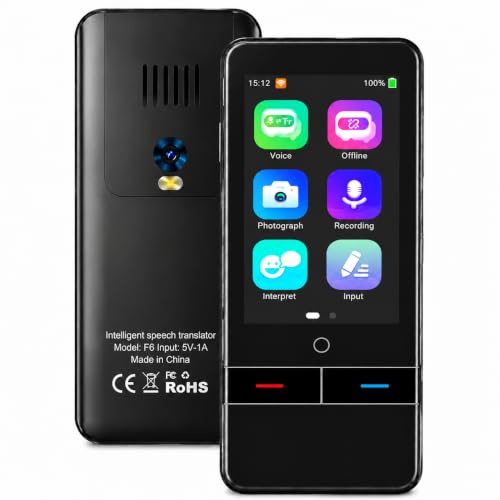
6. Ceymoal Pocket Translator: Best for Battery Life
Pros
- 139 online voice languages
- 19 offline languages
- Photo translation in 57 online and 23 offline languages
- Up to 8 hours of continuous translation
Cons
- No screen size is specified
- Offline coverage is limited
- The feature description is focused on core translation
Best for: travelers who need a simple device to last through a full day.
The Ceymoal Pocket Translator is a practical middle ground. It covers the main jobs without adding the meeting recorder and large display found on FLTIDUNDI and CAWRUGA. The result is a device aimed at someone who wants voice translation, an offline fallback, and a camera for printed text.
Online voice translation supports 139 languages, with a claimed 0.5-second response time. Offline support covers 19 languages, enough for several common travel combinations but not as broad as the online mode. The camera translates 57 languages online and 23 offline, which gives menus, tickets, and short signs a useful backup function.
The 1, 500mAh battery is rated for up to 8 hours of continuous translation. That matches the listed figure for FLTIDUNDI and RUISJ, so Ceymoal is a sensible option when battery endurance matters more than a larger screen or recording features. Its two-way voice and camera modes are aimed at travel, business meetings, and language study.
Ceymoal is less distinctive than the Jarvisen Translator 2, which adds built-in global mobile data, and less versatile than FLTIDUNDI, which records audio. It earns its place by keeping the central functions easy to understand and pairing them with a full-day battery claim. Choose it for long days of sightseeing or meetings, not for classroom reading support.
7. Herpla Voice Translator: Best Compact Option

Pros
- Small 3-inch touchscreen
- 160 online and 15 offline languages
- Voice, text, and photo translation
- Rechargeable battery
Cons
- Offline coverage is limited to 15 languages
- Fixed-focus camera is intended for text within 30cm
- No battery duration is specified
Best for: people who want a small translator for basic conversations and nearby printed text.
The Herpla Voice Translator is compact without abandoning a screen. Its 3-inch touchscreen sits on a body measuring about 4.53 by 2.24 by 0.56 inches, making it easier to carry than the CAWRUGA while still giving both speakers a place to read the translated words.
The listing states support for 160 languages online and 15 offline, though its title gives a different 138-language description. That inconsistency is worth keeping in mind. The product is clearly intended for online use when available, with voice recognition, two-way speech and text translation, and a rechargeable battery.
Its fixed-focus camera is specifically designed for text and photo translation within about 30cm. That is useful for a nearby menu, label, or short document, but it is not a general travel camera and should not be treated as one. The limitation is unusually clear in the product information, which is preferable to pretending the camera handles every scene equally well.
Herpla is smaller and simpler than FLTIDUNDI Translator, but its offline language support is weaker and it has no stated continuous-use figure. It is a reasonable choice for straightforward exchanges where pocket size matters. If your trip depends on long battery endurance or broad offline coverage, Ceymoal or Jarvisen is safer.
8. RUISJ Instant Translator: Best for Photo Translation

Pros
- 139+ online voice languages
- 18 offline voice languages
- 5MP camera for image translation
- Up to 8 hours of continuous use
Cons
- Photo language figures differ across the listing
- No screen size is specified
- Full language coverage depends on online access
Best for: travelers who regularly need to read signs, menus, and printed labels.
The RUISJ Instant Translator makes its camera a central part of the pitch. It combines two-way voice translation with a 5MP camera, so it can handle a conversation and then switch to a menu, sign, or label without requiring a second device.
Online voice support covers 139 or more languages, and offline voice translation covers 18. The listing says online photo translation reaches 55 languages and offline photo translation 23, though another line describes the photo function slightly differently. Readers should regard the camera as a useful travel aid, not as a guarantee of unlimited image coverage.
A 1, 500mAh battery is listed for up to 8 hours of continuous use and up to 7 days of standby. The device can fully charge in 1 to 2 hours, according to the product information. Its body measures 4.92 by 1.93 by 0.51 inches, which keeps it smaller than the large-screen CAWRUGA.
RUISJ is a better fit than Herpla if photo translation is a priority, while Ceymoal offers a similar battery claim with a more tightly stated feature set. The changing photo-language descriptions are the main concern. Choose RUISJ when menus and signs are as important as spoken conversation, and choose Jarvisen when connectivity and a defined offline setup matter more.
9. IAMJOY Translation Earbuds: Best Multi-Mode Earbuds

Pros
- Four translation modes
- 163 languages and 85 accents listed
- Bluetooth 5.3
- Charging case extends use through a day
Cons
- Requires a phone for its translation functions
- Continuous use is listed at 4 to 5 hours
- Coverage claims are presented in different ways
Best for: casual travelers who want translation and everyday earbuds in one device.
The IAMJOY Translation Earbuds are built around flexibility. They offer free talk, translation machine, headphones plus phone, and AI chat modes, so the same pair can handle a one-on-one exchange, a phone-assisted conversation, or ordinary audio playback.
IAMJOY lists 163 languages and 85 accents, while another feature describes two-way translation in 78 languages. That makes the headline number difficult to interpret, but the product is clearly aimed at broad online language coverage rather than a small fixed set. It also supports music and calls, which makes the earbuds less single-purpose than a handheld translator.
Battery life is listed at 4 to 5 hours per charge, with the charging case extending operation through a full day. Bluetooth 5.3 is specified, and the earbuds use an ear-contour design with automatic power-off after five minutes of disconnection. A full charge takes about 1.5 hours.
IAMJOY has more modes and broader stated language coverage than Timekettle M3, but M3 provides the clearer 40-language setup, active noise cancellation, and a longer listed earbud runtime. IAMJOY is the more exploratory option for users who want an AI chat mode and phone features. It is not the right pick if you need an entirely standalone device.
10. Diydeg Y113 Earbuds: Best for Phone Integration

Pros
- Supports 144 languages
- iOS and Android app support
- Simultaneous interpretation mode
- Music, calls, and noise reduction
Cons
- About 3 hours of playback per charge
- Translation depends on a phone and network
- App setup is central to the experience
Best for: users who already prefer app-based translation through a phone.
The Diydeg Y113 Earbuds are best understood as a Bluetooth headset built around a translation app. They support iOS and Android, and the phone remains central to the experience. That can be convenient for users who already keep their phone out during conversations, but it is less appealing to anyone hoping for a self-contained translator.
The listing says the earbuds support 144 languages over Wi-Fi or cellular service. Simultaneous interpretation mode can use the phone near a sound source for foreign-language courses, movies, directions, or short exchanges. There is also a mode where one person wears an earbud and the other uses the phone or another audio device.
Diydeg adds music and phone-call functions, plus dual noise reduction. Bluetooth 5.1 is specified. Battery life is about 3 hours for playback, with the charging case intended to support a full day, so the case is important for travel use.
The short per-charge runtime puts Diydeg behind Timekettle M3 and IAMJOY. Its advantage is the familiar app-based approach and broad stated language support. If you want the most polished earbud conversation setup, choose M3. If you want a phone-centered experiment that also handles calls and music, Y113 is the more direct fit.
How to choose the best online translator
The right translator depends less on the biggest language number than on how you will speak, read, connect, and recharge it.
Online and offline coverage
Online translation usually provides the broadest language selection, but it depends on Wi-Fi or cellular service. Offline support is more valuable than a large online figure when you will be on a flight, underground, in a remote area, or roaming without reliable access.
Look at the specific offline languages, not just the total online count. Jarvisen lists 18 offline language pairs, Ceymoal lists 19 offline languages, and FLTIDUNDI lists more than 20. Those details are more useful than a general claim about supporting every language.
A translator with fewer offline languages can be more useful than one with a larger online list when the signal disappears.
Voice conversation
Two-way voice translation should let both speakers participate without repeatedly changing settings. Response time matters because long pauses make a conversation feel mechanical, while clear playback and a visible transcript help confirm what was heard.
Handheld devices are easier to share across a table. Earbuds create a more private, natural exchange, but require a phone and app in this group. Jarvisen's listed 0.5-second response and RUISJ's 0.2-second claim sound quick, though real results will depend on speech, noise, network quality, and language pair.
Camera and text translation
A camera is useful for menus, road signs, labels, tickets, and short printed passages. Check both online and offline image coverage, since those numbers can be far lower than voice coverage.
The camera does not need to replace a phone camera. What matters is whether the device can focus on nearby text, show a readable result, and switch back to voice mode quickly. Herpla specifically describes a fixed-focus camera for text within 30cm, while FLTIDUNDI, CAWRUGA, Ceymoal, and RUISJ provide stated online and offline image-language figures.
Screen and controls
A larger screen makes it easier to show translated text to another person and inspect a photo result. CAWRUGA's 5.5-inch screen is the most generous here, followed by FLTIDUNDI's 4.1-inch display and Herpla's 3-inch screen.
Large screens add bulk. A smaller device is easier to carry, but tiny text can be frustrating in bright outdoor settings or for users with limited vision. Count the controls, too. CAWRUGA lists three buttons, while touchscreen-first models put most functions on the display.
Battery and connectivity
Battery claims range from about 3 hours of earbud playback to up to 8 hours of continuous translation on several handheld devices. Earbuds also need their charging case, and app-based models need a phone close by.
Built-in mobile data can simplify travel. Jarvisen includes two years of global mobile data, while the other handheld models emphasize online access without specifying the same arrangement. For a broader look at how offline language support changes travel planning, focus on the languages you actually expect to use rather than the largest headline number.
Frequently asked questions
Do translator devices work without Wi-Fi?
Some do, but only for their listed offline languages. Jarvisen, FLTIDUNDI, Ceymoal, RUISJ, Herpla, and CAWRUGA all specify offline translation support. Earbuds in this roundup generally depend on a connected phone and app for translation.
Are translator earbuds better than handheld devices?
Earbuds can feel more natural for one-on-one conversations because each person can hear the translation privately. Handheld devices are easier to pass around, do not require both people to wear earbuds, and often include cameras and larger displays. The better format depends on how comfortable you are using a phone app and sharing audio equipment.
Can these devices translate photos?
Several can. FLTIDUNDI, CAWRUGA, Ceymoal, RUISJ, and Herpla list photo or image translation, while the VSOROV pen can scan text and translate photos. Photo coverage is usually smaller offline than online, and the camera works best with clear, nearby printed text.
Which translator is best for students?
The VSOROV Scan Translator Pen is the most education-focused option. It can scan text, read it aloud, extract passages, and support pronunciation practice. It also states that it is not suitable for blind users, so buyers should match it to the intended reading needs.
Do translator devices need a subscription?
The listings do not describe a recurring subscription for most of these handheld devices. Jarvisen includes two years of global mobile data, while the Timekettle M3 listing says offline packs can be purchased separately through its app. Check the connectivity and offline terms for the exact model before traveling.
How many languages should a translator support?
The useful number is the coverage for your specific language pair and travel route. A device with 20 well-chosen offline languages may be more practical than one with 150 online languages if you expect weak service. Also check whether the number refers to voice, photo, accents, or a combined total.
The bottom line
The Best online translator for most travelers is the Jarvisen Translator 2 because it combines two-way voice translation, 18 offline language pairs, photo translation, built-in global mobile data, and a defined battery setup. FLTIDUNDI Translator is the better pick for users who want a larger screen, recording, and broader voice and image coverage in one device.
For learning, choose the VSOROV Scan Translator Pen. For a hands-free conversation, the Timekettle M3 Earbuds are more convincing than the app-dependent alternatives, especially if music, calls, and noise reduction matter too.
If you are undecided, choose a handheld model for flexibility and an earbud model only when you specifically want private, phone-assisted conversations.
As an Amazon Associate we earn from qualifying purchases.