

Picking a gaming PC should be the fun part of a new setup, but the spec sheets and endless configurations turn a straightforward buy into a research project. You want a machine that runs the games you actually play at settings that look good, without wasting time on components you don't need. This roundup of the best pc gaming computer setups cuts through the noise with ten prebuilt towers that cover everything from lightweight esports rigs to ray-tracing monsters.
Our top pick overall is the MSI Codex Z2. It pairs an RTX 5070 with an 8-core AMD processor and a cooling layout that keeps noise down during long sessions, and it leaves room for upgrades. But the right choice depends on whether you need raw GPU horsepower, a compact case, or an all-in-one bundle that includes a monitor and peripherals. We break down each contender's real strengths and weaknesses.
| # | Product | Award | GPU | RAM | Storage | Best for |
|---|---|---|---|---|---|---|
| 1 | MSI Codex Z2 | Best overall | RTX 5070 | 32 GB DDR5 | 2 TB NVMe | High-end 1440p/4K gaming |
| 2 | KOTIN RTX 5070 Ryzen 7 | Best for 4K gaming | RTX 5070 | 32 GB DDR5 | 1 TB NVMe | 4K ray-tracing with smart display |
| 3 | Evounic RTX 4060 White | Best liquid-cooled white build | RTX 4060 | 64 GB DDR4 | 512 GB SSD + 1 TB HDD | High-FPS 1080p/1440p with liquid cooling |
| 4 | STGAubron RX 7600 | Best for 1080p 60+ fps | RX 7600 8G | 16 GB DDR4 | 512 GB SSD | Smooth 1080p gaming with modern GPU |
| 5 | STGAubron RTX 3050 | Solid all-rounder | RTX 3050 6G | 16 GB DDR4 | 512 GB SSD | Budget ray-tracing and 1080p |
| 6 | STGAubron RX 580 | Best entry-level dedicated GPU | RX 580 8G | 16 GB DDR4 | 512 GB SSD | Playing older AAA titles at high settings |
| 7 | YAWYORE R5 5600GT | Best integrated graphics for esports | Radeon Vega (integrated) | 16 GB DDR4 | 1 TB NVMe | Esports and light gaming |
| 8 | STGAubron i5 RX 560 | Best starter tower | RX 560 4G | 16 GB DDR4 | 512 GB SSD | Entry-level gaming and work |
| 9 | suevery Ryzen 5 | Compact gamer | RX 560 4G | 16 GB DDR4 | 512 GB SSD | Tight desk spaces |
| 10 | Dell Renewed i5 Bundle | Best complete bundle | GT 1030 2G | 16 GB DDR4 | 512 GB SSD | All-in-one with monitor, keyboard, headset |
1. MSI Codex Z2: Best overall
Pros
- Four fans and an air cooler keep temps low even during extended sessions
- 2 TB NVMe drive is double the storage of most competitors
- MSI Center software makes RGB and fan curve tweaking easy
- RTX 5070 provides serious 1440p and 4K performance
Cons
- No integrated smart screen like the KOTIN
- Front panel lacks USB-C port on older desks
Best for: someone who wants a balanced, high-performance prebuilt with plenty of storage and room to upgrade.
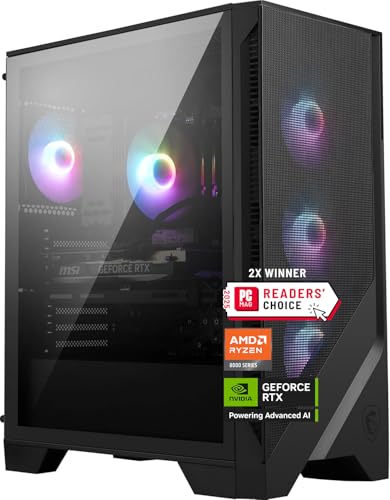
The MSI Codex Z2 is the kind of prebuilt that makes you forget it came out of a box. The chassis breathes well, three 120 mm fans pull air in through the front mesh, a fourth exhausts out the back, and the included air cooler is quiet enough that the GPU fans are usually the loudest thing in the room. That matters when you're grinding through a four-hour session of a CPU-heavy sim or a ray-traced RPG.
Under the hood, the AMD Ryzen 7 8700F and RTX 5070 handle current AAA titles at 1440p with ray tracing enabled, and they push playable frame rates at 4K when you dial back a couple of settings. The 32 GB of DDR5 memory (running at standard speeds, not the 6000 MHz of the KOTIN) is enough to keep a browser, Discord, and the game all open without stutter. The 2 TB NVMe SSD is genuinely fast, game loads feel instant, and it means you won't have to uninstall games every other week.
For anyone looking at the full picture of what a prebuilt should deliver, our detailed guide to the best pre built gaming PC options covers the same factors we weigh here: cooling, expandability, and real-world gaming performance. The Codex Z2 scores on all three. The only thing missing is a front-panel USB-C port, which some newer cases include, and the KOTIN smart display is a nice extra if you like monitoring temps without overlays. But for pure, balanced power out of the box, MSI has built something that feels thoroughly thought through.
2. KOTIN RTX 5070 Ryzen 7: Best for 4K gaming

Pros
- Integrated smart display shows GPU temp, CPU usage, and weather in real time
- 32 GB of DDR5 6000 MHz memory is faster and more responsive than standard 5200 MHz
- 850W 80+ Gold PSU leaves headroom for future upgrades
- 360 mm AIO liquid cooler keeps the Ryzen 7 9700X near silent under heavy load
Cons
- RTX 5070 is excellent but not as well cooled as some partner-card designs in the same chassis
- 1 TB SSD fills up quickly with modern game installs
Best for: someone who wants a 4K-capable rig with a unique smart display and a liquid-cooled CPU that stays whisper quiet.
The KOTIN is the most fun prebuilt on this list. Open the box and the first thing you notice is the 11.3 inch smart screen built into the front of the case. It shows live CPU and GPU temperatures, usage percentages, and even the weather, a piece of fluff that turns into something genuinely useful when you are tweaking fan curves or just want a glance at your thermals without alt-tabbing.
The hardware is no joke. The Ryzen 7 9700X is an eight-core chip with a boost over 5.0 GHz, and the 360 mm AIO liquid cooler keeps it well below throttling temps even during all-core rendering. The 32 GB of DDR5 at 6000 MHz is the fastest memory in this roundup, which helps in CPU-bound games like Valorant and in tasks like video editing. The 1 TB PCIe 4.0 NVMe drive is quick, though generous as it is, you will fill it faster than you expect, games like Call of Duty and Baldur's Gate 3 each chew up over 100 GB.
Stacked against the MSI Codex Z2, the KOTIN has a higher ceiling with its faster memory and larger liquid cooler, but the MSI's overall build quality and easier software tweaking (MSI Center is more polished than the bundled software here) give the MSI the edge for most buyers. That said, if you want the rawest 4K frames and you enjoy a little style, the KOTIN is the one we would keep.
3. Evounic RTX 4060 White: Best liquid-cooled white build

Pros
- All-white case and components stand out in any room
- Liquid cooling keeps CPU temps low and stable
- 64 GB of DDR4 is overkill for gaming but fantastic for workstation tasks
- RTX 4060 delivers consistent high-FPS 1080p and capable 1440p
Cons
- Core i7 Xeon is an older server-derived chip, not a modern desktop CPU
- 512 GB SSD fills fast, though the included 1 TB HDD provides bulk storage
Best for: a builder who wants a showpiece white gaming PC that pulls double duty as a productivity machine.
The Evounic is unmistakable. The white chassis, white cables, and white fans (with RGB lighting that you can set to any color) make it the kind of PC that guests notice. The liquid cooler keeps the CPU cool and quiet, something you appreciate when you are streaming or doing long video exports.
The RTX 4060 is a solid 1080p card that can handle 1440p at medium settings in most games. It is a clear step behind the RTX 5070 in the two top picks, but for the vast majority of gamers who play on 1080p monitors, the 4060 is more than enough. The 64 GB of RAM is unusual, most gaming rigs stop at 32 GB. It means you can run a virtual machine, a dozen browser tabs, a game, and a livestream all at once without hitting a wall. The CPU is a 12-core Intel i7 Xeon, which is a server chip that trades single-core speed for multi-core count. It is fine for gaming, but the single-core performance is closer to an older desktop i7, so it is not ideal for ultra-high-FPS esports titles.
The dual storage setup, 512 GB NVMe for the OS and favorite games, 1 TB HDD for the rest, works well enough, but keep your heavy hitters on the SSD. Compared to the YAWYORE or STGAubron RX 7600, the Evounic offers a unique aesthetic and workstation-level RAM capacity, but its older CPU architecture means it is not the fastest pure gaming machine in this range.
4. STGAubron RX 7600: Best for 1080p 60+ fps

Pros
- Radeon RX 7600 8G GDDR6 handles modern 1080p games at high settings without breaking a sweat
- Intel Core i7 (up to 3.9 GHz) provides enough CPU grunt for the GPU
- Wi-Fi 6 and Bluetooth 5.2 are welcome upgrades over older generations
- Comes with RGB keyboard and mouse, so you are set out of the box
Cons
- Only 16 GB of DDR4, which is adequate but not future-proof
- 512 GB SSD fills up fast
Best for: a gamer who wants a dedicated modern GPU that can run current AAA titles smoothly at 1080p, with minimal fuss.
The STGAubron RX 7600 sits in a sweet spot. The RX 7600 is a current-generation GPU from AMD that competes with the RTX 3060 and RTX 4060, and it delivers strong 1080p performance in games like Fortnite, Warzone, and Elden Ring. Paired with an older Core i7 processor that still pushes enough frames, this is a reliable rig for anyone who plays at 1080p and wants to turn up graphics settings.
The case has three RGB fans and a clean black finish. The included keyboard and mouse are typical freebies, serviceable, but you will likely replace them. Wi-Fi 6 and Bluetooth 5.2 mean you are not tethered to a wired network, which is convenient. The 512 GB SSD will hold the operating system and a few large games, but you may want to add another drive down the line.
Compared to the STGAubron RTX 3050 model, the RX 7600 is noticeably faster in raw rasterization, though it lacks ray-tracing hardware. For most games running at 1080p, that trade-off is worth it. If you plan to play at higher resolutions or want ray tracing, the RTX 3050 or one of the RTX 5070 machines would be a better fit.
5. STGAubron RTX 3050: Solid all-rounder

Pros
- RTX 3050 6G supports ray tracing and DLSS, giving you access to newer visual features
- Six RGB fans for maximum airflow and a striking look
- Intel Core i7 with 16 GB of DDR4 handles multitasking without drama
- Wi-Fi 6 and Bluetooth 5.0 keep you connected wirelessly
Cons
- RTX 3050 is the least powerful 30-series card; ray tracing is more of a novelty than usable at 60 fps
- 512 GB SSD is the minimum for storage
Best for: a gamer who wants a budget-friendly introduction to ray tracing and DLSS, even if it means turning down settings.
The RTX 3050 has a reputation as an entry-level ray-tracing card, and this STGAubron build is a solid vessel for it. In practice, ray tracing at 1080p with the 3050 means low or medium ray settings and perhaps DLSS on to keep frame rates north of 30 fps. It is not a transformative experience, but it gives you access to the feature set, which matters if you play games that emphasize reflections and lighting.
The case itself is spacious with six ARGB fans, three front intake, one rear exhaust, and presumably two top exhaust (the specs list six). That is a lot of airflow, and the system stays cool. The Core i7 and 16 GB of DDR4 are a familiar combination that runs older and less demanding games without issue. For games like Valorant, CS2, and League of Legends, this PC will push well over 100 fps.
When you compare it to the STGAubron RX 7600, the RTX 3050 loses on raw performance but gains feature support. If you are curious about ray tracing or plan to plug into a 4K TV for media, the 3050 is a reasonable start. But if pure fps is your target, the RX 7600 or even the RX 580 might serve you better.
6. STGAubron RX 580: Best entry-level dedicated GPU

Pros
- Radeon RX 580 8G is still capable for 1080p gaming in older and less demanding titles
- Comes with RGB keyboard and mouse, plus a set of fans for decent airflow
- Core i7 with 16 GB of DDR4 is fine for everyday use
- Wi-Fi 6 and Bluetooth 5.0 provide wireless flexibility
Cons
- RX 580 is a 2017 GPU; it will struggle with the newest AAA games at high settings
- 512 GB SSD is tight for multiple modern games
Best for: someone on a tight budget who wants a dedicated GPU that can handle esports and older AAA games at 1080p.
The RX 580 is a legend in budget PC building. It has aged well enough that it still plays Fortnite, Warzone (at lowered settings), GTA V, and most esports titles at smooth frame rates. This STGAubron build gives you that card in a prebuilt package with a Core i7 and 16 GB of RAM, which is plenty for the GPU's capabilities.
The case has four RGB fans, so cooling is fine. The included keyboard and mouse are basic but functional. The 512 GB SSD is the same across many of these lower-tier builds, and it is the first thing you will want to upgrade. A 1 TB SATA SSD is a cheap and easy addition down the line.
Compared to the newer RX 7600 or RTX 3050, the RX 580 is noticeably slower in modern titles. But for a fraction of the cost, it still does the job for a huge library of games. If your gaming diet consists of Overwatch, League, CS2, and a handful of older campaigns, this is more than enough. It is also a good base for a future GPU swap.
7. YAWYORE R5 5600GT: Best integrated graphics for esports

Pros
- AMD Ryzen 5 5600GT with Vega integrated graphics that can play many esports titles at playable frame rates
- 1 TB NVMe SSD is generous storage for the category
- 550W 80+ Bronze PSU is efficient and reliable
- MSI A520M-A PRO motherboard offers solid expandability
Cons
- No dedicated GPU; integrated graphics are only suitable for lighter games
- 16 GB of DDR4 is fine but not upgradable without replacing sticks
Best for: a gamer who plays mainly competitive esports titles (Valorant, CS2, League) and might add a dedicated GPU later.
The YAWYORE is an unusual entry in this roundup because it relies entirely on the integrated Radeon graphics built into the Ryzen 5 5600GT. That integrated GPU is one of the best in the business for light gaming. With the right settings, it runs Valorant at over 100 fps, CS2 at over 80, and League at well over 100. It will not play Cyberpunk 2077 or Starfield well, but it handles the core esports library respectably.
The rest of the build is solid. The 1 TB NVMe SSD is double the capacity of most competitors at this level, and the 550W 80+ Bronze PSU leaves enough headroom for a lower-power dedicated GPU if you want to add one. The motherboard is an MSI A520M-A PRO, a budget board that still includes PCIe 3.0 and room for a graphics card. The case has five ARGB fans that keep everything cool and quiet.
The obvious trade-off is graphical horsepower. Compared to even the STGAubron RX 580, the integrated Vega is significantly slower in GPU-bound games. But if you are certain your gaming stays within the esports realm, this PC is compact, quiet, and more than capable. It also leaves the door open for a future GPU upgrade, which the STGAubron RX 580 does not need but you might eventually want.
8. STGAubron i5 RX 560: Best starter tower

Pros
- Core i5 processor with 16 GB of DDR4 is a dependable combination for everyday computing and light gaming
- Radeon RX 560 4G delivers playable frame rates in older games and esports
- Wi-Fi 6 and Bluetooth 5.0 keep you wire-free
- Comes with RGB keyboard and mouse
Cons
- RX 560 is the least powerful dedicated GPU in this roundup; new AAA games will require low settings and low resolution
- Only two case fans; airflow is adequate but not generous
Best for: a first-time gaming PC buyer who wants a dedicated GPU and a full set of peripherals for a very low investment.
The STGAubron i5 RX 560 is the cheapest dedicated-GPU gaming PC in this list, and it earns its place as a starter tower. The RX 560 is a modest card from 2017, but it plays Fortnite at 60 fps on medium settings, runs League and Valorant at high frame rates, and can handle older AAA titles like GTA V and Fallout 4 well. It is not for Cyberpunk or modern ray-traced games, but it is a genuine gaming PC.
The Core i5 processor is a capable workhorse for browsing, office tasks, and light multitasking. 16 GB of DDR4 is standard and enough for gaming with a few background apps. The 512 GB SSD is the same size you get in most of these entry-level builds, and like the others, it fills fast. The case is compact with two RGB fans, which keeps noise low but means you should not expect heavy overclocking.
Compared to the YAWYORE, this PC has a dedicated GPU, so it will outperform the integrated solution in almost every game. But the YAWYORE's 1 TB storage and newer motherboard platform make it a better long-term proposition. If you need something right now and cannot stretch further, the STGAubron i5 RX 560 will play games and is easy to set up.
9. suevery Ryzen 5: Compact gamer

Pros
- Small case that fits on a cluttered desk without dominating the space
- Ryzen 5 six-core processor provides good multithreaded performance
- Wi-Fi 6 built in, so no wired connection needed
- RX 560 4G handles esports and older games without trouble
Cons
- RX 560 is the same GPU as in the STGAubron i5, with the same limitations for modern AAA games
- 512 GB SSD is the baseline; you will want extra storage quickly
Best for: a gamer who needs a compact tower that sits on a desk or in a tight space without sacrificing the ability to play the esports games they love.
The suevery stands out for its size. It is noticeably smaller than the STGAubron towers and fits on a desk corner without forcing the monitor into an awkward position. That matters if you share a workspace or just prefer a clean, unobtrusive look. Inside, the Ryzen 5 processor and RX 560 GPU mirror the performance of the STGAubron i5 RX 560, so you get the same gaming capabilities in a more compact package.
The cooling setup includes customizable RGB fans, and the case manages heat well enough for the components inside. The Ryzen 5 is a newer architecture than the Core i5 in the STGAubron, which gives it a slight edge in multithreaded work like streaming or light video editing. The 512 GB SSD is the same size as the competition, and like all of them, you will want to add a second drive sooner than later.
If you are choosing between this and the STGAubron i5 RX 560, the decision comes down to size. The STGAubron is a standard mid-tower with a bit more expansion space and a few more fans. The suevery is smaller and slightly more efficient. Both play the same games at the same settings.
10. Dell Renewed i5 Bundle: Best complete bundle

Pros
- Includes a 24-inch 1080p monitor, RGB keyboard and mouse, and a headset, so it is truly ready out of the box
- Core i5 processor with 16 GB DDR4 is a capable daily driver
- GT 1030 2G can play esports games at low settings and handles media playback easily
- Renewed pricing makes this an affordable entry point
Cons
- GT 1030 is a low-end GPU that struggles with modern games; even integrated graphics on a newer CPU can beat it
- Renewed unit may have cosmetic wear; check the seller's condition notes
Best for: a beginner who has no existing PC gear and wants a single box with everything needed to start gaming immediately.
The Dell Renewed bundle is not the most powerful machine here, but it is the only one that includes a monitor, a keyboard and mouse, and a headset in the box. The 24-inch 1080p LED monitor is a standard office-grade panel with a quick refresh rate and acceptable colors. The peripherals are entry-level but functional. For someone who has never owned a gaming PC, this bundle removes the guesswork of buying a separate display and input devices.
The GeForce GT 1030 2G is a modest GPU designed for 1080p media and very light gaming. It can run League of Legends, Fortnite on low settings, and older indie games. It will not run modern AAA titles well. The Intel Core i5 and 16 GB of RAM are fine for multitasking. The 512 GB SSD is the same size as the other budget picks.
Compared to any other dedicated-GPU PC on this list, the GT 1030 is the weakest. Even the RX 560 outperforms it by a large margin. But if your budget is extremely constrained and you need a monitor and peripherals included, this bundle saves you the hassle of piecing a setup together. Consider it a gateway to PC gaming that lets you save for a better GPU later. For a comprehensive look at what a starter gaming PC should include, including how to choose a monitor and peripherals, our guide to the best gaming PC under 1000 covers similar ground for a tighter budget.
How to choose a gaming PC
A prebuilt gaming PC is a bundle of trade-offs: faster GPU means higher frame rates, more RAM helps with multitasking, bigger storage holds more games, and better cooling keeps everything quiet and reliable. The key is matching the machine to the games you actually play and the screen you will plug it into.
GPU
The graphics card determines frame rates and visual quality more than any other component. For 1080p gaming at high settings, an RTX 4060 or RX 7600 is a comfortable baseline. For 1440p or 4K, you want an RTX 5070 or better. For esports titles like Valorant and CS2, even an older RX 580 is more than enough, while the GT 1030 is only suitable for the least demanding games.
RAM
16 GB is the minimum for modern gaming. 32 GB gives you headroom for streaming, browsing, and heavy multitasking. 64 GB (like the Evounic build) is excessive for gaming alone but useful for video editing or running virtual machines. DDR5 is faster than DDR4 and helps with CPU-bound scenarios, but it is not a night-and-day difference for most games.
Storage
A 512 GB SSD fills up fast, expect to install the OS, a few games, and call it full. 1 TB is a more comfortable starting point. 2 TB, as in the MSI Codex Z2, will last a long time. If your chosen PC has a smaller SSD, you can usually add a 1 TB SATA SSD later for a reasonable cost.
CPU
For gaming, single-core speed matters most. Modern AMD Ryzen 5 and 7 chips, as well as Intel Core i5 and i7, all work well. An eight-core CPU like the Ryzen 7 9700X or 8700F is future-proof and helps with streaming. Older CPUs like the i7 Xeon in the Evounic are fine for gaming but not ideal. The Ryzen 5 5600GT in the YAWYORE is a capable all-rounder, though its integrated graphics limit it.
The biggest mistake people make is buying a GPU that is stronger than the monitor can show. Match your build's resolution target to your display, not the other way around.
Cooling and noise
Liquid cooling (AIO) keeps CPU temperatures lower and usually runs quieter than a stock air cooler, especially under sustained load. Air cooling is simpler and cheaper, and a well-designed mid-tower with multiple fans (three or more) works perfectly for most builds. A system with four or more case fans, like the STGAubron RTX 3050, will be quieter overall because the fans spin slower.

Frequently asked questions
What resolution should I target with a gaming PC?
That depends on your monitor and your expectations. 1080p is the most common and least demanding, a PC with an RX 7600 or RTX 4060 will run almost everything at high settings. 1440p requires an RTX 5070 or similar for high-refresh rates. 4K is still demanding even for the RTX 5070, though it is playable with some settings turned down.
Do I need a dedicated graphics card?
For gaming, yes, almost always. Integrated graphics (like the Vega in the YAWYORE) can handle esports and older games, but they will not run modern AAA titles at enjoyable settings. A dedicated GPU like the RX 560 or better is the minimum for mainstream gaming.
How much storage do I really need?
Modern games can take 80 to 150 GB each. A 512 GB SSD holds the OS and maybe three or four large games. 1 TB holds about seven to ten games. 2 TB is enough for most people without worrying about uninstalling titles.
Is liquid cooling better than air cooling?
For a prebuilt that comes with liquid cooling (like the KOTIN and Evounic), the benefit is quieter operation under heavy load and lower CPU temperatures. Air cooling is simpler and still very effective for most builds. The difference matters most if you plan to run the CPU at full load for extended periods.
Can I upgrade components in a prebuilt gaming PC?
Most prebuilt towers use standard parts, so you can replace the GPU, add RAM, or swap the storage drive. The motherboard form factor (usually micro-ATX or ATX) determines the size of the case. Some budget builds use proprietary power supplies or odd-size motherboards, which complicates upgrades. Check the specs before buying if you plan to upgrade.
Should I buy a renewed or refurbished gaming PC?
A renewed PC can save money, but the warranty and return period are usually shorter, and cosmetic condition varies. The Dell bundle in this roundup is a renewed unit that works well for a beginner, but you accept that it might have scratches or a dusty interior. If you want a pristine machine with a full warranty, stick with new units.
What about Wi-Fi and Bluetooth?
Most modern prebuilt PCs include Wi-Fi 6 and Bluetooth 5.0 or better. These are standard on the majority of gaming motherboards. If you buy a very low-end build, you may need to add a USB Wi-Fi adapter. All the systems on this list have built-in wireless.
Do I need a separate CPU cooler?
Prebuilt gaming PCs come with a cooler already installed. Some use the stock cooler from the CPU, which is adequate. Others include a larger air cooler or liquid cooling. You generally do not need to replace it unless you plan to overclock heavily or want quieter operation.

The bottom line
The MSI Codex Z2 is the best overall gaming PC for most people. It pairs a fast RTX 5070 with a modern eight-core CPU, plenty of storage, and a cooling setup that keeps noise low. The KOTIN is a strong alternative if you want even faster memory and the smart display, while the Evounic offers a unique white aesthetic with liquid cooling and extreme amounts of RAM.
For tighter budgets, the STGAubron RX 7600 or RTX 3050 builds are honest 1080p machines that will play the latest games without frustration. The YAWYORE is a clever choice if you are focused on esports and plan to add a GPU later, and the Dell renewed bundle is the only real all-in-one option that includes everything you need to start playing immediately.
If you are still unsure, look at the games you play most often and the resolution of your current monitor. That pair of facts will point you to the right tier of GPU. The rest of the components will follow. The best pc gaming computer setup is the one that fits the games you love, and there is a prebuilt in this roundup that does exactly that.
As an Amazon Associate we earn from qualifying purchases.