

A headset can make a great gaming session miserable when footsteps blur into background noise, the microphone makes teammates ask you to repeat yourself, or a cable catches on the edge of your desk. The right model should make positional audio easier to read and voice chat disappear into the background.
Our Best PC Gaming Headset picks cover polished wireless designs, serious desktop audio, lightweight competitive options, and dependable wired headsets. The Logitech G522 Lightspeed is the best all-rounder, while the rest of the list serves more specific needs, from multi-system switching to simple plug-and-play gaming.
The Logitech G522 Lightspeed is our top pick, with the SteelSeries Arctis Nova Pro close behind for buyers who want dedicated desktop controls and higher-end audio tuning.
Comparison table
| # | Product | Award | Connection | Key audio or mic feature | Best for |
|---|---|---|---|---|---|
| 1 | Logitech G522 Lightspeed | Best overall | LIGHTSPEED, Bluetooth, USB | 48 kHz/24-bit audio, 48 kHz/16-bit mic | Most PC gamers |
| 2 | Logitech G Astro A50 | Best for multi-system setups | LIGHTSPEED, Bluetooth, USB-C | 40 mm graphene drivers, 48 kHz mic | Switching between platforms |
| 3 | Razer BlackShark V2 X | Best wired lightweight headset | 3.5 mm | 50 mm titanium-coated drivers, 7.1 surround | Straightforward PC gaming |
| 4 | SteelSeries Arctis Nova 5 | Best wireless battery life | 2.4 GHz, Bluetooth 5.3, USB-C | 100+ presets, 32 kHz/16-bit mic | Long wireless sessions |
| 5 | Logitech G733 Lightspeed | Best lightweight RGB headset | LIGHTSPEED, wired | PRO-G drivers, Blue VO!CE mic | Comfortable casual play |
| 6 | Razer BlackShark V3 | Best competitive wireless headset | 2.4 GHz, Bluetooth 5.3, USB | 10 ms latency, THX spatial audio | Fast competitive games |
| 7 | Logitech G432 | Best wired surround headset | USB DAC, 3.5 mm | 50 mm drivers, DTS Headphone:X 2.0 | PC and console flexibility |
| 8 | Razer BlackShark V3 X HyperSpeed | Best lightweight wireless headset | 2.4 GHz, Bluetooth, USB | 50 mm drivers, 7.1 surround | Wireless competitive play |
| 9 | HyperX Cloud Alpha | Best durable wired headset | 3.5 mm | Dual chamber drivers, detachable mic | Long-term wired use |
| 10 | SteelSeries Arctis Nova Pro | Best desktop audio system | Wired GameDAC | 96 kHz/24-bit, ESS Sabre Quad-DAC | Detailed PC audio |
1. Logitech G522 Lightspeed: Best Overall

Pros
- Clear 48 kHz/24-bit wireless audio
- Strong full-bandwidth microphone
- LIGHTSPEED, Bluetooth, and wired USB modes
- Washable suspension band
- Up to 60 hours of battery life with lighting off
Cons
- RGB lighting reduces the maximum battery life
- Does not offer the Astro A50's multi-system dock
- Some of its best tuning tools require Logitech software
Best for: PC players who want a comfortable wireless headset with flexible connections and a good microphone.
The Logitech G522 Lightspeed is the headset we would hand to most PC gamers. It has the useful parts of a modern wireless model without making the setup feel like a project. LIGHTSPEED handles gaming on PC, Bluetooth covers mobile devices, and USB-A to USB-C wired operation gives you a fallback when you want uninterrupted play. That range of options makes it easier to use the same headset at a desk and away from it.
Its PRO-G drivers produce 48 kHz/24-bit audio, a specification that matters here because higher-resolution playback can preserve fine differences in effects, dialogue, and environmental sound. The headset is also designed around a full-bandwidth 48 kHz/16-bit microphone. That gives voice chat more room for natural detail than a narrow-sounding gaming mic, and Logitech includes Blue VO!CE controls for voice shaping, EQ, and other microphone adjustments through G HUB or the G mobile app.
The physical design is sensible. At 280 g, the G522 is light enough for long sessions, and the washable suspension band spreads pressure across the head rather than relying on a narrow hard band. Rounded cushion ear cups complete the comfortable fit. Side-facing LIGHTSYNC RGB adds a strong visual accent, though it is a feature you may eventually turn off when you want the advertised battery endurance. With lighting off, Logitech specifies up to 60 hours, and the wireless range extends to 30 meters.
The G522 is more versatile than the Razer BlackShark V3, which focuses harder on low-latency competitive play, and it is less complicated than the Logitech G Astro A50. The A50 is the better fit for a desk shared by several systems, but the G522 is easier to recommend when PC is the priority. Its weakness is that some of its strongest customization depends on Logitech's software, and the RGB feature has a practical battery trade-off. Skip it if you want a dedicated hardware dock or no software involvement. For everyone else, this is the Best PC Gaming Headset to start with.
2. Logitech G Astro A50: Best for Multi-System Setups

Pros
- Switches between three systems
- Magnetic charging base station
- 40 mm PRO-G graphene drivers
- Bluetooth mixing with a mobile device
- Extensive 10-band parametric EQ
Cons
- Heavier than the Logitech G522
- Shorter stated playtime than several wireless rivals
- More equipment than a PC-only player needs
Best for: gamers who move between a PC, console, and another supported system at the same desk.
The Logitech G Astro A50 earns its place because it solves a particular desktop problem elegantly. Its PLAYSYNC system lets the headset connect to three systems at once through USB-C, with on-ear controls for moving between Xbox, PS5, PC or Mac, and Nintendo Switch or Switch 2. If your desk has more than one gaming system, avoiding repeated cable swaps is more significant than another incremental audio adjustment.
The A50 uses 40 mm PRO-G graphene drivers. The driver material is less important than the result the design is aiming for, which is clear separation between sounds, accurate timing, and enough definition to follow movement in a busy game. It also supports uncompressed 24-bit LIGHTSPEED wireless audio. The seven-core DSP lets you shape the sound and save settings on the headset, while G HUB and the G app add a 10-band parametric EQ, microphone controls, noise gate, and stream output mixing.
The included magnetic base station changes the ownership experience. Rather than hunting for a charging cable after a session, you can return the headset to its dock. Logitech specifies 24 hours of playtime at 78 dB. That is adequate for substantial sessions, but it trails the 60-hour SteelSeries Arctis Nova 5 and the 70-hour claim of the Razer BlackShark V3. Bluetooth dual-device mixing is a useful extra for bringing a phone, Discord chat, or music into the game audio.
At roughly 0.8 lb, the A50 is heavier than the 280 g G522 and the 240 g Razer BlackShark V2 X. It also asks for more desk space and setup attention. PC-only users should choose the G522 instead, while anyone who values switching between systems will find the A50 much more capable. This is the Best PC Gaming Headset for a multi-platform household, provided you will actually use its docking and switching features.
3. Razer BlackShark V2 X: Best Wired Lightweight Headset

Pros
- Very light 240 g design
- 50 mm titanium-coated drivers
- Useful passive noise isolation
- 3.5 mm compatibility across many devices
- Clearer voice pickup from the cardioid microphone
Cons
- No wireless connection
- Surround sound software is limited to Windows 10 64-bit
- Xbox One may require a separate stereo adapter
Best for: players who want a light, uncomplicated headset with a standard analog connection.
The Razer BlackShark V2 X is refreshingly direct. Plug its 3.5 mm cable into a PC, controller, Mac, or compatible mobile device and start playing. There is no battery to monitor, wireless dongle to place, or application required for basic listening. That simplicity makes it an especially good match for a second PC, a young player, or anyone who would rather spend time gaming than managing a headset.
Its custom-tuned 50 mm drivers use titanium-coated diaphragms and divide the tuning between highs, mids, and lows. In practice, that design is intended to keep dialogue and effects from collapsing into a single mass of sound. Windows software adds 7.1 surround sound, though Razer specifies that feature for Windows 10 64-bit. The closed ear cups and cushions create a closer seal, giving the headset useful passive isolation when nearby room noise is a distraction.
The V2 X is one of the lightest models here at 240 g. Its breathable foam ear cushions help with extended wear, and the HyperClear cardioid microphone favors voice in front of the mic while reducing pickup from the sides and rear. That is a sensible approach for voice chat in a shared room, though it does not offer the voice processing flexibility found on the Logitech G522 or the software-driven noise control of the SteelSeries Arctis Nova Pro.
The obvious compromise is the cable. The Razer BlackShark V3 X HyperSpeed provides wireless freedom while retaining a light design, and the Logitech G432 offers a USB DAC and DTS processing. The V2 X remains the better pick for people who want the lowest-friction setup and a light fit. If you need Bluetooth, wireless range, or a detachable microphone, skip it. If a cable is acceptable, this is the Best PC Gaming Headset for simple plug-and-play use.
4. SteelSeries Arctis Nova 5: Best Wireless Battery Life

Pros
- Up to 60 hours of battery life
- Six hours from a 15-minute USB-C charge
- Quick switching between 2.4 GHz and Bluetooth 5.3
- More than 100 game audio presets
- Retractable ClearCast 2.X microphone
Cons
- Preset support depends on the companion app
- Not as configurable from dedicated hardware as the Nova Pro
- No Xbox compatibility listed in the supplied specifications
Best for: wireless players who want long battery life and quick access to game-specific audio tuning.
The SteelSeries Arctis Nova 5 gets the basics right for people who dislike charging routines. Its battery is rated for up to 60 hours, and a 15-minute USB-C fast charge is specified to provide six hours of use. That makes it easier to grab before a long weekend session without waiting for a full recharge.
Wireless flexibility is the other reason to consider it. A button switches between 2.4 GHz gaming audio and Bluetooth 5.3, so you can take a call or listen to mobile audio without rebuilding the connection. The compact USB-C dongle supports PC, PlayStation, Switch, Meta Quest, phones, and tablets. The headset also provides on-ear power, mute, volume, and quick-switch controls, which keeps routine adjustments away from the keyboard.
The neodymium magnetic drivers are tuned for clear highs, defined mids, and deep bass. More useful for players who like to tailor sound, the companion app includes more than 100 game audio presets for titles including GTA V, FIFA, and Call of Duty. The retractable ClearCast 2.X microphone supports 32 kHz/16-bit audio and is specified to provide twice the clarity of the earlier design. The microphone disappears into the ear cup when you are listening rather than chatting.
The Logitech G522 has a more polished overall balance and a higher-resolution stated audio path, while the Nova 5 wins on fast charging and game-specific presets. The Logitech G733 Lightspeed is another comfortable wireless option, but its 29-hour battery rating is far shorter. The Nova 5 is not the right choice if you need Xbox support or a dedicated desktop control box. For PC players who want a Best PC Gaming Headset that can go for days between charges, it is a strong fit.
5. Logitech G733 Lightspeed: Best Lightweight RGB Headset
Pros
- Comfortable reversible suspension headband
- Front-facing dual-zone LIGHTSYNC RGB
- Blue VO!CE microphone filters
- PRO-G drivers
- 20-meter wireless range
Cons
- Battery life is shorter than newer wireless picks
- RGB is more decorative than practical
- The headset's platform support is narrower than the Astro A50's
Best for: PC gamers who prioritize a colorful, lightweight design and comfortable long sessions.
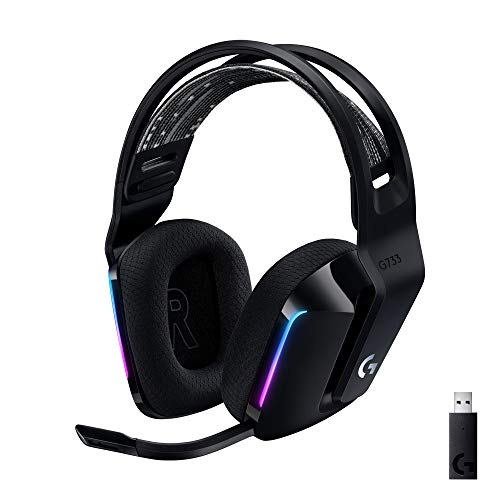
The Logitech G733 Lightspeed remains an appealing headset for players who care as much about the desk setup as the audio. Its front-facing, dual-zone LIGHTSYNC RGB can display up to 16.8 million colors, with preset animations and custom effects controlled through G HUB. The lighting is prominent without requiring an external strip or separate accessory.
Comfort is the G733's strongest practical quality. The reversible suspension headband spreads the headset's load, while the ear cups and headband use leatherette padding. Logitech lists a 20-meter wireless range and up to 29 hours of playtime. That is enough for regular gaming, though it is well behind the 60-hour G522 and Nova 5. The headset also supports stereo play on PS4 and is designed for PC, PS5, PS4, and Nintendo Switch use.
PRO-G drivers aim for precise, consistent sound with reduced distortion. The detachable boom microphone includes Blue VO!CE filters, giving you tools to make speech richer and cleaner rather than relying only on the raw microphone signal. For readers comparing microphone performance, the microphone traits that matter most for game chat are worth considering before choosing a headset mainly for its lighting.
The G733 is lighter in feel than the heavier desktop-focused models, but it lacks the G522's newer 48 kHz/24-bit audio specification and broader connection options. Choose the G733 when its suspension fit and RGB design appeal to you. Skip it if you want Bluetooth, a longer battery cycle, or the most adaptable multi-device setup. It is a comfortable choice for relaxed PC gaming, not the most technically complete wireless model here.
6. Razer BlackShark V3: Best Competitive Wireless Headset

Pros
- Wireless latency as low as 10 ms
- 70-hour battery claim
- THX spatial audio with 7.1.4 surround
- Detachable wideband microphone
- Simultaneous 2.4 GHz and Bluetooth audio
Cons
- Not compatible with Xbox consoles
- Heavier listed weight than the other BlackShark models
- Competitive features need software tuning to reach their potential
Best for: PC competitors who care about fast wireless response, directional cues, and flexible audio mixing.
The Razer BlackShark V3 is the focused choice in this group. Its second-generation HyperSpeed wireless connection is specified to reach latency as low as 10 ms, a figure aimed at keeping audio tightly synchronized with rapid on-screen events. That matters most in competitive shooters and other games where a footstep or reload cue needs to arrive without an obvious delay.
Razer uses second-generation 50 mm Triforce Titanium drivers, tuned for clarity and positional performance. THX spatial audio expands that presentation with a 7.1.4 surround mode and overhead audio processing. Those features will not make every game sound better, but they provide a broad set of tools for players who want to experiment with directional audio. Razer also includes FPS profiles tuned with esports players and lets you create and save custom EQ settings.
The detachable HyperClear Super Wideband microphone uses a 9.9 mm design and covers a wider frequency range than a basic chat mic. That is useful for voice detail and callouts. Connectivity is unusually flexible: the headset can use 2.4 GHz, Bluetooth 5.3, or USB, and it can mix 2.4 GHz and Bluetooth audio from two devices at once. The listed battery life is up to 70 hours, giving it the longest stated endurance among the wireless picks here.
The Razer BlackShark V3 X HyperSpeed is lighter and less specialized, while the Logitech G522 is the smoother general-purpose recommendation. The V3 has a clear weakness for console households because it does not support Xbox consoles, including Xbox Series X, Series S, and Xbox One. Its listed weight is also higher than the other BlackShark model. Choose it for PC or supported consoles when competitive response and audio control matter more than broad Xbox compatibility.
7. Logitech G432: Best Wired Surround Headset

Pros
- 50 mm audio drivers
- DTS Headphone:X 2.0 surround sound
- USB DAC and 3.5 mm connections
- Flip-to-mute 6 mm boom microphone
- Rotating ear cups
Cons
- Heavier than the Razer BlackShark V2 X
- DTS processing requires Logitech G HUB
- No wireless operation
Best for: players who want one wired headset for PC, Mac, consoles, and compatible mobile devices.
The Logitech G432 is a practical wired headset with more connection flexibility than its straightforward design suggests. On PC or Mac, you can use the USB DAC for digital audio and processing, or connect through 3.5 mm. The analog cable also works with mobile devices and a range of consoles. PlayStation 5 and PlayStation 4 support USB stereo audio, while the Nintendo Switch supports wireless stereo audio when docked according to the supplied details.
Its 50 mm drivers are designed to produce a broad, cinematic presentation. On Windows, DTS Headphone:X 2.0 uses software processing to create surround sound that places effects around the listener. That can make an enemy moving behind you or a sound cue from the side easier to parse, though the result depends on the game mix and your preference for virtual surround.
The 6 mm boom mic flips up to mute, an old-fashioned control that remains faster than finding a button in a dark room. Leatherette ear cups and the padded headband are intended to keep pressure off the ears, and the ear cups rotate up to 90 degrees for storage or carrying. At 1.2 lb, it is considerably heavier than the 240 g Razer BlackShark V2 X, so fit and clamping pressure deserve more attention during long sessions.
The G432 is more versatile than the HyperX Cloud Alpha because its USB DAC adds PC processing, while the Cloud Alpha has the sturdier-feeling aluminum frame and detachable cable. The SteelSeries Arctis Nova Pro goes much further for desktop audio control, but it is also a more involved system. Choose the G432 when you want broad wired compatibility and software surround. Skip it if wireless freedom or the lightest possible fit matters most.
8. Razer BlackShark V3 X HyperSpeed: Best Lightweight Wireless Headset

Pros
- 270 g lightweight design
- 2.4 GHz wireless and Bluetooth
- Detachable 9.9 mm cardioid microphone
- 50 mm Gen-2 drivers
- 7.1 surround sound
Cons
- No battery-life figure is supplied
- Lacks the V3's THX 7.1.4 mode
- Xbox support is not listed
Best for: players who want wireless freedom and a lighter headset for competitive or everyday play.
The Razer BlackShark V3 X HyperSpeed takes the core BlackShark formula and removes some of the extra complexity. It weighs 270 g, which places it between the 240 g V2 X and the heavier Razer BlackShark V3 in the supplied product information. Plush ear cups and the reduced weight make it a sensible option for long sessions when a wired headset feels restrictive.
The headset uses 2.4 GHz HyperSpeed wireless for low-latency play, with SmartSwitch Dual Wireless allowing a move between 2.4 GHz and Bluetooth. USB provides a wired fallback for uninterrupted sessions. That three-mode arrangement gives it more flexibility than the wired V2 X, and it is easier to use with a phone than the Logitech G733, whose supplied features focus on LIGHTSPEED and platform support.
The Gen-2 50 mm Triforce drivers are tuned for stronger sound and a wider soundstage, while 7.1 surround processing is intended to make footsteps and other cues easier to place. The detachable 9.9 mm HyperClear cardioid microphone favors speech from the front and can be removed when you are using the headset for ordinary listening. Razer does not provide a battery-life figure in the supplied data, so buyers who need a known endurance target should look to the 60-hour Nova 5 or 70-hour BlackShark V3.
The Razer BlackShark V3 has more advanced spatial processing, custom FPS profiles, and a wider stated microphone range, but the X HyperSpeed is the less elaborate choice. Compared with the Logitech G522, it is more focused on low-latency gaming and less focused on RGB, app integration, and broad everyday polish. Choose it for a light wireless frame and the detachable mic. Pass if documented battery life or Xbox support is essential.
9. HyperX Cloud Alpha: Best Durable Wired Headset

Pros
- Dual chamber drivers
- Durable aluminum frame
- Detachable braided cable
- Detachable noise-cancelling microphone
- Broad console and mobile compatibility
Cons
- No USB or wireless connection
- Surround processing is not listed
- Older design has fewer software controls
Best for: players who want a sturdy analog headset with a removable cable and microphone.
The HyperX Cloud Alpha is the classic hardware-first option in this roundup. Its aluminum frame and expanded headband give it a reassuringly solid structure, while the detachable braided cable reduces the risk that a damaged cable ends the headset's useful life. The microphone also detaches, so the headset is less conspicuous when you are using it for ordinary listening.
HyperX's dual chamber drivers separate bass frequencies from the mids and highs. The purpose is to reduce distortion and keep different parts of the mix more distinct. That approach suits games with heavy effects, but it also gives music, dialogue, and environmental sounds more room to coexist than a single crowded channel. The supplied frequency response is 15 Hz to 25, 000 Hz, though that range alone does not determine sound quality.
The Cloud Alpha connects through 3.5 mm and works with PC, PS4, PS5, Xbox One, Xbox Series X and Series S, Mac, mobile devices, Nintendo Switch, and VR devices with compatible ports. An in-line control provides quick audio adjustments. The detachable noise-cancelling microphone is a useful feature for chat, but this headset does not offer the deeper EQ, surround, or microphone processing found in Logitech G HUB, Razer's apps, or SteelSeries Sonar.
Its 0.657 lb listed weight is lower than the Logitech G432, and the aluminum frame gives it a more substantial construction than the lightweight Razer V2 X. The trade-off is that it cannot compete with wireless models for freedom of movement or with the SteelSeries Arctis Nova Pro for desktop tuning. Choose the Cloud Alpha if durability, analog compatibility, and replaceable connections matter more than software features.
10. SteelSeries Arctis Nova Pro: Best Desktop Audio System

Pros
- GameDAC Gen 2 with OLED controls
- 96 kHz/24-bit audio support
- ESS Sabre Quad-DAC
- Retractable noise-cancelling microphone
- Two-system switching
Cons
- Wired desktop setup
- Heaviest listed headset in the roundup
- More equipment and tuning than many players need
Best for: PC gamers who want detailed audio control, high-resolution playback, and easy switching between two systems.
The SteelSeries Arctis Nova Pro is the most serious desktop audio setup here. Rather than treating the headset as an isolated wireless accessory, it builds the controls into the GameDAC Gen 2. The OLED display and multifunction controls let you adjust EQ, input, volume, ChatMix, and other settings without repeatedly opening software.
Its premium high-fidelity drivers support a 96 kHz/24-bit signal through the GameDAC Gen 2, and the ESS Sabre Quad-DAC is specified to provide a 78 percent purer signal than the first-generation GameDAC. Those numbers matter most to listeners who can hear and appreciate subtle changes in detail, separation, and texture. Sonar software adds a pro-grade parametric EQ, giving experienced users considerably more control than the fixed profiles on simpler headsets.
Spatial audio support includes 360-degree processing, with compatibility for Tempest 3D Audio on PS5 and Microsoft Spatial Sound. The ClearCast Gen 2 microphone retracts into the ear cup and uses AI-powered noise cancellation through Sonar to reduce background sound during comms. ComfortMAX adds height-adjustable rotating ear cups, a suspension band, and a glasses-friendly build, although the listed 2.51 lb product weight makes this the heaviest option in the group.
The Nova Pro is more revealing and configurable than the Logitech G432, but it is also much less convenient than the wireless Logitech G522. Its two-system switching is a strong reason to choose it, especially if a PC and console share one desk. Players who just want a headset for occasional gaming should skip the desktop hardware and use a simpler model. For serious PC audio enthusiasts, it is the most capable wired system in this roundup.
How to choose best pc gaming headset
The right gaming headset depends less on a long feature list than on how you play, where you play, and how much control you want over the audio chain.
Connection type
Wired headsets avoid battery management and usually connect with either 3.5 mm or USB. A 3.5 mm connection is broadly compatible with PCs, controllers, phones, and handhelds, while USB can add a DAC, software surround, EQ, and chat controls. Wireless models are more convenient at a desk, but check whether they use 2.4 GHz, Bluetooth, or both. Dedicated 2.4 GHz wireless is generally the more appropriate choice for low-latency gaming.
Positional audio
A gaming headset should separate footsteps, reloads, voices, and environmental effects instead of presenting them as one loud block. Driver size alone does not guarantee that separation. Look for real tuning options, a useful soundstage, and surround or spatial processing that works with your PC and games. The Razer BlackShark models focus on positional cues, while the SteelSeries Arctis Nova Pro offers deeper EQ control for people willing to tune it.
The most useful gaming audio is not the loudest sound. It is the sound that arrives clearly from the direction you need.
Microphone quality
A boom microphone with a directional pickup pattern can keep voice chat clearer in a noisy room. Detachable or retractable designs are convenient when you use the headset for music, while flip-to-mute controls are faster during a match. Software such as Blue VO!CE, Razer voice controls, and SteelSeries Sonar can shape or clean up speech, but the physical microphone still matters. If voice chat or streaming is central to your setup, how to separate game audio from clear spoken voice can help narrow the choice.
Comfort and weight
Weight, ear cup padding, headband design, and clamp all affect how long you can wear a headset. The Razer BlackShark V2 X is listed at 240 g, the Razer BlackShark V3 X HyperSpeed at 270 g, and the Logitech G522 at 280 g. Those figures are useful comparisons, but a suspension band or well-shaped ear cup can matter just as much as the number. Glasses wearers should pay particular attention to flexible bands, rotating ear cups, and pressure around the temples.
Battery and charging
Wireless battery claims vary widely in this group. The Logitech G522 and SteelSeries Arctis Nova 5 are both specified for up to 60 hours under their stated conditions, while the Razer BlackShark V3 lists up to 70 hours. The Astro A50 lists 24 hours at 78 dB and offsets that limitation with a magnetic charging dock. Fast charging can be more useful than a very high maximum if you often forget to recharge, as the Nova 5's six hours from 15 minutes demonstrates.
Frequently asked questions
Do all of these headsets work with a PC?
Yes, every headset in this roundup is presented as a PC-compatible product. The connection varies, with 3.5 mm, USB, 2.4 GHz wireless, Bluetooth, or a combination of those options. Confirm that your PC has the required port or that you have the appropriate USB connection available.
Is a wired or wireless gaming headset better?
A wired headset does not need charging and can offer a simple, stable connection. Wireless models are easier to use away from the desk and avoid cable drag, but they require battery management. For competitive PC play, a 2.4 GHz wireless model is generally a better fit than Bluetooth alone because it is designed for lower latency.
Which headset has the longest stated battery life?
The Razer BlackShark V3 lists up to 70 hours. The Logitech G522 and SteelSeries Arctis Nova 5 each list up to 60 hours under their stated conditions. RGB lighting can reduce the G522's maximum, and the supplied data does not include a battery figure for the Razer BlackShark V3 X HyperSpeed.
Can these headsets be used with consoles?
Most of them support at least one console platform. The Logitech G Astro A50 is designed around switching among several systems, while the HyperX Cloud Alpha uses a 3.5 mm connection for broad compatibility. The Razer BlackShark V3 specifically does not support Xbox consoles, so Xbox owners should check the compatibility details carefully before choosing it.
Do virtual surround features improve gaming?
They can make directional cues easier to distinguish, but the effect depends on the game, the audio mix, and your personal preference. Some players prefer a clean stereo signal, while others find 7.1 or spatial processing useful in competitive games. The Razer BlackShark V2 X, Logitech G432, and Razer BlackShark V3 X HyperSpeed all include surround-related features, with different software requirements.
Are RGB lights useful on a gaming headset?
RGB lighting is primarily decorative. It can coordinate with a gaming setup and provide visual personalization, but it does not improve microphone clarity or positional audio. On the Logitech G522, lighting also affects the stated maximum battery life, so turn it off if endurance matters more than appearance.
The bottom line
The Logitech G522 Lightspeed is the Best PC Gaming Headset for most people because it combines comfortable construction, strong microphone specifications, three connection modes, and up to 60 hours of battery life. It does not have the Astro A50's multi-system dock, but it is easier to live with when PC is the main platform.
Choose the SteelSeries Arctis Nova Pro if your desk is also an audio workstation and you want the GameDAC Gen 2, high-resolution playback, two-system switching, and extensive EQ control. For a lighter and simpler wireless option, the SteelSeries Arctis Nova 5 is the more practical alternative, while the Razer BlackShark V2 X remains the straightforward wired pick.
If you are undecided, choose the Logitech G522 unless you specifically need a desktop DAC, console switching, or a wired connection.
As an Amazon Associate we earn from qualifying purchases.