

A power supply is easy to ignore until a new graphics card exposes its limits. The right unit has enough continuous output, handles short GPU power spikes, fits the case, and does not turn every demanding game into a fan-noise problem. The Best PC power supply for most new builds is the MSI MAG A850GL, thanks to its modern standard, useful capacity, modular cables, and long warranty.
This list also includes quieter alternatives, higher-capacity units for demanding workstations, and a basic 600W model for simpler systems. The choices range from the compact MSI MAG A750GL to the platinum-rated ASUS ROG Strix 1000W.
Comparison table
| # | Product | Award | Output | Efficiency | Standard | Best for |
|---|---|---|---|---|---|---|
| 1 | MSI MAG A850GL | Best overall | 850W | 80 PLUS Gold | ATX 3.1, PCIe 5.1 | Modern gaming PCs |
| 2 | Corsair RM850e 2025 | Best for quiet builds | 850W | Cybenetics Gold | ATX 3.1, PCIe 5.1 | Quiet gaming systems |
| 3 | Thermaltake Smart 600W | Best for basic builds | 600W | 80 PLUS | ATX 12V 2.3 | Office and entry-level PCs |
| 4 | MSI MAG A750GL | Best compact 750W unit | 750W | 80 PLUS Gold | ATX 3.1, PCIe 5.1 | Midrange gaming PCs |
| 5 | be quiet! Pure Power 750W | Best silent 750W unit | 750W | 80 PLUS Gold | ATX 3.1, PCIe 5.1 | Quiet upgrades |
| 6 | ASUS ROG Strix 1000W | Best high-end unit | 1000W | 80 PLUS Platinum | ATX 3.1 | High-power GPUs |
| 7 | be quiet! Pure Power 1000W | Best quiet 1000W unit | 1000W | 80 PLUS Gold | ATX 3.1, PCIe 5.1 | Powerful quiet workstations |
| 8 | be quiet! Pure Power 850W | Best balanced quiet unit | 850W | 80 PLUS Gold | ATX 3.1, PCIe 5.1 | Enthusiast gaming PCs |
| 9 | Thermaltake Toughpower GT 850W | Best modular Thermaltake | 850W | 80 PLUS Gold | ATX 3.1, PCIe 5.1 | GPU-focused builds |
| 10 | Corsair RM850x | Best for cable management | 850W | Cybenetics Gold | ATX 3.1, PCIe 5.1 | Clean custom builds |
1. MSI MAG A850GL: Best Overall

Pros
- 850W continuous output suits a wide range of gaming PCs
- Fully modular cabling reduces unused wires
- ATX 3.1 and PCIe 5.1 support
- Native 12V-2x6 cable
- 10-year limited warranty
Cons
- Gold efficiency is not the highest level here
- The larger capacity may be unnecessary for modest systems
- MSI provides fewer published cooling details than some rivals
Best for: a modern gaming PC that needs sensible headroom and current GPU support.
The MSI MAG A850GL is the easiest unit to recommend when the build brief is simply “give me dependable power for a current gaming PC.” Its 850W capacity leaves room for a strong graphics card, a capable processor, storage drives, and several case fans without pushing the supply toward its limit. It also avoids the awkward middle ground of older units that require a graphics card adapter.
That modern compatibility comes from ATX 3.1 and PCIe 5.1 support, plus a native 12V-2x6 cable. A direct cable connection keeps the GPU power path simpler than an adapter arrangement. The fully modular design helps during installation because only the motherboard, CPU, graphics card, and drive cables your system needs have to be connected. That leaves more space behind the motherboard tray for cable routing.
MSI uses 80 PLUS Gold certification here, a sensible efficiency tier for a gaming desktop that spends long sessions under load. The important practical combination is the 850W output and the newer power standard. The MSI MAG A750GL offers the same general feature set at 750W, but this model gives a little more breathing room for high-draw graphics cards and future component changes. It is also a stronger all-rounder than the older Thermaltake Smart 600W, which lacks the newer ATX 3.1 and PCIe 5.1 positioning.
There are limits. The product data does not provide a fan mode, detailed connector count, or a precise chassis size for the internal unit, so builders with unusually tight cases should confirm clearance before ordering. It also does not have the Platinum efficiency rating of the ASUS ROG Strix 1000W. Still, its combination of output, standards, modular wiring, and a 10-year limited warranty makes it the Best PC power supply for the broadest range of new gaming builds.
2. Corsair RM850e 2025: Best for Quiet Builds

Pros
- 120mm rifle bearing fan with a load-aware fan curve
- ATX 3.1 and PCIe 5.1 compliant
- Native 12V-2x6 cable
- 105°C-rated capacitors
- Modern Standby compatibility
Cons
- 850W capacity is excessive for basic office systems
- It does not have the higher Platinum certification of the ASUS
- The RM850x has a more installation-focused cable design
Best for: a quiet gaming or productivity build with modern standby support.
The Corsair RM850e 2025 takes a more specific approach than the MSI MAG A850GL. It is still an 850W fully modular ATX 3.1 supply, but Corsair puts more of the emphasis on acoustic behavior and low-load operation. The 120mm rifle bearing fan uses a calculated fan curve intended to keep noise controlled, including when the unit is working hard.
Its ATX 3.1 compliance is paired with PCIe 5.1 support and a 12V-2x6 cable. That combination is useful for a new graphics card because the supply is designed around the transient demands associated with modern GPUs. The 105°C-rated capacitors are another reliability-minded detail. They do not make a computer faster, but they are relevant in a component that may spend years tucked into a warm case.
Modern Standby compatibility gives this Corsair a role beyond gaming. Systems that frequently move between sleep and active use can wake quickly, while the supply is designed for improved efficiency at low loads. The RM850e 2025 is also physically compact at 5.91 inches long, 5.51 inches wide, and 3.35 inches high according to the listed product dimensions. That should appeal to builders who want substantial capacity without a particularly imposing chassis.
The main choice is between this and the Corsair RM850x. The RM850e 2025 has the clearer low-noise and standby pitch, while the RM850x focuses on flexible embossed cables with low-profile combs. The RM850e is the better fit for a quiet everyday machine, but buyers who care most about cable presentation may prefer its sibling. Skip this model if the computer only needs basic office power, or if 600W is already comfortably sufficient.
3. Thermaltake Smart 600W: Best for Basic Builds

Pros
- 600W continuous output
- Active power factor correction
- Over-power, over-voltage, and short-circuit protection
- Two PCI-E 6+2-pin connectors
- Five-year coverage
Cons
- Older ATX 12V 2.3 platform
- Only 80 PLUS certified efficiency
- Not fully modular
- No native 12V-2x6 connector
Best for: a straightforward office, home, or entry-level desktop with modest power demands.
The Thermaltake Smart 600W belongs in this roundup because not every computer needs an ATX 3.1 supply. For a basic desktop, the useful part of this unit is its clear, uncomplicated specification: 600W maximum output, a strong 12V rail, active PFC, and standard protection against overload, over-voltage, and short circuits.
It supports ATX 12V 2.3 and EPS 12V 2.92 standards rather than the newer ATX 3.1 platform used by most of the other picks. Its two PCI-E 6+2-pin connectors can support a compatible graphics card, but this is not the supply to choose when the build centers on a newer GPU that expects a native 12V-2x6 connection. The 16 millisecond minimum hold-up time within 60 percent load is a concrete sign that the unit is intended for conventional desktop use, not the most demanding modern gaming hardware.
Efficiency is rated at 80 PLUS, meaning 80 percent efficiency under typical load according to the supplied data. That is a lower tier than the Gold models here, and the fixed cabling means unused leads remain in the case. The listed dimensions are 8.9 inches long, 4 inches wide, and 7 inches high, though case compatibility should always be checked against the manufacturer’s mounting layout.
The Smart 600W is a sensible match for an office PC, a home desktop, or an older system with moderate components. It is not a substitute for the MSI MAG A850GL, Corsair RM850e 2025, or any other ATX 3.1 unit in a new high-performance build. If your planned graphics card uses a modern 12V-2x6 cable, choose one of the newer supplies instead. Readers building a gaming machine should also consider how much power a modern gaming system actually needs before settling on this older platform.
4. MSI MAG A750GL: Best Compact 750W Unit

Pros
- 750W continuous output
- Fully modular design
- 80 PLUS Gold certification
- ATX 3.1 and PCIe 5.1 ready
- Native dual-color 12V-2x6 cable
- 10-year limited warranty
Cons
- Less headroom than the A850GL
- No listed fan curve or acoustic certification
- Case clearance still needs checking
Best for: a midrange gaming PC that needs current GPU support without stepping up to 850W.
The MSI MAG A750GL is the practical version of the top pick for builders who know their system does not need 850W. Its 750W continuous output is well suited to a midrange gaming desktop, while its ATX 3.1 and PCIe 5.1 support keep the build aligned with current graphics card power connections.
Like the A850GL, it is fully modular and includes a native 12V-2x6 cable. The supplied feature list also calls out a dual-color version of that cable, which can make it easier to see whether the connector is fully seated during installation. Modular cables matter more than they sound in a smaller case. Removing leads for hardware you do not have gives the builder more room around the power supply shroud and improves the path for airflow.
80 PLUS Gold certification puts it in the same efficiency class as the A850GL, while the 10-year limited warranty gives this 750W unit a long intended service life. The listed product dimensions are 12 inches in length, 9 inches in width, and 5 inches in height. Those figures are worth comparing with the case specification before buying, particularly in a compact chassis where cable bend space can matter as much as the supply itself.
The trade-off is straightforward. The MSI MAG A850GL is the safer recommendation for a particularly power-hungry GPU or a future upgrade, while the be quiet! Pure Power 750W has a stronger quiet-running story through its semi-passive cooling. The A750GL wins when current GPU compatibility and modular simplicity matter more than a zero-RPM fan mode. It is the right capacity for a focused midrange build, but not the one we would choose for a system likely to receive a major graphics card upgrade soon.
5. be quiet! Pure Power 750W: Best Silent 750W Unit

Pros
- 80 PLUS Gold efficiency up to 94.3 percent
- Semi-passive zero-RPM cooling
- Native 12V-2x6 connector
- Four PCIe 6+2-pin connectors
- LLC topology and one 12V rail
Cons
- 750W may not suit the largest GPUs
- Heavier than some competing 750W models
- No published acoustic rating in the supplied data
Best for: a quiet gaming or media creation PC with a 750W power target.
The be quiet! Pure Power 750W is built around a simple idea: the power supply should disappear into the background. At low load, its fan turns off completely. When the system demands more, the airflow-optimized fan blades and fan control are intended to keep operation quiet across the load range.
That silence-focused design does not come at the expense of current connectivity. This is an ATX 3.1 unit with a native 12V-2x6 connector for PCIe 5.1 graphics cards, along with four PCIe 6+2-pin connectors for current GPU arrangements. It offers 750W of continuous power through one 12V rail and is designed to handle power excursions up to double its rated output, according to the supplied product information.
The efficiency claim is unusually specific for this group, reaching up to 94.3 percent under the cited certification. In a PC that spends a lot of time rendering, gaming, or creating media, less wasted power means less heat for the fan to move. The LLC topology is also presented as a way to support voltage regulation and efficiency. At 6.48 pounds, it is not a lightweight unit, and its listed dimensions are approximately 6.3 inches long, 5.91 inches wide, and 3.39 inches high.
Compared with the MSI MAG A750GL, the Pure Power 750W is the more convincing choice for a quiet room. MSI has the same broad modern standard support, but be quiet! provides the stronger cooling story. The weakness is capacity. Skip it for a system whose graphics card selection points clearly beyond a 750W design. For a quiet midrange build, though, it is one of the most coherent choices here. A case with good airflow will help the semi-passive design spend more time at its quietest.
6. ASUS ROG Strix 1000W: Best High-End Unit

Pros
- 1000W capacity for demanding systems
- 80 PLUS Platinum certification
- GaN MOSFET design
- GPU-First voltage sensing
- Large ROG heatsinks
- 0dB technology at light loads
Cons
- More capacity than most mainstream PCs require
- No detailed connector count in the supplied data
- Physically substantial and relatively heavy
Best for: a high-end graphics workstation or gaming PC with substantial transient demands.
The ASUS ROG Strix 1000W is the specialist pick for a system where power headroom is part of the design rather than an afterthought. Its 1000W capacity gives high-end processors and graphics cards more room to handle demanding workloads, while the ATX 3.1 platform addresses the short power excursions that can make an under-specced supply unstable.
ASUS uses an 80 PLUS Platinum certification here, above the Gold rating used by most of the list. The internal design includes GaN MOSFETs, which ASUS says support power efficiency and a more organized layout for cooler operation. Large ROG heatsinks cover critical components, and dual ball fan bearings are specified as a durability feature. These are the sorts of details that matter in a supply expected to work hard for long sessions.
The GPU-First intelligent voltage stabilizer is the unusual feature. ASUS says its voltage sensing improves delivery to the graphics card by up to 45 percent. That claim should not be confused with a frame-rate boost, but the design is clearly aimed at keeping GPU power delivery stable during changing loads. The 0dB technology can also keep the fan off during light gaming, helping the system stay quiet when it is not drawing heavily.
The ASUS is more elaborate than the MSI MAG A850GL and the be quiet! Pure Power 1000W. The MSI is the easier general recommendation, while the be quiet! emphasizes quiet operation with a semi-passive fan. ASUS is the one to choose when the combination of 1000W capacity, Platinum certification, GPU-focused voltage sensing, and large heatsinks directly matches the build. Its listed dimensions are 6.3 inches long, 5.9 inches wide, and 3.4 inches high, with a weight of 3.4 pounds. Confirm the case layout before installation, and skip it for a modest system that will never approach this capacity.
7. be quiet! Pure Power 1000W: Best Quiet 1000W Unit
Pros
- 1000W continuous output
- Semi-passive zero-RPM cooling
- Native 12V-2x6 connector
- Four PCIe 6+2-pin connectors
- 80 PLUS Gold efficiency up to 94.4 percent
- 10? Wait no warranty not provided
Cons
- Larger capacity than most mainstream builds need
- Gold rather than Platinum certification
- Heavy at about 6.9 pounds
Best for: a powerful gaming or media creation PC where quiet operation matters.
The be quiet! Pure Power 1000W is the high-capacity alternative for people who want the ASUS ROG Strix 1000W’s output without making Platinum efficiency and GPU-specific voltage sensing the central priorities. It supplies 1000W continuously through one large 12V rail, giving a demanding processor and graphics card room to respond to sudden load changes.
Its native 12V-2x6 connector supports next-generation PCIe 5.1 graphics cards, while four PCIe 6+2-pin connectors cover current-generation GPU configurations. The unit is fully modular, so the installation can be kept to the cables the build actually needs. ATX 3.1 compliance is the foundation for the transient-load capability, with the supplied information stating that the unit can handle excursions up to double its rated power.
The reason to choose this over ASUS is the cooling approach. The Pure Power 1000W uses semi-passive zero-RPM cooling, so the fan shuts off under low load and starts only when needed. Its listed efficiency reaches up to 94.4 percent, and the LLC topology is intended to support stable voltage regulation and efficient operation. The product measures approximately 6.3 inches long, 5.91 inches wide, and 3.39 inches high, with a listed weight of about 6.91 pounds.
That weight is the most obvious practical weakness, especially if the power supply must be held in place while cables are routed through a compact case. The ASUS is a better match for buyers who specifically want Platinum certification, GaN MOSFETs, or GPU-First voltage sensing. The be quiet! is the stronger fit for a high-capacity system in a quiet room. If the computer will use a moderate GPU, the Pure Power 850W or 750W models make more sense than carrying this much unused capacity.
8. be quiet! Pure Power 850W: Best Balanced Quiet Unit
Pros
- 850W continuous output
- 80 PLUS Gold efficiency up to 94.4 percent
- Semi-passive zero-RPM cooling
- Native 12V-2x6 connector
- Four PCIe 6+2-pin connectors
- ATX 3.1 support
Cons
- Gold certification is below the ASUS Platinum unit
- Heavy for its capacity
- No published warranty length in the supplied data
Best for: an enthusiast gaming PC that needs 850W and a quiet cooling profile.
The be quiet! Pure Power 850W occupies the sweet spot in this family. It provides the same 850W capacity as the MSI MAG A850GL and both Corsair models, but it makes low noise the defining feature. The fan turns off entirely at low load, then uses airflow-optimized blades when the system calls for active cooling.
This is a fully modular ATX 3.1 PSU with native 12V-2x6 support for PCIe 5.1 graphics cards. Four PCIe 6+2-pin connectors give it flexibility for current GPU designs, while the single 12V rail is designed to handle demanding graphics card excursions. The supplied product information says it can manage spikes up to twice its rated power, which is directly relevant to a modern gaming system that can change load quickly.
Efficiency reaches up to 94.4 percent in the supplied claim, placing it slightly above the 750W model in the same family. LLC topology is used for voltage regulation and efficiency. The listed dimensions are about 6.3 inches long, 5.91 inches wide, and 3.39 inches high. Its listed weight is approximately 6.48 pounds, so this is not the right unit for someone trying to minimize the weight of a compact build.
The choice against the MSI MAG A850GL comes down to priorities. MSI gives you the straightforward all-round package and a stated 10-year limited warranty, while be quiet! gives you the more explicit semi-passive cooling story. The Corsair RM850e 2025 is another strong quiet option, with a 120mm rifle bearing fan and Modern Standby compatibility. Choose the Pure Power 850W when a quiet enthusiast system matters more than standby features or a lighter installation experience.
9. Thermaltake Toughpower GT 850W: Best Modular Thermaltake

Pros
- 850W output
- Fully modular low-profile flat cables
- Native PCIe 5.1 12V-2x6 connector
- Smart Zero Fan technology
- 80 PLUS Gold efficiency
- Single high-amperage 12V rail
Cons
- Five-year warranty is shorter than MSI's stated warranty
- Efficiency is below the ASUS Platinum unit
- No detailed fan acoustics are provided
Best for: a modern GPU-focused build with modular installation and automatic fan control.
The Thermaltake Toughpower GT 850W is a clean step up from the company’s Smart 600W. It brings the current ATX 3.1 and PCIe 5.1 standards, raises capacity to 850W, and adds a native 12V-2x6 connector for a direct connection to a compatible graphics card. That makes it much better suited to a new gaming PC than the older Thermaltake model.
Smart Zero Fan technology adjusts fan speed based on load. At low demand, the supply can minimize fan activity, while heavier workloads bring in active cooling. Thermaltake also uses a fully modular design with low-profile flat black cables. Flat cables are easier to route through tight spaces than bulky bundled wiring, particularly when the case has narrow channels behind the motherboard tray.
The unit uses 80 PLUS Gold efficiency and a high-amperage single 12V rail. Thermaltake positions it for high-end gaming and workstation builds, though the supplied data does not specify a connector count beyond the native PCIe connection. Its listed dimensions are 5.9 inches long, 3.4 inches wide, and 5.5 inches high. Those measurements should be compared carefully with the case’s PSU clearance and cable-routing space.
The MSI MAG A850GL remains the better broad recommendation because it pairs the same broad modern standard with a stated 10-year limited warranty. The Toughpower GT 850W has an appealing installation design and Smart Zero Fan control, but its stated warranty is five years. It is a good fit for a builder who prefers Thermaltake’s flat modular cables and wants a direct modern GPU connection. Readers planning a compact chassis should settle the case dimensions first, since the amount of internal room a PC case leaves for cable routing can determine whether a modular supply is easy or frustrating to install.
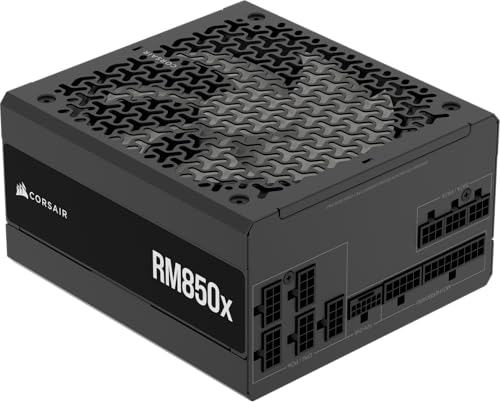
10. Corsair RM850x: Best for Cable Management
Pros
- 850W output
- Fully modular cabling
- Native 12V-2x6 connector
- ATX 3.1 and PCIe 5.1 support
- Cybenetics Gold efficiency
- Flexible embossed cables with low-profile combs
Cons
- No semi-passive or zero-RPM mode is listed
- Less capacity than the 1000W models
- No warranty length is provided in the supplied data
Best for: a clean custom build where flexible, organized cabling matters.
The Corsair RM850x is the cable-management specialist of the group. It has the expected modern foundation, with 850W output, ATX 3.1 compliance, PCIe 5.1 readiness, and a native 12V-2x6 connector. The distinction is its embossed cables and low-profile combs, which are intended to make the wiring easier to bend and present neatly inside a finished case.
Fully modular cabling means the builder connects only the leads required by the motherboard, CPU, GPU, and storage layout. That can reduce clutter and leave a cleaner path for case airflow. It is especially helpful when a tempered-glass side panel makes the rear of the build visible, or when the case has narrow cable channels.
Corsair rates this model at Cybenetics Gold efficiency, up to 91 percent according to the supplied feature list. The RM850x is also designed around ATX 3.1 and PCIe 5.1 transient requirements, so it is a more appropriate partner for a current high-performance graphics card than the Thermaltake Smart 600W. The listed dimensions are 2.3 inches in height, 5.91 inches in length, and 3.39 inches in width, with a listed weight of 3.9 pounds.
The RM850e 2025 is the stronger Corsair choice if low-load behavior and Modern Standby matter most. This RM850x is the more attractive option when the installation itself is the priority. It does not have a listed zero-RPM or 0dB mode, so builders pursuing the quietest possible system should look at the Corsair RM850e 2025 or either be quiet! Pure Power model. Choose the RM850x when you want modern GPU support and cables that are easier to shape into a tidy final build.
How to choose best pc power supply
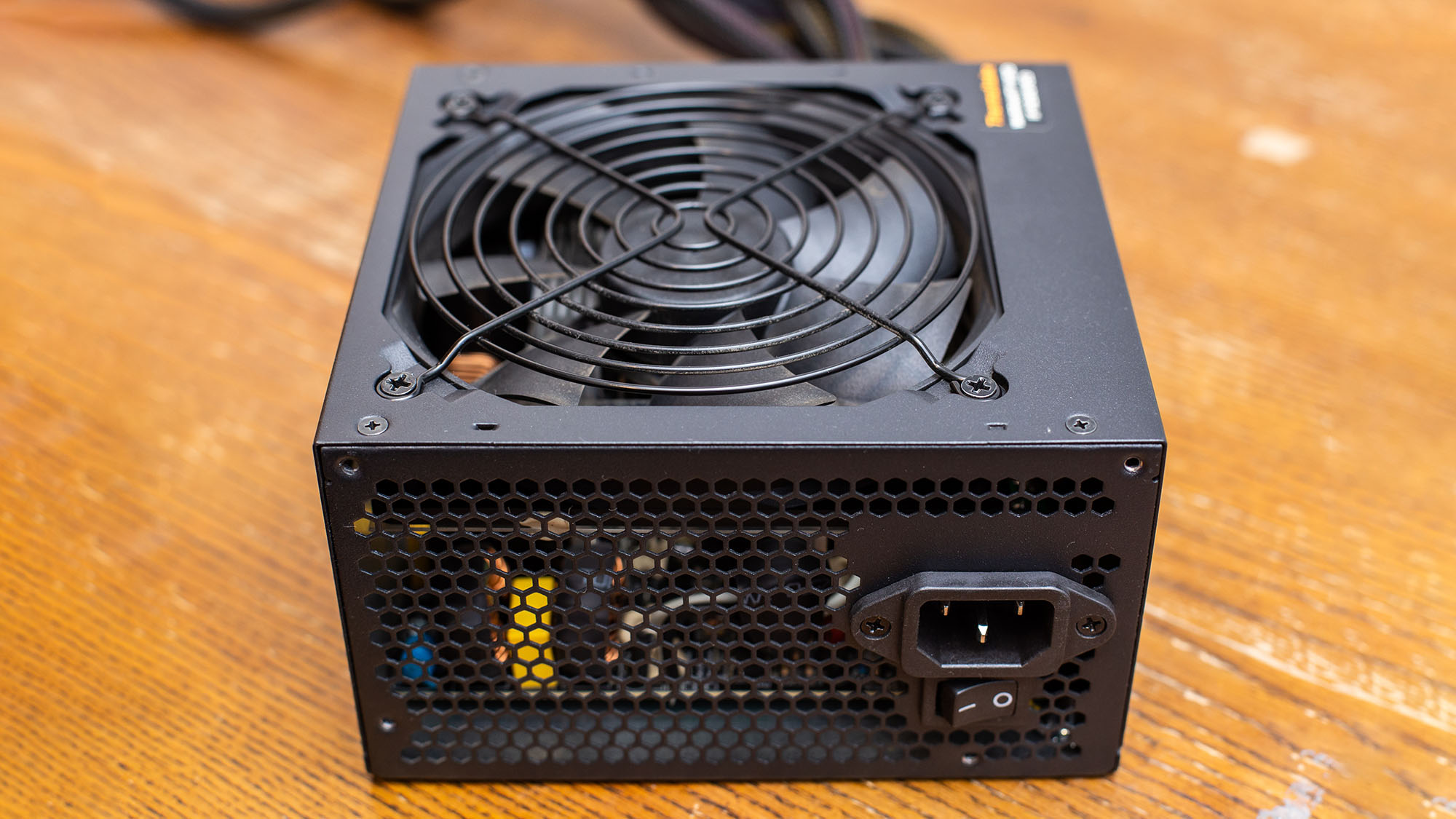
The Best PC power supply is not simply the unit with the largest wattage. Match capacity to the processor and graphics card, then look at the power standard, connectors, efficiency, cooling, and physical fit.
Continuous output
Wattage is the amount of power the supply can provide continuously. A 600W unit can be appropriate for an office PC or modest desktop, while an 850W or 1000W model leaves more room for a demanding graphics card and sudden load changes.
Do not choose capacity based only on the graphics card’s typical draw. The processor, drives, fans, USB devices, and future upgrades all use part of the system’s available power. The MSI MAG A750GL suits a focused midrange build, while the MSI MAG A850GL gives a wider safety margin without moving to a 1000W unit.
ATX and PCIe generation
ATX 3.1 support is an important dividing line in this selection. The newer standard is designed to handle transient power excursions from current GPUs. PCIe 5.1 readiness and a native 12V-2x6 connector also reduce dependence on adapter cables.
The Thermaltake Smart 600W uses an older ATX 12V 2.3 platform and two PCI-E 6+2-pin connectors. That is fine for a compatible older or modest system, but it is not the natural match for a new GPU that expects a 12V-2x6 connection.
A modern connector matters most when the graphics card can create modern transient loads.
Efficiency certification
80 PLUS certification indicates how efficiently a supply converts incoming power into usable output under specified conditions. Gold models such as the MSI, Corsair, Thermaltake Toughpower, and be quiet! units occupy a stronger efficiency tier than the basic 80 PLUS Thermaltake Smart 600W. The ASUS ROG Strix 1000W goes further with 80 PLUS Platinum certification.
Efficiency does not tell you everything about electrical quality or noise. Treat it as one part of the decision, alongside the power standard, cooling design, capacity, and warranty information supplied for the specific model.
Modular cabling
A fully modular PSU lets you disconnect cables that your system does not need. That makes installation cleaner and can improve the space available for routing air and wires. The Corsair RM850x goes a step further with embossed cables and low-profile combs, while the Thermaltake Toughpower GT 850W includes low-profile flat cables.
Fixed cables are not automatically a problem in a spacious case, but they leave unused leads inside the chassis. For a compact case, modular cabling is usually easier to work with.
Cooling and noise
Fan control determines how noticeable the supply is during everyday work and gaming. The be quiet! Pure Power models use semi-passive zero-RPM cooling, the ASUS uses 0dB technology, the Thermaltake Toughpower GT uses Smart Zero Fan, and the Corsair RM850e 2025 uses a 120mm rifle bearing fan with a calculated curve.
A zero-RPM mode does not mean the supply stays fanless under sustained heavy load. It means the fan can remain off at low demand. Case airflow still matters, since a cooler case interior gives the supply less heat to remove.

Frequently asked questions
How many watts should a gaming PC power supply have?
The answer depends on the processor, graphics card, drives, fans, and planned upgrades. The 750W models suit many midrange systems, while 850W provides more headroom for stronger graphics cards. A 1000W unit is appropriate when the rest of the build can actually use its capacity.
Is ATX 3.1 important for a new gaming PC?
It is a useful feature for a new build, particularly when paired with a native 12V-2x6 connector. ATX 3.1 supplies are designed to handle the transient behavior associated with newer graphics cards. An older ATX 12V unit can still serve a compatible system, but it is not as forward-looking.
What does fully modular mean?
Fully modular means every detachable power cable can be connected only when needed. This reduces unused wiring inside the case and makes cable routing easier. It does not change the supply’s wattage or efficiency by itself.
Is 80 PLUS Gold enough for a gaming PC?
80 PLUS Gold is a strong efficiency tier for many gaming and workstation builds. The ASUS ROG Strix 1000W has 80 PLUS Platinum certification, but efficiency should be considered alongside output, connectors, cooling, and physical compatibility. Certification alone does not determine whether a supply fits a particular system.
Does a zero-RPM fan mean a power supply is silent?
It means the fan can stop under low-load conditions. During extended gaming or rendering, the fan may run to keep internal temperatures under control. Semi-passive designs such as the be quiet! Pure Power models can still be very quiet, but the case’s airflow and ambient temperature affect the result.
Can a 600W supply run a gaming PC?
It can run a compatible gaming PC with modest power requirements. The Thermaltake Smart 600W has two PCI-E 6+2-pin connectors, but it uses an older ATX 12V platform and does not have a native 12V-2x6 connector. Check the graphics card requirements before using it in a new build.
Should I replace my power supply when upgrading the GPU?
Replace it if its capacity, connectors, or power standard do not match the new card. A modern ATX 3.1 unit with a native 12V-2x6 cable can simplify the upgrade. An older supply may remain suitable if it has sufficient output and the required connectors, but age and condition also matter.
The bottom line
The Best PC power supply for most new gaming desktops is the MSI MAG A850GL. Its 850W capacity, fully modular design, 80 PLUS Gold certification, ATX 3.1 and PCIe 5.1 support, native 12V-2x6 cable, and 10-year limited warranty make it the most balanced pick in this group.
Choose the Corsair RM850e 2025 for a quieter system with Modern Standby compatibility, or the be quiet! Pure Power 850W when semi-passive cooling is the deciding feature. The ASUS ROG Strix 1000W is the specialist choice for high-end hardware, while the Thermaltake Smart 600W remains suitable for simpler systems that do not need modern GPU power connections.
If you are undecided, choose the MSI MAG A850GL unless your build clearly calls for quieter cooling, 1000W capacity, or a basic 600W platform.
As an Amazon Associate we earn from qualifying purchases.