

The frustrating part of RV internet is not finding a device that claims to connect anywhere. It is choosing between cellular coverage, satellite visibility, external antennas, and the equipment needed to keep several devices online. The Best RV Internet Options make very different compromises once you leave a campground Wi-Fi network behind.
This list covers compact cellular hotspots, 4G routers, portable satellite kits, and a few useful Starlink accessories. Some products provide the connection itself, while others improve how an existing connection is mounted, distributed, or monitored.
TravlFi JourneyGo is our top pick for most travelers, with KUMA Connect PRO, Starlink Gen 3 Standard Kit, and TravlFi Journey1 covering the strongest alternatives from cellular flexibility to satellite performance.
Comparison table
| # | Product | Award | Connection | Key feature | Best for |
|---|---|---|---|---|---|
| 1 | TravlFi JourneyGo | Best overall | LTE cellular | eSIM plans, no SIM required | Travelers wanting simple mobile internet |
| 2 | Portable Starlink Mini Kit 4th Gen | Best portable satellite kit | Satellite | Wi-Fi 5, 12 to 48V DC | Remote work away from cellular coverage |
| 3 | TravlFi Journey1 | Best compact hotspot | LTE cellular | Compact, eSIM data plans | Solo travelers and small rigs |
| 4 | KUMA Connect PRO | Best external antenna system | 4G LTE | Outdoor 2x2 MIMO antenna | Weak-signal campsites |
| 5 | Frigga 4G Monitor | Best for RV safety | 4G cellular and Wi-Fi | Temperature and humidity alerts | Monitoring pets or equipment |
| 6 | Starlink Gen 3 Standard Kit | Best full-size satellite kit | Satellite | Built-in Wi-Fi 6 router | Families and full-time RVers |
| 7 | STARGEAR Mini Mount | Best Starlink Mini mount | Accessory | Locking mount with 8° tilt | Securing a Starlink Mini outdoors |
| 8 | WXPSKY Starlink Ethernet Adapter | Best wired expansion | Ethernet | One WAN and three LAN ports | RVs with wired devices |
| 9 | Portable Satellite Mini Kit | Best all-in-one satellite kit | Satellite | Integrated Wi-Fi and multiple mounts | Off-grid campers |
| 10 | GL.iNet Spitz GL-X750V2 | Best configurable LTE router | 4G LTE | OpenWrt, VPN support, dual-band Wi-Fi | Technical users building a custom setup |
1. TravlFi JourneyGo: Best Overall

Pros
- Pocket-sized private network
- Uses nationwide cellular networks
- eSIM data plans require no physical SIM
- Prepaid plans do not require a contract
Cons
- Cellular coverage is still required
- No external antenna is listed
- Data service is tied to TravlFi plans
Best for: RV travelers who want the least complicated way to get a private cellular connection on the road.
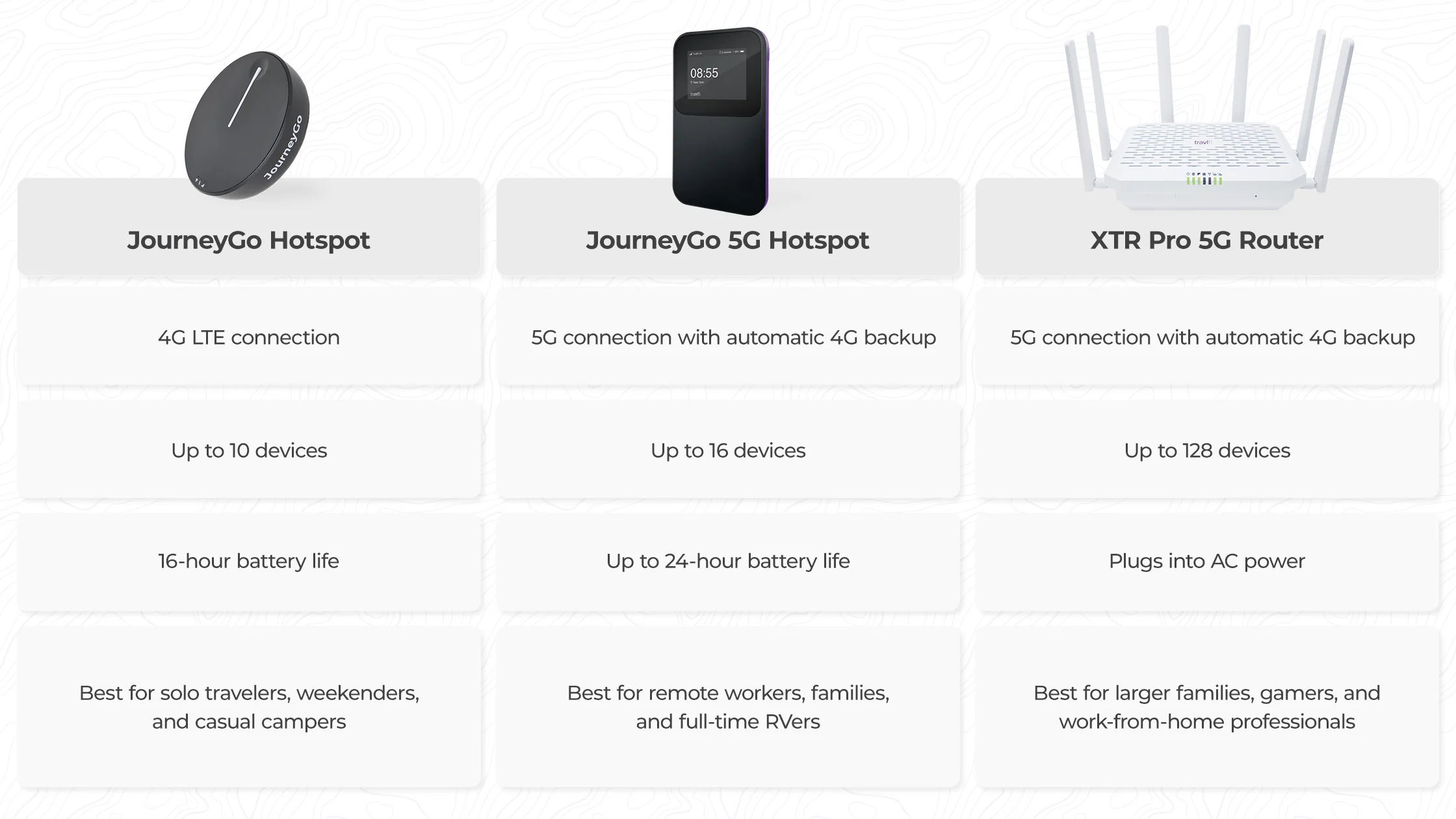
The TravlFi JourneyGo is the easiest product here to understand. It is a compact LTE hotspot that creates a private network for a laptop, phone, tablet, or other travel device, without asking you to find a compatible modem or swap a SIM card each time you change plans. That simplicity matters in an RV, where the best setup is often the one that can be turned on quickly at a new stop.
TravlFi says the JourneyGo uses nationwide cellular networks and offers coverage virtually anywhere in the United States where a cellular connection is available. Its eSIM approach is the defining feature. Plans can start at 2 GB and extend to unlimited options, with prepaid service chosen month by month. That lets an occasional traveler use a smaller allowance while someone working from the road can select a larger plan, without committing to a contract.
The JourneyGo is a better fit for casual mobility than the KUMA Connect PRO. KUMA is the stronger choice when the signal is weak because its outdoor antenna can be placed away from the vehicle and fed into a router. The JourneyGo wins on portability and setup. It also avoids the more technical carrier and SIM decisions required by the GL.iNet Spitz GL-X750V2.
Its weakness is the same as every cellular hotspot's: it cannot create coverage where the carrier has none. The feature list does not mention an external antenna connection, and the device needs a cellular signal to work properly. That makes it a poor answer for deep backcountry locations where satellite service is the only realistic route.
For most people traveling through towns, highways, established campgrounds, and many rural areas, the JourneyGo is the right starting point. It keeps the hardware small, the network private, and the service choices straightforward. Readers who need a fixed installation or stronger reception should move up to KUMA, while those traveling beyond cellular reach should consider a satellite kit.
2. Portable Starlink Mini Kit 4th Gen: Best Portable Satellite Kit

Pros
- Compact satellite hardware
- Integrated Wi-Fi 5 router
- Supports up to 128 devices
- Accepts 12 to 48V DC or USB-C PD power
- Includes kickstand and pipe adapter
Cons
- Requires a clear view of the sky
- Larger and heavier than a cellular hotspot
- Satellite service is still required
Best for: remote workers and campers who need satellite connectivity in a small, flexible package.
The Portable Starlink Mini Kit 4th Gen is aimed at the traveler who cannot count on a nearby cell tower. Its dish measures 11.75 by 10.2 inches and weighs under 2.5 pounds, so it is substantially easier to carry than a full-size satellite kit. The integrated router also means fewer boxes and fewer cables inside the RV.
Its built-in Wi-Fi 5 router uses dual-band 3x3 MU-MIMO and is specified to support up to 128 devices. That is more capacity than most campers need, but it gives the kit room for phones, computers, streaming devices, cameras, and smart equipment at the same time. The claimed download performance is over 100 Mbps, which is suitable for video calls, streaming, and ordinary browsing when the satellite connection and service conditions cooperate.
Power flexibility is a particularly useful detail. The kit can draw between 25W and 40W and accepts 12 to 48V DC input or USB-C PD battery packs. That makes it more practical for off-grid use than a satellite setup designed only around a conventional wall outlet. The included kickstand and pipe adapter offer a couple of ways to place the antenna, and the advertised region unlock is useful for travelers moving between supported areas.
Compared with the Portable Satellite Mini Kit, this model gives us more concrete information about the router, device capacity, power draw, and dimensions. The Starlink Gen 3 Standard Kit has a more full-size design and a Wi-Fi 6 router, so it is the better choice for a larger fixed RV installation. The 4th Gen Mini is the one to choose when storage space and DC power matter more than maximum hardware scale.
The catch is that portability does not eliminate satellite limitations. The antenna still needs a clear view of the sky, and the kit is not a cellular fallback. Its generic product presentation also gives less brand context than the established TravlFi and GL.iNet options. Choose it for remote connectivity where carrying a small satellite kit is more important than having the most conventional home-style network.
3. TravlFi Journey1: Best Compact Hotspot

Pros
- Small private network for travel
- eSIM data plans need no physical SIM
- Prepaid plans with no contract
- Designed for nationwide cellular coverage
Cons
- Needs cellular service
- No external antenna feature is listed
- Less suited to large fixed installations
Best for: solo travelers who need a small cellular hotspot for a laptop, phone, or a few connected devices.
The TravlFi Journey1 is the smaller, simpler sibling to the JourneyGo. It creates a private network in a compact body, which is exactly what a solo traveler needs when the alternative is relying on public campground Wi-Fi. The listed weight is 0.4875 pounds, keeping it easy to move between the cab, campsite table, and interior workspace.
Like the JourneyGo, the Journey1 uses eSIM technology rather than requiring a physical SIM. TravlFi offers data plans from 2 GB through unlimited options, and the service is prepaid month by month. That structure suits people whose travel schedule changes, especially those who may use the hotspot heavily during one trip and barely at all during the next.
The distinction between the Journey1 and JourneyGo is less about the basic concept than the type of traveler. The JourneyGo is the stronger all-round recommendation in this group, while the Journey1 makes sense when the smallest practical footprint is the priority. Neither has the outdoor antenna system found on the KUMA Connect PRO, and neither offers the configuration depth of the GL.iNet Spitz GL-X750V2.
The Journey1's biggest limitation is coverage dependence. TravlFi describes coverage as virtually anywhere in the United States, but the feature list also makes clear that a cellular connection is required. It cannot replace satellite internet in a remote valley or desert campsite with no usable carrier signal. The absence of listed dimensions and antenna connections also makes it harder to plan a permanent installation around the device.
For a phone, tablet, or work laptop, the Journey1 is a sensible compact hotspot. It is less compelling for a family with many simultaneous users or an RV owner trying to spread signal throughout a large vehicle. Those buyers should look at KUMA's router and wired ports, while light travelers can keep the Journey1 in a bag and move on.
4. KUMA Connect PRO: Best External Antenna System

Pros
- Outdoor 2x2 MIMO antenna for weak signals
- Unlocked for AT&T and T-Mobile
- Four LAN ports
- Supports up to 32 devices
- Includes 12V DC and AC power options
Cons
- SIM card is required and sold separately
- Verizon certification is pending
- More involved to install than a pocket hotspot
Best for: RV owners who regularly camp where a roof or exterior antenna can improve cellular reception.
The KUMA Connect PRO addresses the problem that pocket hotspots cannot solve: a usable signal may exist outside the RV, but not inside it. Its high-gain outdoor antenna is designed to capture weak 4G LTE signals and feed them to the indoor router. That separation is more meaningful than simply choosing a router with a stronger indoor antenna.
KUMA specifies an outdoor 2x2 MIMO antenna with up to 150 Mbps 4G performance and a local Wi-Fi network rated at 300 Mbps. The product is also described as supporting up to 32 devices, enough for a typical family RV with phones, computers, televisions, and connected equipment. The two dedicated indoor Wi-Fi antennas are intended to create a coverage area extending up to 150 feet, though the real result will depend heavily on walls, vehicle construction, antenna placement, and local interference.
The hardware is unusually practical for an RV. The metal router measures 5.55 by 3.34 by 1.02 inches and weighs 1.75 pounds. It includes four LAN ports, so a television, gaming console, or desktop computer can use a wired connection instead of competing for wireless airtime. It also supports both a 12V DC adapter for direct vehicle use and a standard 240V AC wall plug.
KUMA beats the TravlFi JourneyGo when reception is the deciding factor, but JourneyGo is much easier to carry and activate. KUMA also differs from the GL.iNet Spitz GL-X750V2, which offers VPN and OpenWrt controls but does not list an outdoor high-gain antenna in this kit. The KUMA is the more purpose-built choice for a permanent or semi-permanent RV installation.
You do need to supply a compatible SIM and data plan, and the product states that Verizon certification is pending. That makes carrier compatibility something to verify before installation. Skip KUMA if you want a pocket device with minimal setup. Choose it if your usual campsite has weak service and you are willing to mount an antenna to gain a more dependable cellular link.
5. Frigga 4G Monitor: Best for RV Safety

Pros
- 4G connectivity for locations without Wi-Fi
- Includes a pre-installed SIM and two years of service
- Temperature and humidity alerts
- Wi-Fi support on both 2.4GHz and 5GHz networks
- Up to seven days of battery operation
Cons
- It monitors conditions rather than providing internet access
- Cellular coverage is still required
- Service renewal is needed after the included period
Best for: RV owners who need remote alerts about temperature, humidity, power, or disconnection.
The Frigga 4G Monitor is not a router, but it belongs in an RV connectivity discussion for a useful reason: internet access is often most important when nobody is inside the vehicle. This small monitor checks temperature and humidity, then sends alerts through its app, email, and on-device voice alarms. That can matter when pets, water systems, electronics, or stored supplies are exposed to changing conditions.
Its cellular design does not depend on the RV's primary Wi-Fi network. The monitor includes a pre-installed global SIM with two years of cellular service, and it can report through 4G in locations where Wi-Fi is unavailable but cellular coverage remains. At home or in a connected building, it can also join 2.4GHz or 5GHz Wi-Fi networks. This dual-connection approach makes it more flexible than a sensor that only works on a local router.
The screen refreshes every five seconds in constant-on mode, while the app uploads readings every 10 or 30 minutes. Alerts can cover temperature and humidity changes, power failures, disconnections, and drops. Records are stored for up to two years and can be downloaded in CSV format. Its 2.63-inch square body weighs 0.7 pounds, and the rechargeable battery can run for up to seven days on a full charge.
This device complements the TravlFi JourneyGo rather than competing with it. JourneyGo supplies a private network for people and devices, while Frigga provides its own monitoring connection for the RV itself. It also avoids the installation work associated with KUMA Connect PRO, since it is a standalone sensor rather than a roof-mounted internet system.
The limitation is fundamental: Frigga cannot connect a laptop or television to the internet. It is a safety and monitoring accessory, not a replacement for a hotspot or satellite kit. The included cellular service also needs renewal after two years. For anyone leaving pets or temperature-sensitive equipment in an RV, however, its independent alerts can be more useful than another general-purpose router.
6. Starlink Gen 3 Standard Kit: Best Full-Size Satellite Kit

Pros
- Broadband-class satellite connection
- Built-in Wi-Fi 6 router
- Rugged, weather-resistant hardware
- Includes dish, stand, cables, power supply, and router
- Supports Residential and Roam service options
Cons
- Requires a clear view of the sky
- Large and heavy for a portable setup
- Monthly service plan is required
Best for: families and full-time RVers who need satellite internet for several demanding devices.
The Starlink Gen 3 Standard Kit is the most home-like satellite option in this group. It is designed for broadband-class speeds and low latency in rural and remote locations, where cellular hotspots may be unreliable or unavailable. For a family streaming video, joining calls, and using several devices at once, that difference can be more important than the compactness of a travel hotspot.
The included router uses Wi-Fi 6 and is described as a modern tri-band design intended to keep multiple users connected. The kit includes the antenna, kickstand mount, router, power supply, a 50-foot Starlink cable, and an AC cable. That makes it a complete starting point rather than a dish that requires a separate indoor network before it can be useful.
The physical footprint is substantial. The listed dimensions are 26 by 20 by 4 inches, and the product information gives a weight of 16 pounds. That is much less convenient to stow than the Portable Starlink Mini Kit 4th Gen, which measures 11.75 by 10.2 inches and weighs under 2.5 pounds. The Standard Kit is better suited to an RV owner who wants a more permanent setup and has room for the hardware.
Satellite performance depends on placement. Starlink requires a clear view of the sky, so trees, buildings, and roof equipment can interrupt service. Residential and Roam service options are supported, but a monthly service plan is required. If your routes usually follow populated areas with dependable cellular coverage, the TravlFi JourneyGo is a simpler system. If your work depends on connectivity in genuinely remote places, the Standard Kit has the stronger case.
The main reason to skip it is not capability, but size and installation planning. It is a poor fit for a small camper where every storage compartment matters. For a larger rig, family travel, or full-time use, it offers the most conventional network experience in this roundup. Consider the Mini kit if portability matters more, and consider KUMA if cellular coverage is available but weak.
7. STARGEAR Mini Mount: Best Starlink Mini Mount

Pros
- Locking mechanism helps secure the dish
- Aluminum alloy construction
- Rust-resistant coating
- Designed for RVs, trailers, trucks, and yachts
- 8° tilt angle
Cons
- It is a mount, not an internet kit
- Compatibility is focused on Starlink Mini
- Installation still needs a suitable mounting surface
Best for: Starlink Mini owners who need a more secure mobile mounting arrangement.
The STARGEAR Mini Mount solves a very specific problem. A portable dish is easy to move, but leaving it loose on an RV roof or campsite creates a risk of shifting, loosening, or disappearing. This mount uses a locking mechanism that secures the dish after the Starlink cable is connected, with a supplied screwdriver for removal when needed.
The mount is made from high-strength aluminum alloy die-casting and has a rust-resistant coating. Its listed dimensions are 9.84 by 7.09 by 9.8 inches. It is intended for mobile rooftops including RVs, trailers, trucks, motorhomes, and yachts, so it makes more sense for repeated travel than a temporary ground placement.
An 8° tilt angle is built into the design. The stated goal is to improve signal reception while reducing wind resistance, which is a sensible combination for a dish used around moving vehicles. The mount is described as plug and play, with the dish snapping into place after the locking screw is loosened or tightened.
This accessory belongs with the Portable Starlink Mini Kit 4th Gen, not with the Starlink Gen 3 Standard Kit. The Standard Kit has its own full-size hardware and mounting arrangement, while STARGEAR is specifically intended for the Mini. If you do not already own a compatible Starlink Mini, this product cannot provide internet access by itself.
The weakness is the narrow role. It does not add cellular backup, improve the satellite service plan, or replace a dish. It also depends on a properly chosen mounting surface and careful installation. For a Mini owner who travels often and wants the antenna held more securely, it is a practical part of the overall setup.
8. WXPSKY Starlink Ethernet Adapter: Best Wired Expansion

Pros
- One Gigabit WAN and three Gigabit LAN ports
- Supports 10, 100, and 1000 Mbps connections
- QoS and VLAN support
- Wall-mount and adhesive installation options
- Plug-and-play operation
Cons
- Requires a compatible Starlink Router Mini
- Adds wired ports but does not provide internet alone
- Compact plastic enclosure is not a cellular or satellite device
Best for: Starlink Mini users who need wired connections for televisions, consoles, computers, or other equipment.
The WXPSKY Starlink Ethernet Adapter is useful when an RV network has outgrown wireless connections. It is designed for the Starlink Router Mini and adds one Gigabit WAN port plus three Gigabit LAN ports. That lets a television, desktop computer, game console, or other fixed device connect by cable rather than relying on a Wi-Fi signal passing through the vehicle.
The ports support auto-sensing speeds from 10 to 1000 Mbps. The feature list also names QoS prioritization, VLAN support, and low-latency data forwarding. Those controls can help separate traffic or give certain devices priority, though they are most useful to someone comfortable managing a more deliberate network. For a simple phone and laptop setup, the adapter adds little.
Physical installation is flexible. The enclosure measures about 4.72 by 3.94 by 1.97 inches and weighs about 0.55 pounds. It can be attached with screws for a permanent wall installation or with adhesive backing on smooth surfaces such as glass, metal, or tile. That is a useful approach in an RV where drilling may not be desirable.
Unlike the KUMA Connect PRO, WXPSKY does not improve the incoming signal. Unlike the STARGEAR Mini Mount, it does not secure an antenna outside. It works farther downstream, expanding the local network after the Starlink connection already exists. Readers considering a broader home or RV setup may also want to think about how wired devices fit into a flexible travel network before choosing where to mount it.
The product's limitation is also its compatibility requirement. It is not a standalone router and will not turn a cellular hotspot into a wired network. It is the right add-on for a Starlink Mini owner with fixed equipment, but unnecessary for someone whose RV network consists mainly of wireless phones and tablets.
9. Portable Satellite Mini Kit: Best All-in-One Satellite Kit

Pros
- Integrated Wi-Fi router
- Includes several mounting options
- Includes a 49.2-foot DC power cable
- Designed for travel and off-grid use
- Straightforward setup
Cons
- Product information is less detailed than competing kits
- Requires a clear satellite view
- Satellite service is required
Best for: campers who want a complete portable satellite package with flexible placement options.
The Portable Satellite Mini Kit takes the all-in-one approach. Its dish and Wi-Fi router are integrated, so the buyer does not need to plan around a separate indoor router. The package includes a kickstand, pipe adapter, flat mount, DC power cable, power supply, and lug, giving it more placement flexibility than a kit that expects one fixed installation method.
The listed dimensions are 18.5 by 11.4 by 1.5 inches, and the weight is 2.4 pounds. That is still portable for an RV, although it is larger than the 4th Gen Mini kit. The 49.2-foot DC cable is particularly useful when the best antenna position is some distance from the vehicle or when the power source and dish need to be separated.
Setup is intended to be quick, whether the dish is placed on the ground, attached to a pipe, or secured with the flat mount. The integrated Wi-Fi router keeps the interior equipment count low. That is appealing for a camper that does not have a dedicated networking cabinet and wants to get online without building a system from separate components.
The Portable Starlink Mini Kit 4th Gen offers more explicit technical information, including Wi-Fi 5, 3x3 MU-MIMO, support for up to 128 devices, and 25W to 40W power draw. The Starlink Gen 3 Standard Kit is the more substantial choice with Wi-Fi 6 and a larger full-size design. This kit sits between them as a basic portable package with a generous cable and several mounting options.
The main concern is the limited detail available about its router and satellite hardware. There is no listed device capacity, Wi-Fi generation, or power draw in the product information. Buyers who need to plan battery use or support many simultaneous devices should favor the 4th Gen kit. For a straightforward off-grid setup where the included accessories matter most, this Mini Kit is still a reasonable fit.
10. GL.iNet Spitz GL-X750V2: Best Configurable LTE Router

Pros
- AT&T certified and compatible with T-Mobile
- OpenWrt pre-installed
- OpenVPN and WireGuard support
- Dual-band Wi-Fi
- microSD support up to 128GB
Cons
- North America only
- Requires a micro SIM
- Cellular speed depends on carrier and location
- Ethernet ports are limited to 10/100 Mbps
Best for: technically minded RV owners who want VPN, OpenWrt, and expandable router controls.
The GL.iNet Spitz GL-X750V2 is the enthusiast option. It is not as immediately simple as JourneyGo, but it gives the owner much more control over how cellular internet is routed, secured, and extended. OpenWrt comes pre-installed, and the router includes OpenVPN and WireGuard support, making it a strong fit for someone who wants a VPN running at the network level rather than configuring every device individually.
The router uses a micro SIM and supports AT&T and T-Mobile. GL.iNet says the revised board and optimized antennas improve 4G performance, with an average 4G speed of 15 to 20 Mbps depending on carrier and location. Its Wi-Fi side is dual-band, with claimed rates of up to 300 Mbps on 2.4GHz and 433 Mbps on 5GHz. Those figures describe the local wireless network, not a guarantee of cellular throughput.
Storage and expansion are the reason to choose Spitz over a basic hotspot. It has 128MB of RAM, 16MB of NOR flash, a USB 2.0 port, a microSD slot supporting up to 128GB, and two SMA antenna connectors. The router's listed size is 115 by 74 by 22mm, and its weight is about 0.19 pounds. It is compact enough for an RV cabinet or work bag while still offering controls that general-purpose hotspots often omit.
Spitz is more configurable than the TravlFi Journey1 and JourneyGo, but that flexibility comes with carrier and setup decisions. The KUMA Connect PRO is better when the central problem is a weak outdoor signal and a large local Wi-Fi area. Spitz is better when the signal is adequate and the priority is VPN routing, OpenWrt packages, storage, or a custom network.
The North America-only limitation matters, as does the list of regions where cellular functionality is restricted. The two Ethernet ports are only 10/100 Mbps, which may constrain wired transfers even if the cellular connection itself is sufficient. Skip this router if you want a device that works with minimal configuration. Choose it when you know why you need OpenWrt and want a compact cellular gateway that can grow with your network.

How to choose best rv internet options
The right RV connection starts with the places you visit and the devices you need to keep online, not with the router's headline speed.
Cellular coverage
Cellular hotspots and LTE routers are the simplest choice when your routes stay within carrier coverage. JourneyGo and Journey1 use TravlFi's eSIM service, while KUMA and Spitz require a compatible SIM and carrier plan. Check which networks are supported and remember that a device cannot compensate for a location with no usable cellular signal.
A cellular system is usually easier to power and move than satellite equipment. An external antenna, as included with KUMA, becomes important when the signal is weak outside the RV or the vehicle's walls block reception.
Satellite visibility
Satellite kits are the more dependable category for remote locations, but they need a clear view of the sky. Trees, buildings, cliffs, and roof equipment can interrupt the connection. The full-size Starlink kit and both portable satellite kits are best considered when cellular coverage is uncertain or absent.
Satellite internet solves the coverage problem only when the antenna can see the sky.
Router capacity
Look at the number of devices and the way they connect. The 4th Gen Mini kit lists support for up to 128 devices, while KUMA lists support for 32. Those figures are useful headroom, but an RV with a television, gaming console, desktop, and work laptop may benefit more from wired Ethernet than from a large device count.
The WXPSKY adapter adds three Gigabit LAN ports to a compatible Starlink Router Mini. KUMA includes four LAN ports in its own router, while Spitz has two Ethernet ports limited to 10/100 Mbps.
Power and portability
A compact hotspot can run from a small travel setup, while a satellite dish and router need more deliberate power planning. The 4th Gen Mini kit lists a 25W to 40W draw and accepts 12 to 48V DC or USB-C PD battery packs. The other portable satellite kit includes a long DC cable, which can make dish placement easier.
Full-size satellite equipment takes more storage space. Compare the listed dimensions and weight with your available compartments before committing to a permanent installation.
Security and control
A private hotspot is preferable to open campground Wi-Fi for ordinary browsing and work. Spitz goes further with OpenVPN, WireGuard, OpenWrt, and programmable storage options. KUMA focuses on reception and coverage, while the WXPSKY adapter adds network features such as QoS and VLAN support.
For a deeper look at the trade-offs between cellular plans and hardware, how much data an RV connection really needs is a useful question to settle before choosing a device.
Frequently asked questions
Can an RV hotspot work anywhere?
No. Cellular hotspots need a usable signal from a supported network. TravlFi describes broad US coverage, but local terrain, carrier availability, and congestion still affect the connection.
Is satellite internet better than cellular internet for an RV?
Neither is universally better. Cellular is easier to power and usually simpler to deploy near towns and highways, while satellite can reach remote locations beyond cellular coverage. Satellite equipment needs a clear view of the sky, which can be difficult in wooded campsites.
Do these products include internet service?
The hardware and service arrangements differ. TravlFi devices use TravlFi data plans, KUMA and Spitz require compatible SIM-based service, and the satellite kits require an applicable satellite service plan. The Frigga monitor includes a pre-installed SIM with two years of cellular service for its monitoring functions.
Can I use a cellular router with any carrier?
Not necessarily. KUMA is described as unlocked for AT&T and T-Mobile, with Verizon certification pending. Spitz is certified for AT&T and compatible with T-Mobile. Confirm the carrier, SIM type, and plan requirements before installing a router.
Does Starlink need a clear view of the sky?
Yes. The Starlink kit in this roundup states that the antenna needs a clear view of the sky to connect to satellites. Trees, buildings, and other obstructions can reduce or interrupt service.
What is the difference between a hotspot and a router?
A hotspot is usually designed for portable personal connectivity, while an RV router is more suited to a fixed installation with several devices. Routers such as KUMA and Spitz can offer wired connections or more network controls, while JourneyGo and Journey1 emphasize compactness and simple cellular access.
Can the Frigga monitor provide Wi-Fi for an RV?
No. Frigga monitors temperature and humidity and sends alerts through its app, email, and on-device alarm. It has 4G and Wi-Fi connectivity for reporting, but it is not a general-purpose hotspot or router for laptops and televisions.

The bottom line
The Best RV Internet Options depend on whether your main problem is cellular coverage, remote satellite access, or managing a larger network inside the vehicle. TravlFi JourneyGo is the best fit for most travelers because it keeps cellular access private and portable without requiring a physical SIM. KUMA Connect PRO is the stronger choice for weak-signal campsites, thanks to its outdoor antenna, 12V power, and four wired ports.
For remote work beyond dependable cell coverage, choose the Portable Starlink Mini Kit 4th Gen if storage and DC power matter, or the Starlink Gen 3 Standard Kit if you have room for full-size hardware and need a larger network. The STARGEAR mount and WXPSKY adapter make sense only as additions to a compatible Starlink setup.
If you are undecided, choose JourneyGo for ordinary road travel, KUMA for weak cellular locations, and a satellite kit only when your destinations regularly fall outside carrier coverage.
As an Amazon Associate we earn from qualifying purchases.