

Long typing sessions punish the same few habits: shoulders pulled inward, wrists bent toward the center, and a keyboard that forces both hands into one fixed position. A split keyboard can address those problems, but the designs vary from familiar office layouts to deep contoured wells that require a genuine adjustment period.
Our Best split keyboard picks cover wireless convenience, membrane quietness, mechanical switches, tenting, backlighting, and fully programmable layouts. The Logitech Ergo K860 is the single best starting point for most people, while the rest of the list serves more specialized needs.
Comparison table
| # | Product | Award | Connection | Key type or feature | Best for |
|---|---|---|---|---|---|
| 1 | Logitech Ergo K860 | Best overall | Bluetooth or USB receiver | Quiet sculpted keys | Most office users |
| 2 | KINESIS Freestyle Edge Linear | Best mechanical flexibility | Wired | Hot-swap linear switches, RGB | Custom mechanical setups |
| 3 | Arteck Split Wireless | Best wireless simplicity | 2.4G USB wireless | Rechargeable battery, palm rest | Cable-free desks |
| 4 | KINESIS Advantage360 Pro | Best contoured design | Bluetooth or wired charging | Quiet mechanical switches, adjustable tenting | Serious ergonomic work |
| 5 | Cloud Nine C989M | Best for macros | Wired | Tactile switches, RGB, number pad | Work and gaming |
| 6 | KINESIS Freestyle Edge Tactile | Best tactile mechanical option | Wired | Hot-swap tactile switches, RGB | Tactile typists |
| 7 | Perixx PERIBOARD-512B | Best traditional layout | Wired USB | Membrane switches, 4.2 mm travel | Familiar office typing |
| 8 | Arteck Split Wired Backlit | Best backlit membrane option | Wired USB | Seven colors, three brightness levels | Dim workspaces |
| 9 | KINESIS Freestyle2 VIP3 | Best adjustable classic design | Wired USB-A | Up to 9-inch separation, tenting | Windows users who need adjustability |
1. Logitech Ergo K860: Best Overall

Pros
- Familiar full-size layout
- Bluetooth and USB receiver connectivity
- Comfortable memory foam wrist rest
- Three tilt positions
- Quiet, scooped keys
Cons
- The two halves are fixed together
- No mechanical switches
- No backlighting
Best for: office users who want a gentle move into ergonomic typing without relearning a radically different layout.
The Logitech Ergo K860 is the keyboard we would put in front of someone who knows their wrists and shoulders need a change but does not want an ergonomic experiment. Its curved, split keyframe feels different immediately, yet the full-size arrangement remains recognizable. The fixed design is less flexible than the separated KINESIS boards, but it is also easier to place and live with on a normal desk.
The main comfort work comes from the shape rather than from a dramatic tent. Logitech gives the keyboard tilt legs at 0, -4, and -7 degrees, so users can choose a flatter position or raise the front slightly. The integrated memory foam wrist rest is broad and pillowed, and the sculpted keys are shaped to meet fingertips rather than presenting a completely flat surface. Logitech says the design reduces wrist bending compared with a standard keyboard, but the practical advantage is simpler: your hands do not have to collapse inward as much.
Wireless support is straightforward. The K860 connects through Bluetooth or its USB receiver, and Logitech Options software can customize Fn behavior, create shortcuts, and show battery notifications. The keys are quiet enough for shared workspaces, while the CAPS LOCK indicator and full-size layout retain the small conveniences that disappear on more specialized ergonomic boards. It is a useful contrast with the features that make long typing sessions less tiring, especially if you want comfort without switching to mechanical hardware.
Its weakness is the fixed center. You cannot move the two key zones farther apart or angle them independently, so people with pronounced shoulder or wrist issues may outgrow its adjustment range. It also lacks backlighting and mechanical switch customization. Choose the K860 when your priority is a calm transition to better posture, not a deeply configurable typing platform.
2. KINESIS Freestyle Edge Linear: Best Mechanical Flexibility

Pros
- Hot-swap linear switches
- RGB lighting
- Fully programmable
- Detachable palm support
- Mac keycaps and lift kit included
Cons
- Product data does not specify switch model or key travel
- Requires a wired desk setup
- Split mechanical layouts take adjustment
Best for: mechanical keyboard users who want to tune switch feel and hand spacing around their own posture.
The KINESIS Freestyle Edge Linear is the most adaptable option here for someone who already knows they want mechanical keys. Its important distinction is not merely that it is split. This version uses hot-swap linear switches, allowing the switch setup to change without replacing the entire keyboard. That gives it a longer useful life than a fixed, one-feel board.
The two halves can be arranged to suit the user, and the detachable palm support keeps the base from forcing one exact wrist position. The included lift kit adds another layer of adjustment, raising the halves for users who prefer tenting. RGB lighting is present, but it is secondary to the physical flexibility. The real reason to choose this board is the ability to separate hand position, switch preference, and tenting instead of accepting one factory arrangement.
KINESIS also makes it fully programmable, which matters on a split board because thumb keys and modified layouts can become part of the workflow. Mac keycaps are included for users moving between operating systems. The data supplied for this version does not provide a switch model, key travel measurement, dimensions, or weight, so we would not pretend to predict its exact sound or actuation feel from the listing alone.
Compared with the Logitech Ergo K860, this is much more capable but much less immediate. The K860 wins for quiet, familiar office use, while the Freestyle Edge Linear is the one to pick when customization is the point. Skip it if you want wireless connectivity, a low learning curve, or a keyboard that works best without configuration.
3. Arteck Split Wireless: Best Wireless Simplicity

Pros
- 2.4G USB wireless connection
- Rechargeable battery
- Claimed six-month battery life
- Cushioned palm rest
- USB-C charging cable included
Cons
- Uses a USB receiver rather than Bluetooth
- No tenting adjustment is listed
- Membrane key feel is less configurable
Best for: a home or office desk that needs a comfortable split layout without a cable running to the computer.
The Arteck Split Wireless is appealing because it keeps the ergonomic idea uncomplicated. Insert the nano USB receiver, switch on the keyboard, and type. There is no software layer, no mechanical switch decision, and no separate halves to position. For someone replacing a conventional office keyboard, that restraint can be more useful than a long list of advanced controls.
Its split shape is paired with a cushioned wrist and palm rest, giving the hands a defined place to settle. The keyboard measures 16.5 inches long and 9.6 inches wide, so it has a full desktop footprint without reaching the larger dimensions of some traditional ergonomic boards. The listing specifies a rechargeable lithium battery and a claimed six-month life based on two hours of use per day. Actual runtime depends on use, but the figure indicates that frequent charging should not be part of the routine.
The wireless connection is 2.4G through the supplied receiver, not Bluetooth. That makes setup predictable on a desktop, but it is less convenient for devices that lack a full-size USB port or for people who switch between several computers. The receiver stores at the back of the keyboard, and a USB-C charging cable is included. Arteck also lists a 24-month warranty, which is useful for a simple office peripheral expected to stay in daily service.
The Logitech Ergo K860 feels more polished and offers Bluetooth plus tilt adjustment. The Arteck counters with a simpler setup and a more direct, no-software approach. It is not the right pick for someone seeking mechanical feedback, independent tenting, or multi-device Bluetooth. For a cable-free Windows workstation where comfort matters more than customization, it is a sensible fit.
4. KINESIS Advantage360 Pro: Best Contoured Design

Pros
- Deep contoured key wells
- Three adjustable tenting heights
- Bluetooth and wireless linking
- Quiet Kailh Box Pink Silent switches
- Fully programmable open-source layout
Cons
- Steep learning curve
- Premium palm pads are sold separately
- Contoured design is not familiar to everyone
Best for: experienced ergonomic keyboard users who want a highly adjustable, programmable layout with quiet mechanical switches.
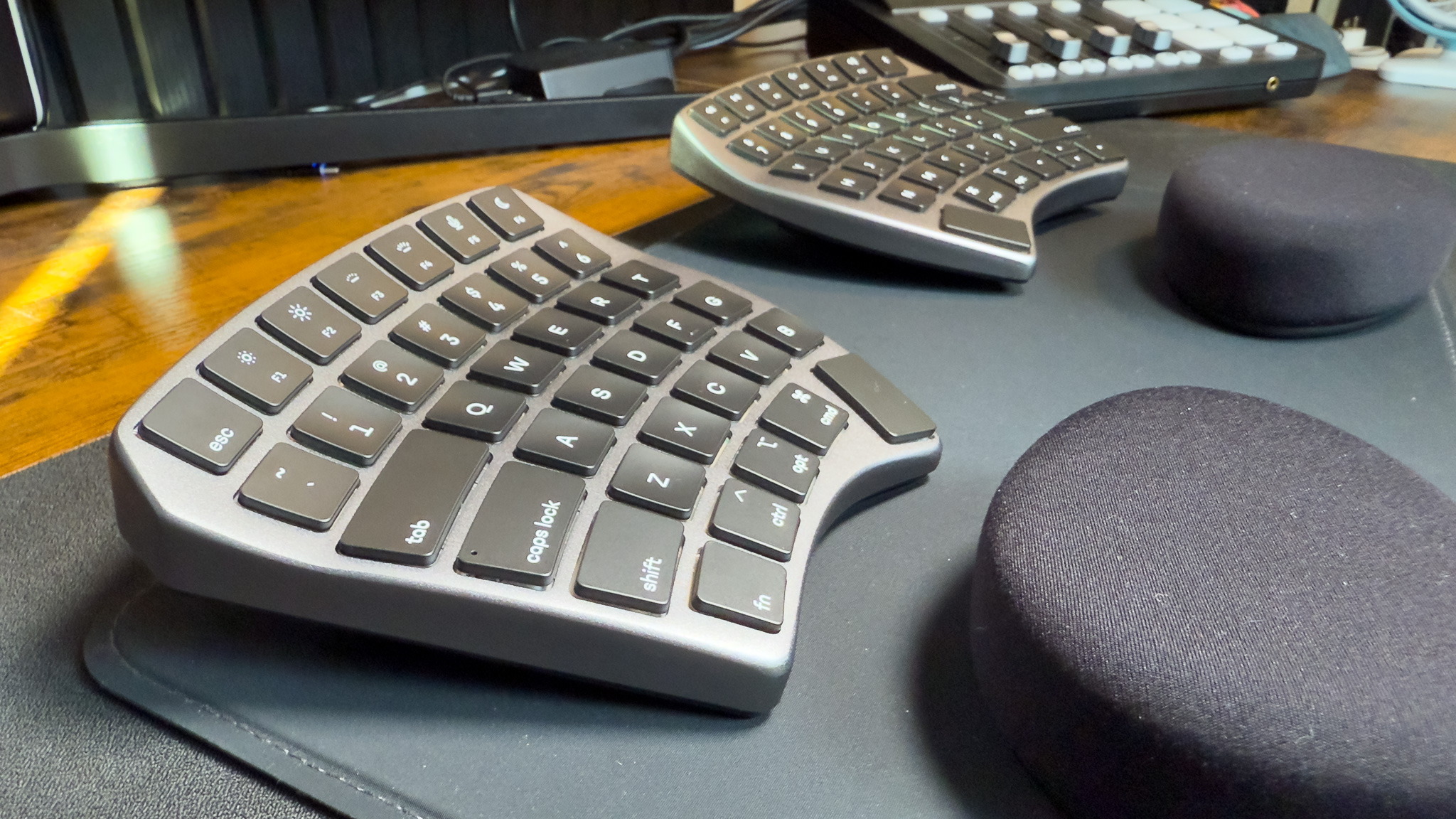
The KINESIS Advantage360 Pro is not a conventional keyboard cut in half. Its concave key wells, orthogonal layout, thumb keys, and integrated tenting create a different typing posture from every other board here. Fingers stay closer to their own key columns, while the split halves can be separated up to 10 inches with the included cable. That is a serious ergonomic architecture, not just a curved palm rest.
The physical adjustment range is unusually broad. Three tenting heights let users change the angle to suit their hands, and the built-in palm supports keep the lower arms from hanging over the desk. The product measures 15 inches long, 8 inches wide, and 3 inches high, with a listed weight of 3.2 pounds. Those dimensions reflect its tall, sculpted form. It needs deliberate desk placement, but it does not sprawl across the surface in the same way as a wide one-piece board.
Kailh Box Pink Silent switches use a linear feel and low activation force, with the listing citing durability of 50 million presses. The switches are designed to keep noise down, which makes the Advantage360 Pro more suitable for shared spaces than a loud tactile board. Bluetooth and wireless linking support cable-free use, while USB-C cables are included for charging. The board works with Windows, macOS, Linux, and Chrome, and its layout can be reconfigured through GitHub or a web-based interface.
That flexibility comes with the biggest learning curve in this roundup. The Logitech Ergo K860 is far easier for a first-time ergonomic buyer, and even the KINESIS Freestyle Edge Linear preserves a more familiar key arrangement. The Advantage360 Pro is for someone willing to retrain muscle memory and tune the layout over time. Skip it if you need instant familiarity or expect to use a conventional number row without adaptation.
5. Cloud Nine C989M: Best for Macros

Pros
- Tactile Kailh Brown switches
- RGB backlighting
- Ten programmable macro keys
- Full number pad
- USB pass-through
Cons
- Wired only
- Separation is limited to 8 inches
- Product data uses conflicting switch wording
Best for: PC users who want an ergonomic split board with a number pad and dedicated macro controls.
The Cloud Nine C989M takes a different route from the compact, highly separated KINESIS designs. It keeps a full number pad and adds ten programmable macro keys, making it unusually useful for spreadsheet work, editing shortcuts, and games that benefit from dedicated commands. If losing the number pad would send you back to a standard keyboard, this is one of the few ergonomic mechanical options here that avoids that compromise.
The keyboard separates by up to 8 inches and includes built-in tenting with palm support. The palm rests use a 7-degree angle, which creates a fixed ergonomic lift rather than asking the user to assemble an accessory. The layout is substantial, and the product dimensions list a height of about 11.1 inches, a length of 16.5 inches, and a width of about 4.9 inches. Those measurements are presented unusually in the listing, so desk fit deserves a careful check before ordering.
The listing describes Kailh Brown switches as giving low activation force and tactile feedback, with RGB illumination that can be adjusted through the included app. It also lists USB pass-through, which can make a wired desk easier to manage. One caveat is that the title calls the switches tactile Brown, while one feature uses the phrase “Kailh Linear Brown.” Because those descriptions conflict, we would treat the product as intended for a Brown-style tactile experience but would not infer a precise switch specification beyond the supplied wording.
The KINESIS Freestyle Edge Tactile offers more separation flexibility and hot-swap switch support, but it does not give you the C989M's number pad and macro bank. The Cloud Nine is therefore a specialist choice. It is a poor fit for anyone who wants wireless use or a minimalist desk, but a strong match for PC users whose work or games depend on extra controls.
6. KINESIS Freestyle Edge Tactile: Best Tactile Mechanical Option

Pros
- Hot-swap tactile switches
- RGB lighting
- Fully programmable
- Detachable palm support
- Mac keycaps and lift kit included
Cons
- Wired connection
- Product data does not specify switch model or dimensions
- More involved than a standard office keyboard
Best for: typists who want noticeable tactile feedback and the option to alter their switch setup later.
The KINESIS Freestyle Edge Tactile is the companion to the linear version above, with tactile switches for users who prefer a clear bump during a keypress. That distinction matters more than the RGB lighting. Tactile feedback can make a keyboard feel more deliberate for long-form typing, while users who prefer a smooth uninterrupted press should choose the Linear model instead.
Hot-swap support is the practical advantage. Switches can be changed without replacing the board, so the keyboard can evolve as preferences change. The detachable palm support helps keep the hands from being locked into one resting position, and the included lift kit allows a more elevated setup. RGB is available for visibility and personalization, but the ergonomic benefit comes from arranging the two halves around the shoulders and forearms.
The board is fully programmable and includes Mac keycaps, giving it more operating-system flexibility than a conventional Windows-only ergonomic board. The supplied product data does not list the switch model, key travel, dimensions, weight, or a separation measurement. That limits how precisely we can describe its sound, height, and physical reach. The safe conclusion is that it is a configurable split mechanical keyboard with tactile hot-swap switches, not a board with a verified set of unlisted measurements.
Compared with the Cloud Nine C989M, the Freestyle Edge Tactile gives up the number pad and macro cluster but offers a cleaner separated design. Compared with the KINESIS Freestyle Edge Linear, it suits readers who want a bump rather than a smooth press. It should be skipped by anyone who needs Bluetooth or a ready-to-use layout with no configuration.
7. Perixx PERIBOARD-512B: Best Traditional Layout

Pros
- Familiar one-piece split layout
- 4.2 mm key travel
- Tactile membrane feedback
- Integrated wrist rest
- Wired USB connection
Cons
- No wireless connectivity
- No independent separation
- Audible feedback may not suit quiet rooms
Best for: office users who want an inexpensive-feeling transition from a traditional full-size keyboard without mechanical switches.
The Perixx PERIBOARD-512B is the most traditional-looking option in this group, and that is its appeal. It uses a one-piece split layout, curved rows, curved keycaps, and a built-in wrist rest. The hands are encouraged into a more natural position without asking the typist to manage two separate modules or a new orthogonal arrangement.
Its membrane switches have a listed 4.2 mm key travel, which is longer than many low-profile office boards. Perixx describes the feel as tactile with audible confirmation and compares it to the feedback of Brown mechanical switches, though the switch technology is membrane rather than mechanical. The product also cites durability up to 20 million keystrokes. Those details point to a deliberate, deep press rather than a short, laptop-like action.
At 18.92 inches long and 9.2 inches wide, it occupies more desk width than the Logitech Ergo K860. Its listed weight is 2.28 pounds, and the height is 1.72 inches. The extra footprint is partly the cost of keeping a familiar full-size arrangement and broad wrist support. It connects through wired USB, so there is no battery management or receiver to misplace, but cable routing becomes part of the setup.
This is not the board for someone who wants dramatic tenting or customizable mechanical switches. The Arteck Split Wired Backlit adds backlighting, while the KINESIS Freestyle2 VIP3 offers true separation and adjustable tenting. The Perixx makes more sense for a reader who wants a gradual ergonomic change, deep membrane travel, and a conventional office workflow.
8. Arteck Split Wired Backlit: Best Backlit Membrane Option

Pros
- Seven backlight colors
- Three brightness levels
- Cushioned palm rest
- Six-foot USB cable
- Simple plug and play setup
Cons
- Wired only
- No mechanical switch option
- No adjustable tenting listed
Best for: users who want a straightforward split office keyboard that remains readable in a dim room.
The Arteck Split Wired Backlit is the uncomplicated backlit choice. Its split design and cushioned wrist and palm rest address the basic posture problem, while the illumination helps when the room is dark or the desk sits beneath uneven lighting. It does not try to compete with the mechanical KINESIS boards. Instead, it keeps the feature set familiar and the setup direct.
Arteck lists seven backlight colors with three brightness levels. That is enough control to improve key visibility without requiring desktop software. The keyboard uses a 1.8-meter, or 6-foot, USB cable, so it can reach a computer placed under or beside a desk. A wired connection also means there is no battery to charge and no wireless receiver occupying a port.
The listing does not provide switch type, key travel, dimensions, weight, or a tenting range. We can therefore describe the board as a wired split membrane-style office keyboard with backlighting and palm support, but not assign it a particular typing sound or mechanical feel. The supplied warranty information is 24 months, and the intended use is clearly a Windows computer or laptop rather than a multi-device wireless setup.
The Perixx PERIBOARD-512B is the better choice if deeper key travel and a more pronounced tactile response matter. The Arteck is easier to recommend for a dim workspace, especially for someone who wants the visual benefit of lighting without moving into a programmable mechanical layout. Skip it if you need separated halves, tenting, or switch customization.
9. KINESIS Freestyle2 VIP3: Best Adjustable Classic Design

Pros
- Up to 9 inches of separation
- Three tenting settings
- Integrated palm supports
- Standard Windows layout
- No software or special drivers required
Cons
- USB-A wired connection
- Membrane switches
- Designed around Windows controls
Best for: Windows users who want extensive physical adjustment without moving to mechanical or programmable controls.
The KINESIS Freestyle2 VIP3 remains a strong option for anyone who knows that a fixed split shape will not be enough. The two modules can separate by up to 9 inches, and the pivot tether lets the user adjust the splay. That makes it easier to open the shoulders and place each hand where it feels natural, rather than adapting the body to a permanently joined keyboard.
The included VIP3 accessory provides 5, 10, or 15 degrees of tenting and integrated cushioned palm supports. Those settings are meaningful because tenting changes how much the wrists rotate inward. The keyboard uses a standard Windows layout with cut, copy, paste, multimedia controls, and an embedded number pad. Users can therefore gain physical adjustment without having to learn the much more unusual key wells of the KINESIS Advantage360 Pro.
Kinesis uses a low-force membrane switch with tactile feedback. The keyboard measures 19 inches long, 12.5 inches wide, and 3.5 inches high, with a listed weight of 2 pounds. Those dimensions include the broad adjustable arrangement, so it needs more desk room than the Logitech Ergo K860. It connects through USB-A and requires no software or special drivers, which keeps the board predictable on a Windows machine.
The trade-off is that it lacks mechanical switches, wireless support, and deep programmability. The KINESIS Freestyle Edge Tactile is the stronger choice for mechanical enthusiasts, while the Freestyle2 is friendlier to someone who wants standard keys and hardware adjustment. Choose it when physical positioning matters more than lighting, wireless use, or custom layers.
How to choose best split keyboard
The right split keyboard depends on how much physical adjustment you need and how much change your typing habits can absorb.
Separation and tenting
A fixed curved keyboard such as the Logitech Ergo K860 gently changes hand alignment, but its halves cannot move independently. A true separated design lets you place the modules farther apart and rotate them, which can help users who feel cramped by a conventional layout.
Tenting raises the inner edges or changes the vertical angle of the keys. The KINESIS Freestyle2 VIP3 offers 5, 10, and 15-degree settings, while the Advantage360 Pro has three adjustable heights. If you are unsure, start with a modest angle. Extreme tenting can feel awkward until the hands adapt.
The most ergonomic split keyboard is the one you can position without twisting your shoulders to reach the mouse.
Key layout and learning curve
One-piece boards retain familiar rows and modifiers. Separated keyboards with standard layouts are easier to learn, while contoured or orthogonal boards can reduce finger travel after the adjustment period. The Advantage360 Pro is the most dramatic change here because its concave wells and thumb keys move away from ordinary desktop conventions.
If you type mostly documents and email, familiar layouts reduce disruption. If you are willing to remap keys and build new muscle memory, a programmable board can better match your hands and software.
Switch feel and travel
Membrane switches are generally familiar and quiet, though their response varies. The Perixx lists 4.2 mm of travel and tactile feedback, while the KINESIS mechanical models use either linear or tactile switches. Linear switches have a smooth press. Tactile switches add a noticeable bump that can help some typists recognize actuation.
Do not choose solely from the word “mechanical.” Switch feel, sound, keycap shape, and the board's height all affect comfort. The Freestyle Edge models add hot-swap support, which is useful if you expect your preferred switch feel to change.
Connection type
Wireless keyboards reduce cable clutter, but they introduce a receiver or Bluetooth pairing and require battery charging. The Logitech Ergo K860 supports both Bluetooth and a USB receiver. The Arteck Split Wireless uses a 2.4G receiver and lists a rechargeable battery with a claimed six-month life based on two hours of daily use.
Wired boards are simpler for a fixed workstation. They do not need charging, and products such as the Freestyle2 VIP3 require no special software. Check the available port before choosing a USB-A model.
Palm support and desk space
Palm rests can reduce pressure when they support the hands at the right height, but a thick rest can also interfere with a low desk or compact tray. Measure the available width and depth before ordering. The Freestyle2 VIP3 measures 19 by 12.5 inches, while the K860 is about 17.95 inches wide and 9.17 inches deep.
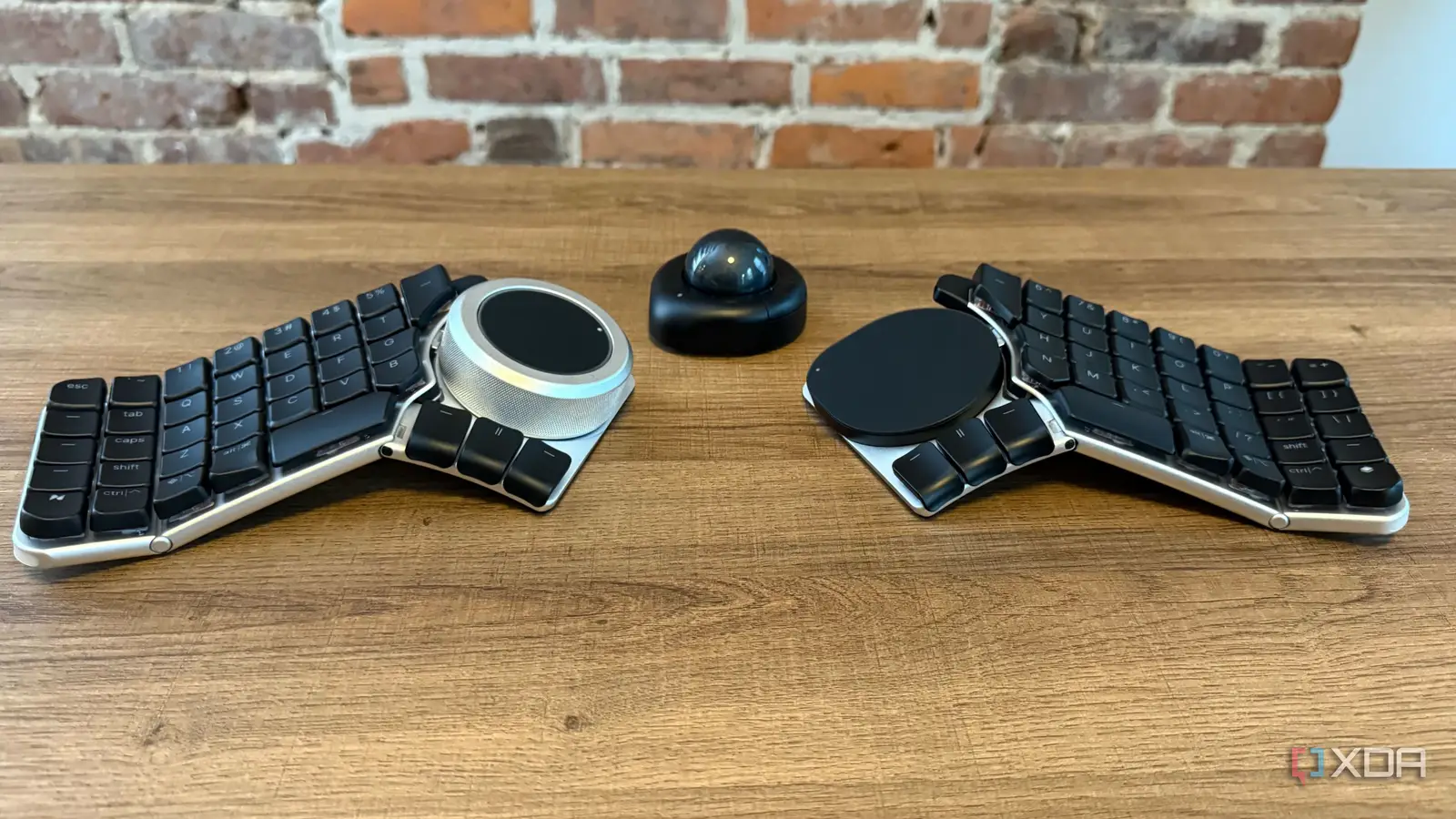
A separated mechanical board also needs room between its halves. The ability to spread a keyboard across the desk is useful only if the mouse, notebook, and other equipment still have a comfortable place.
Frequently asked questions
Are split keyboards better for wrist comfort?
They can help by allowing the hands and forearms to sit farther apart and at a more natural angle. Comfort still depends on desk height, chair position, tenting, and the amount of wrist pressure on the palm rest. A split layout is not a substitute for regular breaks or a properly positioned workstation.
Is a split keyboard difficult to learn?
A familiar one-piece design such as the Logitech Ergo K860 usually requires less adjustment than the KINESIS Advantage360 Pro. Separated boards with standard rows are easier to learn, while contoured wells, thumb clusters, and orthogonal layouts can require a longer transition. Expect a temporary drop in typing speed when changing to an unfamiliar arrangement.
Do split keyboards work with laptops?
Wired keyboards work when the laptop has the required USB port or a suitable adapter. Wireless models can be more convenient, but the Arteck Split Wireless uses a USB receiver rather than Bluetooth. The Logitech Ergo K860 supports Bluetooth, making it more flexible for compatible laptops and tablets.
Should I choose linear or tactile switches?
Linear switches press smoothly with no pronounced bump. Tactile switches provide a bump that some typists prefer for feedback and control. The KINESIS Freestyle Edge Linear and Tactile models make that choice directly, while the Cloud Nine C989M uses Brown-style tactile wording in its listing.
Does a split keyboard need tenting?
No. Separation alone can improve hand spacing, and some users prefer a flat arrangement. Tenting becomes useful when the wrists feel rotated inward or when raising the inner edges makes the hands more comfortable. Start with a small adjustment and change it gradually.
Are ergonomic split keyboards suitable for gaming?
Some are. The Cloud Nine C989M includes RGB lighting, a number pad, ten programmable macro keys, and USB pass-through, while the KINESIS Freestyle Edge models add RGB and programmable controls. A conventional gaming keyboard may still be simpler for games that depend on familiar key positions and rapid device switching.
How much desk space does a split keyboard need?
The answer depends on whether the halves can move apart. A fixed model has a predictable footprint, while boards such as the Freestyle2 VIP3 can spread to 9 inches between modules. Leave room for the keyboard, mouse, palm supports, and any cable between the two halves.

The bottom line
The Logitech Ergo K860 is the Best split keyboard for most office users because it improves hand position without demanding a new typing language. It has a comfortable wrist rest, quiet keys, three tilt positions, and both Bluetooth and receiver support. Its fixed halves are the limitation, so users who need precise separation or tenting should move to a KINESIS model.
For mechanical typing, the KINESIS Freestyle Edge Linear and KINESIS Freestyle Edge Tactile offer the most useful combination of separation, hot-swap switches, palm support, lift adjustment, and programmability. The KINESIS Advantage360 Pro goes further for dedicated ergonomic enthusiasts, while the KINESIS Freestyle2 VIP3 is the safer choice for Windows users who want adjustable hardware with a familiar layout.
If you are undecided, start with the Logitech for a gentle transition, or choose the Freestyle2 VIP3 when independent spacing and tenting matter more than wireless convenience.
As an Amazon Associate we earn from qualifying purchases.