

An iPad stylus has to do more than tap an icon. A blunt rubber tip can make small handwriting frustrating, while a rechargeable pencil can be useless if it does not match your iPad model. The Best stylus pens for iPad range from simple, no-charge pointers to active pencils with palm rejection, tilt sensitivity, and replaceable nibs.
The right pick depends on what you actually do. The Metapen A8 is the strongest all-round active pencil here, while MYSTILUCK and Hastraith add fast charging and drawing-friendly features. For classrooms, families, and offices, the Bopomofo, DAXINGXING, and GCHMDE multipacks are easier to share.
Our top pick is the Metapen A8, with choices ranging from precise rechargeable pencils to dependable passive multipacks.
Comparison table
| # | Product | Award | Tip and control | Power | Best for |
|---|---|---|---|---|---|
| 1 | Metapen A8 | Best overall | 0.1 mm precision, palm rejection, tilt support | USB-C, up to 10 hours | iPad note-taking and drawing |
| 2 | MYSTILUCK iPad Stylus | Best fast-charge pencil | 0.1 mm precision, tilt support, palm rejection | USB-C, up to 9 hours | Sketching with minimal downtime |
| 3 | Hastraith iPad Pencil | Best battery display | Tilt support and palm rejection | USB-C, more than 10 hours | Long writing sessions |
| 4 | KEEPRO iPad Pencil | Best shortcut features | Pixel precision and tilt sensitivity | USB-C, up to 10 hours | Notes and quick undo |
| 5 | MEKO 3-in-1 Stylus | Best passive versatility | Disc tip plus two rubber sizes | No charging | Browsing, notes, and games |
| 6 | Bopomofo 2-in-1 Stylus | Best five-pack | Transparent disc and rubber tips | No charging | Families and mixed devices |
| 7 | AmberVec 2-in-1 Stylus | Best capped design | Disc and fibre tips | No charging | Shared iPad and phone use |
| 8 | DAXINGXING Dual-Tip Stylus | Best ten-pack for classrooms | 0.27-inch and 0.21-inch rubber tips | No charging | Schools and offices |
| 9 | GCHMDE Dual-Tip Stylus | Best simple bulk set | 7 mm and 5 mm rubber tips | No charging | General touchscreen use |
| 10 | Abiarst Universal Stylus | Best pocket spares | Soft rubber tip | No charging | Keeping spares everywhere |
1. Metapen A8: Best Overall

Pros
- Pixel-level 0.1 mm precision
- Palm rejection for comfortable writing
- USB-C charging reaches full charge in 30 minutes
- Metal barrel and magnetic storage
- Two spare nibs included
Cons
- No pressure sensitivity
- Magnetic attachment does not work with every listed iPad
- Not compatible with iPhone or Android
Best for: iPad owners who want a serious writing and drawing pencil without Bluetooth setup.
The Metapen A8 is the one that feels most like a purpose-built iPad pencil rather than a finger substitute. Double-tapping the hidden switch turns it on or off, so there is no app or pairing routine before taking notes. The aluminum barrel also gives it a more substantial feel than the light passive pens below, and the built-in magnets help keep it from rolling away when the iPad is on a desk.
Its headline feature is 0.1 mm accuracy with no claimed breakpoints or delay. That matters when handwriting small words, marking up a PDF, or tracing a narrow line. Palm rejection is the bigger everyday advantage: you can rest your hand on the display while writing instead of hovering awkwardly or wearing a glove. The A8 does not support pressure sensitivity, so an artist cannot make a brush respond to harder strokes in the same way as a pressure-sensitive drawing tool.
Battery behavior is sensible. A full USB-C charge takes 30 minutes and is rated for up to 10 hours, while a one-minute charge is claimed to provide 50 minutes of use. It also shuts down after five minutes of inactivity. The included spare nibs make regular use less stressful, and the tip has a stated durability test behind it, though we would still keep the replacements in a safe place.
Compared with the MYSTILUCK, the A8 has the more convincing metal construction and a useful double-magnet design. MYSTILUCK charges faster and supports tilt, so it is the better drawing-first alternative. The A8 is also more narrowly focused than the MEKO and the multipacks because it works only with compatible iPads from 2018 onward, not phones or Android tablets. Check your exact model carefully, especially if you expect magnetic storage, since several listed iPads do not support that attachment. This is the pick we would keep for notes, study, and everyday iPad work.
2. MYSTILUCK iPad Stylus: Best Fast-Charge Pencil

Pros
- Full charge in 13 minutes
- Up to 9 hours of continuous use
- Tilt sensitivity and palm rejection
- 0.1 mm pixel-level accuracy
- Four replacement nibs included
Cons
- No pressure sensitivity
- Works only with compatible iPads
- Magnetic attachment is model dependent
Best for: iPad users who sketch or write often and want a short charging interruption.
MYSTILUCK is the active pencil for people who regularly forget to charge accessories. Its USB-C connection reaches a full charge in 13 minutes, and the battery is rated for up to 9 hours of continuous use. That combination is unusually practical. A short pause before class or a drawing session can restore the pencil without leaving it attached to a charger for long.
The pencil supports palm rejection and tilt sensitivity. Tilt support is useful in drawing apps that vary line thickness or depth with the angle of the nib, while palm rejection keeps stray touches from interrupting handwriting. Its smart chip is rated for pixel-level accuracy up to 0.1 mm, which should make small annotations and detailed strokes more controlled than a broad rubber tip. As with the Metapen A8, there is no pressure sensitivity, so this is not a complete substitute for a pressure-sensitive art stylus.
The pen enters sleep mode after five minutes of inactivity, and an LED warns when the battery drops below 5 percent. Four spare nibs are included, a useful detail for anyone who writes frequently. The POM nib is described as smoother and more durable than ordinary replacement tips, but the long-term feel will still depend on the screen protector and the nib surface.
MYSTILUCK beats the Metapen A8 on charge speed and drawing flexibility, while the A8 feels more substantial and charges for a little longer use. Hastraith offers a longer stated battery figure and a clearer multi-level battery display, but MYSTILUCK is the more compelling choice when fast recovery matters. It supports iPad models from 2018 to 2026 and does not work with iPhone, Android, or Microsoft devices. Buyers who want one pen for several touchscreen platforms should skip it.
For someone who spends time sketching, annotating, or writing on a compatible iPad, MYSTILUCK has the right mix of responsiveness and convenience. It is also a good reminder that the differences between active and passive pencil designs matter more than a generic claim of universal compatibility.
3. Hastraith iPad Pencil: Best Battery Display

Pros
- Full charge in 13 minutes
- More than 10 hours of continuous use
- Three-level battery indicator
- Tilt sensitivity and palm rejection
- Three replacement nibs and protective accessories
Cons
- Not compatible with iPhone or Android
- No pressure sensitivity is specified
- Bluetooth may need to be turned off if the pen does not work
Best for: students and note-takers who want clear battery warnings and long sessions.
Hastraith takes a straightforward active-pencil formula and adds the battery information people actually need. Three indicator lights show roughly 70 to 100 percent, 30 to 70 percent, and 5 to 30 percent, with a flashing light below 5 percent. That is more useful than discovering a dead pencil in the middle of a lecture, even if it is not as exact as a percentage shown on the iPad.
Charging takes 13 minutes through USB-C, and continuous use is rated at more than 10 hours. The stylus turns on with a touch of the cap button and does not require Bluetooth for ordinary use. Palm rejection lets the hand rest on the display, while tilt sensing changes line thickness with the angle of the pen. Those features make it much better suited to handwritten notes and casual drawing than any of the passive pens in this roundup.
The box includes a USB-C cable, three replacement nibs, a dust cover, a silicone protective cover, and a manual. Those extras do not change the writing technology, but they make the pencil easier to keep ready in a bag. The stated compatibility covers iPads from 2018 through 2026, including multiple iPad, Air, mini, and Pro generations. It is not a universal stylus for phones or Android tablets.
Hastraith is a close rival to MYSTILUCK. Both claim a 13-minute full charge, tilt sensitivity, and palm rejection, while Hastraith claims more than 10 hours rather than up to 9. MYSTILUCK gives a 0.1 mm accuracy figure and four extra nibs, so it has the stronger published precision story. The Hastraith is the better fit for someone who values the visible battery stages and included cover.
The main setup warning is worth taking seriously: if it does not work after switching it on, the instructions say to turn off the iPad's Bluetooth. That is a minor inconvenience, not a reason to reject the pen, but it makes this less foolproof than a passive stylus. Choose Hastraith for a compatible iPad when battery awareness matters more than app shortcuts.
4. KEEPRO iPad Pencil: Best Shortcut Features

Pros
- Tilt sensitivity and pixel-precision claims
- Up to 10 hours of use
- Bluetooth can show battery percentage
- One-click undo shortcut
- Three spare tips included
Cons
- Full charge takes 30 minutes
- No pressure sensitivity
- Shortcut features require Bluetooth
Best for: note-takers who want battery information and a quick undo command.
KEEPRO is the most feature-oriented of the active pencils here. It works without a Bluetooth connection for basic writing and drawing, but pairing adds battery status in the iPad bar and a one-click undo shortcut. That is a meaningful distinction for note-taking. Undoing the last mark without reaching for an on-screen control can keep a fast annotation session moving.
The pencil supports tilt sensitivity and is described as offering pixel-perfect precision with low latency. It uses a replaceable tip and includes three extras, giving frequent writers a practical way to maintain the nib. Tilt is useful for shading and variable-width marks, but KEEPRO does not support pressure sensitivity. Artists who need pressure-driven brush control should not treat it as a full professional drawing pencil.
USB-C charging takes up to 30 minutes, reaches 80 percent in 15 minutes, and supports up to 10 hours of continuous use. Automatic shutdown after five minutes of inactivity helps preserve the battery. The controls require a long three-second press to power the pen on or off, and the Bluetooth light can make the first setup feel less immediate than a simple passive stylus.
KEEPRO covers compatible iPads released from 2018 onward, including recent iPad, mini, Air, and Pro models. That list is broad, but it is still not an Android or iPhone accessory. The MYSTILUCK charges faster, and Hastraith offers a more informative built-in light display, while KEEPRO is the one to choose if the undo shortcut is genuinely useful to your workflow.
The weakness is that its best convenience features depend on pairing, even though basic use does not. That creates extra setup for anyone who only wants to write a few words. For students, office workers, and anyone marking up documents repeatedly, the shortcut and battery percentage make KEEPRO a sensible step up from a passive pen. For occasional scrolling, it is more technology than necessary.
5. MEKO 3-in-1 Stylus: Best Passive Versatility

Pros
- Transparent disc tip for visible precision
- Two rubber tip sizes
- No battery or Bluetooth
- Two styluses included
- Replacement tips included
Cons
- No palm rejection
- Passive tips are less suited to fine handwriting
- Disc tip needs its protective cap
Best for: people who want one simple stylus for several touchscreen devices.
MEKO makes the strongest case for a passive stylus by giving one body three different contact options. The transparent disc tip lets you see the point touching the screen, while the two silicone rubber tips handle ordinary navigation. That makes it more adaptable than a single blunt rubber nib, especially when switching between selecting small controls and scrolling through a page.
The two rubber tips measure 0.18 and 0.27 inches. The smaller end is more controlled for writing and note-taking, while the wider end is comfortable for browsing, games, and large interface elements. The disc tip is the most precise of the three because its contact point remains visible. It is still a capacitive accessory, not an active iPad pencil, so it cannot provide palm rejection, tilt response, or pressure sensitivity.
There is no charging and no Bluetooth pairing. Unscrew the cap to use the disc tip, or use either rubber tip directly. All three tip types are replaceable, and the package includes two styluses, four replacement tips of each rubber size, and two replacement disc tips. That is a well-considered arrangement for a household where a pen may be misplaced or a nib may wear down.
MEKO is more versatile than the Bopomofo and AmberVec because it offers three tip styles rather than two. The active pencils are much better for resting a hand on the screen and writing long pages, but MEKO works across iPads, iPhones, Android devices, Nintendo Switch, Kindle, and touchscreen computers. It is the easier recommendation for a mixed-device home.
The disc tip also has a practical drawback: it needs its cap when not in use, and the visible disc can feel less natural than a pencil nib. That is a small trade-off for not charging anything. If you need a dependable pointer for browsing, occasional notes, and games, MEKO is a smart choice. If your work is mostly handwritten notes, move up to Metapen A8 or MYSTILUCK.
6. Bopomofo 2-in-1 Stylus: Best Five-Pack

Pros
- Five pens in different colors
- Transparent disc and rubber tips
- No charging or connection
- Six replacement rubber nibs and three disc nibs
- Lightweight alloy construction
Cons
- No palm rejection or active-pencil features
- Compatibility depends on capacitive touch settings
- Disc tips require more careful handling
Best for: families, classrooms, and households that need several passive pens.
Bopomofo is built around availability. Five different-colored pens mean a family can keep one with each device, or a teacher can hand them out without asking students to share a single accessory. The pens use a lightweight alloy body and require no charging or other connection, so they are ready whenever a touchscreen needs a more precise touch than a finger.
Each stylus has a flexible transparent disc tip on one end and a rubber tip on the other. The disc makes the contact point easier to see for selecting small controls or writing, while the rubber end is faster for scrolling and general navigation. The listing also includes six replacement rubber nibs and three replacement disc nibs, which is reassuring for a shared set where tips are more likely to be misplaced.
The universal capacitive compatibility covers Apple, Samsung, Motorola, Lenovo, Xiaomi, Nintendo Switch, and major Android and Microsoft touchscreen platforms. That flexibility is the reason to choose Bopomofo over an active pencil. It can follow the household from an iPad to a phone or another tablet without checking a model list.
MEKO is the more refined single-user passive option because its three-tip configuration gives more control. Bopomofo wins when several people need pens at once, and it has a more useful replacement supply than the Abiarst. The DAXINGXING set includes more pens and more rubber nibs, but Bopomofo's disc tip is better for seeing exactly where a mark will land.
Do not expect active-pencil behavior. There is no palm rejection, pressure sensitivity, tilt sensing, or battery indicator. Some devices may also limit writing behavior through their own settings, as the product notes acknowledge. Bopomofo is for touch control, quick annotations, and everyday touchscreen work, not detailed digital art. For a shared home or classroom, it is the set we would put in a drawer and stop worrying about.
7. AmberVec 2-in-1 Stylus: Best Capped Design

Pros
- Disc tip for more precise contact
- Fibre tip for browsing and scrolling
- Three pens included
- Spare disc and fibre tips stored in the bodies
- Magnetic caps protect both ends
Cons
- No charging or palm rejection
- iPad setting may need adjustment
- Not an active drawing pencil
Best for: users who want a few passive pens with protected replaceable tips.
AmberVec's best idea is the hidden spare-tip system. Each of the three aluminum-alloy pens has a replacement disc tip and fibre tip stored inside the body, so a worn or lost nib does not immediately end its useful life. The magnetic cap also attaches to either end, protecting the tip and reducing the chance that the cap disappears into a bag.
The disc end is intended for notes and drawing because its transparent surface gives a clearer view of the contact point. The fibre end is better for scrolling, browsing, and keeping fingerprints away from the display. Neither end turns the stylus into an active iPad pencil. There is no palm rejection, tilt response, pressure sensitivity, or battery to maintain.
AmberVec works with capacitive touch screens across iPad, iPhone, Android tablets, touch laptops, Surface, Chromebooks, and other compatible devices. That is much broader than the active iPad-only models. Before using it on an iPad, the instructions say to turn off the “Only Draw with Apple Pencil” setting. That is an important setup step for anyone expecting it to write immediately.
Bopomofo is the better choice for a larger group, and MEKO offers more tip variety in a two-pen package. AmberVec sits neatly between them: fewer pens than Bopomofo, but better tip protection and a useful spare hidden inside each body. Its magnetic cap system also makes it easier to carry without exposing the disc.
The limitation is the same one shared by passive styluses. A person who writes for an hour may miss palm rejection, and a digital artist will find the control less expressive than a rechargeable pencil. AmberVec makes the most sense as a portable set for browsing, light notes, and shared devices. It is also a good option for users who tend to lose replacement nibs.
8. DAXINGXING Dual-Tip Stylus: Best Ten-Pack for Classrooms

Pros
- Ten dual-tip pens
- 0.27-inch and 0.21-inch rubber tips
- Twenty replacement nibs included
- Alloy bodies measure 5.31 inches
- No charging or pairing
Cons
- Rubber tips do not offer disc-tip visibility
- No palm rejection or tilt sensing
- Bulk set is unnecessary for one user
Best for: classrooms, offices, and families that need many identical passive styluses.
DAXINGXING is the most organized bulk option for a classroom or shared office. Ten alloy-body pens are easy to distribute, and the mixed colors make it possible to assign one to a desk, person, or room. Because they need no charging or Bluetooth, there is no charging station or pairing list to manage.
The two ends use different rubber sizes. The 0.21-inch fine tip is intended for handwriting, detailed sketching, and selecting small icons. The 0.27-inch tip is better for scrolling, filling color, and general navigation. Both are soft rubber, so they should be gentler on a display than a hard point, and the set includes 20 matching replacement nibs that can be changed without tools.
Its universal capacitive compatibility extends beyond the iPad to iPhone, Android, Samsung Galaxy, Nintendo Switch, Chromebooks, Microsoft Surface, and other touchscreen devices. That is useful in a room where hardware varies. The 5.31-inch pen length is also a sensible size for a normal grip, though the listing provides no active electronics to improve handwriting latency or reject a resting palm.
Compared with GCHMDE, DAXINGXING offers the more clearly specified tip sizes and a larger replacement supply. Abiarst is slimmer and better as a pocket spare, while Bopomofo and MEKO offer transparent disc tips that make precise contact easier to see. DAXINGXING wins by being simple, consistent, and easy to replace across many desks.
The weakness is that both ends are rubber. That keeps the design uncomplicated, but a fine rubber tip still covers more of the writing point than a disc or active nib. Choose it for shared touchscreen navigation, basic notes, and schoolwork. A single iPad owner who wants polished handwriting should choose an active pencil instead.
9. GCHMDE Dual-Tip Stylus: Best Simple Bulk Set

Pros
- Ten pens in a black and white set
- 7 mm and 5 mm rubber tips
- Aluminum bodies
- Replaceable ends
- No charging or Bluetooth
Cons
- No transparent disc tip
- No palm rejection or tilt sensitivity
- Less useful if only one pen is needed
Best for: homes and workplaces that want a straightforward ten-pen supply.
GCHMDE keeps the idea simple: ten passive pens, two rubber sizes, and no setup. The black and white finish is less colorful than DAXINGXING, but it can look tidier in an office or supply cupboard. Pick one up and it works as a finger replacement immediately, which is still the most dependable behavior for occasional touchscreen use.
The larger 7 mm tip is aimed at browsing, drawing broad marks, and gaming, while the 5 mm end is intended for writing and more controlled selections. The aluminum body gives the pens a sturdier feel than a disposable plastic pointer. The tips are described as replaceable from either end, so the set can continue circulating after one nib wears down.
GCHMDE works with capacitive devices including iPad, iPhone, Nintendo Switch, Android phones, Samsung Galaxy products, Chromebooks, Microsoft Surface, and tablets. That cross-device support is more important here than iPad-specific features because the main reason to buy this set is flexibility. It is a supply of general touchscreen tools, not a digital art instrument.
DAXINGXING is the closest comparison. Its 0.21-inch fine tip is slightly smaller than GCHMDE's 5 mm tip, and its replacement count is more explicitly detailed. GCHMDE is a cleaner choice for someone who prefers black and white pens and wants the larger 7 mm and smaller 5 mm pairing. MEKO remains better for precision because of its transparent disc tip.
The limitation is easy to state: there is no disc point, no battery, no palm rejection, and no tilt support. The fine rubber end can handle short notes, but it will not feel like the Metapen A8 for a full page of handwriting. Buy GCHMDE when several people need basic touch control, or when you want spares in more than one room.
10. Abiarst Universal Stylus: Best Pocket Spares

Pros
- Ten lightweight pens
- Soft anti-scratch rubber tips
- Clip for a pocket or diary
- Universal capacitive compatibility
- Easy to share
Cons
- Single rubber tip design
- No palm rejection or active features
- Less precise than a disc-tip stylus
Best for: keeping a simple touchscreen pointer in bags, drawers, and notebooks.
Abiarst is the least complicated option in the group, and that is its appeal. The ten-pack is designed to be distributed rather than carefully stored. A pen can live in a pocket, diary, desk drawer, or family room, so there is usually one nearby when a finger feels too broad for a small on-screen control.
The soft rubber tip is intended to avoid scratching the display while reducing fingerprints and smudges. It gives a more defined touch than a fingertip, which helps with small keyboard keys, icons, and menu controls. The trade-off is that there is only one tip style, so it cannot switch between a fine disc and a wider rubber end like Bopomofo or MEKO.
A pocket clip makes the slim pen easier to carry, and the light body should not add much to a notebook or case. Abiarst supports capacitive screens across iPad, iPhone, tablets, Samsung Galaxy devices, and other compatible touchscreens. There is no battery, pairing, palm rejection, tilt sensing, or pressure response to complicate the experience.
The DAXINGXING and GCHMDE sets are better if you want two tip sizes on every pen. Bopomofo is better if a transparent disc matters, and AmberVec has a more thoughtful cap and hidden-spare arrangement. Abiarst earns its place by being easy to scatter around the house and easy to share without worrying about a particular device model.
Do not choose it for extended handwriting or serious drawing. A soft single rubber point is best at navigation and short annotations, not precise line work. For a desk drawer, travel bag, or household with several touchscreen devices, Abiarst is a practical reserve set.
How to choose best stylus pens for ipad
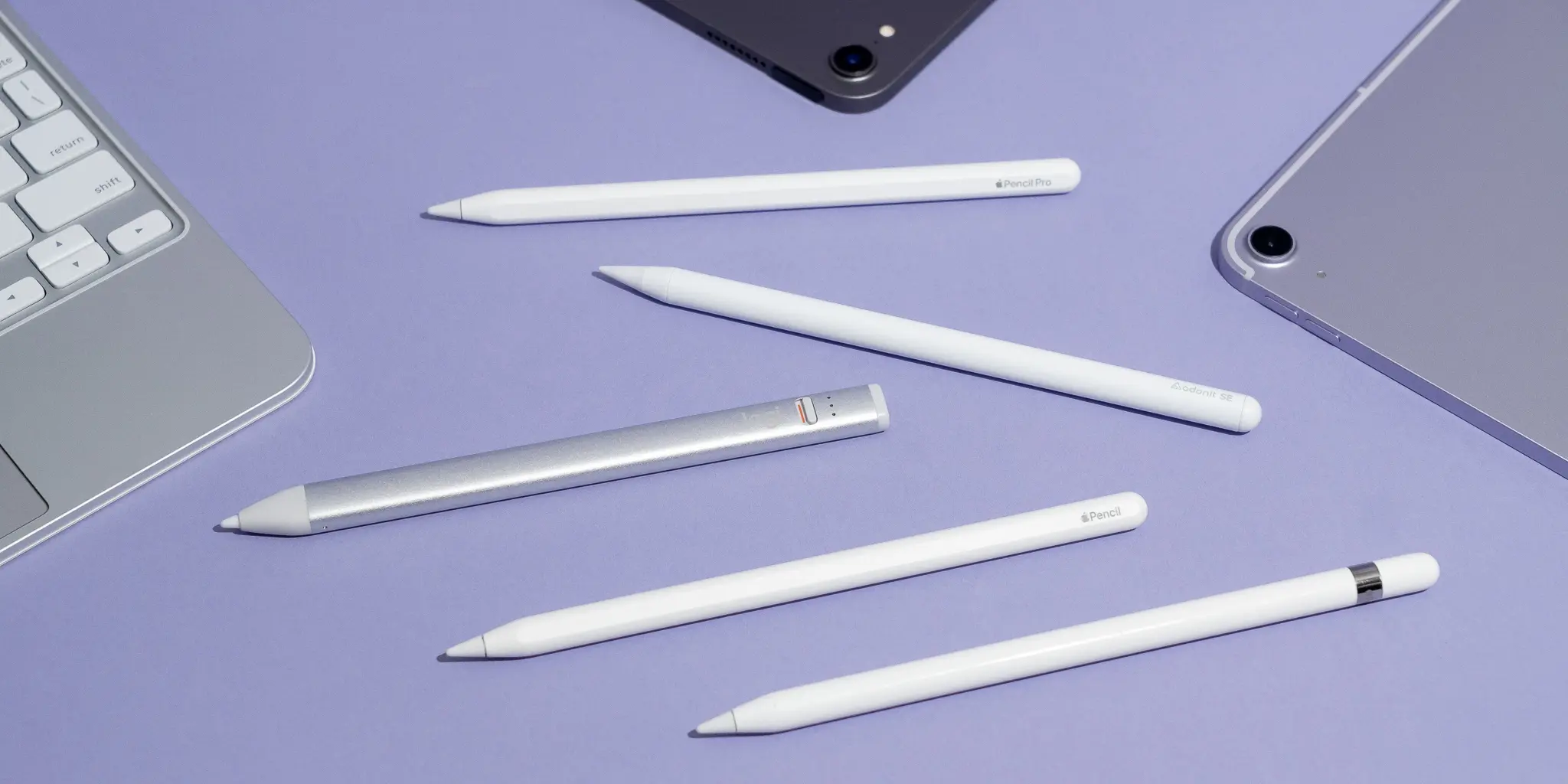
Start with the kind of control you need. A passive stylus is instant and broadly compatible, while an active iPad pencil is better for sustained writing, palm rejection, tilt effects, and more controlled marks.
Active and passive operation
Passive styluses use the same capacitive touch behavior as a finger. They do not need charging or Bluetooth, and they usually work across iPad, iPhone, Android, and other touchscreens. Their weakness is that they cannot normally reject a resting palm or report battery status.
Active pencils use electronics and a rechargeable battery. The Metapen A8, MYSTILUCK, Hastraith, and KEEPRO are designed for compatible iPads from 2018 onward. They offer more writing-focused features, but model compatibility matters and none of these listings claims pressure sensitivity.
Tip design
A transparent disc tip is useful when you need to see the exact contact point. MEKO, Bopomofo, and AmberVec use disc designs alongside rubber or fibre tips. Rubber tips are faster for scrolling and navigation, while fine rubber tips are more controlled than broad ones.
For active pencils, replaceable nibs matter because the tip is the part that receives daily wear. The Metapen A8 includes spare nibs, as do MYSTILUCK, Hastraith, and KEEPRO. A screen protector can also change the feel and resistance of any tip.
Palm rejection and tilt sensitivity
Palm rejection is the feature that most clearly separates an active writing pencil from a passive pointer. It lets you rest your hand on the iPad without creating stray touches. Tilt sensitivity changes the stroke with the angle of the pencil and is most useful for shading, sketching, and apps that support variable line width.
Metapen A8 has palm rejection but does not support pressure sensitivity. MYSTILUCK, Hastraith, and KEEPRO add tilt sensitivity, but their listings also state that pressure sensitivity is not supported. If you are choosing an iPad mainly for handwritten notes, palm rejection matters more than tilt.
For long notes, buy the pen that rejects your palm first, then compare tip precision and charging behavior.
Compatibility
Check the exact iPad generation before buying an active pencil. The compatible lists cover many iPad, iPad Air, iPad mini, and iPad Pro models released from 2018 onward, but the details differ. Metapen A8, MYSTILUCK, and Hastraith do not work with iPhone or Android, while the passive pens are designed for capacitive screens across several platforms.
The iPad setting can matter with passive pens too. AmberVec specifically says to turn off “Only Draw with Apple Pencil” before use. KEEPRO also provides Bluetooth instructions for disconnecting an existing Apple Pencil connection if the stylus does not respond.
Battery and charging
A passive stylus has no charging concern, which makes it ideal for occasional use or shared rooms. An active pencil needs a charging routine, so look at both charge time and runtime. MYSTILUCK and Hastraith claim a full charge in 13 minutes, Metapen A8 takes 30 minutes, and KEEPRO reaches 80 percent in 15 minutes and full charge in 30 minutes.
Battery indicators are useful when the pencil is part of a daily workflow. Hastraith uses three indicator lights, while KEEPRO can show battery percentage through Bluetooth. Automatic sleep after five minutes appears on several active models and helps prevent an idle pencil from running flat.

Frequently asked questions
Do these styluses work with every iPad?
The passive models use capacitive touch and are intended to work with iPads and many other touchscreen devices. Active pencils have narrower compatibility lists, generally covering iPads released from 2018 onward. Check the exact generation and size before ordering.
Is palm rejection important for iPad notes?
Yes, especially if you write for long periods. Palm rejection allows your hand to rest on the display without producing unwanted touches. Passive styluses in this roundup do not provide that feature.
Do any of these pens support pressure sensitivity?
The Metapen A8, MYSTILUCK, and KEEPRO listings specifically state that pressure sensitivity is not supported. The other listings describe tilt or capacitive touch behavior without claiming pressure sensitivity. These pens can still handle notes and casual drawing, but brush response will not match a pressure-sensitive pencil.
Which stylus works without charging?
Bopomofo, DAXINGXING, Abiarst, AmberVec, GCHMDE, and MEKO are passive styluses that do not require charging or Bluetooth. They are ready to use on compatible capacitive screens. The trade-off is the lack of active features such as palm rejection and tilt response.
Can an iPad stylus work on an iPhone or Android tablet?
The passive models are designed for broad capacitive compatibility and can work across iPad, iPhone, Android, and other touchscreens. Metapen A8, MYSTILUCK, Hastraith, and KEEPRO are iPad-specific according to their compatibility information. Do not assume an active iPad pencil will work on a phone.
How often do stylus nibs need replacing?
There is no single replacement schedule because wear depends on use, screen texture, and pressure. A rough or dragging feel is a better signal than a calendar date. Several picks include spare nibs, so replacing a worn tip does not require replacing the whole stylus.
Can I use a passive stylus for drawing?
Yes, but it is better for casual sketches, coloring, annotations, and simple touch control than detailed artwork. A transparent disc can improve visibility, while an active pencil with tilt sensitivity gives more control. None of the products here claims pressure sensitivity.
The bottom line
The Best stylus pens for iPad are not all trying to do the same job. Metapen A8 is the strongest all-round active pencil because it combines 0.1 mm precision, palm rejection, quick USB-C charging, a metal barrel, and spare nibs. MYSTILUCK is the better choice for drawing and fast charging, while Hastraith stands out for its battery indicator and long stated runtime.
For a shared home, classroom, or office, Bopomofo 2-in-1 Stylus is the most balanced multipack, and MEKO 3-in-1 Stylus is the most flexible passive design for one person using several devices. The DAXINGXING and GCHMDE sets make more sense when quantity matters more than fine control.
If you are undecided, choose Metapen A8 for serious iPad notes, or choose MEKO when you want a pen that never needs charging.
As an Amazon Associate we earn from qualifying purchases.