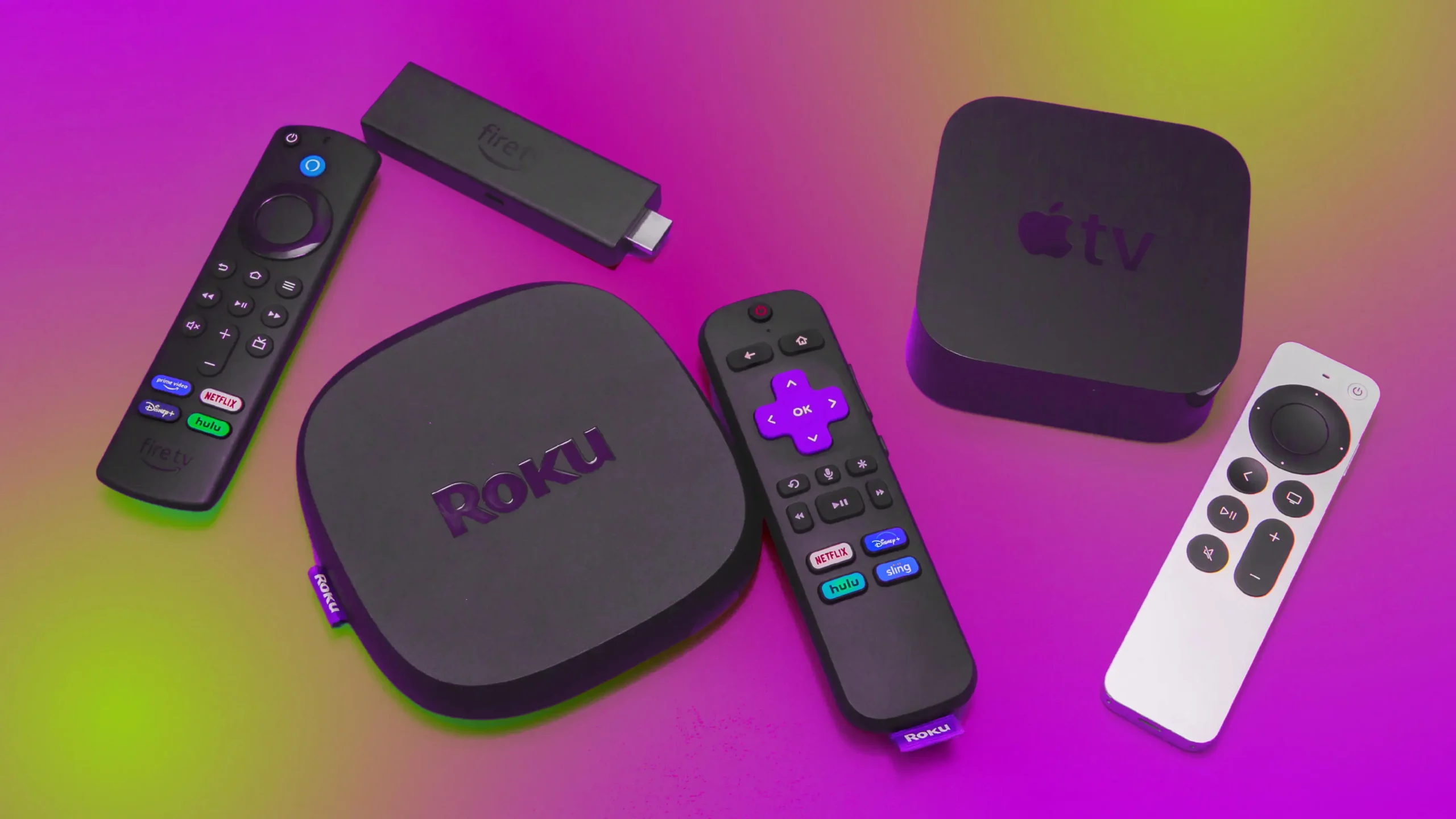

A smart TV can still feel slow, cluttered, or awkward to navigate, especially when its built-in software stops receiving updates. The right streaming player gives an older television a cleaner home screen, better search, and access to free and subscription entertainment without replacing the panel.
Our Best best tv streaming device picks range from tiny HDMI sticks that hide behind the screen to full-size players with Ethernet, USB ports, hands-free voice control, or advanced home theater support. Roku is the easiest starting point for most households, while Amazon and NVIDIA offer stronger options for Alexa homes, gaming, and local media.
Roku Ultra is our top pick, with the Roku Streaming Stick 4K, Amazon Fire TV Stick 4K Max, and NVIDIA Shield Android TV Pro covering the most compelling alternatives.
Comparison table
| # | Product | Award | Video | Connectivity | Remote | Best for |
|---|---|---|---|---|---|---|
| 1 | Roku Ultra | Best overall | 4K, HDR10+, Dolby Vision, Dolby Atmos | Wi-Fi 6, Ethernet | Rechargeable, backlit, hands-free | A polished living-room setup |
| 2 | Roku Streaming Stick 4K | Best streaming stick | 4K, HDR10+, Dolby Vision | Long-range Wi-Fi | Voice remote | 4K TVs in difficult Wi-Fi rooms |
| 3 | Amazon Fire TV Stick 4K Max | Best for Alexa | 4K, Dolby Vision, HDR10+, Dolby Atmos | Wi-Fi 6E | Voice remote with recents button | Alexa households and app-heavy users |
| 4 | Amazon Fire TV Stick 4K Plus | Best Fire TV stick | 4K, Dolby Vision, HDR10+, Dolby Atmos | Wi-Fi 6 | Alexa Voice Remote | Fast 4K streaming in a compact stick |
| 5 | NVIDIA Shield TV Pro | Best for enthusiasts | 4K HDR, Dolby Vision, Dolby Atmos | Gigabit Ethernet, dual-band AC Wi-Fi, 2 USB 3.0 | Backlit voice remote | Plex, gaming, and local media |
| 6 | Roku Streaming Stick Plus | Best simple 4K stick | 4K, HDR10+ | Wi-Fi | Voice remote | Straightforward 4K viewing |
| 7 | Amazon Fire TV Cube | Best hands-free player | 4K, Dolby Vision, HDR, Dolby Atmos | Wi-Fi 6E | Hands-free Alexa and voice remote | Controlling a full entertainment system |
| 8 | Amazon Fire TV Stick 4K Select | Best essential 4K stick | 4K, HDR10+ | Wi-Fi | Alexa Voice Remote | Basic 4K and Alexa access |
| 9 | Roku Streaming Stick HD | Best for HD TVs | HD | TV-powered HDMI stick | Voice remote | Older or secondary HD televisions |
| 10 | Amazon Fire TV Stick HD | Best HD Fire TV stick | Full HD | Wi-Fi | Alexa Voice Remote | First-time Fire TV users with HD TVs |
1. Roku Ultra: Best Overall

Pros
- Fast interface and quick app launches
- 4K, HDR10+, Dolby Vision, and Dolby Atmos
- Rechargeable backlit remote with remote finder
- Ethernet and Bluetooth headphone support
Cons
- Larger than a hidden HDMI stick
- Requires a separate power connection
- More hardware than a basic HD TV needs
Best for: someone who wants the cleanest Roku experience with strong connectivity and a better remote.
The Roku Ultra is the one that feels most complete once it is sitting under the TV. It starts apps quickly, keeps Roku's uncluttered home screen, and avoids the little compromises that come with a stick. The box is a better fit for a main television where a reliable connection and comfortable remote matter more than hiding every component.
It supports 4K, HDR10+, Dolby Vision, and Dolby Atmos, so it is ready for a modern television and compatible sound system. Roku says it is 30% faster than any other Roku player, and that advantage is most noticeable when moving through menus or launching several apps in succession. Wi-Fi 6 handles wireless connections, while Ethernet gives you a wired route when the router is close enough. That flexibility is useful for a television in a busy network or a room where wireless reception is inconsistent.
The included Roku Voice Remote Pro is a major reason to choose this model over the Roku Streaming Stick 4K. Its buttons are backlit, it recharges instead of relying on disposable batteries, and a lost remote finder helps when it disappears between couch cushions. Hands-free voice control lets you say “Hey Roku” from across the room. Bluetooth Headphone Mode is another thoughtful feature for late-night viewing, although it is specific to the Roku ecosystem rather than a universal audio solution.
The weakness is physical. The Ultra is not a discreet dongle, and its power and Ethernet options make it less convenient to move from room to room. It also makes little sense for an older HD television that cannot display 4K or HDR. A stick is easier for travel and secondary screens, while the NVIDIA Shield TV Pro is more capable for local files and gaming.
For a living-room television, the Ultra gets the important things right: a calm interface, broad picture support, strong search, and a remote that feels designed rather than merely included. It is our first recommendation for buyers who want Roku's simplicity without giving up performance or useful connections.
2. Roku Streaming Stick 4K: Best Streaming Stick

Pros
- 4K picture with Dolby Vision and HDR10+
- Long-range Wi-Fi receiver
- Compact design leaves neighboring HDMI ports clear
- Simple interface and voice control
Cons
- Remote is less advanced than the Ultra remote
- No Ethernet connection
- Older model than several newer Fire TV options
Best for: someone who wants a small Roku player for a 4K television, especially where Wi-Fi is not ideal.
The Roku Streaming Stick 4K is the natural choice when you want the Roku experience but do not want a box on the shelf. It sits behind the television, keeps nearby HDMI ports accessible, and can travel between screens without much fuss. The setup is straightforward, and Roku's home screen remains easier to understand than many content-heavy alternatives.
This stick handles 4K video, Dolby Vision, and HDR10+, which means it can make full use of a compatible television's higher-resolution panel and HDR capabilities. The long-range Wi-Fi receiver is the standout practical feature. It gives the stick a better chance in a bedroom or upstairs room farther from the router, though it cannot solve a genuinely poor home network. The included voice remote controls the player and can also power the television and adjust volume when the TV supports those commands.
Compared with the Roku Streaming Stick Plus, this model adds Dolby Vision and has the more explicit long-range Wi-Fi design. Compared with the Roku Ultra, it gives up Ethernet, Bluetooth Headphone Mode, and the rechargeable backlit remote. Those are meaningful losses for a primary home theater, but they are easy to accept when the goal is a hidden player behind a wall-mounted screen.
The age of the design is the main drawback. It remains capable, but shoppers seeking the newest search features or more aggressive app performance may prefer a current Fire TV stick. Roku's interface also favors simplicity over the deep Alexa integration found on Amazon's players. Skip this one if your home is built around Echo devices or if you need USB expansion.
For most 4K televisions in bedrooms, guest rooms, and smaller living rooms, the Streaming Stick 4K is the Roku stick to get. It combines the platform's approachable menus with the picture features that matter on a current TV.
3. Amazon Fire TV Stick 4K Max: Best for Alexa

Pros
- Wi-Fi 6E support
- 16GB storage
- Dolby Vision, HDR10+, and Dolby Atmos
- Fast processor and useful live TV controls
Cons
- Fire TV interface promotes a large amount of content
- Requires a compatible Wi-Fi 6E network to use its newest wireless advantage
- Alexa features are less appealing outside an Amazon ecosystem
Best for: households that use Alexa, want plenty of app and game storage, and prefer a fast Fire TV experience.
The Amazon Fire TV Stick 4K Max is Amazon's most capable stick in this group. It feels aimed at people who install many apps, use their television for more than passive viewing, or already have Alexa controlling lights, cameras, and other devices. The processor keeps navigation fluid, and the newer Fire TV design puts pinned apps, content categories, and recommendations closer to the front.
The hardware has several useful advantages. Wi-Fi 6E can reduce congestion when the home network and router support the 6GHz band, though the benefit depends heavily on the rest of the network. The 16GB of storage is double that of the Fire TV Stick 4K Plus and other sticks listed here, leaving more room for apps, games, and downloads. Video support includes 4K Ultra HD, Dolby Vision, HDR10+, and Dolby Atmos, making this a strong match for a current television and soundbar.
The remote adds a recents button and dedicated channel controls, which are handy for people who jump between live channels and streaming apps. Alexa+ can search across services using natural language, control compatible smart home devices, and answer general questions. Xbox cloud gaming and Amazon Luna broaden the device's role, but they require the relevant subscriptions and, in some cases, a compatible controller.
The Roku Ultra is still easier to live with if you want a quieter interface and a more refined remote. The Max wins on storage, Alexa integration, and wireless capability, while the NVIDIA Shield TV Pro remains the stronger choice for Plex, USB storage, and more serious local-media use. Wi-Fi 6E also should not be treated as a magic speed button if your router does not support it.
Choose the Fire TV Stick 4K Max for an Alexa-centered home that wants a small device with room to grow. It is especially well suited to viewers who switch among many services and appreciate quick access to recent apps and live channels.
4. Amazon Fire TV Stick 4K Plus: Best Fire TV Stick

Pros
- 4K support with Dolby Vision and HDR10+
- Wi-Fi 6 for busy home networks
- Alexa search across apps
- Compact design with TV power and volume controls
Cons
- Less storage than the Fire TV Stick 4K Max
- No Ethernet connection
- Fire TV recommendations can feel busy
Best for: viewers who want a current 4K Fire TV stick without stepping up to the Max model.
The Amazon Fire TV Stick 4K Plus is the sensible middle ground in Amazon's current stick lineup. It has the important picture features, a modern Fire TV experience, and enough wireless ability for a home with several connected devices. Plug it into an HDMI port, connect it to Wi-Fi, and Alexa can search for shows across supported apps.
Its 4K Ultra HD output is joined by Dolby Vision, HDR10+, and Dolby Atmos. Those formats matter only when the TV and sound system support them, but the inclusion means the stick will not immediately feel limited after a television upgrade. Wi-Fi 6 is useful on a crowded network, particularly when phones, tablets, and smart home devices are active at the same time.
The updated interface organizes content into dedicated categories and lets you pin more favorite apps. Alexa+ can find shows, manage compatible smart home devices, display Amazon Photos, and respond to broader questions. The remote handles television power and volume, with preset app buttons for quicker access. It is a more direct Fire TV experience than the HD model, and the 4K Select also lacks some of this model's format support because it is limited to HDR10+.
The Amazon Fire TV Stick 4K Max is the better fit for heavy app users because its 16GB storage and faster performance leave more headroom. The Roku Streaming Stick 4K is preferable for readers who value a simpler home screen and Roku's more neutral presentation. The Plus sits between those approaches, with Amazon's deeper voice and smart home features but fewer enthusiast connections.
The stick's main limitation is that it is still a stick. There is no Ethernet port, and storage is not as generous as the Max. It makes the most sense for a 4K television in a home that already uses Amazon services and Alexa.
5. NVIDIA Shield TV Pro: Best for Enthusiasts

Pros
- AI upscaling for HD video
- 3GB RAM and 16GB storage
- Two USB 3.0 ports and built-in Plex Media Server
- Gigabit Ethernet, Dolby Vision, and Dolby Atmos
Cons
- Larger and heavier than every stick here
- More complex than a basic streaming player
- Gaming accessories are separate
Best for: enthusiasts who want local media, Plex, expandable storage, and gaming features alongside mainstream apps.
The NVIDIA Shield TV Pro is not the casual pick, and that is exactly why it remains interesting. It is built for the person who wants a streaming player to handle Plex libraries, USB accessories, games, and a wider range of home theater tasks. Its Tegra X1+ chip gives the interface plenty of power, while AI upscaling can enhance HD video on a 4K display.
NVIDIA includes 3GB of RAM and 16GB of storage, along with two USB 3.0 ports. Those ports support storage expansion, cameras, keyboards, and controllers, giving the Shield a flexibility none of the HDMI sticks can match. The built-in Plex Media Server is particularly useful for a household with a local collection, though it also means setup can involve more decisions than a simple plug-in player.
For home theater, the Shield supports Dolby Vision HDR, Dolby Atmos, and Dolby Digital Plus. Gigabit Ethernet provides a reliable wired connection, while dual-band AC Wi-Fi and Bluetooth 5.0 cover wireless use. The remote has motion-activated backlighting, voice control, infrared control for the TV, and a locator. Chromecast 4K is built in, and GeForce Now plus other Android TV games add a gaming angle.
The Roku Ultra is friendlier for ordinary streaming and has a cleaner path from setup to watching. The Shield wins when you care about local files, USB expansion, or gaming, while the Amazon Fire TV Cube is more convenient for hands-free control of a broader entertainment system. The Shield's interface and settings can feel less welcoming than Roku's, and its 2019 release means it is not the newest hardware in this roundup.
Skip it if you only need Netflix, YouTube, and a few free channels on a bedroom TV. Choose it if you are willing to spend time organizing a media library or connecting peripherals. For that audience, the Shield TV Pro is still unusually capable.
6. Roku Streaming Stick Plus: Best Simple 4K Stick

Pros
- Compact HDMI design
- 4K and HDR10+ support
- TV-powered setup with minimal cable clutter
- Clear Roku menus and voice search
Cons
- Does not support Dolby Vision
- No Ethernet connection
- Remote is basic compared with Roku Ultra
Best for: anyone who wants an uncomplicated Roku stick for a 4K television.
The Roku Streaming Stick Plus is the uncomplicated 4K option in this lineup. Its slim body hides behind the television, and it can draw power from the TV, which helps keep the installation tidy. That makes it a particularly easy choice for a guest room, apartment, or wall-mounted screen where a separate box would be distracting.
It streams in 4K and supports HDR10+, so compatible content can show more detail and a wider range of brightness and color than HD video. It does not include Dolby Vision, which is the important distinction between this model and the Roku Streaming Stick 4K. Most viewers will not need to change anything in the menus, but owners of a Dolby Vision television may want the other stick to make better use of it.
Roku's interface remains the strongest reason to choose it. Search is available by voice, the home screen is easy to scan, and free live TV and other ad-supported content are placed within reach. The voice remote can power the TV and adjust volume, reducing the need to keep two remotes nearby. Roku also provides one account for managing supported subscriptions, which can simplify household administration.
The Roku Streaming Stick HD is a better match for an HD television, while the Roku Ultra adds faster performance, Ethernet, headphone mode, and a rechargeable backlit remote. Amazon's current 4K sticks offer stronger Alexa and smart home integration, so this Roku is less compelling in a home already organized around Alexa devices.
Its weakness is limited expansion. There is no wired network option, and the remote does not have the Ultra's premium features. For a basic 4K screen, however, those omissions are easy to live with. This is the Roku stick to choose when simplicity matters more than every available format.
7. Amazon Fire TV Cube: Best Hands-Free Player

Pros
- Hands-free Alexa with built-in microphones and speakers
- Octa-core processor
- Wi-Fi 6E support
- Controls compatible TVs, soundbars, receivers, and connected devices
Cons
- Cube must remain visible for voice pickup
- Microphone privacy controls require attention
- More equipment than a normal streaming stick needs
Best for: households that want voice control across the TV, soundbar, receiver, and smart home.
The Amazon Fire TV Cube is a different proposition from the stick models. It is meant to sit out in the room, listen for commands, and act as a hub for the entertainment system. Say what you want to watch, ask it to adjust compatible equipment, or move between streaming and another connected source without reaching for the remote.
Its octa-core processor is twice as powerful as the Fire TV Stick 4K Max according to Amazon's product information, which helps explain the quick app starts and fluid navigation. Wi-Fi 6E is built in for compatible networks. The Cube supports 4K, Dolby Vision, HDR, and Dolby Atmos, so it has the picture and audio credentials for a main home theater.
The hands-free microphones and built-in speakers are the defining features. The Cube can control a compatible TV, soundbar, or receiver across the room, and it can manage smart home tasks such as displaying a Ring camera feed or starting a video call. It can also connect compatible devices so you can move between a cable box, game console, webcam, and streaming services.
That convenience comes with a placement and privacy trade-off. The Cube needs to remain exposed rather than hidden behind the TV, and some people will not want an always-listening device in the room. An electronic microphone off button is included, which helps, but it is still a product that asks for more trust than the Roku Ultra. The Ultra is the calmer choice for viewers who simply want a remote.
The Cube is also less specialized than the NVIDIA Shield TV Pro for local media and USB accessories. Pick it for hands-free control, not because it is the smallest or most flexible player. It makes the most sense when several entertainment components and Alexa routines need to work together.
8. Amazon Fire TV Stick 4K Select: Best Essential 4K Stick

Pros
- 4K Ultra HD output
- HDR10+ support
- Alexa search across apps
- Access to free and live content
Cons
- No Dolby Vision support
- Less storage and capability than the 4K Max
- Fire TV home screen can feel crowded
Best for: viewers who need a basic current Fire TV stick for 4K and HDR10+ television viewing.
The Amazon Fire TV Stick 4K Select covers the fundamentals without trying to be a home theater hub. It plugs into an HDMI port, connects to Wi-Fi, and opens the current Fire TV experience with access to major apps, free ad-supported channels, and live television services. Alexa makes it possible to search and launch shows without typing with the remote.
Video output reaches 4K Ultra HD with HDR10+. That is enough for a sharp picture and expanded HDR color on a compatible display, but the absence of Dolby Vision separates it from the Amazon Fire TV Stick 4K Plus and Amazon Fire TV Stick 4K Max. If your TV is specifically built around Dolby Vision, one of those models is a more suitable match.
The updated Fire TV software adds dedicated content categories, pinned apps, personalized recommendations, and Alexa+ features. It can also control compatible lights, cameras, and other smart home devices. Xbox cloud gaming is supported with a Game Pass subscription and compatible controller, though this is a secondary feature rather than a reason for every buyer to choose this stick.
The Roku Streaming Stick Plus offers a less promotional home screen, while the Amazon Fire TV Stick HD is the better fit for a television that cannot display 4K. The Select is the more sensible Amazon option when 4K matters but you do not need the Max model's 16GB storage, stronger processor, or additional gaming focus.
Its limitations are clear and easy to understand. There is no Dolby Vision, and its storage and performance do not match the Max. For a straightforward 4K television in an Alexa household, though, it gives you the essential Fire TV tools without requiring a full-size player.
9. Roku Streaming Stick HD: Best for HD TVs

Pros
- Tiny design can stay behind the television
- Can draw power from the TV
- Simple Roku home screen
- Voice remote controls TV power and volume
Cons
- Limited to HD streaming
- No Dolby Vision or 4K support
- No wired network option
Best for: older HD televisions, secondary screens, and simple travel setups.
The Roku Streaming Stick HD is a deliberately modest device. It is for the television that still works well but has slow built-in software, an outdated app selection, or no streaming platform at all. The stick stays out of sight behind the screen, and its ability to draw power from the TV can eliminate an extra wall adapter and cable.
HD streaming is the central limitation, but it is also the reason this model remains useful. A 1080p television cannot show the extra detail of 4K, so a 4K player would not improve the picture. Roku supplies access to popular apps, free movies, shows, live TV, news, sports, and a unified search screen. The interface is more approachable than the software found on many older smart TVs.
The voice remote can power the television, adjust volume, search by voice, and launch entertainment. Roku also supports personalized picks, a Sports Zone, and subscription management through one account. Those features make the stick feel more current than its HD output suggests, especially on a bedroom or guest-room TV.
The Amazon Fire TV Stick HD offers similar resolution with deeper Alexa and smart home control. Choose the Roku if you prefer its uncluttered menus, or choose the Amazon model if voice commands for lights, cameras, and weather are central to your setup. The Roku Streaming Stick Plus is the clear upgrade for any 4K display.
Do not buy this for a new 4K television or a demanding home theater. For an older HD set, it is small, easy to move, and refreshingly uncomplicated. It is also a good travel companion when you want Roku's familiar layout on another screen.
10. Amazon Fire TV Stick HD: Best HD Fire TV Stick

Pros
- Full HD streaming
- Alexa Voice Remote
- Free and live TV access
- Smart home controls
Cons
- Not suitable for 4K displays
- Fire TV interface has more promotional content
- No Dolby Vision or HDR10+ support
Best for: first-time Fire TV users with an HD television and Alexa-compatible devices.
The Amazon Fire TV Stick HD is aimed at the basic streaming upgrade. It turns an HDMI-equipped HD television into a gateway for Netflix, Prime Video, Disney+, Peacock, and thousands of other apps, while free services such as Tubi and Pluto TV are available without another device. The compact stick is easy to take from one TV to another.
Full HD is the appropriate output for an HD screen, and the Alexa Voice Remote keeps navigation simple. Press the button to search for shows across multiple apps, launch entertainment, or ask about the weather. Alexa can also dim compatible lights, show a live camera feed, play music, and handle other smart home tasks.
This model is a better fit than the Roku Streaming Stick HD for a home already using Alexa and Amazon smart home products. Roku has the cleaner interface, however, and its search and content organization feel less tied to one ecosystem. Buyers with a 4K television should step up to the Amazon Fire TV Stick 4K Select or another 4K model rather than treating this as a future-proof choice.
The Fire TV layout can put recommendations and sponsored content close to the apps you actually want. That is not a technical flaw, but it can make the first screen feel busier than Roku's. The device also lacks HDR and 4K support, so it has a defined ceiling.
For an older HD television and an Alexa-centered home, that ceiling is not a problem. This is the Fire TV stick to choose when the screen is HD and smart home voice control matters more than advanced picture formats.

How to choose best tv streaming device
The right player depends on the television's resolution, the network in that room, the services you use, and how much control you want over the rest of the home theater.
Video formats
Start with the TV, not the streaming device. HD models need only HD output, while a 4K TV can benefit from 4K Ultra HD and HDR formats. Dolby Vision and HDR10+ are not interchangeable in every setup, so check which format the television supports before choosing between the Roku Streaming Stick Plus, Roku Streaming Stick 4K, and Fire TV models.
A player that supports Dolby Atmos is useful when a compatible soundbar or receiver is connected. It will not create immersive sound from ordinary television speakers, but it gives a suitable audio system the signal it needs.
Wireless and wired connections
A streaming stick depends on Wi-Fi, which is convenient but sensitive to distance, walls, and congestion. Wi-Fi 6 and Wi-Fi 6E can help on compatible networks, while the Roku Streaming Stick 4K's long-range receiver is useful in rooms farther from the router. Ethernet, available on Roku Ultra and NVIDIA Shield TV Pro, is the stronger option when a network cable can reach the player.
A fast streaming device cannot compensate for a weak signal behind the television.
Interface and search
Roku emphasizes a simple home screen and broad service search. Fire TV provides deeper Alexa control, personalized recommendations, and smart home commands, but its home page can feel busier. Think about whether you want the device to help you browse or simply get out of the way until you choose an app.
Voice search is useful for long titles and actors' names. Hands-free Alexa on the Fire TV Cube is a different level of convenience, but it requires leaving the Cube exposed in the room.
Remote design
A basic voice remote is enough for most bedrooms. A backlit remote helps in a dark living room, and the Roku Ultra's rechargeable Voice Remote Pro adds hands-free commands and a lost remote finder. Dedicated channel and recents buttons on the Fire TV Stick 4K Max are useful for viewers who move frequently between live TV and apps.
Also check whether the remote can control TV power and volume. One remote is much easier to live with than two, especially for guests and family members who do not want to learn a new setup.
Storage and expansion
Most streaming sticks are designed for apps and streaming rather than local files. The Fire TV Stick 4K Max has 16GB of storage, while the NVIDIA Shield TV Pro also has 16GB plus two USB 3.0 ports for expansion and accessories. Plex users, gamers, and people with USB media should skip the basic sticks and consider the Shield.
If you only use a few streaming apps, storage matters less than the interface and remote. Extra capacity is most useful when you install games, download content, or keep a larger app collection.

Frequently asked questions
Do I need a streaming device if my TV already has apps?
Not always. A separate player is useful when the built-in interface is slow, missing apps, difficult to navigate, or no longer updated. It can also provide a more consistent experience across several TVs in the home.
Is 4K streaming worth choosing over HD?
Choose 4K when the television supports 4K and you want the device to remain useful after a screen upgrade. HD is sufficient for an HD television, and it avoids paying attention to picture formats the panel cannot display.
Which streaming device is easiest to use?
Roku Ultra and the Roku Streaming Stick 4K have the most straightforward interface in this group. Their menus focus on apps, search, and content discovery without requiring as much navigation through recommendations.
Which model is best for Alexa?
The Amazon Fire TV Cube offers the deepest Alexa integration because it has built-in microphones and speakers for hands-free control. The Fire TV Stick 4K Max, Fire TV Stick 4K Plus, Fire TV Stick 4K Select, and Fire TV Stick HD all provide voice control through their remotes.
Can these devices play free live TV?
Yes. Roku models provide access to free live TV and other ad-supported entertainment, while Fire TV models include services such as Fire TV Channels, Prime Video free content, Tubi, and Pluto TV. Availability and content can change, and some live channels require a subscription.
Can I use a streaming stick while traveling?
The Roku Streaming Stick HD, Roku Streaming Stick 4K, Roku Streaming Stick Plus, and Fire TV sticks are compact and can connect to another television's HDMI port. You will still need Wi-Fi, and some hotel or public networks require an extra sign-in step.
Should I choose a box or a stick?
Choose a stick when you want a hidden, portable device with a simple installation. Choose a box such as Roku Ultra, NVIDIA Shield TV Pro, or Fire TV Cube when you need Ethernet, USB ports, hands-free control, stronger remote features, or more dependable use as a main home theater player.

The bottom line
The Roku Ultra is the strongest all-around recommendation from this Best best tv streaming device roundup. It combines 4K, HDR10+, Dolby Vision, Dolby Atmos, Wi-Fi 6, Ethernet, headphone mode, and an excellent rechargeable remote without making the interface difficult to use.
Choose the Roku Streaming Stick 4K when you want those essential 4K picture features in a tiny design. The Amazon Fire TV Stick 4K Max is the better alternative for Alexa households and app-heavy users, while the NVIDIA Shield TV Pro is the specialist pick for Plex, USB expansion, and gaming.
If you are undecided, buy Roku Ultra for a main living-room TV, or Roku Streaming Stick 4K when keeping the hardware hidden matters most.
As an Amazon Associate we earn from qualifying purchases.