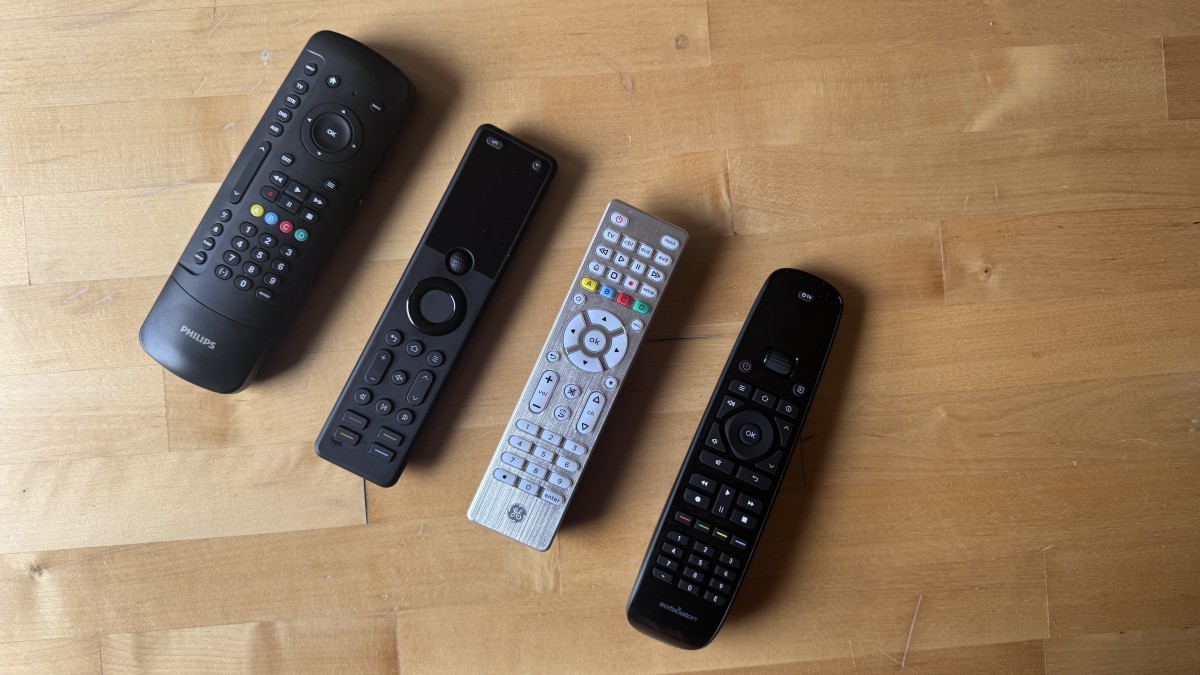

A missing or broken TV remote turns a simple evening into a hunt through sofa cushions, app menus and half-working replacement controls. The harder problem comes when the television, soundbar and streaming box each insist on a different handset.
The Best universal remotes in this group split into two useful types: true multi-device controllers and simple infrared replacements for one TV brand. Acoyer Multi Brand Remote is the strongest all-around pick, while the rest range from a polished four-device GE model to compact Samsung-only replacements and a rechargeable backlit option.
Comparison table
| # | Product | Award | Device support | Setup | Standout feature | Best for |
|---|---|---|---|---|---|---|
| 1 | Acoyer Multi Brand Remote | Best overall | TVs, DVD and Blu-ray players, streaming players and more | Code entry or automatic search | Broad TV brand coverage | Mixed-brand TV households |
| 2 | GE 4 Device Remote | Best multi-device design | Up to four audio/video components | Online video, code entry and search | Master volume control | TV, disc player and receiver setups |
| 3 | LOUTOC Samsung Two Pack | Best two-pack | Samsung TVs | No programming required | Two infrared remotes | Homes that need a spare |
| 4 | GE Backlit 4 Device Remote | Best for dark rooms | Up to four audio/video components | Code entry or automatic search | Blue LED backlight | Late-night viewing |
| 5 | GE Rechargeable Backlit Remote | Best rechargeable model | Up to four audio/video components | Code entry or automatic search | USB-C charging and app keys | Frequent TV users |
| 6 | EONCHARM Samsung Remote | Best compact Samsung replacement | Samsung TVs | No programming required | Netflix, Prime Video and Hulu keys | Samsung TV owners |
| 7 | Whizmrchen Samsung Remote | Best simple Samsung replacement | Samsung TVs | No programming required | Smart Hub buttons | Replacing a basic Samsung handset |
| 8 | Angrox Multi Brand Remote | Best streaming shortcut layout | Samsung, LG, Vizio, TCL, Hisense, Sony and Roku TVs | Setup buttons and included manual | Dedicated streaming hot keys | Several major TV brands |
1. Acoyer Multi Brand Remote: Best Overall

Pros
- Covers a wide range of major TV brands
- Can control compatible players and streaming devices
- Supports direct code entry and automatic code search
- Includes a code list and user manual
Cons
- Requires two AAA batteries, which are not included
- Infrared only, with no support for streaming sticks or several soundbars
- Setup can require trying multiple codes
Best for: households that want one straightforward handset for several common TV brands and infrared devices.
The Acoyer Multi Brand Remote is the one we'd hand to someone who has not checked the model number of every device in the room. Its useful trait is not a flashy feature. It is the unusually broad list of supported television brands, including Samsung, LG, Vizio, Sony, Hisense, Onn, Sharp, RCA, Element, Westinghouse, Sanyo, Emerson, Philips, JVC, Sceptre, Sansui, Panasonic, Magnavox and Skyworth. That makes it a sensible first attempt when the original remote has disappeared and the TV brand is known but the exact model is not.
This is an infrared controller, so it works by pointing it at the device rather than pairing wirelessly. The listing also identifies support for DVD and Blu-ray players and media streaming players, though compatibility still depends on the individual device. Two AAA alkaline batteries are required and are not included. At 7.64 inches tall, 2.24 inches wide and about 0.13 pounds, it has the familiar long, light shape that is easy to find on a coffee table without feeling bulky.
Setup is more involved than with the Samsung-only replacements below, but the process is clearly described. You choose the device type, hold the Setup button for three seconds, select the TV, streaming or audio mode, then enter a four-digit brand code. If the first code fails, the supplied code list gives you other options, and the instructions also point to an automatic code search. That flexibility matters with older sets, where a single code is not always enough.
Compared with the Angrox Multi Brand Remote, Acoyer covers more brands in its stated compatibility list and gives you a more traditional code-list approach. The GE 4 Device Remote is the better fit for a fuller entertainment system because it is explicitly designed around four components and master volume control. Acoyer is less attractive if your setup includes a Roku Streaming Stick, Fire TV device, Apple TV or a soundbar from one of the excluded groups. Those devices do not use the infrared control path this remote supports.
Choose this model when broad TV coverage matters more than rechargeable power or illuminated buttons. It is the most adaptable choice here for a basic living room with a television and one or two compatible infrared accessories.
2. GE 4 Device Remote: Best Multi-Device Design

Pros
- Controls up to four audio/video components
- Master volume works across device modes
- Includes navigation, DVR and digital dot buttons
- Supports major brands and older components
Cons
- Requires two AAA batteries, which are not included
- Does not work with Roku Streaming Stick or Amazon Fire TV Stick
- Requires programming for devices beyond the preconfigured controls
Best for: a living room with a TV, player, receiver or compatible streaming box that needs one central controller.
The GE 4 Device Remote feels more purposeful than a basic TV replacement because its layout assumes there is more than one box in the cabinet. It can operate up to four audio/video components, including a television, Blu-ray or DVD player, cable or satellite receiver, streaming media player or soundbar when the device is compatible. That makes it a better system remote than a handset designed primarily to replace a lost TV controller.
The important detail is master volume control. Once configured, you can adjust volume without constantly switching to the receiver or soundbar's mode. The button set also includes Menu, Home/Guide, DVR List, Info, navigation controls and an Advanced DVR section. A digital dot button is useful for subchannels, a small detail that many simple replacement remotes leave out.
GE describes this as a four-device model with a comprehensive code library for major brands and thousands of newer and legacy audio/video components. Setup can use direct code entry or the online setup video, and the remote's familiar device buttons make it clear which component is active. The silver handset measures 6.99 inches tall, 1.8 inches wide and 0.63 inches deep, with a listed weight of 0.2 pounds. It takes two AAA batteries.
The GE Backlit 4 Device Remote is the more comfortable choice if you watch in a dark room, and the GE Rechargeable Backlit Remote adds illuminated controls, USB-C charging and direct app buttons. The standard GE model has the cleaner case for someone who does not need those extras, and its control layout is arguably less distracting. It also stands apart from the Acoyer because its main advantage is component management rather than the sheer number of TV brands named in the compatibility list.
There is one important boundary. GE specifically excludes Roku Streaming Stick and Amazon Fire TV Stick devices, so a television with a streaming stick as its main source may still leave you reaching for a second controller. Pick this model for a conventional multi-box setup, especially one with a receiver, disc player or cable equipment.
3. LOUTOC Samsung Two Pack: Best Two-Pack

Pros
- Includes two infrared remotes
- No pairing or programming required
- Works with Samsung Smart TV, LED, LCD, HDTV and 3D series
- Includes three shortcut buttons
- Listed response time is 0.5 seconds at up to 32 feet
Cons
- Designed for Samsung TVs rather than mixed-brand systems
- Batteries and manual are not included
- Three shortcut buttons may not match every streaming setup
Best for: Samsung TV owners who want a ready-to-use replacement and a spare for another room.
The LOUTOC Samsung Two Pack solves a different problem from the GE models. It is not the answer for a TV, receiver and Blu-ray player spread across brands. It is the practical answer when a Samsung handset has failed and you would rather keep a second remote in a drawer than repeat the search later.
There is no pairing or programming process. Insert two AAA batteries into the remote and use it with a compatible Samsung television. The listing covers Samsung Smart TV, LED, LCD, HDTV and 3D sets across Samsung series. It also claims a 0.5-second response and operation up to 10 meters, or 32 feet, through infrared. Those details suggest a replacement intended for normal sofa-to-TV use rather than a long-range or wireless home theater setup.
The two remotes each have three shortcut buttons. They can make frequently used streaming functions easier to reach, though the listing does not identify the services attached to those buttons. That is less flexible than the named Netflix, Prime Video and Hulu shortcuts on the EONCHARM Samsung Remote, but LOUTOC gives you a second handset in the package. At 6.9 inches long, 1.65 inches wide and 0.9 inches tall, it has a straightforward replacement-remote footprint.
The limitation is obvious and should guide the purchase. This is effectively a Samsung TV replacement, not a universal controller for LG, Sony or Roku equipment. The Whizmrchen Samsung Remote is the simpler one-unit alternative, while EONCHARM Samsung Remote makes a stronger case if streaming shortcut labels and broad Samsung model coverage matter more than having a backup.
The package does not include batteries or a manual, so keep that in mind before discarding the old remote. For a Samsung television in the bedroom, guest room or family room, the two-pack makes sense because one can stay in use while the other remains available when the first vanishes.
4. GE Backlit 4 Device Remote: Best for Dark Rooms

Pros
- Fully backlit keypad with blue LED illumination
- Controls up to four audio/video devices
- Preprogrammed for Samsung TVs and Roku boxes
- Offers automatic code search and direct code entry
- Master volume control works across device modes
Cons
- Batteries are not included
- Not compatible with Roku Streaming Stick or Amazon Fire TV Stick
- Backlighting is an extra feature for a remote that otherwise needs setup
Best for: viewers who regularly use a multi-device system in dim or dark rooms.
The GE Backlit 4 Device Remote earns its place by fixing one small but irritating problem: finding the right button when the lights are off. Its full keypad uses blue LED backlighting, so controls such as navigation, volume and playback are easier to distinguish during a film. This is more useful than a decorative light around the edge because the buttons themselves are illuminated.
Under the backlight, the control scheme is familiar and practical. The remote handles up to four audio and video devices, including a TV, disc player, cable or satellite receiver, soundbar or compatible streaming media player. It is preprogrammed for Samsung TVs and Roku streaming media boxes, although the listing makes clear that Roku Streaming Sticks are excluded. Automatic code search and direct code entry cover other supported equipment.
Master volume control is the strongest multi-device feature. You can change the audio level without first selecting the device that owns the volume function. That puts it closer to a proper living-room remote than the LOUTOC Samsung Two Pack, which is focused on direct TV replacement. Its 6.75-inch height, 1.75-inch width and 0.18-pound weight keep it reasonably compact despite the extra device controls.
The GE Rechargeable Backlit Remote is the more modern version of this idea, with USB-C charging and dedicated app keys. It also costs attention from anyone who dislikes keeping AAA batteries around. The backlit GE model remains the clearer pick for someone who wants a conventional black remote and does not need rechargeable power. Acoyer covers a wider mix of named television brands, but this GE remote has the more developed control structure for four components.
Skip it if your main device is a streaming stick or if you only need a Samsung replacement with no setup. For a dark media room with a compatible TV, receiver and player, the blue backlight is the feature that makes this model easier to live with every night.
5. GE Rechargeable Backlit Remote: Best Rechargeable Model

Pros
- Rechargeable battery stays powered for months on one charge
- USB-C to USB-A charging cable included
- Fully backlit keypad
- Controls up to four audio/video devices
- Dedicated Netflix, Disney+, Prime Video and YouTube keys
Cons
- Not compatible with Roku Streaming Stick or Amazon Fire TV Stick
- Requires setup for many brands and devices
- A charging cable is another item to keep track of
Best for: frequent TV users who want an illuminated four-device remote without disposable batteries.
The GE Rechargeable Backlit Remote is the most convenient model here for someone who uses a remote every day and dislikes the gradual warning signs of dying batteries. Its built-in rechargeable power system is designed to last for months on a charge, and the included 18-inch USB-C to USB-A cable handles recharging. A blue indicator shows that charging is in progress, then turns green when the remote is full.
The backlit keypad gives it an advantage after dark, while the slim profile and white front with black backplate make it visually distinct from the black GE Backlit 4 Device Remote. The controls cover up to four audio/video devices, with support for TVs, Blu-ray or DVD players, soundbars, cable and satellite receivers and other compatible equipment. Samsung TV and Roku box buttons are preprogrammed, and the master volume function lets one volume control work across modes.
This is also the strongest remote in the group for named streaming shortcuts. It has direct keys for Netflix, Disney+, Prime Video and YouTube. Those buttons reduce menu navigation when the connected device supports the corresponding commands. The listing still identifies this as an infrared universal remote, so app buttons do not change the compatibility limits. Roku Streaming Sticks and Amazon Fire TV Sticks remain outside its supported device group.
Compared with the GE Backlit 4 Device Remote, this model adds charging and more clearly labeled app access, making it the better fit for a frequently used main room. The standard GE has a simpler battery routine and may suit a guest room or occasional-use setup. GE 4 Device Remote is also worth considering if backlighting is not important and you prefer its silver finish and button layout.
The main weakness is that rechargeable does not mean maintenance-free. It needs access to a USB cable and an occasional charging routine, while a battery-powered handset can be revived by swapping cells. Choose this one when illuminated controls, four-device support and direct streaming access matter more than keeping the setup as simple as possible.
6. EONCHARM Samsung Remote: Best Compact Samsung Replacement

Pros
- No programming or setup required
- Supports Samsung TV series from 2017 through 2024
- Includes Netflix, Prime Video and Hulu shortcut buttons
- Compact, easy-grip design
- Covers the functions of the original remote according to the listing
Cons
- Samsung-only compatibility
- Uses two AAA batteries, which are not included
- Infrared design cannot control streaming sticks or other wireless devices
Best for: Samsung owners who want a compact replacement with clearly identified streaming shortcuts.
The EONCHARM Samsung Remote is deliberately uncomplicated. It is made for Samsung televisions, not for assembling a single control center for every device under the TV. That narrow focus lets it skip programming, pairing and code hunting. Insert batteries and use it as an infrared replacement for compatible Samsung Smart TV, LED, LCD, HDTV, 3D and other Samsung series televisions.
EONCHARM lists compatibility with Samsung series from 2017 through 2024 and names a long set of remote model numbers, including BN59-01315A, BN59-01315J, BN59-01301A, BN59-01175N, AA59-00741A and AA59-00786A. Those identifiers are useful if the old handset is still available and you can compare its label. They are more helpful than relying on the broad word “universal” alone.
There are three streaming shortcut buttons for Netflix, Prime Video and Hulu. That is a more clearly defined arrangement than the unnamed shortcuts on the LOUTOC Samsung Two Pack, while the compact shape makes it easy to grip. The listed dimensions are unusual compared with the other remotes, at 3.10 inches in height, 2.36 inches in length and 1.97 inches in width, so shoppers should check the product image and layout carefully rather than assuming a full-length handset.
The compact design also means this is not the natural pick for a mixed-brand room. Acoyer Multi Brand Remote and Angrox Multi Brand Remote can cover several major TV brands, while EONCHARM is better when the television is Samsung and you want the least possible setup. The Whizmrchen Samsung Remote is similarly direct but emphasizes Smart Hub buttons instead of named streaming keys.
EONCHARM is a good match for a Samsung television whose original remote has stopped working but whose owner does not need receiver or soundbar control. Confirm the model family before ordering, then enjoy the benefit of a replacement that does not ask you to program anything.
7. Whizmrchen Samsung Remote: Best Simple Samsung Replacement
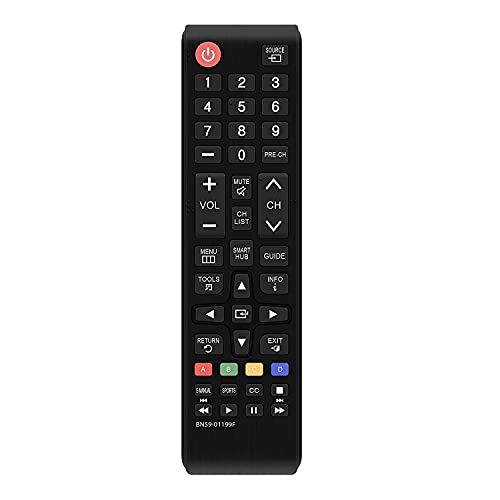
Pros
- No programming or setup required
- Supports Samsung LCD, LED, HDTV, 3D and Smart TV models
- Includes Smart Hub buttons
- Compatible with many newer and older Samsung series
- Small shape is easy to grip
Cons
- Samsung-only device support
- Requires two AAA batteries, which are not included
- No backlighting or rechargeable power
Best for: replacing a basic Samsung TV remote with a familiar infrared button layout.
The Whizmrchen Samsung Remote is the most stripped-back option in this roundup. It does not try to control four devices or add a charging system. Instead, it aims to replace the ordinary Samsung TV handset with a design that works without programming. For an older television in a bedroom or spare room, that simplicity is the point.
Its stated compatibility includes Samsung 2K and 4K UHD LED, LCD, HDTV, 3D and Smart TV models. The listing specifically names remote models BN59-01199F, AA59-00666A and AA59-00741A, and says it supports Samsung series from 2017 through 2024 as well as older sets. The model-number references give Samsung owners a useful way to check fit before buying.
The remote includes Smart Hub buttons and is designed to cover the functions of the original handset. It uses infrared and two AAA batteries, which are not supplied. Whizmrchen also describes a farther transmitting distance and stable performance, though it does not provide a numeric distance. The listed dimensions are 7 inches long, 1.5 inches wide and 1 inch high, giving it the long, narrow profile most people expect from a traditional TV remote.
The EONCHARM Samsung Remote is the more interesting alternative if dedicated Netflix, Prime Video and Hulu controls are important. The LOUTOC Samsung Two Pack is the better answer for a home that needs a spare or two rooms covered. For a single Samsung set where Smart Hub access matters and you want no programming, Whizmrchen keeps the interaction familiar.
There is no backlight, charging feature or multi-device control here. That makes it a poor choice for a full home theater, but a sensible one for anyone replacing a lost Samsung handset without wanting to learn a new control system.
8. Angrox Multi Brand Remote: Best Streaming Shortcut Layout

Pros
- Supports Samsung, LG, Vizio, Hisense, TCL, Philips, Sony and Roku TVs
- Dedicated shortcut buttons for several streaming services
- Setup uses two buttons and an included manual
- Slim 6.22-inch design
- Includes a 90-day return warranty
Cons
- Infrared only
- Does not support streaming sticks, TV cubes or several soundbars
- Requires two AAA batteries, which are not included
Best for: households with several major TV brands that want quick access to common streaming apps.
The Angrox Multi Brand Remote takes the broad-brand approach and puts more emphasis on streaming shortcuts. It is listed as compatible with Samsung, Vizio, LG, Hisense, TCL, Philips, Sony and Roku TVs, giving it a useful spread across the brands most likely to appear in a home with more than one television.
Its shortcut buttons are labeled for Netflix, Prime Video, Disney+ and Hulu, although some of the listing text abbreviates those names. That is the right idea for people who spend more time launching apps than navigating through a television's home screen. The remote is 6.22 inches long, 1.49 inches wide and 0.47 inches high, so its slim profile should sit comfortably beside a standard TV remote.
Setup requires two AAA batteries and the included manual. The listing describes holding two setup buttons before following the instructions, rather than simply inserting batteries and using the handset. That is a small extra step compared with EONCHARM Samsung Remote or Whizmrchen Samsung Remote, but it is necessary for a multi-brand controller. Angrox also includes a 90-day return warranty and says questions receive a response within 12 hours.
The Acoyer Multi Brand Remote has the stronger stated list of supported TV brands and includes a code-list and automatic-search process. Angrox is more appealing when its streaming keys match the apps you use most. The GE models are better for up to four audio/video components, especially if master volume control is important, while Angrox is primarily a TV remote.
Do not choose this handset for a Roku Streaming Stick, Fire TV device or one of the listed unsupported soundbars. It communicates through infrared only, so its wide TV compatibility does not translate into wireless control of every streaming product. For several conventional smart TVs and a preference for dedicated app buttons, it is the most focused option among the multi-brand alternatives.

How to choose best universal remotes
The right remote depends less on the word “universal” than on the control method, device mix and button layout you actually use.
Infrared compatibility
Every model here relies on infrared to some extent, which means the remote must be pointed toward the TV or compatible component. Infrared is straightforward for conventional televisions, DVD players and some boxes, but it does not automatically control wireless accessories. Roku Streaming Sticks, Amazon Fire TV Sticks, TV cubes and several soundbars are specifically excluded by products in this group.
Before choosing a remote, identify whether your streaming service runs inside the television or on a separate stick. If you are still deciding between television types, what a television can do without its own smart platform can help clarify which devices the remote will need to operate.
A remote that supports your TV brand may still fail if the device you watch through uses wireless commands instead of infrared.
Brand and model coverage
A multi-brand remote makes sense when the room contains TVs from different manufacturers or when the exact model is unknown. Acoyer names a particularly broad set of TV brands, while Angrox focuses on Samsung, LG, Vizio, Hisense, TCL, Philips, Sony and Roku. GE's models use a broad code library for major audio/video brands and older components.
Samsung-only replacements are different. EONCHARM and Whizmrchen list Samsung series and model numbers, and both avoid programming. That is convenient when the TV is known to be Samsung, but neither should be treated as a controller for an LG television or a separate streaming box.
Device count
Count the devices that need regular control, not every box connected to the television. A TV plus a receiver and disc player makes a four-device GE model more useful than a simple TV replacement. Master volume control is especially helpful when the sound comes from a receiver or compatible soundbar.
If the television is the only device that matters, a Samsung replacement may be easier to live with because its controls are dedicated to one brand. A two-pack can also be useful when two rooms use compatible Samsung TVs or when losing the remote is a recurring problem.
Setup method
No-programming remotes are the easiest to deploy, but they are usually brand-specific. LOUTOC, EONCHARM and Whizmrchen are designed around immediate Samsung TV use. Multi-device remotes require code entry, automatic code search or both. That takes longer at the beginning but gives you more control once the correct codes are stored.
Keep the original remote's model number nearby if possible. It can make compatibility checking more reliable than the TV's general marketing name, especially when one television family has several generations and remote layouts.
Backlighting and power
A fully backlit keypad matters if you watch in a dark room or regularly use small navigation buttons. The GE Backlit 4 Device Remote uses blue LED illumination, and the GE Rechargeable Backlit Remote adds the convenience of USB-C charging. The rechargeable model also includes named streaming app keys.
Battery-powered remotes are easier to revive immediately when cells are available. Rechargeable models avoid regular battery replacement but need a charging cable and a charging routine. Neither option solves compatibility, so treat power and illumination as comfort features after confirming the device support.

Frequently asked questions
Do these remotes work with Roku Streaming Sticks?
No. The listings for Acoyer, GE and Angrox specifically exclude Roku Streaming Sticks, and several also exclude Amazon Fire TV Sticks or other TV sticks. These devices commonly use wireless communication rather than the infrared commands supported by the remotes here.
Which remote works with several TV brands?
Acoyer Multi Brand Remote and Angrox Multi Brand Remote are the clearest choices for several major television brands. The GE models also support broad audio/video code libraries, but their main advantage is controlling up to four components rather than only switching between TV brands.
Do Samsung replacement remotes need programming?
LOUTOC Samsung Two Pack, EONCHARM Samsung Remote and Whizmrchen Samsung Remote are described as requiring no programming or setup. They are infrared replacements for compatible Samsung TV models. Check the listed model numbers and series before ordering, particularly if the television is older.
Can one remote control a TV and soundbar?
The GE models are designed to control up to four audio/video components and list soundbars among the compatible device types. Compatibility depends on the specific soundbar. Acoyer also mentions sound and other devices but excludes several named soundbar groups, so checking the model is essential.
Which remote is easiest to use in a dark room?
GE Backlit 4 Device Remote and GE Rechargeable Backlit Remote both have fully backlit keypads. The rechargeable model adds USB-C power and direct keys for Netflix, Disney+, Prime Video and YouTube, while the other uses replaceable AAA batteries.
Do these remotes include batteries?
No batteries are included with the products that specify battery requirements. Acoyer, GE 4 Device Remote, GE Backlit 4 Device Remote, LOUTOC, EONCHARM, Whizmrchen and Angrox use two AAA batteries. The GE Rechargeable Backlit Remote uses an internal rechargeable system and includes an 18-inch USB-C to USB-A cable.
Should I choose a universal remote or a Samsung replacement?
Choose a Samsung replacement when the TV is Samsung and you want immediate use with no programming. Choose a multi-brand remote when you need to control different television brands or several audio/video components. A multi-device GE model is the better fit for a receiver and player, while Acoyer and Angrox are more focused on broad TV coverage.

The bottom line
The Best universal remotes choice here is Acoyer Multi Brand Remote because it combines the broadest stated TV compatibility with code entry, automatic search and support for compatible players. It is the one to choose when the room contains a mixture of common TV brands and infrared equipment. For a more structured home theater with up to four components, GE 4 Device Remote has the better control layout and master volume feature.
Samsung owners have a simpler decision. LOUTOC Samsung Two Pack is the practical spare-friendly option, EONCHARM Samsung Remote has named streaming shortcuts, and Whizmrchen Samsung Remote keeps the replacement experience basic with Smart Hub buttons. For dark-room viewing, GE Rechargeable Backlit Remote is the most polished pick because it combines illuminated controls, app keys and rechargeable power.
If you are undecided, choose Acoyer for mixed brands, GE for several components, or a Samsung-only replacement when the television is the only device that matters.
As an Amazon Associate we earn from qualifying purchases.