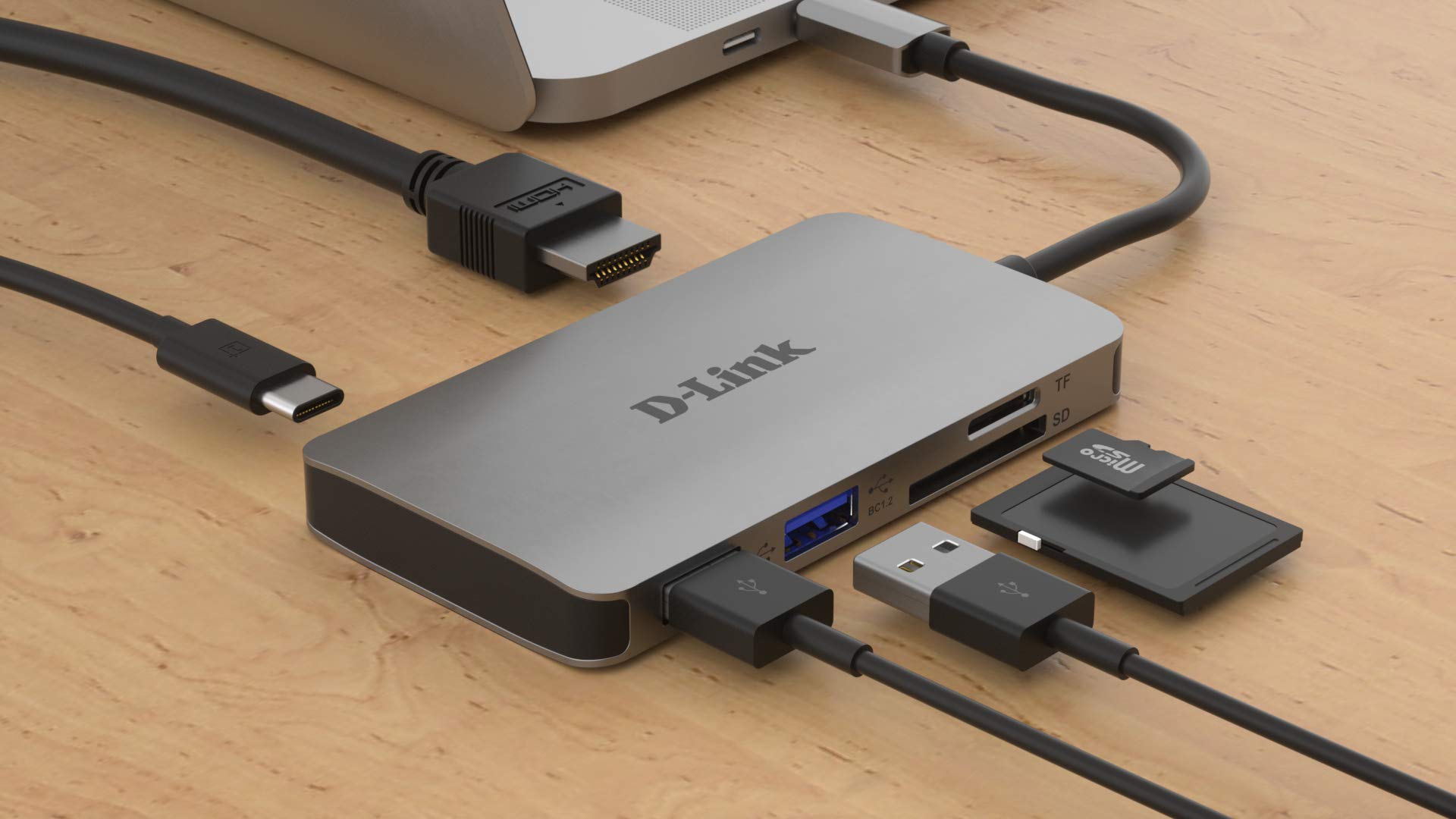

A desktop PC can run out of USB ports surprisingly quickly. Add a keyboard, mouse, printer, webcam, external drive, headset, and a few flash drives, and the case ports are gone before the desk is properly set up. The right hub also keeps those accessories within reach instead of forcing you to crawl behind the computer.
The Best USB Hub for PC depends on what those ports need to do. A small four-port splitter is ideal for a keyboard and mouse, while a powered desktop hub is the safer choice for several drives or a busy workstation. We compared compact, long-cable, powered, USB-A, and USB-C designs.
Acer USB Hub 4 Ports is our top pick for most PC owners, while the other nine cover high-capacity desks, charging, long cable runs, and portable setups.
Comparison table
| # | Product | Award | Ports | Data speed | Power | Best for |
|---|---|---|---|---|---|---|
| 1 | Acer USB Hub 4 Ports | Best overall | 4 USB-A | Up to 5Gbps | USB-C input for stability | Everyday PC accessories |
| 2 | ABFCRTTW 7-Port Long Cable | Best long-reach hub | 7 USB-A | Up to 5Gbps | 5V/3A USB-C power input | Desktop cable flexibility |
| 3 | Anker 4-Port USB 3.0 Hub | Best compact classic | 4 USB-A | Up to 5Gbps | Bus powered | Portable PC setups |
| 4 | intpw 9-Port USB 3.2 Hub | Best USB-C mix | USB-A and USB-C | Up to 10Gbps | 65W adapter, 45W PD ports | Mixed modern workstations |
| 5 | SABRENT 10-Port HB-BU10 | Best port control | 10 USB-A | Up to 5Gbps | 60W adapter | Many individually controlled devices |
| 6 | TP-Link UH720 | Best charging hub | 7 data ports, 2 charging ports | Up to 5Gbps | 12V/4A adapter | PCs with phones and tablets |
| 7 | JESWO 7-Port Powered Hub | Best aluminum powered hub | 7 USB-A | Up to 5Gbps | 20W adapter | Neat desktop expansion |
| 8 | ABFCRTTW 7-Port USB-C Hub | Best USB-A and USB-C layout | 4 USB-A, 3 USB-C | Up to 5Gbps | 5V/3A USB-C power input | Mixed peripheral collections |
| 9 | WENTER 11-Port Powered Hub | Best maximum expansion | 10 data ports, 1 charging port | Up to 5Gbps | 12V/3A adapter | Large fixed workstations |
| 10 | UGREEN 4-Port Ultra-Slim Hub | Best ultra-portable hub | 4 USB-A | Up to 5Gbps | Bus powered | Travel and tight spaces |
1. Acer USB Hub 4 Ports: Best Overall
Pros
- Four USB 3.0 data ports
- Up to 5Gbps transfer speed
- Two-foot cable suits a desktop or laptop
- Compact 0.1-pound design
- USB-C input can improve stability with drives
Cons
- USB-C input is for power only
- No dedicated charging output
- Four ports can be limiting for a large workstation
Best for: someone who needs a dependable four-port expansion hub for ordinary PC accessories.
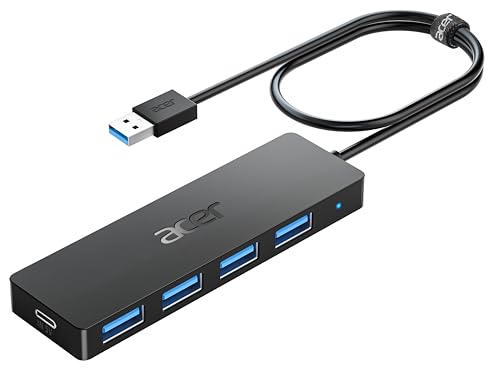
The Acer USB Hub 4 Ports gets the basics right without taking over the desk. Its four USB-A ports turn one computer connection into room for a keyboard, mouse, printer, flash drive, or similar accessory. The two-foot cable gives it enough reach to sit beside a desktop or travel with a laptop, and the slim body is easy to tuck behind a monitor.
Each port is USB 3.0 and rated for data speeds up to 5Gbps. That is the level to look for when moving photos or documents from a flash drive, though connected devices and the shared computer connection still affect actual results. Acer says all four ports can work simultaneously, and the built-in GL3510 chip plus thermal design is intended to keep the connection stable.
The small USB-C socket deserves careful attention. It is marked as a 5V input and cannot transfer data or charge another device. Its job is to supply power to the hub and connected ports, which can help when an external hard drive needs more stable power. That distinction makes the Acer more useful than a simple bus-powered splitter in some setups, but it is not a charging hub.
Compared with the Anker 4-Port USB 3.0 Hub, the Acer offers the same basic port count and speed while giving users the option of supplemental power. The UGREEN 4-Port Ultra-Slim Hub is smaller and lighter for travel, but the Acer's longer cable and power input make it more comfortable on a fixed desk. Skip it if you need USB-C data ports, dedicated charging, or more than four devices. For a keyboard, mouse, printer, and occasional storage device, it is the easiest hub here to recommend.
2. ABFCRTTW 7-Port Long Cable: Best Long-Reach Hub

Pros
- Seven USB-A ports
- Four-foot cable for desktop placement
- Aluminum housing helps with heat dissipation
- Up to 5Gbps data transfer
- 5V/3A USB-C power input
Cons
- Does not support charging
- All ports use USB-A
- Power input is not a data connection
Best for: desktop users who need to place a multi-port hub away from the computer tower.
The ABFCRTTW 7-Port Long Cable solves a problem that small hubs ignore: the computer is often under the desk while the devices are not. Its four-foot cable lets the aluminum hub sit on the desktop, beside a monitor, or near a cluster of external accessories. That extra reach is more meaningful than it sounds when plugging in a flash drive or moving a printer cable.
There are seven USB-A ports, all described as USB 3.0 with transfer speeds up to 5Gbps. That is enough for common peripherals and ordinary file transfers, and the seven-port layout gives a desktop PC far more breathing room than the Acer USB Hub 4 Ports. The product supports Windows, macOS, and Linux with plug-and-play operation.
The hub has a 5V/3A Type-C port intended to provide power for higher-demand devices such as external hard drives and USB fans. It does not turn the hub into a charger, and the listing specifically says the device supports data transmission rather than charging. Buyers should treat that socket as supplemental hub power, not as a USB-C data port.
The aluminum enclosure is a sensible choice for a hub that may have several cables attached, since the material is intended to aid heat dissipation. The JESWO 7-Port Powered Hub is a better fit when you want a supplied wall adapter and a powered design, while this ABFCRTTW is more flexible when a four-foot computer cable is the main requirement. It is a strong desktop choice for older USB-A equipment, but not for anyone building a USB-C-first setup.
3. Anker 4-Port USB 3.0 Hub: Best Compact Classic

Pros
- Four USB 3.0 ports
- Up to 5Gbps data transfer
- Two-foot cable
- Lightweight 0.11-pound design
- Plug-and-play operation
Cons
- Charging is not supported
- No supplemental power input
- Only USB-A ports are provided
Best for: a laptop or desktop user who wants a simple, compact way to add four data ports.
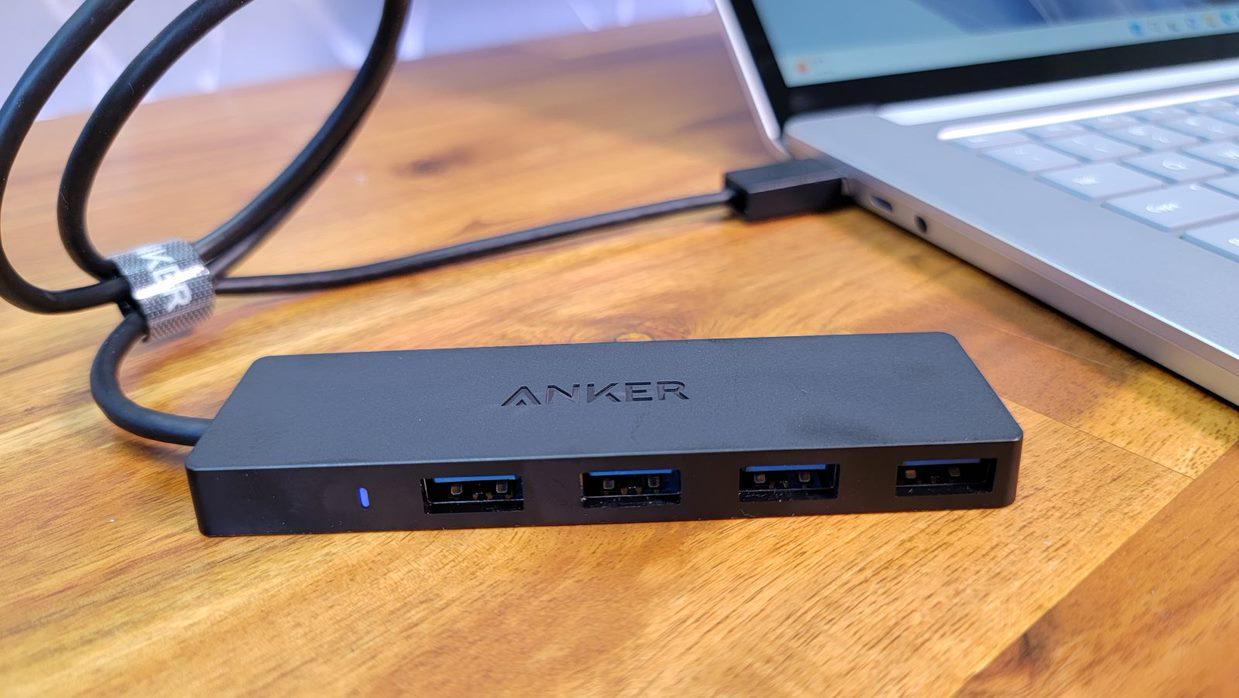
The Anker 4-Port USB 3.0 Hub is a straightforward splitter with few surprises. It takes one USB-A connection and provides four more for a mouse, keyboard, flash drive, printer, or other peripheral. The two-foot cable is long enough to move the ports away from a laptop or reach a convenient place on a desk without becoming difficult to pack.
Its four ports support data transfer up to 5Gbps, which puts it in the same practical class as the Acer USB Hub 4 Ports and UGREEN 4-Port Ultra-Slim Hub. Anker describes the enclosure as designed for heat resistance and durability, and the hub works without drivers. It is also backward compatible with ordinary USB accessories, though older devices will remain limited by their own interface.
The important limitation is printed directly in the product name: this hub is not designed to charge devices. It is a data hub, not a powered station. That makes it a better match for low-demand accessories than for several external hard drives, phones, or other devices that may draw substantial power through USB.
Anker includes an 18-month warranty and customer service, details that may matter to buyers who prefer an established accessory line. The Acer has a supplemental USB-C power input, and the UGREEN is thinner and lighter at 33g, but the Anker remains a clean middle ground for a basic four-port setup. Choose it when the computer has a spare USB-A port and the goal is simply to connect more peripherals.
4. intpw 9-Port USB 3.2 Hub: Best USB-C Mix

Pros
- USB 3.2 ports reach up to 10Gbps
- Four USB 3.0 ports add wider compatibility
- Two dedicated 45W PD charging ports
- Supplied 65W power adapter
- Aluminum angled desktop design
Cons
- PD ports do not transfer data
- No video output
- Multiple SSDs are not recommended simultaneously
Best for: a mixed USB-A and USB-C workstation that needs both fast data and dedicated device charging.
The intpw 9-Port USB 3.2 Hub is the most capable design here for a modern desk, but it also requires the closest reading of the port labels. Its layout combines one USB-C 3.2 port and two USB-A 3.2 ports rated up to 10Gbps with four USB-A 3.0 ports rated up to 5Gbps. That gives newer storage devices a faster path while keeping room for older keyboards, printers, and flash drives.
Two more USB-C ports are dedicated 45W PD charging outputs. They can charge compatible phones, tablets, and other USB-C devices when the supplied power adapter is connected, but they do not carry data. The hub also cannot provide video output, so it is not a replacement for a display dock. That separation is sensible, as long as buyers do not expect every USB-C socket to do everything.
The supplied adapter is rated at 65W, and the hub uses it to compensate for the limited power available from a computer's USB port. The product includes a 3.3-foot USB-C to USB-C cable, making it a natural fit for a USB-C laptop or desktop. Its angled triangular body is set at 32 degrees, with feet intended to keep it stable while devices are plugged in and removed.
This is a more versatile choice than the seven-port ABFCRTTW USB-C Hub because it adds 10Gbps ports, powered charging, and a wall adapter. The SABRENT 10-Port HB-BU10 still gives you more USB-A data connections, and the TP-Link UH720 has a clearer split between data and charging for a traditional USB-A desk. Avoid the intpw if you need video output or plan to run several removable SSDs at once. For a mixed modern workstation, it offers the broadest connection mix in the group.
5. SABRENT 10-Port HB-BU10: Best Port Control

Pros
- Ten USB 3.0 data ports
- Individual power switches
- LED indicator for every port
- 60W, 12V/5A power adapter
- Supports Windows, macOS, and Linux
Cons
- USB-A only
- No dedicated charging output
- Larger than compact four-port hubs
Best for: a fixed desk with many USB-A peripherals that need to be switched off individually.
The SABRENT 10-Port HB-BU10 is built for the desk that has stopped pretending it only needs a keyboard and mouse. Ten USB 3.0 ports provide room for storage, card readers, printers, headsets, controllers, and other USB-A equipment. The supplied 60W, 12V/5A power adapter is important here because a hub serving this many devices should not depend entirely on the computer's own port.
Its most useful feature is not the raw count. Every port has its own power switch and blue LED indicator. That lets you cut power to a drive or accessory without pulling the cable, and the lights make it easy to see which connections are active. For a workstation that changes frequently, this is much tidier than reaching behind the case.
Data transfer is rated up to 5Gbps through the USB 3.0 ports. The hub also supports USB 2.0 and USB 1.1 devices, so older peripherals do not need an adapter. It is plug and play across Windows, macOS, and Linux, which keeps installation simple, though all ten connections remain USB-A.
The WENTER 11-Port Powered Hub offers one more data connection and a dedicated charging port, but the SABRENT has the cleaner individual control system. The TP-Link UH720 is a better match if phone and tablet charging matters more than per-port switches. Skip the SABRENT if desk space is tight or your newer accessories are mostly USB-C. For a large collection of USB-A equipment, the physical switches make it easier to live with than a plain multi-port hub.
6. TP-Link UH720: Best Charging Hub

Pros
- Seven USB 3.0 data ports
- Two dedicated 5V/2.4A charging ports
- 12V/4A power adapter
- Overheat, overload, and surge protection
- Two-year warranty and 24/7 technical support
Cons
- Older USB-A layout
- No individual switch for every port
- Charging ports are separate from data ports
Best for: a USB-A desktop that needs both peripheral expansion and dedicated phone or tablet charging.
The TP-Link UH720 makes a clear distinction between data and charging. Seven USB 3.0 data ports handle a keyboard, mouse, printer, hard drive, and similar equipment, while two separate USB charging ports are designed for phones, tablets, and smaller devices. That arrangement avoids using a data port for charging and makes the hub useful at a mixed work desk.
The data ports support transfer speeds up to 5Gbps and are backward compatible with USB 2.0 and USB 1.1. TP-Link also supports hot swapping, so compatible accessories can be connected or removed while the computer is running. The 12V/4A adapter supplies the hub, while the charging ports can provide up to 2.4A at 5V.
The product includes circuit protections for overheating, overload, overvoltage, and short circuits, along with a built-in surge protector. Those features do not make it a universal charging station, but they are reassuring when several peripherals are connected. Plug-and-play support covers Windows, Mac, Chrome, and Linux systems according to the listing.
The TP-Link has a more useful charging arrangement than the SABRENT HB-BU10, which focuses on individual port control rather than dedicated charging. The intpw 9-Port USB 3.2 Hub is faster and adds USB-C, but its layout is more complicated and its PD ports also do not transfer data. The UH720 is not the newest design, and buyers with USB-C-only accessories should look elsewhere. For a conventional USB-A PC with phones or tablets on the same desk, it remains a well-organized option.
7. JESWO 7-Port Powered Hub: Best Aluminum Powered Hub

Pros
- Seven USB 3.0 ports
- Supplied 20W power adapter
- 3.3-foot USB cable
- Aluminum body with non-slip design
- Compatible with Windows, Mac, and Linux
Cons
- No dedicated charging port
- USB-A data ports only
- Less power capacity than larger powered hubs
Best for: a tidy desktop setup that needs seven USB-A data connections and supplemental power.
The JESWO 7-Port Powered Hub is a sensible step up from a portable splitter when several accessories will remain connected. Its seven USB 3.0 ports provide room for the usual keyboard, mouse, printer, flash drives, and storage devices, while the 3.3-foot cable lets the hub sit in a more convenient spot than the computer's rear panel.
JESWO rates the ports for data transfer up to 5Gbps. That is the same ceiling as the Acer, TP-Link, and SABRENT hubs, so the appeal here is not a faster interface. It is the combination of seven ports, a supplied 20W adapter, and a desktop-friendly cable. Plug-and-play operation is specified for Windows, Mac, and Linux.
The aluminum body is designed to dissipate heat and has a non-slip base. That should help the hub stay put when a stiff cable is connected, although it does not have the individual switches found on the SABRENT or WENTER. The 20W adapter also means this is a powered data hub, not a dedicated high-output charging station.
The ABFCRTTW 7-Port Long Cable gives you a similar port count and a longer cable, but its power arrangement is less complete and it does not support charging. The TP-Link UH720 is more useful when phones and tablets need their own charging ports. Choose JESWO when the priority is a clean, powered USB-A desktop hub with a moderate number of connections. Skip it if your equipment includes many USB-C devices or if you need per-port power control.
8. ABFCRTTW 7-Port USB-C Hub: Best USB-A and USB-C Layout

Pros
- Four USB-A and three USB-C ports
- Four-foot cable
- Aluminum housing
- Up to 5Gbps data transfer
- 5V/3A Type-C power input
Cons
- Does not support charging
- USB-C ports are not rated at 10Gbps
- No supplied wall adapter
Best for: a desktop with a mixture of USB-A and USB-C peripherals.
The ABFCRTTW 7-Port USB-C Hub is the practical choice when a desk has not fully moved from USB-A to USB-C. Four USB-A ports accommodate older accessories, while three USB-C ports make it easier to connect newer drives and cables without separate adapters. The four-foot lead is useful for a desktop tower positioned under or beside the desk.
All seven ports are described as USB 3.0 with speeds up to 5Gbps. That is quick enough for routine file transfers and peripheral use, but it is not the 10Gbps performance offered by the USB 3.2 ports on the intpw 9-Port Hub. The listing also says not to expect charging, so the USB-C ports should be considered data connections rather than power outputs.
A 5V/3A Type-C port is included to provide more stable power for high-demand devices such as external hard drives and USB fans. It is not a data port. The aluminum housing is intended to aid heat dissipation, and the hub uses a dual-chip design with plug-and-play support across Windows, Mac OS, and Linux.
The long-cable ABFCRTTW model has seven USB-A ports instead, making it better for an older accessory collection. The JESWO 7-Port Powered Hub has a wall adapter and aluminum construction, but it cannot connect USB-C peripherals directly. This model makes the most sense for a PC owner who wants a balanced port mix and enough cable length to place the hub on the desk. It is not the right pick for charging devices or high-speed external SSD work.
9. WENTER 11-Port Powered Hub: Best Maximum Expansion
Pros
- Ten USB 3.0 data ports
- Dedicated smart charging port
- Individual on and off switches
- LED indicator for each port
- 3.3-foot USB cable and long power cable
Cons
- USB-A ports only
- Plastic construction
- No USB-C data connection
Best for: a busy, permanent workstation with a large collection of USB-A devices.
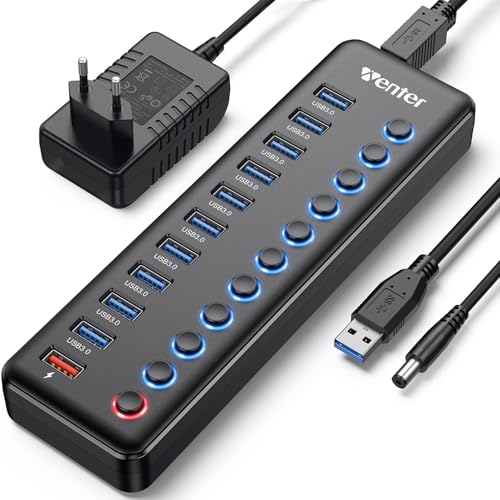
The WENTER 11-Port Powered Hub is designed for a desk where USB devices accumulate faster than available ports. Ten USB 3.0 data ports leave room for storage, input devices, printers, card readers, and other peripherals, while a separate smart charging port handles a phone, tablet, or camera. It is a more expansive arrangement than the seven-port hubs in this roundup.
The ten data connections support speeds up to 5Gbps and work with USB 3.0, USB 2.0, USB 1.1, and USB 1.0 devices. The included 12V/3A adapter provides external power, and the hub supports hot swapping without requiring drivers. WENTER lists compatibility with Windows, Mac OS, and Linux.
Individual on and off switches are a strong reason to choose this hub over a basic splitter. Each port has an LED, so you can disable an idle drive or accessory without unplugging it and see which connections are receiving power. That control is especially useful when the hub stays in one place and several devices remain attached.
The WENTER offers one more data port than the SABRENT HB-BU10 and adds a dedicated charging port, while the SABRENT supplies a higher-rated 60W adapter and has a more established, simpler ten-port focus. The TP-Link UH720 is tidier for a smaller collection and has two charging ports. WENTER is not a good fit for USB-C equipment, and the listing has inconsistent power-cable length details, so buyers should plan around the included cable without relying on a specific measurement. It is best for a large USB-A workstation that benefits from visible, per-port control.
10. UGREEN 4-Port Ultra-Slim Hub: Best Ultra-Portable Hub

Pros
- Four USB-A ports
- Up to 5Gbps data transfer
- 0.5-foot cable
- 33g portable design
- Works across Windows, macOS, Linux, and Chrome OS
Cons
- Very short cable
- No charging support
- No USB-C ports or supplemental power input
Best for: travelers and laptop users who need four nearby USB-A data ports.
The UGREEN 4-Port Ultra-Slim Hub is the smallest and simplest option in this list. It turns one USB-A connection into four ports for a mouse, keyboard, flash drive, or other peripheral, with a short 0.5-foot cable that keeps the hub close to the computer. That makes it easy to carry and less likely to leave loose cable across a small laptop workspace.
The four USB 3.0 ports support data transfer up to 5Gbps. UGREEN says the hub can handle a 10GB file in 16.4 seconds under its stated conditions, though real transfer times depend on the drive, computer, and file mix. Plug-and-play support covers Windows, macOS, Linux, and Chrome OS.
At 33g and 0.4 inches thick, this is the most travel-friendly hub here. It is also compatible with devices such as Xbox Series and PS5 that have USB-A connections, according to the listing. There is no charging output, and the hub does not include supplemental power, so it is better suited to low-demand peripherals than multiple external drives.
The Anker 4-Port USB 3.0 Hub has a longer two-foot cable and a more substantial feel, while the Acer adds a USB-C power input for stability. The UGREEN wins when the hub needs to disappear into a laptop bag or fit beside a cramped port. Its short lead is also its biggest weakness on a desktop PC, where the rear ports may be difficult to reach. Choose it for portability, not for a permanent multi-device workstation.
How to choose best usb hub for pc
The right PC hub starts with the devices you need to connect, then narrows down by speed, power, cable layout, and port type.
Port type and count
Count the plugs you use now, then account for the accessories likely to stay connected. Four USB-A ports are enough for a keyboard, mouse, printer, and occasional flash drive. Seven or more makes sense for a workstation with storage, audio, cameras, and other equipment.
USB-C ports are useful only when they match the devices you plan to connect. A USB-C socket may carry data, provide power, or do both, so read the port description instead of assuming every USB-C connection is a full-featured dock.
Data speed
USB 3.0 hubs in this group support up to 5Gbps, while the intpw adds USB 3.2 connections rated up to 10Gbps. Faster ports matter most for large file transfers and external solid-state drives. A keyboard or mouse will not feel faster on a 10Gbps port.
The speed is shared through the hub and limited by the connected device and computer port. A hub with several fast ports does not guarantee that every connected drive will run at its maximum speed at the same time.
Choose 10Gbps for fast storage work, not because a keyboard needs it.
External power
Bus-powered hubs draw electricity from the computer and are usually enough for mice, keyboards, printers, and flash drives. Powered hubs use a wall adapter to provide more stable operation with several accessories or external hard drives.
A supplemental power input is not the same as a charging port. Acer and the ABFCRTTW models use USB-C inputs to support the hub, while TP-Link, SABRENT, JESWO, WENTER, and intpw include external adapters.
Charging ports
Some hubs separate data ports from dedicated charging outputs. The TP-Link UH720 has two 5V/2.4A charging ports, WENTER has one smart charging port, and intpw has two 45W PD charging ports.
Check whether a charging port supports data before connecting a storage device. On the intpw, the PD ports are charging only. A hub can charge a phone while offering no way to access files through that same port.
Cable length and placement
A short cable keeps a travel hub compact, but it can be awkward when the computer's ports are behind a tower. Two feet works for many laptop and desk arrangements. Four feet gives a desktop hub more freedom to sit on top of the desk or beside a monitor.
A longer cable is especially helpful when the computer is under the desk. It can also reduce the temptation to leave storage devices hanging from a rear port.
Switches and indicators
Individual switches let you cut power to a device without removing its cable. LEDs show which ports are active, which is useful when several accessories are connected. SABRENT and WENTER provide the strongest control here.
Switches add little benefit to a travel hub. For a permanent desk, they can make a multi-device setup easier to manage and reduce cable handling.
For a fuller desktop setup, consider how the hub fits alongside the peripherals that make a PC workspace comfortable. If several devices will remain connected, cable placement and access matter almost as much as the port count.
Frequently asked questions
Can a USB hub add more ports to a PC?
Yes. A USB hub shares one computer USB connection with several downstream ports. The connected devices still share the bandwidth and power available through the computer connection.
Is USB 3.0 fast enough for external drives?
USB 3.0 supports up to 5Gbps and is suitable for many hard drives, flash drives, and ordinary solid-state drives. The actual speed depends on the drive, the computer's port, the hub, and whether other devices are transferring data at the same time.
Do powered USB hubs work with desktop PCs?
Yes. A powered hub connects to the PC for data and uses a separate adapter for additional power. This can improve stability when several peripherals or external drives are connected.
Can a USB hub charge a phone?
Only if it has a charging output or is specifically designed to provide charging. The Anker, UGREEN, and ABFCRTTW data hubs do not support charging, while the TP-Link, WENTER, and intpw models include dedicated charging functions.
Do USB-C hub ports always support data?
No. USB-C describes the connector shape, not every capability. The Acer and ABFCRTTW power inputs are for supplying power to the hub, and the intpw's two PD ports are for charging rather than data.
Will a USB hub support keyboards and mice at the same time?
These hubs are designed for common USB peripherals such as keyboards and mice. They can share a hub without requiring high data bandwidth, though a bus-powered hub may be less suitable when many higher-draw devices are connected too.
Does a USB hub provide video output?
No, not automatically. The intpw listing specifically says it does not support video output, and none of these products is presented as a display dock. A monitor connection requires a hub or dock with an explicitly supported video standard.
The bottom line
The Best USB Hub for PC for most everyday setups is the Acer USB Hub 4 Ports. It is compact, supports four USB 3.0 data connections at up to 5Gbps, and includes a USB-C power input that can help stabilize demanding peripherals. The Anker 4-Port USB 3.0 Hub is a similarly simple alternative, while the UGREEN 4-Port Ultra-Slim Hub is the better travel companion.
For a permanent desk, the intpw 9-Port USB 3.2 Hub is the most versatile pick when USB-C, faster data, and dedicated charging all matter. The SABRENT 10-Port HB-BU10 and WENTER 11-Port Powered Hub make more sense for large USB-A collections, especially when individual switches are useful.
If you are undecided, count the devices that need data first, then choose powered expansion when external drives or charging will share the desk.
As an Amazon Associate we earn from qualifying purchases.