
The best TV for you is the one that fits your room size, viewing habits, and lighting conditions. Start with screen size and panel type; those two choices determine more than any other spec. If you watch mostly movies in a dark room, an OLED is the obvious pick. If the room is bright and you watch a mix of sports, news, and streaming, a high-quality LED or QLED will serve you better. Resolution beyond 4K is largely irrelevant for most homes today, and HDR performance matters far more than the sheer number of pixels.
Step One: Pick the Right Screen Size
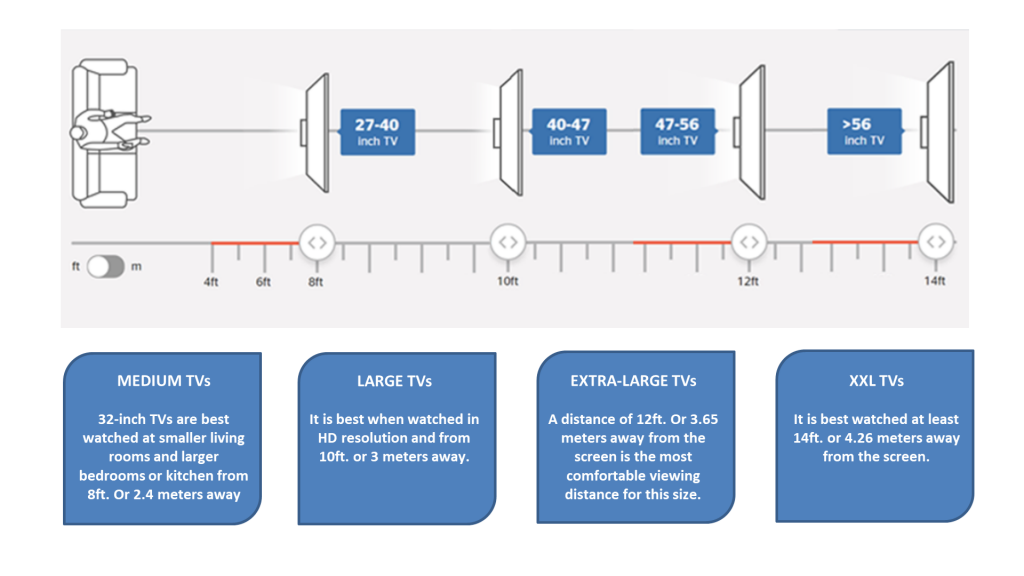
Size is the single most important decision because it directly affects immersion and comfort. A TV that is too small for the viewing distance makes you lean in; one that is too large can cause eye strain or make you miss details at the edges.
The widely accepted rule is to measure the distance from your seating position to the screen, then multiply that distance by roughly 0.84 to get the recommended screen diagonal in inches. For example, if you sit 8 feet (96 inches) away, 96 multiplied by 0.84 gives about 80 inches. That sounds large, but modern 4K content holds up well at closer distances. Many people actually prefer a larger screen than the rule suggests, especially for movies and gaming.
In practice, here is what the industry experience suggests:
- 6 feet or less: 55 to 65 inches is comfortable.
- 7 to 8 feet: 65 to 75 inches works well.
- 9 to 10 feet: 75 to 85 inches.
- 11 feet or more: 85 inches and up.
These are starting points. If you watch mostly standard-definition or 1080p content, sitting too close to a very large screen will reveal compression artifacts. For 4K streaming and Blu-ray, you can sit closer without noticing pixels.
Also measure the physical space: the TV width plus a few inches on each side, and the height including the stand. Wall mounting changes the effective viewing distance slightly, so recalculate if you plan to mount.
Step Two: Choose a Panel Type
The panel technology determines contrast, black levels, brightness, viewing angles, and longevity. There are three main types available in 2026.
OLED (Organic Light Emitting Diode)
Each pixel produces its own light and can turn off completely, creating true blacks and infinite contrast. This gives OLED TVs the best picture quality for dark-room viewing. Colors are rich, viewing angles are excellent, and response times are instant.
The trade-offs: OLED panels are not as bright as high-end LED sets, so they struggle in very bright rooms with direct sunlight. There is also a risk of permanent burn-in if static elements like news tickers or game HUDs are displayed for many hours each day, though modern OLEDs have mitigations. OLEDs also cost more per inch than LED alternatives.
Best for: movie enthusiasts, gamers who play in a dim room, and anyone who prioritizes picture quality over brightness.
LED / QLED (Quantum Dot LED)
These are LCD panels with LED backlighting. The term QLED refers to a layer of quantum dots that improve color volume and brightness. A good LED TV with full-array local dimming can approach OLED contrast, but it cannot match the per-pixel black level. The best LED sets get much brighter than OLED, making them ideal for bright living rooms.
Cheaper LED TVs use edge lighting or basic direct lighting with few dimming zones, resulting in visible blooming (halos around bright objects on dark backgrounds). The viewing angle is narrower than OLED; colors and contrast shift if you sit off-center.
Best for: bright rooms, daytime viewing, sports, and households where the TV is on for many hours with static content.
Mini-LED
A refinement of LED backlighting where the LEDs are much smaller, allowing more dimming zones. Mini-LED TVs can deliver high brightness and very good contrast, sometimes rivaling OLED in dark scenes without the burn-in risk. They cost more than standard LED but less than OLED for the same size.
Best for: a middle ground that offers excellent HDR brightness and good black levels without OLED's concerns.

Step Three: Resolution and HDR
Resolution: 4K is the Standard
Almost every TV sold today is 4K (3840×2160). 8K TVs exist but are not worth the premium for almost anyone. There is very little native 8K content, and the human eye cannot resolve the extra detail at normal seating distances for screens under about 85 inches. 1080p TVs are still available in very small sizes but are obsolete for main rooms.
Stick with 4K. It is future-proof, and streaming services, Blu-rays, and game consoles all support it.
HDR (High Dynamic Range)
HDR is about contrast and color, not resolution. A TV that handles HDR well can show bright highlights and deep shadows in the same scene, with a wider range of colors. There are several HDR formats: HDR10 (standard), Dolby Vision (dynamic metadata), HDR10+ (similar to Dolby Vision but open), and HLG (for broadcast).
The most important factor is the TV's peak brightness and color volume. For a meaningful HDR experience, look for a TV that can sustain at least 600 nits of brightness on a 10% window, and ideally over 800 nits. OLEDs typically reach 600-800 nits, while high-end LED sets can exceed 1500 nits.
Dolby Vision is widely used in streaming and on disc, so support for it is a strong plus. HDR10+ is less common but found on some Amazon Prime content. Most TVs support HDR10, but not all support Dolby Vision. Check the specs.
Step Four: Refresh Rate and Gaming Features
If you watch only movies and TV shows, a standard 60Hz panel is fine. If you watch sports, play games, or connect a PC, a 120Hz (or higher) panel makes motion smoother.
For gamers, look for HDMI 2.1 ports. HDMI 2.1 supports 4K at 120Hz, variable refresh rate (VRR), auto low latency mode (ALLM), and eARC for high-quality audio. These features matter for PlayStation 5, Xbox Series X, and high-end PC gaming. Not all HDMI ports on a TV are 2.1; check which ones are.
Input lag is also critical. Most modern TVs have a game mode that reduces lag to under 10ms, which is excellent. If you play competitive shooters, prioritize a TV with low input lag and VRR.

Step Five: Smart Platform
Every TV is a smart TV now. The built-in operating system determines how you access apps, how often you see ads, and how long the TV receives updates.
The most common platforms in 2026 are:
- Google TV (used by Sony, TCL, Hisense): clean interface, wide app selection, integrates with Google Assistant and Chromecast. Some models show ads on the home screen.
- webOS (LG): intuitive, fast, with a launcher bar at the bottom. LG has reduced ads recently. Good for streaming.
- Tizen (Samsung): smooth, with a customizable home screen. Samsung pushes its own services but supports all major apps.
- Roku TV (TCL, Hisense, others): simple, no frills, great for people who just want apps. Roku is known for long-term updates.
- Fire TV (Toshiba, Insignia, some others): Amazon-centric, with Alexa built in. The interface is ad-heavy and can feel sluggish on lower-end hardware.
Choose the platform you find easiest to use. You can always add an external streaming device later, but the built-in platform should be at least responsive enough for basic use.
Step Six: Connectivity and Sound
Ensure the TV has enough HDMI ports for your devices. At least two HDMI 2.1 ports is ideal for a gaming setup. One port should support eARC to send uncompressed audio to a soundbar or receiver.
Most TVs have mediocre built-in speakers. They are fine for news and casual viewing, but for movies and music, plan to add a soundbar or speaker system. The money you save on a TV can go toward audio.
Putting It All Together: A Decision Framework
- Measure your room and seating distance. Determine the largest size that fits physically and is comfortable to view.
- Assess your lighting. Is the room bright with windows? Go with a high-brightness LED or QLED. Is it a dedicated media room with controlled light? OLED is the best choice.
- Decide on budget indirectly. Without mentioning price, consider that OLED and Mini-LED cost more per inch. If the absolute best picture is your priority, OLED. If you need a very large screen or high brightness, LED.
- Check HDR support. Make sure the TV supports Dolby Vision if you watch a lot of streaming movies.
- Consider gaming needs. If you own a current-gen console, confirm HDMI 2.1 and 120Hz support.
- Pick a smart platform you like. Read a few reviews about the responsiveness of the interface.
- Plan for audio. Budget for a soundbar if you care about sound quality.
Common Misconceptions
"More pixels always mean better picture." Not true. 8K is overkill for most homes. Contrast and color matter more than resolution at normal distances.
"All 4K TVs are the same." Far from it. The panel type, backlight technology, and processing chip make huge differences. A cheap 4K LED looks noticeably worse than a well-reviewed model from a major brand.
"I need the highest refresh rate for movies." Movies are filmed at 24 frames per second. A 60Hz TV can display 24p content without judder if it has proper 24p support. 120Hz helps with motion interpolation and gaming, but is not necessary for movies.
"OLED burn-in is inevitable." Modern OLEDs have pixel refresher cycles, logo dimming, and other protections. If you vary content and do not leave static images on screen for 10+ hours a day, burn-in is unlikely during normal ownership.
FAQ
Do I need an 8K TV in 2026?
No. There is almost no native 8K content, and the difference at normal viewing distances is invisible on screens under 85 inches. 4K remains the practical standard for the next several years.
What is the difference between OLED and QLED?
OLED uses self-emissive pixels that turn off completely for perfect blacks. QLED is an LED-backlit LCD with a quantum dot layer for better color. OLED wins in dark rooms; QLED wins in brightness and is less susceptible to burn-in.
How do I know if a TV supports Dolby Vision?
Check the specifications on the manufacturer's website or the box. Look for "Dolby Vision" in the HDR support list. Most mid-range and high-end TVs from LG, Sony, TCL, and Hisense include it. Samsung TVs do not support Dolby Vision; they use HDR10+ instead.
Should I buy a TV with a 120Hz refresh rate if I don't game?
It is not necessary, but it can improve motion clarity for sports and reduce judder in 24p content if the TV has good motion processing. If you only watch movies and news, 60Hz is fine.
How long should a modern TV last?
Expect 5 to 7 years of good performance. LED backlights can last longer, but the smart platform may become slow or stop receiving app updates after 4-5 years. OLED panels have a lifespan of roughly 30, 000 to 50, 000 hours of use, which translates to many years of normal viewing.