

Streaming setups tend to fail in predictable ways: the microphone sounds distant, the room is too dark, or the mixer has more buttons than the creator knows what to do with. The Best streaming bundles solve at least one of those problems by combining the core hardware into one starting point.
This group is unusually broad. It includes creator audio kits, two streaming televisions, and a webcam package, so the right choice depends on what you mean by streaming. Some are built for a solo podcaster, some for gaming chat, and one is a serious living-room display.
Our top pick is the TENLAMP G10 Creator Audio Mixer Bundle, with the Sony BRAVIA 9 II for premium TV streaming and the Abel Gaming Webcam Kit for a complete camera, light, and microphone setup.
| # | Product | Award | Main hardware | Compatibility | Best for |
|---|---|---|---|---|---|
| 1 | TENLAMP G10 Creator Audio Mixer | Best overall | Mixer and condenser microphone | Windows, Mac, iOS, Android | Creators who want flexible audio controls |
| 2 | Sony BRAVIA 9 II 65-inch | Best premium TV | 65-inch RGB Mini LED TV | Google TV, HDMI 2.1 | High-end home streaming |
| 3 | Roku 50-inch Select QLED | Best simple TV | 50-inch 4K QLED TV | Roku, Wi-Fi, Ethernet | Easy everyday streaming |
| 4 | FIFINE AmpliGame KS5 | Best USB and XLR mic | Dynamic microphone and mixer | USB and XLR | Gamers who may upgrade later |
| 5 | Abel Gaming Webcam Kit | Best camera starter kit | 1080p webcam, microphone, LED light | PC, Mac, mobile devices | New Twitch and YouTube creators |
| 6 | P PUPGSIS T12S Audio Bundle | Best live-control kit | Dynamic microphone and mixer | PC, phone, PS5 | Interactive gaming streams |
| 7 | sktome AM100 V8 Podcast Kit | Best complete condenser kit | BM-800 mic and sound card | PC, phone, consoles | Beginners who need many accessories |
| 8 | sktome V8s Two-Mic Kit | Best for two speakers | Two condenser microphones | PC, phone, gaming platforms | Co-hosted podcasts |
| 9 | ALSO GO V8s Podcast Kit | Best compact sound-effects kit | BM-800 mic and mixer | PC, phone, Xbox | Small streaming desks |
| 10 | Brvomussy Recording Studio Kit | Best instrument-friendly kit | Two condenser mics and mixer | PC, phone, PS5, Xbox | Creators adding instruments |
1. TENLAMP G10 Creator Audio Mixer: Best Overall

Pros
- Mixer, microphone, and accessories in one system
- Noise reduction and real-time voice controls
- Works with computers, phones, and tablets
- Follow singing mode for live performance
Cons
- Effects may take time to learn
- Condenser microphones need thoughtful placement
- No detailed technical specifications for the microphone are provided
Best for: creators who want one flexible audio setup for streaming, podcasting, gaming, and singing.
The TENLAMP G10 Creator Audio Mixer is the most complete-feeling audio bundle here. It is not just a microphone attached to a small control box. The package combines an audio mixer, condenser microphone, and the supporting accessories needed to start recording or streaming without assembling a system piece by piece.
Its strongest feature is control. The mixer lets you adjust bass, treble, reverb, and pitch in real time, while built-in noise reduction helps keep unwanted background sound from dominating a voice track. The follow singing mode is a particularly useful touch for live performers because the creator can hear the original track while the audience receives the intended vocal and music mix.
The G10 also covers more devices than the FIFINE AmpliGame KS5. TENLAMP lists compatibility with Windows, Mac, iOS, and Android, and says that no drivers are required. That makes it a better fit for someone who moves between a computer, phone, and tablet. Its listed dimensions are 10.9 by 7.67 by 2.28 inches, and it weighs 4.23 pounds, so this is a substantial desktop unit rather than a tiny travel accessory.
The weakness is that the feature list is more specific about effects than about the microphone's pickup behavior or recording specifications. Buyers who want a straightforward microphone with a clear upgrade path may prefer the FIFINE's USB and XLR arrangement. The G10 is better for creators who want immediate hands-on control, voice effects, and a wide range of live formats.
For creators building a serious desk-based audio station, this is the bundle we'd keep. It gives a beginner room to experiment without making the mixer irrelevant once the stream becomes more ambitious.
2. Sony BRAVIA 9 II 65-inch: Best Premium TV

Pros
- RGB Mini LED backlighting
- 4K resolution at 120Hz
- HDMI 2.1, VRR, and ALLM
- Google TV with broad app support
- Dolby Vision, HDR10, and HLG
Cons
- Large and heavy at 99 pounds
- Premium feature set may exceed casual viewers' needs
- A 65-inch screen needs substantial room
Best for: viewers who want a premium home display for movies, live television, and next-generation gaming.
The Sony BRAVIA 9 II is the clear display specialist in this roundup. While most of the products focus on sending your voice to an audience, this one is designed for the other side of streaming: watching films, sports, shows, and games on a large, high-performance screen.
Sony uses RGB Mini LED backlighting with XR Backlight Master Drive. The practical promise is tighter control over brightness, contrast, and color than a basic LED television can provide. The 65-inch 4K HDR panel should give streaming films a more cinematic presentation, especially with supported HDR content. Dolby Vision, HDR10, and HLG are all listed, so the television is prepared for the major HDR formats named in the product information.
This is also the strongest gaming television in the group. HDMI 2.1, 4K at 120Hz, variable refresh rate, auto low latency mode, auto HDR tone mapping, and a dedicated Game Menu cover the features that matter when a console or gaming PC is connected. Google TV supplies the streaming interface, with apps including Netflix, Prime Video, Disney+, YouTube, Apple TV, Hulu, and Peacock. Built-in Gemini assistance, Chromecast, AirPlay 2, and smart-home compatibility add convenience around the screen.
The physical demands are real. The television is listed as 66 inches wide, 39 inches high, and 15 inches deep, with a weight of 99 pounds. It also needs a sturdy stand or suitable wall mount. The Roku 50-inch Select QLED is far easier to place, and its Roku interface is simpler for households that want fast access to familiar apps. Sony wins on picture and gaming capability, not ease of fitting into a small room.
This is the right pick for a dedicated media room or a viewer who notices differences in HDR, motion, and gaming response. If streaming is mainly casual television in a bedroom or apartment, the Sony's scale and advanced controls are more than necessary.
3. Roku 50-inch Select QLED: Best Simple TV

Pros
- 50-inch 4K QLED display
- Straightforward Roku platform
- HDR support
- HDMI, USB, Wi-Fi, and Ethernet connectivity
- HDMI cable included
Cons
- Less advanced backlighting than the Sony
- The product information does not identify the exact HDR formats
- Not as specialized for high-refresh gaming
Best for: households that want a simple television with built-in access to streaming apps.
The Roku 50-inch Select QLED gets the basics right. It is a conventional living-room television with a 50-inch 4K QLED display, built-in Roku software, and the connections needed for a console, soundbar, Blu-ray player, or separate streaming device. The appeal is less about technical ambition and more about reducing the number of boxes on the shelf.
Quantum Dot technology is used to widen the color range and improve brightness, while the 4K resolution keeps compatible content sharp on a screen of this size. HDR support is listed, although the product information does not specify the exact formats. That matters if you are comparing it directly with the Sony BRAVIA 9 II, which names Dolby Vision, HDR10, and HLG.
Roku remains the easier platform for a mixed household. Its interface is familiar, the product supports live television and free entertainment apps, and voice remote features are supported. Multiple HDMI and USB connections, Wi-Fi, and Ethernet give it enough flexibility for a typical media center. The package also includes an HDMI cable and a 12-month CPS warranty, according to the listing.
It does not match Sony's RGB Mini LED backlight, 4K at 120Hz support, or HDMI 2.1 gaming feature set. The Roku is the calmer choice for people who want to launch apps and watch content without adjusting a long list of picture options. Readers comparing television platforms can also consider how a built-in interface compares with a separate streaming box before deciding what belongs in the setup.
The Roku is best when ease matters more than enthusiast-level display performance. It suits a living room, bedroom, office, or apartment where a 50-inch screen and uncomplicated software make more sense than the Sony's larger, heavier design.
4. FIFINE AmpliGame KS5: Best USB and XLR Mic

Pros
- Dynamic microphone with USB and XLR connections
- Mixer includes volume fader and headphone monitoring
- Individual mute control
- Five RGB lighting effects
- Useful for gaming, podcasts, and streaming
Cons
- Mixer controls differ between USB and XLR use
- Some functions are unavailable through XLR
- Listed weight is 3.26 pounds
Best for: streamers who want simple USB setup now and an XLR route for a later audio upgrade.
The FIFINE AmpliGame KS5 is the most sensible bridge between beginner convenience and more traditional recording hardware. Its dynamic microphone supports both USB and XLR, so a new streamer can connect directly to a computer and later use a more advanced audio path without replacing the microphone.
The bundled mixer is designed for quick gaming adjustments. It has individual mute control, headphone monitoring, a volume fader, and other function keys. The RGB system offers five lighting effects, including static and flowing modes, which will appeal to creators who want the audio hardware to look at home beside a gaming PC.
The important caveat is how the two connection methods behave. FIFINE says that the RGB, mute, monitoring, and volume knob functions are not available through the XLR connection and work only through USB. That is not a flaw if you understand the arrangement, but it prevents the mixer from behaving like a fully identical control surface in both modes.
Compared with the TENLAMP G10 Creator Audio Mixer, the FIFINE is less expansive for voice effects and mobile-device flexibility. It is more useful for someone who specifically wants a dynamic microphone and a recognizable upgrade route. The P PUPGSIS T12S Audio Bundle offers more playful sound pads and voice changers, but the FIFINE's dual USB and XLR design is easier to plan around.
Choose this bundle if you expect your audio setup to evolve. It is a better long-term starting point than a fixed condenser microphone kit, especially for a gaming streamer who values physical mute and headphone controls.
5. Abel Gaming Webcam Kit: Best Camera Starter Kit

Pros
- 1080p video at up to 30 fps
- USB microphone included
- LED light with warm, cool, and mixed modes
- Works with PC, Mac, and many mobile devices
- Three-piece camera, audio, and lighting package
Cons
- Not a standalone PS5 or Xbox solution
- Requires a capture card and PC for console streaming
- 30 fps is aimed at standard streaming rather than high-motion video
Best for: first-time creators who need a camera, microphone, and light in one package.
The Abel Gaming Webcam Kit solves a problem that audio-only bundles cannot: a new creator needs to look presentable as well as sound clear. The package includes a 1080p webcam, USB microphone, and adjustable LED light, making it a practical starting point for Twitch, YouTube, podcast video, remote work, or online calls.
The webcam records at 1920 by 1080 resolution and up to 30 frames per second. That is enough for conventional talking-head streams and video calls, though creators making fast gaming footage should not expect the motion handling of a higher-frame-rate camera. The included LED uses warm, cool, and mixed modes, so it can compensate for a dim room or an unflattering overhead light.
Compatibility is broad for a USB kit. The listing names Windows, Mac, Android, iOS, and Harmony OS support, with compatibility spanning Windows 7 and newer and Mac OS 10.10 and newer. The microphone also includes noise suppression. The kit contains three main items, which keeps the setup more focused than the multi-control audio packages elsewhere in this list.
The console warning should be taken literally. It is not compatible with PlayStation, Xbox, or consoles by itself. Streaming from a PS5 or Xbox requires both a capture card and a PC or laptop. That makes the FIFINE or P PUPGSIS bundles more relevant for console-focused audio, although neither replaces the camera and light.
This is the one we'd recommend to a new face-on-camera creator who wants fewer separate decisions. It is not a complete console studio, but for PC and Mac streaming it covers the three essentials that are most often missing: picture, voice, and lighting.
6. P PUPGSIS T12S Audio Bundle: Best Live-Control Kit

Pros
- Dynamic microphone and gaming mixer included
- Four programmable sound pads
- Sound pads can record clips up to 25 seconds
- Six voice changers and two preset effects
- Headphone monitoring and separate mute controls
Cons
- The supplied headphones are intended for testing
- Uses a 1/4-inch microphone connection
- More focused on live effects than polished recording
Best for: gaming streamers who want quick sound effects and direct control during a live broadcast.
The P PUPGSIS T12S is built for interaction. Its selling point is not a restrained studio workflow. It is a small live-performance console with buttons for muting, voice changes, sound effects, karaoke mode, ducking, and loopback, paired with a dynamic microphone.
Four customizable sound pads can each hold up to 25 seconds of recorded material. Six voice changers and two preset sound effects add more options for gaming banter, audience interaction, and playful live segments. Individual mute controls, headphone monitoring, and volume faders make the mixer easier to operate while attention is divided between a game and a chat window.
The bundle uses a 1/4-inch, or 6.35mm, dynamic microphone connection and includes an XLR to 6.35mm TRRS audio cable, an OTG cable, and wired headphones. The headphones are described as being supplied to test whether the sound-card set works properly, so they should not be treated as the main reason to buy the kit. The package is compatible with PC, phone, and PS5, and the maker lists support for OBS, YouTube, Twitch, and Discord.
The TENLAMP G10 Creator Audio Mixer is the more versatile choice for singing, mobile creation, and detailed tonal adjustment. The FIFINE AmpliGame KS5 is better if microphone connectivity and future XLR use matter more. P PUPGSIS wins when the stream itself is the performance and the creator needs buttons that can be reached quickly.
Audio effects can become distracting if they are used constantly, and the product is less clearly aimed at clean long-form podcast recording. Pick it for a lively gaming channel, not for a quiet voiceover booth.
7. sktome AM100 V8 Podcast Kit: Best Complete Condenser Kit

Pros
- BM-800 condenser microphone
- Boom arm, shock mount, pop filter, and foam cover
- Cardioid pickup pattern
- Voice changer and live sound card
- Supports computers, phones, tablets, and consoles
Cons
- Requires charging before use
- Condenser microphones can hear more room sound
- The product information does not provide detailed audio measurements
Best for: beginners who want a traditional microphone arm setup with a live sound card.
The sktome AM100 V8 is a classic starter podcast package. It includes the BM-800 condenser microphone, adjustable suspension scissor arm, shock mount, pop filter, anti-wind foam cap, power cable, and live sound card. That collection is useful for someone starting from an empty desk and wanting the microphone physically positioned rather than held or placed loose on a stand.
The microphone uses a cardioid pickup pattern, which is intended to favor sound from the front. That is a sensible arrangement for a solo speaker, particularly when the microphone is placed close to the mouth and the rear of the mic is aimed toward a noisy source. The pop filter and foam cover provide two layers of protection against plosive sounds and wind.
The V8 sound card adds voice effects and connection options. The listing says it works with Windows and Mac OS, as well as smartphones, tablets, iPad, PS4, Xbox, Switch, and other game platforms. That is wider device coverage than some basic computer microphone kits. The system also supports different connection methods for calls, live singing, TikTok, YouTube, and voice chat.
The main limitation is the lack of detailed audio measurements. The listing describes a professional sound chipset and rich, mellow capture, but it does not identify a frequency response or sample rate. Compared with the FIFINE AmpliGame KS5, this is a less clearly documented microphone path. Compared with the two-mic sktome V8s kit, it is the better fit for one speaker.
Charge the system before first use, as the product instructions request. This is a sensible entry point for a solo creator who wants a boom arm and basic effects without building the rig one part at a time.
8. sktome V8s Two-Mic Kit: Best for Two Speakers

Pros
- Two condenser microphones included
- Two boom arms and shock mounts
- Four voice changers
- Twelve electric sounds and twelve sound effects
- Designed for shared podcasts and streams
Cons
- More equipment to position and manage
- Condenser microphones need a reasonably controlled room
- The system requires charging before use
Best for: two-person podcasts, interviews, and gaming streams with a co-host.
The sktome V8s is the obvious pick when one microphone is not enough. It includes two condenser microphones, two microphone boom arms, two shock holders, two pop filters, two foam head covers, and two 3.5mm earphones. The setup is much closer to a shared podcast station than a solo creator kit.
The V8s sound card brings the controls together in one operating panel. The listing names reverb, treble, bass, noise reduction, accompaniment, ducking, and voice change modes. Four voice changers, twelve electric sounds, twelve sound effects, and ten modes give a co-hosted show plenty of ways to add transitions or audience interaction.
Both microphones use a cardioid pickup pattern, which is suitable for focusing each speaker's voice from the front. Placement will matter more with two speakers because the microphones need to be separated and aimed carefully. A small, reflective room may make the condenser microphones pick up more ambient sound than a dynamic microphone such as the FIFINE's.
The trade-off is physical complexity. The single-mic sktome AM100 V8 is easier to set up and leaves more desk space, while the Brvomussy Recording Studio Kit also lists two condenser microphones but adds direct instrument access. The V8s is the cleaner choice for two human voices and does not pretend to be an instrument rig.
Choose it for a co-hosted podcast, interview, or gaming stream. A solo creator should skip the extra hardware unless a second speaker is part of the plan.
9. ALSO GO V8s Podcast Kit: Best Compact Sound-Effects Kit
Pros
- BM-800 condenser microphone
- Boom arm, shock holder, pop filter, and foam cover
- Ten sound effects and four voice changes
- Cardioid pickup and noise reduction
- Compact mixer dimensions
Cons
- Includes one microphone
- Needs charging before first use
- Not as expandable as a USB and XLR system
Best for: creators who want a small desktop mixer with basic voice effects.
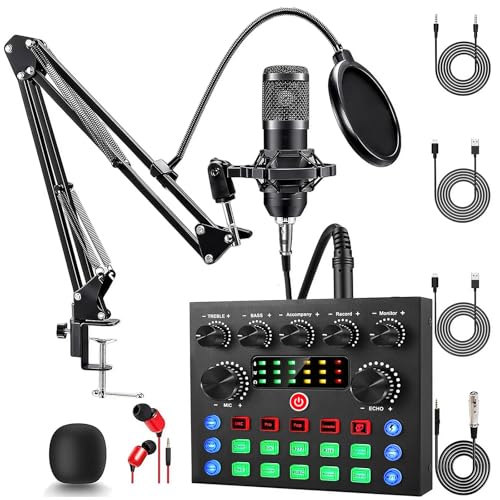
The ALSO GO V8s keeps the familiar BM-800 starter format but makes the mixer the center of attention. The package includes one microphone, a boom arm, shock holder, pop filter, and foam cover, so it provides the physical basics for a voice setup without the second-microphone complexity of the sktome V8s.
Its mixer supports ten sound effects, four voice changes, four voice modes, and thirteen practical functions. Reverb, treble, bass, and noise reduction are all listed. That is enough to make a live broadcast more playful, while the cardioid pickup and dual-layer pop and wind protection aim to keep the main voice prominent.
The compatibility list includes Windows, Mac OS, iOS, Android, PCs, smartphones, and Xbox systems. The product also says it can work for gaming, podcasting, music, and outdoor creation. The mixer measures 5.12 inches long, 4.17 inches high, and 1.02 inches wide, which makes it notably easier to fit on a crowded desk than the TENLAMP unit.
It is not the choice for someone who wants a documented studio interface or a clear future move to XLR hardware. The FIFINE AmpliGame KS5 has the stronger upgrade story, and the P PUPGSIS T12S has more explicitly live-oriented sound pads. ALSO GO sits between those approaches, offering a compact package with enough effects for casual broadcasts.
This bundle makes sense for a small desk and a single creator. Fully charge it before first use, then treat the effects as occasional tools rather than the foundation of every recording.
10. Brvomussy Recording Studio Kit: Best Instrument-Friendly Kit

Pros
- Two condenser microphones included
- Two suspension arms
- Ten sound effects and four voice variations
- USB-C connectivity
- Supports direct connection of several instruments
Cons
- Listed weight is 3.26 pounds
- Product information does not provide detailed audio measurements
- More equipment than a solo speaker needs
Best for: creators who want a two-microphone setup with the option to connect instruments.
The Brvomussy Recording Studio Kit is the most ambitious of the BM-800-style bundles. It includes two condenser microphones and two anti-vibration suspension arms, then adds a live sound card with voice changing, effects, and USB-C connections. That makes it a better fit for a small recording corner with more than one performer.
The mixer offers four sound variations, including female, male, child, and monster, plus ten sound effects and thirteen functions. The listing also describes smart noise reduction, a DSP audio processing chip, metal mesh, and foam protection around the microphone. Those details suggest a kit aimed at creators who want live manipulation as well as ordinary speaking.
Its unusual advantage is direct instrument access. The product says it can connect electric guitars, basses, and electronic drums while retaining their dynamic response. It also lists compatibility with smartphones, PCs, PS5, Xbox, Windows, Mac OS, Android, iOS, and Chrome OS. That combination gives it a wider creative brief than the ALSO GO V8s, which is more naturally a single-voice podcast kit.
The claims are broad, and the listing does not provide detailed recording measurements. The kit is also more than a solo podcaster needs, especially if there is no plan to use instruments or a second microphone. The sktome V8s Two-Mic Kit is a more direct choice for two spoken voices, while the FIFINE is easier for a single gamer who wants USB and XLR.
Choose Brvomussy when the stream might include music, multiple speakers, or live instrument input. It is a flexible bundle, but it needs a creator with a clear use for all that hardware.
How to choose best streaming bundles
The right bundle starts with the content format, then narrows down to the hardware that controls the biggest weakness in the setup.
Microphone type
Dynamic microphones tend to be more forgiving in rooms with fans, keyboard noise, or untreated walls because they are designed for close vocal use. Condenser microphones, including the BM-800 models in this list, can capture a more open voice but need careful placement and room management.
For a solo gaming stream, the FIFINE dynamic microphone is easier to position than the condenser kits. For a seated podcast with a boom arm and pop filter, the sktome and Brvomussy packages make more sense.
Mixer controls
A mixer matters when the creator needs to change microphone level, monitor headphones, mute quickly, or add effects without opening software. Faders and individual mute controls are useful during a live broadcast. Sound pads are more specialized, but a 25-second recording pad can be handy for recurring audience cues.
Do not choose a mixer only because it has many buttons. The controls should match the show. TENLAMP is stronger for tonal adjustment and singing, while P PUPGSIS is more entertaining for gaming interaction.
The best live mixer is the one whose important controls you can reach without looking away from the stream.
USB, XLR, and device support
USB is the easiest route into a computer, while XLR is the more traditional connection for an audio interface or mixer. The FIFINE is unusual here because its microphone supports both. Its USB and XLR modes do not expose the same mixer functions, so check the connection you intend to use.
Mobile and console compatibility also varies. The Abel webcam kit needs a capture card and a PC or laptop for PS5 or Xbox streaming. The audio bundles list broader phone and console support, but the exact cable and connection path still matters.
Camera resolution and lighting
A camera kit should be judged as a complete image system, not only by resolution. The Abel webcam records 1920 by 1080 at up to 30 fps, and its adjustable LED offers warm, cool, and mixed modes. That light may improve the image more than a small jump in camera sharpness would.
Creators who stream without appearing on camera can ignore this category. Anyone making face-to-camera content should plan for lighting direction, background clutter, and the distance between the webcam and the subject.
Television platform and display hardware
For TV streaming, software and panel hardware are separate decisions. Roku's interface is straightforward and supports a broad collection of apps, while Sony's Google TV adds a more advanced display and gaming feature set. Sony also lists HDMI 2.1, 4K at 120Hz, VRR, and ALLM, which matter for compatible consoles.
A separate device can change how you organize the setup, so consider which television connections matter for adding streaming hardware before buying a screen. If the television's built-in software is the priority, Roku is the simpler path. If picture control and gaming response matter more, Sony is the stronger option.

Frequently asked questions
What is the best streaming bundle for a beginner?
The TENLAMP G10 Creator Audio Mixer Bundle is the strongest all-around audio starting point because it combines a microphone, mixer, noise reduction, effects, and broad device support. For a creator who needs video as well as audio, the Abel Gaming Webcam Kit is more complete because it includes a camera and light.
Which streaming bundle is best for gaming?
The FIFINE AmpliGame KS5 is the best fit for a gaming streamer who wants a dynamic microphone, headphone monitoring, mute control, and both USB and XLR connections. The P PUPGSIS T12S is better for creators who prioritize voice changers and live sound pads.
Can the Abel webcam kit stream directly from a PS5?
No. The product listing says it is not compatible with PlayStation, Xbox, or consoles by itself. A PS5 or Xbox setup requires a capture card and a PC or laptop.
Are condenser microphones good for podcasting?
They can be, especially when the microphone is placed close to the speaker and the room is reasonably quiet. The BM-800 bundles add cardioid pickup, pop filters, foam covers, and shock mounts, but a dynamic microphone may be easier in a noisy gaming room.
Which bundle works for two podcast hosts?
The sktome V8s Two-Mic Kit includes two condenser microphones, two boom arms, and two shock mounts, making it the most direct fit for two speakers. The Brvomussy kit also includes two microphones, but it is more useful when instrument access is part of the plan.
Is XLR better than USB for streaming?
Neither connection is automatically better for every streamer. USB is simpler for a computer, while XLR can fit a more flexible audio chain. The FIFINE bundle supports both, though its mixer controls differ between USB and XLR operation.
Should I use a built-in TV streaming platform or a separate device?
A built-in platform is simpler and reduces cable clutter. A separate device can offer a different interface or make it easier to replace the streaming hardware without replacing the television. The Roku 50-inch Select QLED is the most straightforward built-in option here, while the Sony adds Google TV alongside a more advanced display.

The bottom line
The Best streaming bundles category has two clear winners by use case. The TENLAMP G10 Creator Audio Mixer is the best general creator setup because it combines flexible sound controls, voice effects, noise reduction, and support for computers and mobile devices. For a premium television, the Sony BRAVIA 9 II 65-inch is the more capable choice, especially for HDR viewing and 4K gaming at 120Hz.
The FIFINE AmpliGame KS5 is the smarter pick for a gamer who wants a dynamic microphone and a path from USB to XLR. If the show needs a camera and lighting as well as audio, the Abel Gaming Webcam Kit covers those essentials in one package.
If you are undecided, choose the bundle that fixes the part of your stream viewers notice first: voice, picture, lighting, or the television itself.
As an Amazon Associate we earn from qualifying purchases.