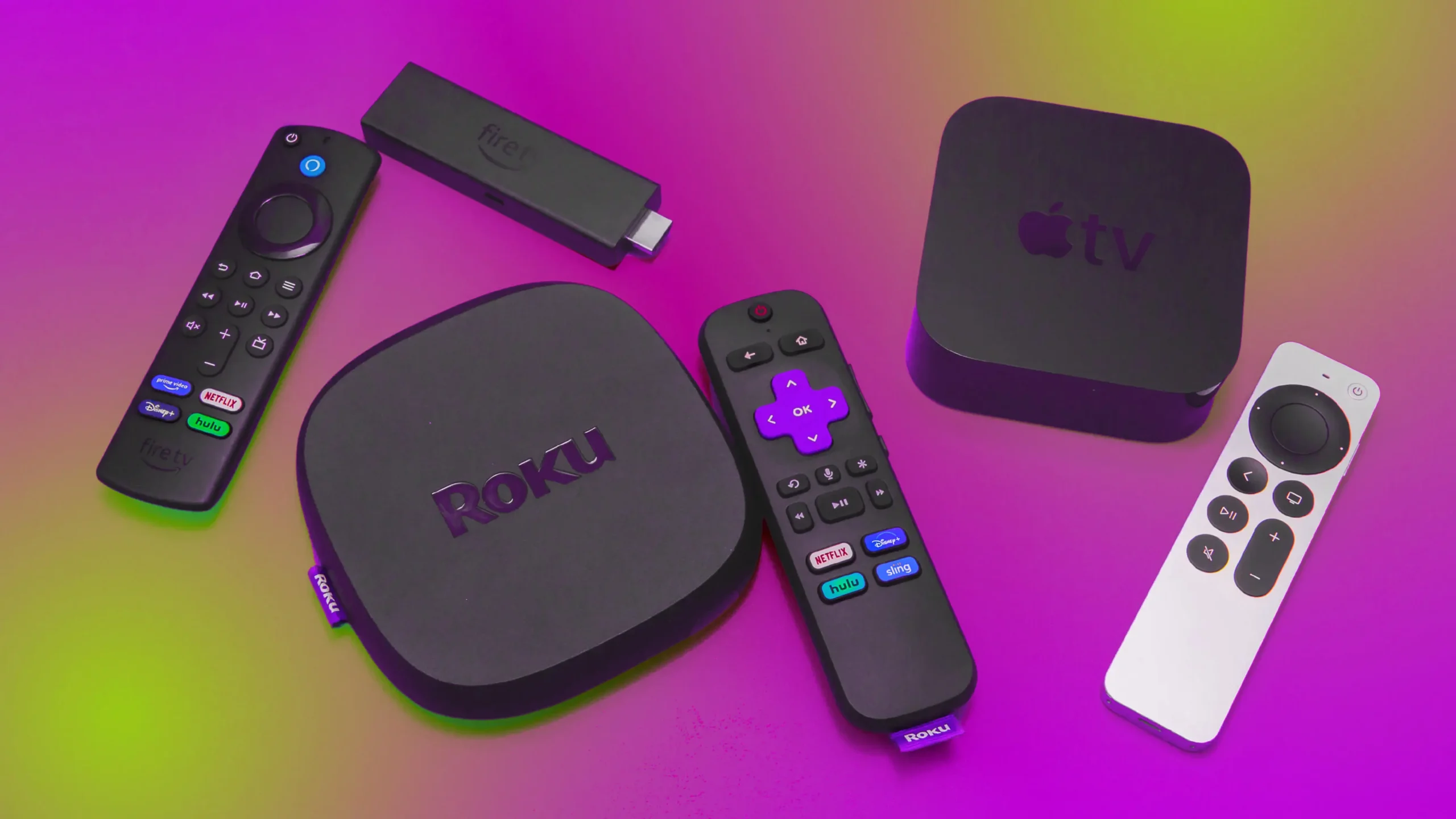

A slow TV interface turns a five-minute episode search into an evening of scrolling. The right box should start apps quickly, find shows across services, and match your television's picture and sound capabilities. Our guide to the Best streaming boxes focuses on those everyday differences, from Roku's clean menus to Android TV's broader flexibility.
The Roku Ultra is our top pick because it combines fast navigation, 4K HDR10+, Dolby Vision, Dolby Atmos, Wi-Fi 6, Ethernet, and an unusually capable rechargeable remote. The other nine picks cover hands-free Alexa control, serious local-media hardware, compact travel sticks, Google TV, and inexpensive Android boxes with plenty of storage.
Comparison table
| # | Product | Award | Video | Connectivity | Best for |
|---|---|---|---|---|---|
| 1 | Roku Ultra | Best overall | 4K, HDR10+, Dolby Vision | Wi-Fi 6, Ethernet, Bluetooth | Most households |
| 2 | NVIDIA Shield TV Pro | Best for power users | 4K HDR, Dolby Vision | Gigabit Ethernet, Wi-Fi, 2 USB 3.0 | Plex, games, local media |
| 3 | Amazon Fire TV Cube | Best hands-free control | 4K, Dolby Vision, HDR | Wi-Fi 6E, HDMI device control | Alexa households |
| 4 | RINGREAT Android 14 TV Box | Best storage for Android | 4K at 60Hz, HDR | Dual-band Wi-Fi, USB 3.0, LAN | App-heavy setups |
| 5 | Roku Streaming Stick HD | Best for HD TVs | HD | TV-powered HDMI stick | Older or secondary TVs |
| 6 | Xiaomi TV Box S 3rd Gen | Best Google TV picture features | 4K, HDR10+, Dolby Vision | Wi-Fi 6, Bluetooth | Google TV viewers |
| 7 | KICKPI KP1 | Best certified Android option | 4K HDR, Dolby Audio | Wi-Fi 5, Ethernet, Bluetooth 5.0 | Chromecast users |
| 8 | TiVo Stream 4K | Best unified search | 4K, Dolby Vision HDR, Dolby Atmos | Android TV, Google Assistant | Cross-app discovery |
| 9 | Roku Streaming Stick 4K | Best compact 4K stick | 4K, HDR10+, Dolby Vision | Long-range Wi-Fi | Wall-mounted TVs |
| 10 | RINGREAT Android 14 8K Box | Best storage capacity | 8K decoding, HDR | Wi-Fi 6, Bluetooth 5.0, USB 3.0 | Local files and expansion |
1. Roku Ultra: Best Overall

Pros
- Fast interface and quick app launches
- 4K, HDR10+, Dolby Vision, and Dolby Atmos support
- Rechargeable backlit remote with hands-free voice control
- Wi-Fi 6, Ethernet, and Bluetooth headphone mode
Cons
- Larger than Roku's streaming sticks
- Roku's interface is less flexible than Android TV for advanced users
- Some services require separate subscriptions
Best for: households that want a quick, simple box with strong picture, sound, and remote features.
The Roku Ultra is the easiest recommendation here because it gets the fundamentals right without making the living room feel like a small computer lab. Apps launch quickly, the home screen is straightforward, and the remote has the buttons people actually use. It is a better fit for a family that wants to get from the couch to a show with minimal friction than an enthusiast who enjoys adjusting a media server.
Picture support is broad enough for a modern television. Roku Ultra handles 4K, HDR10+, and Dolby Vision, while Dolby Atmos covers compatible surround-sound setups. Those formats matter only when the TV, sound system, and streaming service support them, but the box will not be the limiting factor in a well-equipped room. Wi-Fi 6 gives it a newer wireless connection, and Ethernet is available when a wired link makes more sense.
The remote is a standout. Its rechargeable battery is designed to last for months on a charge, the buttons are backlit, and a lost remote finder can save a frustrating search through sofa cushions. Hands-free control lets you say “Hey Roku” from across the room, while Bluetooth Headphone Mode sends audio directly to compatible headphones. That combination is more useful day to day than a remote that merely adds another microphone button.
Compared with the Roku Streaming Stick 4K, the Ultra is the more complete choice because it adds Ethernet, Wi-Fi 6, a more advanced remote, and a faster interface. The NVIDIA Shield TV Pro is more capable for Plex, games, and USB expansion, and the Fire TV Cube is more compelling for Alexa households. Roku Ultra gives up that deeper customization and has a larger box, but its clarity of purpose is exactly why it leads the Best streaming boxes in this group.
2. NVIDIA Shield TV Pro: Best for Power Users

Pros
- Tegra X1+ processor and real-time AI upscaling
- Two USB 3.0 ports for storage and accessories
- Built-in Plex Media Server
- Dolby Vision, Dolby Atmos, and Chromecast 4K
Cons
- Older platform than several newer competitors
- Bigger and heavier than a streaming stick
- Android TV takes more setup and exploration than Roku
Best for: viewers who keep local media, want expandable storage, or plan to use the box for games and advanced home theater tasks.
The NVIDIA Shield TV Pro is the box to choose when streaming is only part of the brief. It has the feel of a small home entertainment computer, with a Tegra X1+ chip, 3GB of RAM, 16GB of storage, and two USB 3.0 ports. Those ports can handle storage, cameras, keyboards, and controllers, so the Shield can grow with a setup instead of staying limited to the apps installed at the start.
Its AI upscaling is the most interesting picture feature in the lineup. The box can enhance HD video in real time toward 4K, which is useful when a favorite older show is not available in native 4K. It also supports 4K HDR, Dolby Vision, Dolby Atmos, and Dolby Digital Plus. The result depends on the original source and display, but the combination is well suited to a television paired with a capable sound system.
Connectivity is unusually complete. Gigabit Ethernet sits alongside dual-band AC Wi-Fi and Bluetooth 5.0, and the remote has motion-activated backlighting, voice control, infrared TV control, a customizable menu button, and a locator. Built-in Chromecast 4K makes it easy to send content from a phone, and GeForce Now support gives the Shield a gaming angle that the Roku Ultra does not match.
The trade-off is simplicity. The Roku Ultra is faster to understand for casual viewers, and the Fire TV Cube makes more sense if Alexa and connected devices are central to the room. Shield TV Pro wins when USB expansion, Plex Media Server, game streaming, and video processing matter more than a minimalist home screen. Skip it if you only need Netflix, YouTube, and a few mainstream apps with no interest in local media.
3. Amazon Fire TV Cube: Best Hands-Free Control

Pros
- Octa-core processor for quick app starts
- Built-in Alexa microphones and speakers
- Wi-Fi 6E support
- Controls compatible TVs, soundbars, receivers, and smart home devices
- 4K, Dolby Vision, HDR, and Dolby Atmos
Cons
- Microphone privacy controls may not suit every room
- Fire TV recommendations can feel busy
- Hands-free features depend on compatible devices and services
Best for: Alexa users who want voice search and smart home control without picking up the remote.
The Amazon Fire TV Cube is shaped around voice control rather than a traditional remote-first experience. Its built-in microphones and speakers allow Alexa to control a compatible TV, soundbar, or receiver from across the room. Ask for a show, change the volume, check the weather, or bring up a Ring camera view without hunting for a handset.
Amazon pairs that convenience with an octa-core processor. The company says it is twice as powerful as the Fire TV Stick 4K Max, and the practical point is quick movement through apps and menus. The Cube can also move between streaming and compatible cable boxes, game consoles, or webcams. That makes it more useful than a basic streamer for a living room with several HDMI-connected devices.
The wireless hardware is current, with Wi-Fi 6E support for compatible networks. Video output includes 4K, Dolby Vision, HDR, and Dolby Atmos, so it can serve a modern television and soundbar properly. Alexa+ adds natural-language discovery across apps, though recommendations and search results still reflect the Fire TV environment rather than Roku's notably uncluttered layout.
Privacy is the real dividing line. The Cube includes an off button that electronically disconnects the microphones, which is reassuring, but some people simply do not want an always-ready speaker near the television. Roku Ultra has better remote ergonomics and a calmer interface, while the Cube beats it for smart home routines and hands-free control. Choose the Fire TV Cube when Alexa is already part of the household's daily routine, not just because voice search sounds appealing.
4. RINGREAT Android 14 TV Box: Best Storage for Android

Pros
- Android 14 operating system
- 4GB RAM and 64GB storage
- 4K output at 60Hz with HDR
- USB 3.0, HDMI, and LAN ports
- Dual-band 2.4GHz and 5GHz Wi-Fi
Cons
- No Dolby Vision or Dolby Atmos claim in the supplied specifications
- Bluetooth 4.2 is behind newer wireless standards
- Generic Android boxes require more careful app selection and setup
Best for: users who need more local app and file space than mainstream streaming sticks usually provide.
The RINGREAT Android 14 TV Box is aimed at people who want a lot of room for apps, games, videos, and files. Its 4GB of RAM and 64GB of storage are generous for this size of device, and the quad-core processor is intended to keep app launches and multitasking responsive. That makes it more flexible than a tightly controlled stick, particularly for a secondary TV used for several different kinds of content.
It supports 4K Ultra HD at 60Hz and HDR, with H.265 hardware decoding for compatible video. A 60Hz output is appropriate for ordinary television, movies, and most streaming content. The supplied features do not claim Dolby Vision or Dolby Atmos, so it is not the right pick for someone building around those specific home theater formats. The Roku Ultra and Xiaomi TV Box S 3rd Gen have stronger stated support for advanced HDR and audio.
Connection options are practical. Dual-band 2.4GHz and 5GHz Wi-Fi give the box flexibility on a crowded home network, while USB 3.0 and LAN support wired accessories and a more stable connection. Its small 4-by-4-by-0.78-inch body is easy to place, and the included mini keyboard can make text entry less tedious than using a basic directional remote.
This box asks more from its owner than the Roku Streaming Stick HD. Roku provides a polished, predictable app environment, while RINGREAT provides more storage and a wider sense of what the hardware can hold. Buyers should be comfortable checking that their preferred legitimate services are supported and managing a less curated Android experience. It suits app-heavy users who understand that storage capacity is not the same thing as a guarantee of every streaming app.
5. Roku Streaming Stick HD: Best for HD TVs

Pros
- Tiny design stays behind the television
- Can draw power from the TV
- Voice remote controls power and volume
- Simple Roku interface
- Useful free live TV and entertainment discovery
Cons
- HD rather than 4K output
- No stated Dolby Vision or Dolby Atmos support
- Fewer connectivity options than Roku Ultra
Best for: an older 1080p television, a guest room, or travel use where compact setup matters most.
The Roku Streaming Stick HD is the uncomplicated choice for a television that does not need 4K. It plugs into an HDMI port, can draw power from the TV, and stays almost entirely out of sight. At 3.7 inches long, 0.8 inches wide, and 0.5 inches high, it is easy to move between rooms or pack for a trip.
Roku's home screen remains the main reason to choose it. The interface is simple, search works across supported services, and the platform includes free live TV, news, movies, and shows. The voice remote can search, start entertainment, power the television, and adjust volume, which removes the usual need to keep a TV remote and streaming remote together.
The limitation is output. This model is for HD streaming, not 4K, HDR10+, or Dolby Vision. That is perfectly reasonable for a 1080p set, but buying it for a newer 4K television leaves picture capability unused. The Roku Streaming Stick 4K adds 4K, HDR10+, Dolby Vision, and a long-range Wi-Fi receiver, while the Roku Ultra adds Ethernet and a richer remote.
The HD stick is also less suited to a home theater system. It lacks the Ultra's stated Dolby Atmos support and Bluetooth Headphone Mode, and it has fewer ways to connect accessories. Still, its small size and TV-powered design are hard to beat for a spare screen. If your television is HD and you want the least visible hardware possible, this is the Roku to keep in mind.
6. Xiaomi TV Box S 3rd Gen: Best Google TV Picture Features

Pros
- 4K output with HDR10+ and Dolby Vision
- Dolby Atmos and DTS:X support
- Wi-Fi 6 and a quad-core A55 processor
- Google TV recommendations and cross-app search
- Google Cast and 360-degree Bluetooth remote
Cons
- 2GB RAM is less generous than some Android alternatives
- Advanced formats require compatible TV and audio equipment
- Google TV can require more menu exploration than Roku
Best for: viewers who want Google TV's app aggregation and a broad set of cinematic picture and audio formats.
The Xiaomi TV Box S 3rd Gen brings a strong list of theater features in a compact 3.82-inch square enclosure. It runs Google TV on a 6nm platform with a quad-core A55 CPU reaching up to 2.5GHz, and the platform pairs 2GB of memory with 32GB of storage. It is not the most spacious Android box here, but it has enough capacity for a conventional streaming setup.
Video support is the main attraction. The box handles 4K UHD, HDR10+, and Dolby Vision, while Dolby Atmos and DTS:X cover compatible audio systems. These formats can produce richer highlights, deeper contrast, and more immersive sound, but only when the display and receiver or soundbar support them. The Roku Ultra offers a similarly strong mainstream format list, while Xiaomi adds DTS:X to the stated capabilities.
Google TV organizes recommendations and search across apps, and Google Cast lets you send content from a phone or tablet to the television. The 360-degree Bluetooth remote includes voice control through Google Assistant, with commands for searching, playback, and compatible smart home functions. Wi-Fi 6, including OFDMA and MU-MIMO support, is useful on a compatible router when several devices compete for bandwidth.
The 2GB memory figure is the point to weigh carefully. The RINGREAT Android 14 TV Box offers twice that memory and twice the storage, while the Xiaomi has a more clearly defined Google TV experience and stronger stated theater support. Roku Ultra remains easier for guests and family members to navigate. Pick Xiaomi when Google Cast, Google TV recommendations, and Dolby Vision matter more than having the largest app library on the box itself.
7. KICKPI KP1: Best Certified Android Option

Pros
- Google certified Android TV 14
- Built-in Chromecast
- 4K HDR and Dolby Digital Plus
- Voice remote with Google Assistant
- Ethernet, dual-band Wi-Fi, and Bluetooth 5.0
Cons
- 2GB RAM and 16GB storage are modest
- Wi-Fi 5 rather than Wi-Fi 6
- Less expansion than NVIDIA Shield TV Pro
Best for: Android TV users who want certified app access, Chromecast, and a simple voice remote.
The KICKPI KP1 takes a more reassuring approach to the crowded Android box category. It is Google certified and runs Android TV 14, which matters because certification is tied to app compatibility and a more conventional television interface. The box is designed for plug-and-play setup, with a built-in HDMI cable, remote, power adapter, and instructions.
It supports 4K HDR video and Dolby Digital Plus audio. That is enough for sharp streaming and surround sound on compatible equipment, though the feature list does not claim Dolby Vision or Dolby Atmos. Xiaomi TV Box S 3rd Gen and Roku Ultra are better matches for a television and audio system specifically chosen around those formats.
The hardware is sensible rather than lavish. There is 2GB of RAM and 16GB of storage, with storage expansion through USB. Dual-band Wi-Fi covers 2.4GHz and 5GHz networks, 100Mbps Ethernet provides a wired option, and Bluetooth 5.0 handles headphones, gamepads, and other wireless accessories. Built-in Chromecast is particularly useful for people who regularly start videos on a phone.
That certified foundation separates KICKPI from the generic Android boxes below it, but the limited memory means it is not a natural replacement for the Shield TV Pro. The RINGREAT Android 14 TV Box provides more RAM and internal storage, while KICKPI offers the clearer Android TV identity. For readers comparing how different television platforms handle app discovery and casting, the KP1 is the straightforward Google-oriented option.
8. TiVo Stream 4K: Best Unified Search

Pros
- Searches and recommends across multiple apps
- 4K UHD and Dolby Vision HDR
- Dolby Atmos support
- Google Assistant voice control
- Small plug-in form factor
Cons
- Older Android TV hardware
- No stated Wi-Fi generation or expandable storage
- Platform design is less current than newer Google TV boxes
Best for: viewers who want one search and watch-list experience across several streaming apps.
The TiVo Stream 4K has one clear idea: stop making people remember which app contains a show. Its central search, browsing, recommendations, and watch lists are designed to work across supported services, so the viewer can think about a title rather than open apps one at a time. That approach still has appeal for households with several subscriptions.
The box supports 4K UHD, Dolby Vision HDR, and Dolby Atmos sound. It also includes Netflix, Prime Video, Disney+, Peacock, and other apps, while Google Assistant handles voice searches and compatible smart home commands. A show may still open in its original service, and service availability can change, but cross-app discovery is the reason this small device remains interesting.
Its compact dimensions, roughly 3.03 inches long, 2.09 inches wide, and 0.63 inches high, make it suitable for a crowded television cabinet or a screen mounted close to a wall. Power consumption is listed at a maximum of 5W. The plug-in design is unobtrusive, though the supplied data does not identify a newer Wi-Fi standard, expandable storage, or the sort of processor detail available for the Shield or Xiaomi.
Roku Ultra is faster and more current as an all-purpose recommendation, and Xiaomi TV Box S 3rd Gen gives Google TV buyers a newer feature set. TiVo earns its place for people who dislike app switching more than they care about advanced hardware. If your main frustration is finding a program rather than decoding local files or attaching accessories, its interface still addresses the right problem.
9. Roku Streaming Stick 4K: Best Compact 4K Stick

Pros
- 4K, HDR10+, and Dolby Vision support
- Long-range Wi-Fi receiver
- Hidden stick design does not block nearby HDMI ports
- Voice remote controls TV power and volume
- Easy setup and clear Roku menus
Cons
- Fewer ports than Roku Ultra
- Remote is less advanced than the Ultra's rechargeable model
- No stated Ethernet connection
Best for: a 4K television where the streaming hardware should disappear behind the panel.
The Roku Streaming Stick 4K is the best physical fit for a wall-mounted TV or a cabinet where a box would be awkward. Its slim design stays behind the screen and does not block neighboring HDMI ports, leaving room to switch between streaming and a game console. The stick can also travel easily between compatible televisions.
Despite its size, it supports 4K video, HDR10+, and Dolby Vision. That makes it a meaningful step above the Roku Streaming Stick HD, not merely a smaller version of the same experience. The long-range Wi-Fi receiver is intended to help in rooms farther from the router, though a strong home network remains important for high-resolution streaming.
The voice remote can search, start shows, power the television, and adjust volume. Roku's uncluttered home screen and broad selection of apps and free entertainment make the stick easy to hand to a guest or family member. It does not offer the Ultra's Ethernet option, Bluetooth Headphone Mode, or rechargeable backlit remote, so its compact design comes with fewer extras.
The Roku Ultra is the better choice for a primary home theater, especially when a wired connection or advanced remote matters. The Streaming Stick 4K wins when hidden installation is the priority. Anyone deciding between the two should consider whether a compact stick or a full box fits the television setup better, especially if nearby HDMI ports and cable clutter are concerns.
10. RINGREAT Android 14 8K Box: Best Storage Capacity

Pros
- 4GB RAM and 128GB storage
- 8K decoding and HDR support
- Wi-Fi 6 and Bluetooth 5.0
- USB 2.0, USB 3.0, and LAN ports
- Includes HDMI cable, remote, adapter, and manual
Cons
- 8K decoding does not guarantee 8K streaming from every service
- No stated Dolby Vision or Dolby Atmos support
- Generic Android setup requires more user involvement
Best for: people storing apps, offline files, and games who want the largest internal capacity in this group.
The RINGREAT Android 14 8K Box is built around capacity. Its 4GB of RAM and 128GB of storage leave substantially more room for apps, games, and offline files than the other Android boxes here. That is the reason to consider it, not the 8K label by itself. Most streaming decisions still depend on app support, network quality, and the television connected to the box.
The quad-core processor runs Android 14, and the device claims 8K decoding with HDR color optimization. A compatible display and source are necessary to see the benefit, and the supplied features do not specify Dolby Vision or Dolby Atmos. Roku Ultra, NVIDIA Shield TV Pro, and Xiaomi TV Box S 3rd Gen have more clearly stated support for the premium HDR and audio formats many home theater buyers care about.
Connectivity is better than the storage-focused design might suggest. Wi-Fi 6 handles wireless networking, Bluetooth 5.0 pairs with speakers, headphones, and game peripherals, and USB 2.0, USB 3.0, and LAN provide room for wired devices and storage expansion. The box measures about 4.06 inches square and 0.71 inches high, so it remains easy to place beside a television.
The main caution applies to generic Android hardware in general. Large storage does not turn an uncertified app environment into the same experience as Roku, Google TV, or Fire TV, and buyers should confirm support for the legitimate services they use. The RINGREAT Android 14 TV Box is the more balanced Android pick, while this model makes sense for someone whose priority is internal capacity and local media flexibility.
How to choose best streaming boxes
The right streamer depends on the television, the services you use, and how much control you want over the hardware. These are the factors that separate a smooth living-room upgrade from a box that creates new setup work.
Video formats
Start with the television's native resolution and HDR support. An HD screen does not need a 4K box, while a 4K display benefits from a streamer that supports 4K output and the HDR formats it can show. Dolby Vision and HDR10+ can improve contrast and color on compatible displays, but a format listed on the box does nothing if the TV or streaming service lacks support.
8K decoding is a specialized feature, not a guarantee that every service will provide 8K streams. For most buyers, consistent 4K playback and broad HDR compatibility matter more than an ambitious maximum resolution claim.
Audio compatibility
Dolby Atmos, Dolby Digital Plus, and DTS:X serve different equipment combinations. Check the formats supported by the soundbar, receiver, or television before choosing a box. Roku Ultra, NVIDIA Shield TV Pro, Fire TV Cube, and Xiaomi TV Box S 3rd Gen have the strongest stated combinations in this group.
Buy for the formats your TV and sound system can actually use, not the biggest resolution printed on the package.
Operating system
Roku is the easiest platform for many households because its menus are focused and its search is simple. Fire TV is a natural fit for Alexa users and compatible smart home equipment. Android TV and Google TV offer Chromecast, Google Assistant, and more room for app-based customization, while certified hardware such as KICKPI KP1 provides a more dependable app foundation than an unspecified Android box.
The platform also affects how recommendations are presented. If you want one place to browse across services, TiVo Stream 4K and Google TV are worth considering. If you would rather choose an app from a clean grid, Roku is the safer route.
Network connection
Wi-Fi quality affects startup times, buffering, and high-resolution playback. Wi-Fi 6 and Wi-Fi 6E can help on compatible routers, especially in busy homes, but placement and broadband performance still matter. Ethernet is useful when the television is near a router or when wireless interference is persistent.
The Roku Ultra and NVIDIA Shield TV Pro offer wired networking, while the Fire TV Cube supports Wi-Fi 6E. The Roku Streaming Stick 4K's long-range receiver is a practical choice for a distant television, but it does not replace a wired connection in every difficult network.
Storage and expansion
Most mainstream streamers are designed for cloud-based services and do not need much internal storage. Android boxes with 64GB or 128GB provide more room for apps and files, while the Shield TV Pro adds two USB 3.0 ports for external storage and accessories. KICKPI KP1 has 16GB and supports expansion through USB.
Treat storage as a capability, not proof of a better streaming experience. More space helps with local files and games, but app certification, updates, processing, and interface quality determine how pleasant the box is to use every day.
Frequently asked questions
Do I need a 4K streaming box for an HD television?
No. The Roku Streaming Stick HD is designed for HD output and is a sensible match for an older or secondary television. A 4K box can still work with an HD screen, but its higher-resolution features will not be visible.
Which streaming box is easiest for most people?
The Roku Ultra is the easiest all-around pick in this group. Its home screen is simple, app access is broad, and the remote combines voice control, backlighting, recharging, and a locator.
Can these boxes play Dolby Vision?
Several can. Roku Ultra, NVIDIA Shield TV Pro, Fire TV Cube, Xiaomi TV Box S 3rd Gen, and TiVo Stream 4K list Dolby Vision support. You also need a compatible television and a streaming service or file that provides Dolby Vision content.
Is an Android TV box the same as a certified Google TV device?
No. Android-based boxes can vary widely in app support and interface quality. Google certification, as advertised for the KICKPI KP1, is a useful sign that the device is intended to support a conventional television app environment, while generic Android boxes may require more checking before purchase.
Can I connect headphones to a streaming box?
Some can. Roku Ultra supports Bluetooth Headphone Mode, and NVIDIA Shield TV Pro supports Bluetooth 5.0. Android boxes in this list also advertise Bluetooth support, but compatibility with a particular pair of headphones can vary.
Does 8K decoding mean I will watch 8K streaming content?
Not necessarily. The RINGREAT Android 14 8K Box advertises 8K decoding, but the source app, available content, network, and television all need to support that format. For most homes, dependable 4K and HDR support remain more relevant.
Which box is best for Plex or local media?
The NVIDIA Shield TV Pro is the strongest fit. It includes a built-in Plex Media Server, 16GB of storage, two USB 3.0 ports, Gigabit Ethernet, and support for controllers and other accessories.
The bottom line
The Best streaming boxes list starts with the Roku Ultra because it balances speed, 4K picture formats, strong audio support, useful connectivity, and the best remote here. Choose the NVIDIA Shield TV Pro instead when Plex, local files, USB accessories, AI upscaling, or game streaming matter more than a simple interface.
The Amazon Fire TV Cube is the clear alternative for an Alexa-centered home, while the Roku Streaming Stick HD and Roku Streaming Stick 4K make more sense when the hardware needs to hide behind the TV. Android buyers should choose the Xiaomi TV Box S 3rd Gen for Google TV and theater formats, or a RINGREAT model when storage is the priority.
If you are undecided, buy the Roku Ultra for a primary television and choose a stick only when compact installation matters more than ports and remote features.
As an Amazon Associate we earn from qualifying purchases.