

A sore wrist after a long day at the desk is often a sign that your mouse is asking your forearm to twist and hover for hours. A vertical mouse changes that posture, while a trackball reduces the repeated movement needed to cross the screen.
The Best ergonomic mouse for most people is Logitech Lift Vertical Ergonomic Wireless Mouse, thanks to its comfortable 57-degree shape, quiet controls, small-to-medium hand fit, and choice of Bluetooth or Logi Bolt wireless. The rest of this list covers larger vertical designs, rechargeable models, multi-device options, and trackballs.
Comparison table
| # | Product | Award | Connection | Tracking or control | Best for |
|---|---|---|---|---|---|
| 1 | Logitech Lift Vertical Ergonomic Wireless Mouse | Best overall | Bluetooth or Logi Bolt | SmartWheel, customizable buttons | Small to medium right hands |
| 2 | Anker Vertical Ergonomic Mouse | Best simple vertical design | 2.4GHz USB receiver | 800, 1200, or 1600 DPI | Straightforward desk setups |
| 3 | Logitech Lift Vertical Mouse Off White | Best light-color option | Bluetooth or Logi Bolt | SmartWheel, customizable buttons | Small to medium right hands |
| 4 | ProtoArc EM11 NL Vertical Mouse | Best rechargeable vertical mouse | Bluetooth or USB-A receiver | 1000, 1600, or 2400 DPI | Hands under 7.5 inches |
| 5 | TECKNET Vertical Ergonomic Mouse | Best adjustable tracking | Bluetooth or USB-A receiver | Six levels, up to 4800 DPI | Quiet office work |
| 6 | Logitech MX Vertical Mouse | Best for medium to large hands | Wireless receiver | 4000 DPI, cursor speed switch | Larger hands and broad motions |
| 7 | Logitech Ergo M575S Trackball Blue | Best trackball | Bluetooth or Logi Bolt | Thumb-controlled ball | Small desks and limited movement |
| 8 | Lekvey Rechargeable Vertical Mouse | Best rechargeable large-hand pick | 2.4GHz USB receiver | 800, 1200, or 1600 DPI | Medium to large hands |
| 9 | UGREEN Vertical Wireless Mouse | Best multi-device option | Bluetooth or 2.4GHz | Four levels, up to 4000 DPI | Mixed computer and tablet use |
| 10 | Logitech Ergo M575S Trackball Black | Best compact-control alternative | Bluetooth or Logi Bolt | Thumb-controlled ball | Stationary cursor control |
1. Logitech Lift Vertical Ergonomic Wireless Mouse: Best Overall
Pros
- 57-degree vertical position encourages a more neutral wrist posture
- Soft textured grip and supportive thumb rest
- Quiet clicks and smooth SmartWheel
- Bluetooth and Logi Bolt connectivity
- Rated for up to two years of battery life
Cons
- Designed for small to medium right hands
- Not rechargeable
- Vertical shape takes some adjustment
Best for: right-handed users who want a polished vertical mouse for long workdays.
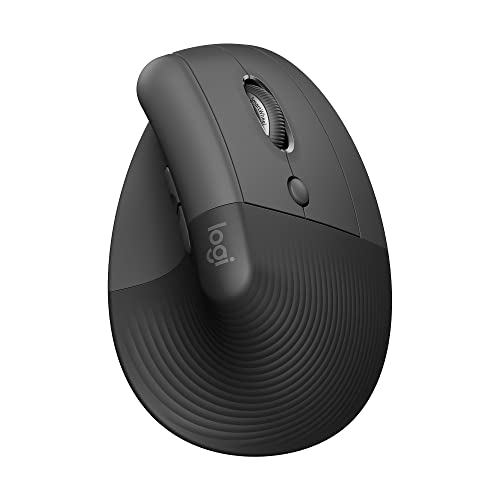
The Logitech Lift Vertical Ergonomic Wireless Mouse is the easiest recommendation here because it feels like a deliberately shaped hand rest rather than a conventional mouse turned on its side. Your palm settles around the softly textured body, your thumb lands on a defined rest, and the 57-degree angle keeps the hand closer to a handshake position. That change is noticeable during long stretches of browsing, writing, and spreadsheet work.
The fit is the important detail. Logitech describes Lift as a mouse for small to medium right hands, and its 5.6-inch length, 3.4-inch width, and 3-inch height give it a compact footprint without making the body feel flimsy. At roughly 0.28 pounds, it is light enough to reposition without effort. Users with large hands may find the palm support too short, and they should look first at the MX Vertical or Lekvey.
The controls are better considered than those on many entry-level vertical mice. The SmartWheel moves smoothly through ordinary documents, while the customizable buttons sit within easy reach. The left and right clicks are whisper-quiet, which makes Lift more suitable for a shared office or quiet room than the Anker. Connectivity is flexible too. It works through Bluetooth Low Energy or the Logi Bolt USB receiver and supports Windows, macOS, iPadOS, ChromeOS, and Linux.
Lift uses a replaceable battery, with Logitech claiming up to two years of battery life. That is convenient for someone who does not want another charging cable, though buyers who specifically want USB-C charging should consider the ProtoArc or Lekvey. The Graphite version also includes certified post-consumer recycled plastic in 70 percent of its plastic parts.
The weakness is not hidden: this is a right-handed mouse with a transition period. It will not suit left-handed users, and its upright grip can feel unfamiliar for several days. Still, compared with the more basic Anker, Lift has a quieter, more refined control layout and better device compatibility. It is the one we'd keep for a normal office desk, especially when small or medium hand fit matters.
2. Anker Vertical Ergonomic Mouse: Best Simple Vertical Design

Pros
- Natural handshake-style grip
- Three selectable DPI levels
- Forward and back buttons for browsing
- Automatic power-saving mode
- 18-month warranty
Cons
- 2.4GHz USB receiver only
- Requires two AAA batteries
- Clicks are not quiet
Best for: someone who wants a basic right-handed vertical mouse without Bluetooth pairing.
The Anker Vertical Ergonomic Mouse takes a direct approach. Its tall body tilts the hand into a handshake position, with the thumb resting on one side and the fingers reaching down to the primary buttons. It does not have the soft, carefully contoured feel of Logitech Lift, but the central ergonomic idea is sound and easy to understand.
Its optical sensor offers 800, 1200, and 1600 DPI settings. That is enough range for ordinary documents, web browsing, and general desktop work. The lower setting gives a slower cursor for detailed selections, while 1600 DPI reduces the amount of wrist travel needed across a large display. The forward and back buttons are useful for navigating web pages, though they add noise when pressed.
This mouse connects through a 2.4GHz USB receiver rather than Bluetooth. The receiver stores in the bottom of the mouse, so it is less likely to disappear in a laptop bag, but the arrangement may require a USB-A port or an adapter on a newer computer. It is a single-device design, unlike the ProtoArc, TECKNET, and UGREEN models.
The dimensions are 120 by 62.8 by 74.8 millimeters, and the listed weight is 3.4 ounces. That puts it close to Lift in overall portability, though the shape feels less compact around the palm. Anker says it enters power-saving mode after eight minutes of inactivity and wakes with a left or right click. Two AAA batteries are required and are not included.
The biggest compromise is sound. The product information explicitly says click sounds are unavoidable, so this is not the pick for a library, shared bedroom, or quiet recording space. It also lacks the multi-device flexibility and rechargeable battery found elsewhere in this roundup. Choose it when a simple USB receiver setup and a familiar three-level sensitivity range matter more than silent operation.
For readers comparing it with a wider range of computer pointing devices, the control styles that reduce repeated desk movement are useful to consider before settling on a vertical shape. The Anker is uncomplicated, but that simplicity is precisely why it remains easy to recommend for a basic workstation.
3. Logitech Lift Vertical Mouse Off White: Best Light-Color Option

Pros
- Same comfortable 57-degree vertical design as Lift Graphite
- Quiet clicks and SmartWheel scrolling
- Bluetooth and Logi Bolt support
- Up to two years of battery life
- Soft grip for small to medium right hands
Cons
- Right-handed design only
- Not rechargeable
- Light finish can show desk grime
Best for: users who want Lift's compact ergonomic shape in an off-white finish.
The Logitech Lift Vertical Mouse Off White is functionally the same recommendation as the Graphite Lift, but the finish gives it a different role. It looks at home beside a light keyboard or a minimalist laptop setup, and its pale shell makes the mouse feel less visually heavy on a small desk. The important choice is not performance. It is whether the color and slightly different dimensions suit your workspace.
The 57-degree body creates the same upright posture that makes Lift so comfortable for many right-handed users. The thumb rest supports the hand instead of leaving it to hover against the desk, while the textured surface gives the fingers a secure place to settle. At 5.7 inches long, 3.5 inches wide, and 3 inches high, this version is fractionally larger than the Graphite listing, though both are aimed at small to medium hands.
The scrolling and button experience is one of the strongest reasons to choose Lift over a generic vertical mouse. The SmartWheel handles normal page movement smoothly, and the customizable buttons can be assigned to frequently used actions. The primary clicks are quiet enough for a shared workspace. That makes it more pleasant for long writing sessions than the noisier Anker and more polished than the basic Lekvey controls.
Wireless support is broad. Lift can use Bluetooth Low Energy or a Logi Bolt USB receiver, and Logitech lists compatibility with Windows, macOS, iPadOS, ChromeOS, and Linux. Battery life is listed at up to two years, which is excellent for users who prefer to swap a battery rather than stop working to recharge. The off-white version contains 54 percent certified post-consumer recycled plastic in its plastic parts.
This model has the same limitations as the Graphite Lift. It is not for left-handed users, it is not a trackball, and the upright grip requires a short adjustment period. The light finish may also need more cleaning than Graphite if you work around food, dust, or dark desk mats. If you are choosing strictly for ergonomics, the two Lift versions should be treated as equal. Pick this one when the finish fits your setup better.
4. ProtoArc EM11 NL Vertical Mouse: Best Rechargeable Vertical Mouse

Pros
- Built-in 500mAh rechargeable battery
- Can connect to up to three devices
- Bluetooth and USB-A receiver modes
- Silent primary clicks
- Designed for hands under 7.5 inches
Cons
- Forward and back buttons do not work with Mac
- Scroll wheel and side buttons are not silent
- USB-C cable is for charging only
Best for: small to medium-handed users who want a rechargeable vertical mouse with multi-device switching.
The ProtoArc EM11 NL Vertical Mouse stands out because it combines a compact vertical shape with features normally reserved for more elaborate office mice. It is designed for hand lengths under 7.5 inches, so its proportions are closer to Logitech Lift than to the larger MX Vertical. The body encourages a relaxed grip, but the mouse does not feel as sculpted or as immediately natural as Lift.
A built-in 500mAh lithium-ion battery means there is no battery compartment to open. Charge it through the included Type-C cable, then use Bluetooth or the included USB-A receiver. The receiver is not USB-C, and the cable is for charging only, so laptop owners with USB-C-only ports will need another connection method or an adapter. ProtoArc says the mouse can connect to three devices, using two Bluetooth connections and one 2.4GHz connection.
Tracking can be set to 1000, 1600, or 2400 DPI. Those steps cover ordinary office work well, with 1000 DPI giving controlled movement and 2400 DPI helping when a large screen requires less hand travel. The back and forward buttons make browser navigation faster, though they are not compatible with Mac systems. None of the buttons are programmable, which separates this model from Logitech's software-supported options.
The left and right buttons are quiet, a useful trait in a shared workspace. The scroll wheel and forward and back buttons are not silent, so the product is quieter rather than completely silent. Its listed weight is about 0.55 pounds, noticeably heavier than Lift and Anker. That extra mass can make the mouse feel planted, but it is less appealing if you regularly carry it between rooms.
The learning curve is real. ProtoArc advises giving the shape one to two weeks, and that is sensible for anyone coming from a flat mouse. The EM11 NL is a stronger rechargeable alternative to Lekvey because its multi-device support is more flexible, while Lift remains the more refined pick for quiet scrolling and overall fit. Choose ProtoArc if charging convenience and switching between computers matter most.
5. TECKNET Vertical Ergonomic Mouse: Best Adjustable Tracking

Pros
- Six DPI settings from 800 to 4800
- Bluetooth and USB-A wireless modes
- Can connect with two Bluetooth devices
- Quiet primary clicks
- 36-month warranty when registered
Cons
- Requires two AAA batteries
- Side buttons do not work with macOS
- Right-handed design only
Best for: office users who want more cursor-speed choices and quiet primary clicks.
The TECKNET Vertical Ergonomic Mouse is the most flexible tracking option in the group. Its six DPI levels run from 800 through 1200, 1600, 2400, 3200, and 4800. That gives it a wider adjustment range than Anker, ProtoArc, and Lekvey. The lower settings make precise editing easier, while 4800 DPI can reduce broad cursor movements on a high-resolution or wide display.
The shape places the palm near a vertical handshake angle and is intended for right-handed use. Its dimensions are listed as 4.74 inches long, 2.49 inches wide, and 0.27 pounds in weight, although the listed height is not a useful representation of the full vertical body. The important practical point is that it is relatively light and narrow, so it should feel less demanding to move than the heavier ProtoArc.
Connection options are unusually broad for this class. Bluetooth 5.0 and 3.0 modes can handle two devices simultaneously, while the 2.4GHz USB-A receiver provides a conventional plug-in connection. A button on the underside switches modes. That is useful for a laptop and desktop pairing, though it is less seamless than a mouse with a dedicated desktop software workflow.
The left and right buttons are designed to be nearly silent, which helps in libraries, offices, and shared rooms. The other function buttons are not silent. Compatibility covers Windows, Mac, Chrome, and Linux, but TECKNET specifically says the side buttons do not work with macOS. It runs on two AAA batteries, enters deep sleep after roughly 10 to 30 minutes of inactivity, and uses an LED to signal low battery.
The TECKNET beats Anker on tracking range and device flexibility, but Lift still feels more comfortable and cohesive around the hand. It also lacks the rechargeable battery found in ProtoArc and Lekvey. This is the model to choose when cursor speed matters as much as wrist posture, particularly for someone who moves between different screen sizes during the day.
6. Logitech MX Vertical Mouse: Best for Medium to Large Hands

Pros
- Comfortable 57-degree vertical angle
- Textured surface and supportive thumb rest
- 4000 DPI high-precision sensor
- Dedicated cursor speed switch
- Designed for medium to large hands
Cons
- Heavier than Logitech Lift
- Larger body needs more desk room
- Older design lacks the newer Lift refinements
Best for: right-handed users with medium to large hands who want a substantial vertical grip.
The Logitech MX Vertical Mouse is the right counterpoint to Lift. Lift is compact and friendly for smaller hands, while MX Vertical gives a larger hand more palm support and a fuller grip. Its 57-degree angle is familiar to anyone who has used Lift, but the body feels more substantial and encourages you to rest the hand rather than pinch the mouse with the fingers.
The textured surface is practical rather than decorative. It prevents the palm from sliding as the hand stays upright, and the thumb rest gives the side of the hand somewhere to settle. The mouse measures about 4.72 inches long, 3.11 inches wide, and 3.09 inches high, with a listed weight of 0.5 pounds. That weight is nearly twice the listed mass of Lift, so it is less nimble but more planted.
Its 4000 DPI sensor is the main performance advantage. Logitech says the higher sensitivity can reduce hand movement compared with a traditional 1000 DPI mouse, while the dedicated cursor speed switch lets you change speed without opening software. That is handy when moving from detailed selections to broad navigation. It does not offer the six-step range of TECKNET, but the sensor and switch feel more purposeful.
MX Vertical is a wireless receiver model, and Logitech notes that the receiver is supplied inside or alongside the mouse. The product listing also mentions the same natural handshake position and a claimed reduction in muscular activity compared with a standard mouse. Those claims do not make the mouse universally comfortable, but they explain why its large, fixed shape works well for users who dislike rotating the forearm.
The trade-off is size. Small hands may struggle to reach the buttons without stretching, and people who prefer a light mouse will notice the half-pound body. Lift is the better choice for smaller hands and quieter everyday use, while MX Vertical is the more convincing option for a large palm that feels cramped on compact vertical mice. Skip it if your desk is tight or you prefer frequent repositioning.
7. Logitech Ergo M575S Trackball Blue: Best Trackball

Pros
- Thumb-controlled cursor requires very little desk movement
- Comfortable sculpted shape
- Works on any surface
- Bluetooth and Logi Bolt connectivity
- Up to 18 months of battery life
Cons
- Trackball control needs an adjustment period
- Ball and cage need occasional cleaning
- Not ideal for users who prefer traditional mouse movement
Best for: small desks or users who want to reduce repeated forearm movement.
The Logitech Ergo M575S Trackball Blue approaches wrist comfort from a different direction. Instead of holding the hand upright, it keeps the mouse stationary while the thumb rolls a trackball to move the pointer. That matters on a shallow desk, a crowded workstation, or any setup where sliding a conventional mouse back and forth is irritating.
The sculpted body supports the hand and keeps the forearm in a more relaxed position. Logitech says its Ergo Lab development and testing produced 25 percent less forearm muscle strain compared with a standard mouse. The number is a company claim, not a promise for every hand, but the design's benefit is easy to understand: the cursor can travel across the screen without the arm traveling with it.
There are three customizable buttons, and the Logi Options Plus app can adjust cursor speed and assign shortcuts or Smart Actions. Bluetooth and the included Logi Bolt receiver provide flexible connection options. Battery life is listed at up to 18 months from one AA battery, which is included. The trackball also works on any surface, so a hard mousepad is not necessary.
The learning curve is different from a vertical mouse. New users may initially overshoot targets or find thumb control less precise than expected. Cleaning is part of ownership too, though the ball can be ejected from its cage for that purpose. Users who enjoy quick flicks across a large desk may prefer MX Vertical or Lift, while those with limited desk depth will appreciate that the M575S does not need a clear travel path.
The blue-ball version is otherwise the same product as the Black Silver Ball model lower in the list. It is the stronger pick here because it gives the trackball idea a distinctive finish without changing the underlying control experience. If repeated arm movement is the problem, and you are willing to learn thumb control, this is more useful than simply switching to another vertical shape.
For a setup that combines pointing and typing comfort, how the keyboard and mouse should share the same wrist posture is a useful next question. The M575S handles the mouse side especially well, but the rest of the desk still affects how your arms feel.
8. Lekvey Rechargeable Vertical Mouse: Best Rechargeable Large-Hand Pick

Pros
- Rechargeable battery with over 150 hours of continuous use
- Large-hand fit
- Three DPI settings
- Forward and back browsing buttons
- 36-month manufacturer's warranty
Cons
- 2.4GHz USB receiver only
- No Bluetooth
- Requires an adjustment period
Best for: medium to large-handed users who want a rechargeable vertical design with simple USB setup.
The Lekvey Rechargeable Vertical Mouse has a taller, roomier shape than Lift and is explicitly recommended for medium or large hands. The listed dimensions are 5.0 by 3.0 by 2.5 inches, with a weight of 0.21 pounds. That combination makes it light for its size, though the large body can feel unwieldy to anyone with short fingers.
Its vertical design aims to keep the wrist and arm in a neutral handshake position. The thumb rests along the side, and the forward and back buttons sit where they can speed up browser navigation. There are three DPI choices, 800, 1200, and 1600, which are sufficient for ordinary work but less adaptable than TECKNET's six settings or MX Vertical's 4000 DPI sensor.
The built-in rechargeable battery is the main practical attraction. Lekvey states that it provides over 150 hours of continuous use on one charge, and the included Type-C charging cable is 150 centimeters long. The mouse connects through a nano USB receiver stored on its underside, with no Bluetooth pairing or drivers required. That simplicity is appealing, but it makes the mouse less suitable for tablets and USB-C-only laptops without an adapter.
Compatibility includes Windows versions through Windows 10, Linux, and Mac OS. The receiver setup is plug and play, and the product is backed by a 36-month manufacturer's warranty. The design is quieter and more straightforward than the Anker, but it lacks Lift's dual connection options and software customization.
Lekvey's own guidance suggests a three-to-five-day adjustment period, which is a reasonable expectation for a large vertical body. It is not the right choice for a small hand, a multi-device desk, or anyone who wants to switch between Bluetooth and a receiver. For a larger hand that wants a light rechargeable mouse and does not need Bluetooth, it is a sensible alternative to the heavier MX Vertical.
9. UGREEN Vertical Wireless Mouse: Best Multi-Device Option

Pros
- Bluetooth and 2.4GHz connectivity
- Supports switching between up to three devices
- Four DPI levels up to 4000
- Quiet clicks
- PTFE glide feet
Cons
- Uses one AA battery
- No rechargeable battery
- Right-handed vertical design may not suit every hand
Best for: users who switch between a computer, laptop, and tablet.
The UGREEN Vertical Wireless Mouse is built around flexibility. Its handshake-style body supports a more upright wrist posture, but its strongest feature is the ability to connect through Bluetooth or 2.4GHz wireless and switch among up to three devices. That makes it a natural fit for a desk with a work laptop, personal computer, and tablet.
The sensor has four settings: 1000, 1600, 2000, and 4000 DPI. The lower choices are useful for careful document work, while 4000 DPI gives the cursor more reach with less physical movement. It is not as finely adjustable as TECKNET, but the range is broader than the basic three-level mice from Anker and Lekvey.
UGREEN gives the mouse five buttons, including navigation controls, and says the clicks are quiet. PTFE glide feet reduce friction between the mouse and desk, which should make movement smoother and quieter. The listed dimensions are about 4.72 inches long, 3.39 inches wide, and 0.37 pounds. It is neither especially tiny nor especially heavy, though larger-hand users may prefer the fuller support of MX Vertical.
One AA battery powers the mouse, and smart sleep mode helps extend battery life. The stated wireless range is up to 10 meters. Compatibility covers Windows, macOS, Linux, ChromeOS, and Android, giving it broader platform coverage than the ProtoArc's listed systems. The compromise is that it is not rechargeable, and its vertical shape remains right-handed.
UGREEN is a better travel and multi-device tool than Anker, while TECKNET offers more DPI steps for users who change cursor speed often. Lift still feels more refined in the hand, but UGREEN wins when one mouse must move between several operating systems. Choose it for connection flexibility, not because it offers the most sculpted ergonomic support.
10. Logitech Ergo M575S Trackball Black: Best Compact-Control Alternative

Pros
- Stationary design saves desk space
- Thumb-controlled ball works on any surface
- Bluetooth and Logi Bolt support
- Three customizable buttons
- Up to 18 months of battery life
Cons
- Trackball technique takes practice
- Requires occasional ball cleaning
- Listed item condition may vary by listing
Best for: users who want the M575S control style with a black and silver ball.
The Logitech Ergo M575S Trackball Black provides the same core experience as the blue-ball version above. Its sculpted shell supports the palm while the thumb moves the ball, so the mouse stays in one place. That makes it especially useful where a conventional mouse would repeatedly hit the edge of the desk or collide with a keyboard.
The M575S is shaped for most hand sizes and is intended to improve forearm posture. Logitech's product information cites 25 percent less forearm muscle strain, while the physical benefit comes from avoiding broad arm movements. Your hand can remain settled as the pointer travels, which is a meaningful advantage for compact workstations and users recovering from irritation caused by constant mouse repositioning.
Bluetooth and Logi Bolt provide two ways to connect, and three customizable buttons can be configured with the Logi Options Plus app. Cursor speed is adjustable through the same software. Battery life is listed at up to 18 months from an included AA battery. It is more versatile than the receiver-only Lekvey and more desk-friendly than every traditional sliding mouse in this roundup.
Trackballs do not suit everyone. Thumb control can feel awkward at first, especially when precise selection is part of the job, and the ball needs cleaning if dust gathers around the cage. People who play fast-action games or simply prefer the momentum of a normal mouse may adapt more slowly. For ordinary office work, however, the stationary design is remarkably efficient.
The Black Silver Ball version does not change the ergonomics or features of the blue-ball M575S. Choose between them based on finish and availability, while recognizing that the blue-ball model is the clearer lead recommendation in this list. If you want the same compact-control concept with a darker visual treatment, this is the one to keep in view.

How to choose best ergonomic mouse
The right ergonomic mouse is defined by hand fit and movement style first, then by sensor, connection, and control details.
Hand size and shape
A vertical mouse needs to support the palm without forcing the fingers to stretch toward the buttons. Logitech Lift and ProtoArc EM11 NL target small to medium hands, while MX Vertical and Lekvey are more suitable for medium to large hands. UGREEN and TECKNET sit between those extremes, but their fit will still depend on how much of your palm the shell supports.
Look at the manufacturer's hand-size guidance where available, then compare the listed length and width with a mouse that already feels comfortable. A body that is too short can leave the wrist unsupported. One that is too large can make the thumb buttons difficult to reach.
Vertical angle
Vertical mice rotate the hand so the palm faces inward instead of down toward the desk. Logitech's Lift and MX Vertical both use a 57-degree angle, while the other vertical models describe a handshake-style posture without publishing a precise angle.
The angle alone does not determine comfort. Thumb support, button reach, surface texture, and the height of the palm rest matter just as much. A steep design can reduce wrist rotation but still feel awkward if your fingers must curl sharply to click.
The most ergonomic shape is the one that lets your hand rest, not the one with the tallest shell.
Trackball control
A trackball avoids repeated desk movement entirely. The M575S models let the thumb move the pointer while the mouse remains stationary, making them useful on narrow desks or surfaces where a regular sensor would not track reliably.
The trade-off is control technique. Trackballs require a short learning period, and the ball cage needs occasional cleaning. They are a strong choice for office navigation, but users who prefer quick, broad mouse gestures may prefer Lift or MX Vertical.
Tracking range
DPI controls how far the pointer travels for a given physical movement. Lower settings favor careful selections, while higher settings help when one mouse must cover a wide display without requiring large arm movements.
Anker, ProtoArc, and Lekvey provide three practical levels. UGREEN reaches 4000 DPI with four settings, MX Vertical includes a 4000 DPI sensor and cursor speed switch, and TECKNET offers six levels up to 4800 DPI. More settings are useful only if you regularly change tasks or display sizes.
Connection and power
Bluetooth keeps a USB port free and is useful with tablets and modern laptops. A 2.4GHz receiver can be simpler on a desktop, especially when pairing is inconvenient. ProtoArc, TECKNET, UGREEN, and Logitech Lift offer both connection types, while Anker and Lekvey rely on a USB receiver.
Rechargeable models such as ProtoArc and Lekvey eliminate disposable battery changes. Battery-powered options can last longer between interruptions, with Lift listing up to two years and the M575S listing up to 18 months. Decide whether charging convenience or long standby matters more for your desk.

Frequently asked questions
Are vertical mice better for wrist comfort?
A vertical mouse can reduce the amount of forearm rotation required to hold the device. It does not guarantee comfort, since hand size, grip pressure, desk height, and button reach also matter. Lift and MX Vertical are good examples of how the same general angle can serve different hand sizes.
Should I choose a vertical mouse or a trackball?
Choose a vertical mouse if you want traditional cursor movement with a more neutral hand position. Choose a trackball if your desk is cramped or you want to keep the hand stationary while moving the pointer. The M575S requires more adjustment at first, but it can greatly reduce repeated arm movement.
Do ergonomic mice work for left-handed users?
The products in this roundup are designed for right-handed use. A vertical shell with a thumb rest is shaped for one hand, so left-handed users should look for a specifically ambidextrous or left-handed model rather than assuming the design will transfer.
How long does it take to get used to a vertical mouse?
Many users need several days before the grip feels natural. ProtoArc specifically advises allowing one to two weeks, while Lekvey mentions a three-to-five-day adjustment period. Start with relaxed movements and avoid gripping the mouse tightly while learning the new angle.
Is a higher DPI better for office work?
Not automatically. Lower DPI can make precise selections easier, while higher DPI reduces the distance your hand must travel across a large screen. The useful setting depends on display size, pointer speed preferences, and how much control you want.
Are quiet clicks important?
Quiet clicks are useful in shared offices, libraries, bedrooms, and recording spaces. Lift, ProtoArc, TECKNET, and UGREEN emphasize quieter primary buttons, while Anker explicitly notes that click sounds are unavoidable. Side buttons and scroll wheels may still make noise even when the main clicks are quiet.

The bottom line
The Logitech Lift Vertical Ergonomic Wireless Mouse is the Best ergonomic mouse for most right-handed users with small to medium hands. Its 57-degree angle, supportive grip, quiet clicks, reliable scrolling, and Bluetooth or Logi Bolt connections make it the most balanced option here. Larger hands should step up to Logitech MX Vertical Mouse, while small desks and users who want less arm movement should choose Logitech Ergo M575S Trackball Blue.
The ProtoArc EM11 NL Vertical Mouse is the most appealing rechargeable alternative, and UGREEN Vertical Wireless Mouse makes the most sense for switching among several devices. For an undecided reader, measure your hand first, then choose between a vertical grip and a stationary trackball.
As an Amazon Associate we earn from qualifying purchases.