
A flash drive is only useful when it fits the port in front of you, holds the files you need, and does not become a tiny cap or connector lost in a drawer. The Best best flash drives in this roundup cover USB-A, USB-C, dual-connector designs, multi-packs, and several different approaches to portability.
The Lexar D40E 256GB is our top pick because it combines USB-C and USB-A access, a metal enclosure, encryption software, and the most useful capacity here. The other nine picks narrow the field by speed, ruggedness, number of drives, or compatibility with older computers.
Comparison
| # | Product | Award | Capacity | Interface | Best for |
|---|---|---|---|---|---|
| 1 | Lexar D40E 256GB | Best overall | 256GB | USB-A and USB-C, USB 3.2 Gen 1 | Mixed-device households |
| 2 | SanDisk Ultra Flair | Best USB-A speed | 128GB | USB 3.0 | Fast transfers to older laptops |
| 3 | Samsung BAR Plus Champagne | Best rugged design | 128GB | USB 3.1 | Travel and everyday carry |
| 4 | Lexar D40E 128GB | Best compact dual connector | 128GB | USB-A and USB-C, USB 3.2 Gen 1 | Phone and laptop transfers |
| 5 | Lexar A30E 128GB 2-Pack | Best two-drive set | 128GB each | USB-A, USB 3.2 Gen 1 | Separate work and personal files |
| 6 | PNY Turbo Attaché 3 5-Pack | Best multi-user pack | 128GB each | USB-A, USB 3.0 | Offices and classrooms |
| 7 | Samsung BAR Plus Titan Grey | Best durable USB-A drive | 128GB | USB 3.1 | Keyring carry |
| 8 | PNY Turbo Attaché 3 2-Pack | Best simple two-pack | 128GB each | USB-A, USB 3.0 | PC and Mac file sharing |
| 9 | Lexar A30E 64GB 3-Pack | Best lightweight set | 64GB each | USB-A, USB 3.2 Gen 1 | Smaller file handoffs |
| 10 | myemuun Dual USB-C 2-Pack | Best basic dual-port pack | 128GB each | USB-A and USB-C, USB 2.0 | Occasional device-to-device transfers |
1. Lexar D40E 256GB: Best Overall

Pros
- USB-C and USB-A connectors in one drive
- 256GB capacity for large media libraries
- Metal enclosure with a 360-degree swivel design
- 256-bit AES encryption software
- Three-year limited warranty
Cons
- 26g is heavier than the small USB-A models
- Transfer speed is listed up to 100MB/s
- Swivel body takes more room around some ports
Best for: people moving files between USB-C phones or tablets and traditional USB-A computers.
The Lexar D40E 256GB is the drive we would keep in a laptop bag. Its defining advantage is not a clever app or an unusual shape. It is the simple relief of having both common USB connector types available without carrying an adapter. The 360-degree swivel lets you switch between USB-C and USB-A, and there is no removable cap to misplace.
Capacity makes this version more compelling than the otherwise similar Lexar D40E 128GB. A 256GB drive gives you considerably more room for video projects, photo libraries, installers, and a second copy of important documents. Lexar lists transfer speeds up to 100MB/s, though actual results depend on the host device, interface, and usage conditions. It uses the USB 3.2 Gen 1 standard, so it is suited to ordinary file movement rather than replacing a high-speed external solid-state drive.
The metal enclosure feels more reassuring than the light plastic bodies on the PNY Turbo Attaché 3 models. Lexar also includes a security software solution with 256-bit AES encryption, which gives sensitive files an extra layer of protection when you use the included software. The drive is rated for temperatures from 0 to 50 degrees Celsius and measures 70.4 by 16.9 by 11.7mm.
There are limits. At 26g, it is not the lightest option, and the swivel construction can occupy neighboring space on a crowded laptop. Its 100MB/s ceiling also trails the SanDisk Ultra Flair's listed read speed and the Samsung BAR Plus family's listed performance. Still, those models are USB-A only. Choose the D40E 256GB when your files travel between newer and older devices and you want the least complicated connection setup.
2. SanDisk Ultra Flair: Best USB-A Speed

Pros
- Listed read speed up to 150MB/s
- Sleek metal casing
- 128GB capacity
- Password protection with 128-bit AES encryption
- Very light body
Cons
- USB-A only
- Mac security software requires a download
- Listed speed depends on the host and usage
Best for: anyone who mainly uses USB-A computers and wants quick access to large files.
The SanDisk Ultra Flair is the straightforward speed pick for a USB-A setup. It slides easily into a desktop, laptop, or hub, and its metal casing gives it a more substantial feel than basic plastic thumb drives. There is no USB-C connector, so it is not the right answer for a modern phone or tablet that lacks USB-A.
SanDisk lists read speeds up to 150MB/s and says the drive can move a full-length 1.2GB MPEG-4 movie in less than 30 seconds under its stated test conditions. Those figures are useful as a ceiling, not a promise for every computer. The host port, file type, and other system activity all affect transfers. Still, the USB 3.0 connection gives this model a clear advantage over the myemuun Dual USB-C 2-Pack, whose stated standard is USB 2.0.
The 128GB capacity is practical for documents, photos, music, and a rotating collection of videos. SanDisk also includes password protection using 128-bit AES encryption. The feature works with supported Windows and Mac systems, although Mac users need to download the relevant SecureAccess software. That is a modest inconvenience, but it is better than treating an unprotected removable drive as a safe place for private files.
The Ultra Flair loses ground to the Lexar D40E models on connector flexibility and to the Samsung BAR Plus on environmental protection. It is also an older USB 3.0 design, so buyers should not confuse its top-line read figure with guaranteed sustained write performance. Pick it for a USB-A computer that needs fast, uncomplicated file transfers, not for a mixed USB-C household.
3. Samsung BAR Plus Champagne: Best Rugged Design

Pros
- Metal body with integrated keyring
- Waterproof, shock-proof, temperature-proof, magnet-proof, and X-ray-proof design
- Listed read speeds up to 300MB/s
- Five-year limited warranty
- Compact 1.58-inch length
Cons
- USB-A only
- No capacity above 128GB in this listing
- Highest advertised speed is read speed
Best for: travelers who want a sturdy USB-A drive that can stay attached to a keyring.
The Samsung BAR Plus Champagne is built around a useful physical idea: a flash drive should be easy to carry and hard to lose. Its metal body is short and dense, and the integrated keyring gives it a natural place on a lanyard or keychain. That is more practical than a loose drive disappearing into a laptop sleeve.
Samsung lists read speeds up to 300MB/s with its USB 3.1 design and cites a 3GB 4K UHD video transfer in 10 seconds under its test conditions. As with the SanDisk, those numbers depend on the host system and the type of transfer. The fast read specification makes the drive appealing for opening large files, while the available evidence does not promise the same figure for writing files onto it.
The real distinction is durability. Samsung describes the body as waterproof, shock-proof, temperature-proof, magnet-proof, and X-ray-proof, and backs it with a five-year limited warranty. Those claims do not make a flash drive a substitute for a backup, but they do make the BAR Plus a more comfortable companion for commutes, travel, and daily carry than the lighter multi-pack models.
The compromise is compatibility. This is a USB-A drive, so it needs an adapter or a suitable hub for many current phones and tablets. The Lexar D40E 256GB is more versatile and holds twice the capacity, while the Samsung BAR Plus Titan Grey offers the same core design in another finish. Choose the Champagne model when rugged USB-A storage matters more than USB-C access.
4. Lexar D40E 128GB: Best Compact Dual Connector

Pros
- USB-C and USB-A in one body
- Swivel design avoids a loose cap
- Metal enclosure
- 256-bit AES encryption software
- Three-year limited warranty
Cons
- Less capacity than the 256GB version
- 26g is relatively heavy
- Transfer speeds listed up to 100MB/s
Best for: users who need USB-C and USB-A access but do not need the larger capacity of the top pick.
The Lexar D40E 128GB has the same central appeal as its larger sibling: it removes the connector question from everyday file transfers. Plug the Type-C end into a compatible phone, tablet, Mac, or newer laptop, then rotate the housing to expose Type-A for a conventional computer. The arrangement is simple and far less fussy than keeping a small adapter nearby.
Lexar lists transfer speeds up to 100MB/s and describes the drive as plug and play, with no software installation needed for ordinary use. That is enough for documents, photos, music, and many video files. It is not the fastest model in this group on paper. The SanDisk Ultra Flair and Samsung BAR Plus advertise higher read speeds, but neither can connect directly to USB-C hardware.
The drive measures 70.4 by 16.9 by 11.7mm and weighs 26g. Its metal enclosure is rated for use from 0 to 50 degrees Celsius, and the swivel body means there is no separate cap to lose. Lexar's security software adds 256-bit AES encryption, while the three-year limited warranty is longer than the warranty information provided for several of the simpler multi-packs.
The obvious reason to choose the Lexar D40E 256GB instead is capacity. If your transfer folder contains large video files or a full photo archive, the larger version gives more breathing room. The 128GB model is the better fit when you want the dual-connector design in a smaller data role and do not need to carry a larger library.
5. Lexar A30E 128GB 2-Pack: Best Two-Drive Set

Pros
- Two 128GB drives
- USB 3.2 Gen 1 connection
- Listed transfer speeds up to 100MB/s
- Push-button retractable connector
- Lexar DataShield encryption
Cons
- USB-A only
- No USB-C connector
- Each drive is limited to 128GB
Best for: households or small teams that want separate removable drives for different file sets.
The Lexar A30E 128GB 2-Pack makes more sense as two independent tools than as one large pool of storage. Keep one drive for work documents and another for personal files, or leave one at home as a second copy while the other travels. The separate-drive approach is also useful when two people need removable storage at the same time.
Each A30E uses USB-A and USB 3.2 Gen 1, with listed transfer speeds up to 100MB/s. That places it in the same broad performance class as the Lexar D40E models, though it gives up the D40E's direct USB-C access. It works with tablets, laptops, Macs, and traditional Type-A devices without software installation for normal storage tasks.
The push-button retractor protects the connector without a loose cap, and a lanyard loop gives the drive an easy attachment point. Lexar lists a weight of 7.41g, making each drive much lighter than the 26g D40E. The body is also compact enough for a pocket, though the USB-A-only design means newer phones may require an adapter.
Lexar DataShield is the most interesting software feature here. It can create a password-protected safe with auto-encryption, and files deleted from that safe are described as securely erased and unable to be recovered. The Samsung BAR Plus models have a tougher body, while the D40E models have broader connector support. Choose this set when having two light, independently managed drives matters most.
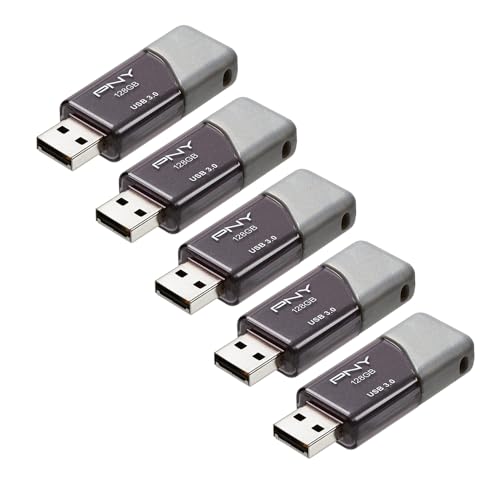
6. PNY Turbo Attaché 3 5-Pack: Best Multi-User Pack
Pros
- Five separate 128GB drives
- Sliding collar protects the connector
- Cap-less design
- USB 3.0 compatibility
- Backward compatible with USB 2.0
Cons
- USB-A only
- No stated encryption feature
- Multi-pack is unnecessary for one user
Best for: offices, classrooms, families, or teams that need several identical removable drives.
The PNY Turbo Attaché 3 5-Pack is a logistics pick. Five identical drives are useful when several people need to move presentations, project folders, videos, or documents without passing one device around. It also gives a small office a consistent set of removable media, rather than a drawer full of mismatched capacities and connectors.
Each drive has 128GB of storage and uses USB 3.0, with read speeds listed up to 100MB/s. PNY says the drives transfer at up to 10 times the speed of standard USB 2.0 drives, though real results depend on the computer, port, file mix, and usage. They remain backward compatible with USB 2.0, but a slower port will limit performance.
The sliding collar is a good practical detail. It protects the connector while avoiding the separate cap that is easy to lose, and the lightweight design is suitable for handing out or carrying between rooms. PNY describes the drives as compatible with most USB 3.0 PC and Mac laptops and desktops, which makes the set a natural fit for conventional computers.
This pack is not aimed at USB-C phones, and the listing does not provide a specific encryption feature. The Lexar A30E 128GB 2-Pack offers stronger file-protection features, while the Samsung BAR Plus offers a more rugged single-drive body. Pick the PNY set when the number of separate drives is the point.
7. Samsung BAR Plus Titan Grey: Best Durable USB-A Drive

Pros
- Rugged metal body
- Integrated keyring
- Listed read speeds up to 300MB/s
- Five-year limited warranty
- Protection against water, shock, temperature, magnets, and X-rays
Cons
- USB-A only
- 128GB capacity
- USB 3.1 performance depends on the host
Best for: USB-A users who want a durable drive attached to a bag, keyring, or lanyard.
The Samsung BAR Plus Titan Grey is the same kind of drive as the Champagne version, with the finish providing the visible distinction. Its 1.58-inch length, 0.61-inch width, and 0.47-inch height make it compact enough for a keyring without becoming a fragile little cap-and-stick design. The integrated ring is more useful than decorative.
Samsung lists read speeds up to 300MB/s through USB 3.1 and describes a 3GB 4K UHD video transfer in 10 seconds under its test conditions. That is a strong reason to consider it for reading large media files from a compatible USB-A port. The figure is not a guarantee for every transfer, and write behavior is not specified at the same level.
The body is the main reason to choose this model. Samsung says it is waterproof, shock-proof, temperature-proof, magnet-proof, and X-ray-proof, with a five-year limited warranty. Those protections are reassuring for a drive that spends its life in a backpack or on a keyring, although important files should still exist somewhere else.
The D40E models are better for USB-C devices, and the SanDisk Ultra Flair may appeal more if a slim USB-A shape is your priority. The Titan Grey BAR Plus earns its place through physical confidence rather than connector flexibility. Choose it for durable USB-A storage and use the matching Champagne version if that finish suits your carry setup better.
8. PNY Turbo Attaché 3 2-Pack: Best Simple Two-Pack

Pros
- Two 128GB drives
- USB 3.0 connection
- Sliding collar protects the connector
- Backward compatible with USB 2.0
- Lightweight design
Cons
- USB-A only
- No stated encryption feature
- Listed performance is less specific than some rivals
Best for: people who need two ordinary USB-A drives for computers and simple file sharing.
The PNY Turbo Attaché 3 2-Pack is the uncomplicated alternative to the more feature-heavy drives above. Two 128GB units are enough to separate working files from backups, keep one in a desk and one in a bag, or share files between two computers without constantly swapping the same drive.
PNY describes the Turbo Attaché 3 as a USB 3.0 drive that transfers at up to 10 times the speed of standard USB 2.0 flash drives. It also works with USB 2.0 hosts, though those older ports run at their own slower speeds. The listing does not give the more precise read figure supplied for the five-pack, so this is better treated as an everyday transfer drive than a speed-focused choice.
The sliding collar and cap-less design protect the connector when the drive is not in use. PNY also describes it as compatible with most USB 3.0 PC and Mac laptop and desktop computers. That is broad conventional-computer compatibility, but it does not solve the USB-C problem that the Lexar D40E handles directly.
The Lexar A30E 128GB 2-Pack is lighter on paper and includes DataShield, while the Samsung BAR Plus is tougher and faster in its advertised read specification. The PNY pair remains appealing when you want two familiar USB-A drives without extra features. Skip it if your primary device is a USB-C phone or tablet.
9. Lexar A30E 64GB 3-Pack: Best Lightweight Set

Pros
- Three separate drives
- 7.41g lightweight design
- USB 3.2 Gen 1
- Push-button retractable connector
- DataShield encryption features
Cons
- 64GB per drive
- USB-A only
- Lower capacity than the other Lexar A30E set
Best for: distributing smaller file collections across several light USB-A drives.
The Lexar A30E 64GB 3-Pack is the compact, easy-to-distribute option. Three drives give you separate destinations for schoolwork, travel documents, presentations, or personal media, and the lower capacity per drive can be an advantage when you prefer not to carry one large archive everywhere.
Lexar lists transfer speeds up to 100MB/s through USB 3.2 Gen 1. That is a sensible level for ordinary documents and photo folders, with the usual caveat that host devices and usage conditions affect actual transfers. The drives work with tablets, laptops, Macs, and other Type-A devices without requiring software for basic storage.
At 7.41g each, these are among the lightest drives in the roundup. The push-button retractor keeps the USB connector covered when it is in a pocket, and the lanyard loop makes it easier to attach each drive to a case or tag. There is no removable cap to lose, which is exactly the sort of small convenience that matters with a frequently shared drive.
Lexar's DataShield can create a password-protected safe with auto-encryption, and the listing says files removed from that safe are securely erased. The trade-off is capacity. The A30E 128GB 2-Pack is a better fit for large files, and the dual-connector Lexar D40E models are better for USB-C devices. Choose this three-pack for light, separate USB-A storage rather than a single large library.
10. myemuun Dual USB-C 2-Pack: Best Basic Dual-Port Pack

Pros
- Two 128GB drives
- USB-C and USB-A connectors
- No adapter needed between those port types
- Plug-and-play design
- Compact and lightweight
Cons
- USB 2.0 standard
- No stated encryption feature
- Brand and specifications are less detailed than leading alternatives
Best for: occasional transfers between USB-C and USB-A devices when speed is not the main concern.
The myemuun Dual USB-C 2-Pack solves the same connector problem as the Lexar D40E, but with a more basic design and a lower USB standard. Two 128GB drives are included, one black and one blue, so you can assign them to different people, devices, or backup jobs.
The dual design includes both USB-C and USB-A connectors, allowing direct use with compatible phones, tablets, MacBooks, PCs, and laptops. The listing describes a plug-and-play setup with no software or drivers required. That broad compatibility is the strongest reason to consider it, particularly for a household with a mix of port types.
The important limitation is USB 2.0. The drive is intended for stable, consistent performance across a wide range of devices, but it will not match the USB 3.0, USB 3.1, or USB 3.2 Gen 1 models when moving large video folders. For a better sense of how storage needs change when moving beyond flash drives, the difference between portable storage formats for larger backups is a useful next step.
The Lexar D40E 128GB is the stronger dual-connector choice for faster transfers and a metal enclosure, while the myemuun set gives you two drives rather than one. The listing does not mention encryption or a warranty, so it is best reserved for ordinary files that do not need extra protection. Pick it for occasional device-to-device transfers, not as the main home for a large media collection.
How to choose best flash drives
The right flash drive depends less on its shape than on the ports, files, and transfer habits it must handle.
Connector type
USB-A remains common on older laptops, desktops, televisions, and hubs. USB-C is increasingly common on phones, tablets, MacBooks, and newer laptops. A dual-connector drive such as the Lexar D40E or myemuun model avoids an adapter, but the connector arrangement can make the body larger than a simple USB-A stick.
Check the ports on the devices you will actually use. If you regularly move files between a phone and an older computer, direct USB-C and USB-A access is more useful than a higher advertised speed that only works with one device.
USB standard and transfer speed
USB 2.0 is adequate for occasional documents but becomes frustrating with large video or photo folders. USB 3.0, USB 3.1, and USB 3.2 Gen 1 are better suited to larger transfers, though the computer port and the drive's own hardware still determine the result.
Advertised figures often describe maximum read speed. Write speed may be lower, and small files usually move differently from one large file. A USB 3.x drive plugged into a USB 2.0 port cannot reach its higher potential.
Capacity
Capacity should match the files you carry, not just the number printed on the package. A 64GB drive suits documents and smaller photo collections, while 128GB gives more room for video, music, installers, and working folders. The Lexar D40E 256GB is the only option here aimed squarely at a larger single-drive library.
For irreplaceable material, use the flash drive as one copy rather than the only copy. how to keep larger files in a separate backup can help when a removable stick is no longer enough.
A dual connector solves compatibility, but a faster USB standard solves the waiting.
Build and protection
Metal bodies can feel sturdier, but the Samsung BAR Plus models go further with stated resistance to water, shock, temperature changes, magnets, and X-rays. Retractable or swivel connectors also reduce the chance of losing a cap. A keyring loop helps prevent the drive itself from disappearing.
No rugged claim replaces a backup. Flash drives are small and easy to misplace, so physical convenience matters almost as much as enclosure material.
Security features
The Lexar D40E includes a security software solution with 256-bit AES encryption, while the A30E models offer Lexar DataShield with a password-protected safe and auto-encryption. SanDisk provides password protection with 128-bit AES encryption through SecureAccess.
These tools are useful for personal or work files, but they require setup and may have operating-system limitations. If the drive will hold sensitive information, choose a model with a stated security feature instead of assuming every USB stick protects data automatically.
Frequently asked questions
Do these flash drives work with USB-C phones?
The Lexar D40E models and the myemuun Dual USB-C 2-Pack include USB-C and USB-A connectors. The other drives in this roundup are USB-A models, so they may need an adapter or a compatible hub when used with a USB-C phone.
Is USB 3.0 faster than USB 2.0 for flash drives?
Yes, USB 3.0 can move files faster than USB 2.0 when both the drive and host port support it. Actual performance depends on the computer, the port, the files, and the drive's internal hardware.
Is a 256GB flash drive better for video files?
A 256GB drive gives more space for videos and other large files than a 64GB or 128GB model. The Lexar D40E 256GB is the best fit here for a larger single-drive media collection, though it should not be the only copy of important footage.
Can a flash drive replace a backup drive?
A flash drive can hold a backup copy, but it should not be the only backup. Its small size makes it easy to lose, and removable storage can fail or become corrupted without warning.
Which models include file protection?
The Lexar D40E models include a security software solution with 256-bit AES encryption. The Lexar A30E models include DataShield, and the SanDisk Ultra Flair includes password protection using 128-bit AES encryption through supported software.
Are the Samsung BAR Plus models waterproof?
Samsung describes both BAR Plus models as waterproof, shock-proof, temperature-proof, magnet-proof, and X-ray-proof. Those are product protection claims, not a reason to expose the drive unnecessarily or skip a second copy of the data.

The bottom line
The Lexar D40E 256GB is the strongest all-around answer among the Best best flash drives here. It combines USB-C and USB-A access, useful capacity, a metal enclosure, encryption software, and a three-year limited warranty. Choose the Samsung BAR Plus Champagne or Samsung BAR Plus Titan Grey instead when rugged USB-A construction and keyring carry matter more than connector flexibility.
For a USB-A computer that needs fast reads, the SanDisk Ultra Flair is the cleaner choice. The Lexar A30E 128GB 2-Pack and PNY Turbo Attaché 3 5-Pack make more sense when separate drives are useful for multiple people or file sets.
If you are undecided, buy the Lexar D40E 256GB unless your devices are USB-A only or you specifically need a multi-pack.
As an Amazon Associate we earn from qualifying purchases.