

A keyboard and mouse can get an aircraft into the air, but they make every turn, trim adjustment, and landing feel like a spreadsheet exercise. The right hardware puts pitch, roll, throttle, and rudder under your hands and feet, where those controls make sense.
Our Best flight simulator controls picks cover civil aviation yokes, combat-style HOTAS systems, console-compatible setups, and standalone rudder pedals. Some are simple enough for a first flight, while others are built around detailed aircraft management and extensive button mapping.
For most PC pilots, the Logitech G PRO Flight Yoke is the best starting point, while the Turtle Beach and Thrustmaster systems offer more complete cockpit-style layouts.
Comparison table
| # | Product | Award | Platform | Key controls | Best for |
|---|---|---|---|---|---|
| 1 | Logitech G PRO Flight Yoke | Best overall | Windows | Yoke, throttle quadrant, 54 programmable controls | Civil aviation |
| 2 | Turtle Beach VelocityOne Flight | Best complete system | Xbox, Windows | Yoke, throttle, trim, rudder, brakes | Full cockpit setups |
| 3 | Logitech G X56 HOTAS | Best for combat sims | Windows | Stick, twin throttles, mini analog stick | Combat and space sims |
| 4 | Thrustmaster T16000M FCS Pack | Best PC flight pack | Windows | Stick, throttle, rudder pedals | Complete PC setups |
| 5 | Thrustmaster T-Flight HOTAS X | Best simple PC HOTAS | Windows | Stick, detachable throttle | New PC pilots |
| 6 | Thrustmaster TCA Captain Pack X | Best Airbus-style setup | Xbox, PC | Sidestick, throttle quadrant, 31 buttons | Airbus simulation |
| 7 | Thrustmaster T-Flight HOTAS One | Best Xbox HOTAS | Xbox, PC | Stick, throttle, twist rudder | Console flying |
| 8 | Thrustmaster TFRP Rudder Pedals | Best pedal upgrade | PS5, Xbox, PC | Rudder axis, sliding rails | Smoother yaw control |
| 9 | Logitech G Pro Rudder Pedals | Best adjustable pedals | Windows | Rudder, differential toe brakes | Detailed landing control |
| 10 | Logitech G Saitek X52 Pro | Best classic HOTAS | Windows | Stick, throttle, LCD display | Custom PC profiles |
1. Logitech G PRO Flight Yoke: Best Overall

Pros
- Smooth stainless steel yoke shaft
- Throttle quadrant included
- At least 54 programmable controls
- Secure two-position desk clamps
Cons
- Windows-focused compatibility
- Takes substantial desk space
- No integrated rudder pedals
Best for: PC pilots who want a convincing civil aviation setup without assembling separate controls.
The Logitech G PRO Flight Yoke feels like the natural first step beyond a gamepad. Its forward and backward yoke movement suits airliners and general aviation aircraft far better than a small joystick, and the stainless steel shaft gives the main control a more substantial feel than the typical plastic stick. The matching throttle quadrant completes the basic cockpit layout rather than leaving engine control on a row of keyboard keys.
The control surface is unusually well equipped for a desktop yoke. Logitech includes a POV hat, 14 buttons, and a three-position mode switch, providing at least 54 programmable controls once the system is configured. That gives a pilot room for autopilot commands, landing gear, views, flaps, and other aircraft functions without constantly reaching for the keyboard. The yoke has a 5.9-foot USB cable, while the quadrant uses a 4.92-foot connection cable, so the two pieces can be arranged across a normal desk.
The included clamps are important. The system is large, measuring 18.9 inches long, 15.8 inches wide, and 9.1 inches high, and the two-position mounting system helps keep it planted during larger control inputs. It weighs 6.17 pounds, which adds to that stable feel, though it also means this is not a quick-grab accessory for a cramped desk. It works with Windows 11, 10, 8.1, and 7, with optional software needed for Microsoft Flight Simulator, FSX, X-Plane 10, and Prepar3D.
Compared with the Logitech G X56 HOTAS, this is the better match for a Boeing-style or general aviation cockpit, but the X56 is more capable for combat aircraft and space simulators. The Turtle Beach VelocityOne Flight includes more integrated controls, including rudder and trim, but it is larger and more ambitious. The Logitech's weakness is its missing pedals. You can use a twist stick or another input method, but coordinated turns and differential braking are better with a separate pedal set.
Choose the Logitech G PRO Flight Yoke if the feel of a yoke matters more than having every control built into one enclosure. It is the most balanced PC civil aviation setup here, especially for someone who wants a clear upgrade path into dedicated rudder pedals.
2. Turtle Beach VelocityOne Flight: Best Complete System
Pros
- Yoke, throttle, trim, rudder, and brake controls in one system
- 180-degree yoke rotation
- Modular throttle quadrant
- Full-color flight management display
- Works with Xbox and Windows
Cons
- Large 10-pound enclosure
- More hardware than casual pilots need
- No separate foot pedal set included
Best for: Xbox or Windows pilots who want the broadest set of cockpit controls from one desktop system.
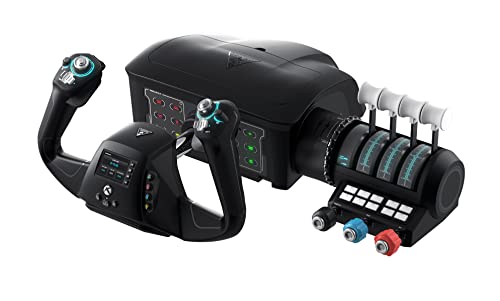
The Turtle Beach VelocityOne Flight is the most complete control station in this group. It combines a yoke handle, throttle quadrant, trim wheel, and integrated rudder and brake controls, so a pilot can manage a large portion of an aircraft without adding multiple boxes around the desk. That all-in-one approach is its defining advantage over the Logitech G PRO Flight Yoke.
Its yoke rotates through 180 degrees and uses a non-contact Hall effect sensor. That arrangement is well suited to smooth pitch and roll inputs, especially in aircraft where a yoke feels more authentic than a sidestick. The dedicated pitch trim wheel is a particularly useful inclusion. Trim is one of the controls that feels awkward on a keyboard, and having a physical wheel makes small corrections much easier to understand and repeat.
The throttle section is modular, with customizable lever handles and buttons. The system provides 12 analog axes, two POV switches, and two four-way HAT switches. It also includes a full-color flight management display and an authentic status indicator panel for PC. Those features make this a better fit for pilots who enjoy configuring and learning their aircraft rather than simply steering around a virtual landscape.
This system is compatible with Xbox titles and Windows titles, including Microsoft Flight Simulator 2020 and Microsoft Flight Simulator 2024. Its secure clamping system helps it stay in place, but the hardware is physically imposing. It measures 19.5 inches high, 19.01 inches long, and 7.2 inches wide, with a 10-pound weight. Plan the desk space first. The built-in rudder controls are convenient, but they do not offer the same foot-driven motion as the Thrustmaster TFRP Rudder Pedals or Logitech G Pro Rudder Pedals.
The VelocityOne Flight beats the Logitech yoke on integrated capability and platform flexibility. The Logitech feels simpler and more focused, while the Thrustmaster TCA Captain Pack X is the more convincing choice for an Airbus-specific layout. Skip the Turtle Beach if you only fly occasionally or have a narrow desk. For a serious Xbox pilot or a Windows user building a central cockpit station, it is the most complete single purchase in the lineup.
3. Logitech G X56 HOTAS: Best for Combat Sims

Pros
- Twin throttles with friction adjustment
- Four spring options for stick force
- Hall-effect aileron and elevator sensors
- Mini analog stick for extra movement axes
- Extensive programmable control layout
Cons
- Requires two USB 2.0 ports
- PC only
- Not shaped like a civil aviation yoke
Best for: PC pilots who fly combat aircraft, spacecraft, or other machines that need many controls close at hand.
The Logitech G X56 HOTAS is built around the idea that a pilot should not need to take a hand off the throttle or stick to find a command. It has the button density and split layout that combat flight and space simulators demand, rather than the yoke-centered arrangement of the Logitech G PRO Flight Yoke. The twin throttles are the key feature, allowing separate engine control or more flexible bindings in spacecraft.
Its aileron and elevator axes use Hall-effect sensors and 16-bit resolution, while the four-spring system lets you adjust stick force. That combination gives the X56 a more configurable control feel than a basic HOTAS. The mini analog stick adds another compact control surface for pitch, roll, yaw, movement, or separately controlled weapons, depending on the simulator and your chosen mapping.
The system also includes RGB backlighting, which is more useful than it may sound when flying in VR or in a dim room. Button position and shape matter when the screen is no longer available as a visual reference, and the X56 places a broad collection of controls under the fingers. Logitech lists more than 189 programmable controls in the product title, and the software allows the lighting and control mapping to be tailored to a particular game.
This is a substantial desktop setup. The stick and throttle together measure about 7.28 inches long, 8.86 inches wide, and 3.54 inches high, and the listed weight is 6.922 pounds. It uses two USB 2.0 ports and has a 2-meter cable, so it needs a computer with suitable connections and a little cable planning. It supports Windows 11, 10, 8.1, and 7, but there is no Xbox or PlayStation compatibility listed here.
The X56 beats the Logitech G Saitek X52 Pro when you want twin throttles, a mini stick, and more flexible spring adjustment. The T16000M FCS Pack is a better organized civil and combat hybrid because it includes pedals, but the X56 gives advanced PC pilots more immediate access to specialized commands. Avoid it if you want a clean airliner cockpit or dislike spending time on button profiles. For combat and space pilots, it is the most expressive control layout in this roundup.
4. Thrustmaster T16000M FCS Pack: Best PC Flight Pack

Pros
- Stick, throttle, and pedals included
- Ambidextrous joystick design
- 16 action buttons and an eight-way hat
- Four independent axes
- T.A.R.G.E.T profile software
Cons
- Windows PC only
- Broad footprint
- Less specialized than the X56 or TCA system
Best for: PC pilots who want a complete three-piece setup for both civilian and combat flying.
The Thrustmaster T16000M FCS Pack is the most sensible all-in-one PC bundle for a pilot who wants hands and feet involved from the first session. It includes the T.16000M joystick, a throttle, and rudder pedals, so it avoids the common problem of buying a stick first and then discovering that coordinated turns require another upgrade.
The joystick uses Thrustmaster's H.E.A.R.T technology, which the product describes as maintaining its precision over time. It is fully ambidextrous, with three removable components that let the grip be configured for left-handed or right-handed use. The stick has 16 action buttons, an eight-way point-of-view hat, four independent axes, and a twist rudder. That gives it enough control range for civilian aircraft while retaining the inputs needed for combat games.
The T.A.R.G.E.T software supports custom profiles for individual games. That matters because a simulator cockpit and a combat aircraft rarely use the same control logic. The included throttle and pedals make the pack more practical than a standalone stick, though the full setup occupies a large area. The listed dimensions are 24.02 inches wide, 16.73 inches long, and 17.52 inches high, with a listed weight of 2.99 pounds.
Compared with the T-Flight HOTAS X, this pack gives you a true pedal set and a more flexible ambidextrous stick. The Logitech G X56 has a denser combat-oriented layout, and the Logitech yoke is more natural for civilian aircraft, but neither gives this pack the same combination of stick, throttle, and pedals in one package. The T16000M's weakness is its broad footprint and Windows-only compatibility.
If you want one PC purchase that covers helicopters, airliners, fighters, and general aviation, the T16000M FCS Pack is a strong fit. It is also a useful choice for households with left-handed and right-handed pilots because the stick can be adapted rather than forcing one grip position.
5. Thrustmaster T-Flight HOTAS X: Best Simple PC HOTAS

Pros
- Plug-and-play setup
- Detachable full-size throttle
- 12 programmable buttons and five axes
- Adjustable stick resistance
- Built-in profile memory
Cons
- PC only
- No dedicated pedals
- Older, simpler control layout
Best for: first-time PC pilots who want a straightforward stick and throttle without a complex cockpit build.
The Thrustmaster T-Flight HOTAS X is the uncomplicated option. It gives a new pilot a joystick and a full-size throttle without asking for a long setup session or a large collection of software profiles. The throttle can stay attached for a compact desktop arrangement or be separated for a more flexible cockpit position.
There are 12 programmable buttons and five axes, including dual rudder control through stick rotation or a progressive tilting lever. A resistance dial lets you tune the stick tension, and the weighted base helps it remain stable during use. The ergonomic hand rest and shaped throttle are aimed at longer sessions, though the physical design is less elaborate than the X56 or T16000M.
Thrustmaster includes an exclusive mapping button and a preset button. Those controls can switch mappings while playing, and built-in memory preserves custom programming when the stick is disconnected. The product also supports plug-and-play operation with preconfigured functions, which is helpful for someone who wants to start flying before learning a simulator's full control menu.
The listed dimensions are about 10.43 inches high, 10.39 inches long, and 9.53 inches wide, with a weight of 4.32 pounds. The unit works with Windows PCs and has a USB connection. It does not include a separate pedal set, so the twist rudder is the main yaw option unless you expand the system later.
The T-Flight HOTAS X is easier to approach than the T16000M FCS Pack, but the pack offers more complete foot control and a more adaptable stick. The T-Flight HOTAS One adds Xbox compatibility, making it the better pick for console owners. If you are building around a small desk, the controls that remain comfortable in tight spaces should guide your choice. Pick this model when easy setup and a familiar stick-and-throttle layout matter more than advanced customization.
6. Thrustmaster TCA Captain Pack X: Best Airbus-Style Setup

Pros
- Officially licensed Airbus-style controls
- 1:1 sidestick and throttle replicas
- Built-in thrust reverser
- 31 throttle quadrant buttons and four axes
- Xbox and PC compatibility
Cons
- Focused on Airbus-style flying
- Rudder controls use the sidestick
- No separate pedals in the pack
Best for: pilots who want an Airbus A320-inspired sidestick and throttle layout on Xbox or PC.
The Thrustmaster TCA Captain Pack X is not a general-purpose HOTAS disguised as an airliner setup. It is designed around the Airbus A320 cockpit, with officially licensed 1:1-scale replicas of the sidestick and flight throttle quadrant. For a pilot who enjoys airline procedures, that focus makes it more immersive than the broader Logitech and T-Flight layouts.
The sidestick has 14 remappable tact-switch buttons and four interchangeable joystick head button modules. Its handle rotates for rudder control, with a lock and unlock function. That gives the system the primary axes needed for flight without requiring pedals, though dedicated pedals remain the more natural solution for pilots who want foot-operated yaw and braking.
The throttle quadrant carries 31 action buttons and four axes. It includes controls associated with Airbus operation, including trim, landing gear, autobrake, rudder trim, and parking brake. The built-in thrust reverser is another important detail for landing practice. These are not generic extra buttons. They are arranged around the workflows of the aircraft the system is meant to represent.
The ecosystem hub on the back of the quadrant lets additional Thrustmaster accessories connect through one USB cable to the PC or Xbox. The set measures 13.19 inches long, 12.6 inches wide, and 9.45 inches high, and weighs 6.44 pounds. That is manageable compared with the Turtle Beach VelocityOne Flight, but it still needs a dedicated area for both pieces.
The TCA Captain Pack X is more authentic for Airbus flying than the Logitech G PRO Flight Yoke, while the Turtle Beach is more flexible for mixed aircraft types. Its biggest weakness is the same feature that makes it special: the Airbus-specific layout is less appealing if you jump between aircraft with very different cockpit designs. Choose it when the A320 workflow is the point, not merely a side feature.
7. Thrustmaster T-Flight HOTAS One: Best Xbox HOTAS

Pros
- Works with Xbox and PC
- Detachable throttle
- Adjustable stick resistance
- Plug-and-play setup
- Compatible with TFRP rudder pedals
Cons
- No separate pedals included
- Fewer advanced controls than the X56
- Large listed dimensions
Best for: Xbox pilots who want a conventional stick and throttle with a PC upgrade path.
The Thrustmaster T-Flight HOTAS One is the sensible console counterpart to the PC-focused HOTAS X. It includes a joystick and throttle that can be used together on a desk or separated for a lap or cockpit arrangement. The controls are familiar enough for a first-time pilot, while the adjustable resistance gives more control over how the stick responds.
Its button layout supports commercial aviation, combat aircraft, and helicopters without forcing the user into an aircraft-specific design. The stick has a trigger, a hat switch, programmable buttons, and a twist function for rudder control. A detachable throttle makes it easier to adapt the system to different seating positions, particularly on a living-room setup where a permanent desk installation may not be practical.
The main reason to choose this model is compatibility. It works with Windows PCs and Xbox Series X|S, with USB connectivity and a plug-and-play approach. It can also be expanded with Thrustmaster TFRP rudder pedals, which gives the setup a clear next step when twist rudder no longer feels precise enough.
This is not as rich in controls as the Logitech G X56, and it does not have the T16000M FCS Pack's included pedals. Its listed dimensions are about 22.24 inches high, 20.47 inches long, and 11.42 inches wide, with a weight of 3.62 pounds, so the measurements deserve attention even though the separate pieces can be repositioned.
The T-Flight HOTAS One is the better buy for an Xbox owner than the PC-only T-Flight HOTAS X. The Turtle Beach VelocityOne Flight offers a far broader Xbox cockpit experience, but it is a much larger commitment in both layout and desk space. If your console is the center of the setup, this is the straightforward choice.
8. Thrustmaster TFRP Rudder Pedals: Best Pedal Upgrade
Pros
- Long rudder-axis travel
- Self-centering action
- Four aluminum sliding rails
- Compatible with PS5, Xbox, and PC
- Ergonomic pedal design
Cons
- Adds another piece of hardware to the setup
- Requires floor space
- Less integrated than systems with built-in rudder controls
Best for: pilots who want smoother foot-operated yaw control across PC and console platforms.
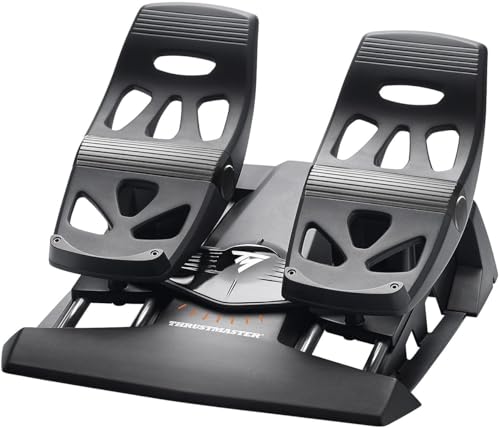
The Thrustmaster TFRP Precision Flight Sim Rudder Pedals solve a specific problem: twist sticks and keyboard keys make yaw control feel disconnected from the rest of the aircraft. These pedals let the pilot coordinate turns with the feet, which is especially useful during taxiing, crosswind landings, and helicopter control.
The rudder axis has a long range of travel and self-centers when released. That combination gives small inputs more room and makes it easier to return to neutral without hunting for the middle. The pedals use Thrustmaster's S.M.A.R.T. sliding rail system with four aluminum rails, intended to provide smooth movement and rigidity.
The platform is designed for comfort and stability during longer flights, and the pedals work with PS5, Xbox Series X|S, and PC. That cross-platform support makes them a useful companion to both the T-Flight HOTAS One and the TCA Captain Pack X. They can also supplement a yoke system such as the Logitech G PRO Flight Yoke, which does not include foot controls.
The main limitation is physical rather than functional. A pedal set needs a clear section of floor and a seating position that keeps the pedals from sliding away. The TFRP units measure about 21.42 inches wide, 13.62 inches long, and 15.83 inches high, with a listed weight of 4.875 pounds. They are not something most users will want to move around between every short session.
Compared with the Logitech G Pro Rudder Pedals, the TFRP set is the more obvious cross-platform choice and has a distinctive sliding-rail design. Logitech's pedals add adjustable tension and differential toe brakes, which may suit detailed PC landing practice better. Choose the TFRP when broad compatibility and smooth, extended rudder travel matter most.
9. Logitech G Pro Rudder Pedals: Best Adjustable Pedals

Pros
- Adjustable rudder tension
- Differential toe brakes
- Self-centering rudder axis
- Smooth foot control
- Compact single-unit design
Cons
- Windows compatibility listed
- No console compatibility listed
- Separate purchase from the main flight controls
Best for: Windows pilots who want adjustable rudder resistance and independent toe braking.
The Logitech G Pro Rudder Pedals are the more configurable foot-control option in this list. Their adjustable tension dial lets the pilot choose a lighter response for a small aircraft or a firmer feel for a heavy jet. That adjustment is more useful than a fixed resistance setting when one control set is shared between several types of aircraft.
The pedals also include differential toe brakes. That means each foot can provide its own braking input, which is valuable during taxiing and runway control. The self-centering rudder axis keeps the pedals returning to a predictable neutral position, while the smooth movement helps avoid the abrupt corrections common with keyboard rudder input.
Logitech lists a 9-bit rudder axis and 7-bit toe-brake axes, along with USB 2.0 compliance. The physical dimensions are 17.8 inches long, 14.4 inches wide, and 9.1 inches high, with a listed weight of 5.07 pounds. That makes them a substantial floor unit, but not as wide as the TFRP pedals' listed footprint.
The important compatibility distinction is that Logitech lists Windows 7, 8, 8.1, and 10, with an internet connection for optional software. There is no console compatibility listed. The TFRP Rudder Pedals are therefore the safer choice for a PS5 or Xbox cockpit, while these Logitech pedals make more sense beside a Windows yoke or HOTAS.
The lack of console support is the real reason to skip them if your setup moves between platforms. For a Windows pilot who wants to tune pedal tension and practice differential braking, they are more capable than the simpler integrated rudder controls found on the T-Flight systems.
10. Logitech G Saitek X52 Pro: Best Classic HOTAS

Pros
- Progressive throttle with adjustable resistance
- Afterburner and idle detents
- LCD multifunction display
- Five-position handle adjustment
- No-contact technology on X and Y axes
Cons
- Windows only
- Requires two USB 2.0 ports
- Less flexible than the newer X56 layout
Best for: PC pilots who want a traditional HOTAS with an integrated display and adjustable grip.
The Logitech G Saitek X52 Pro remains a recognizable traditional HOTAS layout. The stick and throttle are separate units, with the throttle carrying a progressive control and adjustable resistance. Detents for afterburner and idle make it particularly appealing for pilots who want tactile landmarks during combat aircraft operation.
Its LCD multifunction display gives the throttle a small information panel instead of leaving every profile detail on the monitor. Illuminated buttons also help in a dark room, while the five-position handle adjustment lets the stick accommodate different hand sizes. The contoured grip is intended to remain comfortable through longer sessions.
The X52 Pro uses a precision-centering mechanism, no-contact technology on the X and Y axes, and a constant spring force. Its programming software supports separate profiles for different games. The setup requires two USB 2.0 ports and supports Windows 10, 8.1, and 7, with an internet connection for optional software downloads.
The hardware measures about 14.57 inches long, 9.84 inches wide, and 9.06 inches high, with a listed weight of 5.1 pounds. It occupies less room than the Turtle Beach VelocityOne Flight and has a more conventional stick-and-throttle footprint. It is still a dedicated desktop arrangement, not a controller that disappears into a drawer after each session.
The Logitech G X56 HOTAS is the stronger choice for pilots who need twin throttles, a mini analog stick, and more modern combat-oriented flexibility. The X52 Pro is easier to understand and has the useful LCD display, but its Windows-only support rules out console use. Pick it for a classic PC HOTAS experience with adjustable grip and throttle landmarks.

How to choose the best flight simulator controls
The right setup depends less on the aircraft shown on the box than on the kind of input you want to make repeatedly during a flight.
Yoke versus sidestick
A yoke suits airliners and many general aviation aircraft because pitch and roll use a forward-back and turning motion. A sidestick or center joystick is more compact and usually better suited to fighters, helicopters, and spacecraft. The Logitech G PRO Flight Yoke and Turtle Beach VelocityOne Flight favor yoke flying, while the TCA Captain Pack X is built around an Airbus sidestick.
Throttle layout
A separate throttle gives engine control a dedicated hand position. Twin throttles, such as those on the X56, are useful for multi-engine aircraft and space simulators. A modular or detachable throttle is easier to position on a small desk, while a fixed quadrant with trim and landing controls better matches an airliner cockpit.
Rudder and toe brakes
Rudder control affects coordinated turns, taxiing, and crosswind corrections. Twist-stick rudder works for a compact setup, but separate pedals provide more natural control. Toe brakes add another useful layer for steering and stopping on the ground, with the Logitech G Pro Rudder Pedals offering differential braking.
A convincing cockpit starts with the axis you use constantly, not the number of buttons on the box.
Button mapping
More buttons are useful only when they are easy to locate and map. The T-Flight HOTAS X keeps its layout simple, while the X56 and TCA Captain Pack X offer extensive customization for aircraft with complicated procedures. Profile software can save time when switching between simulators, but a basic plug-and-play setup is easier for a first flight.
Desk and floor space
Measure the surface before choosing a yoke, throttle quadrant, or multi-piece pack. Large systems can be stable and comfortable, but they need room to stay assembled. Pedals also need a clear floor area and a chair that will not slide backward when you press the brakes.
Platform compatibility
PC support is common across this category, but console support varies sharply. The Turtle Beach VelocityOne Flight, T-Flight HOTAS One, TCA Captain Pack X, and TFRP pedals list Xbox compatibility, while several Logitech systems are Windows focused. If you are switching between PC and console, confirm every part of the intended setup before building around it.

Frequently asked questions
Do I need a yoke for Microsoft Flight Simulator?
No. A joystick or HOTAS can control Microsoft Flight Simulator effectively, especially for fighters, helicopters, and aircraft with sidesticks. A yoke feels more natural for many airliners and small general aviation aircraft.
Are rudder pedals necessary for flight simulation?
They are not necessary for starting, but they improve yaw control and ground handling. A twist stick can provide rudder input, while dedicated pedals make coordinated turns, taxiing, and differential braking easier to manage.
Which controls work with Xbox?
The Turtle Beach VelocityOne Flight, Thrustmaster TCA Captain Pack X, Thrustmaster T-Flight HOTAS One, and Thrustmaster TFRP Rudder Pedals list Xbox compatibility. The Logitech G PRO Flight Yoke, X56, X52 Pro, and Logitech G Pro Rudder Pedals are listed for Windows platforms.
Is a HOTAS better than a flight yoke?
Neither is universally better. HOTAS controls are more natural for combat aircraft, helicopters, and spacecraft, while a yoke and throttle quadrant better match many civilian aircraft. Choose according to the aircraft types you fly most often.
Can these controls be used with multiple flight simulators?
Several models support programmable profiles or mapping software. The Logitech G PRO Flight Yoke supports Microsoft Flight Simulator, FSX, X-Plane 10, and Prepar3D with optional software, while Thrustmaster's T.A.R.G.E.T software supports custom profiles for the T16000M FCS.
What should a beginner buy first?
A simple stick and throttle such as the Thrustmaster T-Flight HOTAS X is easy to understand on PC, while the T-Flight HOTAS One is the better fit for Xbox and PC. If civil aviation is the priority, the Logitech G PRO Flight Yoke offers a more appropriate starting layout.

The bottom line
The Best flight simulator controls for most PC civil aviation pilots are the Logitech G PRO Flight Yoke. It has a convincing stainless steel yoke, a matching throttle quadrant, secure clamps, and enough programmable controls for a serious desktop cockpit. Its missing pedals are the main limitation, but the setup has a clear upgrade path.
For an all-in-one Xbox or Windows station, the Turtle Beach VelocityOne Flight is the more complete choice, with integrated trim, rudder, brake, throttle, display, and yoke controls. Combat and space pilots should choose the Logitech G X56 HOTAS, while Airbus enthusiasts have a more authentic layout in the Thrustmaster TCA Captain Pack X.
If you are undecided, choose the control style that matches your favorite aircraft first, then check the available desk and floor space before ordering.
As an Amazon Associate we earn from qualifying purchases.