

An HDMI splitter and an HDMI switch solve opposite problems. A splitter sends one source to several screens, while a switch lets several sources share one display. Confusing those jobs is the fastest way to buy the wrong box.
Our Best HDMI splitter picks include true 1-in-2 and 1-in-4 distribution units, plus compact switches that appear in searches for splitters. The Anker 2-in-1 Switch is the best choice for most people switching between two sources, while the OREI UHDS-104 is the stronger pick when one 4K signal must reach four displays.
Comparison table
| # | Product | Award | Direction | Max video | Best for |
|---|---|---|---|---|---|
| 1 | Anker 2-in-1 Switch | Best overall switch | 2 in, 1 out | 4K at 60Hz | Two sources, one screen |
| 2 | UGREEN 5-in-1 Switch | Best for many sources | 5 in, 1 out | 4K at 60Hz | Console-heavy setups |
| 3 | MT-ViKI 1-in-4 Splitter | Best for four 4K displays | 1 in, 4 out | 4K at 30Hz | Long cable runs |
| 4 | Anker 4-in-1 Switch | Best remote switch | 4 in, 1 out | 4K at 60Hz | Hidden equipment racks |
| 5 | avedio links 1-in-2 Splitter | Best basic mirror splitter | 1 in, 2 out | 4K at 30Hz | Simple dual-display mirroring |
| 6 | avedio links 4K60 Splitter | Best 4K dual-display splitter | 1 in, 2 out | 4K at 60Hz | Matching modern displays |
| 7 | OREI UHDS-104 | Best 4K four-output splitter | 1 in, 4 out | 4K at 60Hz | Presentations and signage |
| 8 | GANA Bidirectional Switch | Best no-power switch | 2 in, 1 out or 1 in, 2 out | 4K at 60Hz | Basic desk setups |
1. Anker 2-in-1 Switch: Best Overall

Pros
- Supports 4K at 60Hz
- One-button manual switching
- Very light 0.066-pound design
- Works with laptops, consoles, TVs, and VR headsets
- Includes an 18-month warranty
Cons
- Switches sources, not displays
- No automatic signal detection
- Does not support HDMI CEC
Best for: someone who needs a small, dependable way to connect two HDMI sources to one display.
The first thing to understand about the Anker 2-in-1 Switch is that it is not a conventional HDMI splitter. It takes two HDMI inputs and sends one selected source to one display. That makes it the right answer for a TV shared by a game console and a laptop, but the wrong answer for sending one movie to two screens.
Its appeal is simplicity. Press the physical button and the active source changes, with no remote to lose and no menu to navigate. Anker says the unit supports up to 4K at 60Hz, but the 4K60 conditions are specific: both input and output cables should be shorter than 3.3 feet, use 30AWG construction, and stay within a combined length of 6.5 feet. Those limits matter more than the headline resolution when the switch sits far from a TV.
The compact design is particularly easy to hide behind a monitor or console. It weighs just 0.066 pounds, and the broad compatibility list includes laptops, game consoles, TV screens, and VR headsets. It supports one display at a time, so it cannot create a dual-screen mirror. If you are sorting out cables for a demanding setup, the cable length limits that affect HDMI signal reliability are worth settling before the switch goes behind the furniture.
Compared with the GANA Bidirectional Switch, the Anker is more focused and less flexible because it cannot reverse direction. Compared with the Anker 4-in-1 Switch, it gives up remote control and two extra inputs, but it is much easier to operate when the box is within reach. It also lacks HDMI CEC, so connected devices will not coordinate power and input changes through that feature.
Skip it if you need one source mirrored to two or more displays. For everyone else, this is the cleanest compact switch in the group, especially for a single TV or monitor with two regularly used HDMI devices.
2. UGREEN 5-in-1 Switch: Best for Many Sources

Pros
- Five HDMI inputs
- 4K at 60Hz with 18Gbps transmission
- Supports HDR, VRR, 3D, and CEC
- Remote control reaches within 33 feet
- LED indicators show the active input
Cons
- Requires USB power during use
- Power adapter is not included
- No automatic switching, ARC, or eARC
Best for: a living-room or gaming setup with several consoles and streaming devices sharing one TV.
The UGREEN 5-in-1 Switch is the most useful source switch here when five devices need to stay connected. It has room for a PS5, Xbox, Nintendo Switch, streaming stick, and laptop without making you reach behind the TV every time you want to change inputs. It still sends only one selected source to one display, so the five output claim some shoppers expect from a splitter does not apply.
Video support is unusually broad for this group. The switch handles 4K at 60Hz and lists backward compatibility with 4K at 30Hz, 1440p at 120Hz, and 1080p at 240Hz. It also supports HDMI 2.0 and 1.4, HDCP 2.2 and 1.4, VRR, Dynamic HDR, 3D, and 18Gbps transmission. Those details make it a more convincing fit for current consoles than the 4K at 30Hz distribution units.
The remote is useful when the switch is tucked into a cabinet. Its stated range is within 33 feet, and five LED indicators identify the active input on the box. UGREEN recommends input and output cables within 9 feet for 4K at 60Hz, using AWG30 cable. The USB power cable is included, but a power adapter is not, and the switch must be connected to power for proper operation.
The Anker 4-in-1 Switch is a simpler alternative with one fewer input and a remote, while the Anker 2-in-1 Switch is the tidier choice for a small setup. UGREEN wins when capacity and format support matter more than minimum clutter. It does not support ARC or eARC, and automatic switching is not available, so it is less seamless than a TV's built-in input management.
Choose this one for a crowded entertainment center. Skip it if you only have two sources, or if your real goal is to mirror one HDMI source on several screens.
3. MT-ViKI 1-in-4 Splitter: Best for Four 4K Displays

Pros
- Sends one source to four displays
- Includes a 5V/2A AC power adapter
- Supports 4K at 30Hz and 1080p at 60Hz
- Metal housing helps with heat dissipation
- Supports up to 100 feet total transmission
Cons
- Mirror mode only
- Does not support 4K at 60Hz
- No remote or source switching
Best for: distributing one HDMI feed to four TVs, monitors, or projectors where 4K at 30Hz is sufficient.
The MT-ViKI 1-in-4 Splitter is a genuine distributor, not a mislabeled switch. One HDMI source feeds four outputs at the same time, and every screen shows the same picture. That makes it a sensible fit for a classroom, conference room, retail display, or home setup where one player needs to reach several screens.
Its main compromise is refresh rate. The unit supports up to 4K at 30Hz, along with 1080p at 60Hz and 3D video. For films, slides, signage, and ordinary desktop mirroring, that may be enough. Fast gaming or smooth 4K computer output is better served by the OREI UHDS-104, which reaches 4K at 60Hz.
The included 5V/2A AC adapter is a meaningful part of the design because splitters need power to repeat a signal reliably. MT-ViKI also claims support for cable transmission up to 100 feet total, split as 50 feet on the input and 50 feet on the output, and says the device can be cascaded for larger distribution systems. Its metal housing is intended to improve heat dissipation and EMI protection, useful for installations that stay active for long periods.
There is no extended desktop mode. A computer cannot use this box to create four independent workspaces, and the output screens cannot show different content. It also has no remote because there is nothing to select. The avedio links 1-in-2 Splitter is smaller for a two-screen mirror, but it has the same 4K at 30Hz ceiling and fewer outputs.
Buy the MT-ViKI when the job is clearly one source to four matching displays and long cable runs matter. Avoid it for 4K gaming, high-refresh computer work, or any arrangement that needs separate images.
4. Anker 4-in-1 Switch: Best Remote Switch

Pros
- Four HDMI inputs
- 4K at 60Hz support
- Remote selector included
- Includes a 5-foot USB-A to USB-C cable
- 18-month warranty
Cons
- Switches to one display only
- HDMI cables are not included
- Does not support HDMI CEC
Best for: a four-device entertainment system where remote input changes are more convenient than reaching for a button.
The Anker 4-in-1 Switch is the straightforward upgrade from a TV's limited input count. It provides four HDMI inputs and one output, so a console, disc player, laptop, and streaming device can remain connected. A remote handles selection from the sofa, which is the main reason to choose it over the smaller Anker switch.
Anker lists 4K support at 60Hz and describes the unit as powered for stable signal transmission. The included 5-foot USB-A to USB-C cable supplies the power connection, but HDMI cables are not part of the package. That is easy to overlook when planning a new installation, especially if the existing cables are already routed through a wall or cabinet.
This model is best understood as a quiet traffic controller rather than a display distributor. It cannot send one source to multiple screens, and it does not provide independent outputs. The remote makes it more practical than the GANA Bidirectional Switch for a sofa-based setup, while the UGREEN 5-in-1 Switch gives you one more source input and adds VRR, HDR, and 3D support in its published specifications.
The missing HDMI CEC support is the major limitation. Connected equipment will not use CEC to coordinate switching, and the box cannot automatically detect which source has become active. You must use the remote or the selector, though that is hardly a hardship with four sources and a clearly defined input layout.
Choose the Anker 4-in-1 when you want a familiar brand, four inputs, and remote operation without needing advanced distribution features. If your setup is built around current gaming formats or five devices, UGREEN is the more capable choice.
5. avedio links 1-in-2 Splitter: Best Basic Mirror Splitter

Pros
- Mirrors one source to two displays
- Includes a 4-foot HDMI cable
- Supports 4K at 30Hz
- Supports several multichannel audio formats
- USB power cable is included
Cons
- Power adapter is not included
- Does not support HDCP 2.2
- Mirror mode only
Best for: a basic two-display setup using a source that does not require 4K at 60Hz or HDCP 2.2.
The avedio links 1-in-2 Splitter keeps its job narrow. It duplicates one HDMI source to two displays, carrying video and audio to both at the same time. It cannot combine two sources, switch between inputs, or extend a computer desktop across separate screens.
It supports up to 4K at 30Hz and falls back to 1080p at 50Hz or 60Hz, along with several lower resolutions. That makes it suitable for a mirrored movie, presentation, or camera feed, but not the first choice for a 4K60 console. The published cable guidance recommends HDMI 2.0 AWG26 cable, with a 16-foot limit for 4K and a 32.8-foot limit for 1080p.
The box supports HDMI 1.3 and 1.4, HDCP 1.4, deep color up to 12 bit and 16 bit as listed, and audio formats including DTS-HD, Dolby TrueHD, LPCM 7.1, DTS, Dolby AC3, and DSD. It includes a 4-foot high-speed HDMI cable and a USB power cable. The missing piece is a power adapter, so a wall adapter is still needed to avoid flicker or a no-signal condition.
The HDCP 1.4 limit makes this less broadly compatible than the avedio links 4K60 Splitter. The latter also handles mixed 4K and 1080p outputs through automatic or forced downscaling. The MT-ViKI 1-in-4 Splitter is the better match when four displays are required, but it too is limited to 4K at 30Hz.
This is a reasonable pick for an older or uncomplicated two-screen mirror. Skip it if the source is protected by HDCP 2.2, if 4K at 60Hz matters, or if you need extended desktop mode.
6. avedio links 4K60 Splitter: Best 4K Dual-Display Splitter

Pros
- Mirrors 4K at 60Hz to two displays
- Supports 18.5Gbps bandwidth
- Can mix 4K and 1080p displays
- Includes a USB cable with power adapter
- Includes a 4-foot HDMI 2.0 cable
Cons
- Cannot extend separate desktop content
- No ARC, eARC, or CEC
- Does not switch between sources
Best for: mirroring a modern 4K source on two displays at the same time.
The avedio links 4K60 Splitter is the clearest choice among the two-output true splitters when both screens are modern. It sends one HDMI source to two displays and supports 4K at 60Hz, so a console, computer, or media player does not have to drop to 30Hz simply because a second screen is connected.
Its format support is the important part. The unit is described as HDMI 2.0b with 18.5Gbps bandwidth, 4K at 60Hz in RGB 4:4:4, 1080p at 60Hz or 120Hz, and deep color at 30 or 36 bit. The automatic downscaler can handle a 4K display alongside a 1080p display, although the product notes that not every 4K 4:2:2 combination can be downscaled.
The package includes a USB cable with a power adapter and a 4-foot HDMI 2.0 cable, making setup less dependent on spare accessories. For 4K output, avedio links recommends HDMI 2.0 AWG26 cables no longer than 16 feet. That is a practical limit rather than a flaw, but it is important if the source and displays sit in different rooms. Readers comparing cable runs should also consider the connector and bandwidth differences between common HDMI cables before choosing replacements.
It remains a mirror-only device. It cannot send different content to the two screens, cannot accept two sources for one display, and cannot extract audio for a soundbar. It also lacks ARC, eARC, and CEC. The OREI UHDS-104 is the better four-screen option, while the Anker 2-in-1 Switch is better when the actual need is source selection.
Choose this splitter for two-screen 4K mirroring, especially when the displays have different resolutions. Anyone wanting a multi-monitor extended desktop should skip every true splitter in this roundup.
7. OREI UHDS-104: Best 4K Four-Output Splitter

Pros
- Sends 4K at 60Hz to four displays
- 18Gbps HDMI 2.0 support
- Heavy-duty metal enclosure
- Broad multichannel audio compatibility
- Includes a power adapter and international adapter
Cons
- Mirror mode only
- Recommended cable length is up to 30 feet
- No source switching
Best for: distributing one modern 4K signal across four screens in a presentation, retail, classroom, or home theater setup.
The OREI UHDS-104 is the strongest pure splitter here for a four-display 4K installation. It takes one source and duplicates it across four HDMI outputs, with 4K at 60Hz and 18Gbps transmission. That combination gives it a clear advantage over the MT-ViKI 1-in-4 Splitter, whose maximum 4K refresh rate is 30Hz.
The unit is built for more than a casual desk experiment. OREI uses a metal enclosure intended to improve heat dissipation, and the published setup guidance recommends HDMI cables up to 30 feet for optimal signal stability. It arrives with a power adapter, an international adapter or converter, and a user guide, so the distribution hardware is ready for a more permanent installation.
Audio support is broad, including LPCM, Dolby AC3, DTS 7.1, DSD, Dolby TrueHD, and DTS-HD Master Audio. That matters in a presentation or home theater arrangement where the display chain has to carry more than basic stereo. The splitter is plug and play and does not require drivers, so the setup is mostly a matter of connecting the source, displays, and power.
The limitation is fundamental rather than hidden: all four displays show the same content. This is not a video wall controller, a KVM, or an extended desktop hub. It also does not replace the UGREEN 5-in-1 Switch, which is designed to select among multiple sources. If your installation needs one laptop feed on four projectors, though, UGREEN is solving the wrong problem.
Buy the OREI when four outputs and 4K at 60Hz are both non-negotiable. It is the better long-term fit for signage, teaching, demonstrations, and multi-screen entertainment, provided identical content on every display is exactly what you need.
8. GANA Bidirectional Switch: Best No-Power Switch

Pros
- Works as either 2-in-1-out or 1-in-2-out
- Supports 4K at 60Hz
- Requires no external power
- Aluminum housing
- Two LED indicators show the active port
Cons
- Only one display works at a time in output mode
- Manual switching only
- HDMI cable is not included
Best for: a basic setup that needs either source switching or display selection without a separate power connection.
The GANA Bidirectional Switch is the most flexible little box in the roundup, at least in direction. Connect two sources to one display, or connect one source to two displays and select which display receives the signal. The key word is select: it does not show the same source on both displays simultaneously.
GANA lists 4K at 60Hz support with backward compatibility to 2K and 1080p, plus 3D video. It also lists 3.4Gbps transmission and recommends keeping total HDMI cable length within 3 meters for vivid 4K output. The box uses an aluminum housing and two LEDs to show the active port, giving the otherwise simple unit a more finished feel.
No external power is required, which is its most practical advantage. Press the button to change the active path, and the switch handles the change without a USB cable or wall adapter. That is convenient for a temporary desk setup or a compact cabinet, though the lack of a remote becomes obvious when the unit is out of reach.
The Anker 2-in-1 Switch is a better focused two-source switch, with a much lighter design and a published 4K60 cable condition that is more specific. The GANA is the one to consider when you may need to reverse the direction later. It still cannot distribute one source to two screens at once, and it does not include an HDMI cable.
Choose this model when no-power operation and bidirectional use matter more than remote control. If the goal is genuine simultaneous mirroring, choose the avedio links 4K60 Splitter for two screens or the OREI UHDS-104 for four.
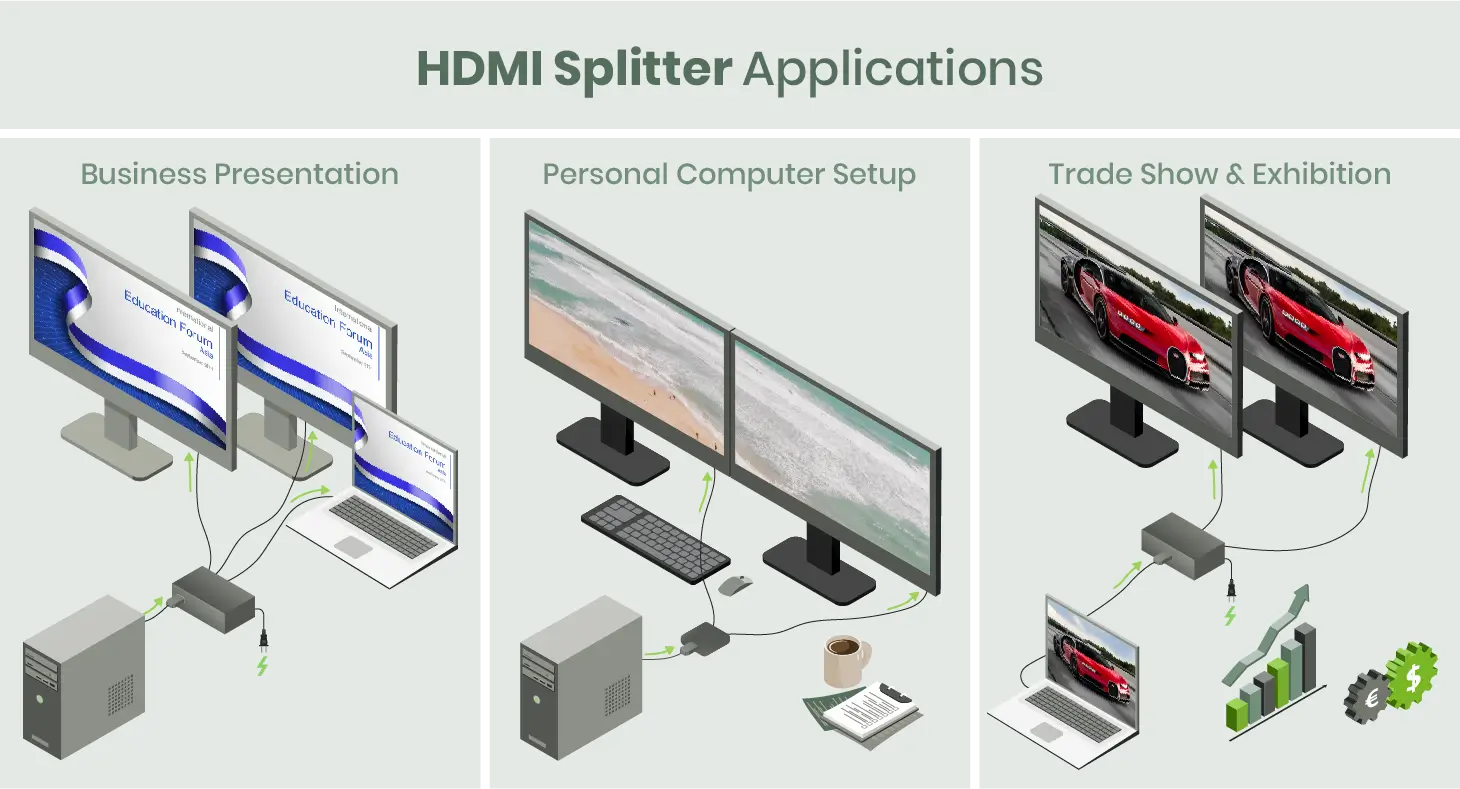
How to choose the best hdmi splitter
Start by deciding whether you need distribution or selection. The Best HDMI splitter for one source and several screens is not the same product as the best HDMI switch for several sources and one screen.
Signal direction
A 1-in-2 or 1-in-4 splitter duplicates one input across multiple outputs. It cannot extend a computer desktop, show separate content, or choose among source devices. A 2-in-1 or 4-in-1 switch does the reverse by selecting one source for a single display.
If the box needs to show different images, it is not a normal HDMI splitter.
Bidirectional switches such as the GANA can reverse their direction, but they still activate only one path at a time. Read the input and output labels carefully before buying.
Resolution and refresh rate
4K at 60Hz is the important dividing line for modern games, fast desktop motion, and smooth video. The MT-ViKI and the older avedio links splitter top out at 4K at 30Hz, while the avedio links 4K60 model and OREI UHDS-104 support 4K at 60Hz.
A 4K60 claim is not independent of the cable run. UGREEN recommends cables within 9 feet, Anker's compact switch gives a much shorter combined cable condition for 4K60, and avedio links recommends up to 16 feet for 4K. Long cables, adapters, and mixed displays can reduce the result.
Number of outputs
Two outputs suit a desk, a TV and projector, or a simple mirrored presentation. Four outputs make sense for classrooms, retail signage, conference rooms, and multi-screen home installations. Extra outputs do not create extra content. Every connected screen on a conventional splitter receives the same source.
Power and signal stability
Powered splitters use external power to repeat and distribute the HDMI signal. The MT-ViKI includes a 5V/2A AC adapter, while the avedio links 1-in-2 model includes a USB power cable but requires an adapter. OREI includes a power adapter, and UGREEN requires USB power during use.
The GANA does not need external power because it is a manual switch, not a multi-output distribution amplifier. That simplicity is useful, but it should not be mistaken for simultaneous two-screen output.
Compatibility features
HDCP version, HDR, VRR, CEC, ARC, and eARC can decide whether a setup works as expected. UGREEN supports HDR, VRR, 3D, CEC, and HDCP 2.2 and 1.4, while the avedio links 4K60 splitter does not support CEC, ARC, or eARC. The older avedio links unit lists HDCP 1.4 and is not compatible with HDCP 2.2.
For a protected streaming source, check HDCP compatibility first. For console gaming, look for 4K at 60Hz and VRR where required. For a soundbar, do not assume a splitter is an audio extractor.

Frequently asked questions
Is an HDMI splitter the same as an HDMI switch?
No. A splitter sends one HDMI source to two or more displays. A switch connects multiple sources to one display and lets you choose which source appears.
Can an HDMI splitter extend a desktop across two monitors?
Normal HDMI splitters cannot extend separate desktop content. They mirror the same image on every connected display, so use a graphics card, dock, or suitable multi-display adapter for independent screens.
Does an HDMI splitter reduce resolution?
It can, depending on the unit, source, displays, cable lengths, and format compatibility. The MT-ViKI and older avedio links model support 4K at 30Hz, while the avedio links 4K60 and OREI models support 4K at 60Hz under their stated conditions.
Do HDMI splitters need power?
Many powered splitters do. Power helps repeat the signal across multiple outputs and longer cable runs. The GANA is an unpowered manual switch, while MT-ViKI, UGREEN, avedio links, and OREI list power connections for their relevant designs.
Can one splitter connect four TVs?
Yes, a 1-in-4 splitter such as the MT-ViKI or OREI UHDS-104 can send one source to four displays. All four screens show the same content, and the source does not become four independent channels.
Will an HDMI splitter work with a PS5 or Xbox?
It can if the splitter supports the console's required resolution, refresh rate, copy protection, and other features. UGREEN supports 4K at 60Hz, HDR, VRR, and HDCP 2.2, while the older 4K at 30Hz splitters are less suitable for current high-refresh console use.
Can an HDMI splitter send audio to a soundbar?
A standard splitter carries audio through the HDMI signal to the connected displays, but it is not automatically an audio extractor. The avedio links products specifically state that they do not connect to a separate speaker or soundbar as an audio extractor.

The bottom line
The Best HDMI splitter depends on the direction of the signal. For genuine distribution, the OREI UHDS-104 is the strongest four-output choice because it combines 4K at 60Hz, 18Gbps support, broad audio compatibility, and a metal enclosure. The avedio links 4K60 Splitter is the more compact fit for two mirrored displays.
For source switching, the Anker 2-in-1 Switch is the easiest pick for two devices, while the UGREEN 5-in-1 Switch is better for a console-heavy setup with remote control, HDR, VRR, and five inputs. If you are undecided, count the sources and displays first, then choose the unit whose signal direction matches that count.
As an Amazon Associate we earn from qualifying purchases.