
A USB drive can be the quickest way to move a video from a phone to a laptop, but the wrong one can leave you hunting for an adapter or waiting through a slow transfer. The connector, capacity, and rated speed matter more than a flashy product name.
Our Best USB Drives list includes compact Type-A models, dual-connector drives for newer phones and laptops, high-capacity options, and multipacks for keeping spares nearby. The Samsung BAR Plus is our top pick, while the rest cover specific needs from maximum speed to simple everyday storage.
Comparison table
| # | Product | Award | Capacity | Connector | Rated read speed | Best for |
|---|---|---|---|---|---|---|
| 1 | Samsung BAR Plus | Best overall | 128GB | USB-A | Up to 300MB/s | Durable everyday storage |
| 2 | Lexar D40E 128GB | Best dual connector | 128GB | USB-A and USB-C | Up to 100MB/s | Moving files between devices |
| 3 | SanDisk Extreme PRO Dual Drive | Best high-speed option | 512GB | USB-A and USB-C | Up to 1, 000MB/s | Large creative files |
| 4 | PNY Attaché X | Best high-capacity Type-A | 256GB | USB-A | Up to 130MB/s | Large everyday transfers |
| 5 | SanDisk Ultra Flair | Best compact Type-A | 128GB | USB-A | Up to 150MB/s | Carrying in a laptop bag |
| 6 | SanDisk Ultra 256GB | Best simple large drive | 256GB | USB-A | Up to 130MB/s | Straightforward file storage |
| 7 | Lexar D40E 256GB | Best dual-connector capacity | 256GB | USB-A and USB-C | Up to 100MB/s | Phone and laptop storage |
| 8 | PNY Turbo Attaché 3 5-Pack | Best multipack | Five 128GB drives | USB-A | Up to 100MB/s | Sharing or organizing files |
| 9 | PNY Turbo Attaché 3 2-Pack | Best two-drive set | Two 128GB drives | USB-A | Not specified | Keeping a spare |
| 10 | Lexar A30E 3-Pack | Best lightweight set | Three 64GB drives | USB-A | Up to 100MB/s | Small file handoffs |
1. Samsung BAR Plus: Best Overall

Pros
- Fast rated read performance
- Metal body with integrated keyring
- Waterproof, shock-proof, temperature-proof, magnet-proof, and X-ray-proof construction
- Five-year limited warranty
Cons
- USB-A only
- Larger capacity is not available in this listing
Best for: anyone who wants a durable USB-A drive for regular file transfers.
The Samsung BAR Plus is the drive we would keep attached to a keyring or in a laptop bag. Its metal body feels more purposeful than the light plastic shells on the PNY Turbo Attaché models, and the integrated keyring makes it harder to leave behind. It is still small enough to disappear in a pocket, though its solid construction gives it a reassuring presence.
Samsung rates this 128GB drive for read speeds up to 300MB/s over USB 3.1. That makes it a strong fit for moving large videos, photo libraries, and folders of documents, though actual performance depends on the host computer, port, and file type. The drive is USB-A, so it fits conventional laptops and desktops directly but cannot connect to a USB-C-only phone or computer without an adapter.
The BAR Plus stands out for protection. Samsung says the enclosure is waterproof, shock-proof, temperature-proof, magnet-proof, and X-ray-proof, and backs it with a five-year limited warranty. Those claims do not make it a backup by itself, but they do make it less stressful to carry around than a basic thumb drive. If your computer has limited USB-A ports, choosing the right way to add more connections can help keep the drive useful alongside other accessories.
The weakness is straightforward: there is no USB-C connector. The Lexar D40E is more flexible across modern phones and laptops, and the SanDisk Extreme PRO is much faster, but neither is as balanced for ordinary USB-A storage and physical toughness. Choose the Samsung BAR Plus if durability and a familiar connector matter more than phone compatibility.
2. Lexar D40E 128GB: Best Dual Connector

Pros
- USB-A and USB-C connectors
- Swivel design avoids a loose cap
- 256-bit AES encryption software
- Compact metal enclosure
Cons
- Rated speed is lower than the fastest drives here
- 128GB capacity limits large media collections
Best for: people moving files between USB-C phones and traditional USB-A computers.
The Lexar D40E 128GB solves the most annoying compatibility problem with one small drive. Its USB-A and USB-C connectors let you move files between a current Android phone, a USB-C laptop, and an older desktop without carrying a separate adapter. The 360-degree swivel design also keeps the connectors attached to the drive, so there is no cap to lose.
Lexar rates it for transfer speeds up to 100MB/s. That is enough for documents, photos, music, and occasional video transfers, but it is not the pick for repeatedly moving very large project folders. The drive is 70.4 by 16.9 by 11.7mm and weighs 26g, so it is compact without being an especially tiny flush-mount design.
The metal enclosure is rated to withstand temperatures from 0 to 50 degrees C. Lexar includes software with 256-bit AES encryption and a three-year limited warranty, which gives the D40E a more complete feature set than the PNY multipacks. Plug-and-play compatibility covers Type-C smartphones, tablets, laptops, Macs, and Type-A devices, although the host device still determines how smoothly file access works.
The Samsung BAR Plus is faster on paper and tougher in its stated protection claims, but it cannot connect directly to USB-C devices. The Lexar D40E 256GB offers the same connector flexibility with twice the capacity, while this version remains easier to manage when 128GB is enough. Skip it if your work involves sustained high-speed media transfers or if you only use USB-A.
3. SanDisk Extreme PRO Dual Drive: Best High-Speed Option

Pros
- Up to 1, 000MB/s read speed
- Up to 900MB/s write speed
- USB-A and USB-C connectivity
- 512GB capacity
- Encryption technology and Memory Zone app support
Cons
- Longer body than most picks
- The fastest results require a suitable host device
Best for: creators and power users moving very large files between USB-C and USB-A devices.
The SanDisk Extreme PRO Dual Drive is in a different performance class from the ordinary USB 3.0 sticks here. It is built for people who regularly move large video files, project folders, or other demanding data and do not want the drive to become the slowest part of the workflow. Its 512GB capacity gives those files room to stay together rather than being split across several smaller drives.
SanDisk rates the drive for read speeds up to 1, 000MB/s and write speeds up to 900MB/s. Those figures are the reason to choose it, but they are not guarantees for every laptop or phone. The host interface, storage system, file sizes, and usage conditions all affect the result. A modern compatible port is essential if you want to approach the drive's headline performance.
This is also one of the most versatile options physically. USB-A and USB-C connectors cover laptops, tablets, and Android smartphones, while the SanDisk Memory Zone app can help with auto backup, file management, and retrieval. Encryption technology adds a layer of protection for sensitive files. At 3.2 inches long, 0.7 inches wide, and 0.1 inches high, it is slim but noticeably longer than the Samsung BAR Plus.
The SanDisk Extreme PRO Dual Drive beats the Lexar D40E models on speed and capacity, while the Lexar drives are more restrained for routine transfers. It is not the sensible choice for a few documents or occasional photos, and its performance advantage disappears on a slower port. If you are comparing removable storage with a larger desktop solution, the amount of space a portable drive gives you is the more important question.
4. PNY Attaché X: Best High-Capacity Type-A

Pros
- 256GB capacity
- Up to 130MB/s read speed
- Sliding collar protects the connector
- USB 3.2 Gen 1 and USB 2.0 compatibility
Cons
- USB-A only
- No stated write speed
Best for: users who want substantial capacity in a conventional Type-A drive.
The PNY Attaché X is the uncomplicated large-capacity option. It does not try to connect to a phone directly or promise extreme throughput. Instead, it gives a Type-A computer 256GB of removable storage in a lightweight body with a sliding collar that covers the connector when the drive is not in use.
Its rated read speed is up to 130MB/s, which puts it ahead of the PNY Turbo Attaché 3 models on paper and close to the 256GB SanDisk Ultra. PNY does not state a write speed here, so this is better viewed as a convenient storage and transfer drive than a tool for predicting how quickly a large folder will be saved.
The Attaché X works with USB 3.2 Gen 1 and USB 3.0 Type-A ports and remains backward compatible with USB 2.0. That makes it broadly useful with older desktops and laptops. The sliding collar is preferable to a loose cap, but the light construction does not offer the same stated environmental protection as the Samsung BAR Plus.
The SanDisk Ultra 256GB adds password protection, while the Lexar D40E 256GB adds USB-C connectivity. The PNY Attaché X makes more sense when a standard USB-A connection and capacity are the priorities. Avoid it if your main computer has only USB-C ports or if you need a documented write-speed target.
5. SanDisk Ultra Flair: Best Compact Type-A

Pros
- Compact metal casing
- Up to 150MB/s read speed
- 128-bit AES password protection
- Suitable for quick everyday transfers
Cons
- USB-A only
- Performance varies by capacity and host device
Best for: carrying a small, familiar USB-A drive for everyday files.
The SanDisk Ultra Flair is the kind of drive that slips into a laptop sleeve and stays there. Its metal casing is more reassuring than a bare plastic shell, and its compact shape avoids taking up much room beside other plugged-in accessories. It is a practical choice for documents, photos, and occasional video transfers.
SanDisk lists read speeds up to 150MB/s and says transfers to the drive can be up to 15 times faster than standard USB 2.0 drives. The important limitation is that the stated read figure is not a universal transfer guarantee. A USB 3.0 host is required, and file attributes, the computer, and capacity can all change the result.
The 128GB drive also supports password protection through 128-bit AES encryption. On Windows systems it is designed to work with SecureAccess, while Mac support requires a software download. That is useful for a private folder, though it should not replace a separate backup of important files.
The Samsung BAR Plus offers stronger stated protection and higher rated reads, while the SanDisk Extreme PRO is dramatically faster and larger. The Ultra Flair earns its place by staying small and simple. Choose it for ordinary USB-A carrying, not for a USB-C phone or a heavy production workflow.
6. SanDisk Ultra 256GB: Best Simple Large Drive

Pros
- 256GB capacity
- Up to 130MB/s read speed
- USB 3.0 and USB 2.0 compatibility
- Secure file encryption and password protection
Cons
- USB-A only
- No stated physical protection rating
Best for: storing a larger collection of files on a conventional USB-A computer.
The SanDisk Ultra 256GB is a straightforward file carrier with enough room for a substantial photo folder, video collection, or document archive. Its plain design is not the reason to buy it. The appeal is the combination of familiar USB-A compatibility, useful capacity, and a published read-speed ceiling.
SanDisk rates it for read speeds up to 130MB/s over USB 3.0, with transfers up to 10 times faster than standard USB 2.0 drives. USB 2.0 compatibility is helpful for older systems, but those older ports will limit performance. SanDisk does not provide a write-speed figure, so large saves may take longer than the read specification suggests.
Secure file encryption and password protection give the Ultra 256GB a useful privacy feature. That matters when the drive travels between computers or holds personal documents. Still, encryption software is not a substitute for keeping another copy of irreplaceable files, and the supplied information does not state the kind of rugged protection offered by Samsung.
The PNY Attaché X is a close alternative with the same capacity and a similar rated read speed. The Lexar D40E 256GB is the better fit for USB-C devices, while the SanDisk Ultra is easier to justify for a USB-A-only setup that benefits from password protection. It is not the pick for high-speed creative work.
7. Lexar D40E 256GB: Best Dual-Connector Capacity

Pros
- USB-A and USB-C connectors
- 256GB capacity
- 360-degree swivel design
- 256-bit AES encryption software
- Three-year limited warranty
Cons
- Rated speed is up to 100MB/s
- Larger body than the 128GB version in some dimensions
Best for: moving a sizable file library between USB-C and USB-A devices.
The Lexar D40E 256GB takes the most useful idea in the 128GB D40E and gives it more breathing room. A 256GB capacity is more comfortable for video folders and phone photo libraries, while the two connectors let the same drive serve a current tablet and an older laptop. The swivel mechanism keeps the unused connector protected without relying on a separate cap.
Lexar rates this model for transfer speeds up to 100MB/s. That is adequate for routine storage, but the SanDisk Extreme PRO Dual Drive is the clear choice for demanding transfers. The D40E is about convenience and compatibility rather than maximum throughput, especially when the host device has a modest interface.
The metal enclosure measures about 70.4 by 16.9 by 11.7mm and weighs 26g according to the supplied specifications. It is rated for temperatures from 0 to 50 degrees C. Lexar also includes 256-bit AES encryption software and a three-year limited warranty, giving it more security support than the PNY options.
The 128GB D40E is smaller in capacity and may be enough for ordinary documents, but this version is the one to choose when files tend to accumulate. The Samsung BAR Plus has stronger stated durability and faster reads, yet it lacks USB-C. Buyers who need both connectors and 256GB should choose this Lexar, while buyers who need speed should skip it.
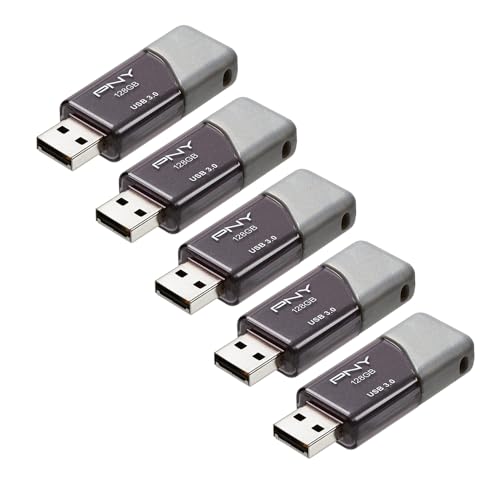
8. PNY Turbo Attaché 3 5-Pack: Best Multipack
Pros
- Five separate 128GB drives
- Up to 100MB/s read speed
- Sliding collar and cap-less design
- USB 3.0 and USB 2.0 compatibility
Cons
- USB-A only
- No stated encryption feature
- Individual drives have less capacity than the 256GB options
Best for: households, classrooms, or teams that need separate removable drives.
The PNY Turbo Attaché 3 5-Pack is less about one standout drive than about having five identical pieces of removable storage ready to assign. Separate drives can be useful for different family members, project folders, bootable media, or a set of rotating copies. It also reduces the temptation to pile unrelated files onto one drive.
Each drive has 128GB of capacity and a rated read speed up to 100MB/s. PNY describes transfers as up to 10 times faster than standard USB 2.0 drives, while USB 2.0 compatibility keeps the drives usable with older computers. There is no USB-C connector, so phones and USB-C-only laptops need an adapter or hub.
The cap-less design uses a sliding collar to protect the connector when the drive is not plugged in. The drives are described as durable and lightweight, but the supplied information does not give a physical protection rating or an encryption feature. That makes sensible file organization and separate backups especially important.
The PNY Turbo Attaché 3 2-Pack is easier to store when you need only two drives, and the Lexar A30E 3-Pack offers a lighter individual drive with security software. The five-pack makes sense for distribution and organization, not for maximum speed or rugged travel. Choose it when the number of separate drives matters most.
9. PNY Turbo Attaché 3 2-Pack: Best Two-Drive Set

Pros
- Two 128GB drives
- Sliding collar protects the connector
- Up to 10 times faster than USB 2.0 drives
- Backward compatible with USB 2.0
Cons
- USB-A only
- No stated read speed in the supplied listing
- No stated encryption feature
Best for: keeping one working drive and one spare for ordinary file transfers.
The PNY Turbo Attaché 3 2-Pack is a practical compromise for someone who wants redundancy without a larger bundle. One drive can stay in a desk drawer while the other travels, or each can be assigned to a different computer. The matching pair also avoids keeping track of different capacities and interfaces.
Each drive is listed as 128GB and is compatible with USB 3.0 ports, with backward compatibility at USB 2.0 speeds. PNY says transfers can be up to 10 times faster than standard USB 2.0 drives, but this listing does not provide a specific read-speed number. Treat it as an everyday transfer drive rather than a performance benchmark.
The sliding collar covers the connector and removes the loose-cap problem. The supplied information describes the design as durable and lightweight, but it does not state encryption or a water and shock resistance rating. The drives are best for files that also exist elsewhere, rather than as the only home for important memories.
The five-pack is the better fit for distributing storage across several people or tasks. The Lexar A30E 3-Pack includes a stated 100MB/s read speed and DataShield security, but it uses 64GB drives. Choose the PNY pair for simple USB-A storage and a ready spare, not for USB-C compatibility.
10. Lexar A30E 3-Pack: Best Lightweight Set

Pros
- Three separate drives
- Push-button retractor
- Lanyard loop
- Up to 100MB/s transfer speed
- DataShield password-protected safe
Cons
- Each drive has 64GB capacity
- USB-A only
- No stated environmental protection rating
Best for: carrying several light drives for small file handoffs and organization.
The Lexar A30E 3-Pack is designed around portability and separation. Three individual drives are useful when one is for work, one is for personal files, and one is a spare. The push-button retractor protects the USB-A connector without a removable cap, and the lanyard loop gives the drive a clear place to attach.
Each drive has 64GB of capacity, so this set is aimed at smaller collections rather than a large media archive. Lexar rates transfer speeds up to 100MB/s and says the drive is compatible with tablets, laptops, Macs, and traditional Type-A devices. As with every drive here, the host interface and usage conditions affect real-world results.
DataShield provides a password-protected safe with automatic encryption, and files deleted from that safe are described as securely erased and unrecoverable. That is a more distinctive security feature than the basic multipacks offer. The drive weighs 7.41g and has a slim portable design, making it the lightest-feeling option in this group based on the supplied specifications.
The PNY Turbo Attaché 3 2-Pack gives each drive twice the capacity, while the SanDisk Ultra Flair is a better single-drive choice for a compact metal casing. The A30E wins when three lightweight, separately managed drives are more useful than one large one. Skip it if you routinely move videos or other files that will not fit comfortably on 64GB.
How to choose best usb drives
The Best USB Drives are separated less by their names than by connector choice, sustained use, capacity, and how much protection your files need.
Connector type
USB-A remains common on desktops, older laptops, televisions, and many hubs. USB-C is now standard on many phones, tablets, and newer laptops, but a USB-C-shaped port does not automatically guarantee the fastest transfer standard.
A dual-connector drive such as the Lexar D40E or SanDisk Extreme PRO avoids carrying an adapter. Choose a USB-A-only model when your devices all use that connector and you want a simpler, smaller range of options.
Capacity
Capacity determines what can stay on the drive at the same time. The 64GB Lexar A30E models suit documents and smaller photo handoffs, while 128GB drives offer more room for mixed files. A 256GB model is a better fit for larger photo and video folders, and the 512GB SanDisk is designed for substantial creative projects.
Remember that advertised capacity is not the same as the free space shown after formatting. Keep another copy of irreplaceable files regardless of the drive size.
Transfer speed
Read speed describes how quickly files can be opened from the drive, while write speed affects how quickly files are saved to it. Several models list only a read speed or a general transfer claim, so do not assume a read figure predicts every copy operation.
The Samsung BAR Plus reaches up to 300MB/s read, and the SanDisk Extreme PRO lists up to 1, 000MB/s read and 900MB/s write. Those figures require a suitable host device. Older USB 2.0 ports will bottleneck even the fastest drive.
A dual connector solves compatibility, but only a fast host port can unlock high transfer speeds.
Physical protection
A metal casing can help a drive handle everyday knocks, but it is not the same as a stated water or shock rating. The Samsung BAR Plus specifically lists waterproof, shock-proof, temperature-proof, magnet-proof, and X-ray-proof protection. The Lexar D40E lists a metal enclosure and an operating temperature range from 0 to 50 degrees C.
For a drive that stays in a desk drawer, a sliding collar or push-button retractor may matter more than environmental protection. For travel, a stronger enclosure and an attached keyring are useful safeguards.
Security features
Password protection and encryption can keep casual users from opening private files if a drive is misplaced. SanDisk lists 128-bit AES protection on the Ultra Flair and Ultra 256GB, while Lexar lists 256-bit AES encryption software for the D40E and DataShield for the A30E.
Security software does not protect against every form of loss or corruption. Use it for sensitive folders, then keep a separate backup of anything you cannot replace.
Frequently asked questions
Do USB drives work with USB-C phones?
A USB-A-only drive usually needs an adapter or compatible hub. Dual-connector models such as the Lexar D40E and SanDisk Extreme PRO include both USB-A and USB-C connectors, making direct transfers more convenient when the phone supports external storage.
Is a 256GB USB drive better than a 128GB model?
It is better when you need to keep larger photo, video, or document folders together. A 128GB drive is easier to manage for ordinary transfers, while a 256GB drive leaves more room for growing collections without switching devices.
Are the fastest USB drives fast on every computer?
No. The computer's port, file system, host storage, file sizes, and usage conditions all affect transfer speed. A drive rated for 1, 000MB/s cannot reach that figure through a slower USB 2.0 connection.
Can a USB drive replace a backup?
No. A USB drive is convenient removable storage, but it can be lost, damaged, corrupted, or accidentally erased. Keep important photos and documents in at least one other location.
Should I choose USB-A or USB-C?
Choose USB-A if your computers and other devices use that connector. Choose USB-C or a dual-connector drive if you regularly move files to newer phones, tablets, or USB-C laptops.
Do encrypted USB drives protect every file automatically?
Usually, the supplied security tools protect files placed inside a password-protected area rather than every file on the entire drive. Follow the software instructions and test access before relying on it for sensitive data.

The bottom line
The Samsung BAR Plus is the most balanced of the Best USB Drives here for ordinary USB-A systems. Its fast rated read speed, integrated keyring, metal body, broad protection claims, and five-year limited warranty make it the one we would carry regularly.
Choose the Lexar D40E 256GB if USB-C compatibility and extra capacity matter more than peak speed. For very large files and demanding transfers, the SanDisk Extreme PRO Dual Drive is the clear specialist choice, with USB-A, USB-C, 512GB of capacity, and much higher rated throughput.
If you are undecided, choose the Samsung for a USB-A computer, the Lexar D40E for mixed USB-C and USB-A devices, and the SanDisk Extreme PRO for high-speed creative work.
As an Amazon Associate we earn from qualifying purchases.