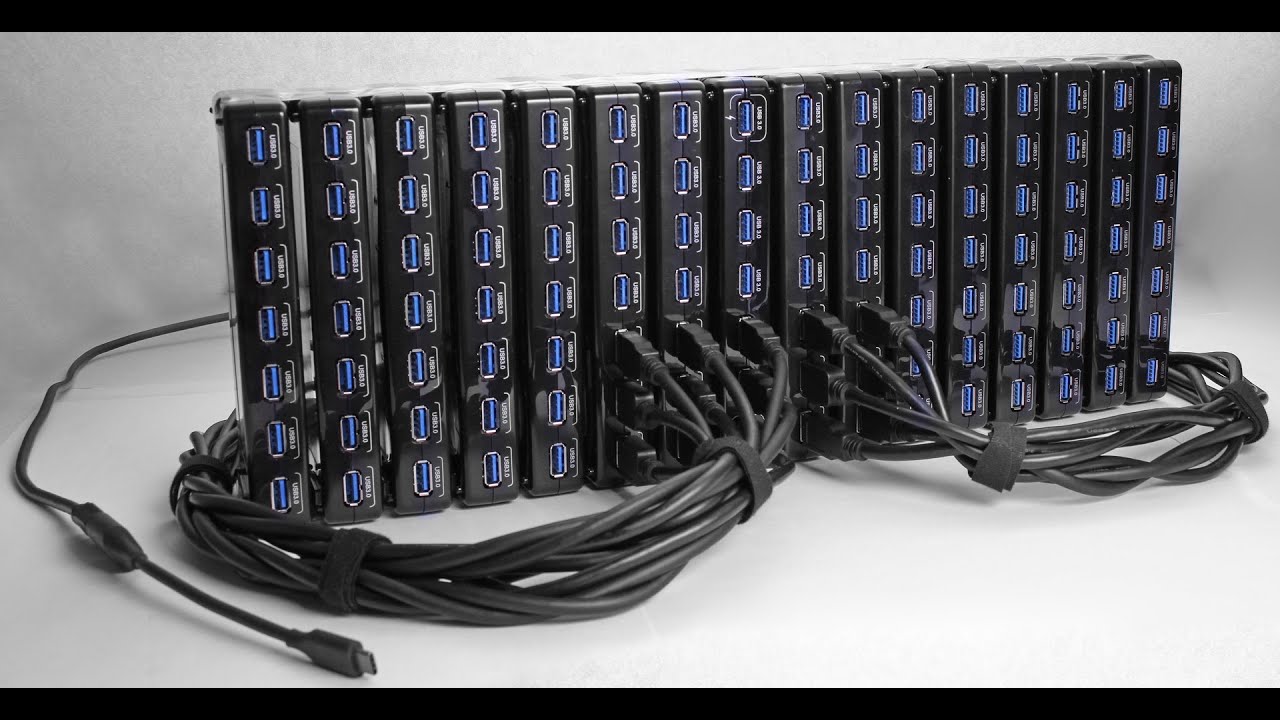

A laptop with one useful USB port becomes frustrating quickly. Add a mouse, keyboard, flash drive, printer, or external storage and you are already swapping cables. The Best USB Hubs solve that problem, but they do not all solve it in the same way.
Some of these are small, bus-powered USB-A splitters. Others need their own adapter and are built for a desk full of drives. A few also add HDMI, SD cards, USB-C, or charging. Our top pick is the Acer 7-in-1 USB-C Hub, while the other nine cover simpler setups, higher port counts, and powered desktop use.
Comparison table
| # | Product | Award | Data ports | Power or video | Best for |
|---|---|---|---|---|---|
| 1 | Acer 7-in-1 USB-C Hub | Best overall | 2 USB-A, 1 USB-C at 5Gbps | HDMI 4K at 30Hz, PD up to 100W | USB-C laptops needing a full workstation adapter |
| 2 | Acer 4-Port USB 3.0 Hub | Best compact USB-A hub | 4 USB-A at 5Gbps | Optional USB-C power input | Travel and everyday peripherals |
| 3 | Anker 7-in-1 USB-C Hub | Best for displays and cards | 2 USB-A, 1 USB-C at 5Gbps | HDMI 4K at 60Hz, PD input | USB-C laptops with a monitor and memory cards |
| 4 | intpw 9-Port USB 3.2 Hub | Best high-speed powered hub | 1 USB-C and 2 USB-A at 10Gbps, 4 USB-A at 5Gbps | Two 45W charging ports | Mixed USB-C and USB-A desktop setups |
| 5 | TP-Link UH720 | Best for charging peripherals | 7 USB-A at 5Gbps | Two 5V/2.4A charging ports | A desk with many USB-A devices |
| 6 | SABRENT HB-BU10 | Best port-by-port control | 10 USB-A at 5Gbps | 60W adapter | Many devices that need individual switches |
| 7 | SABRENT HB-B7C3 | Best powered charging layout | 7 USB-A at 5Gbps | Three 2.4A charging ports | USB-A accessories and device charging |
| 8 | WENTER 11-Port Hub | Best for maximum USB-A count | 10 USB-A at 5Gbps | One 2.4A charging port | A crowded legacy USB workstation |
| 9 | ABFCRTTW 7-Port Hub | Best long-cable layout | 4 USB-A and 3 USB-C at 5Gbps | USB-C power input | Desktop setups with ports out of reach |
| 10 | Anker 4-Port USB 3.0 Hub | Best simple Anker hub | 4 USB-A at 5Gbps | No charging | A basic USB-A expansion |
1. Acer 7-in-1 USB-C Hub: Best Overall

Pros
- Adds HDMI, USB, and card readers in one adapter
- HDMI supports 4K at 30Hz
- USB-C power delivery input supports up to 100W
- Aluminum housing helps with heat dissipation
Cons
- HDMI is limited to 30Hz at 4K
- Video requires a USB-C host port with DP Alt Mode
- It has only three USB data ports
Best for: USB-C laptop owners who need video, storage cards, and everyday peripherals from one adapter.
The Acer 7-in-1 USB-C Hub is the most useful all-rounder here because it does more than multiply USB sockets. It turns one compatible USB-C port into a compact workstation connection, with HDMI, two USB-A ports, one USB-C data port, SD and MicroSD slots, and a USB-C PD input. That is a much better fit for a modern laptop than a four-port USB-A splitter.
The two USB-A ports and USB-C data port reach up to 5Gbps, which is enough for ordinary external drives, card readers, keyboards, and other peripherals. The HDMI output can send 4K video at 30Hz, or Full HD video at higher practical smoothness. It is important to check the laptop first: the host USB-C port must support DisplayPort Alt Mode, and this adapter is not a universal video converter.
The PD input supports up to 100W, although Acer says to use a 65W or higher charger for the best result. That lets the laptop keep charging while the hub handles other connections. The aluminum housing is compact at about 5.12 by 1.38 by 0.39 inches and weighs about 0.15 pounds, so it belongs in a laptop bag without becoming a separate piece of desk equipment.
Compared with the Anker 7-in-1 USB-C Hub, Acer gives you the same broad arrangement of video, card readers, USB data, and power input, but its HDMI output is 4K at 30Hz rather than Anker's 4K at 60Hz. Acer remains the better fit for a general laptop adapter, while Anker is the sharper pick for a smooth external display. Skip this one if your laptop has only USB-A or if you need several high-speed storage devices at once.
2. Acer 4-Port USB 3.0 Hub: Best Compact USB-A Hub
Pros
- Four USB-A data ports
- 5Gbps transfer capability
- Two-foot cable suits laptops and travel
- Optional USB-C input can stabilize power for drives
Cons
- USB-C input does not transfer data
- It cannot charge connected devices
- No USB-C data or video output
Best for: anyone who needs several USB-A peripherals from a laptop or desktop port.
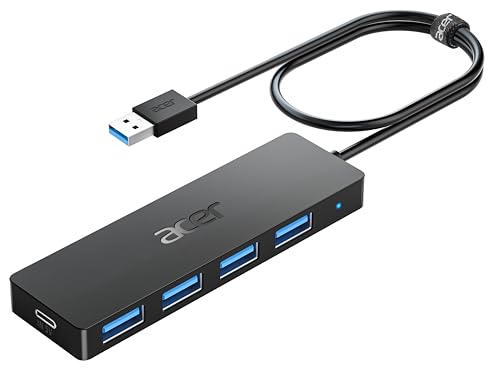
The Acer 4-Port USB 3.0 Hub is the uncomplicated choice. Plug it into a USB-A port and you get four more USB-A connections for a mouse, keyboard, flash drive, printer, or similar accessory. Its two-foot cable is long enough to move the hub away from a cramped laptop port without creating much cable clutter.
All four ports support data transfer up to 5Gbps, and Acer says they can work simultaneously. The hub uses an internal GL3510 chip and has an LED to show when it is active. For a small accessory that is likely to live in a travel bag, the 4.13 by 1.18 by 0.35-inch body and 0.1-pound weight are sensible.
The unusual detail is the USB-C socket marked for 5V input. It cannot transfer data or charge other devices. Its job is to supply extra power to the hub, which can help stabilize data transfer when an external hard drive or several peripherals are attached. That distinction matters because this is an expansion hub, not a charging dock.
The Anker 4-Port USB 3.0 Hub is its closest rival. Both offer four USB-A ports and 5Gbps data, but Acer has the optional power input and Anker explicitly does not support charging. Acer is the more flexible pick for drives, while Anker is a simpler plug-in accessory with a similarly compact shape. Choose another product if you need USB-C data, HDMI, memory cards, or laptop charging.
3. Anker 7-in-1 USB-C Hub: Best for Displays and Cards

Pros
- HDMI supports 4K at 60Hz
- Includes SD and TF card slots
- Three USB data ports run at 5Gbps
- Laptop charging input supports up to 85W
Cons
- Only two USB-A ports
- USB-C data port does not carry video
- Requires a compatible USB-C host connection
Best for: laptop users who regularly connect a monitor and camera cards.
The Anker 7-in-1 USB-C Hub has a more focused layout than most USB hubs. Its standout combination is HDMI plus SD and TF card slots, with enough USB data connectivity for a keyboard, mouse, or portable drive. It is the one to consider when a laptop doubles as a photo workstation or presentation machine.
The HDMI output supports 4K at 60Hz, a meaningful improvement over the Acer 7-in-1 USB-C Hub's 4K at 30Hz. Text and motion should look more natural on a compatible display, although the host laptop must support video over USB-C. The USB-C socket on the hub is for data, not video, so HDMI is the only display output.
Its two USB-A ports and one USB-C data port support 5Gbps transfers. The PD input can support laptop charging up to 85W, giving the adapter a practical role at a desk rather than only on the road. The body measures about 5.17 by 1.46 by 0.47 inches and weighs about 0.15 pounds.
The trade-off is port count. You get fewer USB-A sockets than with the TP-Link UH720, and there is no dedicated high-speed 10Gbps connection like the intpw hub. What Anker does better is combine useful laptop functions in a small package. It is the right choice for a display and card workflow, but not for a desk crowded with USB-A equipment.
4. intpw 9-Port USB 3.2 Hub: Best High-Speed Powered Hub

Pros
- USB 3.2 ports reach 10Gbps
- Includes four additional 5Gbps USB-A ports
- Two USB-C charging ports support 45W
- 65W power adapter included
- Angled aluminum desktop design
Cons
- Charging ports do not transfer data
- No video output
- Multiple SSDs are not recommended simultaneously
Best for: a powered desk setup mixing USB-C accessories, USB-A peripherals, and charging.
The intpw 9-Port USB 3.2 Hub is built for people who have outgrown four ordinary USB ports. It combines one USB-C 3.2 port and two USB-A 3.2 ports at up to 10Gbps with four USB-A 3.0 ports at up to 5Gbps. That mix is more useful than a wall of identical ports when newer storage and older accessories share a desk.
Two USB-C PD ports can provide up to 45W for compatible phones, tablets, and other USB-C devices. They are charging-only ports, not hidden data sockets. The included 65W adapter supplies the hub, but the maker says it is not intended to charge a computer or other high-power device.
The angled triangular aluminum body has a 32-degree design and feet for a stable desktop position. The included USB-C cable is 3.3 feet long, giving more placement flexibility than the short leads on many small hubs. The hub also includes protections against overload, over-voltage, over-current, short circuit, and overcharge.
The intpw is more capable than the SABRENT HB-BU10 for modern USB-C equipment, but SABRENT gives you ten matching data ports and individual switches. The intpw's own warning against using multiple SSDs simultaneously limits its appeal for heavy storage work. Pick it for mixed connectivity and charging, not as a replacement for a dedicated storage enclosure.
5. TP-Link UH720: Best for Charging Peripherals

Pros
- Seven USB 3.0 data ports
- Two dedicated 5V/2.4A charging ports
- Physical power button
- Protection against overload and overheating
- Supports Windows, Mac, Chrome, and Linux
Cons
- USB-A only
- No USB-C data
- Larger desktop footprint than a travel hub
Best for: a mostly USB-A desk with several peripherals and separate charging needs.
The TP-Link UH720 remains a sensible desktop hub because it separates data from charging. Seven USB 3.0 data ports run at up to 5Gbps, while two dedicated USB ports provide 5V/2.4A charging for phones, tablets, and other USB-powered devices. That means charging does not consume one of the data connections.
Its 12V/4A power adapter keeps the hub supplied when several devices are connected. The physical power button is useful when the whole desk should go offline, and hot-swappable ports let you connect or disconnect supported devices while the computer is running. TP-Link also lists overheat, overload, overvoltage, short-circuit, and surge protection.
This is a broad-compatibility product. It supports Windows, macOS, ChromeOS, and Linux without requiring drivers, and it remains backward compatible with USB 2.0 and 1.1 devices. The 7.8 by 5.8 by 2.8-inch dimensions make it a desktop unit rather than something to slip beside a tablet.
The SABRENT HB-B7C3 offers the same basic split between seven data ports and dedicated charging, while adding individual port switches and three charging ports. TP-Link's advantage is its clearer software-free compatibility and dedicated master power control. If your setup has USB-C drives or you want a compact travel adapter, this is the wrong shape and port selection.
6. SABRENT HB-BU10: Best Port-by-Port Control

Pros
- Ten USB 3.0 data ports
- Individual power switches
- LED indicator for every port
- 60W power adapter included
- Supports USB 2.0 and USB 1.1 devices
Cons
- No dedicated charging ports
- USB-A only
- Individual LEDs may be bright on a bedside or studio desk
Best for: users who need many USB-A data connections with direct control over each device.
The SABRENT HB-BU10 is the most straightforward high-capacity data hub in this group. It turns one USB 3.0 connection into ten USB 3.0 ports, each capable of up to 5Gbps. If a computer has a keyboard, several drives, card readers, a printer, and other USB-A accessories attached, the extra sockets are the point.
Its best feature is not the raw count. Every port has its own power switch and blue LED, so a drive or accessory can be disconnected electrically without pulling its cable. That is a cleaner arrangement than repeatedly reaching behind a desktop or leaving every device powered all the time.
The included 60W, 12V/5A adapter is designed for the powered hub, and the unit works with Windows, macOS, and Linux without drivers. It is backward compatible with USB 2.0 and USB 1.1 equipment. The included USB 3.0 cable makes setup simple, though this is still a desktop accessory rather than a lightweight travel hub.
Compared with the WENTER 11-Port Hub, SABRENT gives you one fewer total port but ten data ports rather than WENTER's ten data ports plus one charging port, so the practical data capacity is the same. SABRENT has a stronger fit for people who want every port controlled individually. It is not for laptop charging, video output, or USB-C equipment.
7. SABRENT HB-B7C3: Best Powered Charging Layout

Pros
- Seven USB 3.0 data ports
- Three dedicated charging ports
- Individual switches and LED indicators
- 60W power adapter
- Plug-and-play support for Windows, macOS, and Linux
Cons
- No USB-C ports
- Charging ports are limited to 2.4A each
- Fewer data ports than the HB-BU10
Best for: a USB-A workstation that also charges several phones or tablets.
The SABRENT HB-B7C3 is the sibling to the HB-BU10 with a different priority. It provides seven USB 3.0 data ports, plus three dedicated charging ports that can deliver up to 2.4A per port. That arrangement leaves the data sockets available for drives and peripherals when phones or other devices need power.
Each port has an individual switch and LED, which is unusually useful on a powered hub. You can shut down one external drive without disturbing the keyboard, or turn off a charging connection without removing the cable. The 60W, 12V/5A adapter is included to keep the hub stable under a full load.
Data ports support transfers up to 5Gbps, and the unit works with Windows, macOS, and Linux without drivers. Its compact mirrored design is easier to place than some larger desktop hubs, although it still needs a wall outlet and is limited to USB-A connections.
The TP-Link UH720 is the closest alternative and has seven data ports as well as two charging ports. SABRENT adds a third charging port and individual switches, while TP-Link offers a more prominent master power control and broader stated operating-system support. Choose SABRENT for per-port control, but choose another model if USB-C is central to your setup.
8. WENTER 11-Port Hub: Best for Maximum USB-A Count
Pros
- Ten USB 3.0 data ports
- One dedicated charging port
- Individual power switches and LEDs
- Long USB and power cables
- Includes a 12V/3A adapter
Cons
- USB-A only
- Charging is limited to one port
- Product listing gives two different power-cable lengths
Best for: a legacy USB-A workstation that needs the largest number of connected devices.
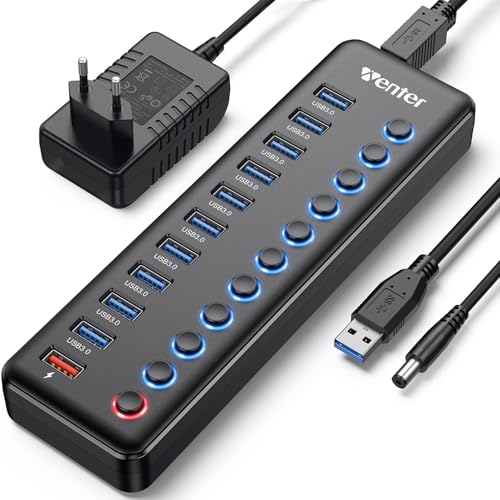
The WENTER 11-Port Hub is designed around quantity. Ten USB 3.0 data ports support up to 5Gbps, and a separate charging port can provide up to 2.4A through the included 12V/3A power adapter. This is a practical shape for a desktop with many keyboards, drives, printers, card readers, and other USB-A hardware.
Individual on/off switches make that port count easier to manage. Each connection can be powered down without unplugging it, while the LEDs show which ports are active. The hub supports USB 3.0, 2.0, 1.1, and 1.0 devices, and it supports hot-swapping without drivers on Windows, macOS, and Linux.
The supplied USB cable is 3.3 feet long. The listing gives conflicting information for the power cable, describing it as both 4 feet and 5 feet, so buyers should not plan a precise cable route around one stated length. That inconsistency does not change the hub's basic role, but it is a reason to leave some routing flexibility.
The SABRENT HB-BU10 offers the same ten data-port count with a 60W adapter, while WENTER adds one dedicated charging port and longer advertised cable options. SABRENT is the cleaner choice for a strictly data-focused setup. WENTER makes more sense when the extra charging socket and maximum USB-A count matter more than a polished specification sheet.
9. ABFCRTTW 7-Port Hub: Best Long-Cable Layout

Pros
- Four USB-A and three USB-C ports
- Four-foot cable for desktop placement
- 5Gbps data transfer
- Aluminum housing
- USB-C input can supply up to 15W
Cons
- Does not charge connected devices
- No wall adapter included in the listed package
- USB-C ports are data connections, not video outputs
Best for: desktop users who need USB-A and USB-C sockets at the end of a long cable.
The ABFCRTTW 7-Port Hub solves a physical problem that compact hubs often ignore. Its four-foot cable lets the hub sit on a desktop while the computer remains under a desk or farther away. The seven ports combine four USB-A connections with three USB-C connections, making it more adaptable than the USB-A-only powered models.
All seven ports are rated for data transfer up to 5Gbps. The listing also describes a USB-C port that can provide 5V/3A, or 15W, for stable power to devices such as external drives and USB fans. The same listing clearly says the device supports data transmission, not charging, so that input should not be treated as a phone or laptop charging port.
The aluminum housing is intended to improve heat dissipation, and the maker describes a dual-chip design for compatibility across Windows, macOS, and Linux. Its approximately 0.2-pound weight keeps it easy to move, although a light hub can slide when several stiff cables are attached.
This is a different proposition from the Acer 4-Port USB 3.0 Hub. Acer is smaller and easier to travel with, while ABFCRTTW reaches across a desk and gives you three USB-C data sockets. It cannot replace the Acer 7-in-1 USB-C Hub for HDMI, card readers, or laptop power, and it is a poor choice if your devices need actual charging.
10. Anker 4-Port USB 3.0 Hub: Best Simple Anker Hub

Pros
- Four USB-A ports
- 5Gbps data transfer
- Two-foot cable
- Slim, lightweight design
- No drivers required for basic use
Cons
- Charging is not supported
- No external power input
- No USB-C, video, or card-reader ports
Best for: a laptop or desktop user who simply needs four additional USB-A data ports.
The Anker 4-Port USB 3.0 Hub is the least complicated product here, and that is its appeal. It expands one USB-A port into four USB-A data connections for ordinary peripherals. There is no power adapter, software, video output, or charging feature to configure.
The ports support data transfer up to 5Gbps, fast enough for moving photos, documents, and other files to a compatible drive. The two-foot cable is long enough for most laptop use, and the hub's body is about 27.68 inches long according to the listed product dimensions, with a 0.11-pound weight. The dimension data is unusual, but the product is clearly positioned as a slim portable hub.
Anker emphasizes heat resistance and durability, and the hub includes an 18-month warranty. The explicit limitation is equally important: it is not designed to charge devices. It should be treated as a data splitter, not as a powered station for phones or multiple hard drives.
The Acer 4-Port USB 3.0 Hub is the better choice when an external drive may need supplemental power through its USB-C input. Anker is preferable when you want the simplest possible USB-A expansion and do not need that option. Anyone needing USB-C, HDMI, SD cards, or charging should move up to one of the seven-in-one or powered models.

How to choose best usb hub
The right hub depends less on the number printed on the box than on the devices you will connect, the speed they need, and whether the computer can supply enough power.
Host connector
Start with the port on the computer. USB-A hubs such as the Acer 4-Port, Anker 4-Port, and WENTER models need a USB-A host connection. USB-C adapters such as the Acer 7-in-1 and Anker 7-in-1 use USB-C, but video support also depends on DisplayPort Alt Mode on the computer.
A USB-C plug does not automatically mean HDMI will work. For a display adapter, confirm that the laptop's USB-C port supports video before choosing a model.
Data speed
USB 3.0 hubs in this group reach up to 5Gbps, which suits keyboards, mice, printers, flash drives, and many ordinary external drives. The intpw hub adds USB 3.2 connections rated up to 10Gbps, making it the more suitable option for newer fast storage.
The headline speed is shared through the host connection. Several active drives can compete for bandwidth, so a hub with more sockets does not create more total USB bandwidth.
Power delivery
Bus-powered hubs are convenient, but demanding drives and several accessories can exceed what a computer port comfortably supplies. The Acer 4-Port hub has a USB-C power input for more stable operation, though it cannot charge devices. Powered models such as the TP-Link, SABRENT, WENTER, and intpw include adapters for more consistent desktop use.
Charging ports are not always data ports. The intpw's two 45W USB-C ports, for example, charge compatible devices but do not transfer files.
Buy for the connections you actually need, then check which ports carry data, power, or video before assuming one socket does everything.
Video and card readers
A USB hub with HDMI is a small laptop dock, not merely a larger splitter. The Anker 7-in-1 supports 4K at 60Hz, while the Acer 7-in-1 supports 4K at 30Hz. Both also include SD and MicroSD card slots, which are useful for cameras and removable storage.
If you only need a monitor, compare the output specification and host compatibility. If you need several drives, a dedicated data hub may be a better fit than spending ports on HDMI and card readers.
For a broader look at the difference between compact splitters and multi-function adapters, the connections that matter in a laptop hub are a useful place to continue.
Port layout and cable length
A two-foot lead works well beside a laptop. A four-foot lead is more useful when the computer sits under a desk, which is why the ABFCRTTW hub suits a fixed desktop arrangement. Individual switches on the SABRENT and WENTER hubs are valuable when devices should be disconnected without removing cables.
Physical port placement matters too. Wide drives and chunky adapters can block neighboring sockets, while an angled desktop body such as the intpw's can make repeated plugging easier.

Frequently asked questions
Do USB hubs reduce transfer speed?
They can. All devices on a hub share the bandwidth of the computer's host connection, so several active drives may transfer more slowly than one drive connected directly. A 10Gbps hub can still be useful, but it does not provide a separate 10Gbps connection to every port at once.
Can a USB hub charge a laptop?
Most ordinary USB-A hubs cannot. The Acer 7-in-1 and Anker 7-in-1 have USB-C power inputs intended to pass power to a compatible laptop, while the intpw hub's charging ports are not intended to charge computers.
Do USB-C hubs work with every USB-C laptop?
No. Data connections are broadly useful, but HDMI output requires a host USB-C port with DisplayPort Alt Mode. Power delivery also depends on the laptop and charger supporting the relevant charging protocol.
Are powered USB hubs better for external hard drives?
They are often a better fit when several drives or power-hungry accessories are connected. A separate adapter supplies the hub instead of relying entirely on the computer's USB port. The Acer 4-Port can accept supplemental power, but the Anker 4-Port does not.
Can these hubs connect USB 2.0 devices?
Yes. The listed powered hubs and the Anker 4-Port support backward-compatible USB equipment. The connected device still determines its operating speed, so a USB 2.0 accessory will not transfer at USB 3.0 speed.
Do charging ports also transfer data?
Not always. The TP-Link and SABRENT charging ports are dedicated for charging, and the intpw hub's two 45W USB-C ports do not transfer data. Check the product's port description rather than assuming every USB-C socket is multifunctional.
Is HDMI output available on a regular USB-A hub?
Not in this group. HDMI appears on the Acer and Anker seven-in-one USB-C adapters, and those require a compatible USB-C host connection. The USB-A hubs here are intended for data and, on powered models, dedicated charging.

The bottom line
The Acer 7-in-1 USB-C Hub is the most versatile pick in this roundup. It adds HDMI, SD and MicroSD readers, three USB data ports, and up to 100W PD input in a small aluminum adapter. The Anker 7-in-1 USB-C Hub is the better alternative when 4K at 60Hz matters more than Acer's broader everyday balance.
For a simple USB-A setup, choose the Acer 4-Port USB 3.0 Hub. For a busy desktop, the SABRENT HB-BU10 gives ten data ports and individual switches, while the TP-Link UH720 is more useful when dedicated charging ports matter. The Best USB Hubs are the ones whose port types match the devices already on your desk.
If you are undecided, choose the Acer 7-in-1 for a USB-C laptop and the Acer 4-Port for straightforward USB-A expansion.
As an Amazon Associate we earn from qualifying purchases.