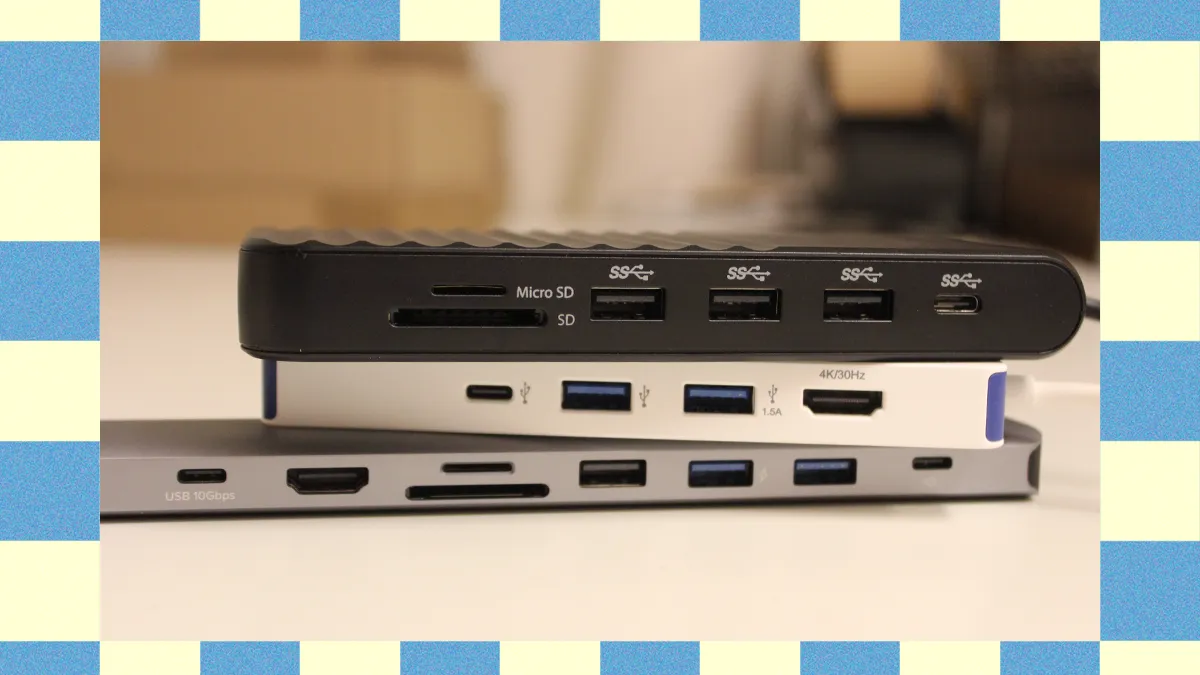

A laptop with one occupied USB port can turn a simple desk setup into a daily exercise in unplugging things. Add a keyboard, mouse, flash drive, external storage, camera card, or second display, and the port shortage gets old quickly. The Best USB hubs and adapters solve that problem, but they do not all solve it in the same way.
The list below includes simple USB-A splitters, USB-C adapters with HDMI and card slots, and powered desktop hubs for several peripherals. Acer USB Hub 4 Ports is the best pick for straightforward USB-A expansion, while Anker USB C Hub 7-in-1 is the stronger choice for modern laptops that need display output, storage access, and pass-through charging.
| # | Product | Award | Ports | Speed | Video and power | Best for |
|---|---|---|---|---|---|---|
| 1 | Acer USB Hub 4 Ports | Best overall | 4 USB-A 3.0 | Up to 5Gbps | 5V USB-C power input | USB-A laptops and desktops |
| 2 | Anker USB C Hub 7-in-1 | Best USB-C adapter | 2 USB-A, USB-C data, SD, TF, HDMI, USB-C PD | Up to 5Gbps | 4K at 60Hz, up to 85W charging | USB-C laptops with displays and cards |
| 3 | BERLAT 7-in-1 USB-C Hub | Best basic USB-C expansion | 1 USB-A 3.0, 4 USB-A 2.0, 2 USB-C 2.0 | Up to 5Gbps on USB 3.0 | No video or charging listed | Keyboards, mice, and light peripherals |
| 4 | UGREEN USB-C Hub 5-in-1 | Best compact HDMI hub | 1 USB-A 3.0, 2 USB-A 2.0, HDMI, USB-C PD | Up to 5Gbps | 4K at 30Hz, up to 95W pass-through | USB-C workstations |
| 5 | Acer USB-C Hub 7-in-1 | Best for card readers | 2 USB-A 3.1, USB-C, SD, microSD, HDMI, USB-C PD | Up to 5Gbps | 4K at 30Hz, up to 100W PD | Cameras and USB-C laptops |
| 6 | SABRENT 4-Port Powered Hub | Best individual switches | 4 USB-A 3.0 | Up to 5Gbps | Powered by 2.5A adapter | Desks with devices that stay connected |
| 7 | Anker USB Hub 4 Ports | Best USB-A cable reach | 4 USB-A 3.0 | Up to 5Gbps | Data only | PCs and desktops |
| 8 | uni USB-C 4-Port Hub | Best USB-C data splitter | 4 USB-A 3.0 | Up to 5Gbps | Data only | USB-C laptops with several accessories |
| 9 | atolla 8-Port Powered Hub | Best high-port-count hub | 7 USB-A 3.0 data ports, charging port | Up to 5Gbps | Dedicated charging port, 5V/4A adapter | Large peripheral collections |
| 10 | UGREEN USB 3.0 Hub 4-Port | Best ultra-slim hub | 4 USB-A 3.0 | Up to 5Gbps | No charging listed | Travel and compact desks |
1. Acer USB Hub 4 Ports: Best Overall
Pros
- Four USB-A 3.0 ports in a simple layout
- Up to 5Gbps data transfer
- Two-foot cable is useful with desktops and laptops
- USB-C power input can improve hard-drive stability
- Works across Windows, macOS, ChromeOS, and Linux
Cons
- USB-C input is for hub power only
- No USB-C data, display, or charging output
- No individual port switches
Best for: someone who needs four dependable USB-A ports without changing the rest of a computer setup.
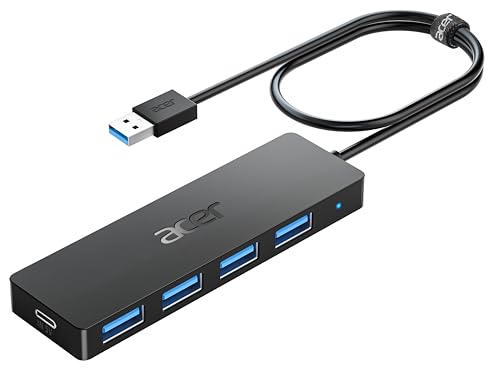
The Acer USB Hub 4 Ports is the kind of accessory that fixes a specific annoyance without trying to become a docking station. Plug it into a USB-A port and it gives you four more USB-A 3.0 connections for a keyboard, mouse, printer, flash drive, or other peripheral. That narrow focus is a strength here. There are no card readers or display settings to think about, and the hub is designed to work without drivers.
Its four ports support data transfer up to 5Gbps, which is the important distinction between this and a USB 2.0 splitter. A keyboard or mouse will not need that bandwidth, but an external drive or large flash drive can benefit from the faster connection. Acer also says the ports can work simultaneously, although available bandwidth is shared when several devices are transferring data at once.
The two-foot cable gives this model an advantage over short, directly attached hubs when the computer's port is in an awkward place. It can sit beside a laptop or reach around the side of a desktop without pulling the hub against the chassis. The body measures about 4.13 by 1.18 by 0.35 inches and weighs 0.1 pounds, so it remains easy to put in a laptop bag. A small LED indicates when the hub is operating.
There is one detail buyers should understand before connecting a hard drive. The USB-C port marked for 5V input does not transfer data and cannot charge another device. It supplies power to the hub and its USB-A ports, which Acer says can make data transfer more stable when drives are connected. That is useful, but it means this is not a USB-C adapter in disguise. The Anker USB Hub 4 Ports has the same basic data-only approach, while the Acer's power input gives it a little more flexibility with demanding peripherals.
The missing features are just as clear. There is no HDMI output, card slot, USB-C data port, or individual switch. People building a camera workflow or a one-cable laptop desk should choose the Anker USB C Hub 7-in-1 or Acer USB-C Hub 7-in-1 instead. For a computer that simply ran out of USB-A sockets, this is the cleanest match in the group.
2. Anker USB C Hub 7-in-1: Best USB-C Adapter

Pros
- HDMI output supports 4K at 60Hz
- SD and TF card slots are built in
- Three data ports support up to 5Gbps
- USB-C power input supports up to 100W
- Compact body with an 18-month warranty
Cons
- Laptop charging is listed as up to 85W
- USB-C port is data only, not video
- Requires a USB-C host port with the right display support
Best for: USB-C laptop owners who need one compact adapter for a monitor, memory cards, accessories, and charging.
The Anker USB C Hub 7-in-1 is the most complete all-purpose adapter here. It covers the common modern-laptop problem in one small package: too few ports, no full-size HDMI connection, and nowhere to insert an SD card. The arrangement includes two USB-A 3.0 ports, one USB-C data port, SD and TF card slots, HDMI, and a USB-C PD input.
The data connections are rated up to 5Gbps. That gives external storage and memory cards a reasonable path for moving files, while the two USB-A ports leave room for a keyboard, mouse, or other desk accessory. The card slots are a meaningful advantage over the Acer USB Hub 4 Ports and the simpler USB-C splitters. Photographers, content creators, and anyone moving files from removable media will not need a separate reader.
HDMI is the standout feature. The port supports 4K output at 60Hz, which allows a sharper, smoother desktop on a compatible display than the 4K at 30Hz output on the UGREEN USB-C Hub 5-in-1 and Acer USB-C Hub 7-in-1. The host laptop must support video output over USB-C, and the hub's USB-C port itself is for data, not a second display connection. That limitation is normal for this class of adapter, but it is important to check the laptop before buying.
The USB-C PD input accepts up to 100W, while Anker lists laptop charging up to 85W. The difference accounts for power used by the hub and attached devices. It is enough to keep many USB-C laptops running through the adapter, though the result depends on the charger and the computer. The body is about 5.17 by 1.46 by 0.47 inches and weighs roughly 0.15 pounds, so it has enough room for the ports without becoming a desk-bound dock.
The trade-off is that this hub cannot make an incompatible USB-C port produce video. It also does not provide a powered bank of USB-A ports for a collection of high-draw drives. For that kind of setup, the atolla 8-Port Powered Hub is a better fit. For a laptop user who needs a monitor, card slots, fast data, and power in a single adapter, this is the most capable choice in the lineup.
3. BERLAT 7-in-1 USB-C Hub: Best Basic USB-C Expansion

Pros
- Seven peripheral connections
- One USB-A 3.0 port reaches up to 5Gbps
- Four USB-A 2.0 ports suit keyboards and mice
- Two USB-C 2.0 ports add newer connector support
- Aluminum housing is light and portable
Cons
- Most ports are limited to USB 2.0 speeds
- No HDMI output or power delivery port
- A single fast port limits high-speed storage use
Best for: a USB-C laptop user adding several low-bandwidth accessories such as input devices and simple USB peripherals.
The BERLAT 7-in-1 USB-C Hub takes a different route from the video adapters above. Its purpose is not to connect a monitor or charge a laptop. Instead, it turns one USB-C connection into a group of USB ports, with one USB-A 3.0 port, four USB-A 2.0 ports, and two USB-C 2.0 ports.
That mix makes sense for a desk where most accessories are not moving large files. A keyboard, mouse, printer, USB fan, or basic card reader can use USB 2.0 without a noticeable drawback. The single USB-A 3.0 port reaches up to 5Gbps for the one device that needs faster data, such as a flash drive. Buyers should not mistake the seven-port count for seven high-speed connections, however. The four USB-A 2.0 and two USB-C 2.0 ports are listed at up to 480Mbps.
The aluminum casing keeps the hub compact and light. It measures about 4 by 1 by 0.5 inches and weighs roughly 0.09 pounds. That makes it easy to carry with a USB-C laptop, and its compatibility list includes Windows, macOS, Android, ChromeOS, and Linux. The design is plug and play, so there is no driver installation to complicate a quick connection.
Compared with the uni USB-C 4-Port Hub, BERLAT offers more physical ports but less speed consistency. The uni gives all four USB-A ports USB 3.0 data capability, while BERLAT is better when the priority is connecting many basic accessories at once. The UGREEN USB-C Hub 5-in-1 is the better option when HDMI or laptop charging matters.
Its limitations are substantial for storage-heavy work. There is no display output, no USB-C PD input, and only one high-speed port. A photographer moving files from multiple drives should skip it, as should anyone hoping to use a USB-C monitor through the hub. It is a sensible choice for a peripheral-heavy but bandwidth-light setup where port quantity matters more than video or fast storage.
4. UGREEN USB-C Hub 5-in-1: Best Compact HDMI Hub

Pros
- HDMI output supports up to 4K at 30Hz
- USB-C input supports up to 95W pass-through
- One USB-A 3.0 and two USB-A 2.0 ports
- Plug-and-play support for major operating systems
- Small aluminum-style adapter body
Cons
- HDMI is limited to 30Hz at 4K
- Only one USB-A port supports 5Gbps
- Host USB-C port must support video output
Best for: a USB-C laptop user who wants a monitor connection, laptop power pass-through, and a few everyday USB-A ports.
The UGREEN USB-C Hub 5-in-1 is a good example of a focused laptop adapter. It has HDMI, one USB-A 3.0 data port, two USB-A 2.0 ports, and USB-C PD input. That is enough for a monitor, keyboard, mouse, and one faster storage device without the extra card slots found on the Anker USB C Hub 7-in-1.
Its HDMI port supports resolutions up to 4K at 30Hz. That is well suited to office work, web browsing, documents, and video playback, where a stable high-resolution image matters more than a high refresh rate. It is not the right pick for a smooth 4K gaming display, and the Anker adapter is the stronger option if 4K at 60Hz is a requirement.
The port split is practical. The USB-A 3.0 connection reaches up to 5Gbps for a flash drive or external storage, while the two USB-A 2.0 ports are better assigned to a keyboard and mouse. UGREEN specifically says charging through the USB-A data ports is not recommended. That keeps the hub's role clear: it expands connectivity rather than acting as a multi-device charging station.
Pass-through power is the other reason to consider it. The USB-C PD port supports up to 100W input and up to 95W pass-through to the laptop, with some power reserved for hub operation. A compatible charger and host device are required, and UGREEN warns against unplugging the PD charger during screen casting or file transfers because that can interrupt the image or data connection. That is a small operational detail, but it matters on a work desk.
The Acer USB-C Hub 7-in-1 offers more ports and card slots, while the Anker USB C Hub 7-in-1 has smoother 4K output and more data connections. The UGREEN model is easier to justify when the setup is simpler and the 4K refresh limit is acceptable. Skip it if you need SD cards, several fast drives, or high-refresh display output. For a basic USB-C workstation, it keeps the cable count and port choices under control.
5. Acer USB-C Hub 7-in-1: Best for Card Readers

Pros
- SD and microSD slots built in
- Two USB-A 3.1 ports and one USB-C data port
- HDMI output supports 4K at 30Hz
- USB-C PD input supports up to 100W
- Aluminum housing with broad operating-system support
Cons
- Video output is limited to 30Hz at 4K
- Host port needs USB-C display support
- Data ports do not provide a second video connection
Best for: photographers, tablet users, and laptop owners who regularly work with SD or microSD cards.
The Acer USB-C Hub 7-in-1 earns its place by putting the ports most often missing from thin laptops into one adapter. It includes two USB-A 3.1 ports, one USB-C data port, SD and microSD card slots, HDMI, and a USB-C PD charging input. That layout makes it more useful for camera cards and removable storage than a basic four-port splitter.
The USB-A and USB-C data ports support transfers up to 5Gbps. That is a meaningful improvement over the BERLAT 7-in-1 USB-C Hub, whose additional ports are mostly USB 2.0. A photographer can connect a card reader or drive while keeping room for a keyboard, mouse, or another accessory. The card slots also remove the need for a separate dongle, though the total bandwidth is still shared across the adapter and host connection.
HDMI supports up to 4K at 30Hz and can mirror or extend a screen to a monitor, television, or projector. The laptop or tablet must support DisplayPort Alt Mode over USB-C. Acer specifically says the adapter does not support 4K at 60Hz or 2K at 144Hz, so it belongs on a productivity desk rather than a high-refresh gaming setup. The Anker USB C Hub 7-in-1 is a better match for smoother 4K output.
The USB-C PD port accepts up to 100W, and Acer recommends a 65W or higher charger for the best performance. The host device also needs to support USB-C power delivery. That combination lets the hub handle data, display output, and charging through one laptop port, although the actual charging result depends on the charger and computer.
The body measures about 5.12 by 1.38 by 0.39 inches and weighs roughly 0.15 pounds. It is compact enough for travel without sacrificing the SD and microSD slots. The main weakness is that its HDMI output and card-oriented design do not suit every workload. Someone who only needs USB-A accessories should choose the Acer USB Hub 4 Ports, while a creator moving between cards, a monitor, and a USB-C laptop will get much more from this model.
6. SABRENT 4-Port Powered Hub: Best Individual Switches

Pros
- Four USB-A 3.0 ports
- Individual power switches with LED indicators
- Includes a 2.5A power adapter
- Supports USB 2.0 and USB 1.1 devices
- Hot-swappable plug-and-play operation
Cons
- Requires a separate power connection
- No USB-C, HDMI, or card-reader ports
- Larger desktop footprint than slim travel hubs
Best for: a desk where several USB devices stay connected and need to be turned off individually.
The SABRENT 4-Port Powered Hub is built for people who dislike reaching behind a computer to disconnect accessories. Each of its four USB-A ports has its own power switch and LED indicator, so a drive, printer, controller, or other peripheral can be disabled without pulling the cable. That is a more useful feature than it may sound, especially on a permanent desk.
All four ports support USB 3.0 transfer speeds up to 5Gbps. The hub is also backward compatible with USB 2.0 and USB 1.1 devices, so older accessories do not need an adapter. The included 2.5A power adapter gives the hub its own power source instead of asking the computer's USB port to supply every connected device.
Individual control is the reason to select SABRENT over the Acer USB Hub 4 Ports or UGREEN USB 3.0 Hub 4-Port. Those slimmer models are easier to carry and need less desk space, but they leave every connected accessory active. SABRENT gives the user a physical way to manage idle devices and can make a busy workstation less cluttered.
The design is still described as thin and lightweight, but its dimensions are listed at about 5.12 by 3.51 by 2.08 inches, which is a noticeably more substantial footprint than the travel-focused hubs. The power adapter also adds another cable to the desk. It is not a one-cable laptop accessory, and it has no HDMI output, card slots, USB-C data, or laptop power pass-through.
The switches are not a substitute for a hub with more ports. If seven or more devices need to remain connected, the atolla 8-Port Powered Hub is more capable. If the main need is controlling four USB-A accessories individually, SABRENT is the more considered design. Skip it for a mobile kit or a computer that lacks room for a powered desktop accessory.
7. Anker USB Hub 4 Ports: Best USB-A Cable Reach

Pros
- Four USB-A 3.0 ports
- Up to 5Gbps data transfer
- Two-foot cable helps with desktop placement
- Durable, heat-resistant construction
- Supports plug-and-play data expansion
Cons
- Charging is not supported
- No external power input
- No USB-C, HDMI, or memory-card ports
Best for: a PC or desktop user who wants four fast USB-A data ports positioned away from the host socket.
The Anker USB Hub 4 Ports is a straightforward data hub with one feature that separates it from many small splitters: its cable is two feet long. That makes it easier to place the hub on a desk rather than leaving it hanging from the side of a laptop or tucked behind a desktop. It is especially practical when the computer's USB-A port is low, recessed, or hard to reach.
The four downstream ports are USB 3.0 and support transfer speeds up to 5Gbps. That is enough for normal file movement from flash drives and compatible external storage, with the usual caveat that multiple active devices share the available connection bandwidth. For a keyboard, mouse, printer, and occasional flash drive, the layout is easy to understand.
Anker is explicit that this hub is not designed to charge devices. It is a data splitter, not a powered charging station. The lack of an external power input also means it is not the right tool for a group of power-hungry hard drives. The Acer USB Hub 4 Ports is a little more adaptable for demanding storage because it can accept 5V power through its USB-C input.
The body is about 27.68 inches long when the cable is included, with a listed weight of 0.11 pounds. Anker also describes the construction as heat resistant and durable, and the product includes an 18-month warranty. It supports the simple plug-and-play workflow expected from a USB-A hub, with no driver or software setup called for.
The UGREEN USB 3.0 Hub 4-Port is smaller and lighter for travel, while SABRENT adds individual switches and a dedicated power adapter for a more permanent desk. Anker sits between those two ideas. It is the one to choose when cable reach matters more than charging, video, card access, or port control. Anyone needing a USB-C laptop adapter should look at the uni USB-C 4-Port Hub instead.
8. uni USB-C 4-Port Hub: Best USB-C Data Splitter

Pros
- Four USB-A 3.0 ports
- Up to 5Gbps data transfer on all four ports
- Braided nylon cable and aluminum shell
- Supports USB-C and Thunderbolt 3 and 4 host ports
- Compact, travel-friendly design
Cons
- Data only, with no charging or display output
- Total connected-device power is limited
- No HDMI, SD, or microSD slots
Best for: a USB-C or Thunderbolt laptop user who needs several USB-A data accessories and nothing else.
The uni USB-C 4-Port Hub is the cleanest answer for a computer that has USB-C ports but still uses USB-A accessories. It converts one USB-C or Thunderbolt 3 or 4 port into four USB-A connections, and all four are designed for USB 3.0 data transfer. That makes it more consistent than hubs that mix one fast port with several USB 2.0 ports.
The advertised data rate reaches 5Gbps. That gives every port a suitable connection for a flash drive, hard drive, card reader, keyboard, mouse, or camera accessory, though four simultaneous transfers still share the host connection. uni says the hub is designed for data synchronization, not charging or display output. That clear division helps avoid the common mistake of expecting a USB-C splitter to drive a monitor.
Power limits deserve attention. uni recommends avoiding connected devices that exceed a total of 900mA, so this is not the right choice for several bus-powered drives or accessories that draw heavily from USB. It also cannot charge a phone or laptop. The Anker USB C Hub 7-in-1 and Acer USB-C Hub 7-in-1 are much better suited to a one-cable laptop setup that includes video and power.
The physical design is appealing for travel. The aluminum shell measures about 4.13 by 1.18 by 0.43 inches and weighs roughly 0.11 pounds. A flexible braided nylon cable adds durability, while the built-in chip is described as protecting against overcurrent, overvoltage, short circuits, and high temperature. The hub also supports OTG use with compatible devices, allowing a USB connection to be read without a traditional PC in supported situations.
The BERLAT 7-in-1 USB-C Hub provides more total connections, but six of its seven ports are USB 2.0. uni is the sharper choice for a smaller number of accessories that need consistent USB 3.0 speed. Skip it if you need charging, HDMI, SD cards, or a large powered device collection. For a USB-C laptop whose missing feature is simply USB-A connectivity, this is a well-defined and portable solution.
9. atolla 8-Port Powered Hub: Best High-Port-Count Hub

Pros
- Seven USB 3.0 data ports
- Dedicated smart charging port
- Individual on and off switches
- Includes a 5V/4A power adapter
- One-meter hub cable helps with desktop placement
Cons
- Larger and heavier than portable hubs
- USB-A only, with no display or USB-C ports
- Dedicated charging port is limited to up to 2.4A
Best for: a desktop user with a large collection of USB-A peripherals that need independent control and external power.
The atolla 8-Port Powered Hub is the most capable choice in this group for a crowded USB-A desk. Its design provides seven USB 3.0 data ports plus a separate charging port, giving it more room than every other product here. Individual switches on the data ports also make it possible to leave cables connected while turning devices off when they are not needed.
The seven data ports support transfers up to 5Gbps. That is useful for a desktop with several drives, printers, card readers, and input devices, although the upstream USB connection remains a shared path. A 5V/4A power adapter supplies the hub, which is important when several peripherals are connected at once. The dedicated charging port can provide up to 2.4A for compatible devices, but it is not a laptop charging or USB-C PD port.
The switch arrangement is one of the main reasons to choose atolla. A drive can stay plugged in without staying active, and a printer or controller can be disabled without reaching behind the computer. That is more convenient than the unswitched Acer and UGREEN hubs. SABRENT offers the same kind of individual control with four ports, but atolla is the better answer when the number of devices is the central concern.
This is a desktop hub rather than a travel accessory. The body measures about 6.3 by 1.77 by 0.91 inches and weighs roughly 0.56 pounds, before considering the power adapter. The included hub cable is about one meter and the adapter cord about 1.2 meters, giving some flexibility for placing it beside a computer. Compatibility includes Windows, macOS, and Linux, with plug-and-play and hot-swapping support.
The limitations are easy to see. There is no HDMI output, USB-C data port, SD reader, or laptop power delivery. The dedicated charging port is also limited compared with a modern USB-C charger. A USB-C laptop owner building a monitor setup should choose Anker USB C Hub 7-in-1, and a small USB-A setup should choose Acer USB Hub 4 Ports. Atolla is for the person whose desk has more USB-A devices than ordinary hubs can comfortably handle.
10. UGREEN USB 3.0 Hub 4-Port: Best Ultra-Slim Hub

Pros
- Four USB-A 3.0 ports
- Up to 5Gbps transfer speed
- Only 0.4 inches thick
- Lightweight 33g design
- Plug and play across major operating systems
Cons
- No charging or external power input
- No USB-C, HDMI, or card-reader ports
- Short 0.5-foot cable is less flexible on desktops
Best for: travel, hot desks, and compact setups that need four USB-A data ports in the smallest footprint.
The UGREEN USB 3.0 Hub 4-Port is the smallest, simplest option here. It turns one USB-A port into four USB-A ports and keeps the body only 0.4 inches thick. At 33g, it is easy to leave in a laptop sleeve or carry between workstations without adding noticeable bulk.
All four ports are USB 3.0 and support up to 5Gbps file transfers. UGREEN says that speed is enough to move a 10GB file in 16.4 seconds under suitable conditions, though actual results depend on the drive, computer, and other active devices. The hub is also plug and play with Windows, macOS, Linux, and ChromeOS, as well as compatible USB-A ports on devices such as game consoles and car systems.
The short 0.5-foot cable is a benefit for a laptop whose USB-A socket sits close to the edge. It keeps the hub close to the computer and avoids loose cable loops. On a desktop, however, that same short reach can be inconvenient. The Anker USB Hub 4 Ports has a two-foot cable and is easier to position away from a tower or monitor stand.
UGREEN does not list external power, charging support, HDMI, USB-C data, or memory-card slots. That makes the role uncomplicated but narrow. A keyboard, mouse, flash drive, and compact accessory are appropriate connections. A group of hard drives or power-hungry peripherals calls for the SABRENT 4-Port Powered Hub or atolla 8-Port Powered Hub instead.
The Acer USB Hub 4 Ports is the stronger general-purpose USB-A pick because it includes a two-foot cable and a USB-C input for added hub power. UGREEN wins on portability and minimal bulk. It is the right choice for someone who wants four fast USB-A ports in a bag and already knows that display output or device charging is not part of the plan.
How to choose best usb hubs and adapters
The right hub starts with the ports on the computer and ends with the devices you need to connect. These are the specifications that separate a useful adapter from one that creates a new bottleneck.
Host connector
USB-A hubs need a USB-A host port, while USB-C adapters need a USB-C connection on the computer, tablet, or phone. USB-C alone does not guarantee video output or laptop charging. Before choosing a display adapter, confirm that the host port supports video transmission, such as DisplayPort Alt Mode.
A USB-C hub can also vary by data generation and supported functions. The uni USB-C 4-Port Hub is a data-only splitter, while the Anker USB C Hub 7-in-1 adds HDMI, card slots, and power input. Match the adapter to the host port rather than assuming every USB-C socket has the same capabilities.
Port type and count
Count the devices that will stay connected, then separate them by connector. Four USB-A ports are enough for many keyboard, mouse, drive, and printer setups. A USB-C laptop used with SD cards and an HDMI monitor needs a multiport adapter instead of a basic USB-A splitter.
More ports are not automatically better. The BERLAT 7-in-1 USB-C Hub has seven connections, but only one USB-A port is USB 3.0. A smaller hub with four consistently fast ports can be the better fit for storage work.
Data speed
USB 3.0 and USB 3.1 ports in this roundup support up to 5Gbps. That is useful for external drives, flash storage, and memory-card transfers. USB 2.0 is adequate for keyboards, mice, printers, and other low-bandwidth accessories, but it is a poor match for repeated large-file transfers.
A hub does not create extra upstream bandwidth. If several fast devices are active at once, they share the connection between the hub and computer. For occasional transfers, that is rarely a problem. For multiple drives working together, an externally powered hub with a sensible port layout is safer.
The fastest hub is wasted when the one port you need is USB 2.0 or the host connection cannot carry the signal.
Video output
HDMI support is useful only when the computer's USB-C port supports video output. Check the maximum resolution and refresh rate as well. The Anker USB C Hub 7-in-1 supports 4K at 60Hz, while the Acer USB-C Hub 7-in-1 and UGREEN USB-C Hub 5-in-1 support 4K at 30Hz.
For office documents and general desktop use, 4K at 30Hz can be adequate. A high-refresh display or fast-moving game benefits from the Anker adapter's 60Hz capability. None of these products should be treated as a multi-monitor workstation without confirming the host computer and the adapter's display limitations.
Power and charging
Bus-powered hubs draw energy from the host computer. That is convenient for keyboards and mice, but several drives can make a powered model more appropriate. The Acer USB Hub 4 Ports accepts 5V power through a USB-C input, while SABRENT and atolla include dedicated power adapters.
USB-C PD pass-through is a separate feature from powering the hub itself. The UGREEN USB-C Hub 5-in-1 supports up to 95W pass-through, and the Acer USB-C Hub 7-in-1 lists up to 100W PD input. Check the actual host and charger requirements before relying on the adapter to keep a laptop charged.
For related desktop connectivity, the right way to add more ports to a PC depends on whether the computer needs simple USB expansion or a powered workstation hub. Network connections are a separate issue, so a USB hub will not replace the considerations involved in choosing the right cable and router setup.
Frequently asked questions
Do USB hubs reduce transfer speed?
A USB hub shares the connection between the hub and the computer among its active devices. A hub with USB 3.0 ports can support up to 5Gbps, but several simultaneous transfers divide the available bandwidth. Keyboards and mice use so little data that they normally have little effect on a file transfer.
Can a USB-C hub charge a laptop?
Only a USB-C hub with a USB-C PD input supports pass-through laptop charging. The Anker USB C Hub 7-in-1, UGREEN USB-C Hub 5-in-1, and Acer USB-C Hub 7-in-1 include power delivery inputs. A data-only model such as the uni USB-C 4-Port Hub cannot charge a laptop.
Will every USB-C hub support HDMI?
No. The host USB-C port must support video output, and the hub must include an HDMI or other display output. The BERLAT 7-in-1 USB-C Hub and uni USB-C 4-Port Hub do not list video output, while the Anker, UGREEN, and Acer multiport adapters do.
Are USB 2.0 ports good enough for a keyboard and mouse?
Yes. Keyboards and mice use very little bandwidth, so USB 2.0 is generally sufficient for them. USB 3.0 is more useful for external drives, flash storage, and other devices that move large files.
Should I buy a powered USB hub for external hard drives?
A powered hub is the safer choice when several external drives or other demanding peripherals will be connected at once. SABRENT includes a 2.5A adapter, and atolla includes a 5V/4A adapter. A simple bus-powered hub can be fine for one low-power drive and everyday accessories.
Can a USB-A hub work with a USB-C laptop?
A USB-A hub needs a USB-A host connection. If the laptop has only USB-C ports, use a USB-C hub such as the uni USB-C 4-Port Hub or a USB-C adapter with USB-A outputs. Avoid relying on an unlisted passive converter when the setup also needs charging or video.
Do USB hubs need drivers?
The products in this roundup are described as plug and play for their supported operating systems. A basic data hub normally does not need a separate driver. Video output and special device compatibility can still depend on the host computer and its operating system.
The bottom line
The Best USB hubs and adapters depend on the port your computer has and the devices you need to attach. Acer USB Hub 4 Ports is the strongest straightforward USB-A choice because it combines four USB 3.0 ports with a useful two-foot cable and optional 5V hub power. For a USB-C laptop, Anker USB C Hub 7-in-1 is the more complete adapter, with 4K at 60Hz HDMI, card slots, fast data ports, and pass-through charging.
Choose atolla 8-Port Powered Hub when a desktop has a large collection of USB-A peripherals, or uni USB-C 4-Port Hub when all you need is consistent USB-A data access from a USB-C laptop. The remaining adapters make sense for narrower needs, from individual switches to an ultra-slim travel design.
If you are undecided, choose Acer for four USB-A accessories and Anker for a modern USB-C laptop setup.
As an Amazon Associate we earn from qualifying purchases.