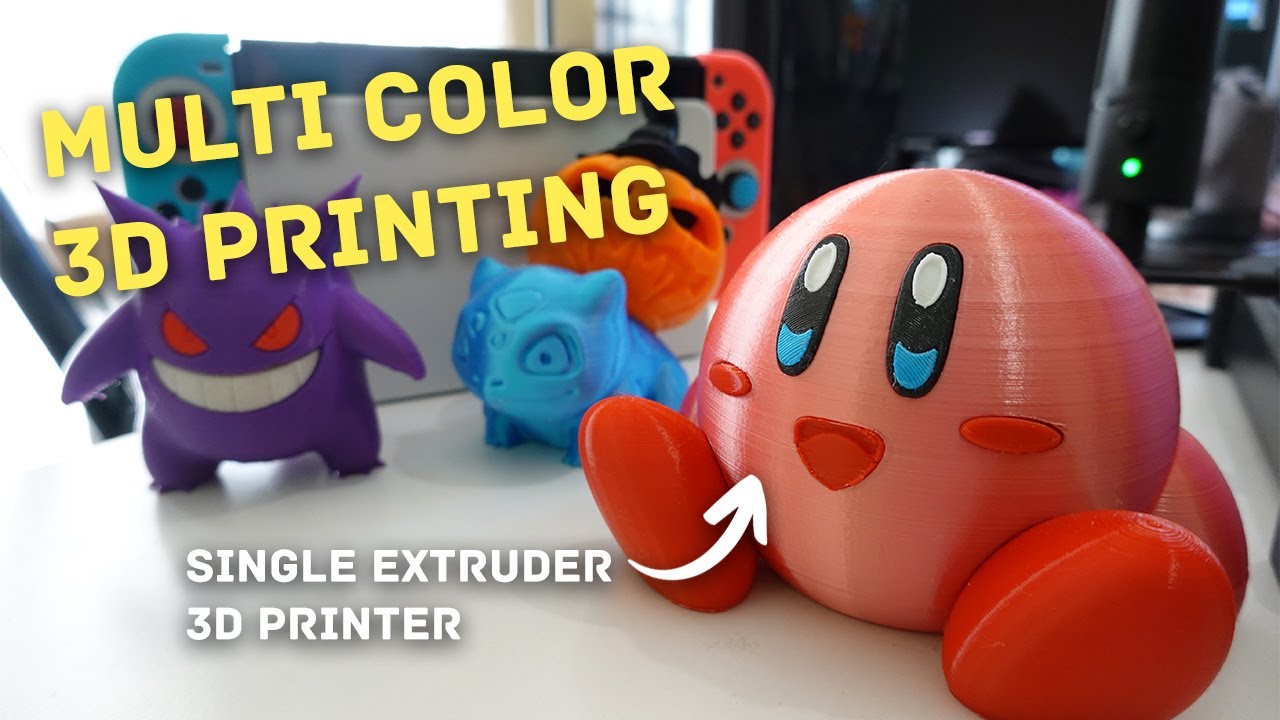

Color changes the character of a 3D print, but it also adds another layer of hardware, filament handling, and potential failure points. The right machine should switch colors without constant intervention, produce a dependable first layer, and still have the speed and build volume for the objects you actually want to make.
We compared nine machines spanning compact four-color models, enclosed CoreXY printers, and large-format systems with more capable material handling. The Bambu Lab P1S Combo is our top pick, while the other choices make stronger cases for quiet operation, large models, family use, or engineering filaments.
Comparison table
| # | Product | Award | Color system | Build volume | Best for |
|---|---|---|---|---|---|
| 1 | Bambu Lab P1S Combo | Best overall | AMS, up to 16 colors | Not specified | Dependable multicolor printing |
| 2 | Flashforge AD5X IFS | Best compact multicolor model | IFS, 4 colors | Not specified | Fast color printing in a small workspace |
| 3 | Creality K2 Combo A | Best quiet enclosed printer | CFS, up to 16 colors | 260 x 260 x 260 mm | Quiet, automated printing |
| 4 | Bambu Lab P2S Combo | Best advanced Bambu system | AMS 2 Pro | Not specified | Multi-material workflows |
| 5 | Creality K2 Combo | Best material flexibility | CFS, up to 16 colors | Not specified | Color and engineering materials |
| 6 | Anycubic Kobra X | Best for families | Native 4-color | 260 x 260 x 260 mm | Simple creative projects |
| 7 | Flashforge AD5X 300C | Best flexible-filament option | IFS, 4 colors | 220 x 220 x 220 mm | TPU and everyday materials |
| 8 | Flashforge Adventurer 5M | Best single-color alternative | No multicolor system specified | 220 x 220 x 220 mm | Fast printing without color hardware |
| 9 | Creality K2 Plus Combo | Best large-format model | CFS, up to 16 colors | 350 x 350 x 350 mm | Large multicolor objects |
1. Bambu Lab P1S Combo: Best Overall

Pros
- Enclosed design supports a wider range of filaments
- AMS enables multicolor and multi-material printing
- Automatic bed leveling simplifies setup
- Supports PLA, PETG, TPU, PVA, PET, ABS, and ASA
- Setup is designed to take about 15 minutes
Cons
- AMS is required for multicolor printing
- Carbon and glass fiber reinforced polymers are not recommended
- Its 47.52-pound body needs a sturdy, permanent location
Best for: someone who wants a polished multicolor printer with an enclosed build area.
The Bambu Lab P1S Combo is the easiest recommendation here because it treats multicolor printing as part of the printer rather than a project of its own. The enclosed body, automatic bed leveling, and included AMS create a much more coherent setup than a basic printer with an optional color accessory. It is the machine we'd keep for regular color models, functional parts, and the occasional multi-material experiment.
The P1S reaches up to 500 mm/s with acceleration up to 20, 000 mm/s². Those figures matter most when printing several small objects or models with frequent direction changes, since the printer can spend less time moving between features. The enclosure also helps the machine handle advanced filaments more consistently than an open-frame design. Bambu lists PLA, PETG, TPU, PVA, PET, ABS, and ASA as ideal supported materials, with PA and PC described as capable. Carbon and glass fiber reinforced polymers are not recommended, so this is not the right tool for every abrasive engineering filament.
Its AMS opens the door to up to 16 colors, provided additional Bambu Lab AMS units are connected. That expansion makes the P1S more useful than a four-color system for complex decorative prints, but it also creates a larger filament-management setup. The printer is advertised as ready to set up in about 15 minutes, which is a meaningful advantage for new owners who would rather start designing than tune a machine.
Compared with the Flashforge AD5X IFS, the P1S has a more convincing all-round feature set because of its enclosure and broader stated filament support. The Creality K2 Combo A offers a larger 260 x 260 x 260 mm build volume and a quieter operating mode, but the P1S is the more balanced choice for people who want a mature multicolor workflow without making quiet operation or maximum model size the deciding factor.
The weakness is physical commitment. At 47.52 pounds, with a footprint of about 18.03 inches wide by 15.31 inches deep, it is not a printer to move casually between shelves. The AMS is also essential for color printing, so buyers interested only in single-color work may not use the most distinctive part of the bundle. For everyone else, the P1S Combo is a strong starting point for the Best multi color 3d printer category because it removes several common sources of friction.
2. Flashforge AD5X IFS: Best Compact Multicolor Model

Pros
- Four-color IFS system fits beside the printer
- Up to 600 mm/s printing speed
- Full auto leveling measures multiple points
- CoreXY structure and vibration compensation
- Supports PLA, TPU, PETG, silk, PLA-CF, and PETG-CF
Cons
- Four-color capacity is less expandable than the top picks
- Build volume is not specified in the supplied product information
- Multicolor printing adds a separate filament-management module
Best for: creators who want fast four-color printing without a large enclosed machine.
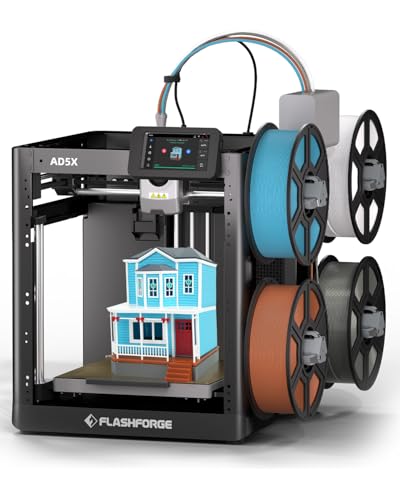
The Flashforge AD5X IFS has a practical personality. Its Intelligent Filament System puts four spools side by side and keeps the color setup relatively compact, making it easier to imagine in a workroom or on a crowded bench. It is aimed at users who want multicolor output without stepping up to a much larger printer, and its modular design helps with placement.
Flashforge lists a maximum speed of 600 mm/s and acceleration of 20, 000 mm/s². Those are headline figures, but the more important detail is that the AD5X pairs them with a rigid all-metal CoreXY motion system and vibration compensation. A rigid frame helps limit shifts as the toolhead changes direction, while vibration control is intended to reduce visible alignment errors in fast layers. The result should be a better fit for colorful models where misaligned layers can make edges and small details look untidy.
Full auto leveling checks multiple points across the bed before printing. That matters with multicolor jobs because a poor first layer can waste more time and filament than a simple single-color model. The AD5X also supports PLA, TPU, PETG, silk, PLA-CF, and PETG-CF. The list gives it more flexibility than a toy-like color printer, though the supplied information does not specify its build volume, so buyers planning large parts should be cautious.
The Bambu Lab P1S Combo remains the more complete choice, especially for enclosed printing and a wider range of common materials. The AD5X is more compelling than the Flashforge Adventurer 5M when color is the central goal, since the Adventurer 5M does not include a multicolor system in the supplied information. Its four-spool layout also takes less commitment than a system designed to expand to 16 colors.
There are limits. Four colors are enough for logos, character models, signs, and many decorative objects, but less appealing for designs that depend on extensive color separation. The missing build-volume detail is another reason not to choose this model blindly for large props. For compact spaces and fast, colorful everyday projects, though, the AD5X IFS has a sensible balance of speed, automation, and filament versatility. Readers choosing a machine for younger makers may also want to consider ways to make 3D printing safer and simpler for children before settling on a model.
3. Creality K2 Combo A: Best Quiet Enclosed Printer

Pros
- 260 x 260 x 260 mm build volume
- CFS can expand to up to 16 colors
- Silent Mode is designed for quieter operation
- AI camera monitors for print failures
- Ships 95 percent pre-assembled according to the title
Cons
- Large 21.06-inch height needs clearance
- Only one CFS unit is included
- AI monitoring does not remove the need for supervision
Best for: home users who want enclosed color printing without a loud workspace.
The Creality K2 Combo A stands out when the printer will live near a desk, family room, or shared workspace. Creality specifically emphasizes Silent Mode, step-servo motors, and dynamically balanced fans. Those features target the constant buzzing and mechanical chatter that can make a fast printer unpleasant to be around, even when the print itself is going well.
Its 260 x 260 x 260 mm build volume is larger than the supplied dimensions of the Flashforge AD5X models, giving the K2 more room for helmets, tall figures, and grouped parts. The printer reaches up to 600 mm/s and uses three step-servo motors across the extruder and X/Y motion system. The appeal is not just speed. Dynamic torque adjustment is intended to keep extrusion and movement more controlled as the printer accelerates or encounters changing resistance.
The included CFS unit supports multicolor printing, and up to four CFS units can be connected for as many as 16 colors. The bundle includes one CFS, so the expanded color count requires additional hardware. The K2 also supports PLA, PETG, ABS, PLA-CF, and PET according to its listed features. Its smart auto-leveling system probes the target print area rather than treating the entire bed as one large calibration zone, which should reduce the time spent preparing smaller jobs.
The Bambu Lab P1S Combo is still our first choice for a smoother general-purpose workflow, while the K2 Combo A is the better fit for someone who prioritizes a larger build area and quieter operation. It also compares favorably with the standard Creality K2 Combo when the available information is the main guide, since the A listing calls out the pre-assembled setup and the targeted leveling behavior. The two K2 entries share much of the same concept, so buyers should verify the exact bundle before ordering.
The tall 21.06-inch body and roughly 16.54-inch width require more clearance than a compact printer. The AI camera can watch for spaghetti failures, idle printing, and other problems in real time, but it should be treated as a safety aid rather than a replacement for checking the machine. Choose this K2 when reduced noise and a roomier build area matter more than having the most established color workflow.
4. Bambu Lab P2S Combo: Best Advanced Bambu System

Pros
- AMS 2 Pro supports multicolor and multi-material printing
- Filament drying reaches up to 65°C
- Adaptive airflow can maintain a 50°C chamber
- AI failure detection and automatic calibration
- Quick-swap nozzle design
Cons
- The printer alone does not support multicolor printing
- Larger 22-inch width needs a dedicated location
- Its feature set may be more than basic color projects require
Best for: experienced makers who want a more controlled material workflow.
The Bambu Lab P2S Combo is the pick for someone who sees multicolor printing as only one part of a broader materials workflow. Its AMS 2 Pro adds filament drying up to 65°C, a useful feature for materials that absorb moisture while stored. Dry filament can make color changes and extrusion more consistent, particularly when a print spends a long time switching between spools.
The P2S reaches up to 600 mm/s and uses a PMSM servo extruder with Active Flowrate Compensation. In practical terms, the system is designed to adjust material flow as printing conditions change, helping corners and surfaces stay more even at high movement speeds. Automatic calibration, quick-swap nozzles, and AI failure detection reduce the amount of manual setup between jobs.
The adaptive airflow system is the more unusual feature. It can direct cooling toward overhangs or retain heat for a chamber temperature of up to 50°C, while a carbon filter is included for air filtration. That gives the P2S a stronger case for users who switch between ordinary decorative filament and more demanding materials. The supplied product information does not state a build volume, so this is not the model to choose solely for large-format work.
A crucial detail is easy to miss: the P2S printer by itself does not support multicolor printing. The Combo with AMS 2 Pro is the relevant configuration for this roundup. That is a sharper distinction than the usual optional accessory situation, and it means buyers should make sure the listed bundle is the one they intend to use.
The Bambu Lab P1S Combo is the simpler recommendation for most people because it already combines enclosure, automatic leveling, and a capable AMS workflow. The P2S makes more sense for owners who will use filament drying, adaptive chamber control, and the newer extrusion features. Its 22-inch width also makes it one of the more demanding machines to place. If you are still learning the basics, a gentler path into setup, slicing, and first-layer troubleshooting may be more useful than jumping straight to its advanced controls.
5. Creality K2 Combo: Best Material Flexibility

Pros
- CFS supports up to 16 colors with expansion
- 40 mm³/s high-flow hotend
- Hardened steel nozzle reaches up to 300°C
- Direct-drive extrusion handles flexible filament
- AI chamber camera and built-in air purifier
Cons
- Heavy 55.12-pound body
- Large 25-inch width requires substantial bench space
- The standard K2 listing has less explicit setup detail than K2 Combo A
Best for: makers who want multicolor printing plus broader material support.
The Creality K2 Combo is the more material-focused member of the K2 group. Its CFS handles automatic filament selection, switching, and relay, while RFID can identify filament information when compatible material is loaded. The system supports up to 16 colors when four CFS units are connected, but the bundle includes one unit, so the maximum requires expansion.
The printer's hardware is built around a 40 mm³/s high-flow hotend, a hardened steel nozzle rated up to 300°C, and direct-drive extrusion. A high-flow hotend can move more material through the nozzle when printing quickly, while direct drive is useful for flexible TPU because the filament has less distance to travel before reaching the melt zone. The hardened nozzle also makes more sense for users who plan to work with abrasive composite filaments.
Creality lists a maximum speed of 600 mm/s and acceleration of 20, 000 mm/s². An aerospace-grade aluminum frame, steel X-axis rail, and dual Z-axis are intended to keep layers steady as the printer moves quickly. The enclosed design and built-in air purifier add a layer of practicality for indoor use, though ventilation and sensible material selection remain important.
Compared with the Creality K2 Combo A, this version has the clearer material specification, including the 300°C nozzle and 40 mm³/s flow rate. The K2 Combo A makes a stronger case for quiet operation and a stated 260 x 260 x 260 mm build volume. The Bambu Lab P2S Combo has the more sophisticated drying and airflow system, but the K2 Combo is attractive when direct-drive TPU work and a hardened nozzle matter more.
The footprint is a real constraint. The listed dimensions are about 25 inches wide, 21 inches deep, and 20 inches tall, and the machine weighs 55.12 pounds. That is not a casual tabletop accessory. The AI chamber camera can detect failures, monitor the build plate, and record time-lapses, but the printer's strongest reason to exist is its material handling. Choose it for projects that move beyond simple PLA color changes.
6. Anycubic Kobra X: Best for Families

Pros
- Native four-color printing
- 260 x 260 x 260 mm print area
- 49-point auto leveling at 0.02 mm accuracy
- 45 dB operating noise claim
- 720P camera with AI monitoring
Cons
- Four-color system is less expandable than 16-color setups
- Open product details do not specify the supported filament range
- Family use still requires adult oversight around hot parts
Best for: households making toys, gifts, and colorful educational projects.
The Anycubic Kobra X is designed around immediate creative use. It arrives pre-assembled with a modular design, and Anycubic says setup can take about 15 minutes. Native four-color printing means users do not need to build a complicated add-on arrangement before making colorful toys, signs, or holiday decorations.
Its 260 x 260 x 260 mm build volume is generous for a family-oriented machine. That space is enough for larger individual models or several small pieces in one job. The Kobra X also uses 49-point LeviQ 3.0 leveling with stated 0.02 mm accuracy. More probing points can help compensate for small bed irregularities, and automatic leveling is particularly useful when multiple family members are sharing the printer.
Anycubic lists a 45 dB noise level, describing it as quieter than a normal conversation. That makes the Kobra X easier to live with in a study or living room than a printer with louder fans and motors. Its AI safety features can detect foreign objects, print errors, and spaghetti failures, then pause and send a phone notification. A 720P camera provides monitoring, while power and filament recovery help resume interrupted jobs.
The Flashforge AD5X IFS is the stronger alternative when speed and supported flexible materials are the priority. The Kobra X is more appealing for shared household use because it combines four-color operation, a larger stated build area than the AD5X listings, and a quiet operating target. The Creality K2 Combo A offers expansion to up to 16 colors and a more enclosed, material-oriented design, but it is a more serious machine for a family that mainly wants colorful creative projects.
The Kobra X is not maintenance-free, and a camera cannot prevent every failure. Hot surfaces, moving parts, and filament handling still call for supervision, especially with children. It is also less compelling for someone who needs engineering-material specifications rather than colorful everyday prints. For households that want a straightforward way into multicolor making, its setup and monitoring features are well chosen.
7. Flashforge AD5X 300C: Best Flexible-Filament Option
Pros
- Four-color IFS printing
- 300°C maximum nozzle temperature
- Supports flexible TPU
- 220 x 220 x 220 mm build size
- CoreXY all-metal structure
Cons
- Smaller build volume than the 260 mm K2 and Kobra X
- Four-color system is not stated to expand to 16 colors
- Supplied information does not mention an enclosed chamber
Best for: hobbyists who want four colors and flexible TPU capability.
The Flashforge AD5X 300C is a distinct listing from the other AD5X entry, and its most useful differentiator is the stated 300°C nozzle. That temperature ceiling gives it more room for materials that need higher heat than ordinary PLA, while the IFS keeps four-color printing at the center of the design.
The 220 x 220 x 220 mm build volume is enough for household parts, figures, organizers, and many small prototypes. It is more compact than the 260 x 260 x 260 mm space on the Anycubic Kobra X and Creality K2 Combo A, so large objects may need to be divided. The smaller work envelope may be easier to place, but it is a meaningful limitation for helmets, large terrain pieces, or batches of bigger parts.
Flashforge lists a maximum speed of 600 mm/s and acceleration of 20, 000 mm/s². The all-metal CoreXY structure is designed to reduce vibration and preserve alignment during fast movement. IFS automatically manages filament detection and refill, which can keep a long multicolor job moving with fewer manual changes. The printer also supports flexible TPU, giving it a practical advantage for soft grips, gaskets, and bendable parts.
The Flashforge AD5X IFS has a similar four-color concept and also lists support for PLA, TPU, PETG, silk, PLA-CF, and PETG-CF. This 300C model is the better choice when the nozzle temperature and 220 mm cube are the details that matter. The Creality K2 Combo goes further for material handling with a hardened steel nozzle, direct drive, and a 40 mm³/s high-flow hotend, but it occupies considerably more space.
The supplied details do not say that the AD5X 300C has an enclosed chamber, and four colors are the stated capacity. Buyers seeking climate control for demanding materials or a much larger color palette should look at the enclosed Bambu and Creality models instead. For flexible filament and compact multicolor work, this AD5X has a focused specification set that makes sense.
8. Flashforge Adventurer 5M: Best Single-Color Alternative

Pros
- Fully automatic bed leveling
- CoreXY structure with 600 mm/s travel speed
- 280°C direct extruder
- Three-second detachable nozzle changes
- 220 x 220 x 220 mm build volume
Cons
- Multicolor hardware is not specified
- It lacks the color system included with the other leading picks
- Flexible and advanced materials may require more careful selection
Best for: users who prioritize fast single-color printing over color changes.
The Flashforge Adventurer 5M is the outlier in this group because its supplied features describe a fast FDM printer rather than a multicolor system. That does not make it irrelevant. Some users want to print the base model quickly and paint it later, or they need a reliable single-filament machine for functional parts. For that audience, the Adventurer 5M avoids the added complexity of automatic color switching.
Its CoreXY structure supports travel speeds up to 600 mm/s and acceleration up to 20, 000 mm/s². The 280°C direct extruder gives it more flexibility than a basic low-temperature printer, while the 32 mm³/s high-flow nozzle is designed to keep material moving during fast jobs. Automatic bed leveling handles one of the most common setup chores, and a 35-second warm-up to 200°C helps shorten the wait before a print begins.
The 220 x 220 x 220 mm build area is a familiar middle ground for household printing. A dual-sided PEI platform should make it easier to switch surfaces or remove finished models, and the detachable nozzle can be changed in about three seconds according to the product details. Multiple nozzle sizes from 0.25 to 0.8 mm are listed, giving users a way to favor fine detail or faster material deposition.
Compared with the Flashforge AD5X 300C, the Adventurer 5M gives up the IFS and four-color capability but retains a similar 220 mm cube and CoreXY approach. The Bambu Lab P1S Combo is the better choice for anyone who knows they want multicolor printing. The Adventurer 5M is more sensible when color transitions would be occasional and a simple, fast print path is the priority.
Remote monitoring through the Flash Maker mobile app is useful for keeping an eye on a long job, but the supplied information does not identify a multicolor upgrade path. That is the central weakness for this particular roundup. Consider it only if you are comfortable with single-color output and want to avoid paying attention to color hardware you may not use.
9. Creality K2 Plus Combo: Best Large-Format Model

Pros
- 350 x 350 x 350 mm build volume
- CFS supports up to 16 colors with expansion
- 350°C hardened steel nozzle
- Chamber temperature can reach 60°C
- Dual AI cameras and 18 smart sensors
Cons
- 70.55-pound weight makes relocation difficult
- Large build area demands a strong, stable surface
- More automation and material capability may exceed casual needs
Best for: makers producing large multicolor models or batches of smaller parts.
The Creality K2 Plus Combo is the machine to choose when the size of the print matters more than the size of the printer. Its 350 x 350 x 350 mm build volume is substantially larger than the 260 mm cubes in this list. That extra room lets users print larger parts in one piece and arrange more small models in a batch, reducing the need to split tall or wide designs.
The new CFS handles automatic filament selection, switching, and relay, and four CFS units can provide up to 16 colors. RFID filament identification can read color and material information, while a similar loaded spool can take over when a filament runs out. That is useful for long jobs where stopping to change a spool would be disruptive.
This is also the most capable materials machine here on paper. The chamber can maintain a temperature of up to 60°C, and the hardened steel nozzle supports operation up to 350°C. Those figures make the K2 Plus more suitable for high-melting-point engineering filaments than the P1S, AD5X models, or Adventurer 5M. Its 600 mm/s speed and 30, 000 mm/s² acceleration are ambitious for a large-format printer, while 40 mm³/s high-flow capability supports faster deposition.
Automation is extensive. The printer has 18 smart sensors, dual AI cameras, independently motorized Z axes, and a toolhead camera for flow-rate optimization. The chamber camera monitors for spaghetti failures and idle printing, while the Z-axis system can adjust bed tilt before automatic leveling. A rigid Matrix frame and four linear rods are intended to limit resonance, deformation, and wobble as the large bed moves.
The K2 Plus is physically demanding. It weighs 70.55 pounds, and its large-format construction should sit on a sturdy, stable surface rather than a light shelf. The Creality K2 Combo is easier to justify for ordinary parts and has a smaller footprint, while the Bambu Lab P2S Combo offers more sophisticated filament drying in a less large-format-focused package. Choose the K2 Plus when large models, demanding materials, or production-style batches genuinely justify its scale.
How to choose best multi color 3d printer
A multicolor printer is only as useful as its filament system, build platform, calibration, and material support. Judge the whole workflow rather than choosing based on the color count alone.
Color and filament systems
Look for how the printer loads, identifies, switches, and stores filament. The Bambu AMS, Creality CFS, and Flashforge IFS all automate color changes, but they differ in expansion and material features. Four colors suit many decorative models, while systems that can expand to 16 colors are better for designs with complex color separation.
Filament relay matters for long prints. If the system can move to a matching spool when one runs out, it can prevent an otherwise avoidable interruption. Moisture control is another advantage, particularly on the Bambu Lab P2S Combo, whose AMS 2 Pro includes drying up to 65°C.
The best color system is the one that keeps the print moving after the novelty of color wears off.
Build volume
Build volume determines whether a model prints in one piece or must be split. The 220 x 220 x 220 mm Flashforge machines suit ordinary household objects, while the 260 mm cubes from Creality K2 Combo A and Anycubic Kobra X offer more space for large figures and grouped parts. The Creality K2 Plus Combo's 350 x 350 x 350 mm volume is the clear choice for large props and batch production.
Do not confuse external dimensions with build volume. A printer can have a large footprint without offering a proportionally large work area, so check both the print envelope and the space needed around the machine.
Speed and motion structure
Maximum speed is only useful when the frame, motors, extrusion system, and cooling can keep up. CoreXY designs appear across the Flashforge models and are also used to support fast movement on the AD5X. The Creality K2 models add step-servo motors, while Bambu lists up to 500 or 600 mm/s depending on the model.
Acceleration affects how quickly the machine reaches its target speed and how often it can change direction. Vibration compensation and a rigid frame help reduce ringing and alignment errors, especially on tall, colorful models with many sharp edges.
Calibration and failure detection
Automatic bed leveling makes first-layer preparation easier, but the implementation still matters. The Anycubic Kobra X uses 49-point leveling, the K2 Combo A targets the print area, and the Bambu models combine automatic calibration with broader workflow automation.
Cameras can detect spaghetti failures, idle printing, or foreign objects. These systems are useful for notifications and monitoring, but they do not make a printer unattended in every situation. A stable bed, clean nozzle, and correct filament settings remain important.
Materials and enclosure
An enclosed printer is useful for temperature-sensitive materials and can make indoor operation more controlled. The Bambu Lab P1S supports a broad stated range including PLA, PETG, TPU, PVA, ABS, and ASA, while the P2S adds adaptive airflow and a chamber temperature up to 50°C.
For tougher materials, pay attention to nozzle temperature, nozzle construction, and extrusion design. The Creality K2 Combo lists a hardened steel nozzle up to 300°C, and the K2 Plus raises that stated capability to 350°C. Direct drive is useful for flexible TPU, while a hardened nozzle is important for abrasive composites.
Frequently asked questions
Do all of these printers support multicolor printing?
No. The Flashforge Adventurer 5M listing does not specify a multicolor system, so it is better treated as a fast single-color alternative. The other highlighted models list an AMS, CFS, IFS, or native four-color system.
How many colors can these printers print?
The Flashforge AD5X models list four-color printing. The Anycubic Kobra X also lists native four-color printing. The Bambu Lab P1S Combo, Creality K2 Combo A, Creality K2 Combo, and Creality K2 Plus Combo can reach up to 16 colors with their respective systems and additional connected units where required.
Is the Bambu Lab P2S itself a multicolor printer?
The supplied details specifically say the P2S printer does not support multicolor printing by itself. The Combo version with AMS 2 Pro is the configuration intended for multicolor and multi-material printing.
What build volume is enough for most home projects?
A 220 x 220 x 220 mm build area handles many figures, organizers, toys, and functional parts. A 260 x 260 x 260 mm printer gives more breathing room for large models or batches. The 350 x 350 x 350 mm Creality K2 Plus is more appropriate when large parts must be printed in one piece.
Are automatic cameras enough to prevent failed prints?
Cameras and AI detection can identify some spaghetti failures, foreign objects, or idle printing and then alert or pause the machine. They cannot correct every adhesion problem, filament issue, or slicing error. They work best as a monitoring aid alongside correct bed preparation and material settings.
Which printer is best for flexible TPU?
The Creality K2 Combo lists direct-drive extrusion and support for flexible materials, while both Flashforge AD5X listings mention TPU support. The K2 Combo has the more explicit high-flow and hardened-nozzle specification, while the AD5X models offer a smaller, more compact approach.
The bottom line
The Bambu Lab P1S Combo is the strongest all-round recommendation for the Best multi color 3d printer category. Its enclosed body, automatic leveling, AMS color system, quick setup, and broad stated filament support make it the easiest model to recommend for a wide mix of decorative and functional work.
Choose the Flashforge AD5X IFS if you want a compact four-color machine, the Anycubic Kobra X for family projects, or the Creality K2 Plus Combo when a 350 x 350 x 350 mm build volume and high-temperature materials matter more than a small footprint. The Bambu Lab P2S Combo is the better specialist pick for filament drying and adaptive airflow.
If you are undecided, start with the Bambu Lab P1S Combo unless your main requirement is a larger build area, quieter printing, or advanced engineering materials.
As an Amazon Associate we earn from qualifying purchases.