
A laptop can be a surprisingly awkward entertainment machine. Its screen is fine for one person, but sharing a film, presentation, game, or photo album means crowding around a small display and working around a tangle of adapters. The Best smart projectors for laptops solve that by combining HDMI compatibility with wireless casting, built-in streaming, or both.
The important differences are not the inflated resolution claims on the box. Native resolution, usable brightness, focus and keystone controls, streaming support, and the quality of the laptop connection matter far more. Some models here are tiny enough for a backpack, while others are built for a proper home theater or outdoor screen.
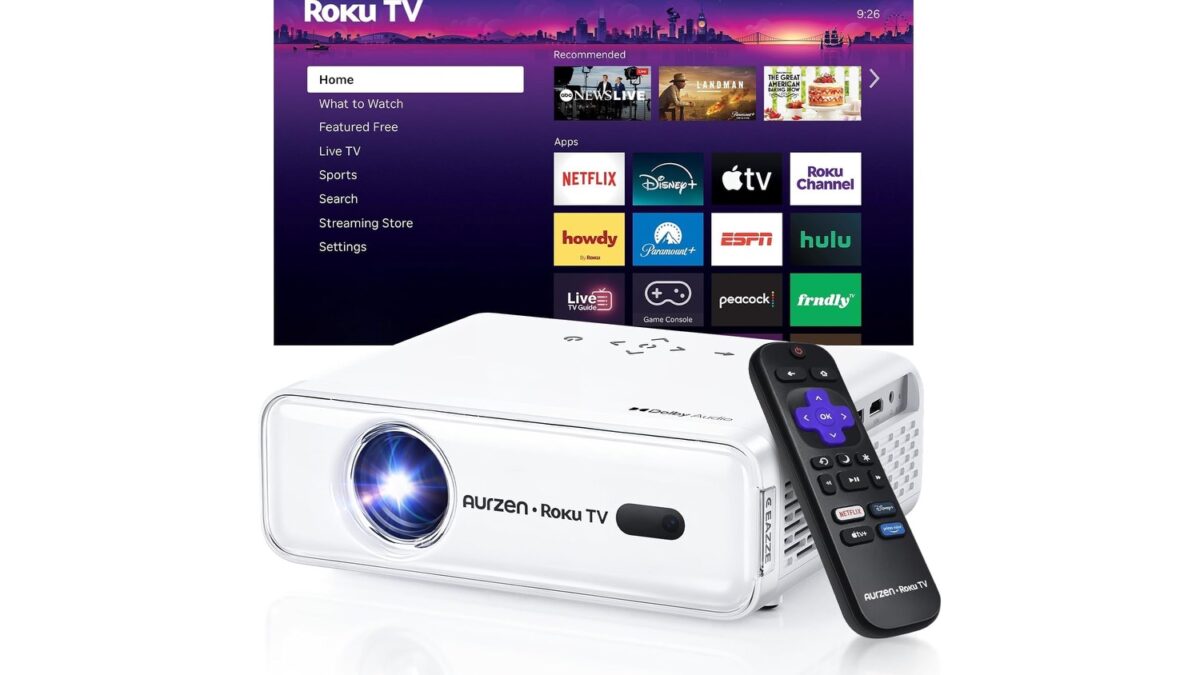
The LYNCAST X7 is our top pick, with the Aurzen D1R close behind for its exceptionally simple Roku interface. The rest range from ultra-portable bedroom projectors to brighter, more capable home cinema models.
Comparison table
| # | Product | Award | Resolution and brightness | Wireless and smart features | Setup or projection range | Best for |
|---|---|---|---|---|---|---|
| 1 | LYNCAST X7 | Best overall | Native 1080p, 2, 000 ANSI lumens | Android 14, Wi-Fi 6, Bluetooth 5.4 | AI calibration, 60 to 200 inches | Bright rooms and laptop presentations |
| 2 | Aurzen D1R | Best streaming interface | 1080p | Roku, dual-band Wi-Fi, Bluetooth 5.2 | Auto focus and keystone, 60 to 150 inches | Easy streaming and family rooms |
| 3 | ONOAYO ONO5Pro 2.0 | Best built-in audio | 4K support, 98% NTSC | Smart TV OS 2.0, Wi-Fi 6, Chromecast | AI calibration, 50% to 100% zoom | Large rooms and outdoor viewing |
| 4 | YGSKK Mini Projector | Best compact 1080p | Native 1080p, 300 ANSI lumens | Built-in apps, Wi-Fi 6, Bluetooth 5.3 | Electric focus, 50 to 200 inches | Bedrooms and ceiling projection |
| 5 | HAPPRUN H1 | Best simple 1080p | Native 1080p | Bluetooth 5.1, TV stick support | 200-inch maximum, three installation methods | Outdoor movie setups |
| 6 | TMY Smart Projector | Best laptop connectivity | Native 1080p | Built-in apps, Wi-Fi 6, Bluetooth 5.2 | HDMI and USB ports | Laptop, console, and streaming use |
| 7 | Maypug Mini Projector | Best short throw | 1080p and 4K support | Built-in apps, Wi-Fi 6, Bluetooth 5.4 | Auto keystone, 40 to 130 inches | Small apartments and bedrooms |
| 8 | ClokoWe Mini Projector | Best ultra-light option | 4K playback support | Built-in apps, dual-band Wi-Fi, Bluetooth 5.2 | Auto keystone, 30 to 200 inches | Travel and dorm rooms |
| 9 | Alwtniet HY300+ | Best tiny projector | Native 720p, 200 ANSI lumens | Android 14, Wi-Fi 6, Bluetooth 5.4 | 0.9:1 throw, 35 to 135 inches | Casual bedroom viewing |
| 10 | Thunrlge Mini Projector | Best ceiling setup | Resolution not stated | Android 11, Wi-Fi 6, Bluetooth 5.0 | 180-degree rotation, auto keystone | Ceiling viewing and flexible placement |
1. LYNCAST X7: Best Overall

Pros
- 2, 000 ANSI lumens for brighter rooms
- Native 1080p picture with 4K and 8K decoding
- Automatic focus, keystone, screen fit, and obstacle avoidance
- Android 14 with a built-in Play Store
- HDMI with CEC and ARC support
Cons
- Larger and heavier than the pocket-size models
- 4K and 8K content is displayed at 1080p
- The feature-rich interface takes more time to learn
Best for: laptop owners who want a bright, flexible projector for films, presentations, and gaming.
The X7 is the projector we would keep for a mixed household. It is bright enough to make a credible attempt at daytime viewing, yet it is still compact enough to move between a desk, living room, and backyard. Its 2000 ANSI lumen rating is the most meaningful advantage over the small projectors here, especially when a laptop presentation has to remain readable before the room is fully dark.
The native 1920 by 1080 resolution is a sensible match for most laptops. Text, menus, and desktop icons will look more coherent than they do on a native 720p projector, while the 4K and 8K decoding support lets the projector accept higher-resolution video and scale it to its 1080p imaging system. The listed 10-bit color depth, 18, 000:1 contrast ratio, and 93% color gamut suggest a more ambitious picture system than the entry-level models, although the source material and room still determine how much of that potential is visible.
Setup is unusually forgiving. AI auto focus, keystone correction, screen fitting, obstacle avoidance, and orientation detection are all listed, so the X7 should be less fussy when the projector cannot sit perfectly square to the wall. Its 1.08:1 short throw ratio helps in a small room, and the 180-degree rotation opens up ceiling projection. The 60 to 200-inch range is broad, while HDMI with CEC and ARC, USB, and 3.5mm audio cover the connections a laptop user is likely to need.
Smart features are strong too. Android 14, a built-in Play Store, Netflix, Prime Video, YouTube, Tubi, and Disney+ reduce the need for a separate streaming device. Wi-Fi 6 supports wireless casting from iOS, Android, and Windows devices, and Bluetooth 5.4 can work with external speakers or headphones. The 20W stereo speaker with Dolby Atmos and Hi-Res Audio is more substantial than the tiny speakers in the portable picks, though a dedicated sound system remains the better choice for a large room. For more serious cinema planning, the room and screen choices that shape a home theater are worth considering before mounting anything.
The weakness is physical rather than functional. At about 4 pounds and roughly 8.9 by 7 by 5.7 inches, it is portable but not something most people will casually carry in a laptop sleeve. It also cannot show native 4K or 8K detail. Choose the X7 if brightness, automatic setup, and broad laptop compatibility matter more than minimum size.
2. Aurzen D1R: Best Streaming Interface

Pros
- Roku interface is easy to navigate
- Auto focus and auto keystone simplify setup
- Dual 5W speakers with Dolby Audio
- AirPlay, Apple TV, and Android compatibility
- Bluetooth 5.2 for private listening
Cons
- Requires a Roku account and internet connection
- Heavier than the smallest portable projectors
- Screen size tops out at 150 inches
Best for: households that want familiar streaming software without adding a TV stick.
The D1R has the cleanest ownership story in this group. Roku is a known interface rather than an unfamiliar projector menu, and the included remote keeps the main streaming functions straightforward. Netflix, Prime Video, Hulu, YouTube, the Roku Channel, and live channels are presented through one home screen, which is a substantial advantage for family members who do not want to troubleshoot an Android projector.
Its 1080p Full HD output suits films, laptop desktops, and slides, with a recommended projection range of 60 to 150 inches. The smaller upper limit is not a problem in a bedroom or living room, and it may encourage a sharper, more watchable image than chasing an oversized screen. A laptop can connect through the available smart ecosystem or through a wired video connection, while AirPlay mirroring and Android support add flexibility for phones and tablets.
Auto focus and auto keystone are the D1R's most useful physical features. Place it, power it on, and the projector is designed to adjust sharpness and alignment without a long manual setup. Dual-band Wi-Fi supports streaming, and Bluetooth 5.2 handles headphones or speakers. The dual 5W speakers with Dolby Audio should be more convincing than the single small speaker built into the lightest models, though their output is still tied to the projector chassis.
The D1R also fits neatly into a smart-home setup. The feature list names Apple HomeKit, Siri, Alexa, and Google Assistant compatibility, while the Roku mobile app can act as a remote and provide easier text entry. That makes searching for an app or film less irritating than typing with a basic directional remote. The interface is a stronger reason to choose it over the HAPPRUN H1, while the LYNCAST X7 wins on brightness, screen range, and calibration options.
Roku's simplicity brings a few boundaries. Activation needs a Roku account and internet connection, and anyone who prefers a fully open Android environment may find the platform restrictive. At about 4.63 pounds, the D1R is better moved from room to room than packed for every trip. It is the right pick for laptop users who want the projector to feel like a television rather than a tinkering project.
3. ONOAYO ONO5Pro 2.0: Best Built-in Audio

Pros
- Dual 60W Dolby Audio system
- Sealed optical engine for dust resistance
- AI focus, keystone, obstacle avoidance, and screen fit
- Built-in Chromecast and Wi-Fi 6
- HDMI 2.1 and an 18ms game mode
Cons
- 12-inch depth makes it the least discreet option
- Its large audio system adds bulk
- Picture output still depends on the room and projection surface
Best for: large movie nights where built-in sound matters as much as the picture.
The ONOAYO is the outlier here because it treats sound as a primary feature rather than an afterthought. Its dual 60W Dolby Audio system is designed to fill up to 540 square feet, and the product claims AI Sound Master processing for echo reduction and bass enhancement. That should make it far more suitable for a backyard gathering or a large room than the small built-in speakers in the YGSKK or ClokoWe.
The picture system is also more ambitious than the basic mini projectors. It supports 4K content, lists a 98% NTSC color gamut and 1.07 billion colors, and uses an ambient light sensor for automatic brightness and contrast adjustment. Those claims do not turn a projector into a television in a bright room, but they point toward better color handling and easier evening viewing. A laptop can feed it through HDMI, while Wi-Fi 6 and built-in Chromecast cover wireless casting.
Setup is one of its strongest areas. VisionIQ calibration provides auto focus, keystone correction, obstacle avoidance, screen fit, and orientation detection, with the feature list claiming adjustment in about three seconds. The 50% to 100% dynamic zoom changes the image size without moving the chassis. That is useful when a laptop is connected on a table and the available wall space changes from one room to another.
Gamers get a dedicated mode with an 18ms input latency claim, HDMI 2.1, and CEC control. That is more relevant to a laptop with a capable graphics system than to a simple movie player, though the projector's real gaming experience will still depend on the game and settings. Smart TV OS 2.0 includes YouTube, Prime Video, and Disney+, with a claimed selection of more than 1, 500 live channels. The sealed optical engine and triple-temperature cooling system are thoughtful durability features.
The ONOAYO's weakness is its size. At 12 inches high by 10 inches long and 7 inches wide, it is not a casual backpack projector, and the large speaker system makes that unavoidable. It also asks the buyer to trust a long list of processing and app claims, so it suits someone who wants an all-in-one entertainment hub more than someone seeking a simple laptop display. For a large room, it beats the Aurzen D1R on built-in sound, while the X7 remains easier to carry and more explicitly focused on presentation flexibility.
4. YGSKK Mini Projector: Best Compact 1080p

Pros
- Native 1080p image
- Electric focus from the remote
- 210-degree rotating base
- Built-in Prime Video, YouTube, and Hulu
- Wi-Fi 6 and Bluetooth 5.3
Cons
- Bluetooth is for audio devices, not smartphone connections
- 300 ANSI lumens calls for a dark room
- Some apps may still require setup or an external source
Best for: bedroom users who want a small native 1080p projector with ceiling flexibility.
The YGSKK gets the basic experience right without taking over a shelf. Its compact body weighs 1.7 pounds and measures about 7.87 by 3.94 by 3.94 inches, so it is easy to move between a desk and a bedside table. The rotating base is the feature that makes it more interesting than a generic cube. It turns through 210 degrees, allowing projection toward a wall or ceiling without balancing the projector on a stack of books.
Native 1080p is the key picture specification. A laptop desktop, presentation, or film gets a real Full HD imaging system rather than merely accepting a 1080p signal and reducing it. The listed 300 ANSI lumens are modest compared with the LYNCAST X7, so this projector belongs in a dark bedroom or a room with controlled lighting. Its claimed compatibility with 4K sources means it can accept certain higher-resolution content through HDMI, not that it displays 4K detail.
Electric focus is especially welcome on a ceiling-facing projector. The remote can adjust focus, and the product says the rectangular image can become clear within three seconds. Connections include HDMI, USB, and audio, with compatibility listed for laptops, TV sticks, DVD players, game consoles, and USB drives. Wi-Fi 6 handles wireless network connections, while Bluetooth 5.3 is intended for headphones, speakers, and other Bluetooth audio devices. It does not support Bluetooth smartphone connections, an important limitation for anyone expecting a phone to pair directly.
The built-in apps include Prime Video, YouTube, and Hulu, with an app store for additional downloads. That makes it more self-contained than the HAPPRUN H1, which is designed around a TV stick for easy streaming. The stereo speakers are useful for casual viewing, but they will not compete with the ONOAYO's 60W audio system or even the more substantial LYNCAST speaker.
The main compromise is brightness. A 200-inch image may be technically supported, but a modest 300 ANSI lumen projector is more convincing at a smaller size in a dark room. Choose the YGSKK over the ClokoWe when native 1080p and electric focus matter more than minimum weight. It is a strong fit for a laptop user who wants a straightforward bedroom cinema and occasional ceiling viewing.
5. HAPPRUN H1: Best Simple 1080p

Pros
- Native 1920 by 1080 resolution
- Three installation methods
- Bluetooth 5.1 for headphones or speakers
- Built-in stereo speakers
- Supports a 200-inch screen
Cons
- Smartphone connection needs an HDMI adapter
- TV stick is not included
- At 4.5 pounds, it is not especially light
Best for: laptop owners who want a native 1080p projector for a wall, tripod, or outdoor screen.
The H1 is a conventional projector in a category crowded with ambitious smart claims. Its strongest point is clear: native 1920 by 1080 resolution. That makes it a sensible choice for laptop presentations and films when image definition matters more than having every streaming service built into the projector.
The projector can work from a desktop, ceiling, or tripod installation. Its listed 200-inch maximum screen size gives outdoor movie nights plenty of scope, although a screen that large needs darkness and a suitable surface. The body weighs 4.5 pounds and measures 9.3 by 8.1 by 3.5 inches, so it is portable in the practical sense, but not as easy to pack as the 0.77-pound ClokoWe.
Streaming is handled through compatible devices rather than a long list of integrated apps. The H1 works with TV sticks such as Fire TV Stick and Chromecast, but those accessories are not included. A laptop can provide the source through HDMI, while Bluetooth 5.1 connects to headphones or an external speaker. Smartphone and tablet connections are less convenient because the feature list requires an HDMI adapter for iOS and certain Android setups.
The built-in Hi-Fi stereo speakers should cover a small bedroom or a quiet outdoor gathering, but the H1 does not have the headroom of the Aurzen D1R's dual 5W system or the ONOAYO's large audio array. There is no stated automatic focus system, so placement and image adjustment may take more attention than they do with the YGSKK or LYNCAST X7.
That simplicity is both its strength and its weakness. It avoids an overcomplicated smart interface, but it also means carrying an extra streaming device and adapters when the laptop is not the source. Choose the H1 for a durable-feeling, native 1080p setup around a laptop or TV stick, especially when tripod and ceiling placement are useful.
6. TMY Smart Projector: Best Laptop Connectivity

Pros
- Native 1080p Full HD support
- Pre-installed Prime Video and YouTube
- Wi-Fi 6 for wireless mirroring
- Two-way Bluetooth 5.2
- HDMI and dual USB connectivity
Cons
- Brightness is not stated
- App support is described broadly rather than exhaustively
- No automatic focus or keystone feature is listed
Best for: users who switch between a laptop, streaming device, game console, and USB media.
The TMY is built around the connections most laptop owners actually use. Its HDMI and dual USB ports make it easy to attach a laptop, Fire TV Stick, console, USB drive, or compatible speaker without relying entirely on wireless mirroring. That is useful for work presentations, where a physical HDMI connection is often more predictable than casting over a busy network.
The projector supports native 1080p Full HD, and TMY says its upgraded LED light source increases brightness by 50% over an earlier version. A numerical brightness rating is not provided, so it is difficult to place the TMY against the 2, 000 ANSI lumen LYNCAST X7 or the 300 ANSI lumen YGSKK. Treat it as a projector for controlled indoor lighting until the room proves otherwise.
Smart functionality is more complete than the basic wired models. Prime Video and YouTube are pre-installed, and the projector is described as compatible with hundreds of apps. Wi-Fi 6 enables wireless mirroring from iOS and Android devices, while Bluetooth 5.2 works in both directions. It can send audio to a Bluetooth speaker or headphones, and it can act as a Bluetooth speaker itself, which is a useful party feature when the display is not in use.
The TMY's main shortcoming is setup information. The feature list does not state an automatic focus or keystone system, so the projector may need more careful positioning than the Maypug Mini Projector or Aurzen D1R. That matters when a laptop is connected at a desk and the available wall changes. Its smart features also do not carry the Roku familiarity of the Aurzen.
For a laptop-centered setup, the TMY is more practical than the Thunrlge because its port selection is explicit and its native resolution is clear. It is a good choice for someone who wants one projector to handle work, films, games, and USB media, provided the viewing room can be kept reasonably dark.
7. Maypug Mini Projector: Best Short Throw

Pros
- Short throw range of 40 to 130 inches
- Wi-Fi 6 and Bluetooth 5.4
- Built-in streaming apps and app store
- Auto keystone and electric focus
- 40% to 100% digital zoom
Cons
- The claimed 15, 000 lumen figure is not given in ANSI lumens
- Digital zoom can reduce effective image size and detail
- Native resolution is not clearly stated
Best for: small rooms where the projector must sit close to the wall.
The Maypug's short throw design solves a common bedroom problem: there is not enough distance between the table and the wall. It is specified for a 40 to 130-inch image from a short projection distance, so a coffee table or cabinet can create a large picture without forcing the projector into the middle of the room.
Its smart features are generous for a compact unit. Built-in apps include YouTube and Prime Video, and a TV Store allows further downloads. Wi-Fi 6 is paired with Bluetooth 5.4, with support for wireless mirroring and audio devices. For a laptop, HDMI and USB compatibility are specifically listed, so wireless casting is an option rather than the only route.
Focus and alignment are less demanding than on the TMY. Auto keystone, electric focus, and a 40% to 100% digital zoom let the user correct a crooked image and resize it without shifting the chassis. The catch is that digital zoom changes how much of the projector's image is used, so the sharpest result should come from physical placement whenever possible.
MAYPUG lists 1080p and 4K support, but it does not clearly identify a native resolution in the supplied information. It also claims 15, 000 lumens and a 10, 000:1 contrast ratio without identifying the brightness figure as ANSI lumens. Those details should be read cautiously, particularly when comparing this unit with the LYNCAST X7's explicit 2, 000 ANSI lumen specification.
The Maypug is smaller than the HAPPRUN and easier to position, but the HAPPRUN gives a clearer native 1080p promise. The Maypug is the better fit for a compact apartment, dorm room, or bedroom where short throw and automatic adjustment matter most. Skip it if you need a confidently specified native resolution for detailed desktop text.
8. ClokoWe Mini Projector: Best Ultra-Light Option

Pros
- Weighs only 0.77 pound
- 180-degree rotatable design
- Built-in YouTube and Prime Video support
- Auto focus and auto vertical keystone
- 0.9:1 short throw ratio
Cons
- Native resolution is not stated
- Recommended screen range is only 40 to 100 inches
- Built-in speakers are suited to casual rather than large-room use
Best for: travelers, students, and laptop users who prioritize low carrying weight.
The ClokoWe is the easiest projector here to justify carrying. At 0.77 pound and about 3.73 by 3.73 by 6.17 inches, it is genuinely backpack-friendly. That makes it a natural companion for a laptop on a trip, in a dorm room, or at a small outdoor gathering where a television is not practical.
Its 0.9:1 short throw ratio helps create a large image without much distance. The projector lists a 30 to 200-inch projection range, but recommends 40 to 100 inches, which is the more useful guidance for a small portable model. Auto focus, dual focus control, and automatic vertical keystone should make quick setup easier than manually aligning a cube projector.
The ClokoWe supports 4K video playback through a USB drive, but the supplied data does not state a native resolution. That distinction matters for laptop desktops and presentation text. A laptop can still send video through the projector's available connections, but buyers who need crisp small type should favor the native 1080p YGSKK or HAPPRUN instead.
Dual-band Wi-Fi supports wireless streaming, while Bluetooth 5.2 connects to speakers and headphones. Built-in apps include YouTube and Prime Video, and TV sticks remain compatible for broader streaming access. The 180-degree rotation is useful for wall or ceiling projection, and the starry-sky mode with nine animated scenes adds a pleasant bedroom feature without changing its core role as a display.
The ClokoWe gives up brightness and defined native resolution to stay light. Its stereo speakers are fine for a quiet room, but an external Bluetooth speaker will make films easier to hear. It beats the Alwtniet on weight and the Thunrlge on clearly described portability, but the YGSKK is the safer pick for a 1080p laptop desktop. Choose ClokoWe when every ounce in the bag matters.
9. Alwtniet HY300+: Best Tiny Projector

Pros
- Weighs 0.88 pound
- Android 14 and built-in streaming access
- 180-degree lens rotation
- 0.9:1 throw ratio
- Wi-Fi 6 and Bluetooth 5.4
Cons
- Native resolution is 720p
- 200 ANSI lumens limits room brightness
- Built-in 5W speaker is modest
Best for: casual films, children's shows, and gaming in a dark bedroom.
The HY300+ is a small, uncomplicated projector with a clear ceiling. It weighs 0.88 pound and measures about 3.7 by 3.7 by 6.2 inches, making it easy to move around a bedroom or pack for a trip. The 180-degree swiveling lens also allows wall, ceiling, table, and tripod placement without a separate mounting system.
The crucial picture detail is native 720p. It supports 4K video, but higher-resolution content is reduced to the projector's 720p imaging resolution. That is adequate for films and children's programs at a moderate size, yet it is less suitable for a laptop desktop filled with small text. The listed 200 ANSI lumens also point toward dark-room use, especially if the image is enlarged toward the 135-inch maximum.
Smart functionality is unusually current for such a small projector. Android 14 and access to Hulu, YouTube, and other apps mean the unit can play content without a separate stick. Wi-Fi 6 handles wireless streaming, and Bluetooth 5.4 is intended for audio and connection flexibility. Its 0.9:1 ultra-short throw ratio allows a 35 to 135-inch image from a relatively close position, with an 80% to 100% resize range.
The integrated 5W SoundBase speaker is convenient, but it will not produce the room-filling sound of the ONOAYO or the stronger presentation of the LYNCAST X7. The 10, 000:1 contrast ratio is listed, though contrast claims are difficult to compare across projector brands without a common measurement method. In practical terms, the dark room and projection surface will have a large effect on the result.
The HY300+ makes more sense as a casual second screen than as a laptop presentation tool. The TMY and YGSKK offer a clearer resolution advantage, while the ClokoWe is even lighter and lists automatic image correction. Choose the Alwtniet when Android 14, ceiling rotation, and a tiny footprint are more important than sharp desktop text.
10. Thunrlge Mini Projector: Best Ceiling Setup

Pros
- 180-degree rotation
- Android 11 and built-in Netflix app
- Wi-Fi 6 and Bluetooth 5.0
- Automatic keystone correction
- Flexible wall, ceiling, and inclined-surface projection
Cons
- The supplied specifications do not state native resolution
- Bluetooth version is older than several rivals here
- Dimensions in the product information are inconsistent with a typical compact projector
Best for: bedroom users who want built-in Netflix and flexible ceiling projection.
The Thunrlge stands out for one specific use: pointing the picture at the ceiling. Its 180-degree rotation supports projection onto walls, ceilings, and inclined surfaces, while automatic keystone correction is intended to keep the image rectangular when the projector sits at an awkward angle. That makes it appealing for bed viewing or a temporary setup where a perfectly level table is unavailable.
Android 11 and a built-in Netflix app give it a more direct streaming path than the HAPPRUN H1. Wi-Fi 6 is listed for faster wireless connections, and Bluetooth 5.0 can connect to speakers or headphones. A laptop can still be the source, but the data supplied does not specify a resolution, brightness, screen range, or port selection, so it is difficult to recommend it for text-heavy work.
The Thunrlge's simplicity can be useful. Automatic keystone reduces one manual adjustment, and the rotation mechanism makes it easier to change from wall viewing to ceiling viewing. It does not list the electric focus of the YGSKK or the full AI calibration suite of the LYNCAST X7, so users should expect less automation when sharpness or placement changes.
Compared with the Alwtniet HY300+, the Thunrlge has a clearly named Netflix app and the same general ceiling-friendly idea, but the Alwtniet provides more concrete information about native resolution, brightness, throw ratio, and weight. Compared with the Maypug, the Thunrlge offers less detail about the image system and connectivity. That uncertainty is its main weakness, not the rotating design itself.
Choose it when ceiling projection and direct Netflix access are the priorities. Laptop owners who need a predictable Full HD desktop should move up to the HAPPRUN, TMY, YGSKK, or LYNCAST models instead.
How to choose best smart projectors for laptops
The right projector for a laptop depends on how clearly it shows text, how easily it connects, and how much control it gives you over placement and sound.
Native resolution
Native resolution describes the actual pixel grid produced by the projector. Native 1080p models such as the LYNCAST X7, YGSKK Mini Projector, HAPPRUN H1, and TMY Smart Projector are better suited to laptop desktops, spreadsheets, slides, and subtitles than a native 720p model.
A projector that supports 4K or 8K input may still display that content at 1080p or 720p. Support describes what the projector can accept, not the detail it can show. For work, prioritize a clearly stated native resolution over a larger input number.
Brightness
Brightness determines how much ambient light the picture can withstand. ANSI lumens are more useful for comparisons than vague lumen claims. The LYNCAST X7 lists 2, 000 ANSI lumens, the YGSKK lists 300 ANSI lumens, the Alwtniet lists 200 ANSI lumens, and several others do not provide an ANSI figure.
Dark rooms make every projector look better. If you need readable laptop text in a room with lamps or daylight, choose the highest clearly specified ANSI brightness and keep the screen size realistic.
A big image is not automatically a useful image. Brightness and native resolution decide whether laptop text remains readable.
Laptop connections
HDMI is the safest connection for a laptop because it carries video and audio with minimal setup. USB can play media files on some models, but it does not automatically replace HDMI for a laptop display. The TMY lists HDMI and dual USB ports, while the YGSKK and LYNCAST X7 also list HDMI and USB connections.
Wireless mirroring is convenient, but it depends on the laptop, operating system, network, and projector software. Wi-Fi 6 appears on the LYNCAST, YGSKK, TMY, Maypug, and other models here. For a presentation or gaming session where interruptions matter, keep a wired connection available. If your laptop is also due for an upgrade, the features that matter for a laptop used around the house can help separate screen convenience from projector capability.
Focus and keystone correction
Focus makes the picture sharp. Keystone correction reshapes an angled image so it appears rectangular. Auto focus and auto keystone save time, but digital correction can reduce the effective image area and may soften the result when used heavily.
The LYNCAST X7, Aurzen D1R, Maypug, and ClokoWe offer particularly convenient automatic adjustment features. A rotating base or lens is useful for ceiling projection, but it does not replace focus control. For the sharpest laptop text, place the projector as square to the screen as possible.
Streaming and audio
Built-in apps reduce the need for a separate streaming stick, but app availability varies. Roku on the Aurzen D1R provides the most familiar interface, while Android-based models offer varying app stores and pre-installed services. A laptop with an HDMI cable remains the most consistent source when an app is unavailable.
Projector speakers are convenient for a bedroom, but large outdoor viewing needs more output. The ONOAYO has the most ambitious built-in audio system, while the LYNCAST X7 and Aurzen D1R have more substantial speaker specifications than the lightest mini models. Bluetooth headphones or speakers can make a small projector much more practical without adding a cable across the room.

Frequently asked questions
Can I connect a laptop to these projectors?
Yes. The LYNCAST X7, YGSKK Mini Projector, TMY Smart Projector, and HAPPRUN H1 explicitly list laptop compatibility or HDMI connectivity. HDMI is generally the simplest option, while wireless mirroring depends on the laptop's operating system and the projector's casting support.
Is native 1080p important for laptop use?
Yes, particularly for presentations, documents, menus, and desktop text. Native 1080p projectors show more actual detail than the native 720p Alwtniet HY300+. A projector that accepts a 4K signal can still display it at a lower native resolution.
Can these projectors stream without a laptop?
Several can. The Aurzen D1R uses Roku, while the LYNCAST X7, YGSKK, TMY, Maypug, ClokoWe, Alwtniet, and Thunrlge list built-in apps or smart operating systems. The HAPPRUN H1 is more dependent on a compatible TV stick or another external source.
Do projectors work well in daylight?
Small projectors with modest ANSI brightness usually need a dark or dim room. The LYNCAST X7 has the strongest stated brightness specification in this group at 2, 000 ANSI lumens, but even it will look better away from direct daylight. Lower-brightness models such as the Alwtniet and YGSKK are better suited to evening or bedroom use.
Can I project onto the ceiling?
Yes. The YGSKK has a 210-degree rotating base, while the Thunrlge, Thunrlge Mini Projector, Alwtniet HY300+, and LYNCAST X7 list 180-degree rotation or ceiling-friendly placement. You still need to consider power access, ventilation, focus, and keeping the image aligned.
Are projector speakers enough for movies?
They can be enough in a quiet bedroom or small room, but compact projector speakers have limited volume and bass. The ONOAYO has the largest stated built-in audio system, while Bluetooth support on many models allows headphones or external speakers to handle sound.
Should I use HDMI or wireless casting from a laptop?
Use HDMI when you need the most predictable connection for work, gaming, or high-quality video. Wireless casting is more convenient for casual viewing and avoids a cable, but it can depend on network conditions and operating system support. A projector with both options gives you the most flexibility.
The bottom line
The Best smart projectors for laptops start with the LYNCAST X7. Its native 1080p image, 2, 000 ANSI lumens, HDMI and ARC support, automatic calibration, Android 14, and broad wireless compatibility make it the most capable all-rounder here. It is larger than the mini models and does not display native 4K, but it is the strongest choice for a laptop that has to handle films, presentations, and games.
The Aurzen D1R is the easier recommendation for streaming-first households, thanks to Roku, auto focus, auto keystone, AirPlay, and a straightforward remote. For a large room where built-in sound is central, the ONOAYO ONO5Pro 2.0 is the more ambitious alternative, while the YGSKK is the better bedroom pick when native 1080p and ceiling projection matter.
If you are undecided, choose the LYNCAST X7 for mixed laptop use, or the Aurzen D1R if simple television-style streaming matters more than maximum brightness.
As an Amazon Associate we earn from qualifying purchases.