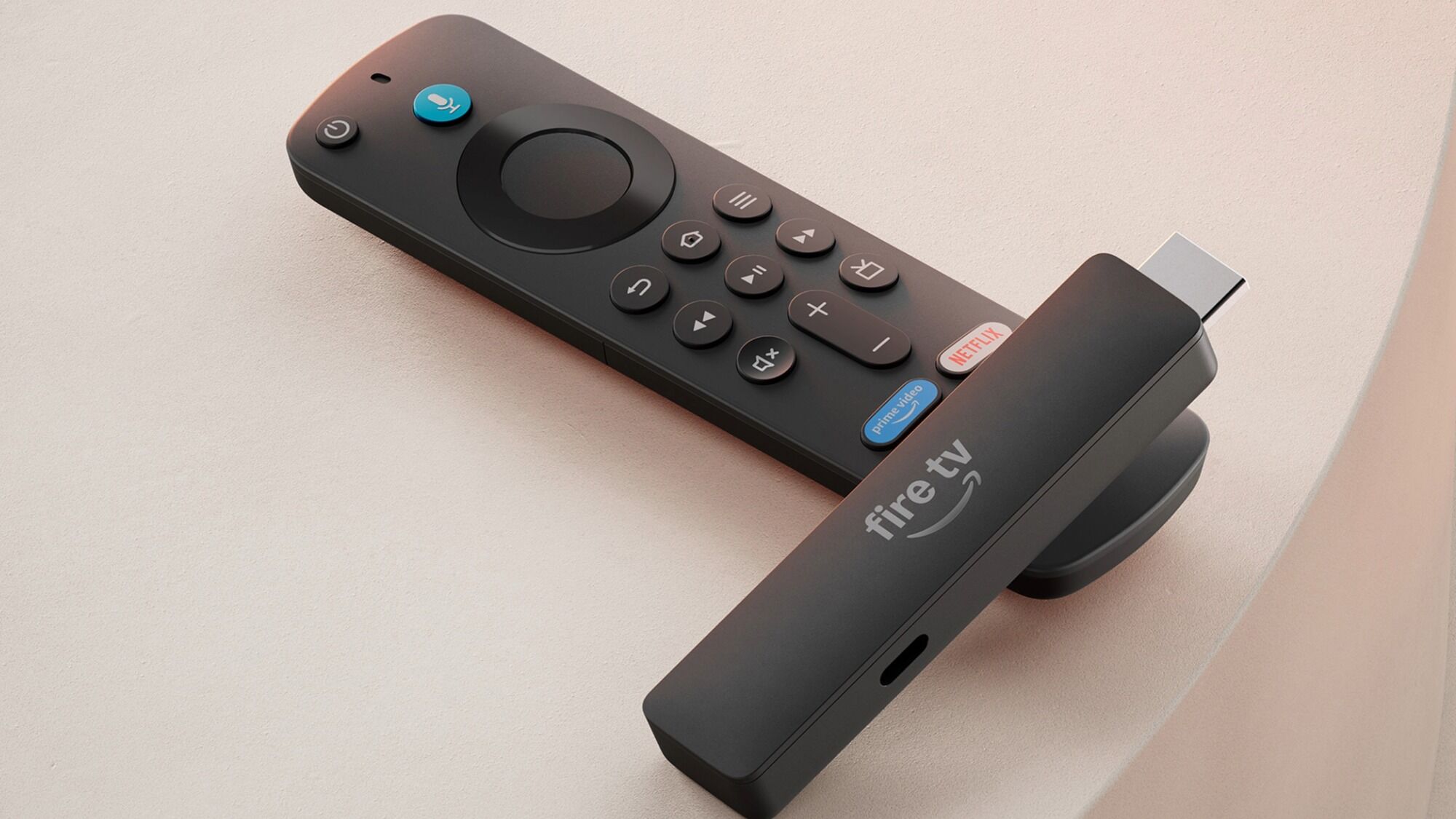

A slow TV interface can make choosing something to watch feel like work. The right streaming stick should start apps quickly, stay hidden behind the screen, and make it easy to find movies, shows, and live channels without juggling several remotes. The Best Fire Sticks for TV also need to match the television they are plugged into, since an HD set does not benefit from every 4K feature.
We compared Amazon's current Fire TV range with two Roku alternatives and one replacement remote. There are simple HD options, 4K models with HDR support, sticks aimed at crowded wireless networks, and a refurbished option that shares much of the hardware of a premium model.
Our top pick is the Amazon Fire TV Stick 4K Plus, with the HD models, Roku alternatives, and higher-capacity Fire TV Stick 4K Max covering the rest of the field.
| # | Product | Award | Picture | Wireless or feature | Best for |
|---|---|---|---|---|---|
| 1 | Amazon Fire TV Stick 4K Plus | Best overall | 4K, Dolby Vision, HDR10+ | Wi-Fi 6, Dolby Atmos | Most 4K TVs |
| 2 | Amazon Fire TV Stick HD | Best simple HD pick | Full HD | Alexa Voice Remote | First-time streamers |
| 3 | Amazon Fire TV Stick 4K Select | Best entry 4K pick | 4K, HDR10+ | Alexa+ search | Basic 4K setups |
| 4 | Amazon Fire TV Stick 4K Max | Best for heavy users | 4K, Dolby Vision, HDR10+ | Wi-Fi 6E, 16GB storage | Apps, games, and art |
| 5 | Amazon Fire TV Stick HD Newest | Best portable HD pick | Full HD | Wi-Fi 6, TV-powered setup | Travel and older TVs |
| 6 | Like-New Amazon Fire TV Stick 4K Max | Best refurbished 4K Max | 4K, Dolby Vision, HDR10+ | Wi-Fi 6E, 16GB storage | Buyers open to refurbished gear |
| 7 | Acoyer Fire TV Replacement Remote | Best replacement remote | Not applicable | Voice control, six shortcuts | Lost or broken remotes |
| 8 | Like-New Amazon Fire TV Stick 4K | Best refurbished 4K stick | 4K, Dolby Vision, HDR10+ | Wi-Fi 6 | Existing 4K TV owners |
| 9 | Roku Streaming Stick HD | Best Roku HD option | HD | TV-powered, voice remote | A clean, simple interface |
| 10 | Roku Streaming Stick 4K | Best Roku 4K option | 4K, HDR10+, Dolby Vision | Long-range Wi-Fi | Roku fans with 4K TVs |
1. Amazon Fire TV Stick 4K Plus: Best Overall

Pros
- 4K picture with Dolby Vision and HDR10+
- Wi-Fi 6 for busy home networks
- Alexa+ searches across supported apps
- Dolby Atmos audio support
- Smart home controls from the remote
Cons
- Its extra 4K features are wasted on an HD television
- It does not have the 16GB storage of the 4K Max
Best for: anyone who wants a current Fire TV stick for a 4K television without moving up to the largest storage model.
The Amazon Fire TV Stick 4K Plus is the easiest recommendation here because it gets the important parts right without narrowing its audience. It is small enough to disappear behind a television, yet it has the wireless support and picture formats that make sense for a modern 4K set. Its 0.1-pound body measures 5.56 inches long, 1.52 inches wide, and 0.69 inches high, so the size is unlikely to interfere with neighboring connections.
Picture quality is the main reason to choose it over the HD models. It supports 4K Ultra HD, Dolby Vision, HDR10+, and Dolby Atmos, giving compatible televisions and sound systems more information to work with. Wi-Fi 6 is also useful when phones, laptops, cameras, and game devices are competing for the same connection. It will not improve a weak broadband connection, but it is a sensible match for a busy modern network.
The updated Fire TV experience organizes content into dedicated categories, lets you pin more favorite apps, and uses Alexa+ for more natural searches. Instead of remembering which service carries a show, you can ask the voice remote to find content across supported apps. The remote also handles TV power and volume, includes preset app buttons, and controls compatible lights, cameras, and other smart home devices. Anyone building around several subscriptions should also consider how a streaming interface reduces app hopping before choosing a platform.
The 4K Plus is not the fastest or most capacious Fire TV option in this group. The Amazon Fire TV Stick 4K Max has a more powerful processor, 16GB of storage, Wi-Fi 6E, an Ambient Experience, and buttons designed for recent channels. Those advantages matter for game downloads, a large app library, or a television used as an art display. For ordinary streaming, the 4K Plus is the more balanced pick, and it is the one we would keep for most 4K living rooms.
2. Amazon Fire TV Stick HD: Best Simple HD Pick

Pros
- Straightforward Full HD streaming
- Alexa voice search across apps
- Smart home controls from the remote
- Compact design for HDMI-equipped TVs
- Access to free and live TV services
Cons
- No 4K or HDR support
- The listing does not specify Wi-Fi 6
- App buttons may vary
Best for: an HD television, guest room, or first streaming setup that does not need 4K playback.
The Amazon Fire TV Stick HD is the least complicated route into Fire TV. It is made for Full HD televisions, connects to an HDMI port, and gives a viewer access to streaming apps, free ad-supported channels, music, and supported live TV services. Its 3.38-inch length and 0.07-pound weight make it particularly unobtrusive behind a smaller television.
This model keeps the picture target clear. It streams in Full HD rather than 4K, so it is a sensible fit for an older panel or a secondary screen. There is no reason to pay attention to Dolby Vision or HDR10+ when the television cannot display them, and this stick avoids presenting those features as part of the experience. The trade-off is that it has less room to grow if the television is later upgraded.
The Alexa Voice Remote is the useful part of the package. Pressing the voice button can search for and launch shows across apps, while dedicated power and volume controls can reduce remote clutter with a compatible TV, soundbar, or receiver. Alexa can also check the weather, dim compatible lights, show camera feeds, and play music. That makes the stick more than a basic app launcher, though the experience still depends on the services and smart home devices in use.
Compared with the Amazon Fire TV Stick HD Newest, this version has fewer standout hardware claims in the supplied specifications. The newer model adds Wi-Fi 6, Bluetooth headphone listening, a TV-powered setup with an included USB-C cable, and a more portable profile. The standard Amazon Fire TV Stick HD remains a good choice for someone who wants a simple Full HD screen upgrade and does not need those additions.
3. Amazon Fire TV Stick 4K Select: Best Entry 4K Pick

Pros
- 4K Ultra HD playback
- HDR10+ support
- Alexa+ natural-language search
- Easy plug-in setup
- Xbox cloud gaming support with the required extras
Cons
- No Dolby Vision support is listed
- No Wi-Fi generation is specified
- Storage capacity is not listed
Best for: a 4K television owner who wants the current Fire TV interface without the Max model's extra features.
The Amazon Fire TV Stick 4K Select makes 4K streaming accessible without turning the device into a full entertainment hub. It is a small stick that plugs into the television, connects to Wi-Fi, and gets to the main apps quickly. The 4.26-inch body weighs 0.094 pounds, which is light enough to hide behind most screens.
Its picture support covers 4K Ultra HD and HDR10+. That combination can produce a sharper image with more vivid highlights on a compatible television, though the result still depends on the TV, source video, and service being used. Dolby Vision is not listed for this model, which is the key picture distinction between it and the Amazon Fire TV Stick 4K Plus or either 4K Max version.
Fire TV's redesigned experience gives the Select a broad app library, personalized recommendations, and Alexa+ search. The voice remote can find programs across apps, manage compatible smart home devices, and answer general questions. It also supports Xbox cloud gaming with an Xbox Game Pass subscription and compatible controller, both sold separately. That feature is better understood as a useful extra than a substitute for a dedicated console.
The Amazon Fire TV Stick 4K Plus is the stronger all-rounder because it adds Wi-Fi 6, Dolby Vision, and Dolby Atmos support. The Select is a better fit when HDR10+ is enough and the television does not need every premium format. It also lacks the 16GB storage and faster processor highlighted for the Amazon Fire TV Stick 4K Max. Choose the Select for uncomplicated 4K streaming, but skip it if Dolby Vision is a must-have.
4. Amazon Fire TV Stick 4K Max: Best for Heavy Users

Pros
- 16GB storage for apps, games, and downloads
- Wi-Fi 6E support
- Dolby Vision, HDR10+, and Dolby Atmos
- Faster app starts and fluid navigation
- Ambient Experience with more than 2, 000 art and photography pieces
Cons
- Its extra capacity is unnecessary for light streaming
- The larger feature set adds complexity
- It is not the smallest option in this group
Best for: households with many apps, cloud gaming interests, or a high-end 4K television.
The Amazon Fire TV Stick 4K Max is the model to choose when a streaming stick is expected to do more than play a few subscription apps. Its faster processor is intended to make app starts and navigation feel more fluid, while 16GB of storage gives it room for more apps, games, and downloads. That is double the storage listed for the 4K Plus and the other Fire TV sticks in this roundup.
The wireless specification is unusually strong for a stick. Wi-Fi 6E can use the newer 6GHz band when the home router and surrounding network support it, which may help reduce congestion. It is not a magic fix for distance or poor broadband, and compatible networking equipment is required. In a crowded home, though, the extra wireless headroom is more meaningful than it is on a quiet network.
The picture and audio formats are equally complete. It supports 4K Ultra HD, Dolby Vision, HDR10+, and Dolby Atmos, so it is prepared for a television and audio system that support those standards. The upgraded remote adds voice control, a recents button, and dedicated channel buttons for live TV. Fire TV Ambient Experience can display more than 2, 000 pieces of museum-quality art and photography when the television is not being used for a show.
The Amazon Fire TV Stick 4K Plus is the better choice for most viewers because it covers the essential 4K formats with less emphasis on storage and gaming. The Max earns its place for people who install many apps, use cloud gaming, or want the Ambient Experience. Its weakness is simple: if your routine is Netflix, one live TV app, and occasional YouTube, much of its hardware will sit idle.
5. Amazon Fire TV Stick HD Newest: Best Portable HD Pick

Pros
- Full HD streaming with Wi-Fi 6
- Direct Power can use the TV's USB connection
- Bluetooth headphone listening
- Compact, portable design
- Alexa+ search and smart home controls
Cons
- No 4K or HDR support
- USB power depends on the television
- Some setups may still need an external power arrangement
Best for: HD televisions, travel setups, and viewers who want private listening through Bluetooth headphones.
The Amazon Fire TV Stick HD Newest is the more flexible HD option in this list. It keeps the compact stick format but adds Wi-Fi 6, Bluetooth listening, and Direct Power through the included USB-C cable. The 5.56-inch body is 1.52 inches wide and weighs about 0.1 pounds, so it remains easy to tuck behind a television or carry between rooms.
The direct-power setup is its clearest practical improvement. The stick is designed to draw power from the TV, which can remove the need for a separate wall adapter and reduce cable clutter. That depends on the television's available USB connection and setup, so it should not be treated as a guarantee that every screen will power it in every situation. Still, the approach is useful for a bedroom television, a travel screen, or a wall-mounted set with limited space.
Full HD is the ceiling here. It is the right match for an HD panel, but buyers with a 4K television should look at the Amazon Fire TV Stick 4K Select or Amazon Fire TV Stick 4K Plus instead. Wi-Fi 6 helps the stick communicate efficiently with a compatible router, and Bluetooth support lets someone watch with headphones without disturbing the room.
The regular Amazon Fire TV Stick HD is similar in its basic mission, but this newest model has the stronger connectivity and setup story. It also carries the updated Fire TV experience, Alexa+ search, preset app buttons, and controls for compatible TVs and smart home products. Choose it over the older HD model when portability, TV-powered installation, or headphones matter. Choose the regular HD version when those features are not needed.
6. Like-New Amazon Fire TV Stick 4K Max: Best Refurbished 4K Max
Pros
- 16GB storage
- Wi-Fi 6E support
- Dolby Vision, HDR10+, and Dolby Atmos
- Fast processor for apps and games
- Ambient Experience support
Cons
- Refurbished condition is not right for every buyer
- Generic packaging may be used
- No new-device purchase experience
Best for: someone who wants the 4K Max feature set and is comfortable choosing a certified Like-New device.
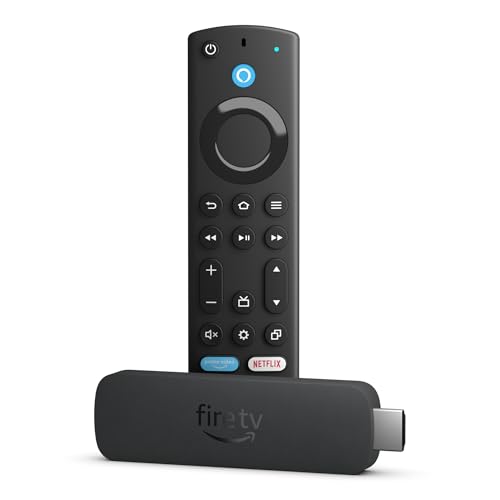
The Like-New Amazon Fire TV Stick 4K Max is functionally aimed at the same demanding user as the new Max. It has a powerful processor, 16GB of storage, Wi-Fi 6E, 4K playback, Dolby Vision, HDR10+, and Dolby Atmos. Its listed body is 6.21 inches long, 1.5 inches wide, and 0.67 inches high, with a weight of 0.11 pounds.
The Like-New designation is the important difference. The supplied product details describe it as refurbished, tested, and certified to look and work like new, with the same limited warranty as a new device. It may arrive in generic Amazon-branded packaging. That is useful information for a buyer who cares more about the device itself than presentation, but it is still a different ownership proposition from opening a new product.
Performance features are extensive. The 16GB capacity gives apps, games, and downloads more room than the other Fire TV sticks here. Wi-Fi 6E can be useful with a compatible 6GHz router, while the processor is designed for quick app starts and fluid navigation. The remote includes voice control, a recents button, and dedicated channel buttons, and the Ambient Experience can turn an idle screen into a display for more than 2, 000 art and photography pieces.
The new Amazon Fire TV Stick 4K Max is the safer pick for anyone who wants a new device without thinking about condition or packaging. The Like-New version makes more sense for an informed buyer who specifically wants the Max's storage and connectivity. It should be skipped by anyone who wants the simplest possible purchase or who does not need more than the regular streaming basics.
7. Acoyer Fire TV Replacement Remote: Best Replacement Remote

Pros
- Voice control after pairing and activation
- Supports many Fire TV stick generations
- Four shortcut buttons
- Two programmable customization buttons
- Small replacement for a lost remote
Cons
- Batteries are not included
- Not compatible with Roku sticks
- Pairing and voice activation require following the manual
Best for: a Fire TV owner whose original remote is lost, damaged, or no longer available.
The Acoyer Fire TV Replacement Remote is not a streaming stick, but it solves a common problem that can make an otherwise working device unusable. It is a replacement voice remote intended for several Fire TV Stick generations, Fire TV Cube models, and selected Fire TV sets. Compatibility needs to be checked carefully before ordering because this is not a universal TV remote.
The remote's feature set is more interesting than a basic button-for-button replacement. It has four shortcut buttons for streaming services and two customization buttons that can be programmed by pressing and holding them. That can reduce the number of steps needed to reach frequently used apps, though the exact experience will depend on the Fire TV device it is paired with.
Voice control is supported, but it is not simply a matter of inserting batteries and speaking. The supplied details say to follow the manual to pair the remote and activate its voice function. Batteries are not included, so those need to be available separately. These are small points, but they matter when the goal is to get a television working immediately.
The largest limitation is compatibility. The listing specifically says it is not compatible with Roku sticks, including Roku 4K models, and it is not intended for several other television brands named in the product details. It should not be considered an alternative to a complete Fire TV stick. For someone with a matching Fire TV device and a missing remote, however, it can restore voice search and TV control without replacing the streamer itself.
8. Like-New Amazon Fire TV Stick 4K: Best Refurbished 4K Stick

Pros
- 4K Ultra HD with Dolby Vision and HDR10+
- Wi-Fi 6 support
- Alexa voice search across apps
- Dolby Atmos audio support
- Certified Like-New condition
Cons
- Refurbished condition will not suit every buyer
- Storage capacity is not listed
- The Max model has more storage and Wi-Fi 6E
Best for: a 4K television owner who wants the standard Fire TV 4K feature set in a Like-New device.
The Like-New Amazon Fire TV Stick 4K is a sensible middle ground between the HD sticks and the 4K Max. It supports 4K Ultra HD, Dolby Vision, HDR10+, and Dolby Atmos, so it can serve as the central streamer for a television with a capable picture and sound system. Its body is 4.27 inches long, 1.18 inches wide, and 0.55 inches high, with a listed weight of 0.1 pounds.
Wi-Fi 6 is useful when several devices share a router, especially during high-bitrate 4K playback. The stick also brings Alexa voice search, preset app buttons, TV power and volume control, and smart home commands. Alexa can search by actor, plot, or an iconic quote, which is more useful than typing a long title with the directional buttons.
This model is described as refurbished, tested, and certified to look and work like new. It carries the same limited warranty as a new device, but generic Amazon-branded packaging may be used. That distinction should be clear before purchase. The device itself has a strong feature set, but the condition is part of the buying decision.
The Amazon Fire TV Stick 4K Plus is the better new-device recommendation because it is also built around Wi-Fi 6 and includes the same major picture formats, while the 4K Max adds 16GB storage, Wi-Fi 6E, and a faster processor. The Like-New Amazon Fire TV Stick 4K is the right fit for someone who wants 4K Dolby Vision streaming and is comfortable with refurbished hardware. It is not the choice for a buyer who expects the newest Max capabilities.
9. Roku Streaming Stick HD: Best Roku HD Option

Pros
- Simple HD streaming interface
- TV-powered design
- Voice remote controls TV power and volume
- Compact body that avoids neighboring HDMI ports
- Strong free live TV selection
Cons
- No 4K or HDR support
- Roku interface differs from Fire TV
- The supplied details do not specify Wi-Fi generation
Best for: viewers who prefer Roku's straightforward home screen and broad free TV selection on an HD television.
The Roku Streaming Stick HD is the cleanest alternative to the Fire TV models in this roundup. Its home screen is designed to keep apps and content easy to reach, and the compact stick stays behind the television rather than taking up shelf space. It measures 3.7 inches long, 0.8 inches wide, and 0.5 inches high, with a listed weight of about 0.13 pounds.
It is built for HD streaming, so it belongs with an HD television rather than a 4K display. The device can run from the TV alone, reducing the need for a wall outlet and extra cable clutter. Roku also says the stick can travel, letting users take their TV setup with them without logging into someone else's device.
The voice remote handles more than search. It can power on the television, adjust volume, control the Roku device, and launch entertainment by voice. Roku's home screen includes personalized picks, quick access to sports and entertainment, and a Sports Zone that shows where games are streaming, provides start reminders, and surfaces scores and highlights.
The Amazon Fire TV Stick HD models are better if Alexa, Fire TV Channels, or Amazon's smart home controls are central to the household. Roku is the stronger match for someone who wants a less cluttered interface and a single place to manage supported subscriptions. The Roku Streaming Stick 4K is the obvious step up for Roku users with a 4K television, but this HD version remains a neat fit for a secondary screen.
10. Roku Streaming Stick 4K: Best Roku 4K Option

Pros
- 4K picture with Dolby Vision and HDR10+
- Long-range Wi-Fi receiver
- Compact design that avoids nearby HDMI ports
- Voice remote controls the TV and streamer
- Free live TV, sports, movies, and shows
Cons
- The model has been available since 2021
- Roku and Fire TV organize content differently
- The supplied details do not list storage capacity
Best for: Roku users with a 4K television who want Dolby Vision and stronger wireless reach.
The Roku Streaming Stick 4K is the Roku alternative for a television that can actually show 4K content. It combines a hidden, compact design with 4K playback, Dolby Vision, and HDR10+. Its 3.7-inch length and 0.8-inch width make it easy to place behind the screen without blocking nearby HDMI ports.
The picture support is its main advantage over the Roku Streaming Stick HD. Four times the resolution of HD can reveal more detail on a suitable screen, while Dolby Vision and HDR10+ can improve color and highlight handling when the television and source support those formats. The stick also includes a long-range Wi-Fi receiver, which is useful for a TV in a room farther from the router.
Roku's interface puts emphasis on a simple home screen, personalized picks, free live TV, and search across entertainment. The voice remote can search and play content, power the TV, and adjust volume. Roku also offers a Sports Zone with game locations, reminders, live scores, and highlights, which gives this model a distinct advantage for viewers who want sports information gathered in one place.
The Amazon Fire TV Stick 4K Plus has a newer Fire TV experience, Alexa+ search, Wi-Fi 6, smart home controls, Dolby Atmos, and access to Xbox cloud gaming. The Roku Streaming Stick 4K counters with a straightforward interface and long-range wireless hardware. Choose Roku if the platform's navigation and sports features fit your habits. Choose the Fire TV Stick 4K Plus if Alexa and Amazon's app ecosystem matter more.
How to choose best fire sticks for tv
The Best Fire Sticks for TV are not all aimed at the same screen or household. Start with the television's resolution, then consider wireless conditions, remote controls, app storage, and the platform you actually want to use.
Resolution and HDR formats
HD sticks are designed for Full HD televisions. They are suitable for older screens and secondary rooms, but they cannot provide 4K playback or HDR. The Amazon Fire TV Stick 4K Select supports 4K and HDR10+, while the Amazon Fire TV Stick 4K Plus and both 4K Max models add Dolby Vision.
HDR only matters when the television supports it and the streaming service provides compatible content. Dolby Vision and HDR10+ are not interchangeable in every setup, so check the TV's supported formats before paying attention to them.
Wireless performance
A streaming stick depends on a stable Wi-Fi connection, especially for 4K video. Wi-Fi 6 can manage busy home networks more efficiently, while Wi-Fi 6E adds access to the 6GHz band with compatible networking equipment. The Roku Streaming Stick 4K instead highlights a long-range Wi-Fi receiver, which may matter more when the television is far from the router.
A newer wireless standard cannot repair weak broadband or a poor router position. If the TV is in a distant room, the connection conditions that affect streaming stability deserve attention before the device itself.
Storage and processing
Most viewers need enough performance to open apps and move through menus without frustration. The Amazon Fire TV Stick 4K Max stands apart with a faster processor and 16GB of storage, double the capacity listed for the Amazon Fire TV Stick 4K Plus and other Fire TV sticks in this selection.
That extra space is most useful for large app libraries, downloads, and games. A household that mainly watches a few streaming services will gain more from a suitable picture format and reliable Wi-Fi than from maximum storage.
Remote and voice search
A voice remote can search across apps much faster than typing with directional buttons. Amazon's remotes add Alexa search, TV power and volume controls, app shortcuts, and smart home commands. The newer HD model also supports Bluetooth headphones for private listening.
Roku's voice remote follows a simpler approach, with search, playback, TV power, and volume control. The Acoyer remote is a replacement option for compatible Fire TV devices, but its voice function must be paired and activated, and it does not work with Roku sticks.
Buy for the television you own now, but do not ignore the wireless network and remote you will use every day.
Platform and content discovery
Fire TV makes sense for households already using Alexa, Prime Video, Fire TV Channels, or compatible smart home products. Roku offers a clean home screen, free live TV, sports discovery, and a single place to manage supported subscriptions.
The interface changes how quickly you find something to watch. Readers comparing the wider category can also use the differences between compact streaming platforms to decide whether Fire TV or Roku better matches their habits.

Frequently asked questions
Do Fire TV sticks work with any television?
They require a television with an HDMI port and a way to provide power. The HD models are designed for Full HD screens, while the 4K models need a compatible 4K television to show their highest-resolution output. The TV's power behavior can affect whether a TV-powered setup works as intended.
Should I choose an HD or 4K streaming stick?
Choose an HD model when the television is limited to Full HD. A 4K model makes sense when the television supports 4K and you want access to higher-resolution streams. Buying a 4K stick does not turn an HD panel into a 4K display.
What is the difference between the Fire TV Stick 4K Plus and 4K Max?
The 4K Plus supports 4K, Dolby Vision, HDR10+, Dolby Atmos, and Wi-Fi 6. The 4K Max adds a faster processor, Wi-Fi 6E, 16GB of storage, an Ambient Experience, and a remote with a recents button and dedicated channel controls. The Max is better for apps, games, and heavier use.
Is the Like-New Fire TV Stick 4K Max new?
No. The supplied details describe it as refurbished, tested, and certified to look and work like new. It comes with the same limited warranty as a new device, but it may use generic Amazon-branded packaging.
Can I use the Acoyer remote with a Roku streaming stick?
No. The product details specifically say that the Acoyer remote is not compatible with Roku stick models, including Roku 4K versions. It is intended for compatible Fire TV sticks, Fire TV Cube devices, and selected Fire TV sets.
Do Fire TV sticks include streaming subscriptions?
The devices provide access to apps and free ad-supported content, but many services require their own subscriptions. Live TV services such as SLING TV and YouTube TV also require subscriptions. Availability and app buttons can vary by device and service.
Can I use Bluetooth headphones with a Fire TV stick?
The newest Amazon Fire TV Stick HD listing specifically includes Bluetooth listening for private viewing. The supplied details for the other models do not make the same claim, so check the individual device's supported features before relying on headphone connectivity.

The bottom line
The Best Fire Sticks for TV start with the Amazon Fire TV Stick 4K Plus. It combines 4K, Dolby Vision, HDR10+, Dolby Atmos, Wi-Fi 6, Alexa+ search, and smart home controls in a compact device that suits most modern 4K televisions. The Amazon Fire TV Stick 4K Max is the better specialist pick for heavy app users, cloud gaming, and anyone who needs 16GB of storage or Wi-Fi 6E.
For an HD television, the Amazon Fire TV Stick HD Newest adds useful Wi-Fi 6, Bluetooth listening, and TV-powered setup, while the Roku Streaming Stick HD is the stronger alternative for viewers who prefer Roku's simpler interface. Choose the platform first, then match the stick to the screen's resolution and the home's wireless conditions.
If you are undecided, choose the Amazon Fire TV Stick 4K Plus for a 4K TV and the Amazon Fire TV Stick HD Newest for an HD TV.
As an Amazon Associate we earn from qualifying purchases.