
A wired Android Auto connection works well until you have to reach for your phone every time you start the car. The cable gets left at home, drapes across the console, or becomes one more thing to plug in before a short trip. The Best android auto wireless adapter options solve that narrow problem, but only if your vehicle already has factory wired Android Auto.
The strongest choices here reconnect quickly, support the right phones, and stay small enough not to crowd the USB port. Some also support CarPlay, which makes them more useful in households with both iPhone and Android users. Our top pick is the Teeran 2-in-1 Adapter, with options below for Android-only cars, multi-phone households, low-profile installations, and flexible port layouts.
Comparison
| # | Product | Award | Compatibility | Connection | Size | Best for |
|---|---|---|---|---|---|---|
| 1 | Teeran 2-in-1 Adapter | Best overall | Wired CarPlay and Android Auto, Android 11+ | 2.4GHz and 5GHz Wi-Fi | 1 x 1 x 0.4 in | Mixed-phone households |
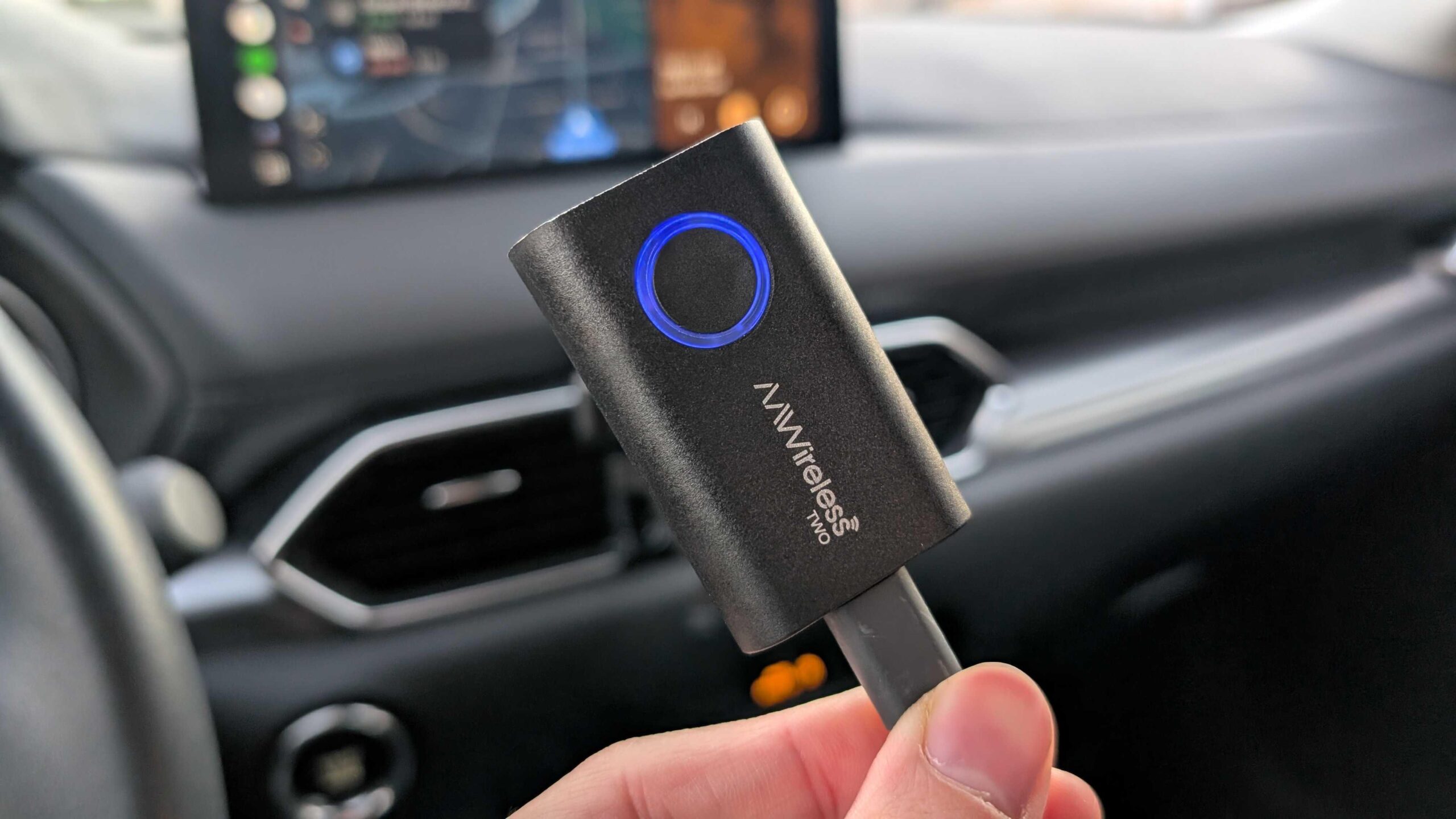
| 2 | AAWireless TWO | Best Android-only pick | Wired Android Auto, Android 11+ | Bluetooth and Wi-Fi | 2.17 x 1.38 x 0.59 in | Android Auto purists |
| 3 | SPIRITIME 2-in-1 Adapter | Best phone switching | Wired CarPlay and Android Auto | Dual-band Wi-Fi and Bluetooth | Not specified | Drivers sharing two phones |
| 4 | Visoud One-Touch Adapter | Best disconnect control | Wired CarPlay and Android Auto | 5.8GHz Wi-Fi and 5.2GHz Bluetooth | Not specified | Quick disconnects |
| 5 | Aswoema Wireless Adapter | Best Android compatibility | Wired Android Auto, Android 10+ | Bluetooth and Wi-Fi | 2.64 x 1.65 x 0.35 in | Older Android phones |
| 6 | Shrandi 2-in-1 Adapter | Best compact design | Wired CarPlay and Android Auto | Wireless auto-connect | 1.18 x 1.18 x 1.1 in | Minimalist consoles |
| 7 | AAWireless TWO+ | Best premium multi-user pick | Wired CarPlay and Android Auto | Bluetooth and Wi-Fi | 2.17 x 1.38 x 0.59 in | Families with iPhone and Android |
| 8 | Spedal CL322M | Best Wi-Fi specification | Wired CarPlay and Android Auto | Wi-Fi 6 and Bluetooth 5.4 | 1.06 x 0.98 x 0.98 in | Interference-prone areas |
| 9 | Visoud 2026 Adapter | Best flexible installation | Wired CarPlay and Android Auto | 5.8GHz Wi-Fi | Not specified | Hidden USB installations |
| 10 | CODONOVA Mini Adapter | Best secure USB connection | Wired CarPlay and Android Auto | Bluetooth 5.4 and Wi-Fi | Mini | Daily commuters |
1. Teeran 2-in-1 Adapter: Best Overall

Pros
- Supports both wired CarPlay and wired Android Auto
- Reconnects in under 3 seconds
- Includes USB-A and USB-C extension cables
- Keeps factory controls working
- Compact flush-fit design
Cons
- Requires an existing wired system
- Android support starts at Android 11
- No Android-only mode advantage over AAWireless TWO
Best for: households that switch between iPhone and Android phones.
The Teeran 2-in-1 Adapter is the easiest recommendation when a car is shared by people using different phones. It does not force the driver to unplug one device before another can connect, and its compact body can sit nearly flush with the USB port. That combination matters more in daily use than a long list of wireless standards.
Compatibility is broad, but the important qualifier is that the car must already have factory wired CarPlay or factory wired Android Auto. The adapter supports iPhone 6 or later and Android 11 or later, and Teeran states support across more than 1, 000 vehicle models. Its dual-band 2.4GHz and 5GHz wireless hardware is designed to make the transition from Bluetooth pairing to the in-car interface quickly, with claimed reconnection in under 3 seconds.
The physical design is unusually easy to place. The adapter measures about 1 x 1 x 0.4 inches, and the tapered housing is intended to sit close to the port rather than hang from it. Both USB-A and USB-C extension cables are included, so a recessed or awkwardly angled socket does not automatically turn into a messy installation. Factory touchscreens, steering wheel buttons, rotary controls, and voice commands remain part of the experience.
Compared with the AAWireless TWO, Teeran is the better fit for mixed-device homes, while AAWireless has the stronger case for someone who only uses Android Auto and wants its companion app. The Teeran weakness is its broad rather than specialized approach. It cannot add Android Auto to a car that never had it, and Android 10 phones are outside its stated support. Choose it when the car already has the correct wired system and different drivers need a clean handoff.
2. AAWireless TWO: Best Android-Only Pick

Pros
- Built specifically for wired Android Auto systems
- Multifunction button for pairing and switching
- Companion app supports updates and troubleshooting
- Supports multiple phones
- Compact 0.039-pound design
Cons
- Does not support Apple CarPlay
- Requires Android 11 or newer
- Wireless interference can affect stability
Best for: Android users who want a focused adapter with app support.
The AAWireless TWO is the most focused product in this group. It is not trying to serve iPhone drivers, and that is useful if every regular driver uses Android. The device is built for cars and head units that support wired Android Auto only, so there is less ambiguity about what it is supposed to do.
Android 11 or newer is required, along with a phone on Google's official Android Auto compatibility list. Once paired, the adapter connects through Bluetooth and Wi-Fi without requiring a cable each time. Its multifunction button gives the driver a physical way to pair phones and switch between them, which is more convenient than digging through a phone's Bluetooth menu in a shared vehicle.
At 2.17 x 1.38 x 0.59 inches and about 0.039 pounds, the unit is small enough to place beside the factory USB port without dominating the console. The free companion app is a meaningful distinction from simpler dongles because it provides firmware updates, troubleshooting, and customization. That gives the TWO a more maintainable feel than adapters that rely entirely on the initial setup.
The limitation is obvious next to the Teeran 2-in-1 Adapter and AAWireless TWO+: it is Android-only. External interference from cell towers, Wi-Fi hotspots, dashcams, and other wireless devices can also affect stability, according to the product information. Drivers who want CarPlay support should skip this model. For an Android-only car, though, the button and app make it a more deliberate choice than a generic plug-and-play dongle.
3. SPIRITIME 2-in-1 Adapter: Best Phone Switching

Pros
- Supports CarPlay and Android Auto
- Quick-swap button for connected phones
- One-click audio disconnect
- LEDs can be switched off
- Includes USB-A and USB-C support
Cons
- Compatibility language focuses on factory CarPlay
- Claimed 5-second connection is not the fastest here
- Android support details are less clear than the iPhone support details
Best for: couples and families who regularly change phones in one car.
The SPIRITIME 2-in-1 Adapter is built around a small but useful idea: phone switching should not require a reset. Its Quick-Swap Button is intended for two connected iPhones, and the same button can disconnect CarPlay audio from the car speakers during a private call. That makes this a particularly interesting option for a shared vehicle, even though its compatibility wording deserves careful reading.
The adapter claims a 5-second automatic connection after the initial setup. Dual-band Wi-Fi and Bluetooth coexistence are intended to keep maps, music, calls, and voice controls responsive. It supports USB-A and USB-C connections, so installation does not depend on one particular port shape. The product also supports iOS 10 or later and describes compatibility with factory CarPlay vehicles from 2016 onward.
A long press of the button turns off the adapter's LEDs. That is a small detail, but bright status lights can be distracting in a dark cabin, especially when the USB port sits directly below the display. The adapter also emphasizes HD audio and low latency, though the listing does not provide a more specific audio codec or wireless throughput figure.
Compared with the Visoud One-Touch Adapter, SPIRITIME puts more emphasis on switching between two phones, while Visoud makes one-touch disconnect its central feature. Its main weakness is the compatibility qualification. The product information repeatedly centers on factory wired CarPlay, while Android Auto support is mentioned more broadly. Check the car's existing system before buying, and skip this model if you need a clearly documented Android-only solution.
4. Visoud One-Touch Adapter: Best Disconnect Control

Pros
- Physical one-touch disconnect button
- Quick device switching
- 5-second reconnection claim
- 5.8GHz Wi-Fi and 5.2GHz Bluetooth
- Heat dissipation holes
Cons
- Only works with factory wired systems
- Does not support cars with factory wireless CarPlay
- No stated dimensions
Best for: drivers who want to disconnect a phone without opening settings.
The Visoud One-Touch Adapter solves a frustration that many small dongles ignore. Automatic reconnection is convenient, but there are times when you do not want the phone taking over the car. A physical button disconnects the active device with one press, and another press can restore the connection. That is useful when a passenger's phone is paired or when a driver wants to stop audio routing temporarily.
Visoud lists support for iPhones running iOS 10 or later and Android phones running Android 11 or later. The adapter uses 5.8GHz Wi-Fi and 5.2GHz Bluetooth, with the product description promising smooth audio and navigation. Its five-second reconnection claim puts it among the quicker options, although actual startup time can still depend on the vehicle's head unit.
The device has built-in heat dissipation holes and a compact housing intended to avoid cable clutter. There are no listed dimensions, so buyers with a tightly enclosed USB compartment should be more cautious than they would need to be with the Spedal CL322M or Shrandi 2-in-1 Adapter, both of which provide clearer size information.
The central restriction is compatibility. This adapter requires a car with factory wired CarPlay or Android Auto and an original touchscreen, and it does not work with a vehicle that already has OEM wireless CarPlay. It also lacks the companion-app angle found on AAWireless TWO. Pick Visoud when the button matters more than advanced software controls, and avoid it if the car's built-in system is already wireless.
5. Aswoema Wireless Adapter: Best Android Compatibility
Pros
- Supports Android 10 and later
- Designed for more than 800 car models
- Aluminum construction
- Includes USB-to-USB-C adapter
- One-year warranty and lifetime technical support
Cons
- Android-only for the stated wired Android use
- Larger than the tiniest dongles
- Product messaging also discusses CarPlay, which can confuse compatibility checks
Best for: Android users with phones that are not supported by Android 11-only adapters.
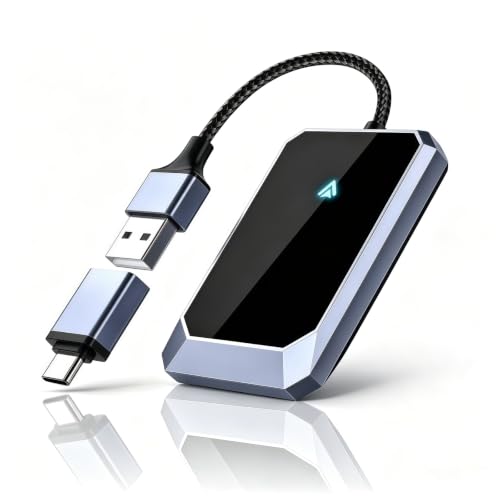
The Aswoema Wireless Adapter stands out because its stated Android requirement begins at Android 10 rather than Android 11. That single version difference may decide the purchase for someone using an older phone. The adapter is aimed at cars with wired Android Auto and claims compatibility with more than 800 vehicle models, while also describing wireless CarPlay functionality.
The setup is straightforward. Plug it into the car's USB port, pair the phone, and let the adapter reconnect automatically on later drives. Aswoema says it uses an A7S chip for stable wireless operation and retains the car's original navigation, music, call, messaging, and voice-assistant controls. The included USB-to-USB-C adapter helps it fit different factory port layouts.
Its aluminum housing measures 2.64 x 1.65 x 0.35 inches and weighs 0.1 pounds. That is still small by dashboard-accessory standards, but it is not as unobtrusive as the Teeran 2-in-1 Adapter or Spedal CL322M. The slim 0.35-inch height may help in a shallow compartment, though its length and width need consideration around neighboring ports.
Aswoema's weakness is the mixed compatibility language. The listing presents it as an Android Auto adapter, then describes a wired CarPlay upgrade, while the main phone compatibility statement centers on Android 10 and later. Confirm which wired protocol the car supports before ordering. Choose it for an Android 10 phone and a conventional wired Android Auto system, not for a household that needs the clearest possible iPhone and Android switching experience.
6. Shrandi 2-in-1 Adapter: Best Compact Design

Pros
- Small thumb-sized housing
- Supports CarPlay and Android Auto
- USB-A and USB-C compatibility
- No app required
- Automatic reconnection
Cons
- Requires a factory-installed wired system
- Android support starts at Android 11
- No physical switching button
Best for: drivers who want the adapter to disappear into the console.
The Shrandi 2-in-1 Adapter is about as simple as this category gets. It is a plug, pair, and drive device with no required app, no companion dashboard, and no extra control scheme to learn. The mini housing measures about 1.18 x 1.18 x 1.1 inches and weighs roughly 0.066 pounds, giving it a tidy footprint around the USB socket.
It supports factory wired CarPlay and Android Auto, with iPhone iOS 10 or later and Android 11 or later listed as the phone requirements. An included USB-to-USB-C converter covers both common port types. Once paired, the adapter is designed to reconnect automatically whenever the car starts, while the product description promises quick responses for navigation and music control.
The feature set is intentionally restrained. You retain the car's normal interface for maps, streaming, calls, and voice commands, but there is no physical button for changing users or disconnecting audio. That makes it less convenient than the SPIRITIME 2-in-1 Adapter in a two-phone household, even though Shrandi takes up less attention once it is installed.
The listing claims compatibility with 98% of factory-wired CarPlay vehicles, but that broad statement should not replace checking the car's existing system. This adapter cannot create CarPlay or Android Auto where neither exists. It is a good fit for a driver who wants a small, quiet installation and does not need multi-user controls. For a family car, the lack of a dedicated switch is the reason to look higher in the list.
7. AAWireless TWO+: Best Premium Multi-User Pick

Pros
- Supports both wired Android Auto and Apple CarPlay
- Multifunction button for pairing and switching
- Supports multiple phones
- Companion app for updates and troubleshooting
- Two-year warranty
Cons
- Requires Android 11 or newer
- Requires iPhone X or newer for CarPlay
- Larger than ultramini competitors
Best for: families sharing one car across Android and iPhone users.
The AAWireless TWO+ is the most complete multi-user option in the lineup. Its purpose is clear: convert a wired Android Auto or Apple CarPlay system into a wireless one while making phone switching manageable. The multifunction button is more practical than relying on whichever phone happens to reconnect first.
Compatibility covers Android 11 or later and iPhone X or newer. The adapter connects through Bluetooth and Wi-Fi, and a free companion app provides updates, troubleshooting, and customization. Those features give it a stronger ownership experience than the many no-app alternatives here. It also supports multiple phones, which is useful for road trips or a car shared by several drivers.
The body measures 2.17 x 1.38 x 0.59 inches and weighs about 18 grams. That is compact enough for most consoles, but it is not as close to invisible as the CODONOVA Mini Adapter or Spedal CL322M. Its physical size is a reasonable trade for the button and broader protocol support, especially if the USB port sits somewhere accessible.
The TWO+ is not the right pick for an older Android phone because Android 11 is required, and the iPhone support begins at iPhone X. It also costs the most in feature complexity, though no adapter can bypass a car that lacks factory wired CarPlay or Android Auto. Choose it over AAWireless TWO when iPhone support matters, and choose Teeran when you want a similarly broad protocol range in a more flush-fitting design.
8. Spedal CL322M: Best Wi-Fi Specification

Pros
- Wi-Fi 6 and Bluetooth 5.4
- Very small 1.06 x 0.98 x 0.98-inch body
- Supports CarPlay and Android Auto
- USB-A to USB-C adapter included
- Heat-resistant design
Cons
- Reconnection can take 5 to 15 seconds
- Android 11 or later is required
- Not compatible with BMW, Tesla, or cars without a wired system
Best for: drivers concerned about wireless interference and dashboard clutter.
The Spedal CL322M is the smallest-looking adapter here and one of the few to specify Wi-Fi 6 alongside Bluetooth 5.4. Those standards do not guarantee perfect operation in every car, but they point to a design aimed at faster data transfer and better resistance to crowded wireless environments. That can matter near busy roads, apartment parking lots, or a console full of wireless accessories.
The adapter supports both wireless CarPlay and wireless Android Auto, and it identifies the connected phone before selecting the appropriate system. Android users need Android 11 or later with Wireless Android Auto enabled. Spedal also specifies compatibility with factory wired CarPlay or Android Auto in model years 2016 to 2025, while excluding BMW, Tesla, and vehicles without a wired system.
Its dimensions are just 1.06 x 0.98 x 0.98 inches, with a listed weight of about 0.018 pounds. The stick-like shape plugs directly into the USB port, and a USB-A to USB-C adapter is included for broader port compatibility. Spedal also describes internal thermal design intended to keep the chip cool during long drives.
The catch is startup time. The product says automatic connection occurs within 5 to 15 seconds after the initial Bluetooth pairing, which is a wider and slower range than the Teeran claim. It also offers no physical phone-switching button like AAWireless TWO+. Pick Spedal if a tiny installation and newer wireless hardware matter most. Skip it if you need a clearly instant handoff between several drivers.
9. Visoud 2026 Adapter: Best Flexible Installation

Pros
- Supports CarPlay and Android Auto
- USB-A extension cable included
- Includes an Android converter
- Aluminum alloy housing
- Automatic reconnection without an app
Cons
- Product information omits a clear wireless Bluetooth specification
- Listed dimensions appear much larger than the mini description
- Requires a factory wired system
Best for: cars with recessed USB ports or awkward console layouts.
The Visoud 2026 Adapter earns its place through installation flexibility. Many wireless dongles are small but awkward when the car's USB port faces sideways, sits deep inside a storage compartment, or leaves no room for a straight plug. This model includes a USB-A extension cable and an Android converter, allowing the adapter to be positioned away from the port instead of wedged into it.
It supports iPhones on iOS 10 or later and Android phones on Android 11 or later. The product is designed to convert factory wired CarPlay and Android Auto, with automatic reconnection after one-time pairing. Visoud also claims support for 98% of original wired systems, although compatibility should still be checked against the specific vehicle.
The housing is described as lightweight aluminum alloy, which can help with heat dissipation and gives the device a more substantial feel than a plain plastic nub. The product information lists dimensions of 4.33 x 3.15 x 0.59 inches, which do not align neatly with the description of a mini body. That discrepancy makes the included extension cable especially important, since it may be better to mount the adapter out of sight rather than treat it as a flush-fit device.
Unlike Visoud One-Touch Adapter, this model does not list a physical disconnect button. It is better at solving port placement than managing active users. The wireless specification is also less detailed than Spedal's Wi-Fi 6 and Bluetooth 5.4 description. Choose it when the console is difficult to access or you want to hide the adapter. For an exposed USB port, a smaller and more clearly specified model makes more sense.
10. CODONOVA Mini Adapter: Best Secure USB Connection

Pros
- Supports CarPlay and Android Auto
- Bluetooth 5.4
- Gold-plated USB connector
- Retains factory controls
- Mini plug-and-play design
Cons
- No listed physical dimensions
- Not compatible with Tesla or BMW
- Requires factory wired CarPlay or Android Auto
Best for: commuters who want a simple adapter with a firm USB connection.
The CODONOVA Mini Adapter focuses on the small points that can make a daily dongle annoying. Its gold-plated USB connector is intended to maintain reliable contact, while the mini design keeps the cable and adapter away from the cup holders and gear area. For a commuter who wants to plug it in once and stop thinking about it, that is the right emphasis.
The adapter supports iPhone iOS 10 or later and Android 11 or later in most 2016 and newer vehicles with factory wired CarPlay or Android Auto. Bluetooth 5.4 and fast Wi-Fi are listed for pairing and data transmission. After the first setup, it reconnects automatically when the car starts, and the original touchscreen, steering wheel buttons, knobs, and voice assistant remain usable.
CODONOVA does not provide a physical size measurement beyond calling the device mini. That makes it harder to predict how it will fit beside another port, although the small plug-style format should suit ordinary USB installations. It also comes with no extension cable mention, so a deeply recessed or sideways port may be a better match for Visoud 2026 Adapter.
The compatibility restrictions are familiar but important. The adapter cannot add either system to a car without factory wired support, and the listing specifically excludes Tesla and BMW. It also lacks the multi-phone controls of SPIRITIME 2-in-1 Adapter and the app support of AAWireless TWO. Choose CODONOVA for a straightforward single-car setup where a secure USB fit matters more than advanced switching.
How to choose best android auto wireless adapter
The right adapter depends less on flashy wireless terminology than on the car's existing system, the phones used in it, and how much control you want after pairing.
Factory wired compatibility
Wireless adapters are converters, not replacement infotainment systems. The car must already support factory wired Android Auto, factory wired CarPlay, or both, depending on the adapter. A vehicle with only Bluetooth audio is not enough, and these products do not add Android Auto to a car that lacks the original feature.
Check the vehicle's infotainment specifications or connect a phone with a data cable before buying. If wired Android Auto does not launch through the factory USB port, start with a compatibility check rather than choosing between wireless standards.
A wireless adapter can remove the cable, but it cannot create the wired system your car never had.
Phone operating system
Android version requirements vary. Aswoema Wireless Adapter lists Android 10 or later, while most of the Android-focused products here require Android 11 or newer. CarPlay requirements vary too, with some products listing iOS 10 or later and AAWireless TWO+ specifying iPhone X or newer.
Shared vehicles should be matched to the oldest phone that needs to connect. A two-in-one label does not mean every phone generation is supported.
Reconnection speed
The useful measure is how long the system takes to appear after the car starts. Teeran claims reconnection in under 3 seconds, while SPIRITIME and Visoud One-Touch list 5-second connection claims. Spedal gives a broader 5 to 15-second range.
Treat these figures as product claims rather than a guarantee for every head unit. The car's startup sequence, phone settings, and wireless interference all affect the result. If short trips are common, quick reconnection matters more because waiting through a long boot process defeats much of the convenience.
Multi-phone controls
A shared car benefits from a physical switching or disconnect button. AAWireless TWO, AAWireless TWO+, SPIRITIME, and Visoud One-Touch each provide a more direct way to manage paired phones than a basic auto-connect dongle.
For a solo driver, a button may be unnecessary. For a couple or family, it can prevent the wrong phone from taking over navigation, calls, or music.
Size and installation
Small adapters reduce clutter, but the smallest body is not always the easiest to install. Measure the space around the factory USB port, especially if it sits inside a covered compartment. USB-A and USB-C support also matters because some adapters include a converter while others include extension cables.
The Teeran 2-in-1 Adapter includes both USB-A and USB-C extension cables, while Visoud 2026 Adapter is more useful when the dongle needs to sit away from the port. A flush-fit model works well in an open console, but a cable-assisted design can be better in a cramped one.
For broader car setup questions, how wireless accessories handle crowded in-car connections can help clarify why placement and interference matter. Drivers also comparing phone hardware may find the tools that keep an Android phone organized useful before troubleshooting the car connection.
Frequently asked questions
Does a wireless Android Auto adapter work in every car?
No. The car must already have factory wired Android Auto, and the phone must meet the adapter's operating system requirements. An adapter cannot add Android Auto to a vehicle that only has Bluetooth or a basic USB media connection.
Do these adapters work with Android Auto and CarPlay?
Some do, and some are Android-only. Teeran, SPIRITIME, Visoud, Shrandi, AAWireless TWO+, Spedal, the second Visoud adapter, and CODONOVA describe support for both systems. AAWireless TWO is designed for wired Android Auto only.
Can several phones be paired?
Several models support multiple phones, including AAWireless TWO, AAWireless TWO+, SPIRITIME, and Visoud One-Touch. Pairing more than one phone does not always mean the adapter will choose the desired driver automatically. A physical switching button makes shared-car use easier.
Do I need an app to install an adapter?
Most of the products here are designed for plug-and-play setup after Bluetooth pairing. AAWireless TWO and AAWireless TWO+ include a companion app for updates, troubleshooting, and customization. A no-app adapter can be simpler, but it usually gives you fewer diagnostic controls.
Will the car's steering wheel controls still work?
The products are designed to preserve the original wired CarPlay or Android Auto controls. Teeran and CODONOVA specifically mention touchscreen, steering wheel buttons, control knobs, and voice assistants. Actual behavior can still depend on the vehicle's factory head unit.
Is a USB-A to USB-C converter included?
Several products include adapters or cables for different port types. Teeran includes USB-A and USB-C extension cables, Shrandi includes a USB-to-USB-C converter, Spedal includes USB-A to USB-C support, and Visoud 2026 includes an Android converter plus a USB-A extension cable. Check the individual listing if the car has a recessed port.
Can wireless adapters fix a bad wired Android Auto connection?
Not necessarily. They remove the physical phone cable from the setup, but they do not repair a faulty USB port, incompatible head unit, weak phone connection, or software problem. Test wired Android Auto first and resolve those issues before moving to a wireless adapter.
The bottom line
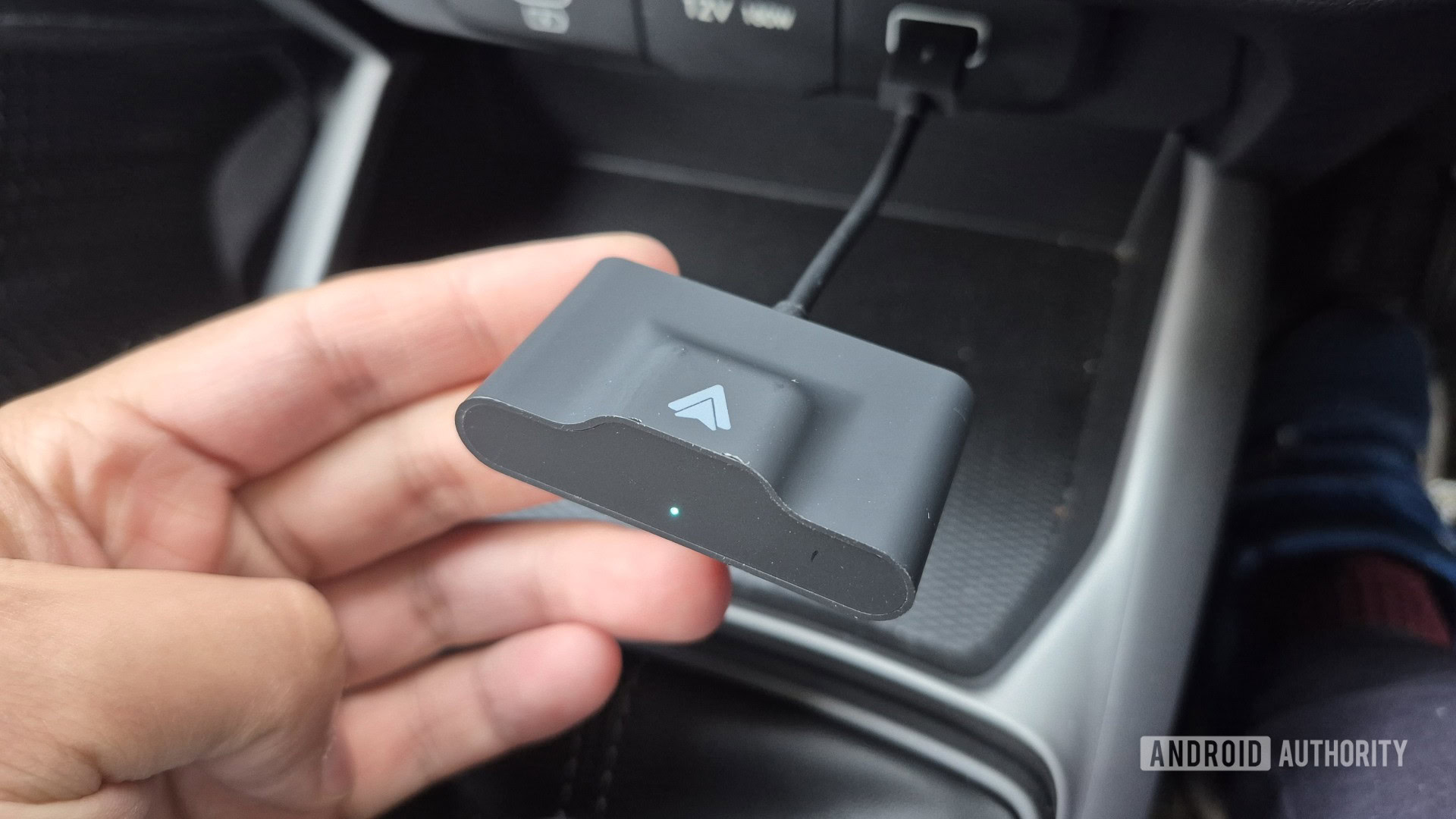
The Best android auto wireless adapter for most mixed-phone households is the Teeran 2-in-1 Adapter. It supports wired CarPlay and Android Auto, reconnects quickly, includes useful cable options, and is small enough to keep the console tidy. Its Android 11 requirement and dependence on an existing wired system are the main reasons to pass.
The AAWireless TWO is the sharper choice for Android-only cars, especially when the companion app and physical pairing button matter. For a family using both iPhone and Android, AAWireless TWO+ adds the strongest multi-user controls, while Spedal CL322M is the smallest option with the most clearly specified wireless hardware.
If you are undecided, verify factory wired compatibility first, then choose Teeran unless your phone, console layout, or need for user switching points elsewhere.
As an Amazon Associate we earn from qualifying purchases.