

A full game drive can turn a quick session into a storage-management chore, especially when modern titles occupy tens or hundreds of gigabytes. The right portable drive should make moving games simple without adding another slow, fragile box to your setup.
The Best external SSD for gaming picks below include fast NVMe-style SSDs, rugged portable models, and two conventional hard drives for buyers who need a large game archive. The Samsung T7 Portable SSD 1TB is our top pick, while the rest range from the fastest USB 3.2 Gen 2x2 models to high-capacity console storage.
Comparison table
| # | Product | Award | Capacity | Interface and advertised speed | Best for |
|---|---|---|---|---|---|
| 1 | Samsung T7 Portable SSD 1TB | Best overall | 1TB | USB 3.2 Gen 2, up to 1, 050 MB/s read | Most PC and console players |
| 2 | WD_BLACK P40 Game Drive | Best for gaming setups | 1TB | USB 3.2 Gen 2x2, up to 2, 000 MB/s read | RGB-equipped gaming PCs |
| 3 | Samsung T9 Portable SSD | Best high-speed SSD | 1TB | USB 3.2 Gen 2x2, up to 2, 000 MB/s | Fast PC file transfers |
| 4 | Samsung T7 Portable SSD 2TB | Best standard-capacity pick | 2TB | USB 3.2 Gen 2, up to 1, 050 MB/s read | Larger game libraries |
| 5 | Seagate Portable Hard Drive 2TB | Best simple archive drive | 2TB | USB 3.0 | Backups and older games |
| 6 | SSK Portable SSD 1TB | Best compact SSD | 1TB | USB 3.2 Gen 2, up to 1, 050 MB/s read | Small travel setups |
| 7 | Lexar ES3 Portable SSD | Best for encryption | 1TB | USB 3.2 Gen 2, up to 1, 050 MB/s read | Portable protected files |
| 8 | WD_BLACK P10 Game Drive | Best high-capacity game archive | 5TB | USB, up to 130 MB/s | Large console libraries |
| 9 | SanDisk Extreme Portable SSD | Best rugged portable SSD | 2TB | USB 3.2 Gen 2, up to 1, 050 MB/s read | Outdoor and travel use |
| 10 | Samsung T7 Shield Portable SSD | Best weather-resistant SSD | 2TB | USB 3.2 Gen 2, up to 1, 050 MB/s read | Rough handling and travel |
1. Samsung T7 Portable SSD 1TB: Best Overall

Pros
- Compact aluminum unibody design
- Up to 1, 050 MB/s read and 1, 000 MB/s write
- Shock resistance and fall protection up to 6 feet
- Broad compatibility with computers, phones, and consoles
Cons
- 1TB leaves less room for a very large library
- Not as fast as USB 3.2 Gen 2x2 drives on a compatible computer
- No listed water or dust resistance
Best for: most players who want a small, dependable SSD for moving and running games.
The Samsung T7 is the drive we would hand to most PC and console players. It is thin enough to disappear behind a console or in a laptop bag, but it does not feel like a disposable accessory. The aluminum unibody construction gives it a solid, cool-to-the-touch feel, and the 0.13-pound weight keeps it easy to carry between systems.
Its USB 3.2 Gen 2 connection is rated for read speeds up to 1, 050 MB/s and write speeds up to 1, 000 MB/s. That is a useful level of performance for installing games, transferring captures, and loading a game library without the sluggish pauses associated with a mechanical drive. The advertised figures still depend on the host device and cable, so a computer with a slower USB port will not let the T7 reach its ceiling.
Samsung lists compatibility with PCs and mobile devices, and the drive can also handle game data. Its compact 3.3 by 2.2 by 0.3-inch body is easier to position than the larger hard drives here. The T7 also supports recording Ultra High Resolution video directly from compatible cameras and mobile devices, which makes it more versatile than a drive intended only for consoles.
The WD_BLACK P40 Game Drive and Samsung T9 Portable SSD are faster on a USB 3.2 Gen 2x2 computer, with advertised read speeds up to 2, 000 MB/s. Most players will not see that full advantage on a console, however, and the T7 is the simpler all-around fit. Its real weakness is the lack of a stated water or dust rating. Skip it if the drive will regularly travel through wet or dusty conditions, and choose the T7 Shield or SanDisk Extreme instead.
The 1TB capacity suits a focused collection rather than every game you own. For someone who rotates a few current games and wants quick transfers in a genuinely portable enclosure, the T7 remains the cleanest recommendation.
2. WD_BLACK P40 Game Drive: Best for Gaming Setups

Pros
- Advertised read speeds up to 2, 000 MB/s
- Customizable RGB lighting on Windows
- Compatible with PlayStation and Xbox consoles
- Shock-resistant structure with up to 2-meter drop protection
Cons
- RGB controls require Windows
- 1TB capacity can fill quickly
- Gen 2x2 speed requires a compatible host device
Best for: PC players who want a fast external SSD that looks at home beside a gaming desktop.
The P40 is the most overtly gaming-focused SSD in this group. Its RGB lighting can be customized through the downloadable WD_BLACK Dashboard on Windows, so it fits a desk with illuminated peripherals better than the understated Samsung T7. The lighting is decorative rather than functional, but it gives the drive a visual identity that standard portable SSDs lack.
The underlying hardware is more ambitious than the T7's. Its USB 3.2 Gen 2x2 interface is advertised at up to 2, 000 MB/s read speed. That requires a host with the same high-speed interface, and performance will vary with the computer, usage conditions, and capacity. On the right PC, large game transfers and other files can move noticeably faster than they do on a standard USB 3.2 Gen 2 drive.
WD_BLACK says the P40 works with PlayStation 5 and Xbox Series X|S consoles. It can play and store PS4 games on a PlayStation 5, while PS5 games can be archived. On Xbox Series X|S, it can play and store Xbox One games and archive newer Series games. That distinction matters more than the RGB: current-generation console software has storage rules that external drives cannot bypass.
The drive measures 4.21 by 2 by 0.51 inches and weighs 0.17 pounds. It is still portable, though it is less pocket-friendly than the T7 or SSK. The shock-resistant structure is reassuring, but there is no stated water or dust protection. The Samsung T9 is the better choice for a plain, fast portable drive, while the T7 is the easier recommendation for mixed devices and simpler compatibility.
Choose the P40 when the Windows dashboard and lighting matter as much as the transfer speed. It is a distinctive desktop gaming accessory, not merely a storage rectangle.
3. Samsung T9 Portable SSD: Best High-Speed SSD

Pros
- Up to 2, 000 MB/s read and write speeds
- Dynamic thermal management for sustained workloads
- Supports computers, cameras, mobile devices, and consoles
- Samsung Magician software supports monitoring and updates
Cons
- Gen 2x2 performance depends on the host device
- Heavier than the T7
- 1TB capacity is limiting for large libraries
Best for: PC gamers with a USB 3.2 Gen 2x2 port who move large game files often.
The T9 is the technical speed leader among the conventional portable SSDs here, but only when its connection is matched by the host. Samsung rates sustained read and write speeds at up to 2, 000 MB/s. That makes it especially interesting for a gaming PC that regularly moves large installations, recordings, or project files between drives.
Samsung's Dynamic Thermal Guard is intended to control heat during heavy use. That matters when a long transfer runs beyond the first few seconds, because a fast interface is less useful if the drive immediately has to reduce its speed. The T9 measures about 3.46 by 2.36 by 0.55 inches and weighs 0.27 pounds, making it chunkier than the T7 but still easy to carry.
The T9 works with desktops, cameras, gaming consoles, and mobile devices. It also supports Samsung Magician software, which can provide firmware updates, drive health monitoring, and encryption features. The included SSD cable is recommended for iPhone 15 ProRes 4K at 60fps recording, according to the product information. That wider compatibility gives the T9 a useful life beyond game storage.
The WD_BLACK P40 reaches the same advertised read speed and adds Windows RGB controls, so it is the more playful choice for a gaming desk. The T7 is easier to recommend for older or ordinary USB connections because its performance target is less dependent on Gen 2x2 hardware. The T9's weakness is precisely that interface requirement. Plug it into a slower port and its headline advantage largely disappears.
This is the drive for a PC owner who has confirmed the port standard and wants the quickest transfers in the roundup. If the drive will mainly sit on a console, the T7's simpler design and broad compatibility make more sense.
4. Samsung T7 Portable SSD 2TB: Best Standard-Capacity Pick
Pros
- 2TB capacity for a broader game library
- Up to 1, 050 MB/s read and 1, 000 MB/s write
- Small 0.13-pound aluminum body
- Shock resistance and fall protection up to 6 feet
Cons
- Standard USB 3.2 Gen 2 speed
- No listed IP water or dust rating
- Same physical design as the smaller T7
Best for: players who like the T7 design but need room for more installed games.
The 2TB T7 makes the same basic case as the 1TB version, with a more practical capacity for a modern game library. It is the quiet, unobtrusive option. There is no lighting, raised armor, or gaming software to configure, just a compact aluminum enclosure that can sit beside a console or travel with a laptop.
The USB 3.2 Gen 2 interface is rated up to 1, 050 MB/s for reads and 1, 000 MB/s for writes. For moving installations, backing up saves, and loading supported games, that is a substantial step beyond a mechanical hard drive. It is not the 2, 000 MB/s class of the T9 or P40, but the T7 does not need a Gen 2x2 port to reach its advertised performance tier.
Samsung lists broad compatibility with PCs and mobile devices, and the drive can store game data. Its 3.3 by 2.2 by 0.3-inch dimensions and 0.13-pound weight are unchanged from the 1TB model. The aluminum unibody offers shock resistance and protection against falls up to 6 feet, a useful safeguard for a drive that moves between a desk and a backpack.
The 2TB T7 is more convenient than the 1TB T7 for players with several large games in rotation. The SanDisk Extreme and T7 Shield are better prepared for water, dust, and rougher travel, while the T9 is the faster option for a suitable PC. The T7's weakness is its ordinary environmental protection, so it should live in a reasonably controlled setup.
Choose this model when capacity matters but you do not need the extra bulk or specialized features of a rugged drive. It is the straightforward expansion drive in the lineup.
5. Seagate Portable Hard Drive 2TB: Best Simple Archive Drive

Pros
- 2TB capacity
- USB 3.0 plug-and-play setup
- Works with Windows and Mac computers
- Included 18-inch cable
Cons
- Mechanical hard drive is much slower than the SSD picks
- Larger and heavier than the portable SSDs
- No stated drop, water, or dust rating
Best for: storing backups and games that do not need SSD-level transfer performance.
The Seagate Portable 2TB is the outlier in this roundup because it is a conventional hard drive, not an SSD. That makes its role clear. It is a simple place to keep a game archive, media collection, or computer backup, but it is not the drive to choose when fast loading and rapid installations are the priority.
Setup is uncomplicated. Seagate says the drive is designed for Windows and Mac computers, with automatic recognition and no software required. The included 18-inch USB 3.0 cable supports the plug-and-play approach. Its 4.6 by 3.15 by 0.58-inch body and roughly 0.42-pound weight make it noticeably larger and heavier than the Samsung T7, SSK, and SanDisk SSDs.
The 2TB capacity gives it enough space for a substantial collection, but the mechanical design brings moving parts and lower transfer performance. The SSD models can reach advertised read speeds from 1, 050 MB/s to 2, 000 MB/s, while this drive's product information does not provide a comparable speed figure. That gap will be apparent during large installs and file transfers.
The WD_BLACK P10 is the stronger choice if the main purpose is a large console game library, since its product information specifically highlights PlayStation and Xbox compatibility and a capacity of 5TB. The Seagate is more general-purpose and simpler for PC or Mac backups. Its weakness is speed, and players should skip it for an active game drive when an SSD is practical.
This is best treated as an archive companion rather than the Best external SSD for gaming. It fits a player who wants uncomplicated bulk storage and does not mind waiting longer for transfers.
6. SSK Portable SSD 1TB: Best Compact SSD

Pros
- Up to 1, 050 MB/s read and 1, 000 MB/s write
- Very small 2.7 by 1.48 by 0.49-inch body
- Weighs about 36.6 grams
- Includes USB-C and USB-A cables
- S.M.A.R.T. diagnostics and adaptive TRIM
Cons
- 1TB capacity
- No stated water or dust resistance
- Sustained performance depends on its SLC cache and host device
Best for: players who want a very small SSD with both USB-C and USB-A connectivity.
The SSK Portable SSD is unusually small, and that is its most convincing reason to exist. At about 2.7 by 1.48 by 0.49 inches and 36.6 grams, it takes up little space in a travel kit. The included USB-C and USB-A cables also make it easier to move between newer laptops and older computers without immediately searching for an adapter.
SSK rates the drive at up to 1, 050 MB/s read and 1, 000 MB/s write through its USB 3.2 Gen 2 connection. An activity LED shows when the drive is working. The company also lists S.M.A.R.T. health diagnostics and adaptive TRIM, features intended to monitor drive condition and manage data blocks over time.
The drive uses SLC caching, with 25 percent of the currently available capacity allocated as high-speed cache. That can help keep large transfers moving within the cache, but it also means performance behavior can change during very long writes. The enclosure is a 2mm aluminum alloy design, and SSK states that its case temperature can peak at 105.58 degrees Fahrenheit during operation.
The Samsung T7 is the safer mainstream recommendation, with a more established design and explicit fall protection. The Lexar ES3 is similarly small and adds 256-bit AES encryption software, while the SSK has the advantage of including both cable types. Its weakness is the lack of a stated environmental rating, so it is not the one to clip to a bag for exposed outdoor use.
The SSK suits a laptop gamer or frequent traveler who values minimal bulk and flexible connections. Its small size is more meaningful than the activity light, and its performance rating puts it comfortably above the mechanical drives here.
7. Lexar ES3 Portable SSD: Best for Encryption

Pros
- Up to 1, 050 MB/s read and 1, 000 MB/s write
- 256-bit AES encryption software
- 42-gram portable design
- Compatibility with PCs, cameras, consoles, and mobile devices
Cons
- 1TB capacity
- USB-C cable included, with no USB-A cable listed
- Compatibility has specific iPhone limitations
Best for: players who carry game files and personal data and want software-based file protection.
The Lexar ES3 takes a compact, low-profile approach. It weighs 42 grams and is 10.5mm thick, according to Lexar, so it is easy to slip into a pocket or laptop sleeve. Its silver finish and thin shape make it less visually aggressive than the P40, which may be preferable when the drive also stores work or personal files.
The USB 3.2 Gen 2 interface is rated for read speeds up to 1, 050 MB/s and write speeds up to 1, 000 MB/s. Lexar cautions that performance may be lower on systems that do not support USB 3.2 Gen 2. A Type-C cable is included for plug-and-play use. The product information lists compatibility with Android devices, cameras, Xbox Series X|S, PlayStation 4, PlayStation 5, and more.
Its standout feature is Lexar DataShield software with 256-bit AES encryption. That is useful when the drive travels with more than a game library, particularly if it contains captures, documents, or other private files. Lexar also notes that this version does not include MagSafe, and it lists support for the iPhone 17 series while excluding iPhone 14 and older models.
The SSK Portable SSD is smaller and includes USB-C and USB-A cables, which gives it an edge for mixed computer setups. The Samsung T7 has the more familiar all-purpose design, while the Lexar makes a stronger case for users who care about encryption. The ES3's weakness is that its compatibility notes require attention, especially for older iPhones.
This is a sensible portable SSD for a player who wants one drive to carry games and protected files. It is not the toughest model here, but the encryption software gives it a clear purpose.
8. WD_BLACK P10 Game Drive: Best High-Capacity Game Archive

Pros
- 5TB capacity
- Designed for PlayStation, Xbox, and PC use
- Up to 130 MB/s advertised speed
- Metal top covering
- Three-year limited warranty listed
Cons
- Mechanical hard drive
- Much slower than every SSD in the roundup
- Larger and heavier than the portable SSDs
Best for: keeping a large console game collection available without replacing the internal drive.
The P10 is built around one job: holding a lot of games. Its 5TB capacity is the largest in this group, and WD_BLACK says it can hold up to 150 games. That makes it appealing for a player who would rather keep an extensive library close at hand than repeatedly download and remove older titles.
This is an HDD, so its advertised speed is up to 130 MB/s. That figure is well below the SSDs, whose listed read speeds begin at 1, 050 MB/s. The difference affects installation, copying, and loading tasks. The P10 can still make a useful console expansion drive, but it should not be mistaken for a high-speed SSD.
WD_BLACK lists compatibility with Xbox Series X|S and PlayStation 5. It can play and store Xbox One games and archive Xbox Series X|S games. On PlayStation 5, it can play and store PS4 games and archive PS5 games. Those archive capabilities make its large capacity particularly useful, even when current-generation games must be moved back to internal storage before playing.
The P10 measures 4.65 by 3.46 by 0.82 inches and weighs 0.51 pounds. Its metal top covering gives it a more substantial feel than the Seagate Portable Hard Drive, and the product listing includes a three-year limited warranty. The SanDisk Extreme or Samsung T7 Shield is much better for rough travel, while the P10 is better for a stationary console shelf.
Choose it for capacity first. If you install and remove games constantly, an SSD will feel more responsive. If you want a broad archive and can accept slower transfers, the P10 is the most capable bulk-storage choice here.
9. SanDisk Extreme Portable SSD: Best Rugged Portable SSD
Pros
- 2TB capacity
- Up to 1, 050 MB/s read and 1, 000 MB/s write
- IP65 water and dust resistance
- Up to 3-meter drop protection
- 256-bit AES hardware encryption
- Carabiner loop
Cons
- Listed as an old model
- Standard USB 3.2 Gen 2 speed
- Larger than the smallest portable SSDs
Best for: carrying a 2TB game drive through travel, commutes, and unpredictable conditions.
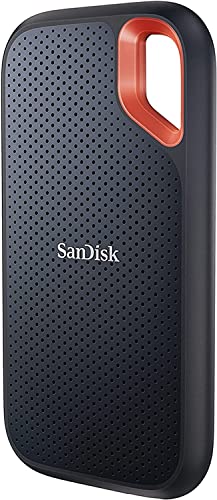
The SanDisk Extreme is the portable SSD to choose when the enclosure needs to tolerate more than a careful desk setup. The product information lists IP65 water and dust resistance, up to 3-meter drop protection, and a carabiner loop for securing the drive to a belt loop or backpack. Those details give it a practical advantage for players who carry a drive regularly.
Its USB 3.2 Gen 2 connection is rated for up to 1, 050 MB/s read and 1, 000 MB/s write speeds. That puts it alongside the Samsung T7, T7 Shield, SSK, and Lexar rather than the 2, 000 MB/s T9 and P40. For game transfers and everyday external storage, it remains a strong performance class, provided the host device and connection support the necessary standard.
SanDisk includes password protection with 256-bit AES hardware encryption and provides the Memory Zone app for file management and freeing space. The drive measures 3.97 by 2.07 by 0.38 inches and weighs 0.11 pounds. It is still slim, though its protective design is less minimalist than the bare Samsung T7.
The Samsung T7 Shield offers similar outdoor-minded protection, including an IP65 rating and protection from falls up to 9.8 feet, while the SanDisk is lighter and includes the useful carabiner loop. The T9 is faster on the right PC, but it lacks the same stated environmental protection. The SanDisk's main drawback is that this listing identifies it as an old model, so buyers should pay close attention to firmware and model details.
For a travel-heavy setup, the SanDisk Extreme is one of the most convincing choices in the roundup. It combines the capacity of the larger drives with the portability and resilience missing from standard enclosures.
10. Samsung T7 Shield Portable SSD: Best Weather-Resistant SSD

Pros
- 2TB capacity
- IP65 water and dust resistance
- Drop protection up to 9.8 feet
- Up to 1, 050 MB/s read and 1, 000 MB/s write
- Samsung Magician software
Cons
- Thicker and heavier than the standard T7
- Standard USB 3.2 Gen 2 speed
- Rugged enclosure takes up more space
Best for: players who want Samsung's portable SSD platform with stronger protection against the elements.
The T7 Shield is the reinforced version of the standard T7, and its extra protection is easy to understand. Samsung lists an IP65 rating for water and dust resistance and drop protection up to 9.8 feet. That makes it a better companion for a backpack or travel case than the regular T7, particularly when the drive may be handled in less controlled surroundings.
Performance remains familiar. The USB 3.2 Gen 2 connection is rated up to 1, 050 MB/s read and 1, 000 MB/s write. It works with PCs, Macs, Android devices, and gaming consoles, and Samsung says it supports iPhone 15 ProRes 4K at 60fps video with the included SSD cable recommended. Samsung Magician adds drive health monitoring, optimization tools, protection features, firmware updates, and LED color settings.
The 3.39 by 2.24 by 0.49-inch body is thicker than the standard T7, and its listed weight is about 0.21 pounds. That is still easy to carry, but the trade-off is clear: the Shield takes up more room in exchange for a more protective outer design. The SanDisk Extreme is lighter and adds a carabiner loop, while the T7 Shield offers the larger stated drop-protection figure.
The T9 and P40 are better for a compatible PC that can use USB 3.2 Gen 2x2, and the ordinary T7 is slimmer for a desk drawer. The Shield's weakness is that its reinforced enclosure does not make it faster. Skip it if the drive will never leave a protected desk and compact size matters more than environmental resistance.
For anyone who wants a 2TB portable SSD that can handle travel, the T7 Shield is a reassuring choice. It is the rugged T7 to keep in mind when the standard model seems a little too exposed.

How to choose best external ssd for gaming
The right external game drive depends on the system it will connect to, the size of the library, and how often it will travel.
SSD type and transfer speed
An SSD has no spinning platters, so it is generally better suited to frequent game transfers and active libraries than a mechanical hard drive. The drives here advertise read speeds from 1, 050 MB/s to 2, 000 MB/s, while the WD_BLACK P10 and Seagate models use hard drives and list much lower or no comparable transfer figures.
USB 3.2 Gen 2 is the common middle ground in this group. USB 3.2 Gen 2x2 can reach the higher 2, 000 MB/s class, but only when the computer has a matching port. A fast SSD connected through a slower interface cannot use its full advertised capability.
A 2, 000 MB/s label matters only when the computer, cable, and drive connection can all support it.
Console compatibility
PlayStation and Xbox systems impose their own rules. An external drive may store or play older-generation games while only archiving newer titles. The WD_BLACK P40 and P10 state these distinctions clearly, while the Samsung drives list compatibility with gaming consoles more broadly.
Check the console's supported interface and game-storage rules before choosing. For PC players, the motherboard's USB port matters too. If you are planning a broader system upgrade, storage speed should be considered alongside the parts that shape a gaming PC build.
Capacity
A 1TB drive is suitable for a rotating selection of games, but large libraries can fill it quickly. The 2TB models provide more breathing room, while the 5TB WD_BLACK P10 is the clear choice for keeping a large archive available.
Capacity should match the way you play. A player who regularly removes finished games may prefer a smaller SSD that is easy to carry. Someone who wants to preserve a library should look at 2TB or larger, while accepting that the P10's hard drive design transfers files more slowly.
Ruggedness and portability
A desk-bound drive does not need the same protection as one carried in a backpack. The standard Samsung T7 is thin and light, while the SanDisk Extreme and Samsung T7 Shield add stated protection against water, dust, and drops. The SSK and Lexar are also small, but their listings do not provide the same environmental ratings.
A carabiner loop, sealed enclosure, or stated IP rating can matter more than a small difference in dimensions when the drive travels. For a fixed console setup, these features are less important than capacity and cable reach.
Security and drive management
Some drives include tools for health monitoring, firmware updates, encryption, or file management. Samsung Magician supports the T9 and T7 Shield, the SSK lists S.M.A.R.T. diagnostics and adaptive TRIM, and Lexar includes DataShield software with 256-bit AES encryption.
These tools do not make a drive load games faster, but they can be useful when the drive stores personal files as well as game data. Mac users moving between computers may also want to compare how external storage fits into their wider backup routine, including the way a Mac handles external backup drives.

Frequently asked questions
Can an external SSD run games?
An external SSD can run supported games on a PC and can expand storage on compatible consoles. Console rules vary by generation, so some newer games may need to be moved to internal storage before they can launch.
Is 1TB enough for gaming?
1TB is enough for a rotating collection, especially if you uninstall games after finishing them. Players who keep many large titles installed should consider a 2TB model or a larger archive drive.
Is USB 3.2 Gen 2 fast enough for an external game drive?
Yes. The USB 3.2 Gen 2 SSDs in this roundup advertise read speeds up to 1, 050 MB/s, which is a substantial improvement over the mechanical hard drives. Actual performance depends on the host port, cable, drive workload, and game system.
Does USB 3.2 Gen 2x2 work on every computer?
No. A USB 3.2 Gen 2x2 SSD can connect to other USB ports, but it will not reach its advertised 2, 000 MB/s speed without a matching host interface. The Samsung T9 and WD_BLACK P40 need suitable hardware to show their full advantage.
Should I choose an SSD or an external hard drive?
Choose an SSD for quicker transfers, frequent game use, and portability. Choose a hard drive when a large archive is the priority and slower installations or copies are acceptable.
Are rugged features important for a gaming SSD?
They matter most when the drive travels. The SanDisk Extreme and Samsung T7 Shield list IP65 water and dust resistance and drop protection, while a desk-bound drive may not need that extra enclosure protection.
Can I use one external SSD with both a PC and a console?
The drives with broad compatibility can move between systems, but each device may require its own formatting or storage setup. Check the console's requirements before putting important files on a drive that will be reformatted.

The bottom line
The Samsung T7 Portable SSD 1TB is the Best external SSD for gaming for most people because it combines a compact aluminum body, useful 1, 050 MB/s-class performance, and broad compatibility without requiring a specialized high-speed port. Choose the Samsung T7 Portable SSD 2TB if the same design makes sense but 1TB is too restrictive.
The WD_BLACK P40 Game Drive and Samsung T9 Portable SSD are the faster PC options, reaching advertised read speeds up to 2, 000 MB/s through USB 3.2 Gen 2x2. For travel, the SanDisk Extreme and Samsung T7 Shield provide stronger environmental protection. For a large archive, the WD_BLACK P10 has the capacity advantage, though its hard drive is much slower than the SSD picks.
If you are undecided, get the Samsung T7 for a compact everyday setup, or the T7 Shield when the drive will travel.
As an Amazon Associate we earn from qualifying purchases.