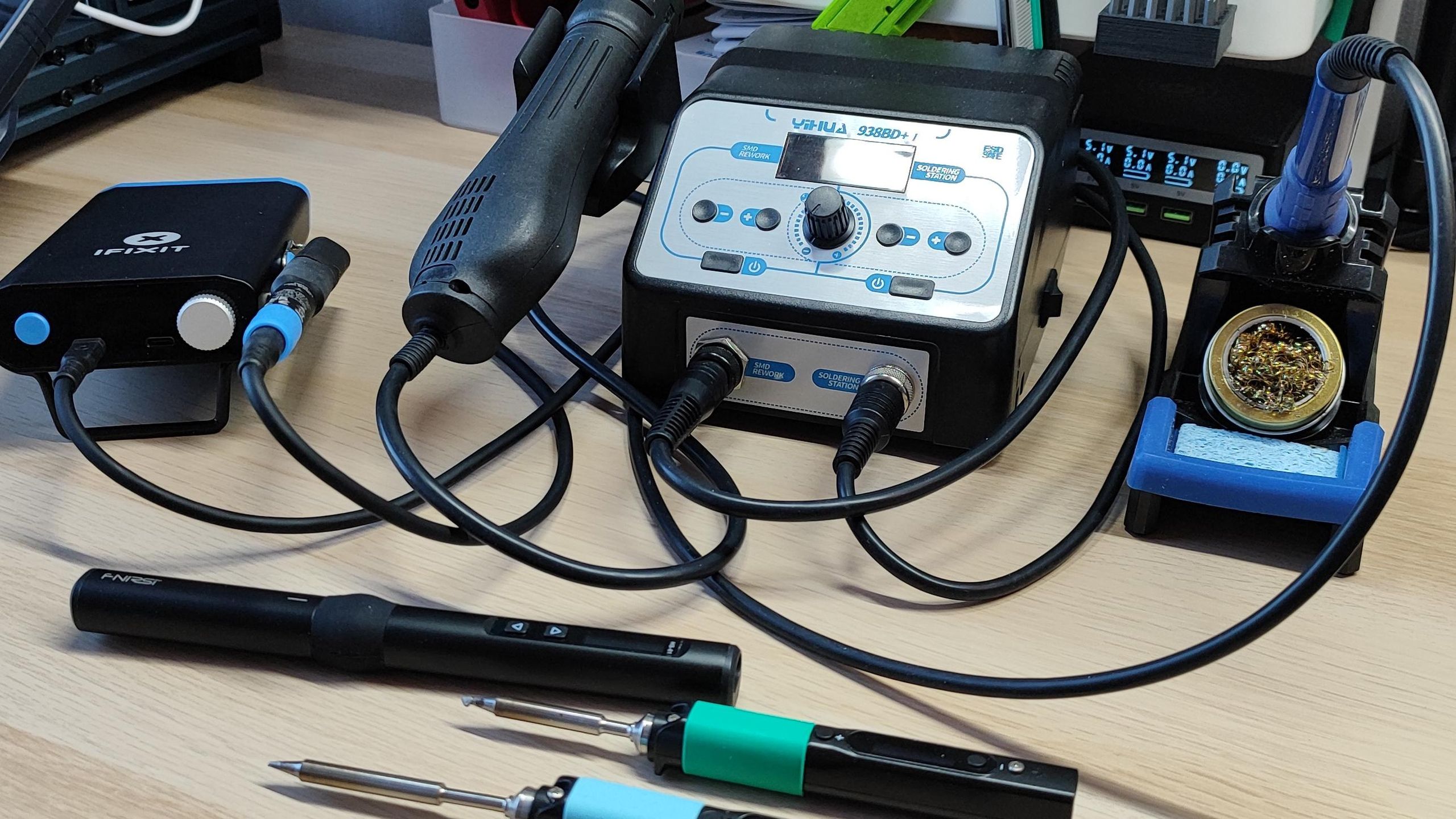

A first soldering iron should make the work feel controlled, not like a race against an overheated tip and a melting handle. Beginners need a readable temperature setting, a stable place to rest the iron, and enough accessories to practice without assembling a separate tool collection.
The Best soldering iron for beginners depends on the kind of work you expect to do. A compact pen is easier to carry, while a station gives you a steadier base, better tip storage, and more consistent temperature management. We compared 10 kits covering both styles, from simple 60W irons to full stations with helping hands and desoldering tools.
Our top pick is the YIHUA 926 III Digital, with the Plusivo 60W Digital close behind for buyers who want a portable kit with a broader accessory bundle.
Comparison table
| # | Product | Award | Power and temperature | Best for |
|---|---|---|---|---|
| 1 | YIHUA 926 III Digital | Best overall | 60W, 194°F to 896°F | A first serious station |
| 2 | Plusivo 60W Digital | Best portable kit | 60W, 200°C to 500°C | Portable electronics work |
| 3 | YIHUA 926 III LED | Best for helping hands | 60W, 90°C to 480°C | Hands-free circuit work |
| 4 | WEP 926LED V3 | Best compact station | 130W maximum, 392°F to 896°F | Small workbenches |
| 5 | HANDSKIT 90W Digital | Best accessory bundle | 90W, 180°C to 480°C | Learning through varied projects |
| 6 | Q-MING 100W Digital | Best high-power pen | 100W, 180°C to 500°C | Larger joints and broad heat |
| 7 | Q-MING 60W Kit | Best simple starter | 60W, 200°C to 450°C | Basic household projects |
| 8 | Liouhoum 80W Digital | Best memory function | 80W, 180°C to 480°C | Repeating the same repairs |
| 9 | Q-MING 80W Digital | Best basic 80W iron | 80W, 180°C to 480°C | General DIY soldering |
| 10 | MEAKEST 60W Premium Kit | Best ergonomic grip | 60W, 200°C to 450°C | Comfortable occasional use |
1. YIHUA 926 III Digital: Best Overall

Pros
- PID temperature stabilization
- Adjustable sleep timer
- Integrated holder and tip storage
- Two helping hands and useful repair accessories
Cons
- Less portable than a pen-style iron
- The included station takes up more room than a simple stand
Best for: a beginner who wants stable temperature control and a proper workbench setup.
The YIHUA 926 III Digital is the one we would put in front of a beginner who expects to keep soldering beyond a single repair. Its station format makes the tool feel settled on the bench, and the integrated iron holder means you are not balancing a hot pen on a tiny wire stand every time you pause. The rear metal mesh also helps keep accidental contact away from the iron while providing slots for tips.
The 60W iron covers a wide 194°F to 896°F range, so it can handle delicate electronics work at lower settings as well as jobs that need more heat. Its PID temperature stabilization is the important part here. The display and master control knob give a beginner a clear target, while the control system is designed to keep the tip near that setting instead of leaving the user to guess when it has cooled. Celsius and Fahrenheit conversion is useful when following tutorials from different regions.
This kit also teaches better work habits. It includes two helping hands, six YIHUA 1200/900M-series tips, 35g of lead-free solder, a solder sucker, ESD-safe tweezers, a solder wire dispenser, and a cleaning sponge. Those extras are more useful than a large pile of unrelated accessories, especially when a learner is holding a board, feeding solder, and trying to keep the iron steady at the same time. The adjustable sleep mode can be set to 5, 10, or 30 minutes, and calibration support gives more experienced users a way to correct temperature accuracy.
The weakness is the station footprint. It measures 7.3 by 4.5 by 2.8 inches and weighs 1.77 pounds, so it is not the choice for a kit that will travel in a drawer. The Plusivo 60W Digital is easier to carry and includes a larger assortment of general-purpose tools, but the YIHUA is calmer and more organized at a fixed bench. Skip it if you only need a pen for occasional wire repair. For learning circuit-board soldering with fewer frustrating variables, this is the strongest starting point.
2. Plusivo 60W Digital: Best Portable Kit

Pros
- Clear LED temperature display
- 200°C to 500°C adjustment
- 21-in-1 accessory package
- Carrying bag keeps the kit together
Cons
- Portable stand is simpler than a station holder
- The accessory count can feel cluttered for a first project
Best for: a beginner who wants to move between a home bench, classroom, or repair area.
The Plusivo 60W Digital is a practical alternative to the YIHUA station when portability matters more than a built-in base. It is a pen-style tool with a clear LED display, a silicone grip intended to reduce slipping, and a PU carrying bag for the assorted parts. That makes it easy to keep everything together instead of discovering that the iron is in one drawer and the desoldering pump is somewhere else.
Its 200°C to 500°C range is broader at the top end than the YIHUA 926 III Digital, though beginners will spend much of their time below that maximum for ordinary electronics. The ceramic heating element and four ventilation holes are intended to bring the iron up to temperature quickly while moving heat away from the handle. A visible display is particularly helpful during the learning stage because it removes one source of uncertainty when a joint is not flowing as expected.
Plusivo packs in five replaceable tips, 0.8mm solder wire, flux paste, tweezers, a stand, a sponge, a desoldering pump, a mini wire stripper, mini screwdrivers, a mini PCB, heat-shrink tubes, and other tools. The kit is listed as 21-in-1, and the selection is geared toward trying different small repair tasks rather than only soldering. If you are also deciding which solder characteristics matter for clean PCB joints, the included wire is a useful way to start before choosing supplies for a more specific project.
The tradeoff is the stand and workspace control. A portable pen does not give the same integrated tip storage, rear guard, or stable station layout as the YIHUA. The carrying bag also means more pieces to sort through. Choose Plusivo over the YIHUA when you need a complete kit that can leave the workbench. It suits beginners who are learning on varied projects and do not want their first setup tied to one desk.
3. YIHUA 926 III LED: Best for Helping Hands

Pros
- Two alligator-clip helping hands included
- PID heat control
- Temperature calibration and sleep settings
- Compact station layout
Cons
- Heavier than a portable pen
- Accessory layout is more bench-focused
Best for: beginners who need both hands free while learning to position wires and boards.
The YIHUA 926 III LED is very close in design to the digital-display YIHUA above, but this version has a 90°C to 480°C stated range and a different station presentation. The reason to choose it is not a radically different soldering experience. It is the integrated station and its included two helping hands, which can remove a major obstacle for someone making their first joints.
The single control knob also acts as a menu button. That is less intimidating than a panel full of small controls, while still allowing temperature adjustment, Celsius and Fahrenheit conversion, calibration, and sleep settings. The sleep timer can be set to 0, 5, 10, or 30 minutes. PID heat control is useful when a beginner is trying to form consistent joints, since the tip is designed to maintain the selected temperature instead of wandering as the work continues.
The accessory set includes six different tips, a 35g roll of lead-free solder, a solder wire bracket, a tweezer, a solder sucker, a sponge, and a tool for detaching the helping hands. The station's rear mesh guard doubles as tip storage and keeps the hot iron separated from casual contact. That combination gives this model a more deliberate bench setup than the Plusivo 60W Digital, though Plusivo remains easier to carry.
The main limitation is that the helping hands are useful only when the station has a stable place to sit. The orange YIHUA measures 7.3 by 4.5 by 2.8 inches and weighs about 2.01 pounds, so it is not a lightweight travel kit. It also does not have the same broad loose-tool assortment as the HANDSKIT 90W Digital. Pick this model if holding a board or wire is the part of soldering that worries you most. For a fixed learning station, the hands-free arrangement is genuinely helpful.
4. WEP 926LED V3: Best Compact Station

Pros
- Integrated iron holder saves bench space
- PID temperature compensation
- Ten-minute sleep mode
- Celsius and Fahrenheit conversion
Cons
- No helping hands included
- Temperature range is stated only in Fahrenheit
Best for: a beginner with limited desk space who still wants a station rather than a loose pen.
The WEP 926LED V3 takes the compact-station idea seriously. The iron holder is built into the station body, so the setup does not need a separate holder taking up another patch of desk. Its 6.3 by 4.84 by 4.45-inch dimensions are not tiny, but the combined arrangement is easier to keep organized than a pen, loose stand, and separate tip container.
A control knob adjusts the temperature from 392°F to 896°F, and the digital display shows the real-time reading. The station uses a PID microcontroller for temperature compensation, a feature that matters more than a high wattage claim when you are trying to keep a joint consistent. The 130W maximum rating gives the station plenty of stated power overhead, but beginners should not assume that maximum power alone makes delicate work easier.
WEP includes solder wire, five extra tips, tweezers, a desoldering pump, and a tip cleaner. That is a focused set. It does not overwhelm a new user with a magnifier, scraper, wire cutter, and several unrelated tools, but it covers the basic cycle of soldering, correcting a joint, and cleaning a tip. Its sleep mode starts after more than 10 minutes of inactivity and lowers idle heat to reduce wear.
The missing helping hands are the clearest disadvantage against either YIHUA 926 III station. The WEP is also nearly 1.98 pounds, so compact does not mean especially light. It makes more sense than the Q-MING 60W Kit for someone who wants a tidy permanent setup, while the Q-MING is simpler to carry. Choose WEP when your bench is crowded and integrated storage matters more than a large accessory bundle.
5. HANDSKIT 90W Digital: Best Accessory Bundle
Pros
- Fast ceramic heating core
- Temperature calibration offset
- Automatic sleep after 15 minutes
- Six 900M tips and carrying case
Cons
- Pen-style stand is less substantial than a station
- The large tool assortment may be more than a beginner needs
Best for: someone learning soldering through electronics repair, desoldering, and small maintenance jobs.
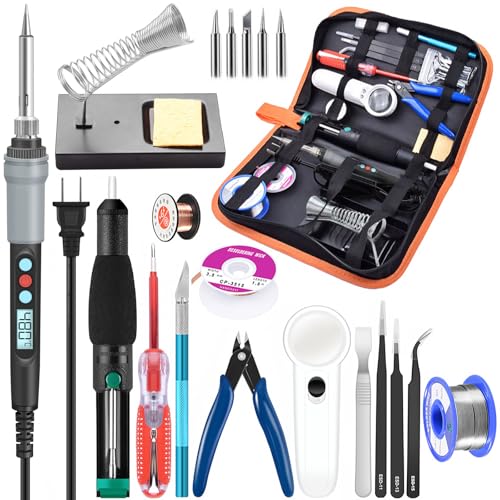
The HANDSKIT 90W Digital is less about a polished station layout and more about giving a beginner many ways to practice. It arrives as a 21-in-1 electronics kit with a digital iron, six 900M tips, tweezers, solder wire, a stand and sponge, wire cutter, desoldering braid, copper wire, LED magnifier, scraper, screwdriver, carving knife, desoldering pump, and PU case. That is a useful direction for a learner who expects to remove mistakes as often as make new connections.
The ceramic heating core is specified to reach working temperature in about 10 seconds. Its 180°C to 480°C range covers the same general territory as the Q-MING 80W Digital and Liouhoum 80W Digital. The LCD shows the selected temperature, while the plus and minus buttons handle adjustment and the same buttons can switch between Celsius and Fahrenheit. The anti-slip, heat-resistant handle should help with controlled movements on small boards.
Calibration is a notable feature for this style of iron. HANDSKIT supports a temperature offset from -99°C to 99°C, allowing adjustment when the displayed setting and actual working behavior do not line up. Its 15-minute sleep mode displays “---” and stops heating after inactivity, then resumes when a button is pressed. That is a sensible middle ground for safety and tip life, though the tip can remain hot while cooling and still needs to stay in the stand.
The kit's weakness is organization during use. A carrying case is convenient, but a box of accessories does not replace the stability of the YIHUA or WEP station. The YIHUA 926 III LED is better when a board needs to be held in place, while HANDSKIT is better when you want tools for cutting, magnifying, and desoldering in the same case. It is a strong fit for a curious beginner who wants to explore several electronics tasks rather than only attach two wires.
6. Q-MING 100W Digital: Best High-Power Pen

Pros
- 100W ceramic heating core
- 180°C to 500°C adjustment
- LED display with Celsius and Fahrenheit
- Password child-lock setting
Cons
- Pen format has less station support
- Higher power requires careful temperature selection
Best for: beginners who expect to work on joints that need more heat than small signal connections.
The Q-MING 100W Digital is the outlier among the pen-style irons here. Its 100W rating gives it more heating capacity than the 60W, 80W, and 90W alternatives, and the ceramic core is specified to reach its working temperature in about 15 seconds. That can help when a joint is connected to a larger metal area that draws heat away, though extra power does not excuse poor tip choice or excessive temperature.
The LED display covers an adjustable 180°C to 500°C range and can switch between Celsius and Fahrenheit. The four ventilation holes and steel-tube design are intended to move heat away from the handle, leaving a longer cool grip area. For a beginner, the useful part is the combination of quick heat and a visible setting. It is easier to start at a controlled temperature than with an iron that simply heats until it feels hot enough.
Q-MING also includes a temperature calibration function and a password lock. The lock is a practical safety detail in a shared home, especially where children or pets might reach the cord or stand. The kit is described as suitable for PCB work, equipment maintenance, circuit boards, craft welding, computers, home appliances, and phone repair. Those applications span a wide range, so the included tips and temperature adjustment matter more than the headline wattage.
The catch is the missing station-style structure. The WEP 926LED V3 and both YIHUA models provide a more controlled place to park the iron and manage tips, while this Q-MING is lighter and easier to move. It also lacks the detailed accessory bundle supplied with HANDSKIT. Choose it when you need a portable iron with extra heat capacity. Beginners working only on small circuit boards should probably start with a lower-power model that gives them more margin for error.
7. Q-MING 60W Kit: Best Simple Starter

Pros
- Straightforward pencil-style design
- 200°C to 450°C adjustment
- Five interchangeable tips
- On and off switch
Cons
- No digital temperature display
- Simple stand offers less bench control
Best for: a beginner who wants a direct plug-in kit for basic repairs and practice.
The Q-MING 60W Kit keeps the first setup uncomplicated. It is a 60W, 110V pencil-style iron with an on and off switch, adjustable temperature, a simple stand, sponge, five interchangeable tips, 0.6mm solder wire, and no-clean flux paste. There is less to configure than with a station, which can be appealing when the immediate goal is to learn how solder behaves.
Its 200°C to 450°C range is sufficient for many electronics and household repair tasks listed by the manufacturer. A ceramic heating core is specified to reach the desired temperature within 15 seconds, while four ventilation holes are intended to dissipate heat before it travels into the handle. The lack of a digital readout means you will set the heat by the control rather than confirm it on a screen, so this iron asks for a little more attention during practice.
The five tips make the kit more flexible than a single-tip starter iron. A finer tip can make small board work less awkward, while a broader shape can transfer heat more readily to a wire or larger connection. The included flux, wire, and sponge mean the first session does not require a separate supply list. For someone following a basic tutorial, that simplicity can be more useful than a case filled with tools they do not yet recognize.
The tradeoff becomes clear beside the Plusivo 60W Digital. Plusivo adds a display, a carrying bag, a desoldering pump, and more than 15 extra items, while Q-MING has the cleaner, less distracting setup. The YIHUA 926 III Digital is the better choice for repeatable temperature control and a permanent bench. Choose Q-MING if you want a basic iron that is easy to understand, and skip it if you need precise displayed temperature or frequent desoldering.
8. Liouhoum 80W Digital: Best Memory Function

Pros
- Ten-second ceramic-core heat-up claim
- Temperature memory
- Five-minute automatic sleep behavior
- 180°C to 480°C range
Cons
- Limited accessory information compared with larger kits
- Pen-style design needs careful placement
Best for: beginners who repeat similar repairs and want the iron to remember a familiar setting.
The Liouhoum 80W Digital stands out for a small feature that becomes convenient quickly: temperature memory. If you regularly return to the same kind of wire or board, the iron recalls the last selected setting at startup. That removes one small piece of repetition, though it is still important to confirm the setting before placing the tip on a new component.
The ceramic core is specified to heat to operating temperature in 10 seconds. Its 180°C to 480°C adjustment range matches the Q-MING 80W Digital and gives enough room to work across common electronics tasks, appliance repairs, jewelry work, and DIY projects. The LCD makes the selected temperature easier to read than the Q-MING 60W Kit's analog control, and the heat-resistant handle is designed to stay cooler during use.
Its sleep behavior is different from the longer timers on the YIHUA stations. When the iron is placed on the stand for five minutes, it automatically reduces temperature and shows “OFF” on the LCD. Holding the handle restores heating. That is convenient for pauses, though a beginner should still treat the tip as hot during the cooling period and keep the iron securely supported.
Liouhoum lists a 24-month replacement service, but the kit does not present the same detailed assortment as the HANDSKIT or Plusivo packages. The WEP 926LED V3 is a better choice if you want station-based tip management, while Liouhoum is easier to carry and quicker to return to a familiar setting. Choose it for repetitive home repair. It is less compelling for a student who needs helping hands, a magnifier, or a broad desoldering toolkit.
9. Q-MING 80W Digital: Best Basic 80W Iron

Pros
- 80W ceramic heating system
- Digital temperature display
- Five replaceable tips
- Solder, sponge, stand, and flux included
Cons
- Stated heat-up time is about 20 seconds
- No sleep mode or calibration feature listed
Best for: general DIY work when a readable display matters more than advanced controls.
The Q-MING 80W Digital is a straightforward step up from a basic analog iron without becoming a station. It uses an 80W ceramic heater, a high-definition LCD, and a flexible 180°C to 480°C temperature range. The kit includes tips, a simple stand, sponge, solder wire, and flux paste, so it covers the essentials without asking a new user to source every consumable separately.
Q-MING says the iron heats within 20 seconds. That is not the fastest claim in this group, but it is a reasonable pause before starting a project and avoids making heat-up speed the whole point of the tool. The four ventilation holes are intended to improve heat dissipation, and the heat-resistant handle is designed for longer repair sessions. A visible display is the strongest reason to choose this over the Q-MING 60W Kit.
The kit is aimed at circuit boards, appliance repair, jewelry and metal headpiece work, computers, and DIY. Those uses vary considerably in size, so the five tips are important. Beginners can experiment with tip shapes as they learn that a tip that is too fine may not transfer enough heat, while one that is too broad can make a small pad harder to approach. For component-level work, it also helps to choose a tip shape that suits small SMD connections rather than relying on one general-purpose tip.
The Q-MING 80W Digital does not list automatic sleep or temperature calibration, both of which appear on the Liouhoum 80W Digital and the more advanced stations. Its simple stand also needs to be placed securely because the iron is not integrated into a station body. Choose this model when you want an uncomplicated digital pen for occasional projects. Move up to Liouhoum if memory matters, or to YIHUA if consistent bench control matters more.
10. MEAKEST 60W Premium Kit: Best Ergonomic Grip

Pros
- Adjustable 200°C to 450°C range
- On and off switch
- Ventilation for heat management
- Silicone protective cover and ergonomic handle
Cons
- No digital display listed
- Fewer detailed controls than the station models
Best for: occasional users who care about a comfortable, slip-resistant pen.
The MEAKEST 60W Premium Kit takes a familiar pen-style approach and puts most of its attention on the grip. The ergonomic handle and high-temperature-resistant silicone protective cover are intended to make the iron easier to hold for longer jobs while reducing slipping. It is a sensible consideration for a beginner who finds a narrow or hard handle tiring during practice.
The 110V iron uses 60W of power and adjusts from 200°C to 450°C. Six air vents are intended to prevent overheating and extend the iron's working life, while the on and off switch makes it possible to cut power without reaching for the outlet. The range is similar to the Q-MING 60W Kit, so both are suited to common small electronics and wire work rather than demanding industrial applications.
MEAKEST says the kit includes a 12-in-1 soldering tool set, with soldering tips, solder wire, a pump, and paste among the listed contents. The different tip shapes are intended for work on guitars, watches, wires, mobile devices, computer hardware, small electronics, and TV capacitors. That breadth is useful for a household repair drawer, although the product information gives less operational detail than the Plusivo or HANDSKIT kits.
The missing digital display is the biggest limitation for a complete beginner. The YIHUA 926 III Digital makes it easier to repeat a known setting, and the Q-MING 80W Digital provides a screen without requiring a station. MEAKEST is more appealing when grip comfort and a simple on and off switch are the priorities. Choose it for occasional repairs and skip it if you want sleep mode, calibration, or a clearly displayed temperature.
How to choose best soldering iron for beginners
The right first iron is less about chasing the largest wattage and more about controlling heat, holding the work securely, and keeping the hot tool safely supported.
Temperature control
Adjustable temperature lets you reduce heat for delicate electronics and raise it when a larger joint absorbs heat. A useful beginner range in this group starts around 180°C or 200°C and reaches roughly 450°C to 500°C. Digital displays are easier to repeat than an unmarked dial, while calibration support can help advanced users correct the displayed setting.
A station such as the YIHUA 926 III Digital or WEP 926LED V3 adds PID control, which is intended to hold the selected temperature more steadily. A basic pen can still work well, but it gives you less feedback when the tip cools against a large connection.
Heating speed and power
The listed wattage describes the iron's heating capacity, not the quality of every solder joint. The 60W models are suitable for many beginner electronics projects, while the 80W, 90W, and 100W irons have more capacity for connections that draw heat away. Heat-up claims in this group range from about 10 to 20 seconds.
More power helps a cold joint recover, but controlled temperature and the right tip matter more than a large number on the handle.
Station or pen design
A pen-style iron is easier to carry and usually takes less setup. A station gives you a dedicated holder, a more stable base, and often better tip storage. The WEP 926LED V3 saves desk space by integrating its holder into the station, while the YIHUA models add a more complete station layout.
For a first permanent workbench, a station is usually easier to manage. For a kit that will be stored between projects or carried to another room, the Plusivo, Q-MING, Liouhoum, and MEAKEST pens are more convenient.
Tips and accessories
A beginner benefits from several tip shapes, but only if the kit includes tools that support actual work. A sponge or tip cleaner helps maintain the tip. Solder wire and flux let you start immediately. A desoldering pump or braid helps correct mistakes, while tweezers and helping hands make small parts easier to position.
The HANDSKIT includes the broadest repair-oriented collection here, including a magnifier, cutter, pump, braid, and case. The YIHUA stations have fewer loose tools but add helping hands and a more organized base.
Safety and idle features
A stable stand is essential. The iron should have a secure place to rest with the tip away from the work surface and anything flammable. Sleep modes reduce idle heat after a period of inactivity, but they do not make a cooling tip safe to touch immediately.
Look for an on and off switch, a heat-resistant handle, ventilation around the heater, and a holder that will not tip easily. The YIHUA, WEP, HANDSKIT, and Liouhoum models list automatic sleep behavior, while the Q-MING 60W and MEAKEST rely more on manual switching and safe placement.
Frequently asked questions
What temperature should a beginner use for soldering?
The correct setting depends on the solder, tip, and material being joined. Start at the lower end of the iron's adjustable range and increase gradually if the joint does not heat cleanly. Avoid using maximum temperature as a shortcut because excess heat can damage components and tips.
Is 60W enough for beginner electronics work?
Yes. A 60W iron can cover many circuit-board, wire, and small repair tasks when the tip is appropriate and the temperature is controlled. Higher-wattage models can recover heat more quickly on larger joints, but they still require careful settings.
Is a soldering station better than a soldering pen?
A station is usually easier to manage on a fixed bench because it provides a holder, display, and often tip storage. A pen is lighter and more convenient to put away or carry. The YIHUA 926 III Digital and WEP 926LED V3 favor bench use, while the Plusivo 60W Digital favors portability.
Do beginners need helping hands?
Helping hands are not essential, but they make the first projects easier. They hold a board or wire while you guide the iron and solder with both hands. The YIHUA 926 III LED is the clearest fit when hands-free positioning is a priority.
What accessories should a beginner have?
Start with solder wire, flux, several tip shapes, a stand, and a way to clean the tip. A desoldering pump or braid is helpful when a joint needs to be corrected. Tweezers, cutters, and a magnifier become useful as projects get smaller.
How should a soldering iron be stored?
Place it in its heat-resistant stand whenever you pause, and keep the stand on a stable, clear surface. Do not touch or change the tip until the iron has cooled fully. Automatic sleep lowers heat on some models, but it does not remove the need for careful placement.
The bottom line
The Best soldering iron for beginners in this group is the YIHUA 926 III Digital. Its 60W output, broad temperature range, PID stabilization, sleep settings, calibration support, integrated holder, and helping hands give a new user a controlled place to learn. The Plusivo 60W Digital is the better alternative when a portable pen and a broad accessory kit matter more than station stability.
For a smaller bench, choose the WEP 926LED V3. For a larger assortment of electronics tools, choose the HANDSKIT 90W Digital. The Q-MING, Liouhoum, and MEAKEST pens remain sensible for occasional repairs, but they give up some of the station models' organization and feedback.
If you are undecided, choose the YIHUA for a permanent workbench or Plusivo for a kit that needs to travel.
As an Amazon Associate we earn from qualifying purchases.