

A USB-C plug does not automatically mean fast charging, high-speed data, or video support. The wrong adapter can charge slowly, refuse to recognize a drive, or fit perfectly while failing at the one job you bought it for.
Our Best USB cables and adapters picks cover the everyday options and the less common jobs too, from a 60W USB-C cable to a SATA drive connector, a serial adapter, and a universal 5V power lead. AINOPE 60W USB-C Cable is the best all-around choice, while the rest are stronger fits for particular ports and devices.
Comparison table
| # | Product | Award | Connector or use | Data speed | Best for |
|---|---|---|---|---|---|
| 1 | AINOPE 60W USB-C Cable | Best overall | USB-C to USB-C, USB-A adapter | Up to 480Mbps | Charging and everyday connectivity |
| 2 | JSAUX USB-C OTG Adapter | Best USB 3.0 adapter | USB-C male to USB-A female | Up to 5Gbps | Phones and laptops using USB accessories |
| 3 | JXMOX USB-C Adapter 4-Pack | Best multi-pack | USB-C female to USB-A male | Up to 480Mbps | Keeping several USB-A ports useful |
| 4 | Powseed 5V DC Power Cable | Best universal DC lead | USB-A to 5V DC plugs | Not specified | Small 5V electronics |
| 5 | OIKWAN USB-RS232 Adapter | Best serial adapter | USB-A to male DB9 | Up to 1Mbps | Older serial equipment |
| 6 | SABRENT SATA Adapter Cable | Best for 2.5-inch drives | USB-A to 2.5-inch SATA | USB 3.0, UASP | Accessing laptop drives |
| 7 | Syntech USB-C Adapter 2-Pack | Best compact pair | USB-C male to USB-A female | USB 3.0 | Travel and quick USB-A access |
| 8 | Elebase USB-C Adapter 4-Pack | Best low-profile set | USB-A male to USB-C female | USB 2.0 | Chargers and small accessories |
| 9 | Basesailor USB-C Adapter | Best simple adapter | USB-A male to USB-C female | Up to 480Mbps | Basic charging and syncing |
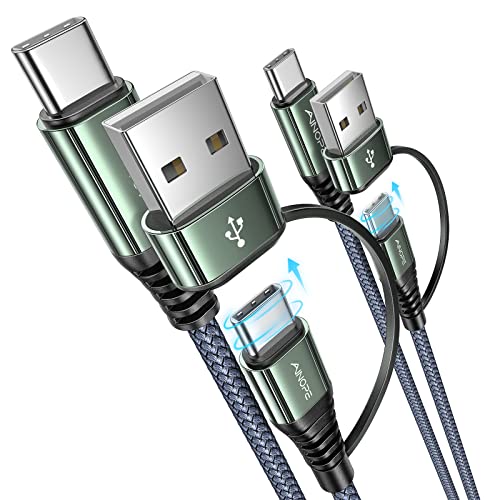
1. AINOPE 60W USB-C Cable: Best Overall
Pros
- USB-C to USB-C cable with a USB-A adapter included
- Supports up to 60W charging
- Braided exterior rated for more than 40, 000 bends
- Two 3-foot cables in the package
Cons
- Data transfer is limited to USB 2.0 speeds
- Does not work with Lightning or Micro-USB devices
- The adapter does not turn the cable into a high-speed USB 3 cable
Best for: someone who wants one dependable cable setup for USB-C chargers, older USB-A ports, and everyday devices.
The AINOPE 60W USB-C Cable is the easiest pick here because it solves two common problems without becoming a drawer full of separate leads. You get two 3-foot USB-C to USB-C cables and a USB-C to USB-A adapter, so the same basic cable works with a newer USB-C charger or an older USB-A charging port. Three feet is a practical length for a desk, bedside table, or car console. It is long enough to use comfortably without leaving a large loop of cable behind the device.
Its strongest specification is the 60W maximum output. That gives the cable room for fast charging on compatible USB-C devices, although the charger and device still determine the actual charging rate. A built-in current-control chip regulates output, and the cable uses a 56K ohm resistor. The listed maximum output is 20V, with support for charger outputs of 18W, 30W, 45W, and 60W. Those details make it a better charging cable than a generic USB-C lead that says little about power handling.
The compromise is data speed. Transfer is listed at up to 480Mbps, which is USB 2.0 territory. That is fine for syncing a phone, moving smaller files, or connecting a printer, but it is not the cable to choose for moving large video files to a fast external drive. Choosing the right connection for a computer setup matters because USB-C describes the connector shape, not the performance level behind it.
AINOPE also makes a stronger durability case than the smaller adapters in this roundup. The braided exterior uses post-consumer recycled material, and the claimed bend lifespan exceeds 40, 000 bends. We would still avoid sharp kinks and tight wrapping, but that construction should stand up well to repeated travel and charging. The cable is not for Lightning or Micro-USB devices, and anyone who needs high-speed storage data should choose the SABRENT SATA Adapter Cable or a dedicated USB 3 cable instead. For mixed USB-C charging around a home, office, or car, this is the one we'd keep.
2. JSAUX USB-C OTG Adapter: Best USB 3.0 Adapter

Pros
- USB 3.0 transfer speeds up to 5Gbps
- Connects USB-A drives and peripherals to USB-C devices
- Aluminum alloy body and braided construction
- Two adapters included
Cons
- Does not support video output
- Requires a USB-C device with OTG support
- It is an adapter rather than a charging cable
Best for: anyone who needs to connect USB-A flash drives, keyboards, mice, or hubs to a USB-C phone or computer.
The JSAUX USB-C OTG Adapter is the right answer when the important part of the connection is a USB-A accessory. Its male USB-C connector plugs into the phone, tablet, or laptop, while the female USB-A port accepts a flash drive, mouse, keyboard, or hub. That arrangement is more useful for file access and peripherals than the USB-C female adapters elsewhere in this list, which are mainly intended to let a USB-C cable plug into an older USB-A port.
The key advantage is USB 3.0 support with transfer rates up to 5Gbps. A compatible phone or computer and a fast enough flash drive are still required, but the ceiling is much higher than the 480Mbps limit on the AINOPE cable, JXMOX, and Basesailor. Moving photos or larger files from a USB-A drive should feel much less restricted. It is also a sensible small adapter for a laptop bag because it can give a USB-C-only computer access to older peripherals without needing a full hub.
The aluminum alloy body should handle repeated use better than a flimsy plastic shell, and the nylon-braided section helps keep the short connection from becoming a tangled nuisance. It is sold as a two-adapter pack, which is useful if you want one at a desk and one in a travel pouch. The compact format does not add a long cable between the device and accessory, so a connected flash drive can remain relatively close to the port.
There is one important boundary: this adapter cannot transmit video. It will not turn a USB-C phone or laptop into a DisplayPort or HDMI source, and it is not a substitute for a video-capable dock. JSAUX is a better choice than Syntech when you specifically want the stated 5Gbps USB 3.0 capability, while Syntech has a smaller, more travel-oriented body. Choose JSAUX for USB-A storage and peripherals, and skip it if your real need is charging from an old USB-A power source.
3. JXMOX USB-C Adapter 4-Pack: Best Multi-Pack

Pros
- Four USB-C female to USB-A male adapters
- Supports charging up to 3A
- Built-in double-sided 56K ohm resistor
- Works with USB 2.0 data connections
Cons
- No video signal transmission
- Limited to 480Mbps data speeds
- Not suitable for MacBook charging through a MagSafe charger
Best for: households, offices, and travel bags that still have several USB-A chargers or power banks.
The JXMOX USB-C Adapter 4-Pack is built around a simple transition problem: you have USB-A ports everywhere, but the cable you want to use ends in USB-C. Each adapter has a USB-A male plug and a USB-C female port. Plug one into a computer, wall charger, car charger, or power bank, then connect a USB-C cable. With four included, it is easy to leave them in separate rooms or keep one in a bag without constantly moving the same adapter around.
JXMOX lists up to 3A for charging and up to 480Mbps for data. That is appropriate for phone syncing, ordinary accessories, and everyday charging when the USB-A source can provide the required output. It is not a high-speed storage adapter, and the USB-A source cannot gain capabilities it does not already have. The double-sided 56K ohm resistor is intended to support safe charging and data transfer, but it does not make this a USB Power Delivery adapter.
Compared with the JSAUX, this is the opposite connector arrangement. JSAUX lets a USB-C host accept a USB-A accessory, while JXMOX lets a USB-A host accept a USB-C cable or accessory. That distinction is easy to miss in a product search and is the first thing to check before ordering. JXMOX is also slower than JSAUX for data, but it is the more convenient choice when your spare chargers and power banks still use USB-A.
JXMOX specifically warns that it does not support video and does not fit a 12 MagSafe Charger or charge a MacBook through that setup because of charging protocol incompatibility. It is not a dock adapter, monitor adapter, or high-power laptop charging solution. For a collection of phones, earbuds, tablets, and low to moderate-power USB-C accessories, the four-pack is practical. If you need only one compact adapter and care more about a low-profile shape, Basesailor is the cleaner alternative.
4. Powseed 5V DC Power Cable: Best Universal DC Lead

Pros
- Five-foot cable length
- Thirteen adapter plugs for different 5V devices
- Supports devices drawing up to 3A
- Includes USB-C, Micro-USB, Mini USB, and barrel connectors
Cons
- Only for DC 5V devices
- Requires center-positive polarity
- Not suitable for laptops or battery-operated toys
- Plug size must be checked carefully
Best for: replacing a missing 5V power lead for a compatible router, camera, speaker, recorder, or other small electronic device.
The Powseed 5V DC Power Cable is not a general USB charging cable. It is a problem-solving lead for small electronics that use a barrel connector or one of several less common DC plugs. The USB-A end connects to a suitable power source, while the five-foot cable terminates in a selected adapter plug. That extra length is useful when the device sits on a shelf or desk away from the USB port.
Compatibility depends on three details that must all match: voltage, current, and polarity. Powseed specifies DC 5V devices with a maximum current of 3A and a center-positive connection, with the inner contact positive and the outer contact negative. A device that needs a different voltage, exceeds the current limit, or uses center-negative polarity is not a safe match. The plug must fit physically too, so the device's original power information and connector size deserve a careful check before use.
The included assortment covers 2.5 by 0.7mm, 3.0 by 1.1mm, 3.5 by 1.35mm, 4.0 by 1.7mm, 4.8 by 1.7mm, 5.5 by 2.5mm, 5.5 by 3.0mm, 6.3 by 3.0mm, and 6.5 by 4.4mm connectors, along with an LED terminal plug, Micro-USB, USB-C, and Mini USB. It does not include a 4.5 by 3.0mm plug. That list gives it far more reach than a normal USB-to-DC lead, but it also makes the cable less straightforward than the dedicated adapters above.
Powseed lists webcams, routers, recorders, Bluetooth speakers, scanners, DVRs, hard drive boxes, USB hubs, and other 5V equipment among its possible uses. Those examples should not be treated as automatic compatibility. It cannot charge laptops, and it is not intended for battery-operated toys. Choose this cable only when the electrical requirements are known. For a standard USB-C phone or accessory, AINOPE, JXMOX, or Basesailor is the safer and simpler fit.
5. OIKWAN USB-RS232 Adapter: Best Serial Adapter

Pros
- FTDI chipset
- Male nine-pin DB9 connector
- Supports Windows, macOS, and Linux
- Six-foot cable
- USB-powered with no external power supply
Cons
- DB9 male connector is not VGA
- Driver installation may be required
- Intended for RS232 equipment, not modern USB peripherals
Best for: connecting a computer to compatible legacy serial devices such as label printers, scanners, CNC equipment, or PLC controllers.
The OIKWAN USB-RS232 Adapter belongs in this roundup because USB cables are not only about phones and chargers. If you need to communicate with older equipment that uses a nine-pin serial port, this cable provides the missing bridge from a computer's USB port to a male DB9 connector. Its six-foot length gives you more room to position a laptop or desktop away from the equipment than a short dongle would.
The FTDI chipset is the important component here. OIKWAN lists support for Windows 11, Windows 10, Windows 8.1, Windows 8, Windows 7, Vista, XP, 2000, macOS, and Linux, along with a transfer rate up to 1Mbps. The adapter creates a COM port, and its baud rate can be changed to the setting required by the connected equipment. That flexibility is what separates a serial adapter from the plug-and-play USB-C accessories in the first three positions.
This is a powered USB connection, so it does not need a separate power supply. The cable uses a PVC exterior and a gold-plated USB connector, while the USB-to-serial design is intended to fit in a small bag. The manufacturer advises installing the appropriate FTDI driver before use. That is not a major issue for an experienced technician, but it means this is not necessarily a connect-and-forget accessory for every computer.
The warning on the connector matters most. This is a male RS232 DB9 cable with nine pins, not a VGA cable with 15 pins. The connected device also needs the correct gender and pin arrangement, and RS232 equipment is not interchangeable with every DB9-shaped port. OIKWAN is much more specialized than the SABRENT or JSAUX, but it is the right tool for legacy control and office equipment. Skip it unless your device documentation specifically calls for USB to RS232 or DB9 serial connectivity.
6. SABRENT SATA Adapter Cable: Best for 2.5-inch Drives

Pros
- USB 3.0 connection with UASP support
- Works with 2.5-inch SATA SSDs and laptop hard drives
- Bus-powered for most compatible drives
- Plug and play on Windows, macOS, and Linux
- Hot-swappable design
Cons
- Does not support M.2, NVMe, or 3.5-inch drives
- Uses USB-A, so USB-C-only computers need another adapter
- Some older or high-capacity hard drives may need more power
Best for: accessing, cloning, or transferring data from a spare 2.5-inch SATA SSD or laptop hard drive.
The SABRENT SATA Adapter Cable is the most useful specialist cable in this selection if you have a loose laptop drive on your desk. Connect the drive's standard 2.5-inch SATA interface to the adapter, plug the USB-A end into a computer, and the drive can be accessed without installing it inside a machine. That is handy for recovering files, checking an old drive, moving data to a replacement SSD, or using a spare drive as temporary external storage.
Its USB 3.0 host connection supports up to 5Gbps, and UASP support can improve transfer performance on compatible computers and operating systems. The actual speed still depends on the SATA drive, the computer, and the files being moved. An SSD should make better use of the interface than an older mechanical disk. The plug-and-play design requires no drivers, and the cable supports hot-swapping on Windows, macOS, and Linux.
Power is drawn from the USB port for most compatible 2.5-inch drives. Some older or high-capacity mechanical hard drives may draw more current than one USB port can provide, especially when spinning up. SABRENT recommends trying a powered USB hub or another USB 3.0 port if the drive does not start. That limitation is worth understanding before assuming the drive itself has failed.
Compatibility is strict. This cable is for 2.5-inch SATA I, II, and III SSDs and laptop hard drives. It does not support M.2 NVMe drives, M.2 SATA drives, 3.5-inch desktop hard drives, or slim SATA optical drives. It also uses USB-A, so a computer with only USB-C ports needs a separate USB-C to USB-A adapter. The JSAUX is a better companion for that situation because it supports USB 3.0 accessories, but the SABRENT remains the direct choice for a loose 2.5-inch SATA drive.
7. Syntech USB-C Adapter 2-Pack: Best Compact Pair

Pros
- Two compact USB-C to USB-A adapters
- USB 3.0 support for charging and data
- Zinc alloy housing with anti-slip embossments
- Rated for up to 10, 000 plug and unplug cycles
- No drivers required
Cons
- No video output
- Female USB-A port limits the connection direction
- Short adapter design may be awkward with some bulky accessories
Best for: carrying a pair of small USB-C-to-USB-A adapters in a laptop bag or travel case.
The Syntech USB-C Adapter 2-Pack is the tidy travel option. Each adapter is a short USB-C male to USB-A female unit, so it lets a USB-C computer, tablet, or phone use a USB-A cable, flash drive, or other compatible accessory. The body measures about 1.08 by 0.65 by 0.32 inches, giving it a small footprint that is easy to leave in a pouch or next to a frequently used port.
Syntech lists USB 3.0 support for both data transfer and charging, which places it alongside JSAUX rather than the USB 2.0 adapters in this group. It is plug and play, with no driver required. The zinc alloy housing includes anti-slip embossments, and the connector design is rated for up to 10, 000 plug and unplug cycles. A foam container is also included for storage and travel, a small but useful touch for an adapter that is easy to lose.
The connector direction needs attention. This is not the right adapter for connecting a USB-C cable to an old USB-A charger. For that task, you need a USB-A male to USB-C female model such as Basesailor or JXMOX. Syntech instead makes a USB-C host accept a USB-A accessory. That makes it useful for a USB-A flash drive on a newer laptop, but not for turning an old wall charger into a USB-C charger.
Syntech and JSAUX have similar core capabilities, but their emphasis is different. JSAUX has a braided construction and a more cable-like feel, while Syntech is smaller and more convenient to keep permanently in a travel kit. Neither supports video output, and neither should be mistaken for a USB-C dock. Pick Syntech when compact storage and two adapters matter most, or JSAUX when you expect more frequent high-speed file transfers.
8. Elebase USB-C Adapter 4-Pack: Best Low-Profile Set

Pros
- Four USB-A to USB-C adapters
- Aluminum alloy housing
- Supports charging and USB 2.0 data
- Compact design can stay plugged in
- Includes a 12-month manufacturer warranty
Cons
- No video output
- USB 2.0 transfer speeds only
- Not suitable for video docks or HDMI and DisplayPort connections
Best for: leaving USB-A to USB-C adapters in chargers, cars, hubs, and other places where a low-profile connection helps.
The Elebase USB-C Adapter 4-Pack takes the familiar USB-A to USB-C conversion and makes it easy to distribute around the house. Each adapter plugs into a standard USB-A port and presents a USB-C female connection for a cable, flash drive, card reader, earphones, or another low-power USB-C accessory. Four units make sense for a mixed setup with a car charger, desk hub, bedside charger, and travel bag.
Elebase specifies USB 2.0 data transfer and charging support. That is enough for ordinary syncing and accessories, but it is not the right choice for fast external storage or other tasks where USB 3 bandwidth matters. The aluminum alloy shell helps with heat dissipation and protects the adapter from everyday wear. Its compact shape is designed to sit close to the host port, which can reduce the leverage and strain caused by a longer adapter hanging from a charger.
The biggest limitation is not physical size but function. These adapters do not transmit video and cannot support HDMI, DisplayPort, video-capable USB-C hubs, or docking stations that rely on video output. They also cannot add high-power USB-C fast-charging protocols to an older USB-A source. The source port, cable, and connected device all remain part of the charging equation.
Elebase is a better fit than Basesailor when you want four distributed adapters and a low-profile design. Basesailor is the more straightforward individual adapter, while JXMOX offers the same general connector direction with a stated 3A charging capability and four units. Choose Elebase for everyday low-power accessories and leave it plugged in where needed. For high-speed storage or displays, use JSAUX, Syntech, or a purpose-built dock instead.
9. Basesailor USB-C Adapter: Best Simple Adapter

Pros
- USB-A male to USB-C female design
- Supports up to 480Mbps data transfer
- Supports charging up to 5V/2A
- Aluminum alloy housing
- Small enough to leave plugged in
Cons
- No USB Power Delivery or PPS support
- No video output
- Not intended for high-power USB-C devices
Best for: basic USB-C charging and syncing from an existing USB-A port.
The Basesailor USB-C Adapter is the straightforward choice for converting an older USB-A port into a connection for a USB-C cable. It works with laptop ports, wall chargers, car chargers, hubs, and power banks, making it a useful little accessory when you already own USB-C cables but still rely on older USB-A hardware. Its low-profile body can remain connected without the bulk of a short cable dangling from the port.
Basesailor specifies USB 2.0 transfer up to 480Mbps and charging up to 5V/2A, depending on the USB-A source. That is enough for routine phone syncing, earbuds, smaller accessories, and charging at the level the source can provide. It is not a USB Power Delivery or PPS adapter, so it cannot provide the higher-power charging behavior associated with many modern USB-C chargers. A USB-C connector alone does not change the electrical limits of the old USB-A source.
The aluminum alloy housing is intended to help with heat dissipation and protect the internal USB 2.0 components during ordinary plugging and unplugging. The small design also reduces the chance of catching the adapter on a cable or bag. It supports USB-C phones, tablets, earphones, flash drives, card readers, and other low-power accessories, but compatibility still depends on the accessory and host device.
Basesailor is slower than JSAUX and Syntech, and it does not have their USB 3.0 capability. It is more comparable to Elebase and JXMOX, with the advantage of being a simple, compact single adapter for basic connections. Do not use it for HDMI, DisplayPort, a USB-C dock's host cable, or high-power fast charging. If those limitations match your needs, it is an uncomplicated adapter that does exactly what its connector layout suggests.

How to choose best usb cables and adapters
The Best USB cables and adapters are not interchangeable. Start with the direction of the connection, then match power, data, and device-specific requirements before thinking about construction.
Connector direction
USB-C male to USB-A female adapters, such as JSAUX and Syntech, let a USB-C host use a USB-A accessory. USB-A male to USB-C female adapters, such as JXMOX, Elebase, and Basesailor, let an older USB-A source accept a USB-C cable or accessory.
This is the most common ordering mistake. A product can have the right connector shape and still be useless for the intended connection if the male and female ends are reversed. Draw the connection as a chain from the host to the accessory before buying.
Charging capability
A cable or adapter does not create power that the charger and device cannot provide. AINOPE supports up to 60W through its USB-C cable, while Basesailor is specified for up to 5V/2A and JXMOX lists up to 3A. Those figures matter only when the source, cable, and device support the same charging arrangement.
For small accessories, ordinary USB charging is usually enough. Laptops and high-power tablets require much more careful matching, and the adapters in this roundup that are limited to USB-A conversion should not be treated as USB Power Delivery accessories.
Match the host, cable, adapter, and device as one electrical system. The USB-C shape is only the beginning.
Data speed
USB 2.0 connections top out at 480Mbps in the listed specifications. That is adequate for basic syncing, but it can make large file transfers feel slow. USB 3.0 models such as JSAUX and Syntech list speeds up to 5Gbps, while the SABRENT combines USB 3.0 with UASP for compatible 2.5-inch drives.
The slowest component sets the practical limit. A USB 3 adapter will not make a USB 2 flash drive fast, and a USB 2 adapter will hold back a faster drive. For external storage, look specifically for USB 3.0 and, where relevant, UASP.
Video support
Most small USB adapters here do not carry video. JSAUX, JXMOX, Elebase, and Basesailor explicitly exclude video output, and Syntech is presented as a data and charging adapter rather than a display adapter. They cannot replace HDMI or DisplayPort adapters or a video-capable dock.
If a monitor is part of the setup, confirm that the computer's USB-C port supports the required display mode and choose an adapter designed for that signal. Do not assume that a USB-C female port can carry video simply because the connector fits.
Device and drive compatibility
Specialty cables need a more exact match than ordinary charging accessories. The SABRENT supports 2.5-inch SATA SSDs and laptop hard drives, but not M.2 NVMe, M.2 SATA, or 3.5-inch drives. OIKWAN requires compatible RS232 equipment with the correct DB9 gender and pin arrangement. Powseed requires a 5V, center-positive device with a supported plug size and a current draw no higher than 3A.
When a cable connects to older hardware, read the label on the device or its documentation. A physically compatible plug can still have the wrong voltage, polarity, pinout, or protocol.
Build and portability
Braided cable sections, aluminum or zinc alloy housings, and compact bodies all help in different ways. AINOPE's braided cables are suited to repeated handling, while Syntech and Basesailor are small enough to leave in a travel pouch or attached to a charger. Elebase is designed to stay close to the USB-A port, and OIKWAN's six-foot length is more useful at a workbench than inside a phone bag.
Choose based on where the connection will live. A flexible cable is easier to position, while a short adapter is less likely to tangle. Neither construction style fixes a mismatch in connector direction or electrical requirements.

Frequently asked questions
Are all USB-C cables the same?
No. USB-C describes the connector shape, not the cable's charging capacity, data speed, or video capability. The AINOPE cable supports up to 60W charging but lists USB 2.0 data speeds, while JSAUX and Syntech adapters list USB 3.0 data support.
Can a USB-C adapter send video to a monitor?
Not the small adapters in this roundup that specifically exclude video output. JSAUX, JXMOX, Elebase, and Basesailor are for charging and data, not HDMI, DisplayPort, or video-capable docking. A dedicated video adapter or dock is required.
Which adapter connects a USB-A flash drive to a USB-C phone?
Use a USB-C male to USB-A female adapter such as JSAUX or Syntech. The phone or tablet must support USB OTG, and the flash drive must use a compatible USB-A connection. JSAUX is the stronger fit when USB 3.0 transfer speed matters.
Can the SABRENT adapter read an M.2 SSD?
No. SABRENT is designed for standard 2.5-inch SATA SSDs and laptop hard drives. It does not support M.2 NVMe or M.2 SATA drives, 3.5-inch desktop hard drives, or slim SATA optical drives.
Is the Powseed cable safe for any device with a matching plug?
No. The device must be DC 5V, center-positive, and rated for no more than 3A. The plug size must also match, and the Powseed cable does not include every possible connector size. Check voltage, polarity, current, and plug dimensions before connecting it.
Does USB-A to USB-C conversion provide fast charging?
It depends on the USB-A source, the adapter, the cable, and the device. Basesailor lists charging up to 5V/2A and does not support USB Power Delivery or PPS, while JXMOX lists support for up to 3A. Neither adapter should be assumed to provide laptop-class USB-C charging.
What does the OIKWAN USB-RS232 adapter connect to?
It connects a USB port to compatible RS232 equipment through a male nine-pin DB9 connector. Potential devices include label printers, barcode scanners, CNC and PLC equipment, POS hardware, and other serial devices. It is not a VGA adapter, and the device's gender and pin arrangement must match.

The bottom line
The Best USB cables and adapters choice for most people is AINOPE 60W USB-C Cable because it combines two practical three-foot USB-C cables with a USB-A adapter and supports up to 60W charging. Its USB 2.0 data limit is a real weakness, but it is a sensible everyday cable for charging and routine syncing.
For specific jobs, JSAUX USB-C OTG Adapter is the stronger pick for USB-A drives and peripherals because it supports USB 3.0 speeds, while SABRENT SATA Adapter Cable is the specialist choice for accessing a loose 2.5-inch SATA drive. Powseed, OIKWAN, and the smaller adapter packs make sense only when their connector and device requirements match your setup.
If you are undecided, choose the product by tracing the connection from your host port to the device, then confirm power, data speed, and video support before ordering.
As an Amazon Associate we earn from qualifying purchases.