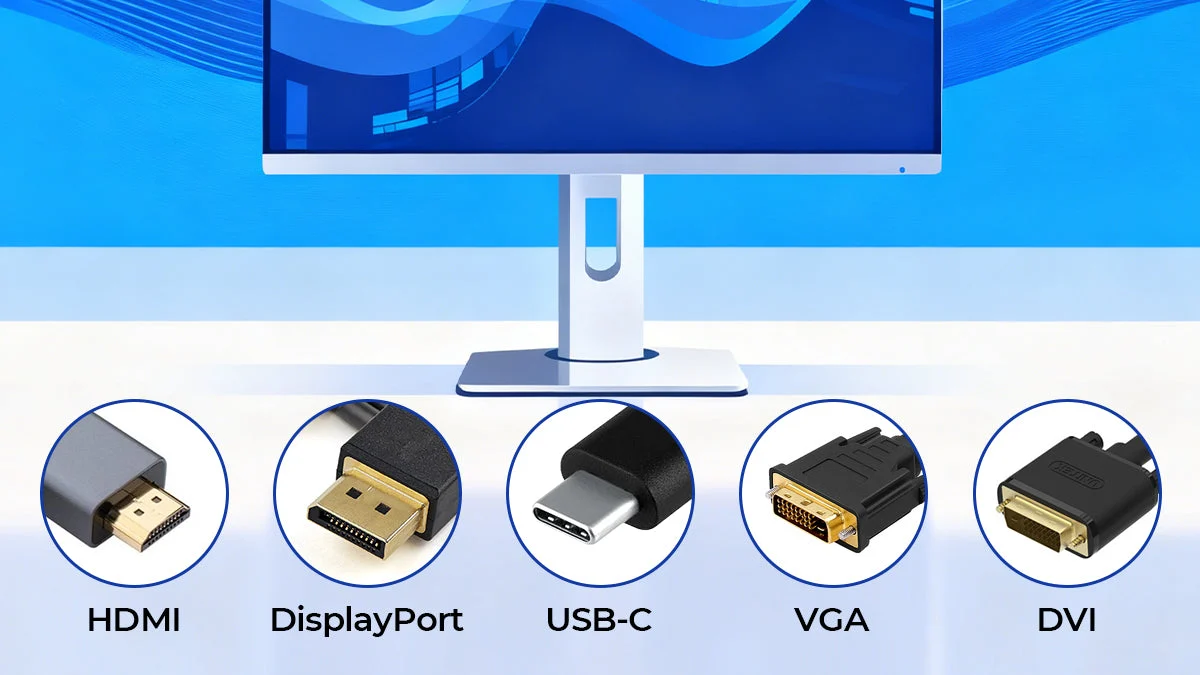

A dead monitor can leave you searching for two entirely different fixes: a replacement display or the cable that was loose all along. The Best computer monitors and cables roundup brings both together, covering a 24-inch office screen, a portable second display, legacy VGA connections, HDMI conversion, power cords, and a serious multi-monitor KVM.
These products are not interchangeable. A VGA cable cannot carry a digital HDMI signal, a power cord does not transmit video, and a portable monitor has very different requirements from a fixed desktop display. We have ranked the nine picks by the job they do best, from the SANSUI monitor for everyday work to short replacement cables for older equipment.
The SANSUI Monitor 24 Inch is our top pick for most desktop users, while the MNN Portable Monitor is the more flexible choice for mobile setups.
Comparison table
| # | Product | Award | Type | Key capability | Best for |
|---|---|---|---|---|---|
| 1 | SANSUI 24-inch Monitor | Best overall | VA monitor | 1920 x 1080 at 100Hz | Home office and general desktop use |
| 2 | MNN 15.6-inch Portable Monitor | Best portable | IPS monitor | 1920 x 1080 at 60Hz | Laptop travel and second-screen work |
| 3 | UGREEN 3-Monitor KVM Switch | Best for multi-PC desks | KVM switch | 3 monitors, 2 computers | Switching between two workstations |
| 4 | BENFEI HDMI to VGA Cable | Best HDMI to VGA adapter | Video converter cable | Up to 1920 x 1080 at 60Hz | Newer computers and older displays |
| 5 | EKYLIN 5-foot VGA Cable | Best shielded VGA cable | VGA cable | Up to 1920 x 1200 | Longer legacy video runs |
| 6 | PASOW 3-foot VGA Cable | Best short VGA cable | VGA cable | Up to 1920 x 1080 and above | Compact desk connections |
| 7 | ENUODA 4.9-foot VGA Cable | Best standard VGA replacement | VGA cable | Up to 1920 x 1080 and above | PCs, projectors, and monitors |
| 8 | LORDTRONICS 10-foot Power Cord | Best long power cord | AC power cable | 18 AWG, 10A at 125V | Displays and computers far from outlets |
| 9 | Lord Computer 5-foot Power Cord | Best standard power replacement | AC power cable | 18 AWG, 10A at 125V | Everyday monitor and PC replacement |
1. SANSUI 24-inch Monitor: Best Overall

Pros
- Full HD resolution on a practical 24-inch screen
- 100Hz refresh rate makes movement smoother
- HDMI and VGA inputs cover newer and older computers
- Adjustable tilt and VESA support
Cons
- No built-in speakers
- Brightness is rated at 250 nits
- Stand only tilts rather than offering height adjustment
Best for: home-office users who want one straightforward desktop display with flexible inputs.
The SANSUI 24-inch Monitor is the most sensible center of this group because it is a complete display rather than a supporting cable. Its 24-inch VA panel gives a comfortable working area without overwhelming a typical desk, and the 1920 x 1080 resolution keeps text and interface elements familiar across office software. It is the one we would choose when a reader wants a regular monitor and does not need a specialized high-resolution panel.
The 100Hz refresh rate is a meaningful step up from a basic 60Hz office screen. Scrolling through long pages and moving windows feels less choppy, although this is not positioned as a high-end gaming display. The panel is rated at 250 nits and includes HDR10, anti-glare treatment, anti-flicker operation, and low-blue-light features. Those specifications point to a monitor designed for long desk sessions, with FreeSync available for compatible systems.
Connectivity is unusually useful at this level. HDMI 1.4 handles current computers, while VGA keeps older desktops and office equipment in play. An HDMI cable is included, but there are no speakers, so sound must come from the computer or another audio device. The 178-degree horizontal and vertical viewing angles should help when the screen is not directly centered in front of one person.
The stand provides a tilt range from -5 to 22 degrees, and the 75 by 75 millimeter VESA pattern gives you an upgrade path to a separate arm or wall mount. It is not as travel-friendly as the MNN 15.6-inch Portable Monitor, and it lacks the multi-display control of the UGREEN 3-Monitor KVM Switch, but it is a much better fit for a fixed work area. The lack of height adjustment is the main ergonomic limitation.
For a compact desktop, the SANSUI is the clearest all-rounder here. Choose it when you want a normal-size screen, modern and legacy video inputs, and a smoother-than-basic refresh rate without building an elaborate setup.
2. MNN 15.6-inch Portable Monitor: Best Portable

Pros
- 15.6-inch Full HD IPS display
- Two full-feature USB-C ports
- Landscape and portrait modes
- Smart cover doubles as a stand
Cons
- Host device must support USB-C DP Alt Mode for one-cable operation
- 60Hz refresh rate is ordinary
- Portable design gives up the adjustment range of a desktop stand
Best for: laptop owners who need a second screen that can travel in a bag.
The MNN 15.6-inch Portable Monitor solves a different problem from the SANSUI. It is for the person whose screen count changes with the location of the work, whether that means a hotel desk, a classroom, or a temporary home-office setup. At 1.53 pounds and 0.3 inches thick, it is much easier to carry than a conventional monitor, while the 14.48 by 8.85-inch footprint remains large enough for a useful document or browser window.
Its 1920 x 1080 resolution is well matched to a 15.6-inch display. The IPS panel supports a 178-degree viewing angle, which is useful when the monitor sits beside a laptop instead of directly in front of you. HDR mode is available for brighter highlights and more vivid image output, and the monitor also includes a low-blue-light mode and flicker reduction for longer viewing sessions.
The two full-feature USB-C ports are the key feature, but they come with an important compatibility condition. A connected laptop or other host needs Thunderbolt 3 or USB 3.1 Type-C with DisplayPort Alt Mode to send both power and video over one USB-C cable. HDMI is also supported, giving the display a fallback for systems without compatible USB-C video. That makes it more adaptable than a USB-C-only travel screen, though you still need to check the host ports before buying.
The supplied PU leather smart cover protects the panel and folds into a stand. The monitor can work in landscape or portrait orientation and supports copy, extended, and second-screen modes. That flexibility is more useful than a single headline specification. Readers comparing travel displays may also want to consider how a second screen changes the space needed on a laptop desk, particularly if the portable panel will be used every day rather than occasionally.
The MNN does not have the 100Hz motion of the SANSUI 24-inch Monitor, and its 60Hz limit is not aimed at competitive gaming. Its real strength is mobility. Pick it when the display needs to move with the computer, not when you want the most comfortable permanent workstation.
3. UGREEN 3-Monitor KVM Switch: Best for Multi-PC Desks

Pros
- Switches two computers across three monitors
- Two DisplayPort 1.4 outputs and one HDMI 2.1 output
- Supports high refresh rates and HDR features
- Four USB 3.0 ports for shared peripherals
- Includes a desktop controller
Cons
- Both computers need compatible triple-display output for three screens
- No keyboard hotkey switching
- Does not support EDID emulation
Best for: people managing two computers from one three-screen desk.
The UGREEN 3-Monitor KVM Switch is the most specialized product here, but it can remove a remarkable amount of desk clutter when its requirements match the setup. It lets two computers share three monitors, a keyboard, mouse, printer, or webcam through four USB 3.0 ports. Instead of moving cables between work and personal machines, you switch the system with a button or the included desktop controller.
Video support is substantial. The unit uses two DisplayPort 1.4 ports and one HDMI 2.1 port, with each output supporting up to 8K at 60Hz. It also lists 4K at up to 240Hz, along with HDR10+, HDCP 2.3 and 1.4, VRR, FreeSync, and G-Sync support. Those capabilities matter only when the computers, displays, and cables can support them, but they leave room for demanding multi-monitor systems.
The largest catch is not hidden in the output specifications. Each computer needs two DisplayPort ports and one HDMI port to drive all three monitors through this switch. Both computers must also support triple-display output. If one machine supports only one or two displays, the unused monitor outputs will not become active through the KVM.
Switching is done with the unit's button or remote desktop controller. Keyboard shortcuts are not supported, which is a small but real inconvenience for users accustomed to hotkey KVMs. The switch is driver-free and supports Windows, macOS, and Linux, and the package includes the required DisplayPort, HDMI, USB, and power cables. A USB-C-only laptop needs a USB-C to USB-A OTG adapter for the KVM's USB connection.
This is far more capable than a simple display cable, but it is also less forgiving. The SANSUI 24-inch Monitor is the easier recommendation for a single computer, while the UGREEN earns its place when two full workstations must share three screens. Confirm the graphics outputs before choosing it, especially if a dock or signal converter sits between the computer and the switch.
4. BENFEI HDMI to VGA Cable: Best HDMI to VGA Adapter

Pros
- Converts HDMI output to VGA input
- Supports 1920 x 1080 at 60Hz
- Six-foot length gives useful placement flexibility
- Molded strain relief and gold-plated HDMI connector
- Includes an 18-month warranty
Cons
- Uni-directional only
- Does not carry audio through VGA
- Not compatible with every low-power HDMI device
Best for: connecting an HDMI computer to an older VGA monitor or projector.
The BENFEI HDMI to VGA Cable is the most useful bridge in this list for mixed-generation equipment. It takes HDMI from a computer, laptop, or compatible source and converts it to VGA for an older monitor, projector, or HDTV. The built-in IC chip handles the digital-to-analog conversion, so there is no separate converter box hanging from the ports.
Its maximum supported output is 1920 x 1080 at 60Hz, with support for 720p, 1600 x 1200, and 1280 x 1024. That is enough for a Full HD office display or presentation projector, though it cannot turn a VGA panel into a modern high-refresh gaming screen. The six-foot cable is long enough to keep a laptop or desktop from being pressed against the display.
The direction matters. This product works from HDMI source to VGA display and cannot send a VGA signal into an HDMI monitor. It also does not suit every low-power HDMI device, with the listing specifically excluding several device types. VGA carries video only, so speakers and audio output need a separate path.
Molded strain relief should help at the connector ends, while the gold-plated HDMI plug is intended to resist corrosion and abrasion. It is compact enough for a laptop bag and includes an 18-month warranty. When a VGA port is still part of the setup, the BENFEI is more appropriate than a standard VGA cable because it solves the signal-format mismatch.
Skip it if both devices already use VGA, or if the display has HDMI and you want to avoid analog conversion. For the right connection direction, it is the cleanest adapter in this roundup.
5. EKYLIN 5-foot VGA Cable: Best Shielded VGA Cable

Pros
- Foil and braid shielding with dual ferrite cores
- Supports resolutions up to 1920 x 1200
- Gold-plated connectors and bare copper conductors
- Screw locks and grip treads
- Useful 1.5-meter length
Cons
- VGA is an analog connection
- Male-to-male plugs require ports on both devices
- Does not convert VGA to HDMI
Best for: a VGA computer and display that need a secure, interference-resistant connection.
The EKYLIN 5-foot VGA Cable is the most thoughtfully equipped of the ordinary VGA leads here. Its 1.5-meter length gives enough reach for most desk and projector arrangements without leaving a large coil behind the equipment. Both ends are male 15-pin VGA, so it connects a VGA-equipped computer directly to a VGA monitor or projector.
The cable supports 1920 x 1200 WUXGA, as well as 1080p, 1600 x 1200, 1024 x 768, and 800 x 600. VGA quality depends on the source, display, cable routing, and connection security, but the listed support covers the common resolutions of older LCD monitors and projectors. The shielding is the feature that separates this lead from a bare-bones replacement: foil and braid shielding plus dual ferrite cores are intended to limit electromagnetic and radio-frequency interference.
The connectors use molded strain relief, grip treads, and finger-tightened screws. Those details matter with VGA because a loose plug can cause a missing color, flicker, or an unstable image. Gold-plated connectors and bare copper conductors round out the signal-focused construction.
The PASOW 3-foot VGA Cable is a better fit when the computer and display sit close together, while the ENUODA 4.9-foot VGA Cable covers the same general job with a simpler feature set. EKYLIN is the one to choose when the cable will run near other electronics or when a firmly secured connection matters.
It remains a legacy analog cable, not a digital upgrade. Choose it for equipment that already has VGA ports, and skip it if one side uses HDMI or DisplayPort.
6. PASOW 3-foot VGA Cable: Best Short VGA Cable

Pros
- Short 1-meter length reduces desk clutter
- Screw-in 15-pin male connectors
- Molded strain relief and grip treads
- Supports 1920 x 1080p and higher listed resolutions
Cons
- Too short for widely separated equipment
- VGA only
- PVC jacket is functional rather than specialized
Best for: a nearby VGA computer and monitor where excess cable would get in the way.
The PASOW 3-foot VGA Cable makes sense when the display and computer are already close. A short lead is easier to route behind a small monitor stand and less likely to form a loop on the desk. Its 1-meter length is a limitation in a large workstation, but an advantage in a compact one.
Both ends use 15-pin male VGA connectors with finger-tightened screws. The screws help prevent the plug from shifting, while molded strain relief protects the point where the cable enters the connector. Grip treads make the plugs easier to remove than smooth housings.
PASOW lists support for 800 x 600, 1024 x 768, 1600 x 1200, and 1920 x 1080p and above for compatible LCD and LED displays. The cable is designed to link a VGA-equipped computer to a monitor, TV, or projector. It does not convert signals, carry digital video, or add any newer display capability.
Compared with the EKYLIN 5-foot VGA Cable, PASOW gives up length and the more extensive shielding description. Compared with the ENUODA 4.9-foot VGA Cable, it is the better choice only when a short run is genuinely enough. A cable that barely reaches is frustrating, but one that leaves unnecessary slack can be just as awkward in a tight setup.
Choose PASOW for a close desktop connection. If the display is across a conference table or several feet away, use a longer VGA lead instead.
7. ENUODA 4.9-foot VGA Cable: Best Standard VGA Replacement
Pros
- Standard 1.5-meter male-to-male VGA design
- Supports up to 1920 x 1080 and above
- Screw-in connectors
- Works with computers, projectors, TVs, and monitors
Cons
- No HDMI or DisplayPort conversion
- Shorter than the BENFEI cable
- VGA remains dependent on analog signal quality
Best for: replacing a conventional VGA monitor cable without adding conversion hardware.
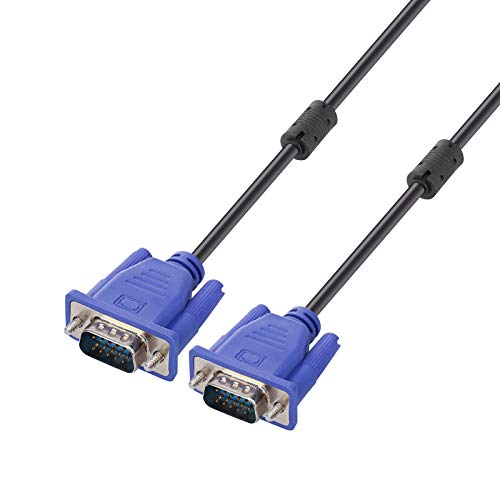
The ENUODA 4.9-foot VGA Cable is a plain, recognizable replacement for a missing or damaged VGA lead. Its 1.5-meter length is close to the familiar five-foot format, enough for many desk arrangements while still easy to manage. The blue cable is male-to-male and uses HDDB15 15-pin connectors.
It supports SVGA at 800 x 600, XGA at 1024 x 768, UXGA at 1600 x 1200, WSXGA at 1680 x 1050, and 1080p Full HD at 1920 x 1080 and above. Those figures describe compatibility with a range of older displays and projectors, not a promise that every VGA device will show every resolution cleanly.
Screw-in plugs are important on a legacy connection because VGA connectors can become loose when equipment is moved. The cable is intended for a PC or laptop connected to a projector, LCD monitor, LED monitor, or TV with a matching port. There is no signal conversion, so both devices need VGA.
The PASOW 3-foot VGA Cable is neater for a close connection, and the EKYLIN 5-foot VGA Cable offers a stronger shielding story. ENUODA sits between those choices as the ordinary replacement for a standard setup. It is also less suitable than the BENFEI when the source has HDMI instead of VGA.
Pick it when you need a direct VGA-to-VGA link and want a familiar length. Do not choose it as a way to modernize a computer with only digital video outputs.
8. LORDTRONICS 10-foot Power Cord: Best Long Power Cord

Pros
- 10-foot length reaches distant outlets
- 18 AWG three-wire construction
- NEMA 5-15P and IEC 60320 C13 connectors
- Rated for 10A at 125V
- Flexible replacement for monitors, PCs, TVs, and printers
Cons
- Extra length can create cable slack
- Provides power only, not video
- Requires a compatible C13 device socket
Best for: a computer or monitor positioned well away from the wall outlet.
The LORDTRONICS 10-foot Power Cord is for the common setup problem where the supplied lead stops just short of the outlet. Its three-prong design uses a standard NEMA 5-15P wall plug on one end and an IEC 60320 C13 connector on the equipment end. That makes it suitable for many computers, monitors, TVs, printers, and power supplies that use the same inlet.
The cable is 18 AWG and rated to carry 125 volts at 10 amps. Those are the useful electrical details to check when replacing a desktop power lead. The listing also describes the cord as flexible and intended for regular replacement use, rather than as a video or data cable.
Ten feet gives more freedom to place a desk, but it also creates more slack than the Lord Computer 5-foot Power Cord. That can be helpful when the outlet is behind furniture or on another wall. It can be untidy when the computer sits directly beside the socket, so measure the route rather than automatically choosing the longest option.
The main compatibility check is physical. The monitor or computer needs a standard C13 inlet, and the wall side needs a grounded three-prong receptacle. This cord cannot replace a figure-eight, cloverleaf, or proprietary power connection.
Choose LORDTRONICS when reach is the problem. For a normal nearby outlet, the shorter Lord Computer cord is easier to route.
9. Lord Computer 5-foot Power Cord: Best Standard Power Replacement

Pros
- Practical 5-foot length
- Molded construction
- 18 AWG cable
- Three-prong universal-style connection for compatible equipment
Cons
- Not suitable for devices without a three-pin inlet
- Shorter reach than the LORDTRONICS cord
- Power cable only
Best for: replacing a lost or worn three-prong monitor or computer power cord.
The Lord Computer 5-foot Power Cord is the uncomplicated replacement to keep in a drawer. Five feet is long enough for most desks without the surplus cable that comes with a ten-foot lead. It is intended for monitors, computers, TVs, printers, radios, and other compatible electronics with a three-pin power connection.
Its 18 AWG construction is fully molded, which should help the cord tolerate ordinary plugging, unplugging, and repositioning. The listing describes the design as sturdy and flexible, with a universal fit for equipment using the appropriate three-prong connection. The cord is rated at 10 amps and 125 volts.
The connector shape matters more than the device brand. A Samsung, Dell, Vizio, LG, or Asus label does not guarantee that every model uses the same power inlet, so check the socket on the back of the equipment before ordering. It also will not carry a monitor signal, connect a laptop to a screen, or replace a video cable.
The LORDTRONICS 10-foot Power Cord is the better choice when the outlet is far away. Lord Computer is the neater pick when the equipment and wall socket are within a normal desk distance. Neither should be confused with a cable that links a computer to a display.
For a standard grounded monitor or desktop power connection, this is the least complicated option in the group. Confirm the three-prong equipment socket first, then choose the length that matches the room.
How to choose best computer monitors and cables
The right choice depends on whether you need a display, a video connection, a power lead, or a switch that controls several systems. Start with the ports and the physical layout, then compare the capabilities that affect daily use.
Panel size and resolution
A 24-inch 1920 x 1080 monitor such as the SANSUI gives office applications a comfortable fixed workspace. A 15.6-inch Full HD portable screen is better when the display must travel with a laptop. Resolution should be judged alongside screen size, since the same pixel count appears denser on a smaller panel.
Refresh rate and panel behavior
Refresh rate affects how smoothly scrolling, cursor movement, and games appear. The SANSUI reaches 100Hz, while the MNN is a 60Hz portable display. Panel type also matters: the SANSUI uses VA, and the MNN uses IPS with a 178-degree viewing angle.
Video direction and connector type
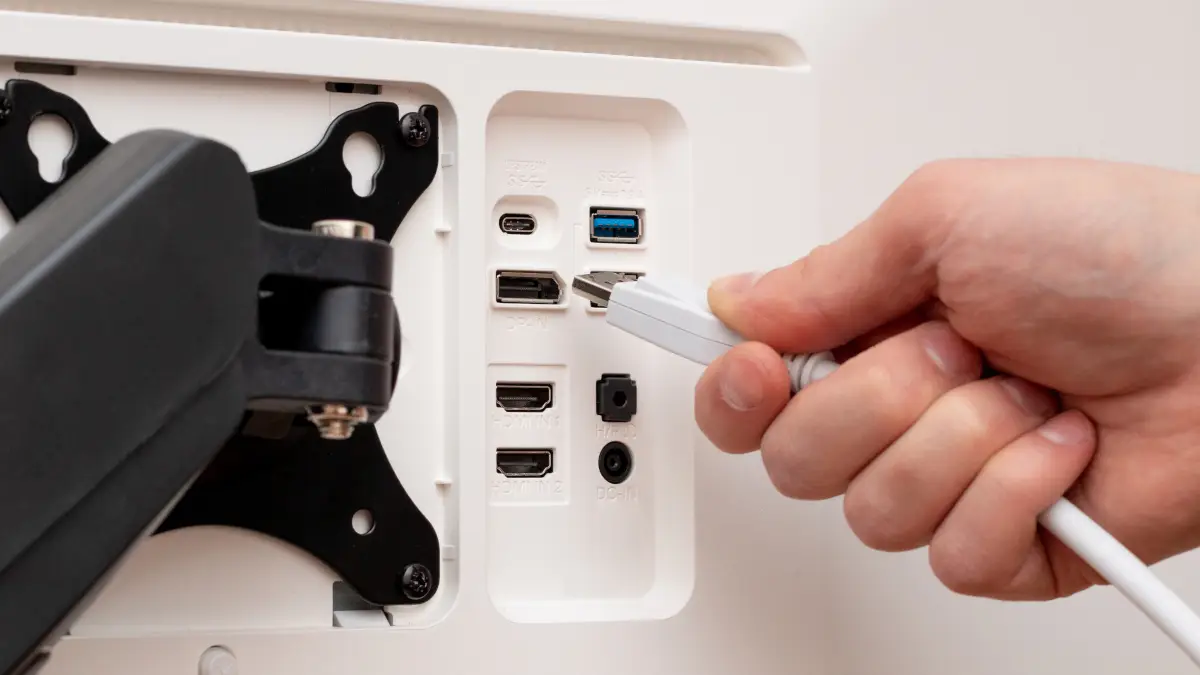
HDMI and VGA are not interchangeable formats. The BENFEI converts HDMI output to VGA input in one direction only. A VGA cable such as EKYLIN, PASOW, or ENUODA requires VGA ports on both devices and cannot convert a digital signal.
Check the ports on both ends before choosing a cable. A correct length cannot fix the wrong signal direction.
Cable length and connection security
Choose the shortest cable that reaches comfortably, with enough slack to avoid pulling on the ports. The PASOW is suited to a close setup, while EKYLIN and ENUODA cover a more typical desk distance. Screw locks and molded strain relief help keep VGA connections stable.
Power connector and electrical rating
A monitor power replacement needs the correct equipment-side connector, commonly an IEC C13 for the cords here. The LORDTRONICS lead is 10 feet and rated for 10 amps at 125 volts, while the Lord Computer cord is 5 feet with 18 AWG construction. Neither carries video or data.
Multi-monitor switching
A KVM switch is useful only when the computers can provide the required display outputs. The UGREEN needs two DisplayPort connections and one HDMI connection from each computer for three-screen operation. It supports button and desktop-controller switching, but not keyboard hotkeys or EDID emulation.
Frequently asked questions
Can the BENFEI cable connect a VGA computer to an HDMI monitor?
No. The BENFEI converts HDMI from the source to VGA at the display. It is uni-directional, so a VGA computer and HDMI monitor need a converter designed for the opposite direction.
Does a VGA cable carry sound?
No. VGA carries analog video only. Audio needs a separate connection between the source and speakers, monitor, or another audio device.
Which cable should I use for a three-prong monitor?
Use a compatible three-prong AC power cord with the correct equipment-side socket. The Lord Computer cord is 5 feet, while the LORDTRONICS cord is 10 feet. Check that the monitor uses the matching C13-style inlet before connecting either one.
Is the SANSUI monitor suitable for gaming?
It supports 100Hz and FreeSync, which can make compatible games look smoother than they do on a 60Hz office monitor. Its 1920 x 1080 VA panel is better suited to casual gaming and general use than to high-end competitive play.
Can the MNN portable monitor work with any USB-C laptop?
No. One-cable USB-C operation requires a host with Thunderbolt 3 or USB 3.1 Type-C DisplayPort Alt Mode. HDMI provides another connection method for compatible devices, but the computer still needs to supply power as required by the setup.
Can the UGREEN KVM show three screens from every computer?
No. Each computer must support triple-display output and provide two DisplayPort ports plus one HDMI port for the three-screen arrangement. If a computer supports only one or two displays, the remaining output will not activate.
Should I buy a longer VGA cable than I need?
Usually not. Extra length creates more slack and makes routing harder, especially on a small desk. Use PASOW for a close connection, or choose EKYLIN or ENUODA when the equipment needs a longer run.
The bottom line
The Best computer monitors and cables list starts with the SANSUI 24-inch Monitor because it is the only conventional desktop screen here with a 24-inch Full HD VA panel, 100Hz refresh rate, HDMI and VGA inputs, and VESA support. It is the right fit for most home-office desks, though its stand lacks height adjustment and there are no speakers.
Choose the MNN 15.6-inch Portable Monitor when mobility matters, or the UGREEN 3-Monitor KVM Switch when two computers must share three displays and peripherals. For legacy connections, the BENFEI HDMI to VGA Cable handles the important direction change, while EKYLIN, PASOW, and ENUODA cover direct VGA links. The two Lord power cords handle the separate job of supplying power.
If you are undecided, identify the ports first, then buy the shortest cable or the simplest monitor that matches the setup.
As an Amazon Associate we earn from qualifying purchases.