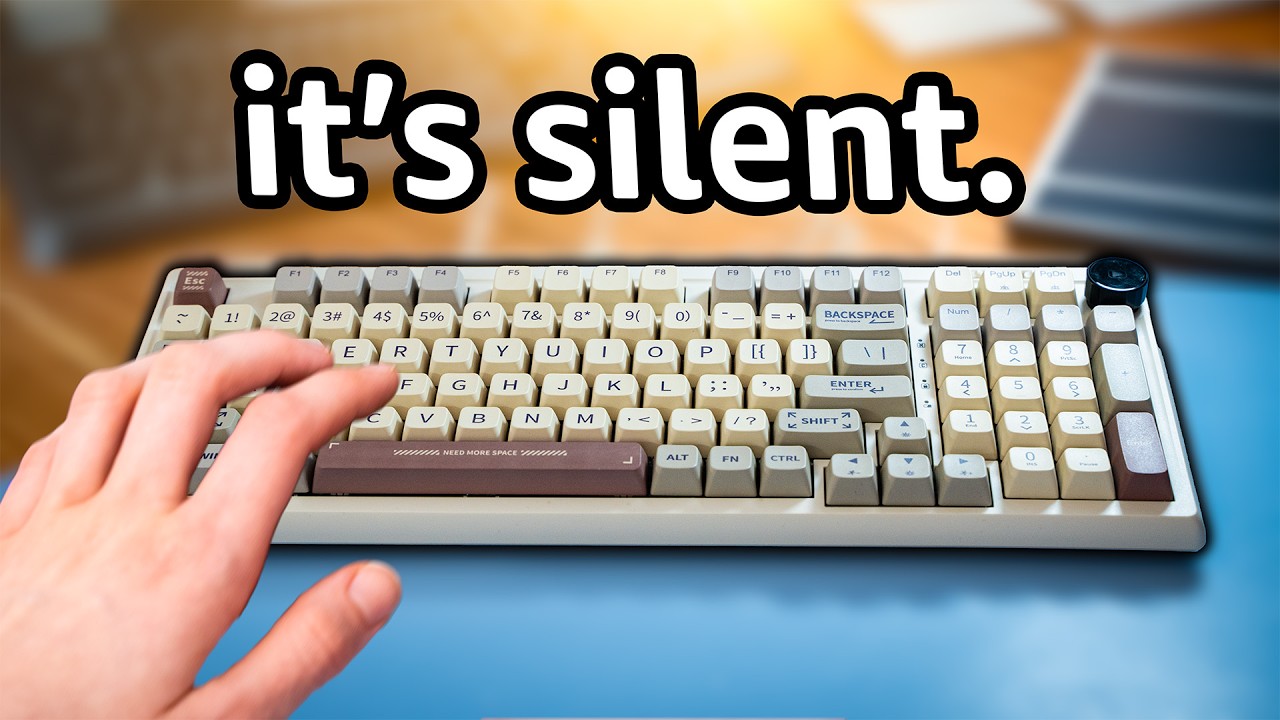

A noisy keyboard can turn a quiet office, bedroom, or shared workspace into a steady stream of clicks and clacks. The right design softens the sound without making every keystroke feel mushy or imprecise. Our Best silent keyboard for typing picks include quiet membrane, scissor, low-profile, ergonomic, and mechanical options.
We ranked these keyboards by how well their construction, connection options, layout, lighting, and stated noise-reduction features fit real typing needs. The Logitech MK295 Graphite Combo is our top pick, while the other eight cover wired simplicity, multi-device work, ergonomic support, and quieter mechanical typing.
Comparison table
| # | Product | Award | Key type | Connection | Best for |
|---|---|---|---|---|---|
| 1 | Logitech MK295 Graphite Combo | Best overall | SilentTouch | 2.4 GHz wireless | Quiet full-size typing with a mouse |
| 2 | TECKNET RGB Wired Keyboard | Best wired with lighting | Low-profile membrane | USB | A lit office keyboard |
| 3 | Cherry Stream | Best scissor typing | CHERRY SX scissor | USB | Precise, quiet office typing |
| 4 | TECKNET Wired Keyboard | Best simple wired pick | Low-profile membrane | USB | Straightforward daily typing |
| 5 | Logitech K950 Slim | Best multi-device slim model | Laptop-style | Bluetooth or Logi Bolt | Switching among three devices |
| 6 | COLIKES Wave | Best ergonomic wireless model | Silent membrane | 2.4 GHz wireless | Wrist support and backlighting |
| 7 | SOLAKAKA KI99 Pro | Best quiet mechanical model | Silent mechanical | Bluetooth, 2.4 GHz, USB-C | Customizable typing and gaming |
| 8 | Logitech MK295 Off White Combo | Best light-finish combo | SilentTouch | 2.4 GHz wireless | A quiet keyboard and mouse set |
| 9 | Logitech MX Keys S | Best premium low-profile model | Laptop-like | Bluetooth or Logi Bolt | Fast multi-device productivity |
1. Logitech MK295 Graphite Combo: Best Overall

Pros
- SilentTouch reduces keyboard and mouse noise
- Full-size layout includes a numeric keypad
- Wireless range reaches 10 meters
- Includes a quiet-clicking mouse
Cons
- Requires disposable batteries
- Windows and Chrome OS are the stated platforms
- The full-size design takes substantial desk space
Best for: home and office users who want quiet typing plus a matching mouse.
The Logitech MK295 Graphite Combo is the easiest recommendation when silence matters but you still want a familiar full-size keyboard. It feels like a conventional office board rather than a compact experiment, with a complete numeric keypad, dedicated navigation space, and eight shortcut keys. The bundled mouse makes it a particularly tidy replacement for an aging desktop setup.
Logitech says SilentTouch reduces typing and clicking noise by 90 percent while preserving the usual typing and clicking feel. That combination is more useful than a keyboard that is merely soft, because coworkers and housemates hear less of the sharp impact that makes ordinary keyboards distracting. One receiver handles the set through a 2.4 GHz wireless connection, and the stated 10-meter range gives plenty of freedom for a desk, counter, or presentation setup.
The keyboard has adjustable tilt legs, a spill-resistant design, and durable keys. Its battery life is stated as up to 36 months for the keyboard and 18 months for the mouse, with on and off switches for periods when the set is not being used. The dimensions are roughly 20.08 by 6.22 inches, so it is not a small footprint, but that extra width buys a conventional layout that suits spreadsheets and number entry.
Compared with the wired TECKNET models, the MK295 removes the cable and adds a mouse, though it has no backlighting. The Cherry Stream feels more precise under the fingers, and the Logitech K950 is better for switching among devices, but neither supplies this same straightforward desktop package. Skip the MK295 if you need macOS support, rechargeable power, or a compact board. For quiet full-size work on Windows or Chrome OS, this is the one we'd keep.
2. TECKNET RGB Wired Keyboard: Best Wired With Lighting

Pros
- Low-profile membrane keys keep keystrokes soft
- Seven-color RGB lighting with two modes
- Full 104-key layout and numeric keypad
- Spill-resistant conductive film
- No batteries or charging
Cons
- Multimedia keys may have limited Mac functionality
- Wired USB connection limits desk flexibility
- Lighting is not individually customizable
Best for: people who want a quiet full-size keyboard with adjustable desk lighting.
The TECKNET RGB Wired Keyboard makes a sensible office keyboard feel less plain. Its low-profile membrane keys have a soft action intended to reduce typing noise, while the wired connection keeps the setup simple and avoids battery anxiety. It is a practical fit for a fixed workstation where the keyboard will stay in one place.
The 104-key, three-zone layout gives typists a full navigation cluster and number pad without asking them to learn a compressed arrangement. Adjustable tilt feet and anti-slip pads help set the angle, which matters during long sessions because a keyboard that shifts slightly can make quiet typing feel much less controlled. At 17.3 by 5.2 inches, it is noticeably narrower than the Logitech MK295.
The distinguishing feature is the lighting. Seven colors, four brightness settings, and static or breathing modes make the legends easier to see in a dim room. Twelve FN shortcuts cover volume, mute, media, email, the homepage, and calculator functions. The conductive film is spill-resistant, and the keys are rated for up to 80 million keystrokes, according to the supplied product details.
The plain TECKNET Wired Keyboard below offers the same core layout and quiet membrane approach without the RGB system. The Cherry Stream feels more deliberate because of its CHERRY SX scissor mechanism, while this TECKNET is the better choice if lighting matters. Its main limitation is the cable, plus reduced multimedia-key functionality on Mac OS. Choose it for a stable Windows desk, late-night work, or anyone who wants quiet typing without adding wireless charging to the routine.
3. Cherry Stream: Best Scissor Typing

Pros
- CHERRY SX scissor technology gives a precise pressure point
- Slim, whisper-quiet design
- Full layout with numeric keypad
- Metal plate and eight rubber feet add stability
- Ten extra office and media keys
Cons
- Wired connection only
- No backlighting
- Larger and heavier than its slim appearance suggests
Best for: frequent typists who prefer a precise scissor-key feel.
The Cherry Stream is the keyboard here for people who care about the moment a key bottoms out. Its flat profile looks understated, but CHERRY SX scissor technology gives the keys a defined pressure point that feels more controlled than a vague membrane action. The result should suit long-form writing, data entry, and office work where consistent key response matters.
It retains a numeric keypad and adds ten office and multimedia keys for actions such as opening a browser or email program, controlling playback, launching the calculator, and locking the PC. Three red status LEDs show Caps Lock, Num Lock, and Scroll Lock states. Those small indicators are useful on a keyboard that otherwise keeps its surface free of lighting effects.
The 18.23 by 6.42-inch body is only 0.71 inches high, yet an integrated metal plate and eight rubber feet keep it planted. Two fold-out feet let you change the typing angle, and abrasion-resistant key lettering is designed to remain legible with prolonged use. The low, flat body is not automatically ergonomic, but the stable base prevents the sliding and flex that can make a slim board irritating.
The TECKNET RGB Wired Keyboard offers more visual flair, while the Logitech MK295 is more convenient if you want wireless operation and a mouse included. The Cherry Stream counters with a more intentional scissor feel and a sturdy base. It is not for a cable-free desk or anyone who needs illuminated keys. If your priority is quiet, precise office typing rather than customization, it deserves its high place here.
4. TECKNET Wired Keyboard: Best Simple Wired Pick

Pros
- Quiet low-profile membrane keys
- Full 104-key layout
- Twelve FN multimedia shortcuts
- Spill-resistant design
- Lifetime warranty with registration
Cons
- No backlighting
- Wired USB design
- Multimedia keys may have limited Mac functionality
Best for: a fixed Windows workstation that needs a quiet, uncomplicated keyboard.
The TECKNET Wired Keyboard is the stripped-back counterpart to the RGB version above. It keeps the part that matters most for a quiet office, namely the low-profile membrane keys, and leaves out the lighting controls. That makes the board visually calmer and easier to recommend for a work desk where decorative effects are not useful.
Its standard 104-key layout is divided into three zones, with a full number pad and familiar navigation keys. Adjustable tilt feet and anti-slip pads let you set a modest typing angle and keep the board from wandering. The 17.3 by 5.2-inch dimensions leave it roomy enough for touch typing while taking less horizontal space than the wider Logitech MK295.
Twelve FN plus F-key combinations provide one-touch access to volume, mute, playback, email, the homepage, and calculator functions. The USB plug-and-play connection works with a broad list of Windows versions, Raspberry Pi 3 and 4, and Mac OS, though the supplied details warn that Mac multimedia keys may be limited. A spill-resistant conductive film and an 80-million-keystroke rating add reassurance for routine use.
It is almost the same practical proposition as the RGB TECKNET, so the choice between them is really about lighting. Cherry Stream is the stronger alternative for a sharper scissor feel, and Logitech MK295 is preferable when wireless freedom or a mouse matters. This TECKNET has no rechargeable battery, no pairing process, and no lighting to distract from the work. Skip it if you need Bluetooth or a more premium key response.
5. Logitech K950 Slim: Best Multi-Device Slim Model
Pros
- Switches among three devices with one tap
- Quiet laptop-style typing
- Bluetooth and Logi Bolt support
- Works across Windows, macOS, Chrome OS, Linux, iPadOS, iOS, and Android
- Customizable keys through Logi Options+
Cons
- No stated rechargeable battery details
- Compact-feeling slim keys may not suit everyone
- Logi Options+ customization is limited to Windows and macOS
Best for: people who type across a computer, tablet, and phone.
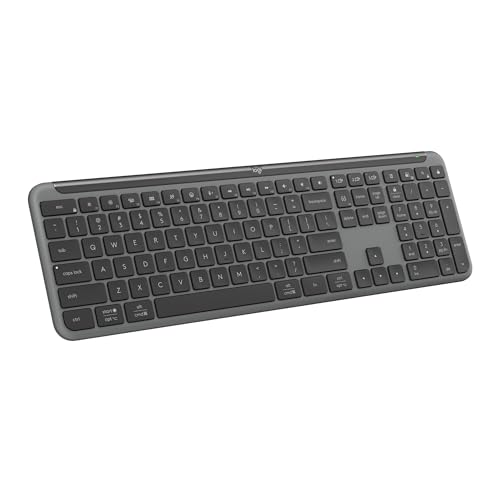
The Logitech K950 Slim is built around a modern typing habit: one person, several screens, and no patience for reconnecting a keyboard every time they change devices. A single tap switches among three paired devices. Its full-size layout remains familiar, but the laptop-style profile gives the board a lighter, flatter character than the Logitech MK295.
The connection choices are unusually flexible for this group. It can pair over Bluetooth or Logi Bolt, and the stated compatibility includes Windows, macOS, Chrome OS, Linux, iPadOS, iOS, and Android. The quiet key design is suited to shared rooms, while one-touch shortcuts handle music, mute, volume, and screen snipping without requiring a separate utility.
Logi Options+ adds customizable keys on Windows and macOS. That is useful for people who repeat the same actions throughout the day, though it makes the keyboard less universal than the basic plug-and-play TECKNET boards. The K950 also uses at least 48 percent certified post-consumer recycled plastic in its keyboard parts, according to the supplied details.
For a desk shared between a laptop and desktop, moving between several connected devices without losing your place is the central advantage. The Logitech MX Keys S goes further with adaptive backlighting and a rechargeable battery, while the K950 is the simpler option for people who want quiet multi-device typing without those extras. Skip it if you need a numeric keypad with a more traditional key height or prefer a wired connection.
6. COLIKES Wave: Best Ergonomic Wireless Model

Pros
- Wave layout and soft wrist rest support a relaxed posture
- Fifteen lighting effects
- Rechargeable 2500mAh battery
- Dedicated multimedia controls
- Wireless range reaches 33 feet
Cons
- Backlighting reduces stated battery life to 10 days
- Wave layout takes adjustment
- The product details do not specify a key count
Best for: users who want ergonomic shaping, wireless freedom, and colorful backlighting.
The COLIKES Wave looks at quiet typing from the wrist down. Its wave-shaped layout, soft wrist rest, and adjustable legs are intended to reduce fatigue during longer sessions, while the silent membrane keys keep the board suitable for an office, library, or late-night room. It is a more committed ergonomic design than the conventional layouts used by TECKNET and Logitech.
Backlighting is a major part of the appeal. There are 15 customizable effects, five backlight modes, and three brightness levels, with options including breathing, wave, gradient, and static patterns. Dedicated controls on the top and an FN plus Page Down shortcut make it possible to change the lighting without digging through software.
The rechargeable battery is 2500mAh and charges through USB-C in approximately five hours. The supplied battery figures are up to 277 days with the backlight off when used for three hours daily, or 10 days with the backlight on. Automatic light shutoff after 90 seconds and sleep after three minutes help preserve charge. A 2.4 GHz connection reaches up to 33 feet, and the package includes a USB-C adapter for dual-system switching.
Windows, Mac, Chrome OS, and Linux compatibility gives it a wider platform spread than the MK295. Still, the wave shape can be a hurdle for anyone who wants to move between keyboards without an adjustment period. The SOLAKAKA KI99 Pro offers more switch customization, while the COLIKES offers more wrist-oriented shaping. Choose this one when posture support and built-in lighting matter more than a compact, conventional layout.
7. SOLAKAKA KI99 Pro: Best Quiet Mechanical Model

Pros
- Silent switches with a gasket structure and five noise-reducing layers
- Bluetooth, 2.4 GHz, and USB-C connections
- Hot-swappable 3-pin and 5-pin switches
- 96 percent layout saves desk space
- PBT keycaps and RGB lighting
Cons
- Gaming-oriented layout may not suit traditional office users
- More setup and customization than a basic office keyboard
- No stated backlight-off battery figure
Best for: typists who want quieter mechanical feedback and room to customize the board.
The SOLAKAKA KI99 Pro is the outlier in this roundup because it aims to preserve mechanical-keyboard character while controlling the noise that normally comes with it. Its silent switches, gasket structure, and five noise-reducing layers target a smoother, quieter press than a typical gaming board. The result should appeal to someone who finds membrane keys too soft but cannot use a loud mechanical keyboard nearby.
A 96 percent layout keeps the number pad and most important navigation controls while trimming some of the wasted space of a full-size board. The control knob handles volume, media, and lighting brightness, giving the board a physical control that the other keyboards largely replace with FN shortcuts. PBT keycaps are designed to resist wear and fading, and their non-slip finish should maintain a consistent feel over time.
Connection flexibility is excellent. Bluetooth 5.0, 2.4 GHz wireless, and USB-C cover desktop, laptop, and mobile use, with a stated 10-meter range. The 10, 000mAh battery is intended to minimize charging, while full RGB and side light bars offer 16.8 million colors. Software can program keys, set macros, and adjust lighting, although the basic functions remain available through hotkeys.
Full hot-swapping is the feature that separates it from every membrane and scissor keyboard here. The 1.2mm flex-cut PCB accepts 3-pin and 5-pin replacement switches without tools, so the owner can change the sound and feel later. the trade-off between quiet switches and mechanical customization is worth understanding before choosing it. The K950 is quieter and simpler for multi-device office work, while this board wins for enthusiasts. Skip it if you want a completely conventional full-size office layout with no software or learning curve.
8. Logitech MK295 Off White: Best Light-Finish Combo

Pros
- SilentTouch reduces keyboard and mouse noise
- Full-size layout with numeric keypad
- Includes a matching quiet-click mouse
- 2.4 GHz connection reaches 10 meters
- Spill-resistant keyboard with adjustable tilt legs
Cons
- Uses disposable batteries
- No backlighting
- Limited stated platform support
Best for: a quiet, light-colored desktop set for Windows or Chrome OS.
The Logitech MK295 Off White is functionally the same kind of office solution as the Graphite version, but its finish gives a desk a visibly lighter look. It combines a full-size keyboard and mouse under one small wireless receiver, which is useful when replacing both peripherals at once. The layout includes a number pad and eight shortcut keys for media, volume, mute, and internet access.
SilentTouch is the central feature. Logitech states that it cuts typing and clicking noise by 90 percent while retaining the familiar feel of the keys and mouse buttons. The contoured mouse is designed for smooth pointing on most surfaces, and the keyboard's adjustable tilt legs let the user set a more comfortable angle.
The 2.4 GHz receiver connects in about three seconds and offers up to 10 meters of range. Battery life is stated as up to 36 months for the keyboard and 18 months for the mouse, with on and off switches. Spill resistance and durable keys make it a sensible shared-space tool, though the full-size dimensions mean it will not disappear on a narrow desk.
The Graphite MK295 is the stronger default because its finish is easier to blend into most workstations, but the two versions offer the same core feature set. The COLIKES Wave is a better fit for wrist support and rechargeable power, while the MK295 is easier for someone who wants a familiar layout and no setup beyond the receiver. Choose the Off White model when its lighter appearance suits the workspace and you do not need backlighting.
9. Logitech MX Keys S: Best Premium Low-Profile Model

Pros
- Spherical dish keys support precise laptop-style typing
- Adaptive backlighting responds as hands approach
- Pairs with up to three devices
- Bluetooth Low Energy and Logi Bolt support
- USB-C rechargeable battery
Cons
- Backlighting cuts stated battery life to 10 days
- Low-profile design is not for users who prefer tall keys
- The full-size body still takes considerable desk space
Best for: serious multi-device typists who want a refined low-profile feel.
The Logitech MX Keys S is the most polished typing instrument in this group. Its low-profile keys have spherical dishes shaped for the fingertips, giving each press a more guided landing than the flat keys on many office keyboards. It stays quiet without trying to imitate a mechanical keyboard, which makes it a strong fit for focused writing and mixed home-office use.
The backlighting is smarter than a simple always-on glow. The keys light as hands approach and adapt to the surrounding environment, with further controls available in Logi Options+. The battery lasts up to 10 days on a full charge with backlighting active, or up to five months with the lighting turned off. USB-C charging keeps the power system current and avoids disposable batteries.
It can pair with up to three devices over Bluetooth Low Energy or the included Logi Bolt receiver, working across Windows, macOS, and Linux. Smart Actions in Logi Options+ can trigger multiple steps with one key, while the solid build and stated keyboard angle are intended to support longer sessions. The 18 by 6-inch body remains close to full-size, so it provides room for conventional navigation and number entry but does not solve a crowded desk.
The Logitech K950 is the better choice for simpler three-device switching, and the SOLAKAKA KI99 Pro is more interesting for mechanical customization. The MX Keys S wins when the typing feel, adaptive light, and restrained design matter most. Its real weakness is that the backlight changes the charging routine, and users who dislike shallow laptop-style keys should skip it. For a refined wireless work keyboard, it is the strongest alternative to the MK295.
How to choose best silent keyboard for typing
The best silent keyboard for typing should match your preferred key feel and workspace before you worry about decorative features. Focus on the mechanism, layout, connection, comfort, and power system.
Key mechanism
Membrane keys such as those in both TECKNET models and the COLIKES Wave use a soft, quiet action that suits shared rooms. Scissor keys in the Cherry Stream provide a more defined pressure point and shorter-feeling travel. Mechanical silent switches, as used by the SOLAKAKA KI99 Pro, offer more feedback and future customization but can still sound different from a quiet office membrane board.
Layout and size
A full-size layout includes a number pad and dedicated navigation keys, which helps with spreadsheets and frequent number entry. The SOLAKAKA's 96 percent layout preserves much of that functionality while reducing unused space. Slim boards can look compact without being truly small, so check the stated dimensions if desk depth is limited.
Connection options
USB is reliable and requires no charging, making the wired TECKNET and Cherry models easy to deploy. Wireless boards range from the MK295's simple 2.4 GHz receiver to the K950 and MX Keys S, which can pair with multiple devices. Bluetooth is useful for tablets and phones, while a receiver can be more convenient for a desktop that has few pairing steps.
Quiet keys matter most when the board stays quiet at the speed and force you actually use.
Ergonomic shape
A conventional flat layout is easiest to move between keyboards, but a wave design and wrist rest can feel more supportive during long sessions. The COLIKES Wave is the most specialized here. Adjustable feet are useful across the category, though they cannot compensate for a layout that forces your hands into an unfamiliar position.
Lighting and power
Backlighting improves visibility in a dim room, but it increases charging frequency on rechargeable models. The TECKNET RGB offers seven colors, the COLIKES provides 15 effects, and the SOLAKAKA adds full RGB with software control. The MX Keys S uses approach-activated lighting, while the non-backlit boards avoid the trade-off entirely.
Compatibility and controls
Check the operating systems before choosing a wireless model. The K950 and MX Keys S support broad platform ranges, while the MK295 is stated for Windows and Chrome OS. Mac users should also note that the TECKNET multimedia shortcuts may have limited functionality. Dedicated media keys are quicker to use, while FN shortcuts keep the board's surface cleaner.

Frequently asked questions
What makes a keyboard silent?
Silent keyboards use membrane, scissor, or specially damped mechanical mechanisms to reduce the sound of the key press and bottoming out. Logitech's SilentTouch system also targets mouse-click noise in the MK295 combo. No keyboard is completely soundless, especially when the user types forcefully.
Are silent mechanical keyboards quieter than membrane keyboards?
Not automatically. A silent mechanical keyboard such as the SOLAKAKA KI99 Pro adds damped switches and internal noise-reduction layers, but it can still have a different sound profile from a membrane keyboard. Membrane and scissor designs are usually the safer choice when minimizing sound is the main goal.
Is a wired or wireless keyboard quieter?
The connection itself does not determine key noise. Wired and wireless keyboards can both be quiet, so choose based on desk setup, battery preferences, and device switching. The wired TECKNET and Cherry models avoid charging, while the wireless Logitech and COLIKES models reduce cable clutter.
Which quiet keyboard is best for number entry?
A full-size keyboard with a numeric keypad is the right fit. The Logitech MK295 models, both TECKNET boards, Cherry Stream, Logitech K950, COLIKES Wave, and Logitech MX Keys S retain full-size layouts or substantial full-size functionality. The SOLAKAKA KI99 Pro uses a 96 percent layout, so check whether its arrangement meets your number-entry needs.
Can a silent keyboard work with a Mac?
Several models list Mac compatibility, including both TECKNET keyboards, the K950, COLIKES Wave, SOLAKAKA KI99 Pro, and MX Keys S. The TECKNET details specifically warn that multimedia keys may have limited Mac functionality. The MK295 listings state Windows and Chrome OS compatibility rather than broad Mac support.
How long do rechargeable quiet keyboards last?
Battery life depends heavily on backlighting and usage. COLIKES states up to 277 days with the backlight off at three hours of daily use and up to 10 days with it on. Logitech states up to 10 days for the MX Keys S with backlighting and up to five months with it disabled.
The bottom line
The Best silent keyboard for typing for most desktop users is the Logitech MK295 Graphite Combo. SilentTouch, a full-size layout, a quiet mouse, long stated battery life, and a simple 2.4 GHz receiver make it easy to live with. Choose the Cherry Stream instead if a precise scissor mechanism matters more than wireless freedom.
For a more specialized setup, the Logitech MX Keys S is the refined low-profile choice for multi-device work, while the SOLAKAKA KI99 Pro is the pick for quiet mechanical feedback and switch customization. The TECKNET RGB is the straightforward wired option when lighting matters, and the COLIKES Wave is the one to consider when wrist support is central.
If you are undecided, choose the MK295 for conventional office typing, or the MX Keys S if you move between several devices every day.
As an Amazon Associate we earn from qualifying purchases.