

A gaming laptop has to solve several problems at once: it needs enough graphics power for modern games, a screen that keeps fast movement clear, and cooling that can sustain performance without turning every session into a distraction. The Best gaming laptop for one player may be a slim OLED machine, while another player needs maximum frame rates and easy desktop replacement power.
We compared nine current laptops across those priorities, including RTX 5050, RTX 5060, RTX 5070, and RTX 5070 Ti systems. The range also includes a lightweight OLED option, a practical 16-inch workhorse, and a Radeon-based laptop that makes more sense for lighter gaming than demanding AAA titles.
Our top pick is the ASUS ROG Strix G16 RTX 5060, with the ASUS ROG Strix G16 RTX 5070 Ti taking the lead for high-refresh gaming and the Lenovo Legion 5i OLED standing out for its display.
Comparison table
| # | Product | Award | Graphics | Display | Memory and storage | Best for |
|---|---|---|---|---|---|---|
| 1 | ASUS ROG Strix G16 RTX 5060 | Best overall | RTX 5060 | 16-inch FHD+ 165Hz, 3ms | 16GB DDR5, 1TB Gen 4 SSD | A balanced gaming setup |
| 2 | ASUS ROG Strix G16 RTX 5070 Ti | Best high refresh performance | RTX 5070 Ti | 16-inch 2.5K 240Hz, 3ms | 32GB DDR5, 1TB SSD | Competitive and demanding games |
| 3 | Lenovo Legion 5i OLED | Best OLED display | RTX 5070 | 15-inch 2.5K OLED 165Hz | 16GB memory, 1TB storage | Gaming and creative work |
| 4 | KAIGERR RX16 | Best lightweight option | Radeon RX Vega 8 | 16-inch IPS | 24GB DDR5, 512GB NVMe SSD | Everyday gaming and schoolwork |
| 5 | MSI Katana 15 HX | Best processor headroom | RTX 5070 | 15.6-inch QHD+ 165Hz | 32GB DDR5, 1TB NVMe SSD | Heavy multitasking and gaming |
| 6 | ASUS TUF Gaming F16 | Best durable design | RTX 5050 | 16-inch FHD+ 165Hz | 16GB DDR5, 512GB Gen 4 SSD | A sturdy daily gaming laptop |
| 7 | Acer Nitro V 16 | Best connectivity | RTX 5050 | 16-inch WUXGA IPS 180Hz | 16GB DDR5, 1TB Gen 4 SSD | Peripherals and external displays |
| 8 | Acer Nitro 16S AI | Best storage capacity | RTX 5070 Ti | 16-inch WQXGA IPS 180Hz | 32GB DDR5, 2TB Gen 4 SSD | Large game libraries |
| 9 | Alienware 16 Aurora | Best cooling design | RTX 5050 | 16-inch WQXGA 120Hz | Not specified | A distinctive desktop-style setup |
1. ASUS ROG Strix G16 RTX 5060: Best Overall

Pros
- RTX 5060 graphics with Blackwell features
- 165Hz display with a 3ms response time
- 1TB Gen 4 SSD
- Vapor chamber and tri-fan cooling
- Wi-Fi 7 and customizable RGB lighting
Cons
- 16GB memory is less generous than the 32GB configurations here
- FHD+ resolution is less detailed than the higher-resolution picks
- Weighs about 5.84 pounds
Best for: someone who wants a well-rounded 16-inch gaming laptop without moving into the largest, most demanding configurations.
The ASUS ROG Strix G16 RTX 5060 is the laptop in this group that makes the fewest awkward compromises. It has the right screen size for gaming, a current RTX 5060 Laptop GPU, a fast processor, and cooling hardware designed for sustained loads. The 16-inch FHD+ panel is not the sharpest display here, but its 165Hz refresh rate and 3ms response time suit fast games far better than a slow, high-resolution screen would.
The Intel Core i7-14650HX gives this machine a strong foundation for games, streaming, and ordinary multitasking. Its 16GB of DDR5-5600MHz memory is enough for the listed configuration and its 1TB PCIe Gen 4 SSD leaves room for a substantial game installation. The RTX 5060 uses NVIDIA Blackwell architecture and supports DLSS 4 and Max-Q technologies, giving newer games access to current rendering and upscaling features.
Cooling is a major reason this model leads the group. ASUS uses an end-to-end vapor chamber, tri-fan technology, and Conductonaut Extreme liquid metal on the chipset. Those parts do not make the laptop silent, but they show that the design is aimed at keeping performance stable during long sessions rather than chasing a thin chassis at all costs. The 360-degree RGB light bar can sync with the keyboard and ROG peripherals, while Stealth Mode turns the lighting off when the laptop needs to look more restrained.
Compared with the ASUS TUF Gaming F16, the ROG Strix has the stronger processor, more storage, faster wireless, and a more elaborate cooling design. The ASUS ROG Strix G16 RTX 5070 Ti is clearly ahead for demanding games and high-refresh play, while the Lenovo Legion 5i OLED has a more visually impressive panel. The weakness here is the 16GB memory and FHD+ resolution. Buyers who want 2.5K detail or 32GB from the start should move up the list, but for a broad mix of games, the ROG Strix G16 RTX 5060 is the safest recommendation.
2. ASUS ROG Strix G16 RTX 5070 Ti: Best High Refresh Performance

Pros
- RTX 5070 Ti Laptop GPU with Blackwell architecture
- 2.5K 240Hz display
- 32GB DDR5-5600MHz memory
- Vapor chamber and tri-fan cooling
- Wi-Fi 7
Cons
- Heavier than the Lenovo Legion 5i OLED
- 1TB storage may fill quickly with large modern games
- High-refresh hardware is more than casual players need
Best for: competitive players and enthusiasts who want a fast, sharp screen alongside strong graphics hardware.
The ASUS ROG Strix G16 RTX 5070 Ti is the performance pick for readers who care about the complete gaming experience, not just a capable GPU. Its ROG Nebula display runs at 2.5K resolution, 240Hz, and 3ms. That combination makes the screen unusually well matched to the laptop's graphics hardware: the resolution keeps games crisp, while the high refresh rate leaves room for fluid competitive play.
Inside is Intel's Core Ultra 9 275HX, paired with 32GB of DDR5-5600MHz memory and a 1TB PCIe Gen 4 SSD. The memory allocation is more comfortable than the 16GB found in the standard ROG Strix and the Legion 5i, especially if a game, browser, voice chat, and recording tools are open together. The RTX 5070 Ti Laptop GPU brings Blackwell architecture, DLSS 4, and Max-Q technologies to the system.
The cooling system is shared with the other ROG Strix configuration, using an end-to-end vapor chamber, three fans, and Conductonaut Extreme liquid metal on the chipset. That is a serious thermal design for a laptop with this class of processor and graphics hardware. The chassis measures about 13.94 by 10.55 inches and is 0.9 inches wide, with a listed weight of about 5.84 pounds. It is portable enough to move between rooms or take to a desk, though it is not a lightweight travel machine.
The Acer Nitro 16S AI also uses an RTX 5070 Ti and offers twice the storage, but its 180Hz IPS display does not match this model's 240Hz ceiling. The Lenovo Legion 5i OLED has richer panel technology and a lighter listed weight, yet its RTX 5070 is a step down in graphics class. The real limitation is that the 1TB SSD can become cramped when several large games are installed. Choose this ASUS when high refresh gaming is the priority and skip it if a quieter, lighter, or more understated laptop matters more than peak screen speed.
3. Lenovo Legion 5i OLED: Best OLED Display

Pros
- 2.5K WQXGA PureSight OLED display
- 165Hz refresh rate
- RTX 5070 graphics
- About 4.4 pounds
- USB-C fast charging to 70 percent in under 30 minutes
Cons
- 16GB memory is below the 32GB configurations
- RTX 5070 Ti laptops here offer more graphics headroom
- 1TB storage can be limiting for a large library
Best for: students, creators, and gamers who want a relatively light laptop with a high-quality OLED screen.
The Lenovo Legion 5i OLED is the most convincing choice when the display matters as much as frame rate. Its 15-inch 2.5K WQXGA PureSight OLED panel is designed for high-fidelity gaming, streaming, and creative work. The 165Hz refresh rate keeps motion smooth, while OLED technology gives the image a more immediate, high-contrast character than the IPS panels used by most of the other laptops here.
A 15-inch format also helps the Legion feel more manageable away from a desk. The listed weight is about 4.4 pounds, and the chassis is about 0.85 inches high. That is a meaningful difference from the heavier ROG Strix models. Its Intel Core i7-14700HX and RTX 5070 provide a strong gaming base, while 16GB of memory and 1TB of storage cover the basic configuration.
Lenovo adds useful software and power features rather than relying on display appeal alone. Legion AI Engine+ is intended to tune performance for games and reduce render times in creation applications, with controls managed through Legion Space. The Legion Coldfront: Hyper cooling system combines fans, copper heat pipes, and aluminum heat sinks. USB-C fast charging is specified to move the battery from zero to 70 percent in under 30 minutes, which is useful for a laptop that may spend time in classrooms or shared workspaces.
The ASUS ROG Strix G16 RTX 5070 Ti is a better match for 240Hz competitive gaming, and the MSI Katana 15 HX offers 32GB of memory with a similarly high-resolution screen. The Legion wins on portability and OLED image quality. Its compromise is the 16GB memory configuration, plus the fact that OLED is not automatically the right answer for someone who plays only fast esports titles and wants the highest possible refresh rate. It is the one we'd choose for a buyer who games, edits, studies, and watches media on the same machine.
4. KAIGERR RX16: Best Lightweight Option

Pros
- About 3.86 pounds
- AMD Ryzen 7 H255 with 8 cores and 16 threads
- 24GB DDR5 memory
- Backlit keyboard
- Dual-fan cooling
Cons
- Radeon RX Vega 8 graphics are not aimed at the most demanding games
- 512GB SSD is the smallest storage configuration here
- Display refresh rate is not specified
Best for: lighter gaming, schoolwork, and general use when low weight matters more than dedicated RTX graphics.
The KAIGERR RX16 is the outlier in this group. Nearly every other laptop is built around a dedicated NVIDIA RTX GPU, while this model uses Radeon RX Vega 8 graphics integrated with its AMD processor. That distinction matters. It can serve as a Windows laptop for everyday tasks and lighter games, but it should not be treated as a direct performance rival to the ROG Strix, Legion, or Nitro systems with dedicated RTX graphics.
Its strongest physical advantage is its listed weight of about 3.86 pounds. The 16-inch design measures about 14.07 by 9 inches and is 0.66 inches high, making it easier to carry than the heavier gaming machines in this roundup. The AMD Ryzen 7 H255 is specified with eight cores, 16 threads, and a boost speed of up to 4.9GHz. That gives the laptop useful CPU headroom for multitasking, office work, browsing, and less demanding games.
The listed configuration includes 24GB of DDR5 memory and a 512GB NVMe SSD. The memory figure is generous for everyday multitasking, but the storage capacity leaves less room for a large collection of modern games. KAIGERR also includes dual-fan cooling, a backlit keyboard, Wi-Fi 6, and a 16-inch IPS display. The product information promises a wide color gamut and high refresh rate, but it does not specify the exact refresh rate, so buyers should not assume it matches the 165Hz, 180Hz, or 240Hz panels elsewhere on this page.
The ASUS TUF Gaming F16 and Acer Nitro V 16 are much better fits for buyers who specifically want current RTX graphics. The KAIGERR is lighter than both and has more listed memory than the TUF, but its integrated Radeon graphics define its limits. Readers comparing lighter systems should also consider how much carrying weight matters for a laptop used every day before choosing a larger performance machine. Skip this model for demanding ray-traced games. Choose it when portability, general responsiveness, and lighter gaming are the main requirements.
5. MSI Katana 15 HX: Best Processor Headroom

Pros
- Intel Core i9-14900HX with 24-core hybrid architecture
- RTX 5070 graphics
- QHD+ 165Hz display
- 32GB DDR5 memory
- Broad port selection and four-zone RGB keyboard
Cons
- Heavier than the Lenovo Legion 5i OLED
- 0.99-inch chassis width is substantial
- RTX 5070 Ti models offer more graphics performance
Best for: players who stream, create, or multitask heavily while gaming.
The MSI Katana 15 HX is built around a processor that does not disappear into the graphics card's shadow. The Intel Core i9-14900HX has a 24-core hybrid architecture, giving this laptop a strong reason to appeal to anyone who runs demanding applications alongside a game. Its RTX 5070 handles the graphics work, while 32GB of DDR5 memory keeps the rest of the system comfortable during heavier multitasking.
The 15.6-inch QHD+ display operates at 165Hz and covers 100 percent of the DCI-P3 color space according to the supplied features. That makes it useful beyond games, particularly for video and image work where color range matters. The refresh rate is not as high as the 240Hz ASUS display, but 165Hz is still a sensible target for smooth motion, and the higher resolution gives games more detail than a standard FHD+ panel.
MSI uses its Cooler Boost 5 design with dual fans and five shared heat pipes. The purpose is to keep the processor and graphics system stable during long sessions. The port selection is one of the strongest here, with USB-C Gen 2, HDMI supporting up to 8K, several USB-A ports, RJ45 Ethernet, Wi-Fi 6E, and high-resolution audio. The four-zone RGB keyboard includes highlighted WASD keys, a small but practical touch for players who use the built-in keyboard.
The Lenovo Legion 5i OLED is lighter and more attractive for mixed mobile use, while the ASUS ROG Strix G16 RTX 5070 Ti is better if the goal is the highest refresh rate and stronger GPU tier. The Katana's weakness is its thicker, nearly 5-pound chassis and its RTX 5070 rather than RTX 5070 Ti. It suits a desk-based player who values CPU capacity, ports, and 32GB memory more than a particularly slim design.
6. ASUS TUF Gaming F16: Best Durable Design
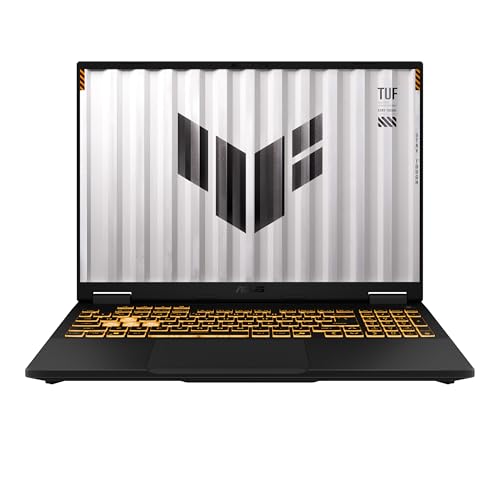
Pros
- RTX 5050 Laptop GPU with a listed 115W maximum TGP
- 16-inch FHD+ 165Hz display
- 100 percent sRGB color coverage
- MIL-STD-810H testing
- Adaptive-Sync and Arc Flow cooling
Cons
- 512GB SSD is limited for a modern game library
- Core i5 processor is less capable than the processors above it
- 4.85-pound weight is noticeable for travel
Best for: someone who wants a straightforward gaming laptop with a durable design and a fast, color-accurate screen.
The ASUS TUF Gaming F16 puts durability ahead of decorative styling. Its subtle cover and embossed TUF logo make it less conspicuous than many gaming laptops, while the 16-inch 16:10 display gives games and ordinary applications more vertical room than a conventional 16:9 panel. The FHD+ resolution is paired with a 165Hz refresh rate, 100 percent sRGB coverage, and Adaptive-Sync to reduce tearing and stutter.
The hardware is a sensible step into dedicated PC gaming. Intel's Core i5-13450HX works with an RTX 5050 Laptop GPU, which is specified with a maximum TGP of 115W. That power target is useful context because laptop GPU names do not tell the whole performance story. The system has 16GB of DDR5 memory and a 512GB PCIe Gen 4 SSD, enough for a practical starting setup but not much room for a large collection of installed games.
ASUS says the chassis has undergone MIL-STD-810H testing. That does not make the laptop indestructible, but it gives the TUF a more reassuring design brief than a machine built only around appearance. Cooling uses second-generation Arc Flow Fans, a full-width heatsink, and a full-width vent. The listed dimensions are about 13.94 by 10.59 inches, with a 0.7-inch width and weight of about 4.85 pounds.
The Acer Nitro V 16 offers a faster 180Hz screen, 1TB storage, and a newer Core 7 processor, while the ASUS ROG Strix G16 RTX 5060 brings a stronger GPU and more elaborate cooling. The TUF's main weakness is its 512GB SSD, which will require careful library management. It is a good fit for a buyer who values a restrained design, a color-accurate fast display, and a chassis built with durability testing in mind.
7. Acer Nitro V 16: Best Connectivity

Pros
- 180Hz WUXGA IPS display with 3ms Overdrive
- RTX 5050 Laptop GPU
- 1TB Gen 4 SSD
- Thunderbolt 4 and HDMI 2.1
- Ethernet, Wi-Fi 6, and microSD card reader
Cons
- Listed weight is about 5.29 pounds
- RTX 5050 is below the RTX 5060 and RTX 5070 systems
- 16GB memory is less than the 32GB options
Best for: gamers who connect several peripherals, an external display, wired networking, or removable storage.
The Acer Nitro V 16 makes a strong case for the player whose laptop is also a hub. Its 16-inch WUXGA IPS display runs at 180Hz with a 3ms Overdrive response time, and its 1920 by 1200 resolution preserves the useful 16:10 shape. That combination is well suited to fast games, while the 300-nit brightness and stated accurate colors make the screen practical for general use.
The internal hardware is balanced around Intel's Core 7 240H and an NVIDIA RTX 5050 Laptop GPU. Acer lists 16GB of DDR5 memory, two DDR5 slots supporting up to 32GB, and a 1TB PCIe Gen 4 SSD. The extra storage is welcome, particularly when compared with the 512GB drive in the TUF Gaming F16. RTX 50-series features such as DLSS 4 and Blackwell architecture are also part of the graphics platform.
Connectivity is the standout. The laptop includes a Thunderbolt 4-capable USB-C port with DisplayPort and USB charging up to 65W, multiple USB ports, HDMI 2.1, Ethernet, Wi-Fi 6, and a microSD card reader. That selection is unusually useful for a laptop that may move between a gaming desk, a classroom, and a content-creation setup. Acer's dual-fan, quad-intake, and quad-exhaust cooling system is designed to push heat out during extended use.
The ASUS TUF Gaming F16 has a durability story that Acer does not match in the supplied data, while the ASUS ROG Strix G16 RTX 5060 is the stronger performance choice. The Nitro V's downside is its 5.29-pound listed weight, which makes the plentiful ports more useful at a desk than on a daily commute. If external displays and wired accessories are part of the plan, this is the most flexible machine in the group.
8. Acer Nitro 16S AI: Best Storage Capacity

Pros
- RTX 5070 Ti Laptop GPU
- 2TB Gen 4 SSD
- 32GB DDR5 memory
- 16-inch 2560 by 1600 display
- 180Hz refresh rate and 100 percent sRGB coverage
Cons
- Display refresh rate is below the fastest ASUS model
- Fewer detailed cooling and port specifications are supplied
- AI features may matter less to buyers focused only on gaming
Best for: players who want strong graphics hardware and enough internal storage for a broad game collection.
The Acer Nitro 16S AI combines two specifications that are easy to appreciate immediately: an RTX 5070 Ti Laptop GPU and a 2TB Gen 4 SSD. The graphics processor puts it in the same broad performance tier as the second-place ROG Strix, while the larger drive gives it a practical advantage for players who dislike uninstalling games. Its 32GB of DDR5 memory also gives it more breathing room than the 16GB systems.
The 16-inch WQXGA IPS panel runs at 2560 by 1600 and 180Hz, with 100 percent sRGB color coverage. It is not as fast as the ASUS ROG Strix G16 RTX 5070 Ti's 240Hz display, but it is sharper than the FHD+ screens and still has enough refresh headroom for fluid action. The 16:10 format provides useful vertical space for general computing, and the stated color coverage makes the screen suitable for more than gaming.
The processor is AMD's Ryzen AI 9 365, a 10-core chip with a listed 73 Overall AI TOPS capability. Acer positions the laptop as a Copilot+ PC with AI-ready hardware, alongside support for 4K HDR streaming and current NVIDIA DLSS 4 features. The chassis weighs about 4.81 pounds and measures about 14.05 by 10.85 inches, with a listed width of 0.78 inches.
The ASUS ROG Strix G16 RTX 5070 Ti has the faster panel and a more fully described vapor chamber and tri-fan cooling system. The Acer counters with twice the storage and a slightly lower listed weight. Its weakness is not a clear performance shortfall, but a thinner feature description around ports and cooling compared with the ASUS and MSI entries. Choose the Nitro 16S AI when storage capacity, 32GB memory, and a high-resolution 180Hz panel matter more than the very highest refresh rate.
9. Alienware 16 Aurora: Best Cooling Design

Pros
- RTX 5050 Laptop GPU
- 16-inch WQXGA display
- 300-nit brightness
- Cryo-Chamber cooling design
- One-year onsite service listed
Cons
- 120Hz refresh rate is the slowest specified here
- Memory and storage details are not supplied
- Weighs about 5.49 pounds
Best for: buyers drawn to Alienware's distinctive design and a larger high-resolution display for mixed gaming and media use.
The Alienware 16 Aurora takes a different route from the aggressively high-refresh laptops above. Its 16-inch WQXGA display is specified at 120Hz and 300 nits, giving games and video a sharp, roomy canvas without chasing the 180Hz or 240Hz figures found elsewhere. The RTX 5050 Laptop GPU brings NVIDIA Blackwell graphics and AI features to the system, placing it in the same general graphics class as the TUF Gaming F16 and Nitro V 16.
Alienware's cooling story centers on a Cryo-Chamber structure that focuses airflow on the core components. The design avoids the need for a rear thermal shelf, according to the supplied product features, and aims to support the internal hardware without making the back of the machine unusually extended. That is a useful approach for a laptop intended to look more streamlined than older large gaming systems.
The product information lists a blue finish, dimensions of about 14.06 by 10.45 inches, a 0.73-inch width, and a weight of about 5.49 pounds. It also includes one year of onsite service for covered hardware issues that cannot be resolved remotely. The supplied listing does not specify memory or storage capacity, so those details should be confirmed before purchase rather than assumed from the GPU or processor name.
The ASUS TUF Gaming F16 has a faster 165Hz display and a defined 16GB memory and 512GB SSD configuration, while the Acer Nitro V 16 adds a 180Hz panel, 1TB SSD, and a much broader listed port selection. The Alienware's main weakness is the 120Hz refresh rate and incomplete configuration detail. It is a better fit for someone who values the Alienware design and cooling concept than for a competitive player chasing the fastest possible screen.

How to choose best gaming laptop
The right gaming laptop starts with the games you play, then works outward to the screen, cooling system, memory, storage, and connections that shape daily use.
Graphics hardware
The graphics processor has the greatest direct effect on gaming performance. The RTX 5070 Ti systems in this group sit above the RTX 5070, RTX 5060, and RTX 5050 laptops in the product hierarchy, while the KAIGERR's Radeon RX Vega 8 is integrated graphics rather than a dedicated RTX solution.
NVIDIA's Blackwell-based models add DLSS 4, ray tracing features, and AI-assisted rendering. Those features can help newer games, but the laptop's power configuration and cooling also matter. A GPU name alone does not guarantee identical performance between different chassis.
Match the GPU to the screen you will actually use. A fast 240Hz panel needs more graphics headroom than a 120Hz display.
Display resolution and refresh rate
Resolution determines image detail, while refresh rate determines how many times the screen can update each second. FHD+ and WUXGA panels are easier targets for midrange graphics hardware, while 2.5K, QHD+, and WQXGA screens make games and desktop text sharper but ask more from the GPU.
The laptops here range from the Alienware's 120Hz screen to the ROG Strix's 240Hz panel. A 165Hz or 180Hz display is already a strong fit for fast games. Look for a low response time too, such as the 3ms figures supplied for several models, because refresh rate and pixel response work together to keep motion clear.
Processor and memory
The processor affects game-related background tasks, streaming, creation software, and general responsiveness. Intel HX chips such as the Core i7-14650HX, Core i7-14700HX, Core i9-14900HX, and Core Ultra 9 275HX are aimed at demanding workloads. AMD's Ryzen AI 9 365 and Ryzen 7 H255 take different approaches, with the former emphasizing AI-ready capability and the latter appearing in a lighter system with integrated Radeon graphics.
Memory matters when several applications remain open. The 32GB configurations in the ASUS ROG Strix G16 RTX 5070 Ti, MSI Katana 15 HX, and Acer Nitro 16S AI provide more room than 16GB systems. The KAIGERR lists 24GB, though its graphics hardware remains the limiting factor for demanding games.
Storage capacity
Modern games can consume a large portion of a laptop drive, so storage affects how often the library needs to be managed. The 2TB SSD in the Acer Nitro 16S AI offers the most room in this group. Several systems include 1TB Gen 4 SSDs, while the ASUS TUF Gaming F16 and KAIGERR RX16 list 512GB drives.
Speed is also relevant for loading applications and games. PCIe Gen 4 and NVMe SSDs are the common fast-storage choices here. If you keep video projects, game captures, and several large games locally, prioritize capacity rather than assuming an external drive will always be convenient. Players choosing around a fixed limit can compare which hardware compromises make sense for a gaming laptop before settling on a configuration.
Cooling and chassis design
Gaming laptops generate more heat than ordinary notebooks, so cooling affects sustained performance, fan noise, and comfort. The ROG Strix models use a vapor chamber, tri-fan technology, and liquid metal on the chipset. MSI uses dual fans and five heat pipes, while Acer's Nitro V 16 uses dual fans with quad intake and exhaust paths.
Chassis weight is the other side of that decision. The Lenovo Legion 5i OLED is listed at about 4.4 pounds, the KAIGERR at about 3.86 pounds, and the ROG Strix configurations at about 5.84 pounds. A lighter laptop is easier to carry, but a larger cooling system can be useful when the machine spends most of its time plugged in at a desk. A cooling pad can help in some setups, and the airflow features that matter for long gaming sessions explain what to look for around the laptop itself.

Frequently asked questions
Is a 165Hz display enough for gaming?
Yes. A 165Hz display is fast enough for smooth play across a wide range of games and is a strong middle ground for a gaming laptop. Higher refresh rates such as 180Hz and 240Hz are most useful when the GPU can produce correspondingly high frame rates and the player notices the difference.
Is 16GB of memory enough for a gaming laptop?
16GB is a practical configuration for gaming and ordinary multitasking. Buyers who stream, edit, run many browser tabs, or keep several game-related tools open may prefer 32GB, as found in the ASUS ROG Strix G16 RTX 5070 Ti, MSI Katana 15 HX, and Acer Nitro 16S AI.
Should a gaming laptop have a 1TB SSD?
A 1TB SSD is a more comfortable starting point than a 512GB drive because modern games can be large. It still may require library management if many demanding games are installed at once. The Acer Nitro 16S AI has a 2TB SSD, making it the strongest fit for a large local library.
Is an RTX 5050 enough for gaming?
An RTX 5050 can support a capable gaming laptop, particularly when paired with a 165Hz or 180Hz FHD+ or WUXGA display. The ASUS TUF Gaming F16, Acer Nitro V 16, and Alienware 16 Aurora use RTX 5050 graphics, but they are not aimed at the same performance tier as the RTX 5070 and RTX 5070 Ti systems.
Is an OLED screen good for gaming?
OLED can provide a rich, high-contrast image and is also useful for media and creative work. The Lenovo Legion 5i OLED combines that panel type with a 165Hz refresh rate. Players focused on the highest competitive refresh rate may prefer the 240Hz ASUS ROG Strix display instead.
Does a gaming laptop need Wi-Fi 7?
No. Wi-Fi 7 is a useful forward-looking feature in the ASUS ROG Strix models, but the quality of the network, router, and internet connection also affects online play. Wi-Fi 6 and Wi-Fi 6E laptops can still provide a strong wireless experience, while Ethernet remains useful for a stable desk-based connection.

The bottom line
The ASUS ROG Strix G16 RTX 5060 is the Best gaming laptop for most people in this group because it combines a fast 165Hz display, current RTX graphics, 1TB storage, capable cooling, and Wi-Fi 7 without leaning too far into any one specialty. It is the one to choose when you want a gaming machine that also handles everyday work and entertainment comfortably.
For more demanding play, the ASUS ROG Strix G16 RTX 5070 Ti is the clear upgrade, with a 2.5K 240Hz screen, 32GB memory, and stronger graphics hardware. The Lenovo Legion 5i OLED is the better alternative for a lighter mixed-use laptop with a display that stands out for games, media, and creative work.
If you are undecided, choose the ROG Strix G16 RTX 5060 for balance, the ROG Strix G16 RTX 5070 Ti for maximum gaming headroom, or the Legion 5i OLED when screen quality and portability lead the decision.
As an Amazon Associate we earn from qualifying purchases.