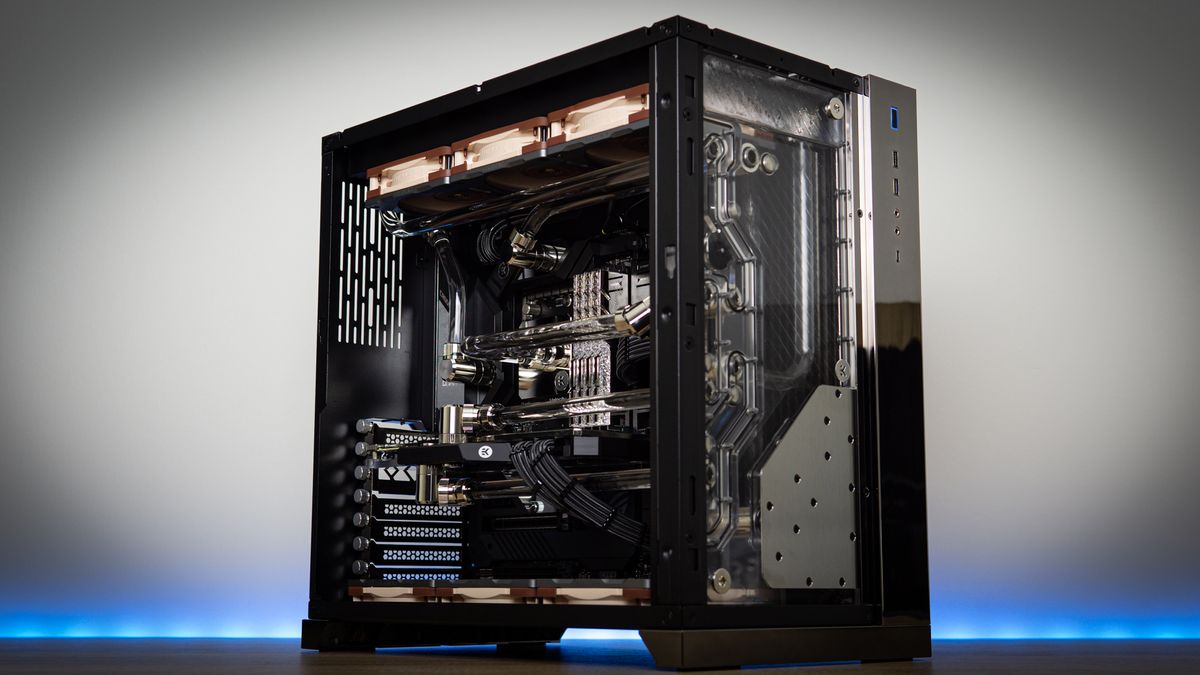

A gaming desktop has to do more than carry a powerful graphics card. It needs enough memory for modern games, storage that does not fill immediately, cooling that can cope with long sessions, and a case you can live with beside your desk. The wrong combination can leave a fast GPU held back by a weak processor or a cramped upgrade path.
Our Best gaming desktop pc picks range from the RTX 5070 systems that target demanding 1440p play to accessible RTX 5060 and RX 580 towers for lighter gaming. The KOTIN Ryzen 7 9700X system is the top pick, while ASUS, Alienware, MSI, CyberPowerPC, iBUYPOWER, ZOTAC, YAWYORE, and STGAubron each make a case for a different type of player.
Quick comparison
| # | Product | Award | Graphics | Processor | Memory and storage | Best for |
|---|---|---|---|---|---|---|
| 1 | KOTIN Ryzen 7 9700X | Best overall | RTX 5070 12GB GDDR7 | Ryzen 7 9700X, 8 cores | 32GB DDR5, 1TB NVMe | High-end 1440p and 4K gaming |
| 2 | Alienware Aurora RTX 5070 | Best polished design | RTX 5070 | Core Ultra 7 265F | 1TB storage | A distinctive turnkey setup |
| 3 | MSI Codex Z2 | Best storage capacity | RTX 5070 | Ryzen 7 8700F, 8 cores | 32GB DDR5, 2TB NVMe | Large game libraries |
| 4 | KOTIN Ryzen 7 8700F | Best 1440p starter | RTX 5060 Ti 8GB | Ryzen 7 8700F, 8 cores | 16GB DDR5, 1TB NVMe | High-refresh 1080p and 1440p |
| 5 | iBUYPOWER Element Ryzen 9 | Best for CPU-heavy work | RTX 5070 12GB | Ryzen 9 7900X | 32GB DDR5, 1TB NVMe | Gaming and creation |
| 6 | ASUS ROG G700 | Best upgrade platform | RTX 5070 Ti | Core Ultra 7 265KF | 32GB DDR5, 1TB NVMe | Enthusiasts planning upgrades |
| 7 | CyberPowerPC Gamer Xtreme | Best connectivity | RTX 5070 12GB | Core i9-14900KF, 24 cores | 32GB DDR5, 2TB NVMe | Multitasking and peripherals |
| 8 | YAWYORE Ryzen 7 5700X | Best wireless basics | RTX 5060 8GB GDDR7 | Ryzen 7 5700X, 8 cores | 32GB DDR4, 1TB NVMe | Everyday gaming and streaming |
| 9 | ZOTAC MEK Ryzen 5 | Best compact feature set | RTX 5060 8GB GDDR7 | Ryzen 5 9600X, 6 cores | 16GB DDR5, 1TB NVMe | 1080p and 1440p gaming |
| 10 | STGAubron Core i7 | Best for light gaming | RX 580 8GB | Core i7, up to 3.9GHz | 16GB, 512GB SSD | Older games and esports |
1. KOTIN Ryzen 7 9700X: Best Overall

Pros
- RTX 5070 graphics with 12GB GDDR7 memory
- 32GB DDR5 6000MHz memory
- 360mm liquid cooling and 850W Gold power supply
- Built-in display for system temperatures and usage
- WiFi 7 connectivity
Cons
- 1TB of storage can fill quickly with large games
- Larger cooling system adds complexity
- Distinctive display and lighting may not suit a restrained setup
Best for: players who want a strong all-round tower for demanding games, streaming, and creative work.
The KOTIN Ryzen 7 9700X is the tower we would keep for a wide mix of gaming and non-gaming work. It has the kind of headroom that makes a prebuilt feel less disposable: an RTX 5070 with 12GB of GDDR7 graphics memory, a Ryzen 7 9700X with eight cores, and 32GB of DDR5 memory running at 6000MHz. That combination is well suited to high-refresh 1440p play and gives demanding games room to use higher texture settings.
The processor matters here because the system is not built around graphics power alone. Eight cores can handle a game while background applications, voice chat, streaming tools, or browser tabs remain active. The 1TB PCIe 4.0 NVMe SSD should make Windows and game launches feel responsive, though a large library will eventually call for extra storage.
Cooling is more elaborate than on most of the other towers. A 360mm liquid cooler works with an 850W 80 Plus Gold power supply, while the ARGB mid-tower case provides a familiar gaming look. WiFi 7 is a welcome modern feature for wireless networking, and the built-in 11.3-inch smart display shows CPU and GPU temperatures, usage, and weather. It is useful information rather than lighting for its own sake, although it also makes the machine more visually conspicuous.
Compared with the MSI Codex Z2, the KOTIN has a newer Ryzen 7 9700X and stronger stated memory speed, but MSI gives you twice the storage. The ASUS ROG G700 moves up to an RTX 5070 Ti and offers a more upgrade-focused chassis, yet it is substantially larger. KOTIN's weakness is the 1TB drive and the fact that liquid cooling adds a component you may eventually need to monitor. Buyers wanting a simple air-cooled tower should look at MSI or ZOTAC instead.
For someone choosing a single machine for current games, streaming, and occasional demanding desktop work, this is the most balanced pick in the group. It also arrives with Windows 11 Home, is assembled and tested, and includes a one-year limited warranty with lifetime technical support.
2. Alienware Aurora RTX 5070: Best Polished Design
Pros
- RTX 5070 graphics
- Intel Core Ultra 7 265F processor
- Customizable AlienFX lighting
- Alienware Command Center profiles
- One-year onsite service
Cons
- Only 1TB of storage is specified
- The chassis is relatively deep and heavy
- Proprietary design may not appeal to upgrade-focused users
Best for: someone who wants a recognizable gaming tower with coordinated lighting and guided software controls.
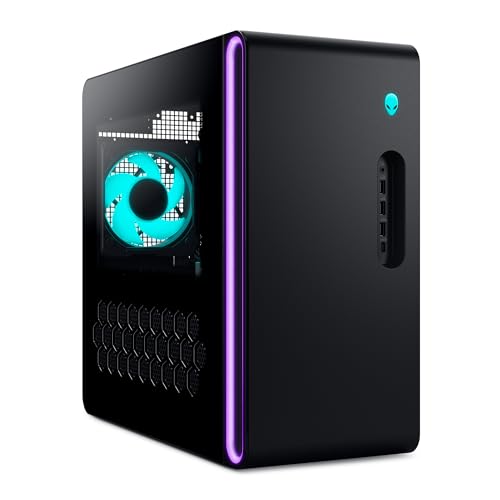
The Alienware Aurora RTX 5070 is the obvious choice for buyers who care about the whole setup, not just the component list. Its matte black chassis and stadium-style lighting give it a distinct presence, and AlienFX lets you coordinate lighting zones across compatible Alienware equipment. This is a more finished, branded experience than the open RGB approach used by KOTIN, MSI, and iBUYPOWER.
Its central hardware pairing is an RTX 5070 and Intel Core Ultra 7 265F. The graphics card is the main reason to choose this configuration for modern gaming, while the Core Ultra processor gives it the processing capacity for gaming, livestreaming, and multitasking. The listing identifies 1TB of storage, enough for a starting library but less generous than the 2TB drives in the MSI Codex Z2 and CyberPowerPC Gamer Xtreme.
Alienware's Command Center software is the most meaningful extra. It lets owners edit AlienFX lighting, choose performance modes, and create profiles for individual games. That can make a prebuilt easier to manage for a newcomer who would rather adjust settings in one interface than search through separate utilities.
The Aurora is 16.46 inches tall, 18.05 inches long, and weighs 33.894 pounds. That is not an especially small tower, so measure the space under or beside the desk before ordering. Its one-year onsite service is another practical advantage, particularly for buyers who would rather have covered hardware issues handled at home than open the case themselves.
The real limitation is flexibility. The product information does not spell out the memory configuration or cooling arrangement, and the chassis design is less inviting to someone who expects to replace several parts over time. The MSI Codex Z2 offers more storage, while the ASUS ROG G700 is the better fit for clearly stated upgrade access. Choose Alienware when the cohesive design and software experience matter as much as raw component selection.
3. MSI Codex Z2: Best Storage Capacity
Pros
- RTX 5070 graphics
- 32GB DDR5 memory
- 2TB M.2 NVMe storage
- USB Type-C connectivity
- Four-fan cooling layout
Cons
- Ryzen 7 8700F is less capable than the top AMD processor here
- Tall chassis needs suitable desk clearance
- Air cooling is less elaborate than liquid-cooled rivals
Best for: gamers who want a large starting library without immediately adding another storage drive.
The MSI Codex Z2 gets one important thing right that many gaming desktops overlook: it gives the game library breathing room. Its 2TB M.2 NVMe SSD is double the capacity found in several otherwise powerful systems here. That matters when modern installations, downloadable content, and creative files compete for the same drive.
The core pairing is an RTX 5070 and an eight-core Ryzen 7 8700F. The processor boosts up to 5.0GHz and has 16 threads, which is plenty for gaming alongside ordinary background work. The RTX 5070 provides the graphics muscle for demanding 1440p play and supports the newer Blackwell architecture, with ray tracing and modern frame-generation features listed among its capabilities.
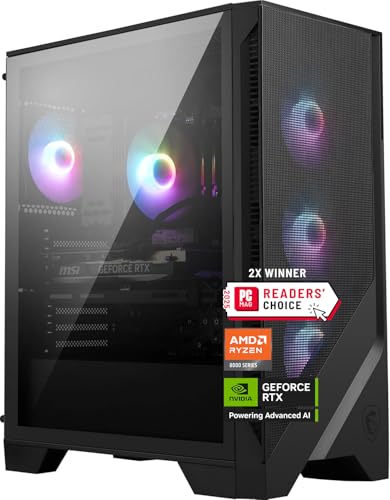
MSI uses an ARGB air cooler and four system fans, with three at the front and one at the rear. That is a straightforward airflow arrangement, and it avoids the pump and radiator considerations that come with the KOTIN Ryzen 7 9700X or ASUS ROG G700. The trade-off is that it does not have the same liquid-cooling specification or processor tier as those systems.
The Codex Z2 is 19 inches tall, 16 inches long, and 8.38 inches wide. It is taller than the KOTIN Ryzen 7 9700F system, so desk placement deserves attention. USB Type-C is a useful modern connection, and the MSI Center software handles lighting customization. Windows 11 Home is installed, and the machine is described as VR-ready.
Against Alienware Aurora RTX 5070, MSI offers a much clearer storage advantage and a less stylized case. Against KOTIN's top pick, it gives up the newer Ryzen 7 9700X and faster listed memory while gaining 1TB of capacity. The weakness is therefore easy to define: it is not the fastest CPU configuration in this group. For a gamer who wants a roomy drive and a sensible cooling layout, it is the more practical pick.
4. KOTIN Ryzen 7 8700F: Best 1440p Starter

Pros
- RTX 5060 Ti 8GB graphics
- Eight-core Ryzen 7 processor
- DDR5 6000MHz memory
- Five 120mm ARGB fans
- Three M.2 storage slots
Cons
- 16GB memory leaves less room for heavy multitasking
- 8GB graphics memory is less comfortable for demanding settings
- 650W power supply leaves less capacity than the top picks
Best for: players focused on high-refresh 1080p and sensible 1440p gaming.
The KOTIN Ryzen 7 8700F is the more restrained sibling to the top KOTIN system. It keeps an eight-core AMD processor and modern DDR5 memory but steps down to an RTX 5060 Ti with 8GB of graphics memory. That makes it a natural fit for 1080p high-refresh gaming and 1440p play with settings chosen carefully, rather than a tower aimed at maximum resolution and texture quality.
The Ryzen 7 8700F reaches up to 5.0GHz and gives the system enough CPU capacity for gaming, streaming, and content creation. Its 16GB of DDR5 6000MHz memory is a reasonable starting point, though heavy browser use, streaming software, and large creative applications will make the 32GB systems feel more relaxed. The 1TB PCIe Gen4 NVMe SSD is specified with read speeds of up to 6, 000 MB/s, which should help with boot and loading times.
Cooling is unusually well covered for this class of machine. A CPU air cooler with six copper heat pipes and a temperature display works alongside five 120mm ARGB fans. The display can be useful when checking temperatures without opening software, although it also adds to the visual theme. WiFi 7 and Bluetooth support make it a modern wireless setup for online play and peripherals.
Upgrade planning is a strong point. The motherboard has four memory slots and supports up to 256GB of DDR5 according to the listing, while three M.2 slots leave room for additional solid-state storage. A 650W 80 Plus Gold power supply is included. That is a sensible match for the listed hardware, but it gives less power headroom than the 850W unit in the top KOTIN.
The RTX 5060 Ti is the clear boundary. Players who want consistently demanding 4K settings should move to the RTX 5070 systems, while the ZOTAC MEK offers a newer six-core CPU and a similarly positioned graphics card. KOTIN's advantage is its eight-core processor, stronger cooling layout, and unusually clear storage expansion path. It is the pick for a player who wants room to grow without starting with a top-tier tower.
5. iBUYPOWER Element Ryzen 9: Best for CPU-Heavy Work

Pros
- Ryzen 9 7900X processor
- RTX 5070 with 12GB graphics memory
- 32GB DDR5 memory
- Six USB 3.1 ports
- Keyboard and RGB mouse included
Cons
- 1TB storage is modest for a broad game library
- WiFi is listed as 802.11ac rather than a newer standard
- Large, heavy case
Best for: gamers who also run demanding multicore applications and want included peripherals.
The iBUYPOWER Element Ryzen 9 takes a different route from the KOTIN and MSI systems. It pairs the RTX 5070 with a Ryzen 9 7900X, making the processor the headline feature. That extra CPU emphasis suits a buyer who games but also edits, renders, streams, or runs several demanding applications at the same time.
The machine includes 32GB of DDR5 memory configured as two 16GB modules and a 1TB NVMe SSD. The memory capacity is comfortable for gaming and multitasking, but the drive can become tight once several large games and work projects accumulate. The graphics card has 12GB of memory, giving it a more comfortable specification for high-resolution textures than the RTX 5060 Ti and RTX 5060 systems.
Connectivity is unusually clear in the listing. There are six USB 3.1 ports, a gigabit Ethernet connection, and onboard audio. WiFi is included through 802.11ac, which is still useful for ordinary wireless play but is behind the WiFi 7 support found in both KOTIN systems. A tempered glass RGB case and 16-color lighting provide the expected gaming presentation.
It also includes a gaming keyboard and RGB mouse, so a new setup can get started without selecting those accessories separately. Windows 11 Home is installed, and the listing describes the system as free of bloatware. That is a small but welcome detail for anyone who wants a clean first boot.
Compared with the KOTIN Ryzen 7 9700X, iBUYPOWER offers a stronger listed CPU for heavily threaded work but lacks the KOTIN's WiFi 7, 360mm cooler, smart display, and 850W Gold power supply details. CyberPowerPC counters with the same RTX 5070 class and 2TB storage, while ASUS offers a faster graphics tier. The iBUYPOWER's weakness is its older wireless standard and limited starting storage. Choose it for CPU-heavy work, the included peripherals, and a familiar glass-sided build.
6. ASUS ROG G700: Best Upgrade Platform

Pros
- RTX 5070 Ti graphics
- Core Ultra 7 265KF processor
- 32GB DDR5 memory
- Tool-less access for upgrades
- 240mm liquid cooler and quad-fan design
Cons
- Very large and heavy chassis
- Only 1TB of storage
- WiFi 6 is not as current as WiFi 7
Best for: enthusiasts who want a high-performance platform with easier access to future components.
The ASUS ROG G700 is the specialist pick in this roundup. Its RTX 5070 Ti puts it above the RTX 5070 systems on the graphics side, while the Intel Core Ultra 7 265KF gives it a strong foundation for gaming and multitasking. If the target is demanding graphics settings and a tower that can evolve, this is the most convincing hardware package here.
ASUS specifies 32GB of DDR5 memory and a 1TB PCIe 4.0 M.2 NVMe SSD. The storage is quick and suitable for a fresh installation, but it is not generous for a large game library. That shortcoming is more noticeable beside the 2TB MSI Codex Z2 and CyberPowerPC Gamer Xtreme.
The thermal design is reassuring on paper. A 240mm liquid cooler works with four fans, dust filters, and an airflow-focused chassis. Tool-less access is the more important feature for long-term ownership because it should make component changes less intimidating. The 58-liter case supports triple-slot graphics cards, so the chassis has room for substantial hardware.
Connectivity includes 2.5Gbps Ethernet, WiFi 6, versatile ports, Dolby Atmos audio, and AI noise cancellation. Those extras make sense for a desktop built around gaming and communication, although WiFi 6 is not as new as the WiFi 7 connections in KOTIN's systems. The dual-glass design, ROG Slash details, and Aura Sync RGB lighting also make this a showpiece rather than a quiet-looking office tower.
The G700 measures 18.88 inches tall, 20.05 inches long, and 9.45 inches wide, and weighs 43.8 pounds. That is the largest and heaviest option in this group, so it needs a strong, open placement. It also costs storage capacity compared with MSI and CyberPowerPC. Buyers who want the most straightforward setup should choose the KOTIN Ryzen 7 9700X, but enthusiasts who expect to upgrade and want the strongest stated graphics option should choose ASUS.
7. CyberPowerPC Gamer Xtreme: Best Connectivity

Pros
- 24-core Core i9-14900KF processor
- RTX 5070 with 12GB graphics memory
- 2TB PCIe 4.0 NVMe SSD
- USB-C and multiple USB-A ports
- Keyboard and mouse included
Cons
- WiFi 5 and Bluetooth 4.2 are dated standards
- Very heavy tower
- The processor may be more than many games require
Best for: users connecting several peripherals while gaming, streaming, or working.
The CyberPowerPC Gamer Xtreme is built for a crowded desk. Its connectivity list includes two USB-C 3.2 ports, four USB-A 3.2 ports, four USB-A 2.0 ports, LAN, WiFi 5, Bluetooth 4.2, and 7.1-channel audio. That is enough flexibility for a gaming keyboard, mouse, headset, external storage, controllers, and other accessories without immediately reaching for a hub.
Underneath, the machine uses an Intel Core i9-14900KF with 24 cores and a GeForce RTX 5070 with 12GB of graphics memory. The processor is the most core-heavy option in the roundup, which can help with demanding multitasking and threaded workloads. For gaming alone, the graphics card remains the decisive component, and it places this system alongside the KOTIN Ryzen 7 9700X, Alienware Aurora, MSI Codex Z2, and iBUYPOWER Element.
Storage is a genuine strength. The 2TB PCIe 4.0 NVMe SSD gives a game library more breathing room than the 1TB drives in many rivals. The listing also includes a liquid-cooled CPU, tempered side panel, custom RGB lighting, and a keyboard and mouse. Those additions make the system feel ready for a full desk setup rather than a bare tower.
The weakness is wireless age. WiFi 5 and Bluetooth 4.2 work, but they do not match the WiFi 7 in the KOTIN systems or WiFi 6E in the ZOTAC MEK. Ethernet users will care less, and the generous wired port selection may matter more. The tower weighs 42.7 pounds, so moving it around is not something to do casually.
Against iBUYPOWER, CyberPowerPC gives you twice the listed storage and substantially more ports, while iBUYPOWER has the newer Ryzen 9 platform and a more current wireless specification is not listed. ASUS offers a stronger graphics tier and clearer upgrade positioning. The CyberPowerPC is right for someone who wants abundant wired connectivity and storage, but it is not the cleanest pick for a wireless-first setup.
8. YAWYORE Ryzen 7 5700X: Best Wireless Basics

Pros
- Eight-core Ryzen 7 5700X processor
- RTX 5060 with 8GB GDDR7 memory
- 32GB DDR4 memory
- WiFi and Bluetooth built in
- 1TB NVMe SSD
Cons
- DDR4 platform is older than the DDR5 alternatives
- Power supply is 650W 80 Plus Bronze
- Graphics card is below the RTX 5070 systems
Best for: players who want a ready-to-use wireless tower for mainstream gaming.
The YAWYORE Ryzen 7 5700X is a straightforward gaming desktop with a sensible emphasis on everyday usability. It includes built-in WiFi and Bluetooth, a 1TB M.2 NVMe SSD, and 32GB of memory. Those basics make it easy to place into a room where wired networking is inconvenient.
The Ryzen 7 5700X has eight cores and 16 threads, with boost speeds up to 4.6GHz. It is paired with an RTX 5060 carrying 8GB of GDDR7 memory. That combination is aimed at mainstream 1080p gaming and selected 1440p settings, rather than the higher-resolution workload suited to the RTX 5070 and RTX 5070 Ti machines.
One important distinction is the memory type. YAWYORE uses 32GB of DDR4 at 3200MHz, while the more modern KOTIN, MSI, ASUS, and CyberPowerPC systems use DDR5. The larger capacity is helpful for multitasking, but the older platform gives it less of a forward-looking feel. The MSI B550M-A PRO motherboard and 650W 80 Plus Bronze power supply are clearly identified, which is useful information when considering later changes.
The machine also supports DLSS 4 multi-frame generation, ray tracing, and Reflex 2 delay optimization through its RTX 5060 graphics card. The listing notes that the GPU brand may vary, so buyers should not assume a particular board partner or cooler design. That uncertainty is worth keeping in mind beside the more specifically described ZOTAC MEK.
YAWYORE is lighter than many of the other towers at 24.95 pounds, which makes it easier to position. It does not have the DDR5 memory, Gold-rated power supply, or multi-slot storage expansion described for KOTIN's RTX 5060 Ti system. Still, its 32GB capacity and included wireless functions are useful. Pick it for uncomplicated everyday gaming, and skip it if you want the newest platform for future component changes.
9. ZOTAC MEK Ryzen 5: Best Compact Feature Set

Pros
- Ryzen 5 9600X processor
- RTX 5060 8GB GDDR7 graphics
- WiFi 6E and 5-Gigabit LAN
- HDMI 2.1 and support for up to four displays
- Three-year GPU warranty
Cons
- 16GB memory is the smallest DDR5 capacity here
- Six-core processor has less multitasking headroom
- Tall chassis despite its relatively low weight
Best for: players who want a current platform, strong networking, and a distinctive white build.
The ZOTAC MEK Ryzen 5 is a good reminder that a gaming desktop's appeal is not only about the graphics card. It combines an RTX 5060 Twin Edge OC White Edition with a Ryzen 5 9600X, then adds unusually strong networking and display support. It is aimed at 1080p and 1440p gaming, with a current AM5 processor platform that feels more forward-looking than the DDR4-based YAWYORE.
The Ryzen 5 9600X has six cores, 12 threads, boost speeds up to 5.4GHz, and 32MB of L3 cache. That is a strong gaming-oriented specification, although the six-core layout gives it less room for heavy parallel workloads than the Ryzen 7 and Ryzen 9 systems. The RTX 5060 has 8GB of GDDR7 memory and supports DLSS 4 multi-frame generation and real-time ray tracing.
ZOTAC includes 16GB of DDR5-5200 memory and a 1TB NVMe M.2 SSD. The memory is adequate for a clean gaming setup, but it is the first component we would watch if the machine also runs streaming, editing, and many background applications. A 650W 80 Plus Gold power supply, WiFi 6E, Bluetooth 5.3, and 5-Gigabit LAN are all notable strengths.
The connection selection is particularly good. HDMI 2.1 and DisplayPort 1.4a support up to four displays, while USB 3.2 Gen 2 and 7.1-channel HD audio cover common desk equipment. The case has a tempered glass panel, 120mm fans, a magnetic grill, and a digital display showing system information and ambient temperature.
ZOTAC also specifies a one-year complete system warranty and a three-year GPU warranty. The 19.09-inch height means it is not truly small, despite weighing 19.12 pounds. Compared with the KOTIN Ryzen 7 8700F, it has less memory and a smaller CPU but a newer AM5 processor and better stated networking. Choose ZOTAC for a current, tidy gaming platform; choose KOTIN for heavier multitasking and easier memory expansion.
10. STGAubron Core i7: Best for Light Gaming

Pros
- RX 580 with 8GB graphics memory
- 16GB system memory
- WiFi 6 and Bluetooth 5.0
- Four RGB fans
- Keyboard and mouse included
Cons
- Older RX 580 graphics platform
- 512GB SSD fills faster than the other drives
- The processor model is not fully specified
Best for: lighter PC games, esports, schoolwork, and general desktop use.
The STGAubron Core i7 is the most modest system here, and it should be chosen with realistic expectations. Its Radeon RX 580 has 8GB of graphics memory, while the listing describes an Intel Core i7 processor reaching up to 3.9GHz, 16GB of memory, and a 512GB SSD. That is a workable combination for older games, esports, and general use, but it is far below the RTX 5060, RTX 5070, and RTX 5070 Ti systems for new demanding releases.
The listing specifically names games including Fortnite, Call of Duty Warzone, Grand Theft Auto V, World of Warcraft, League of Legends, Valorant, Apex Legends, Roblox, Minecraft, and Rocket League. It also claims 60-plus frames per second across a range of titles, though actual results will vary with resolution, settings, and the game itself. The important point is that this tower is intended for accessible gaming rather than maximum visual settings.
Connectivity is practical. It has an RJ-45 connection, WiFi 6, Bluetooth 5.0, HDMI, and DisplayPort. Four RGB fans provide airflow and lighting, while the included gaming keyboard and mouse make the machine usable immediately. Windows 11 Home is installed, and the listing includes a one-year parts and labor warranty with lifetime technical support.
The 512GB solid-state drive is the main everyday limitation. It can hold an operating system and a selection of games, but it offers much less room than the 1TB and 2TB drives elsewhere in this roundup. The processor is also described only as a Core i7 up to 3.9GHz, without a generation or exact model, which makes future performance comparisons difficult.
The STGAubron should not be confused with the Best gaming desktop pc choices for demanding new games. The ZOTAC MEK is a much stronger modern platform, while YAWYORE offers a newer RTX 5060 graphics card and twice the storage. STGAubron makes sense for a secondary PC, a first gaming tower focused on lighter titles, or a home machine that also handles school and office tasks.
How to choose best gaming desktop pc
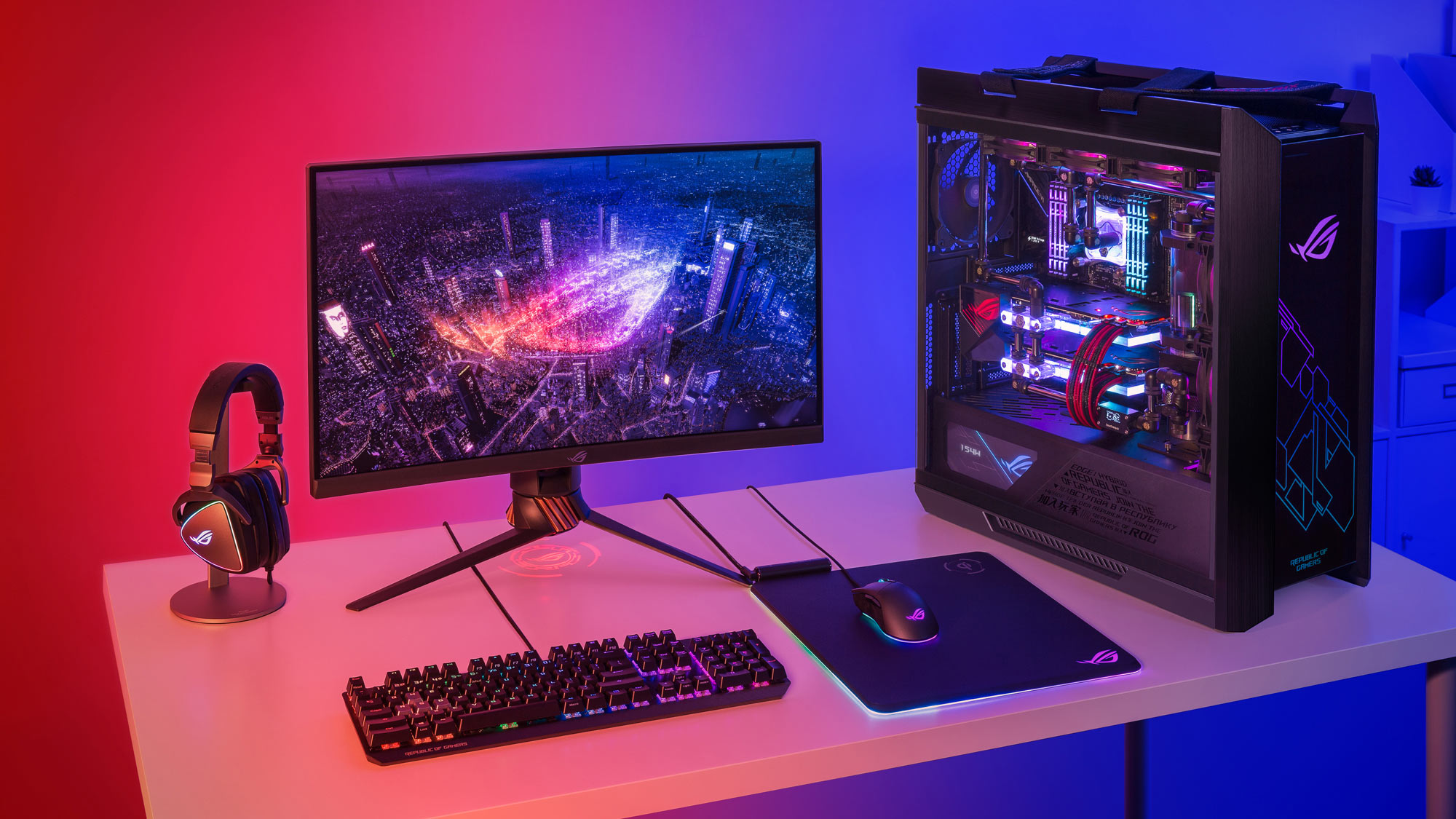
The right desktop starts with the games and display you plan to use, then works outward to cooling, memory, storage, and upgrade access. For a broader look at how complete systems differ, the hardware choices that shape a gaming tower can help before you narrow down a prebuilt.
Graphics card
The graphics card has the largest effect on game resolution, visual settings, ray tracing, and frame rates. The RTX 5070 and RTX 5070 Ti systems in this roundup are the strongest choices for demanding 1440p play and more ambitious settings. RTX 5060 and RTX 5060 Ti towers are better suited to 1080p and selected 1440p configurations, while the RX 580 system is intended for lighter or older games.
Graphics memory matters too. The 12GB RTX 5070 cards provide more room for high-resolution textures than the 8GB RTX 5060 and RX 580 cards. Modern upscaling and frame-generation features can improve smoothness, but they do not turn an entry-level graphics card into a high-end one.
Processor
A fast gaming processor helps maintain frame rates, especially in simulation, strategy, esports, and other CPU-sensitive games. Eight-core chips such as the Ryzen 7 9700X, Ryzen 7 8700F, and Ryzen 7 5700X offer useful room for streaming and background applications. The Ryzen 9 7900X and Core i9-14900KF go further for heavily threaded creation work.
A six-core Ryzen 5 9600X can still be a strong gaming choice, particularly when paired with an RTX 5060. Buyers who regularly render video, compile software, or stream while gaming should favor the higher-core systems.
Memory
Sixteen gigabytes is a reasonable starting point for gaming, but 32GB gives more breathing room for current games, browsers, voice chat, and streaming tools. The KOTIN Ryzen 7 8700F and ZOTAC MEK start at 16GB, while the more powerful systems generally include 32GB.
Memory generation also matters for the platform's age. DDR5 is used in most of the newer towers, while YAWYORE uses 32GB of DDR4. Capacity is not the only consideration, but DDR5 systems generally offer a more current foundation for future changes.
A powerful GPU is wasted if the desktop cannot keep it cool, fed with data, and supplied with enough storage.
Cooling and power
Gaming desktops need consistent cooling during long sessions. Liquid coolers appear in the KOTIN Ryzen 7 9700X, ASUS ROG G700, and CyberPowerPC systems, while MSI, KOTIN's RTX 5060 Ti tower, and ZOTAC use air cooling with multiple fans. Neither approach is automatically superior, but the case needs enough airflow and the cooler needs to match the processor.
The power supply should also suit the graphics card and leave room for sensible upgrades. The KOTIN top pick specifies an 850W 80 Plus Gold unit, while several other systems use 650W supplies. The STGAubron listing does not provide the same detailed power supply information, which is another reason to treat it as a lighter-duty machine.
Storage and expansion
A 1TB SSD is a useful starting point, but large games can consume it quickly. The MSI Codex Z2 and CyberPowerPC Gamer Xtreme stand out with 2TB drives. The STGAubron's 512GB SSD is much easier to fill.
Expansion details are valuable when a desktop has otherwise suitable hardware. KOTIN's RTX 5060 Ti system lists three M.2 slots and four memory slots, while ASUS highlights tool-less access and support for triple-slot graphics cards. If a second drive or more memory is likely, favor a system with clear access and documented expansion room. A related guide on how much space a gaming desk setup really needs can help if the tower will share a crowded workspace.
Networking and ports
Wired Ethernet remains the most consistent choice for competitive online play, but wireless standards matter when the router is across the room. WiFi 7 appears in both KOTIN systems, WiFi 6E is listed for ZOTAC, and Alienware provides a software-centered setup without a detailed wireless specification in the supplied information.
Count the ports you actually use. CyberPowerPC has an especially generous mix of USB-C and USB-A connections, while ZOTAC offers HDMI 2.1, DisplayPort, fast LAN, and support for up to four displays. These details become important when the desktop also runs external drives, capture gear, controllers, and multiple monitors.

Frequently asked questions
Is an RTX 5070 desktop suitable for 1440p gaming?
The RTX 5070 systems in this roundup are the strongest matches for demanding 1440p play. The KOTIN Ryzen 7 9700X, Alienware Aurora, MSI Codex Z2, iBUYPOWER Element, and CyberPowerPC Gamer Xtreme all pair that graphics class with capable processors. Settings and frame rates still depend on the game and display.
How much memory should a gaming desktop have?
Sixteen gigabytes can handle a focused gaming setup, but 32GB is more comfortable for current games with browsers, voice chat, streaming, or creative applications open. The KOTIN Ryzen 7 8700F and ZOTAC MEK use 16GB, while most of the higher-tier picks include 32GB.
Is a 1TB SSD enough for PC games?
It is enough to start, but it may not remain comfortable if you install many large games. MSI Codex Z2 and CyberPowerPC Gamer Xtreme are easier choices for a broad library because each lists a 2TB NVMe SSD. The STGAubron's 512GB drive requires the most careful storage management.
Do gaming desktops include WiFi?
Several do. KOTIN lists WiFi 7, ZOTAC lists WiFi 6E, YAWYORE lists built-in WiFi, and STGAubron lists WiFi 6. The precise standard varies, so buyers should check the listing for the model they choose rather than assume every prebuilt has the same wireless capability.
Is liquid cooling necessary for a gaming desktop?
No. A well-designed air cooler with several case fans can be suitable, as shown by MSI and the KOTIN RTX 5060 Ti system. Liquid cooling can help manage high-performance processors, but it adds a pump and radiator to the system, so it is not automatically the best fit for every buyer.
Can these desktops be upgraded later?
Many can, but the amount of room differs. KOTIN's RTX 5060 Ti system lists four memory slots and three M.2 slots, while ASUS highlights tool-less access and a 58-liter chassis that supports triple-slot graphics cards. Proprietary or less fully documented designs deserve more caution before planning major changes.
Which desktop is suitable for lighter games?
STGAubron is aimed at older and lighter games, esports, and general desktop use. YAWYORE and ZOTAC are stronger modern choices if you want an RTX 5060 and more room for newer titles. Players targeting demanding 1440p or 4K gaming should move up to an RTX 5070 or RTX 5070 Ti system.

The bottom line
The KOTIN Ryzen 7 9700X is our top Best gaming desktop pc pick because it combines an RTX 5070, eight-core Ryzen processor, 32GB of fast DDR5 memory, strong cooling, WiFi 7, and a useful system-monitoring display. Its 1TB SSD is the weakness, but the overall hardware balance is difficult to beat.
Choose the ASUS ROG G700 if upgrade access and the RTX 5070 Ti matter more than size, or choose MSI Codex Z2 if the 2TB SSD is more important than having the newest Ryzen 7 configuration. ZOTAC and STGAubron cover lighter gaming at opposite ends of capability, while CyberPowerPC and iBUYPOWER suit users with heavier multitasking needs.
If you are undecided, choose the KOTIN Ryzen 7 9700X unless you specifically need ASUS's upgrade-focused chassis or MSI's larger drive.
As an Amazon Associate we earn from qualifying purchases.