

A laptop can now use a neural processor for tasks that once depended entirely on the CPU or graphics chip, but the label alone does not tell you much. Some AI laptops are built for demanding games and creative work, while others focus on long battery life, video calls, or basic schoolwork.
Our Best AI laptop picks cover that full spread. The Acer Nitro 16S is the strongest all-round performer, while the MacBook Air M5 is the better fit for people who want a quiet, portable computer with excellent everyday endurance. The remaining models make more sense for specific buyers, from students to Windows productivity users.
The Acer Nitro 16S AI Copilot+ PC is our top pick, with the Apple MacBook Air M5, Acer Aspire 14 AI, Lenovo Legion LOQ, MacBook Neo, and drkako student laptop filling out the range.
Comparison table
| # | Product | Award | Processor and graphics | Display | Memory and storage | Best for |
|---|---|---|---|---|---|---|
| 1 | Acer Nitro 16S | Best overall | Ryzen AI 9 365, RTX 5070 Ti | 16-inch WQXGA IPS, 180Hz | 32GB, 2TB SSD | Gaming and demanding AI workloads |
| 2 | Apple MacBook Air M5 | Best portable Mac | Apple M5 | 13.6-inch Liquid Retina | 16GB, 512GB SSD | Quiet everyday work and study |
| 3 | Apple MacBook Neo | Best compact Mac | Apple A18 Pro | Liquid Retina | 8GB, 256GB SSD | Basic Apple Intelligence tasks |
| 4 | Lenovo Legion LOQ | Best gaming alternative | Core i7-13650HX, RTX 5050 | 15.6-inch FHD IPS, 144Hz | 16GB, 1TB storage | PC gaming and multitasking |
| 5 | Apple MacBook Air M5 Sky Blue | Best for Apple ecosystem users | Apple M5 | 13.6-inch Liquid Retina | 16GB, 512GB SSD | iPhone owners and mobile work |
| 6 | Acer Aspire 14 AI | Best Windows productivity laptop | Core Ultra 7 256V, Intel Arc 140V | 14-inch WUXGA | 16GB, 1TB SSD | Work, study, and long unplugged sessions |
| 7 | drkako 15.6-inch Student Laptop | Best for basic schoolwork | Celeron J4105 | 15.6-inch FHD IPS | 12GB, 256GB SSD | Browsing, documents, and video calls |
1. Acer Nitro 16S: Best Overall

Pros
- Ryzen AI 9 365 and RTX 5070 Ti provide serious headroom
- 180Hz WQXGA screen has a sharp, spacious image
- 32GB memory and 2TB SSD suit large projects and game libraries
- Full 100% sRGB coverage helps creative work
Cons
- Heavy at 4.81 pounds
- Gaming hardware makes it less convenient for frequent travel
- The display resolution puts more demand on the graphics processor
Best for: someone who wants one Windows laptop for demanding games, creative work, and local AI features.
The Acer Nitro 16S is the laptop in this group that feels built around performance first. It has the cooling, graphics hardware, memory, and storage to handle workloads that would expose the limits of a thin productivity machine. It is also the easiest recommendation for someone who wants AI capability without giving up serious PC gaming.
The 10-core AMD Ryzen AI 9 365 processor is the foundation. Acer lists 73 Overall AI TOPS, giving the dedicated neural processing hardware a meaningful role in compatible AI tasks rather than treating it as a marketing label. The processor also has enough general-purpose capacity for demanding multitasking, while the NVIDIA GeForce RTX 5070 Ti Laptop GPU handles the graphics side. Its Blackwell architecture, fourth-generation ray tracing cores, and fifth-generation Tensor cores are aimed at modern games and neural rendering.
The screen is a major reason to choose this model over the Lenovo Legion LOQ. Its 16-inch WQXGA panel runs at 2560 by 1600 and 180Hz, so fast movement should look smoother and text and interface elements have more room than they do on the Legion's 15.6-inch FHD display. The 100% sRGB coverage also makes the Nitro 16S more credible for photo work, video editing, and other color-sensitive tasks. The higher resolution is demanding, but DLSS 4 can use neural rendering, Super Resolution, and Multi Frame Generation to help compatible games maintain fluid performance.
Acer includes 32GB of DDR5 memory and a 2TB Gen 4 SSD. Those are practical strengths, not decorative numbers. The memory gives large creative applications and heavy multitasking more breathing room, while the SSD leaves room for games, source footage, and project files without immediate storage juggling. Wi-Fi 6E is included for compatible networks, though it is not the newer Wi-Fi 7 found in the MacBook Air models.
The weakness is portability. At 4.81 pounds and with a 16-inch screen, this is a substantial machine, and its high-performance design is a poor match for someone who spends every day moving between classrooms or offices. The Acer Aspire 14 AI is far easier to carry and promises up to 22 hours under a specific video playback test, but it cannot approach the Nitro's gaming graphics power. Choose the Nitro 16S if performance is the priority and you can accept a larger charger-bag setup.
2. Apple MacBook Air M5: Best Portable Mac

Pros
- M5 chip combines everyday speed with AI-focused hardware
- 13.6-inch Liquid Retina display supports 1 billion colors
- 12MP Center Stage camera is well suited to calls and classes
- Two Thunderbolt 4 ports and support for two external displays
- Up to 18 hours of battery life is useful for long days away from an outlet
Cons
- 13.6-inch screen can feel tight beside a 16-inch gaming panel
- macOS may not support every Windows-only application or game
- Integrated graphics are not a substitute for the Nitro's RTX GPU
Best for: someone who wants a light, quiet Mac for work, study, communication, and everyday AI tools.
The Apple MacBook Air M5 is the most balanced choice for people who do not need a dedicated gaming GPU. It is only 0.44 inches wide and weighs about 2.71 pounds, so it feels much less demanding to carry than either gaming model. The familiar Air design also avoids the visual bulk associated with high-performance Windows laptops.
Apple's M5 chip brings a faster CPU, unified memory, a Neural Engine, and a next-generation GPU with Neural Accelerators. That combination is better suited to local productivity features, image tools, writing assistance, and creative applications than a conventional thin laptop without dedicated AI hardware. Apple Intelligence is part of the experience, with privacy protections described as a central feature. The chip also keeps normal macOS use responsive when many browser tabs and applications are open.
The 13.6-inch Liquid Retina display supports 1 billion colors. That gives photos and video more color range than a basic office panel, while the resolution keeps text crisp for documents and research. The Nitro 16S has the more impressive gaming screen, with its 180Hz refresh rate and 2560 by 1600 resolution, but the Air is easier to use in a lecture hall, coffee shop, or small desk setup. If your work revolves around a larger desktop, the Air can support up to two external displays.
Apple has paid close attention to calls. The 12MP Center Stage camera can keep you in frame and offers Desk View for showing a workspace, while the three-microphone array is designed to keep speech clear. The four-speaker system supports Spatial Audio and Dolby Atmos, which gives this small laptop a more capable media setup than its size suggests. Wi-Fi 7, Bluetooth 6, two Thunderbolt 4 ports, MagSafe charging, and a headphone jack cover the core connection needs, although a USB hub may still be useful.
The real limitation is platform choice. Someone who needs Windows-specific professional software or modern AAA gaming should buy the Acer Nitro 16S or Lenovo Legion LOQ instead. The Air is also not the pick for a buyer who wants a large screen built into the laptop. For everyone else, its combination of low weight, M5 performance, strong camera features, and stated battery life of up to 18 hours makes it the most complete portable Mac in this group.
3. Apple MacBook Neo: Best Compact Mac

Pros
- A18 Pro chip supports Apple Intelligence and everyday macOS work
- Durable recycled aluminum enclosure
- Liquid Retina display supports 1 billion colors
- 1080p FaceTime HD camera
- Up to 16 hours of battery life
Cons
- 8GB unified memory leaves less room for demanding multitasking
- 256GB SSD is limited for large media collections
- Not suited to demanding games or workstation applications
Best for: a student or home user who wants a small Mac for documents, browsing, streaming, and calls.
The Apple MacBook Neo takes a simpler route to AI computing. It is aimed at everyday assignments, web browsing, presentations, Apple Intelligence features, and casual entertainment rather than professional content creation. The aluminum enclosure and compact footprint make it an approachable choice for someone who wants macOS without carrying a large computer.
The A18 Pro chip provides the processing platform, and Apple positions the Neo around AI-assisted writing, note summaries, and routine productivity. That makes sense for school and general home use. Its 8GB of unified memory is the detail to watch, though. It should be adequate for ordinary applications, but users who keep many demanding apps open or work with large creative files will have more breathing room on either MacBook Air M5 model, both of which have 16GB.
The Liquid Retina display supports 1 billion colors, so photos, video, and text should look more polished than they do on a basic FHD screen. Apple does not specify a screen size in the supplied product details beyond the 13-inch MacBook Neo description, so buyers should not assume it offers the same 13.6-inch measurement listed for the MacBook Air. The 1080p FaceTime HD camera is well suited to classes and calls, and the dual-mic array plus side-firing speakers give it a sensible communications setup.
Battery life is listed at up to 16 hours, enough for a long school day under Apple's stated conditions. FileVault encryption, Find My, automatic security updates, and built-in antivirus protection address the less visible parts of ownership. The Mac and iPhone integration is also useful for people already using Apple's phone, since messages, calls, files, and other continuity features can move between devices.
The Neo is not a smaller MacBook Air M5. The Air has twice the unified memory, more storage, a 12MP Center Stage camera, and Thunderbolt 4 connectivity. The Neo makes more sense when the workload is deliberately light and the user wants a compact Mac for core tasks. Skip it if you regularly edit video, maintain large photo libraries, or expect the laptop to serve as a serious development or creative workstation.
4. Lenovo Legion LOQ: Best Gaming Alternative

Pros
- Core i7-13650HX offers strong multitasking performance
- RTX 5050 graphics are suited to PC gaming
- 144Hz display includes G-Sync
- Hyperchamber cooling uses turbo fans and copper heat pipes
- Rapid Charge Pro reaches 70% in under 30 minutes
Cons
- Weighs 5.28 pounds
- FHD resolution is less sharp than the Nitro 16S panel
- Battery details are less specific than the MacBook and Aspire listings
Best for: a PC gamer who wants a capable gaming-first laptop with useful automatic performance tuning.
The Lenovo Legion LOQ is a straightforward gaming laptop with AI features that support the hardware rather than dominate the product. Its Core i7-13650HX processor, GeForce RTX 5050 graphics, 16GB of memory, and 1TB of storage create a sensible foundation for games, streaming, and general multitasking. It is the model to consider when the Acer Nitro 16S feels more powerful and physically substantial than you need.
Its 15.6-inch FHD IPS display runs at 144Hz, which is a meaningful step above a standard 60Hz panel for competitive games and quick camera movement. G-Sync helps coordinate the display's refresh with the graphics processor, reducing tearing and stuttering. The Nitro 16S is ahead on resolution, refresh rate, color coverage, memory, storage, and graphics power, but the LOQ's 144Hz screen still fits its target well.
Lenovo's AI Engine+ automatically tunes CPU, GPU, and system settings for smoother gameplay and better frame rates. That is a practical use of AI because it works in the background, rather than requiring the owner to learn a complicated set of manual profiles. Hyperchamber Cooling adds turbo fans and copper heat pipes, while the product description says vacuum-sealed thermals help move heat away during demanding use. These features matter because sustained performance is more useful than a brief burst followed by aggressive throttling.
The keyboard has a full layout, white backlighting, and soft-landing switches. That combination should suit both game controls and ordinary typing, though the laptop's 5.28-pound weight makes it less attractive as a daily commuter. Lenovo says Rapid Charge Pro can bring the battery to 70% in under 30 minutes, and Smart Battery Technology is intended to prevent unnecessary drain. The supplied details do not provide an hours figure, so we would not compare its endurance directly with the MacBook Air or Acer Aspire.
The LOQ is the better fit for someone who wants a gaming laptop first and AI tuning second. The Acer Nitro 16S wins for demanding games and high-resolution creative work, while the Acer Aspire 14 AI is much easier to carry for office tasks. Pick the Lenovo when the 144Hz G-Sync display, RTX 5050, cooling system, and gaming keyboard matter more than a lighter chassis.
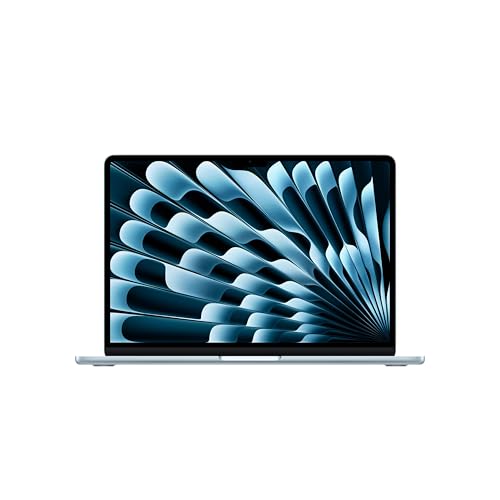
5. Apple MacBook Air M5 Sky Blue: Best for Apple Ecosystem Users
Pros
- M5 chip includes a Neural Engine and Neural Accelerators
- 13.6-inch Liquid Retina display supports 1 billion colors
- 12MP Center Stage camera supports Desk View
- Wi-Fi 7 and Bluetooth 6
- Supports up to two external displays
Cons
- Same limited gaming graphics approach as the other MacBook Air
- Small built-in screen may not suit complex timelines or spreadsheets
- Requires macOS-compatible applications
Best for: an iPhone owner who wants a portable Mac that works smoothly with other Apple devices.
The Apple MacBook Air M5 Sky Blue is functionally the same computer as the Midnight MacBook Air in this list. The distinction is the finish, so the buying decision should focus on the shared hardware and the way it fits into an Apple-centered setup. It is thin, light, quiet, and capable enough for school, office work, communication, and a wide range of creative applications.
Its M5 chip combines a faster CPU with unified memory, a Neural Engine, and a next-generation GPU with Neural Accelerators. Those components give Apple Intelligence and compatible AI applications dedicated hardware support while keeping normal macOS interactions quick. The 16GB unified memory and 512GB SSD are better suited to sustained multitasking than the MacBook Neo's 8GB and 256GB configuration.
The 13.6-inch Liquid Retina panel supports 1 billion colors, which helps presentations, photos, and streaming content look rich. Two Thunderbolt 4 ports, MagSafe charging, a headphone jack, Wi-Fi 7, and Bluetooth 6 cover a modern desk setup. Support for up to two external displays is especially useful if you want a small laptop that can become a more expansive workstation at home.
The 12MP Center Stage camera is one of the Air's strongest practical features. It can keep the user in frame during calls and provide Desk View for showing documents or a physical workspace. The three-microphone array, four speakers, Spatial Audio, and Dolby Atmos support give the Air a more complete communication and entertainment package than many thin laptops. Apple lists up to 18 hours of battery life, though actual results will vary with the applications and display use.
The main reason to buy this version instead of the Midnight model is personal preference, since the supplied specifications are the same. The main reason to avoid both is software compatibility. Windows gaming and specialist applications may not translate cleanly to macOS, and the integrated graphics are not in the same class as the Acer Nitro 16S or Lenovo Legion LOQ. If your daily devices are an iPhone and other Apple products, though, features such as iPhone control, shared files, calls, and continuity make this a particularly coherent choice. Readers comparing portable Mac options may also want to consider how Apple laptops fit different work and study routines before choosing a screen size.
6. Acer Aspire 14 AI: Best Windows Productivity Laptop

Pros
- Up to 22 hours of stated video playback battery life
- Core Ultra 7 256V combines CPU, GPU, and NPU hardware
- Intel Arc 140V graphics are more capable than basic integrated graphics
- Aluminum chassis weighs 3.09 pounds
- 180-degree hinge and backlit keyboard add flexibility
Cons
- WUXGA screen is less expansive than the gaming laptops
- Not designed for high-end gaming
- Battery claim comes from a specific video playback test
Best for: a Windows user who wants long unplugged sessions, built-in AI features, and a portable productivity machine.
The Acer Aspire 14 AI is the Windows counterpart to the MacBook Air in this roundup. It does not chase gaming performance, but it gives ordinary work a strong AI-ready platform in a 14-inch aluminum laptop that weighs 3.09 pounds. That makes it much easier to carry than either gaming pick while retaining more Windows flexibility than the Mac models.
The Intel Core Ultra 7 Processor 256V combines a CPU, Intel Arc 140V GPU, and NPU. Acer lists up to 47 TOPS for the NPU and up to 64 TOPS for the GPU, giving the laptop separate resources for AI acceleration and graphics tasks. These figures do not make it a replacement for the Nitro 16S's RTX 5070 Ti, but they are meaningful for Windows Copilot+ experiences, video effects, image tools, and everyday productivity features.
Acer lists up to 22 hours of battery life, measured under specific video playback settings. That qualification matters, since web browsing, video calls, screen brightness, and AI workloads can reduce endurance. Even so, the figure explains the Aspire's appeal for travel and study. Its 14-inch WUXGA display runs at 1920 by 1200, giving documents a little more vertical room than a standard 16:9 FHD screen.
The aluminum chassis, backlit keyboard, and 180-degree hinge make the Aspire more adaptable than its plain office-laptop appearance suggests. The hinge can lie flat for sharing a screen or presenting across a table. AcerSense provides a dedicated way to reach system settings and AI tools, and the laptop includes Wi-Fi 6E for compatible wireless networks. Memory is 16GB LPDDR5X and storage is a 1TB SSD, a useful balance for office applications, school files, and moderate creative work.
The compromise is graphics performance. The Aspire is not the right choice for someone buying a laptop primarily for new, demanding games, and the Lenovo Legion LOQ is a much better gaming platform. It is also not as light as the MacBook Air. For Windows users who care more about battery endurance, portability, and practical AI features than frame rates, the Aspire 14 AI is the more sensible tool. If you are comparing it with other mobile work machines, the features that matter most in a laptop for home and office use are a useful checklist.
7. drkako 15.6-inch Student Laptop: Best for Basic Schoolwork

Pros
- Large 15.6-inch FHD IPS display
- 12GB of RAM and a 256GB SSD
- 180-degree hinge supports presentations and shared viewing
- USB 3.2, USB Type-C, and Mini HDMI ports
- Built-in AI assistance and a one-year Office 365 subscription
Cons
- Celeron J4105 is the least capable processor here
- Bluetooth 4.2 is older than the wireless standards on the other picks
- Not suitable for demanding games or heavy creative applications
Best for: a student who mainly needs documents, browsing, streaming, and simple video calls.
The drkako 15.6-inch Student Laptop is a basic computer with an AI assistant included, not a performance-focused Copilot+ PC. That distinction should guide the purchase. It is aimed at documents, browser-based schoolwork, meetings, streaming, and simple creative tasks, with a large screen and familiar ports that are convenient in a home study area.
Its Celeron J4105 is a quad-core processor, and the laptop pairs it with 12GB of RAM and a 256GB SSD. That is enough for a modest collection of applications and ordinary multitasking, but it leaves far less performance headroom than the Acer Aspire 14 AI or either MacBook Air. The SSD should make launching the operating system and applications feel more responsive than older hard-drive-based laptops, while the listed ability to expand via SSD up to 2TB or a TF card up to 1TB gives the storage setup some flexibility.
The 15.6-inch FHD IPS display uses a 1920 by 1080 resolution and a 16:9 aspect ratio. It gives students more physical screen area for split documents and online lessons than the 13-inch Apple models, although the Aspire's 1920 by 1200 panel provides more vertical workspace. The narrow bezels help keep the computer's footprint reasonable, and the hinge opens to 180 degrees for presentations, collaboration, or a comfortable viewing angle.
Connectivity is a practical strength. The laptop includes USB 3.2, USB Type-C, and Mini HDMI, so connecting common accessories or an external screen should be straightforward. It also lists 5G Wi-Fi and Bluetooth 4.2. The wireless specification is less modern than Wi-Fi 6E on the Acer models or Wi-Fi 7 on the MacBook Air, and Bluetooth 4.2 is an older standard, but the included ports reduce the need for adapters.
The drkako should be skipped by anyone expecting modern gaming, demanding AI processing, or heavy editing. Its built-in AI assistance can help with chatting, writing, reading, meetings, and drawing, but the product information does not identify a dedicated NPU. The one-year Office 365 subscription is useful for a student starting with word processing and spreadsheets, though software access should not be confused with processor capability. For a more demanding course load, the hardware that helps a laptop keep up with student multitasking is worth prioritizing.

How to choose best ai laptop
The right AI laptop depends on what the neural hardware is expected to do. Start with the processor and graphics system, then consider the display, memory, battery claims, software platform, and physical design.
AI hardware and processor class
An NPU is a neural processing unit designed to accelerate certain AI tasks efficiently. Copilot+ PCs such as the Acer Nitro 16S and Acer Aspire 14 AI identify dedicated AI capabilities, while Apple uses its own Neural Engine and Neural Accelerators in the M5 MacBook Air. The drkako lists an AI assistant but does not list a dedicated NPU.
A high TOPS figure does not automatically make one laptop faster at every task. General CPU performance affects applications and multitasking, GPU capability matters for games and visual creation, and NPU capability matters only when software can use it. Look for a combination that matches the work rather than choosing on the AI figure alone.
Graphics performance
Gaming and 3D applications need a dedicated GPU. The Acer Nitro 16S has an RTX 5070 Ti Laptop GPU, while the Lenovo Legion LOQ uses an RTX 5050. Those are fundamentally different from the integrated Intel Arc graphics in the Aspire 14 AI and the graphics hardware integrated into Apple's M5 chip.
For office work, video calls, writing, and ordinary AI tools, integrated graphics are usually the more sensible design. For ray tracing, demanding games, high-resolution editing, and neural rendering, a dedicated NVIDIA GPU gives the Nitro and Legion a clear advantage.
AI processing can improve a laptop's efficiency, but it cannot turn a basic graphics system into a high-end gaming GPU.
Display size and refresh rate
A larger screen gives documents, timelines, and split windows more room. The Nitro 16S uses a 16-inch 2560 by 1600 panel at 180Hz, and the Legion LOQ has a 15.6-inch 1920 by 1080 panel at 144Hz with G-Sync. Those refresh rates are especially useful for games and fast movement.
The MacBook Air models use 13.6-inch Liquid Retina displays, while the Acer Aspire has a 14-inch 1920 by 1200 WUXGA screen. The drkako's 15.6-inch FHD panel is physically larger, but a screen's size is only part of the experience. Resolution, color coverage, viewing comfort, and the space available in your bag all matter.
Memory and storage
Memory affects how many applications and browser tabs a laptop can keep active without slowing down. The Nitro's 32GB gives it the most headroom here, while the MacBook Air and Acer Aspire each have 16GB. The MacBook Neo has 8GB, and the drkako has 12GB.
Storage affects how many applications, games, photos, and videos you can keep locally. The Nitro has a 2TB Gen 4 SSD, the Legion and Aspire each have 1TB, the MacBook Air models have 512GB, and the Neo and drkako list 256GB. Gaming and creative work benefit from more capacity, while basic schoolwork can fit comfortably within a smaller drive if files are managed carefully.
Battery and portability
A thin laptop is easier to carry, but a dedicated GPU and larger cooling system generally add weight. The MacBook Air weighs about 2.71 pounds, the MacBook Neo has the same listed weight, and the Aspire 14 AI weighs 3.09 pounds. The Nitro and Legion weigh 4.81 and 5.28 pounds respectively.
Battery claims need context. Apple lists up to 18 hours for the MacBook Air and up to 16 hours for the MacBook Neo. Acer lists up to 22 hours for the Aspire under specific video playback conditions, while Lenovo highlights Rapid Charge Pro reaching 70% in under 30 minutes without providing an hours figure in the supplied details. Gaming, brightness, wireless activity, and AI workloads can all change real-world endurance.
Frequently asked questions
What makes a laptop an AI laptop?
An AI laptop typically includes hardware designed to accelerate neural or machine-learning tasks. That may be a dedicated NPU, a Neural Engine, Neural Accelerators, or a graphics processor with AI-focused cores. The software must also support that hardware for the feature to provide a practical benefit.
Is the Acer Nitro 16S suitable for AI work?
Yes. It combines the Ryzen AI 9 365 processor with a stated 73 Overall AI TOPS and an RTX 5070 Ti Laptop GPU with Tensor cores. That makes it the strongest choice here for demanding graphics and AI-assisted creative workloads, although its weight makes it less convenient for daily travel.
Which AI laptop is best for college?
The Apple MacBook Air M5 and Acer Aspire 14 AI are the most balanced college options in this group. The Air is lighter and lists up to 18 hours of battery life, while the Aspire offers Windows compatibility, a 14-inch WUXGA display, 16GB of memory, and a stated battery figure of up to 22 hours under specific playback conditions.
Can these laptops run games?
The Acer Nitro 16S and Lenovo Legion LOQ are the gaming choices. Their dedicated NVIDIA graphics processors and high-refresh-rate displays are designed for that workload. The MacBook models, Acer Aspire 14 AI, and drkako can handle lighter games or casual titles, but they are not the right picks for demanding modern PC games.
Is 8GB of memory enough in the MacBook Neo?
8GB can be sufficient for browsing, documents, streaming, and ordinary Apple Intelligence features. It gives the MacBook Neo less room than the 16GB MacBook Air models when many demanding applications are open. Buyers who expect creative applications, large projects, or long-term multitasking should choose a model with more memory.
Do all of these laptops have a dedicated NPU?
No. The Acer Nitro 16S and Acer Aspire 14 AI explicitly identify AI-focused processor hardware, and Apple identifies a Neural Engine or Neural Accelerators in its chips. The supplied information for the drkako identifies built-in AI assistance but does not specify a dedicated NPU.
Which laptop has the most useful display for gaming?
The Acer Nitro 16S has the strongest display specification for gaming, with a 16-inch WQXGA resolution and 180Hz refresh rate. The Lenovo Legion LOQ follows with a 15.6-inch FHD IPS panel at 144Hz and G-Sync. The choice between them depends on whether you prefer the Nitro's higher resolution and faster panel or the Legion's simpler gaming setup.
The bottom line
The Best AI laptop in this group is the Acer Nitro 16S because it combines the most capable processor and graphics system with 32GB of memory, a 2TB SSD, and a 180Hz WQXGA display. It is the right choice for gaming, demanding creative work, and buyers who want substantial performance headroom.
The Apple MacBook Air M5 is the better pick for a portable, quiet computer with strong camera features, long stated battery life, and a polished everyday macOS experience. Windows users who prioritize endurance should choose the Acer Aspire 14 AI, while the Lenovo Legion LOQ remains a capable alternative for PC gaming.
If you are undecided, choose the Nitro 16S for performance, the MacBook Air M5 for portability, or the Aspire 14 AI for Windows productivity and long unplugged sessions.
As an Amazon Associate we earn from qualifying purchases.