
Finding a laptop that feels responsive for everyday work is harder than reading a specification sheet suggests. A large memory figure cannot rescue a slow processor, and a generous storage drive does not make a low-resolution display easier to read. The Best value laptops are the ones that balance those compromises for a specific kind of user.
This list includes compact Windows machines, two Chromebooks, a large touchscreen model, and one laptop cooling pad that can improve the desk setup but is not a laptop itself. HP 14 Everyday Value Laptop 32GB is our top pick, while the other choices cover ChromeOS simplicity, larger screens, extra storage, and lightweight student use.
Comparison table
| # | Product | Award | Screen | Processor | Memory | Storage | OS | Best for |
|---|---|---|---|---|---|---|---|---|
| 1 | HP 14 Everyday Value Laptop 32GB | Best overall | 14-inch HD, anti-glare | Intel Celeron N4500 | 32GB DDR4 | 512GB | Windows 11 Pro | Multitasking and office work |
| 2 | HP 14 Everyday Value Laptop 2TB | Best for storage | 14-inch HD, anti-glare | Intel Celeron N4500 | 16GB DDR4 | 2TB | Windows 11 Home S-Mode | Large local file libraries |
| 3 | Acer Chromebook 315 | Best Chromebook | 15.6-inch HD, anti-glare | Intel Celeron N4020 | 4GB | 64GB eMMC | ChromeOS | Web work on a large screen |
| 4 | HP 14 Everyday Value Laptop 16GB | Best lightweight Windows pick | 14-inch HD, 60Hz | Intel Celeron N4500 | 16GB DDR4 | 512GB PCIe NVMe SSD | Windows 11 Pro | Portable everyday computing |
| 5 | HP 14 Student Business Laptop | Best for Office users | 14-inch HD | Intel Celeron N4120 | 16GB DDR4 | 128GB eMMC plus 256GB MicroSD | Windows 11 Pro | Documents and schoolwork |
| 6 | HP 14 1.1TB Laptop | Best for battery life | 14-inch HD, anti-glare | Intel Celeron N4500 | 16GB DDR4 | 1.1TB | Windows 11 | Long sessions away from an outlet |
| 7 | HP 17 Everyday Value Laptop | Best large touchscreen | 17.3-inch 1600 x 900, touch | Intel N100 | 4GB DDR4 | 128GB UFS SSD | Windows 11 Home S-Mode | A large desktop-style display |
| 8 | HP Chromebook 14a | Best Full HD Chromebook | 14-inch Full HD | Intel Celeron N4000 | 4GB | 64GB eMMC | ChromeOS | Simple browser-first use |
| 9 | HP 14 Everyday Value Laptop 256GB | Best compact Pro model | 14-inch HD, anti-glare | Intel Celeron N4500 | 16GB DDR4 | 256GB PCIe SSD | Windows 11 Pro | Basic business tasks |
| 10 | KYOLLY Laptop Cooling Pad | Best laptop stand accessory | Fits laptops up to 15.6 inches | Two fans | Five height levels | Two USB ports | USB-powered accessory | Cooler desk use |
1. HP 14 Everyday Value Laptop 32GB: Best Overall
Pros
- 32GB of DDR4 memory leaves plenty of room for browser tabs
- 512GB storage is a practical middle ground
- Windows 11 Pro, Wi-Fi 6, and Bluetooth 5.4
- Compact 2.8-pound chassis
- USB-C, HDMI, USB-A, SD card, and headset connections
Cons
- The 14-inch HD display is less sharp than a Full HD panel
- The Celeron N4500 is meant for basic workloads
- Windows 11 Pro is listed in S Mode
Best for: people who want the most balanced Windows configuration in this group.
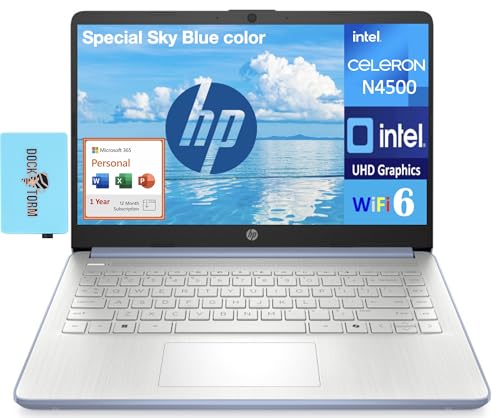
The HP 14 Everyday Value Laptop 32GB is the easiest model here to recommend because it avoids the most common entry-level laptop compromise: too little memory. Its Intel Celeron N4500 remains a basic two-core, two-thread processor, but 32GB of DDR4 gives Windows 11 Pro plenty of working room for email, documents, video calls, and a busy collection of browser tabs.
The 14-inch HD anti-glare display is functional rather than luxurious. Its resolution is 1366 x 768, so text and fine interface details will not look as crisp as they do on the Full HD panel in the HP Chromebook 14a. The compact chassis weighs 2.8 pounds and measures 12.75 inches long, 8.9 inches wide, and 0.6 inches high, which makes it a sensible carry-around machine.
Storage is a useful 512GB, enough for documents, photos, downloaded media, and ordinary applications without immediately requiring an external drive. Connectivity is also well considered. Wi-Fi 6 handles modern wireless networks, Bluetooth 5.4 covers compatible peripherals, and the laptop includes USB-C, USB-A, HDMI, an SD card reader, and a combined headphone and microphone jack.
The HP 14 Everyday Value Laptop 2TB has far more room for files, but its 16GB memory is less generous and its operating system is Windows 11 Home in S Mode. The HP 14 Everyday Value Laptop 16GB offers the same processor and a lighter configuration, while this model is the stronger choice for users who keep many applications open. Its weakness is the processor and screen, not the memory or connectivity. Skip it if you need video editing, gaming, or a high-resolution display. For documents, remote meetings, browsing, and general home administration, it is the most complete Windows package here.
2. HP 14 Everyday Value Laptop 2TB: Best for Storage
Pros
- Very large 2TB storage capacity
- 16GB DDR4 memory
- Lightweight 2.8-pound design
- Wi-Fi 6 and USB-C connectivity
- HD webcam and dual-array microphones
Cons
- Celeron N4500 is not suited to demanding creative work
- Windows 11 Home is in S Mode
- HD resolution is modest for a 14-inch laptop
Best for: users who keep a large collection of documents, photos, or downloaded files locally.
The reason to choose the HP 14 Everyday Value Laptop 2TB is simple: it provides substantially more local storage than the other conventional Windows laptops here. That makes it a good fit for someone who dislikes constantly managing files or relying on cloud storage. It still uses the Intel Celeron N4500, so the extra capacity does not turn it into a performance machine, but it does make everyday file handling less restrictive.
Its 16GB of DDR4 memory is enough for routine multitasking. Office applications, browser tabs, messaging, and video calls should fit comfortably within that allowance. The laptop includes an HD webcam and dual-array microphones, useful for remote classes and meetings, while Wi-Fi 6 provides a modern wireless connection when paired with a compatible router.
The 14-inch display uses an HD anti-glare panel with a thin-bezel design. Anti-glare treatment helps when overhead lighting or a bright window reflects on the screen, but the 1366 x 768 resolution leaves less room for large spreadsheets and side-by-side windows than a Full HD screen would. The chassis is only 0.6 inches high and weighs 2.8 pounds, so the large storage capacity does not come with a bulky frame.
Compared with the HP 14 Everyday Value Laptop 32GB, this model trades memory headroom for much more storage. The HP 14 Everyday Value Laptop 256GB is a better fit when Windows 11 Pro matters more than capacity, while this model keeps Windows 11 Home in S Mode. That mode can restrict application installation, so check software requirements before choosing it. For a home user with a lot of local files and straightforward computing needs, it is the most storage-focused option in the roundup.
3. Acer Chromebook 315: Best Chromebook

Pros
- Large 15.6-inch anti-glare screen
- Numeric keypad
- Claimed 12.5-hour battery life
- Two USB-C and two USB-A ports
- ChromeOS is simple to maintain
Cons
- 4GB memory limits heavy multitasking
- 64GB eMMC storage is small
- HD resolution is not especially sharp at this size
Best for: people who mainly work in a browser and want a roomy screen with a number pad.
The Acer Chromebook 315 is the most convincing choice for a browser-first routine. ChromeOS keeps the experience focused on web applications, Google services, and compatible Chrome apps, and it avoids the maintenance burden that can come with a conventional Windows computer. The large 15.6-inch screen also gives this Chromebook a more comfortable workspace than the 14-inch models.
Acer uses an Intel Celeron N4020 dual-core processor that can reach 2.8GHz, along with 4GB of memory and 64GB of eMMC storage. Those are modest resources, but they fit the intended role. Several ordinary browser tabs, email, documents, and streaming are reasonable expectations. A large number of demanding tabs or Android apps will expose the limits of the memory sooner than they would on the 16GB and 32GB Windows models.
The display is HD and anti-glare, with a narrow 0.37-inch bezel. At this size, the resolution is better suited to documents and web pages than detailed photo work. The integrated numeric keypad is a useful distinction for people entering figures, while the two USB-C ports, two USB-A ports, and headphone jack offer more flexibility than the port selection on many compact machines.
Acer claims up to 12.5 hours of battery life, which makes the Chromebook appealing for long school or office days, though actual use will vary. Compared with the HP Chromebook 14a, this model gives you a larger screen and more ports, but the HP has a Full HD display. It is also a better match than the Windows machines for anyone already invested in browser-based tools. Skip it if you need full Windows software, substantial local storage, or advanced desktop applications. For simple web work, the Acer Chromebook 315 is the cleanest ChromeOS pick.
4. HP 14 Everyday Value Laptop 16GB: Best Lightweight Windows Pick

Pros
- 2.8-pound portable body
- 16GB DDR4 memory
- 512GB PCIe NVMe SSD
- Windows 11 Pro
- USB-C, HDMI, and SD card reader
Cons
- HD display has limited workspace
- Celeron N4500 is an entry-level processor
- Standard keyboard lacks the backlight listed on some alternatives
Best for: commuters, students, and home users who need a light Windows laptop with sensible storage.
The HP 14 Everyday Value Laptop 16GB has the proportions most people expect from a portable everyday laptop. It is 12.75 inches long, 8.9 inches wide, and 0.6 inches high, with a listed weight of 2.8 pounds. That combination makes it easier to carry than the 17.3-inch HP and noticeably less cumbersome than the 15.6-inch Acer Chromebook.
Inside is an Intel Celeron N4500 with two cores and two threads, paired with 16GB of DDR4 memory. The processor sets a clear ceiling on performance, but the memory prevents routine multitasking from feeling unnecessarily cramped. Its 512GB PCIe NVMe SSD also gives it a more practical application and file setup than the 64GB eMMC drives in the Chromebooks.
The 14-inch display runs at 1366 x 768 and 60Hz. It is adequate for web pages, email, and documents, though the modest resolution means less content fits on screen at once. The port selection helps offset that limitation for desk use, with HDMI for an external display, USB-C, an SD reader, and a combined headphone and microphone jack. Wi-Fi 6 and Bluetooth 5.4 cover current wireless needs.
The HP 14 Everyday Value Laptop 32GB is better for unusually heavy multitasking, while the HP 14 Everyday Value Laptop 256GB has a smaller drive but a similar portable shape and Windows 11 Pro. This 16GB version occupies the sensible middle ground for everyday work. It is not the right tool for demanding games or creative applications, but it is a strong fit for someone who values a light chassis and does not need a high-resolution screen.
Readers comparing machines for school should also think about keyboard comfort, webcam quality, and whether their classes require Windows-only software. The needs of students who move between classrooms and home desks can be different from those of a fixed home-office setup.
5. HP 14 Student Business Laptop: Best for Office Users

Pros
- 16GB DDR4 memory
- Windows 11 Pro
- Microsoft Office lifetime license is listed
- Four-core Celeron N4120
- 720p webcam with dual-array microphones
Cons
- Storage combines eMMC and a MicroSD card
- HD display is not Full HD
- Software activation details require attention
Best for: document-heavy school or office work where the included Office license is important.
The HP 14 Student Business Laptop stands apart because its software bundle is central to the package. The listing includes a Microsoft Office lifetime license and Windows 11 Pro, making it aimed at people who want to write documents, prepare presentations, and manage spreadsheets without starting from a browser-only workflow. The listing also says not to install Office 365 because that can invalidate the Office license, so buyers should follow the activation instructions carefully.
Its Intel Celeron N4120 uses four cores and four threads, with a base frequency of 1.10GHz and a burst frequency of up to 2.60GHz. That is still an entry-level platform, but the 16GB of DDR4 memory is well suited to multiple browser tabs and office applications. The storage arrangement is less conventional: 128GB of eMMC storage is paired with a 256GB MicroSD card for data and files.
The 14-inch HD BrightView micro-edge display has a 1366 x 768 resolution. It is suitable for documents and video calls, but it does not provide the same crispness as the Full HD screen on the HP Chromebook 14a. HP lists a True Vision 720p webcam with integrated dual-array microphones, which gives this model a clear purpose for online learning and meetings. Its listed weight is 3.16 pounds, still manageable for daily carrying.
The HP 14 Everyday Value Laptop 16GB is lighter and has a conventional 512GB PCIe NVMe SSD, while this model offers the Office-focused bundle and a four-core processor. The arrangement is not ideal for someone who wants a single fast internal drive, and the license instructions add a layer of care. It makes sense for a student or office user who prioritizes Windows 11 Pro, webcam use, and included productivity software over display sharpness.
6. HP 14 1.1TB Laptop: Best for Battery Life

Pros
- 16GB DDR4 memory
- Up to 1.1TB of storage
- Claimed battery life of up to 12 hours
- Wi-Fi 6 and a full everyday port set
- HP Fast Charge is listed
Cons
- 4.6-pound weight is high for a 14-inch laptop
- HD display has limited detail
- Celeron N4500 is not intended for demanding work
Best for: home and office users who want long stated battery endurance and substantial storage.
The HP 14 1.1TB Laptop is a practical, storage-heavy Windows machine with a notable battery claim. HP lists up to 12 hours of battery life and includes Fast Charge, so it is aimed at people who want to work through a long stretch of browsing, documents, or online classes without constantly searching for an outlet. Battery results depend on screen brightness, applications, and wireless use, but the stated endurance is a meaningful part of this model's appeal.
The Intel Celeron N4500 reaches up to 2.80GHz and has two cores and two threads. It is suitable for ordinary Windows tasks, not intensive editing or modern 3D games. The 16GB of DDR4 memory helps with application switching, and the storage capacity reaches up to 1.1TB, giving this model more room for files than nearly every other Windows laptop in the group.
The 14-inch LED display has a 1366 x 768 resolution, anti-glare treatment, micro-edge construction, and a listed brightness of 250 nits. That is a reasonable combination for text and indoor work. The laptop also has a True Vision HD camera, dual-array microphones, tuned stereo speakers, USB-C, two USB-A ports, HDMI 1.4, an SD card reader, and a combined audio jack.
This laptop is physically different from the lighter HP 14 models, with a listed weight of 4.6 pounds. The HP 14 Everyday Value Laptop 16GB is much easier to carry, while this machine offers more storage and the stronger battery claim. Choose it for a mostly stationary desk or occasional travel setup. Skip it if portability is a daily priority or if you need a sharper display. It is a reasonable option for someone who wants storage, familiar Windows software, and long sessions more than a thin carry.
7. HP 17 Everyday Value Laptop: Best Large Touchscreen

Pros
- Large 17.3-inch touchscreen
- 1600 x 900 display resolution
- Backlit keyboard and fingerprint reader
- Wi-Fi 6 and Bluetooth 5.4
- Wireless mouse is included
Cons
- Only 4GB of DDR4 memory
- 128GB storage is limited
- TN panel has narrower viewing characteristics than stronger display types
- Renewed product with a listed 90-day warranty
Best for: users who want a large touch display for a mostly stationary workspace.
The HP 17 Everyday Value Laptop is the one to consider when a small laptop screen feels cramped. Its 17.3-inch touchscreen gives documents, web pages, and large interface elements more physical room, and its 1600 x 900 resolution is a step above the 1366 x 768 panels used by most of the 14-inch Windows models here. The touch layer can also be useful for casual navigation and simple selections.
HP pairs the display with an Intel N100 processor, listed with four cores and four threads and speeds up to 3.4GHz. The bigger concern is memory: this configuration has just 4GB of DDR4. That is enough for basic browsing and light documents, but it leaves much less headroom than the 16GB and 32GB systems. The 128GB UFS SSD is similarly limited, especially if the laptop will hold photos, videos, or many applications.
The feature set is unusually generous for this list. There is a backlit keyboard, a fingerprint reader, Wi-Fi 6, Bluetooth 5.4, a webcam, two USB 3.0 Type-A ports, USB 3.1 Type-C, HDMI, and a combined headphone and microphone jack. The listed weight is 4.7 pounds, which confirms that this is more of a desktop replacement than a daily commuter. A Dockztorm wireless mouse is included.
The HP 14 Everyday Value Laptop 32GB is much stronger for multitasking and portability, while the Acer Chromebook 315 offers a similar large-screen idea with a simpler operating system and a numeric keypad. This HP's advantage is its touchscreen and Windows compatibility. It is a renewed product, and the listing describes functionality testing, inspection, repackaging, and a 90-day warranty. Choose it when screen size matters most, and avoid it if you need plentiful memory or a lightweight travel computer.
8. HP Chromebook 14a: Best Full HD Chromebook

Pros
- Full HD 14-inch display
- ChromeOS is straightforward for web tasks
- Wi-Fi, Bluetooth, webcam, and USB 3.1
- Compact 13-inch-long chassis
- Renewed product
Cons
- 4GB RAM limits multitasking
- 64GB eMMC storage is restrictive
- Intel Celeron N4000 is an older dual-core platform
Best for: buyers who want a sharper Chromebook screen for email, documents, and web applications.
The HP Chromebook 14a has one clear advantage over the Acer Chromebook 315: its 14-inch display is Full HD. That 1920 x 1080 resolution produces cleaner text and more usable detail than the Acer's HD panel, particularly when reading documents or fitting more content into a browser window. The smaller screen also makes the HP easier to place on a compact desk.
This is an older, simpler configuration built around the Intel Celeron N4000, a dual-core processor. It has 4GB of RAM and 64GB of eMMC storage, so it works best with ChromeOS applications and cloud-based files. Web browsing, email, basic documents, and video playback are the natural workload. Keeping many demanding tabs or large local files on the machine will quickly run into its limits.
The product listing identifies Wi-Fi, Bluetooth, a webcam, and one USB 3.1 port. Product details list dimensions of 13 inches long, 9 inches wide, and 1 inch high, with a 4-pound weight. It is not as light as the compact HP Windows models, but its 14-inch footprint remains easier to manage than a large desktop-style laptop.
The Acer Chromebook 315 has a faster listed Celeron N4020, more USB ports, a numeric keypad, and a larger 15.6-inch screen. It is the better choice for workspace and connectivity, while this HP wins on display resolution and compact proportions. Because this is a renewed model and the storage is small, choose it only if ChromeOS fits your workflow and most files will live online. It is a focused machine, not a general Windows replacement.
9. HP 14 Everyday Value Laptop 256GB: Best Compact Pro Model
Pros
- Windows 11 Pro
- 16GB DDR4 memory
- Wi-Fi 6 and Bluetooth 5.4
- USB-C, HDMI, and SD card reader
- Lightweight 2.8-pound design
Cons
- 256GB storage is the smallest SSD option among the Windows 14 models
- HD screen is less detailed than Full HD
- Celeron N4500 is limited to basic workloads
Best for: users who want a light Windows 11 Pro laptop for straightforward work.
The HP 14 Everyday Value Laptop 256GB is the restrained version of the three closely related HP configurations. It keeps the portable 14-inch chassis, 16GB of DDR4 memory, Intel Celeron N4500 processor, Wi-Fi 6, and Windows 11 Pro, but uses a 256GB PCIe SSD. That is enough for documents, ordinary applications, and a modest personal file collection without making the laptop feel overloaded.
The processor has two cores and two threads, with a maximum listed speed of 2.8GHz. It should handle browsing, word processing, spreadsheets, online classes, and video conferencing, but the specification does not suggest a machine for sustained rendering or demanding creative work. The 16GB memory is the more useful part of the configuration because it keeps everyday multitasking from being unnecessarily restricted.
The 14-inch HD anti-glare display uses a 1366 x 768 resolution. The panel is suitable for indoor work, while the anti-glare surface can reduce distracting reflections. This HP also includes an HD webcam with dual-array microphones, USB-C, HDMI, an SD card reader, a headphone and microphone combo jack, and Bluetooth 5.4. The 2.8-pound body is a genuine advantage when the laptop moves between rooms.
The HP 14 Everyday Value Laptop 32GB is the stronger choice for heavy browser use and larger local projects, while the HP 14 1.1TB Laptop offers much more storage and a longer stated battery claim but weighs considerably more. This model makes sense when Windows 11 Pro and portability matter more than storage expansion. It is not exciting hardware, but its limitations are easy to understand, which is useful when choosing among similar machines.
10. KYOLLY Laptop Cooling Pad: Best Laptop Stand Accessory

Pros
- Two large fans
- Five adjustable height settings
- Smooth fan-speed control
- Anti-slip baffles
- Two additional USB ports
Cons
- It is an accessory, not a laptop
- Compatibility is listed only up to 15.6 inches
- It may not suit the 17.3-inch HP laptop
Best for: laptop owners who want a raised typing angle and added airflow at a desk.
The KYOLLY Laptop Cooling Pad does not belong in a laptop buying decision by itself, but it can make a basic laptop more comfortable to use at a desk. Its two fans sit beneath a precision metal mesh surface, while five height settings let you raise the screen and change the keyboard angle. That is useful for a fixed workspace, especially when the laptop normally sits flat on a desk.
A rolling controller adjusts fan speed, so users can trade airflow against noise rather than running the fans at one fixed level. The product is described as quiet, though fan noise is always dependent on the selected speed and the surrounding room. A blue LED indicates that the fans are active, and anti-slip baffles help keep a laptop in position while typing.
The pad is designed for laptops from 10 to 15.6 inches, so it should suit the 14-inch HP models and the Acer Chromebook 315. It is not an ideal match for the 17.3-inch HP, whose larger footprint may extend beyond the supported size. The cooler also provides two extra USB ports, which can help connect a mouse or keyboard when the laptop's own ports are occupied.
This accessory can help with desk ergonomics and airflow, but it cannot compensate for an underpowered processor or limited memory. The HP 17 Everyday Value Laptop is the only laptop here that clearly exceeds the stated size range. Consider the KYOLLY when your priority is a raised workstation for a compatible laptop, not as a replacement for choosing appropriate hardware.
How to choose best value laptops
The right laptop depends on the workload first, then on the parts that support it. These are the specifications that matter most when separating basic Windows machines, Chromebooks, and large-screen options.
Processor capability
The processor determines how quickly a laptop handles active work, opens applications, and responds when several tasks compete for attention. The Intel Celeron N4000, N4020, N4120, and N4500 in this list are entry-level chips, while the Intel N100 model offers four cores and a higher listed burst speed.
For browsing, email, documents, and video calls, any of these processors can fit the brief when paired with enough memory. They are not strong choices for demanding video editing, advanced photo work, modern games, or other sustained workloads. A higher core count helps with multitasking, but it does not erase the limits of an entry-level platform.
Memory capacity
Memory affects how many browser tabs and applications can remain open without forcing the system to slow down. The 4GB configurations in the Chromebooks and HP 17 are best kept to light workloads. The 16GB HP models are more comfortable for ordinary Windows multitasking, while the 32GB HP 14 gives the most headroom in this group.
Do not treat memory as a substitute for processor performance. The HP 14 Everyday Value Laptop 32GB has the most generous memory configuration here, but its Celeron N4500 remains a basic chip. For routine office use, however, the combination is more comfortable than 4GB paired with a similar class of processor.
More memory helps a basic laptop stay comfortable, but it cannot turn an entry-level processor into a workstation.
Storage type and capacity
Storage capacity determines how much room you have for applications, documents, photos, and downloaded media. The 64GB eMMC drives in the Chromebooks are intended for a cloud-centered workflow. The Windows models offer capacities from 128GB to 2TB, with the larger drives making local file storage easier.
Storage type also matters. The PCIe SSD configurations in the HP 14 models are a more conventional fit for Windows than eMMC storage. The HP Student Business Laptop uses 128GB of eMMC alongside a 256GB MicroSD card, which provides capacity but works differently from a single internal SSD. Anyone who keeps large files locally should pay close attention to this distinction.
Display size and resolution
A 14-inch screen is a useful balance between workspace and portability. The Acer Chromebook 315 goes larger at 15.6 inches, while the HP 17 provides a 17.3-inch touchscreen for a desktop-style setup. Larger screens are easier on the eyes for some tasks, but they also make the laptop heavier and less convenient to carry.
Resolution affects text sharpness and how much content fits on screen. The HP Chromebook 14a's Full HD display is sharper than the 1366 x 768 panels used by most of the Windows laptops. Anti-glare treatment helps with reflections, and the HP 17 adds touch capability, but neither feature makes up for limited resolution or memory when the workload is demanding.
Operating system
Windows 11 is the most flexible option in this list for traditional desktop applications. Several models use S Mode, which creates a more controlled software environment and can restrict application installation. Check that the programs you need are compatible before choosing a Windows S Mode machine.
ChromeOS is simpler and often well suited to browser-based work, Google tools, web email, and online documents. It is less suitable when you require Windows-only applications. If your main concern is picking between familiar desktop software and a browser-centered workflow, the software limits that matter for everyday laptop use should guide the decision before hardware details.
Portability and connectivity
Weight and dimensions matter when a laptop travels daily. The 2.8-pound HP 14 models are easier to carry than the 4.6-pound HP 14 1.1TB and 4.7-pound HP 17. A large screen can be worth the extra weight for a permanent desk, but it is less appealing for commuting.
Ports determine how easily the laptop works with external displays, storage, memory cards, and wired accessories. HDMI, USB-C, USB-A, and an SD card reader appear across several HP models. The Acer Chromebook 315 has two USB-C and two USB-A ports, while the HP Chromebook 14a has a more limited listed connection set.

Frequently asked questions
Are these laptops suitable for school?
The 14-inch HP models with 16GB of memory are well suited to documents, research, browser applications, online classes, and video calls. The HP Student Business Laptop is especially oriented toward Office work and includes a listed lifetime Office license. Check required school software before choosing a Chromebook or a Windows laptop in S Mode.
Which model has the sharpest display?
The HP Chromebook 14a has the sharpest listed display because its 14-inch panel is Full HD. The HP 17 has a higher 1600 x 900 resolution than the 14-inch HD Windows models, but it is also much larger. The Acer Chromebook 315 gives you more physical screen area, though its resolution is HD.
Is 4GB of memory enough for a laptop?
4GB can be enough for light browsing, email, and simple documents, particularly on ChromeOS. It leaves little room for heavy multitasking, though, so the 16GB Windows models are more comfortable for users who keep many tabs and applications open. The 32GB configuration offers the most headroom in this group.
Should I choose Windows or ChromeOS?
Choose Windows when you need traditional desktop applications or Windows-specific software. Choose ChromeOS when your work is mainly in a browser and you prefer a simpler operating system. The Acer Chromebook 315 and HP Chromebook 14a are the ChromeOS choices here.
What does Windows S Mode mean?
S Mode is a more controlled Windows environment designed around applications from the Microsoft Store. It can limit which programs you install, so verify compatibility before buying. The HP 17 and the 2TB HP 14 use Windows 11 Home S Mode, while some other models list Windows 11 Pro in S Mode.
Is a laptop cooling pad necessary?
A cooling pad is not necessary for every laptop. It can raise the screen, change the typing angle, and provide extra airflow during long desk sessions, but it cannot improve a processor's fundamental capability. The KYOLLY model is designed for laptops up to 15.6 inches, so it may not fit the 17.3-inch HP properly.
The bottom line
The Best value laptops in this group are led by the HP 14 Everyday Value Laptop 32GB because it combines 32GB of memory, 512GB storage, Windows 11 Pro, useful ports, and a genuinely portable 2.8-pound design. Its HD screen and Celeron processor are real limitations, but the configuration is the most balanced for everyday Windows multitasking.
Choose the Acer Chromebook 315 if your work is browser-based and you want a large screen, numeric keypad, long claimed battery life, and broad port selection. The HP 14 Everyday Value Laptop 2TB is the better Windows choice for a large local file library, while the HP Chromebook 14a makes more sense when display sharpness matters more than screen size.
For an undecided reader, choose the HP 14 Everyday Value Laptop 32GB unless you specifically need ChromeOS or unusually large local storage.
As an Amazon Associate we earn from qualifying purchases.