

A mouse can make a fast game feel sluggish when its shape fights your grip, its cable catches on the desk, or its extra buttons sit just out of reach. The right one should disappear under your hand and respond exactly when you move it.
Our Best mouse for gaming picks cover compact wireless models, feature-packed ergonomic designs, ultra-light esports mice, and straightforward wired options. The Logitech G305 Lightspeed Black is the one we'd buy for most players, while the rest of the list targets specific grips, genres, and feature priorities.
| # | Product | Award | Sensor / connection | Controls or battery | Best for |
|---|---|---|---|---|---|
| 1 | Logitech G305 Lightspeed Black | Best overall | 12, 000 DPI HERO, 1 ms wireless | 250 hours, 1 AA | Most PC gamers |
| 2 | Logitech G502 Hero Wired | Best wired control | 25, 600 DPI HERO, wired | 11 buttons, adjustable weights | Macro-heavy games |
| 3 | Razer Basilisk V3 | Best ergonomic wired | 26, 000 DPI, wired | 11 buttons, tilt wheel | Comfort and customization |
| 4 | Logitech PRO X2 SUPERSTRIKE | Best click technology | 44, 000 DPI HERO 2, 8 kHz wireless | 60 to 90 hours | Competitive players |
| 5 | Logitech G502 Lightspeed | Best wireless controls | 25, 600 DPI HERO, wireless | 11 buttons, POWERPLAY support | Wireless MMO control |
| 6 | Logitech G703 Lightspeed | Best palm grip | 25, 600 DPI HERO, wireless | 6 buttons, up to 35 hours | Comfortable palm grip |
| 7 | Logitech G305 Lightspeed White | Best compact alternative | 12, 000 DPI HERO, 1 ms wireless | 250 hours, 1 AA | Small setups |
| 8 | Logitech G502 X Plus | Best feature-rich wireless | 25, 000 DPI HERO, wireless | 11 controls, RGB | Wireless customization |
| 9 | Logitech G203 | Best simple wired | 8, 000 DPI optical, wired | 6 buttons, 2.1 m cable | First gaming mouse |
| 10 | Razer Viper V3 Pro | Best lightweight esports | 35, 000 DPI, up to 8 kHz wireless | 95 hours | Fast aim and flicks |
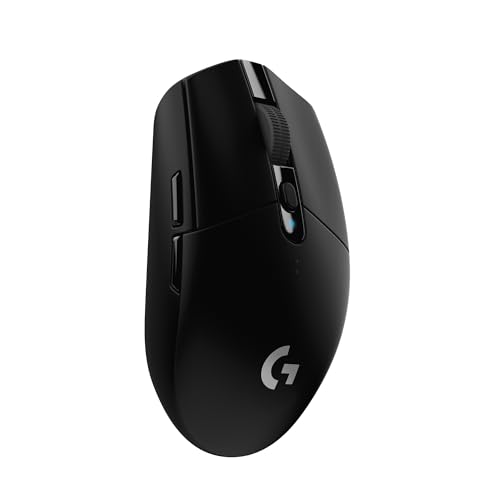
1. Logitech G305 Lightspeed Black: Best Overall
Pros
- Very light 3.4-ounce design
- 1 ms LIGHTSPEED wireless response
- 250 hours from one AA battery
- Receiver storage makes it easy to carry
- Accurate HERO sensor with up to 12, 000 DPI
Cons
- Uses a disposable AA battery
- Fewer buttons than the larger Logitech models
- Shape may feel small for broad hands
Best for: most players who want a light, dependable wireless mouse without unnecessary complexity.
The G305 is the mouse that gets the fundamentals right without asking you to adapt your setup around it. It has a compact, familiar shape, a clean wireless connection, and enough sensor performance for anything from tactical shooters to everyday desktop work. The 3.4-ounce weight makes low-sensitivity aiming easier, and the simple shell keeps the mouse feeling nimble when you need to make broad movements.
Its HERO optical sensor tracks at up to 12, 000 DPI and supports 400 IPS precision. Those figures matter less as targets than as evidence that the sensor has plenty of headroom. You can run a comfortable low sensitivity without worrying about the sensor losing track during a quick sweep. LIGHTSPEED wireless uses a 1 ms report rate, so there is no meaningful handling penalty compared with a wired mouse for ordinary competitive play.
Battery behavior is the G305's quiet advantage. Logitech rates it for up to 250 hours of continuous gameplay from one AA battery, and its Endurance mode can extend battery life to as much as nine months through G HUB. The receiver stores inside the mouse, which turns it into a genuinely practical laptop companion rather than a desktop mouse that happens to lack a cable.
The main compromise is its compact, symmetrical shape and modest control layout. The G502 Hero Wired and Razer Basilisk V3 give you 11 programmable buttons, thumb support, and more ways to tailor the mouse to a particular game. The G305 is better when you want less hand movement and fewer decisions, but players with large hands or a strong preference for palm support should look at the G703 instead.
Choose the G305 if you want the cleanest balance of weight, wireless responsiveness, battery life, and portability. It is also a sensible starting point for anyone comparing the trade-offs between wired and wireless control before settling on a desk setup.
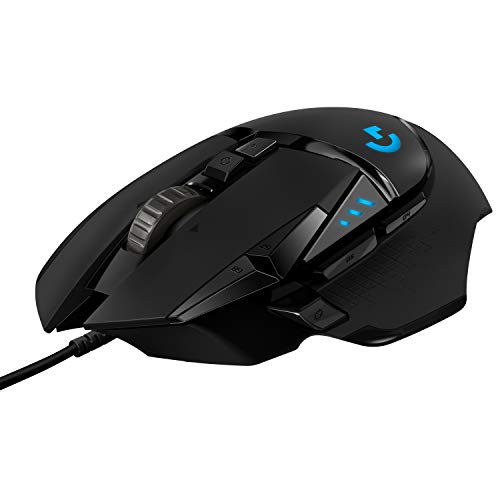
2. Logitech G502 Hero Wired: Best Wired Control
Pros
- 11 programmable buttons
- 25, 600 DPI HERO sensor
- Five removable 3.6-gram weights
- Dual-mode scroll wheel
- Crisp mechanically tensioned primary buttons
Cons
- Heavy compared with lightweight competition mice
- Wired design limits desk flexibility
- Large shape is not ideal for every grip
Best for: players who need many commands close to their thumb and fingers.
The G502 Hero Wired is built around control rather than minimalism. Its broad body, thumb rest, and pronounced button layout make it feel planted, especially in strategy games, action RPGs, and shooters that ask for several weapon or utility commands. The cable is the obvious trade-off, but it also means there is no battery to manage and no wireless receiver competing for a USB port.
The HERO sensor reaches 25, 600 DPI and tracks without smoothing, filtering, or acceleration. Most people will never use the upper end of that range for aiming, but the sensor's consistency is useful when switching between a low-sensitivity game profile and a high-sensitivity desktop profile. Logitech's software lets you assign the 11 buttons to macros, shortcuts, or game commands, giving this mouse a much broader role than a basic six-button design.
The adjustable weight system is unusual now. Up to five 3.6-gram weights can be arranged to change the balance and feel. That does not turn the G502 into a light mouse, and players who make wide, fast sweeps will notice the mass. It does let you settle the mouse more firmly for careful tracking, and the dual-mode wheel adds another useful distinction: tactile scrolling for weapon selection and free spinning for long pages or menus.
Compared with the G305, the G502 Hero is much more capable for games that use a crowded command layout, but it is less agile and less convenient to carry. The Razer Basilisk V3 offers a similarly ergonomic wired approach with a hyperscroll tilt wheel and 11 programmable buttons, while the G502 counters with adjustable weights and Logitech's familiar button tensioning. Skip this model if you want an unobstructed low-sensitivity FPS sweep or a cable-free desk.
The G502 Hero Wired suits a player who sees the mouse as a command center. Its size and weight are deliberate, not flaws to overlook, and they make the most sense for people who want a stable palm-oriented shape with extensive customization.
3. Razer Basilisk V3: Best Ergonomic Wired

Pros
- Comfortable ergonomic shape with thumb rest
- 11 programmable buttons
- 26, 000 DPI Focus Plus sensor
- Free-spin and tactile scroll modes
- 11-zone Chroma RGB lighting
Cons
- Cable restricts movement
- Larger body is not suited to every hand
- Razer Synapse is needed for deeper customization
Best for: right-handed players who want a comfortable shape and a large control set.
The Basilisk V3 feels designed for a hand that wants somewhere to rest. The thumb shelf supports the side of the hand, while the main buttons and side controls are positioned for quick access without forcing your grip to collapse around the shell. It is a more explicitly ergonomic design than the G305, and its shape has a relaxed feel during long sessions.
Its Focus Plus optical sensor reaches 26, 000 DPI and is specified to track without smoothing. That gives it ample precision for fine aim, though the sensor number is not the reason to choose this mouse over the G502 Hero Wired. The more meaningful difference is the control system. Eleven programmable buttons allow commands such as push-to-talk, ping, or ability activation to sit under your fingers rather than on the keyboard.
The hyperscroll tilt wheel is one of the Basilisk's strongest features. Switch it to free-spin mode to move quickly through long menus and documents, then return to tactile mode when you need distinct steps for weapon or skill selection. Left and right tilt add two more inputs. The 11-zone Chroma lighting is configurable across more than 16.8 million colors and can react to supported games, though the lighting is less important than the useful wheel and thumb placement.
The Basilisk V3 is close in spirit to the G502 Hero Wired, but its ergonomic contour feels more intentionally shaped around the hand. The G502 gives you adjustable weights, while the Basilisk gives you a particularly versatile wheel and extensive Chroma integration. Neither is a good match for someone chasing the lowest possible weight, and the cable remains a physical limitation beside the wireless G305.
Buy the Basilisk V3 when comfort and extra inputs matter more than a minimalist shape. It is especially well suited to players who move between games and general desktop use, since the wheel's two modes are useful far beyond gaming.
4. Logitech PRO X2 SUPERSTRIKE: Best Click Technology

Pros
- HITS haptic inductive trigger system
- Ten actuation-point levels
- Five rapid-trigger reset levels
- HERO 2 sensor with up to 44, 000 DPI
- Up to 8 kHz wireless polling
Cons
- Advanced controls require G HUB
- POWERPLAY charging system is sold separately
- Specialized features will be excessive for many players
Best for: competitive players who want to tune click actuation and trigger reset.
The PRO X2 SUPERSTRIKE is the most specialized mouse here. Its defining idea is not a large button count or decorative lighting. It uses Logitech's Haptic Inductive Trigger System to provide customizable click actuation and haptic feedback, giving competitive players more control over how a press begins and resets. That is a meaningful distinction for someone who pays close attention to repeated inputs, but it is not a feature every game or player needs.
The trigger system offers 10 actuation-point levels and five rapid-trigger reset levels. In practical terms, these controls let you choose how early a click registers and how quickly the button is ready to register again. Logitech says the system can make clicks 30 ms faster, though the benefit depends on the game, your settings, and your ability to use the faster trigger consistently.
The HERO 2 sensor tracks at more than 888 IPS and up to 44, 000 DPI, with support for 88 g-force. Its wireless connection supports up to 8 kHz polling, which sends position updates more frequently than standard 1 kHz designs. The mouse also includes large UHMWPE feet and a 0.7 mm thin-wall case, details aimed at reducing friction and keeping movement light. Battery life is rated at 60 to 90 hours, and POWERPLAY 2 support can provide continuous wireless charging with the separate system.
This is a very different proposition from the G305 and G703. Both are easier to understand and more than responsive enough for the majority of games, while the PRO X2 SUPERSTRIKE is aimed at someone willing to tune a specialized input system. The Razer Viper V3 Pro is the simpler esports choice if low weight and straightforward speed matter more than haptic triggers.
Skip this mouse if you do not want to configure advanced controls in G HUB or if your games do not benefit from rapid trigger behavior. For a tournament-focused player who wants to experiment with actuation and reset settings, it is the most technically distinctive option in this group.
5. Logitech G502 Lightspeed: Best Wireless Controls

Pros
- 11 customizable buttons
- HERO sensor with up to 25, 600 DPI
- Hyper-fast scroll wheel
- POWERPLAY charging support
- LIGHTSPEED wireless connection
Cons
- Heavy 0.81-pound listed weight
- Larger shape can limit rapid sweeps
- POWERPLAY charging system is sold separately
Best for: players who want G502 controls without a cable across the desk.
The G502 Lightspeed is the wireless version of the familiar control-heavy G502 concept. Its appeal is immediate if you like a thumb rest, a broad body, and a large number of programmable inputs but do not want a cable dragging across the desk. It feels substantial in the hand, with the kind of planted movement that suits deliberate tracking and games with many commands.
The HERO sensor supports 100 to 25, 600 DPI, 400-plus IPS tracking, and 1:1 movement without smoothing, filtering, or acceleration. The sensor is not the limitation here. The deciding factor is the physical design: 11 buttons let you map macros and shortcuts through G HUB, while the hyper-fast wheel can switch between rapid scrolling and more controlled use.
Wireless performance comes from Logitech's LIGHTSPEED system, which is designed for pro-level responsiveness and connectivity. POWERPLAY compatibility is the more unusual feature. With the separate POWERPLAY wireless charging system, the mouse can remain charged while resting or being used, removing the usual need to connect a cable when the battery runs low.
The G502 Lightspeed is more flexible than the G502 Hero Wired because it removes the cable, but it is still much heavier than the G305 and the Razer Viper V3 Pro. The G502 X Plus is a newer feature-rich alternative with hybrid optical-mechanical switches, while the G502 Lightspeed keeps the established G502 control layout. Players who mostly play fast shooters may find the weight works against them.
Choose it for wireless freedom without giving up a crowded button layout. It is a strong fit for MMO, strategy, and action games where the hand appreciates a stable shape and the thumb appreciates having several commands nearby.
6. Logitech G703 Lightspeed: Best Palm Grip

Pros
- Comfortable contoured design
- Rubber side grips
- HERO 25K sensor
- Six programmable buttons
- Optional 10-gram weight
Cons
- Battery life is up to 35 hours with RGB enabled
- Heavier than lightweight wireless models
- POWERPLAY charging system is sold separately
Best for: palm-grip players who want a supportive wireless shape.
The G703 is the comfortable middle ground in Logitech's wireless lineup. It has a rounded shape that supports the palm, rubber side grips that give the thumb and fingers a secure hold, and six programmable buttons without the crowded feel of a G502. The 95-gram weight is noticeable, but it feels intentional rather than cumbersome when the hand stays mostly planted.
Its HERO 25K sensor provides 1:1 tracking, more than 400 IPS, and a maximum sensitivity of 25, 600 DPI. Those specifications put it on the same technical level as much more elaborate Logitech mice for ordinary aiming. The real difference is how the shell distributes the weight and where the controls land under the hand.
LIGHTSPEED wireless keeps the connection responsive, while battery life reaches up to 35 hours with the default LIGHTSYNC RGB lighting. That is a shorter interval between charges than the G305's 250-hour AA rating or the Razer Viper V3 Pro's 95-hour claim. POWERPLAY support can keep the G703 charged with the separate charging system, but without it you will need to remember its charging routine more often.
The G703 is more comfortable for a relaxed palm grip than the G305, but it is less portable and less nimble. The G502 Lightspeed gives you 11 buttons and a more substantial control surface, while the G703 keeps the side simpler and the silhouette easier to settle into. It is not the right pick for players who want an ultra-light mouse for repeated flicks.
Pick the G703 when hand support matters more than having the lightest possible shell. It is the wireless mouse here that makes the most sense for long sessions built around a calm, palm-forward grip.
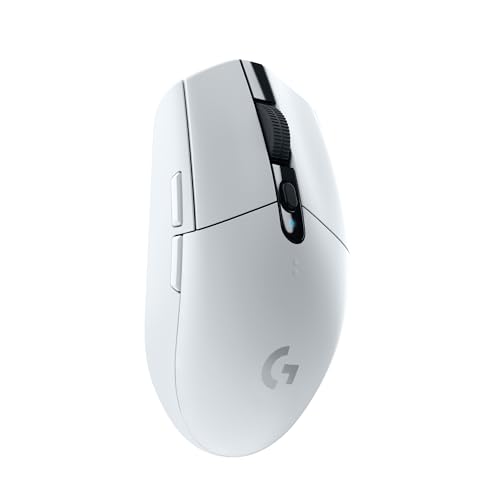
7. Logitech G305 Lightspeed White: Best Compact Alternative
Pros
- Compact 3.4-ounce design
- 1 ms LIGHTSPEED wireless response
- Up to 250 hours from one AA battery
- Built-in receiver storage
- 12, 000 DPI HERO sensor
Cons
- Compact body may not suit large hands
- Uses a single AA battery
- Limited button count beside larger gaming mice
Best for: players who want the G305 shape in a lighter-looking finish or a compact travel setup.
The white G305 has the same essential design as the black version, and that means the same straightforward experience. It is compact, light, and easy to move across a smaller desk. The shape is classic rather than aggressively contoured, so it works well for players who prefer fingertip or claw control and do not need a deep palm rest.
The HERO optical sensor reaches 12, 000 DPI, and the LIGHTSPEED connection uses a 1 ms response time. Those specifications are more than sufficient for precise aiming and quick cursor movement. The mouse does not try to win with a long list of advanced settings. It wins by keeping the basic path from hand movement to screen movement clean and predictable.
A single AA battery supports up to 250 hours of continuous gameplay, and the receiver fits into built-in storage when the mouse is packed away. That combination makes the G305 especially convenient for a gaming laptop or a desk that changes locations. Endurance mode can extend battery life through Logitech G HUB, though it is aimed more at general use than at extracting every bit of competitive response.
The black G305 is the identical choice in a different finish, so the decision between them is purely about appearance. Compared with the G203, the white G305 removes the cable and adds much longer battery-powered use, while the G203 is a little more direct for a permanent desktop setup. Compared with the G703, the G305 is smaller, lighter, and less supportive for a broad palm.
Choose this model when compact wireless simplicity is the priority. It is also a good fit for anyone who wants a mouse that can move between a desktop and laptop without bringing a cable and receiver loose in a bag.
8. Logitech G502 X Plus: Best Feature-Rich Wireless

Pros
- LIGHTFORCE hybrid optical-mechanical switches
- 11 customizable controls
- Removable and reversible DPI-shift button
- Dual-mode tilt scroll wheel
- Customizable eight-LED RGB lighting
Cons
- Broad shape is not ideal for small hands
- Feature set adds complexity
- POWERPLAY charging solution is sold separately
Best for: wireless players who want extensive controls, lighting, and grip customization.
The G502 X Plus takes the familiar G502 formula and gives it a newer control system. It remains a large, right-handed mouse with a thumb rest and many inputs, but the removable and reversible DPI-shift button gives you more freedom to decide how that area behaves. That is a small design detail with a real effect if the button is too easy to press or simply not useful for your grip.
Its LIGHTFORCE switches combine optical and mechanical operation for fast actuation and a crisp click feel. The HERO 25K sensor tracks accurately without smoothing, filtering, or acceleration, so the mouse has the underlying precision expected from a modern gaming model. The more notable change is the updated LIGHTSPEED wireless protocol, which Logitech says has a 68 percent faster response rate than the previous generation.
The dual-mode scroll wheel switches between free spin and ratcheting, tilts left and right, and provides two extra customizable controls. Eight-LED LIGHTSYNC RGB lighting can be customized with startup and power-down effects, and active play detection helps manage battery use. POWERPLAY compatibility is available if you add the separate wireless charging system.
This is the most feature-packed descendant of the G502 designs in this list, but the G502 Lightspeed remains a simpler version of the same general idea. The G502 X Plus adds newer switches, revised wireless behavior, and more lighting, while the Razer Basilisk V3 offers a similarly broad wired control layout with its own hyperscroll system. Neither the G502 X Plus nor the G502 Lightspeed is a good answer for someone who wants a 54-gram esports mouse.
Buy the G502 X Plus for a wireless command center with a customizable shell and visible RGB. It is best suited to players who enjoy tuning hardware and want several physical controls available without reaching for the keyboard.
9. Logitech G203: Best Simple Wired

Pros
- 8, 000 DPI optical sensor
- Six programmable buttons
- Five configurable DPI settings
- Metal-spring tensioned primary buttons
- 2.1-meter USB cable
Cons
- Cable is less convenient than wireless
- Sensor has less headroom than newer premium models
- Basic shape lacks a thumb rest
Best for: new PC gamers who want a straightforward wired mouse with useful customization.
The G203 is refreshingly uncomplicated. Its shape is compact and familiar, the six-button layout covers the essentials, and the USB cable means it works as soon as it is connected. It does not have the G502's thumb rest or the G305's wireless convenience, but that simplicity can be exactly what a first gaming mouse needs.
The 8, 000 DPI optical sensor provides a clear step up from an ordinary office mouse, with no filtering or smoothing listed in the specifications. Logitech G HUB lets you save up to five DPI settings and cycle through them with the middle button. That makes it easy to keep one profile for precise aiming, another for faster movement, and additional settings for desktop work without opening the software every time.
The six buttons can be assigned to commands, controls, or key bindings. Primary buttons use metal-spring tensioning for a crisp feel and consistent feedback. The 2.1-meter USB Type-A cable gives a reasonable amount of reach for a standard desk, though cable routing still matters if your tower sits far away or the mouse area is crowded.
The G203 is less capable than the G305, but the comparison is not simply about sensor numbers. The G305 gives you wireless movement and exceptional battery life, while the G203 gives you a permanently connected mouse with no battery management. The Razer Basilisk V3 adds 11 buttons, a thumb rest, and a more versatile wheel, so it is the better fit for complex games and larger hands.
Choose the G203 when you want the basic controls to work without fuss. It is a sensible first step into PC gaming and a good permanent desk mouse for anyone who does not need wireless freedom or a large macro layout.
10. Razer Viper V3 Pro: Best Lightweight Esports

Pros
- 54-gram ultra-light design
- Focus Pro 35K Gen-2 sensor
- Up to 8, 000 Hz polling
- Up to 95 hours of battery life
- Gen-3 optical switches rated for 90 million clicks
Cons
- Lightweight design prioritizes speed over extra controls
- Advanced settings require Razer Synapse
- Shape may not suit players who want strong palm support
Best for: competitive FPS players who want fast flicks and a very light wireless shell.
The Viper V3 Pro is the specialist for fast, low-drag movement. At 54 grams, it asks very little effort from the hand when you lift and reposition it. That matters in competitive shooters where low sensitivity and repeated arm movements are common. The shape is less about supporting a relaxed palm and more about letting the mouse follow quick changes in direction.
Its Focus Pro 35K Gen-2 optical sensor supports 1-DPI adjustments and intelligent tracking on a wider range of surfaces, including glass according to the product details. Most players will not need 35, 000 DPI, but the one-step adjustments give fine control when tuning sensitivity. Razer's HyperPolling and HyperSpeed wireless systems support up to 8, 000 Hz polling, sending position information more frequently for a smoother response when the rest of the gaming system can keep up.
The Gen-3 optical switches have a stated 0.2 ms actuation time and a 90-million-click lifecycle, with no debounce delay listed. Battery life reaches up to 95 hours, which is considerably more practical for extended wireless use than the G703's up to 35 hours with RGB enabled. The trade-off is that the Viper V3 Pro does not chase the many-button flexibility of the G502 family or the haptic click experimentation of the PRO X2 SUPERSTRIKE.
Compared with the G305, the Viper V3 Pro is lighter and more focused on esports-level tuning, but the G305 is simpler to live with and has a longer claimed battery life. The PRO X2 SUPERSTRIKE offers more specialized trigger controls, while the Viper keeps the experience centered on weight, tracking, and wireless polling. Players who prefer a palm-supporting ergonomic shell should choose the G703 or Basilisk V3 instead.
The Viper V3 Pro is the right pick for a player who knows that every gram affects their aim routine. It is a focused tool for fast shooters, not the most versatile mouse for MMO commands or general office comfort.
How to choose best mouse for gaming
The right gaming mouse comes down to the hand, the game, and how much control you want under your fingers. Start with the physical design, then consider connection, sensor behavior, buttons, and maintenance.
Shape and grip
Shape determines whether a mouse feels natural after an hour instead of merely comfortable for a few minutes. Palm grips usually benefit from a fuller rear and a supportive thumb area, as seen on the Logitech G703 and Razer Basilisk V3. Fingertip and claw grips often suit compact or lighter models such as the Logitech G305 and Razer Viper V3 Pro.
A broad mouse with a thumb rest can feel stable, but it may slow large repositioning movements. A small shell can feel agile, but it may leave the palm unsupported. Consider the way your hand rests before comparing sensor figures.
Weight
Weight affects how much effort goes into starting, stopping, and lifting the mouse. The Razer Viper V3 Pro weighs 54 grams, while the Logitech G305 weighs 3.4 ounces. Those lighter designs favor sweeping aim and frequent repositioning.
Heavier mice such as the G502 Hero Wired and G502 Lightspeed feel more planted and can suit deliberate tracking or games that benefit from a large control layout. Adjustable weights let you tune the G502 Hero, but they cannot make it behave like an ultra-light esports mouse.
The lightest mouse is not automatically the fastest if its shape makes your hand tense.
Sensor and polling
A gaming sensor should track movement without unwanted smoothing, acceleration, or filtering. The G203's 8, 000 DPI sensor is already capable for normal play, while the G305 reaches 12, 000 DPI and premium models climb much higher. The maximum number matters less than consistent tracking at the sensitivity you actually use.
Polling rate describes how often the mouse reports its position. Standard 1 ms wireless connections are responsive enough for most players. Models such as the PRO X2 SUPERSTRIKE and Viper V3 Pro support up to 8 kHz polling, which can reduce the interval between updates, though the benefit depends on your game, display, and computer.
Wired and wireless connections
A wired mouse avoids charging and does not need a receiver, but cable drag can affect low-sensitivity movement. Wireless models such as the G305, G703, G502 Lightspeed, and Viper V3 Pro remove that physical obstruction while adding battery management.
Look at the claimed battery routine rather than assuming every wireless mouse works the same way. The G305 uses one AA battery and is rated for up to 250 hours, while rechargeable models vary widely. POWERPLAY support can keep some Logitech mice charged with a separate charging system.
Buttons and scroll wheel
Six buttons cover the basics, while 11-button designs such as the G502 Hero, Basilisk V3, and G502 X Plus suit games with frequent abilities, shortcuts, or macros. More controls are only useful when they are easy to reach without changing your grip.
A versatile scroll wheel can matter just as much. The Basilisk V3 and G502 X Plus offer free-spin and tactile modes, and the G502 designs add tilt controls. Choose those features for the games and desktop tasks you actually perform, not just because the specification list is longer.
Software and lighting
G HUB and Razer Synapse handle DPI profiles, button assignments, lighting, and advanced settings. The G203 and G305 need less setup, while the PRO X2 SUPERSTRIKE depends more heavily on software for its actuation controls. RGB lighting can coordinate a desk, but it should not outweigh shape or connection quality.
If you are building a complete setup, the keyboard features that matter for gaming can help you decide which commands belong under your left hand and which belong on the mouse.

Frequently asked questions
Is wireless fast enough for competitive gaming?
Yes. The Logitech LIGHTSPEED and Razer HyperSpeed models in this list are designed for responsive wireless play, with several supporting a 1 ms connection or faster polling options. A wired model still avoids battery management, but wireless is no longer automatically a compromise for competition.
What mouse shape is best for FPS games?
There is no universal shape, but lighter models with enough room for your grip tend to make large aiming movements easier. The Razer Viper V3 Pro favors fast repositioning, while the Logitech G305 offers a compact shape with a little more everyday flexibility. Palm-grip players may prefer the fuller Logitech G703.
Do I need more than six mouse buttons?
Six buttons are enough for many shooters and general gaming. Extra buttons help in MMOs, strategy games, and action games with several abilities, but they can make a mouse larger and more crowded. The G502 Hero Wired, Basilisk V3, G502 Lightspeed, and G502 X Plus are the strongest choices when command access is a priority.
Is a higher DPI sensor better?
Not automatically. A high maximum DPI gives you more adjustment range, but accurate tracking at your chosen sensitivity matters more. The G203's 8, 000 DPI sensor is sufficient for many players, while models with 25, 000 DPI or more provide additional headroom rather than a guaranteed improvement.
Should I choose a wired or wireless mouse?
Choose wired if you want a permanently connected mouse with no battery routine. Choose wireless if cable drag bothers you or you regularly move the mouse between locations. The G203 is the simplest wired pick, while the G305 is a particularly convenient wireless option.
Does polling rate affect performance?
A higher polling rate can provide more frequent position updates and may make movement feel smoother. The benefit is most relevant to competitive players with a fast display and a system that can handle the extra processing. A well-tuned 1 ms mouse remains responsive for the majority of games.

The bottom line
The Best mouse for gaming for most people is the Logitech G305 Lightspeed Black. Its 3.4-ounce body, 1 ms wireless connection, accurate HERO sensor, and up to 250 hours from one AA battery create an unusually complete package. The white Logitech G305 Lightspeed has the same strengths, so choose between them by finish and availability.
Choose the Razer Viper V3 Pro if competitive FPS play makes low weight and fast repositioning your top priorities. For a palm-supporting shape, the Logitech G703 Lightspeed is the more comfortable direction, while the Logitech G502 Hero Wired and Razer Basilisk V3 are better for players who need many programmable controls.
If you are undecided, start with the G305 unless your grip clearly calls for a larger ergonomic shell or your game demands a full set of side buttons.
As an Amazon Associate we earn from qualifying purchases.