

A gaming mouse can make a fast shooter feel controlled or turn a long strategy session into a wrestle with your desk. The important differences are not limited to sensor sensitivity. Shape, button placement, connection type, weight, and the software behind the mouse all change how it feels after an hour.
We compared ten strong contenders, from the simple Logitech G305 Lightspeed to the highly specialized Logitech G PRO X2 SUPERSTRIKE. The Best mice for gaming depend on the way you play, but the Logitech G502 Hero Wired is the pick we would recommend first for its broad control layout, precise sensor, and adjustable balance.
Comparison table
| # | Product | Award | Sensor | Connection | Controls | Best for |
|---|---|---|---|---|---|---|
| 1 | Logitech G502 Hero | Best overall | HERO, up to 25, 600 DPI | Wired | 11 programmable buttons | Players who want maximum control |
| 2 | Logitech G305 Lightspeed | Best compact wireless | HERO, up to 12, 000 DPI | Wireless | Programmable controls | Everyday wireless gaming |
| 3 | Razer Basilisk V3 | Best ergonomic wired | Focus Plus, up to 26, 000 DPI | Wired | 11 programmable buttons | Palm and claw grip players |
| 4 | Logitech G502 Lightspeed | Best wireless control | HERO 25K, up to 25, 600 DPI | Wireless | 11 programmable buttons | G502 fans who want wireless |
| 5 | Razer Viper V3 Pro | Best lightweight esports mouse | Focus Pro 35K | Wireless | Standard esports layout | Fast aim and low-sensitivity play |
| 6 | Logitech G502 X Plus | Best feature-rich wireless | HERO 25K | Wireless | Customizable controls and tilt wheel | Feature-focused players |
| 7 | Logitech G PRO X2 SUPERSTRIKE | Best click customization | HERO 2, up to 44, 000 DPI | Wireless | Adjustable actuation and rapid trigger | Competitive enthusiasts |
| 8 | Redragon M612 | Best programmable wired mouse | Optical, up to 8, 000 DPI | Wired | 11 programmable buttons | Macro-heavy gaming |
| 9 | Logitech G703 Lightspeed | Best comfortable wireless mouse | HERO 25K | Wireless | 6 programmable buttons | Comfortable right-handed play |
| 10 | Razer DeathAdder Essential | Best simple ergonomic mouse | Optical, 6, 400 DPI | Wired | 5 programmable buttons | Straightforward PC gaming |
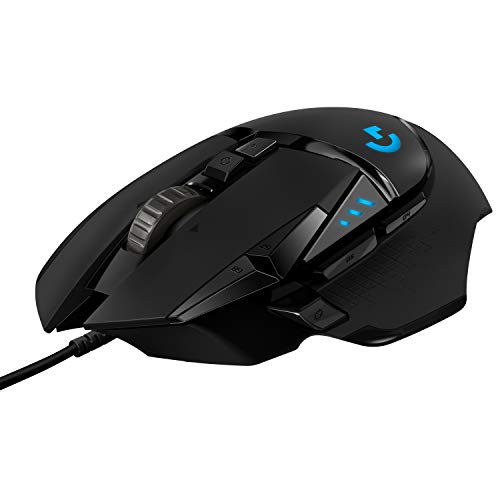
1. Logitech G502 Hero: Best Overall
Pros
- 11 programmable buttons
- Adjustable balance with five removable weights
- Precise HERO sensor
- Crisp primary click response
Cons
- Wired connection limits desk flexibility
- Heavier and less nimble than lightweight esports mice
- Requires Logitech software for full customization
Best for: players who want one mouse that can handle shooters, RPGs, strategy games, and everyday work.
The Logitech G502 Hero is the mouse that makes the most sense when you do not want to specialize. It has the broad, supportive shape associated with the G502 family, a thumb rest, and enough controls to keep common commands close at hand. The cable is the obvious compromise, but it also means there is no battery routine and no wireless receiver to position.
Its HERO sensor tracks up to 25, 600 DPI and is designed to avoid smoothing, filtering, and acceleration. Most players will never use the top setting. The more useful point is that the sensor has plenty of range for adjusting sensitivity precisely, whether you favor slow, controlled aiming or faster cursor movement across a large display.
Control is where this mouse separates itself from the lighter models here. Eleven programmable buttons can handle abilities, push-to-talk, inventory actions, or application shortcuts. The dual-mode scroll wheel can move quickly through long pages or switch to a more deliberate tactile mode. Five 3.6 g weights let you alter the balance and heft, although the result is distinctly less nimble than the 54 g Razer Viper V3 Pro.
The metal spring tensioning in the primary buttons gives the G502 Hero a clean, deliberate click. Its LIGHTSYNC RGB lighting is customizable through Logitech software, but RGB is not the reason to buy it. The real weakness is its substantial body and cable. Players with low-sensitivity aim who make sweeping movements should choose the Viper instead, while those who want wireless freedom should look at the G502 Lightspeed.
For a mixed game library, the G502 Hero remains the safest recommendation. It gives the Logitech G305 Lightspeed more controls, the DeathAdder Essential more flexibility, and the Redragon M612 a more polished sensor and button feel. Pick it if versatility matters more than shaving every gram.
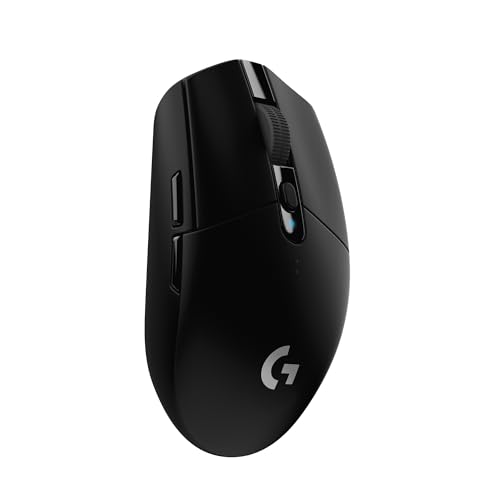
2. Logitech G305 Lightspeed: Best Compact Wireless
Pros
- 1 ms report rate
- Up to 250 hours of continuous gameplay
- Compact 3.4 oz design
- Stores its nano receiver inside the mouse
Cons
- Fewer controls than the G502 models
- AA battery design adds a noticeable lump
- Shape is less supportive for large hands
Best for: players who want dependable wireless gaming in a compact, portable design.
The Logitech G305 Lightspeed is the uncomplicated wireless option. It is compact, light enough to move quickly, and easy to take with a laptop because the nano receiver stores inside the mouse. There is no charging cable to remember during a session because it runs from one AA battery.
The HERO sensor reaches 12, 000 DPI and tracks at up to 400 IPS. That is lower on paper than the G502 Hero's 25, 600 DPI, but it is still more than enough for normal gaming sensitivity. The important practical detail is the 1 ms report rate from LIGHTSPEED wireless, which keeps the connection responsive for competitive play.
Battery life is the G305's defining advantage. Logitech rates it for up to 250 hours of continuous gameplay, or up to nine months in Endurance mode through G HUB. Those figures depend on how the mouse is configured, but the design clearly favors long stretches away from a charging cable.
The trade-off is control and shape. The G305 does not offer the G502 Hero's 11-button command center, and its compact body can feel narrow if you have a large hand or prefer a relaxed palm grip. The Razer Basilisk V3 gives your thumb more support, while the G305 is easier to move and carry.
If you want wireless without a heavy chassis or charging schedule, this is the straightforward pick. It is also a sensible place to start when comparing the trade-offs between wired and wireless play. Choose the G305 for portability, simple controls, and long battery life rather than elaborate lighting or a sculpted ergonomic shell.
3. Razer Basilisk V3: Best Ergonomic Wired

Pros
- Comfortable thumb-rest shape
- 11 programmable buttons
- Free-spin and tactile scroll modes
- 11-zone Chroma RGB lighting
Cons
- Wired design
- Large shape is not ideal for fingertip grip
- Full configuration depends on Razer Synapse
Best for: right-handed players who want a supportive shape and lots of accessible commands.
The Razer Basilisk V3 is the most natural alternative to the G502 Hero. Its ergonomic shape and thumb rest make it easy to settle into a palm or claw grip, and the button arrangement puts more functions under the thumb and index finger without requiring awkward reaches.
Its Focus Plus optical sensor supports up to 26, 000 DPI and is specified to track without smoothing. Again, that maximum is far beyond what most players need, but the sensor gives you fine control over sensitivity. The optical switches are rated for 70 million clicks and have a stated 0.2 ms actuation speed, which translates into a crisp, immediate press rather than a soft or mushy one.
The scroll wheel is unusually useful outside games. It can free-spin for moving through long documents, then return to tactile mode when you need individual weapon or menu selections. Eleven programmable buttons give it the same broad command potential as the G502 Hero, though the shape and software feel different enough that the choice comes down to hand fit.
Razer's Chroma system divides the lighting into 11 zones and supports dynamic effects with integrated games. That is a pleasant customization option, not a performance feature. The more meaningful drawback is the cable, plus the size of the mouse for players who prefer fingertip control or a very compact body.
The Basilisk V3 beats the Logitech G305 Lightspeed on support and command access, but it gives up the G305's portability. Readers comparing hand support should also consider how thumb support changes an ergonomic gaming setup. This is the better choice for a right-handed player who wants a substantial, button-rich mouse and does not mind staying wired.
4. Logitech G502 Lightspeed: Best Wireless Control

Pros
- Familiar 11-button G502 layout
- HERO sensor with up to 25, 600 DPI
- Fast LIGHTSPEED connection
- Compatible with optional POWERPLAY charging
Cons
- Heavy compared with modern lightweight designs
- Battery charging adds another maintenance task
- Large shape does not suit every grip
Best for: G502 fans who want the same command-heavy design without a fixed cable.
The Logitech G502 Lightspeed preserves the feature set that makes the wired G502 Hero so useful, then removes the cable. Its shape remains broad and supportive, with the same general emphasis on thumb access, a thumb rest, and a dual-mode scroll wheel. It feels like a traditional control surface rather than a stripped-down esports tool.
The HERO sensor offers 100 to 25, 600 DPI sensitivity, 400-plus IPS tracking, and 1:1 tracking without smoothing, filtering, or acceleration. LIGHTSPEED wireless is the other essential part of the package. The connection is designed for fast, reliable play, so the move to wireless does not require accepting a sluggish office-mouse feel.
Eleven customizable buttons make this a strong fit for games with abilities, items, and command layers. The hyper-fast wheel also works well for browsing and productivity. An optional POWERPLAY system can charge compatible Logitech mice while they rest or are in use, but that accessory is separate and should not be treated as part of the mouse itself.
The G502 Lightspeed is not light. Its listed weight is 0.81 pounds, a figure that makes the contrast with the 54 g Viper V3 Pro impossible to ignore. The Viper is much easier to fling across a large pad, while the G502 is steadier and more planted. Battery upkeep is another concern if you do not use a charging system.
Choose this over the G502 Hero when the cable would constantly interfere with your movements. Choose the G502 X Plus when you want the newer hybrid switch system and redesigned controls. The G502 Lightspeed is the right wireless pick for players who value familiar ergonomics and a large number of inputs above minimum weight.
5. Razer Viper V3 Pro: Best Lightweight Esports Mouse

Pros
- 54 g lightweight body
- Focus Pro 35K sensor
- Up to 8, 000 Hz polling
- Up to 95 hours of battery life
Cons
- Less useful for players who need many buttons
- Minimal shape support compared with the Basilisk
- Advanced settings require Razer software
Best for: competitive players who prioritize fast, precise movement over extra controls.
The Razer Viper V3 Pro is for the player who notices mouse weight on every flick. At 54 g, it is dramatically lighter than the G502 family and designed around swift, precise movements. That makes it especially appealing for low-sensitivity shooter players who need to cover a lot of pad with little effort.
Its Focus Pro 35K optical sensor supports one-DPI-step adjustments and is designed to track across a wider range of surfaces, including glass. The headline 35, 000 DPI setting is not a target for normal play. Its real usefulness is the granularity and consistency available when you are refining aim.
The wireless system supports up to 8, 000 Hz polling with HyperPolling and HyperSpeed. Higher polling can make cursor updates feel smoother, particularly on a high-refresh display, though the effect depends on the computer and game. Battery life is rated at up to 95 hours, giving the Viper a practical advantage over mice that need frequent charging.
Gen 3 optical switches are rated for 90 million clicks and specify 0.2 ms actuation without debounce delay. The mouse does not try to compete with the G502 Hero on buttons. That is intentional. It is a cleaner, faster instrument for aiming, but a weaker choice for games that demand constant macros or many thumb commands.
The Viper V3 Pro is the specialized pick in this roundup. The Logitech G305 Lightspeed is easier to carry and more flexible for general use, while the Logitech G PRO X2 SUPERSTRIKE offers deeper click customization. If your priority is the lightest, most responsive-feeling wireless body here, the Viper is the one to keep.
6. Logitech G502 X Plus: Best Feature-Rich Wireless

Pros
- LIGHTFORCE hybrid optical-mechanical switches
- Redesigned reversible DPI-shift button
- Tilt and dual-mode scroll wheel
- POWERPLAY compatibility
Cons
- Shape remains large
- More complex than many players need
- Charging system is sold separately
Best for: players who want a modern G502 with extensive customization and wireless freedom.
The Logitech G502 X Plus updates the familiar G502 formula rather than abandoning it. It remains a large, right-handed mouse with a thumb rest and plenty of controls, but the design adds newer switches, revised wireless performance, and a more adjustable button layout.
The HERO 25K sensor provides the precision expected from Logitech's upper-tier gaming mice, with tracking designed to avoid smoothing, filtering, and acceleration. The LIGHTSPEED protocol is specified as 68 percent faster in response rate than the previous generation. That claim matters less than the simple result: the wireless connection is built for gaming rather than merely for cable-free convenience.
LIGHTFORCE switches combine optical and mechanical elements for fast actuation with a crisp press. The reversible and removable DPI-shift button is a thoughtful touch because it lets you adapt a usually awkward control to your grip. The scroll wheel switches between rapid free-spin and ratcheting modes, with left and right tilt controls adding two more possible commands.
Eight customizable RGB LEDs are integrated into the shell, with effects that can respond to games and active play. The mouse also works with the optional POWERPLAY charging system. Its listed dimensions and large body make the G502 X Plus a poor fit for anyone seeking a small or featherweight pointer, even though it weighs far less than the older G502 Lightspeed listing.
Compared with the G502 Hero, this is the more modern wireless design. Compared with the Viper V3 Pro, it is slower to move but far more capable as a command hub. The G502 X Plus is for players who want every button, lighting option, and wheel mode available without giving up wireless play.
7. Logitech G PRO X2 SUPERSTRIKE: Best Click Customization

Pros
- Ten-level click actuation adjustment
- Five-level rapid trigger reset
- Haptic feedback system
- Up to 8 kHz polling
Cons
- Advanced features depend on Logitech G HUB
- Battery life varies from 60 to 90 hours
- POWERPLAY charging is optional
Best for: competitive players who want unusually deep control over click behavior.
The Logitech G PRO X2 SUPERSTRIKE is the most technically distinctive mouse in the list. Its central idea is not extra buttons or dramatic lighting. It is the ability to change how the primary clicks actuate, then use haptic feedback to communicate what is happening under your fingers.
The HITS haptic inductive trigger system offers ten actuation points and five rapid trigger reset levels. In practical terms, that gives competitive players more room to tune the distance and reset behavior of a click. It is a feature aimed at people who enjoy refining controls, not a universal shortcut to better aim.
The HERO 2 sensor tracks at over 888 IPS and up to 44, 000 DPI, with support for 88 g-force. Those figures describe substantial tracking headroom. The more relevant everyday detail is that the sensor is paired with LIGHTSPEED wireless and up to 8 kHz polling, while the battery is specified for 60 to 90 hours depending on use.
The thin-wall 0.7 mm case and extra-large UHMWPE feet are intended to keep the mouse light and easy to move. The mouse works with PC and Mac and is POWERPLAY 2 enabled, though the charging system is not included. Its unusual feature set also means software matters more here than it does with a basic wired mouse.
The Viper V3 Pro remains the cleaner choice for pure low-weight aiming, and the G502 X Plus remains more useful for a large number of commands. The PRO X2 SUPERSTRIKE earns its place for players who specifically want adjustable clicks, haptic feedback, and high polling. Skip it if you want a mouse that works best with little setup.
8. Redragon M612: Best Programmable Wired Mouse

Pros
- 11 reassignable buttons
- Five built-in DPI levels
- Software adjustment up to 8, 000 DPI
- Textured side grip
Cons
- Wired connection
- Heavier than lightweight specialist mice
- Less sensor detail is provided than for the Logitech and Razer models
Best for: players who want many remappable controls in a conventional wired shape.
The Redragon M612 focuses on accessible customization. It has 11 programmable buttons, including a rapid-fire control and two side macro buttons, so it can take on the role of a compact command pad for games with repeated actions.
Its five default DPI levels are 500, 1, 000, 2, 000, 3, 000, and 4, 000, with software options extending the range to 8, 000 DPI. That spread is useful because it gives you distinct sensitivity presets without forcing you to use one very high setting. A wired connection keeps the mouse ready whenever the computer is on.
The shell uses a frosted coating intended to resist fingerprints, while the left side has a rubber texture for extra friction. Redragon describes the shape as suited to a claw grip and designed to reduce fatigue during long use. The listed weight is about 0.278 pounds, so it is not in the same movement class as the Viper V3 Pro.
Five backlit modes add visual customization, but the more important feature is the button flexibility. The M612 has the command density of the G502 Hero, although the Logitech has a more thoroughly specified sensor and a more refined primary click system. The M612 is also less suitable for someone who wants a minimal, uncluttered esports mouse.
This is a practical choice for MMO, strategy, and action games where remapping matters more than extreme tracking specifications. It is also a reasonable wired alternative to the G305 Lightspeed if you prefer direct connectivity and a larger button layout. Pick it when programmable control is the priority and you do not need a premium lightweight design.
9. Logitech G703 Lightspeed: Best Comfortable Wireless Mouse

Pros
- Comfortable right-handed design
- Rubber side grips
- HERO 25K sensor
- Optional 10 g weight
Cons
- Battery life is rated at up to 35 hours with RGB enabled
- Only six programmable buttons
- POWERPLAY charging requires a separate system
Best for: right-handed players who prefer a comfortable wireless shape over a large button count.
The Logitech G703 Lightspeed takes a calmer approach than the G502 models. Its right-handed shape, rubber side grips, and optional 10 g weight make it feel planted and supportive without turning the mouse into a button-heavy control panel.
The HERO 25K sensor supports 100 to 25, 600 DPI, 400-plus IPS, and 1:1 tracking without smoothing, filtering, or acceleration. Those specifications put it in the same sensor class as the G502 Lightspeed. The real difference is the body and control layout, not a lack of tracking capability.
There are six programmable buttons, which is enough for common abilities, push-to-talk, or a few application shortcuts. Metal-spring tensioning in the main buttons is designed to reduce the force needed for a press and maintain a consistent feel. LIGHTSYNC RGB can respond to game action, audio, or screen color through G HUB.
Battery life is rated at up to 35 hours with the default RGB lighting, which is a clear limitation beside the G305's up to 250 hours and the Viper V3 Pro's up to 95 hours. POWERPLAY compatibility can reduce charging interruptions, but it depends on buying the separate charging system.
The G703 is more comfortable for some hands than the flatter Viper, but it is less versatile than the G502 Lightspeed and less portable than the G305. It is a good fit when a supportive right-handed shape matters more than ultra-low weight or a dozen commands. Players with a preference for simple controls may find it easier to live with than the G502 family.
10. Razer DeathAdder Essential: Best Simple Ergonomic Mouse

Pros
- Familiar ergonomic shape
- Tactile rubberized scroll wheel
- Five programmable buttons
- Dedicated DPI controls
Cons
- Wired connection
- 6, 400 DPI sensor is less configurable than newer models
- Fewer controls than the Basilisk V3
Best for: players who want a comfortable, uncomplicated wired mouse for PC gaming.
The Razer DeathAdder Essential strips gaming-mouse design back to its most useful parts. It has a familiar ergonomic shape, a textured scroll wheel, and a small set of programmable controls. That makes it easier to understand than the G502 models, especially for someone moving up from a basic office mouse.
Its optical sensor reaches 6, 400 DPI, with on-the-fly adjustment through dedicated DPI buttons that can be reassigned. That is a lower ceiling than every other Razer mouse here, but sensitivity is not a quality score by itself. The sensor is adequate for ordinary gaming, and many players will never need more than a fraction of the available range.
Five programmable buttons support remapping and complex macros through Razer Synapse. The ridged rubberized wheel gives scrolling a clear tactile texture, which helps when selecting weapons or moving through menus one notch at a time. Mechanical switches are rated for up to 10 million clicks.
The DeathAdder Essential is less capable than the Basilisk V3, whose 11 buttons and 26, 000 DPI Focus Plus sensor give it much more room to grow. It is also heavier than the Viper V3 Pro and lacks wireless convenience. The advantage is simplicity: fewer controls to configure, a shape that suits a relaxed right-handed grip, and no battery to manage.
Choose it if you want the basic strengths of the DeathAdder design without a complicated feature set. It is not the pick for competitive players chasing minimum weight, but it is a comfortable starting point for casual shooters, adventure games, and general PC use.
How to choose best mice for gaming
The right mouse should match your grip, game controls, movement style, and tolerance for cables or charging. These are the factors that matter most when narrowing down the Best mice for gaming.
Shape and grip
Shape affects comfort more than a sensor's maximum DPI. Palm grips generally benefit from a fuller shell and a supportive thumb area, while claw and fingertip grips often feel better with a shorter or lighter body.
The Logitech G703, Razer Basilisk V3, and Razer DeathAdder Essential are shaped around right-handed comfort. The Viper V3 Pro prioritizes movement freedom, while the G502 models add support and controls at the cost of a larger footprint. If possible, compare the mouse dimensions with one you already use.
Weight and movement
A lighter mouse needs less effort for fast swipes and is especially useful for low-sensitivity shooter play. The Razer Viper V3 Pro is the clear specialist here at 54 g. The Logitech G305 is also notably light, while the G502 Lightspeed and other feature-heavy designs feel more grounded.
Buy the lightest mouse that still gives your hand the support and buttons your games actually require.
Sensor and sensitivity
DPI describes sensitivity, not accuracy by itself. A high-quality sensor should track consistently without unwanted smoothing, filtering, or acceleration. The Logitech HERO sensors and Razer optical sensors offer far more range than most players need, so focus on reliable tracking and easy sensitivity adjustment instead of chasing the largest number.
For casual and mixed gaming, 6, 400 DPI is already enough for many setups. Higher ranges become more useful when you want very fine steps between sensitivity presets or need to move quickly across a high-resolution desktop.
Connection and battery
Wired mice are ready immediately and do not need charging, but their cable can catch on a desk edge or limit movement. Wireless mice remove that friction, though battery life and receiver placement become part of ownership.
The G305 uses one AA battery and is rated for up to 250 hours of gameplay. The Viper V3 Pro is rated for up to 95 hours, while the G703 is rated for up to 35 hours with default RGB lighting. POWERPLAY-compatible Logitech models can work with an optional charging system that keeps the mouse topped up while it rests or moves.
Buttons and software
Extra buttons are useful in MMOs, strategy games, productivity, and any title with frequent abilities or inventory commands. They can also get in the way if you prefer a clean shell for aiming.
The G502 Hero, G502 Lightspeed, G502 X Plus, Basilisk V3, and Redragon M612 each provide 11 programmable buttons. The DeathAdder Essential has five, the G703 has six, and the Viper V3 Pro is aimed more directly at streamlined esports control. Software from Logitech or Razer is needed for deeper assignments, lighting, and some advanced features.

Frequently asked questions
What is the most versatile mouse in this roundup?
The Logitech G502 Hero is the most versatile because it combines a precise HERO sensor, 11 programmable buttons, a dual-mode wheel, and adjustable weights. Its wired connection and heavier body make it less suitable for players who want unrestricted low-sensitivity movement.
Is a wireless mouse responsive enough for competitive gaming?
Yes. The Logitech LIGHTSPEED and Razer HyperSpeed systems are designed for responsive gaming connections. The Razer Viper V3 Pro also supports up to 8, 000 Hz polling, though the benefit depends on the rest of your computer and display setup.
How many buttons do I need for gaming?
Five or six programmable buttons cover common game commands and general use. Eleven buttons are more useful for MMOs, strategy games, productivity shortcuts, and players who want several actions under the thumb.
Does a higher DPI sensor make a mouse better?
No. DPI is a sensitivity range, not a direct measure of tracking quality. Consistent tracking, stable wireless performance, comfortable shape, and predictable clicks matter more than using the highest available setting.
Which mouse is best for large sweeping movements?
The Razer Viper V3 Pro is the strongest fit because its 54 g body is easy to move quickly. The Logitech G305 is another mobile option, while the heavier G502 models suit players who prefer a more planted feel.
Are wired gaming mice still a good choice?
Yes. Wired models avoid battery management and are ready whenever connected. The Logitech G502 Hero and Razer Basilisk V3 are particularly capable wired choices, while the DeathAdder Essential keeps the design simpler.
Which mouse is easiest for a first-time PC gamer?
The Razer DeathAdder Essential is easy to understand because it has a familiar ergonomic shape, five programmable buttons, DPI controls, and a tactile scroll wheel. The Logitech G305 is the better alternative if you specifically want wireless play.
The bottom line
The Best mice for gaming start with the Logitech G502 Hero for most players. Its 11 programmable buttons, adjustable weights, dual-mode scroll wheel, and HERO sensor make it useful across nearly every genre, although its cable and substantial weight are real drawbacks.
Choose the Logitech G305 Lightspeed if you want a compact wireless mouse with very long battery life. Choose the Razer Viper V3 Pro for fast competitive aiming and minimum weight, or the Razer Basilisk V3 when hand support and a large command layout matter more.
If you are undecided, buy for your grip and movement style first, then choose the sensor and feature set that fit those habits.
As an Amazon Associate we earn from qualifying purchases.